From the free course AP Computer Science A on Lykke
4.7 Wrapper Classes
A Java ArrayList cannot store a primitive such as int; it stores objects, so Java provides wrapper classes, object types that package primitive values for use wherever an object is required.
4.7 Wrapper Classes
A Java ArrayList cannot store a primitive such as int; it stores objects, so Java provides wrapper classes, object types that package primitive values for use wherever an object is required.
The primitive–object bridge
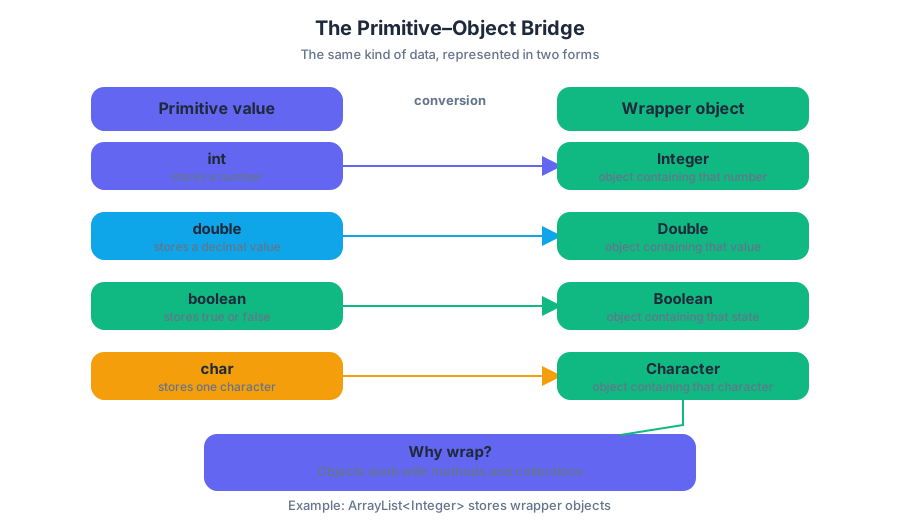
Primitive types are lightweight values:
intdoublebooleanchar
Their corresponding wrapper classes are objects:
IntegerDoubleBooleanCharacter
The relationship is a conversion between two forms of the same kind of data:
| Primitive value | Wrapper object |
|---|---|
int |
Integer |
double |
Double |
boolean |
Boolean |
char |
Character |
A primitive directly stores a value. A wrapper object stores that value inside an object, which means the value can participate in object-based structures and methods. This distinction matters especially when working with collections such as ArrayList<Integer>, which is developed immediately after this topic.
Boxing and unboxing
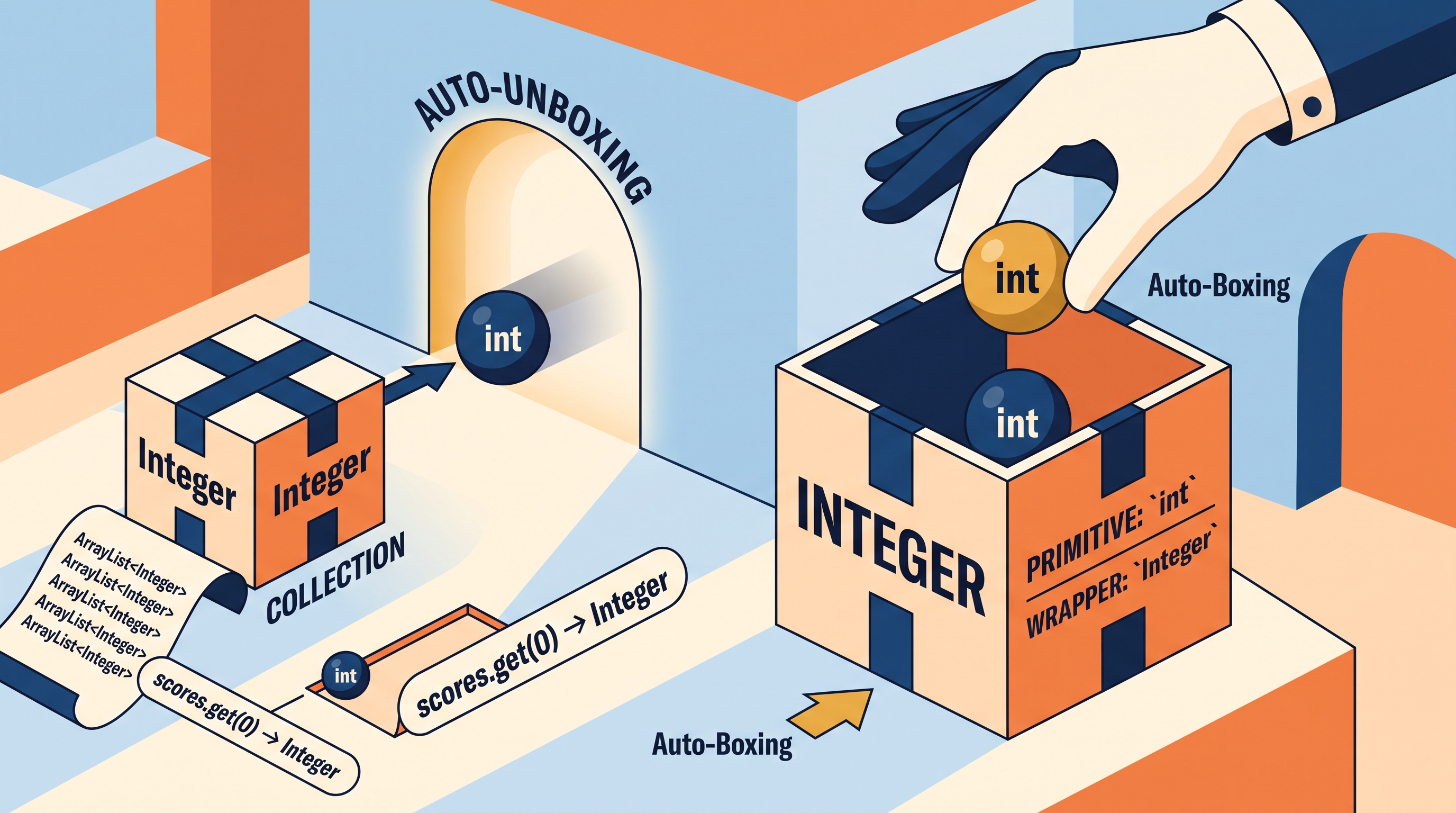
Boxing converts a primitive value into its wrapper object. Unboxing extracts the primitive value from a wrapper object.
Java often performs these conversions automatically. This feature is called autoboxing and auto-unboxing.
int points = 87;

// Autoboxing: int becomes Integer
Integer boxedPoints = points;

// Auto-unboxing: Integer becomes int
int recoveredPoints = boxedPoints;

System.out.println(recoveredPoints);  // 87
The variable boxedPoints refers to an Integer object containing the value $87$. The variable recoveredPoints contains the primitive value $87$. They hold related information, but they are not the same type.
A wrapper can also be created explicitly, although autoboxing is usually clearer:
Integer level = Integer.valueOf(4);
int nextLevel = level + 1;  // level is automatically unboxed
Worked example: recording game scores
Suppose a game records scores in an ArrayList. The list requires object references, so each int score is boxed as an Integer.
import java.util.ArrayList;

ArrayList<Integer> scores = new ArrayList<Integer>();

scores.add(12);  // autoboxes int 12 into Integer
scores.add(19);
scores.add(15);

int firstScore = scores.get(0);  // auto-unboxes Integer into int

System.out.println(firstScore + 5);  // 17
Step by step:
scoresis declared to holdIntegerobjects.scores.add(12)supplies anint, which Java boxes automatically.scores.get(0)returns anIntegerobject.- Assigning that result to
firstScoreautomatically unboxes it. - Arithmetic then operates on the primitive value $12$.
Wrapper methods
Wrapper classes provide useful class methods for interpreting and converting values. For example, Integer.parseInt converts a String into an int, while Double.parseDouble converts a String into a double.
String quantityText = "24";
String priceText = "3.50";

int quantity = Integer.parseInt(quantityText);
double price = Double.parseDouble(priceText);

double total = quantity * price;
System.out.println(total);  // 84.0
The result of Integer.parseInt is an int, not an Integer. The result of Double.parseDouble is a double. The methods perform conversion from text to numeric data; they do not merely change how the text is displayed.
A critical comparison: == and .equals
For primitive values, == compares the values directly. For objects, including wrapper objects, == compares references—whether two variables refer to the same object.
Integer a = new Integer(500);
Integer b = new Integer(500);

System.out.println(a == b);       // false
System.out.println(a.equals(b));  // true
Both objects contain $500$, so .equals reports true. They are separate objects, so == reports false.
Misconception check: “Wrapper objects can always be compared with
==because they contain numbers.”
Correction: Use==for primitive-value comparison and.equalsfor comparing the contents of wrapper objects. Autounboxing can sometimes make==appear to work, but relying on that obscures the types and can produce errors when a reference isnull.
Skills in action
This topic exercises Skill 1.B — Develop Code when a programmer uses wrapper types in an object-based collection; Skill 2.B — Determine Code Functionality when tracing boxing, unboxing, parsing, and wrapper methods; and Skill 2.C — Identify and Correct Errors when fixing type mismatches or an incorrect use of ==. These connect to Computational Thinking Practice 2—Develop Code and Computational Thinking Practice 3—Analyze Code.
Retrieval check: What type is returned by scores.get(0) in an ArrayList<Integer>, and what conversion occurs if it is assigned to an int variable? Answer: It returns an Integer; Java auto-unboxes it into an int.
Source Materials
- AP Computer Science A Course and Exam Description
- AP Computer Science A Course and Exam Description Clarifications and Corrections
- AP Computer Science A Course Overview
- AP Computer Science A Course at a Glance
- AP Computer Science A Course at a Glance Poster
- Adopt AP Computer Science A
- AP Computer Science A
- AP Computer Science A