From the free course AP Computer Science A on Lykke
1.3 Expressions and Output
Key concepts: Expressions and output · System.out.println and println · String concatenation in output · Method specifications · Conditional statements · Iterative statements · String substring bounds · Self-pairing guards · Array or grid row-and-column indexing · List size and object equality checks
An expression produces a value, and an output statement displays that value so a person can observe what the program calculated. In Java, System.out.println displays information and then moves the cursor to a new line; System.out.print displays information but leaves the cursor on the same line.
1.3 Expressions and Output
An expression produces a value, and an output statement displays that value so a person can observe what the program calculated. In Java, System.out.println displays information and then moves the cursor to a new line; System.out.print displays information but leaves the cursor on the same line.
The output pipeline
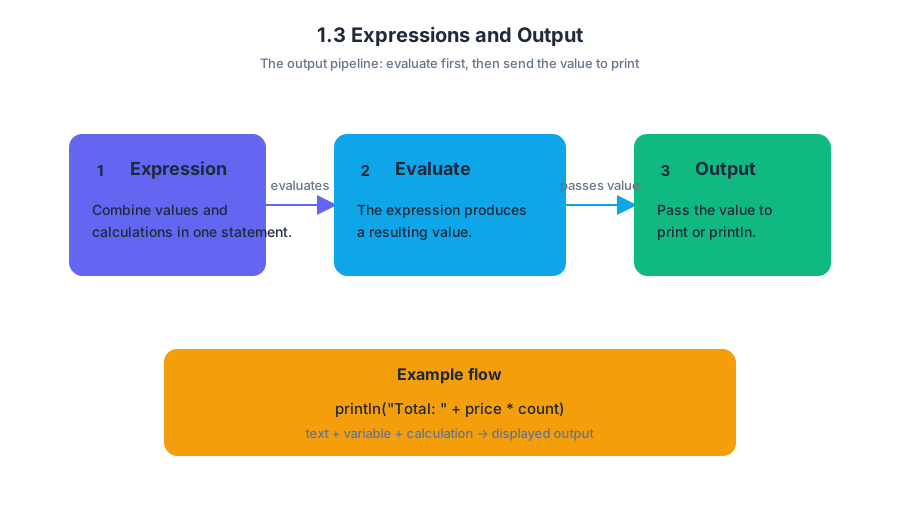
A useful mental model is a small conveyor belt:
The expression is evaluated first. Its resulting value is then passed to print or println. This means that output can combine string literals, variables, and calculations in one statement.
Worked example: constructing a scoreboard
String activeTeamName = "Falcons";
int t1Score = 8;
int t2Score = 11;

System.out.println(activeTeamName + ": " + t2Score + "-" + t1Score);
System.out.print("Next play");
System.out.println(" begins now.");
The first statement concatenates several pieces of text and data. Its output is:
Falcons: 11-8
The second and third statements work together: print leaves the cursor after play, while println adds begins now. and then moves to the next line.
Key distinction:
printlnis not merely “print with extra spaces.” It appends a line break after displaying its argument.
A literal is the code representation of a fixed value. A string literal is a sequence of characters enclosed in quotation marks, such as "Falcons: " or "Next play". The + operator concatenates strings; when one part is a string, the other parts are converted into text for the output.
Expressions inside method specifications
The learning objective 1.3.A — Develop code to generate output and determine the result that would be displayed connects directly to 1.3.A.1, which requires understanding how System.out.print and System.out.println display information. It also supports 1.3.B — Develop code to utilize string literals and determine the result of using string literals, including 1.3.B.1 and 1.3.B.2.
A method specification states what a method must accomplish. To satisfy it, code may combine expressions with conditional statements and iterative statements. For example, a method that removes temperatures outside an allowed range must calculate the current list size, inspect each element, and decide whether removal is needed.
int size = temperatures.size();
int i = 0;

while (i < size) {
    double t = temperatures.get(i);
    if (t < lower || t > upper) {
        temperatures.remove(i);
        size--;
    } else {
        i++;
    }
}
Here, temperatures.size() supplies the number of elements, get(i) retrieves the current element, the Boolean expression chooses whether to remove it, and the loop repeats the process. Because removal shifts later elements left, the index must not advance immediately after a removal.
Indexes, bounds, and locations
Expressions often calculate locations in strings, arrays, collections, and grids. A substring call must stay within the string’s bounds: the starting index is inclusive, and the ending index is exclusive.
int len = target.length();

if (cur.length() >= len) {
    String prefix = cur.substring(0, len);
    String remainder = cur.substring(len);

    if (prefix.equals(target)) {
        // process the matching prefix
    }
}
The length check prevents an invalid substring request. In a grid traversal, use the correct location expression—such as getNextLoc(r, c) or grid.getNextLoc(r, c)—rather than accidentally reusing the current row or column. Always account for index or location shifts after an insertion, removal, or movement.
Comparing values safely
String and object properties should be compared with appropriate methods. For example:
if (box[r][c] != null &&
    box[r][c].getFlavor().equals(flavor)) {
    // the box contains a candy with the requested flavor
}
The null check must come first. Otherwise, calling getFlavor() on null causes an error. For object references, compare against null with == or !=; do not compare an object with the string literal "null".
Common misconception check
Misconception: “A self-pairing guard should skip the whole row or column.” If a program compares every grid element with one selected element, the guard should exclude only the single self element. Skipping an entire row or column discards valid pairs.
Misconception: “String values can be compared with ==.” Use .equals for string contents, as in box[r][c].getFlavor().equals(flavor). The operators == and != are appropriate here for checking whether an object reference is null.
AP skills in action
This topic primarily assesses Computational Thinking Practice 2 — Develop Code: write code that fulfills a method specification using expressions, selection, and iteration. It also assesses Computational Thinking Practice 3 — Analyze Code: trace output, detect out-of-bounds access, identify indexing shifts, and explain why a program does or does not work. Computational Thinking Practice 1 — Design Code appears when choosing a correct traversal or algorithm before implementation.
Retrieval check
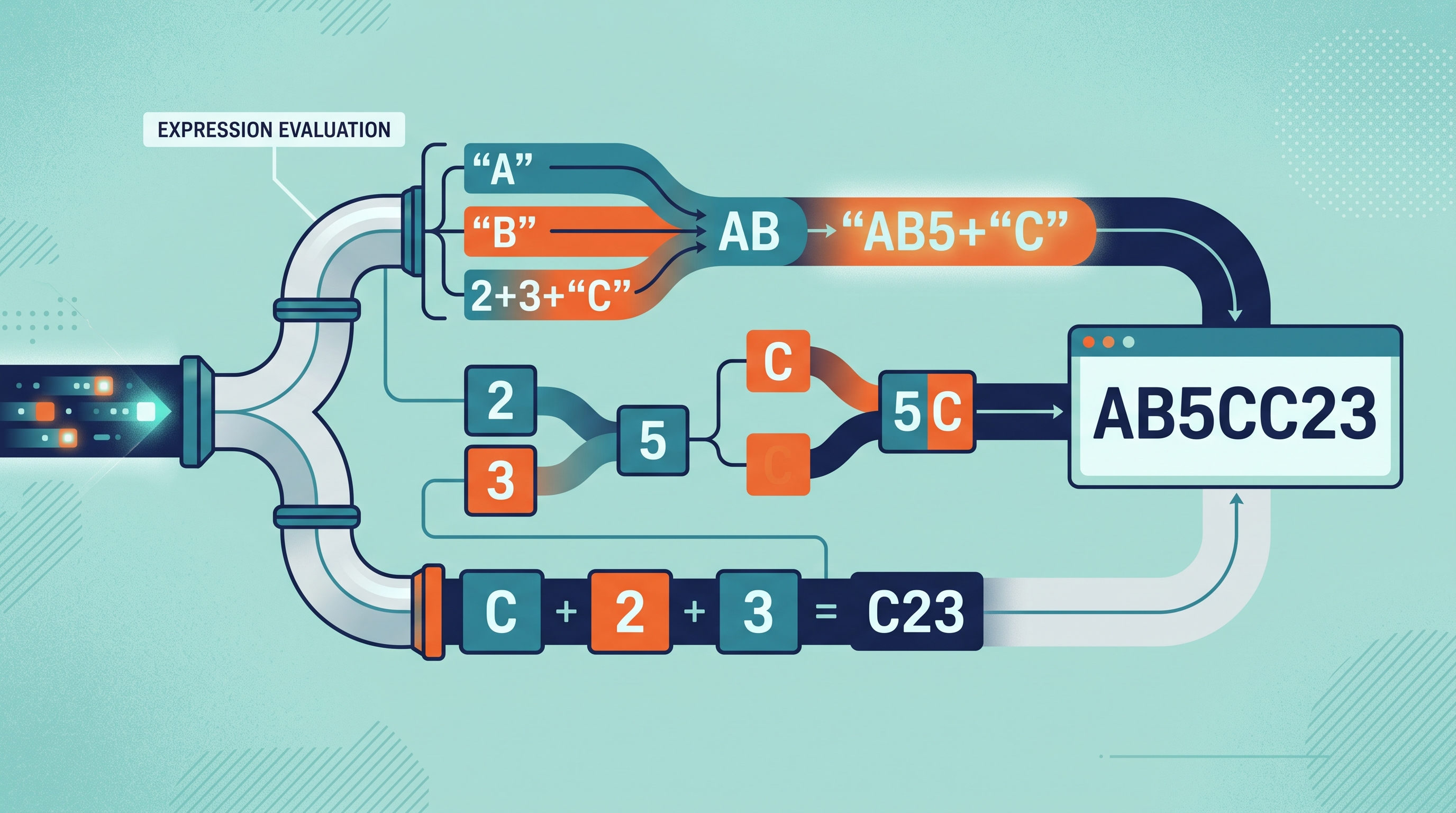
What does this display?
System.out.print("A");
System.out.println("B");
System.out.println(2 + 3 + "C");
System.out.println("C" + 2 + 3);
The output is:
AB
5C
C23
The first numeric expression is evaluated arithmetically before encountering a string. In the last expression, concatenation begins immediately because "C" is already a string.
Source Materials
- AP Computer Science A Course and Exam Description
- AP Computer Science A Course and Exam Description Clarifications and Corrections
- AP Computer Science A Course Overview
- AP Computer Science A Course at a Glance
- AP Computer Science A Course at a Glance Poster
- Adopt AP Computer Science A
- AP Computer Science A
- AP Computer Science A
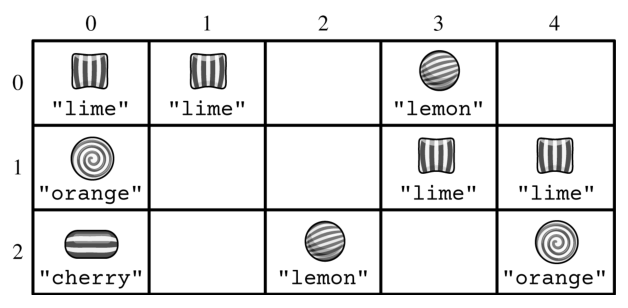
- The method call removeNextByFlavor("cherry") removes and returns the Candy object located in row 2 and column 0. The following grid shows the updated contents of box.