From the free course AP Computer Science A on Lykke
2.3 if Statements
An if statement lets a Java program choose whether to execute a block of code. It is the basic mechanism behind decisions such as approving a loan, displaying a warning, or recommending a school club.
2.3 if Statements
An if statement lets a Java program choose whether to execute a block of code. It is the basic mechanism behind decisions such as approving a loan, displaying a warning, or recommending a school club.
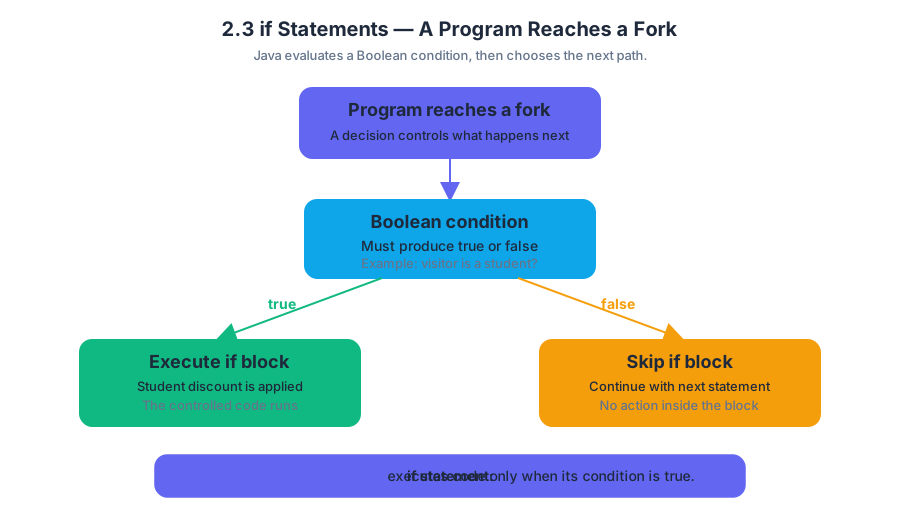
A program reaches a fork
Imagine a museum kiosk deciding whether a visitor receives a student discount. The kiosk evaluates a condition, then follows one of two possible paths:
The condition must produce a Boolean result: true or false. If the result is true, Java executes the statement or block controlled by if; if the result is false, Java skips it and continues with the next statement.
Key definition: An if statement is a selection statement that executes a statement or block of statements only when its Boolean condition is
true.
Basic if syntax
A Java if statement has this structure:
if (condition) {
    statement;
}
The parentheses contain the condition. The braces delimit the body, the code controlled by the condition. Although braces may be omitted for a single statement, using braces consistently makes the control flow clearer and prevents accidental errors when the body later grows.
int age = 15;

if (age < 18) {
    System.out.println("Student admission price");
}

System.out.println("Enjoy the museum!");
Here, age < 18 evaluates to true, so both messages are printed:
Student admission price
Enjoy the museum!
Enjoy the museum!
If age were 22, Java would skip the first println but still execute the second one. An if statement does not stop the entire program when its condition is false; it skips only its controlled statement or block.
Worked example: a temperature warning
A greenhouse controller should display a warning whenever the temperature falls below $10$ degrees Celsius.
double temperature = 7.5;

if (temperature < 10.0) {
    System.out.println("Turn on the heater.");
}

System.out.println("Temperature recorded.");
Trace the code in execution order:
| Step | Action | Result |
|---|---|---|
| 1 | Store $7.5$ in temperature |
Variable contains $7.5$ |
| 2 | Evaluate temperature < 10.0 |
true |
| 3 | Execute the body | Prints heater message |
| 4 | Continue after the if |
Prints recording message |
The output is:
Turn on the heater.
Temperature recorded.
If the value were $12.0$, the condition would be false, the heater message would not appear, and "Temperature recorded." would still be printed. This ability to skip selected actions is what makes selection useful in larger algorithms.
if versus if-else
Use a plain if when an action is needed only in one situation. Use if-else when exactly one of two alternatives must occur.
int score = 84;

if (score >= 60) {
    System.out.println("Pass");
} else {
    System.out.println("Do not pass");
}
The two branches are mutually exclusive: Java executes the if block when the condition is true, and the else block when it is false. It never executes both branches during one pass through this statement.
Common misconception: = is not a comparison
Misconception — assignment is a condition. The operator = assigns a value; it does not ask whether two values are equal. To compare values, use == for primitive numeric or Boolean values.
int tickets = 3;

if (tickets == 0) {
    System.out.println("Sold out");
}
Another frequent error is the dangling statement:
if (tickets > 0)
    System.out.println("Tickets available.");
    System.out.println("Continue to checkout.");
Without braces, only the first println belongs to the if. The checkout message prints regardless of the ticket count. Indentation does not determine control flow; braces and Java syntax do.
AP skill connection
This topic develops Learning Objective 2.3.A and Essential Knowledge 2.3.A1–2.3.A2: selection uses a Boolean condition to determine whether a statement or block executes. It is assessed through Skill 1.B: Determine the output, value, or result of given program code, especially by tracing which branch runs, and Skill 2.A: Develop code, when writing a conditional solution to a contextual problem. Debugging an incorrect condition also exercises Skill 3.A: Identify and correct errors in a program.
Retrieval check
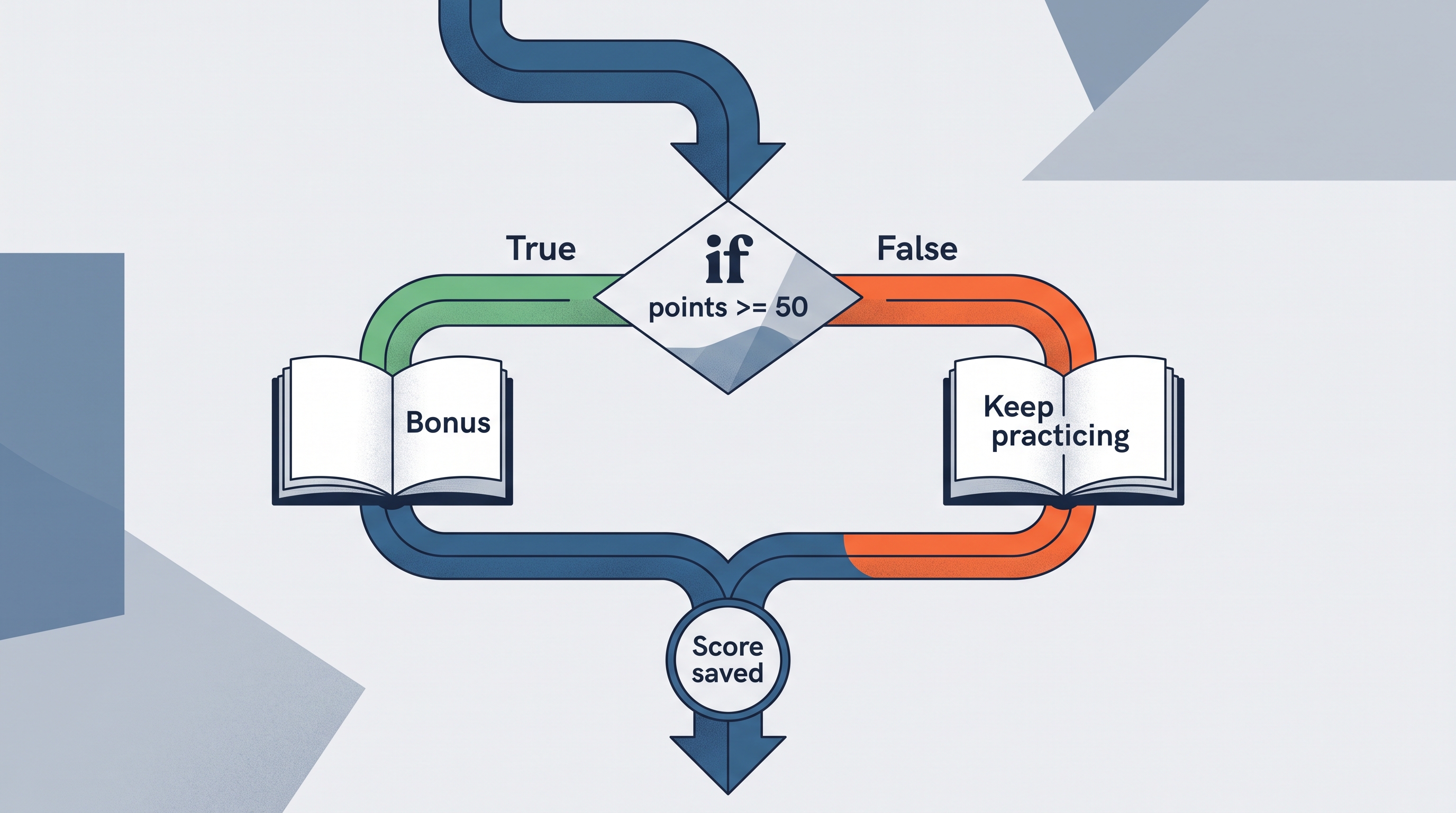
What does this code print?
int points = 40;

if (points >= 50) {
    System.out.println("Bonus");
} else {
    System.out.println("Keep practicing");
}

System.out.println("Score saved");
Answer: It prints "Keep practicing" and then "Score saved". Since $40 \ge 50$ is false, the else block executes; the statement after the complete if-else executes in either case.
Source Materials
- AP Computer Science A Course and Exam Description
- AP Computer Science A Course and Exam Description Clarifications and Corrections
- AP Computer Science A Course Overview
- AP Computer Science A Course at a Glance
- AP Computer Science A Course at a Glance Poster
- Adopt AP Computer Science A
- AP Computer Science A
- AP Computer Science A