From the free course AP Computer Science A on Lykke
1.10 Calling Class Methods
Key concepts: Calling class methods · Class methods are associated with the class rather than an individual object · Using Math class methods · Using String class methods · Creating String objects · Combining strings · Determining the result of a method call · Recognizing code that will not compile · String objects as sequences of characters · The scope limitation on overriding toString
A class method is called through a class name because it belongs to the class itself, not to any particular object. In Java, the call Math.max(8, 13) asks the Math class to perform an operation; no individual Math object is needed.
1.10 Calling Class Methods
A class method is called through a class name because it belongs to the class itself, not to any particular object. In Java, the call Math.max(8, 13) asks the Math class to perform an operation; no individual Math object is needed.
Class methods versus instance methods
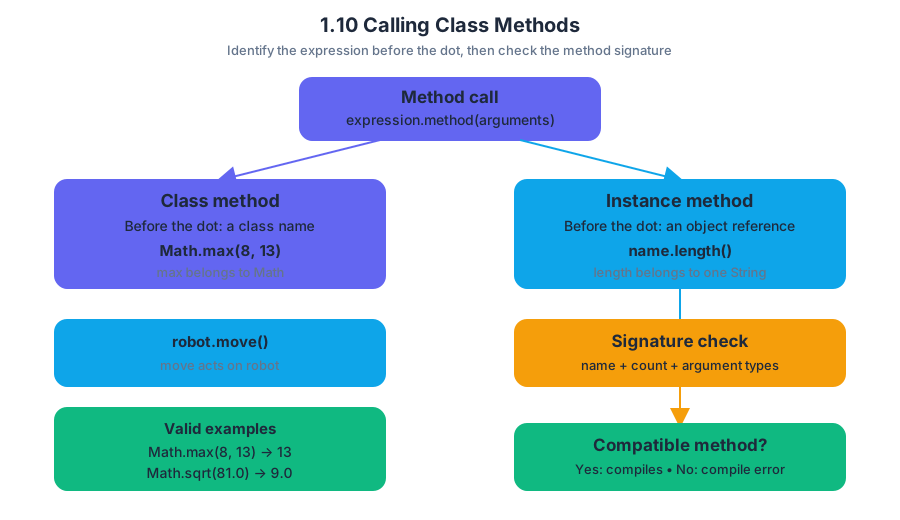
The dot in a method call does not by itself tell you what kind of method is being called. Identify the expression before the dot:
Math.max(8, 13)uses the class nameMath, somaxis a class method.name.length()uses the variablename, which refers to aStringobject, solengthis an instance method.robot.move()uses the variablerobot, somoveis an instance method.
Class method: A method associated with a class and called using the class name.
Instance method: A method associated with one object and called using a reference to that object.
The call must also match an available method signature: the method name, number of arguments, and argument types must be appropriate. If no matching method exists, the program does not compile.
int larger = Math.max(8, 13);       // valid: returns 13
double root = Math.sqrt(81.0);      // valid: returns 9.0
int answer = Math.max(4.2, 7.1);    // does not compile
The last statement fails because Math.max does not provide a version that accepts two double arguments and returns an int. A class method call can therefore be evaluated in two stages:
- Compile-time check: Does the class provide a compatible method?
- Execution trace: If it compiles, what value does the method return?
This directly develops 1.10.A: Develop code to call class methods and determine the result of the call.
Using the standard library
Java’s standard library supplies classes whose methods solve common problems. The Java Class Constructors and Methods Reference is not merely a list to memorize: use it to check the exact method name, parameter types, return type, and behavior.
For example, Math contains class methods for numerical operations:
int low = Math.min(14, 9);       // 9
double magnitude = Math.abs(-3.5); // 3.5
double randomValue = Math.random(); // 0.0 inclusive to 1.0 exclusive
Because these methods are associated with Math, writing new Math() is unnecessary and is outside the intended pattern. The class name acts like a shared toolbox label: choose a tool, supply its arguments, and receive the result.
String objects and String methods
A String object represents a sequence of characters. It can be created with a string literal or with the String class constructor. Since String belongs to java.lang, it is available without an import statement.
String first = "Blue";
String second = new String("Sky");
The two variables refer to String objects containing the character sequences "Blue" and "Sky". Methods such as length, substring, indexOf, equals, and compareTo operate on a String object:
String label = "BlueSky";

int count = label.length();          // 7
String part = label.substring(0, 4); // "Blue"
boolean same = label.equals("BlueSky"); // true
These are not class-method calls in the form String.length(). They are instance-method calls because label identifies the particular String object whose characters should be examined. Confusing String.length() with label.length() is a common compile-time error: the class name does not identify an individual sequence.
Combining strings
Strings can be concatenated—joined end to end—with + or +=. Concatenation creates a new String object; it does not alter an existing String object.
String city = "San";
String place = city + " " + "Jose";
city += " Diego";

System.out.println(place); // San Jose
System.out.println(city);  // San Diego
The original "San" sequence was not edited. The expression city + " Diego" produced a new String, and the assignment changed which object city refers to. A primitive value can also be concatenated with a String; Java implicitly converts the primitive to text.
int score = 27;
String message = "Score: " + score; // "Score: 27"
Skills in action
This topic exercises 2.C: Write program code involving procedural abstractions, especially when selecting and calling a library method; 3.C: Determine the result or output based on code that contains procedural abstractions, by tracing returned values; 4.A: Describe the behavior of a code segment or program; and 4.B: Describe the initial conditions that must be met for a code segment to work as intended or described.
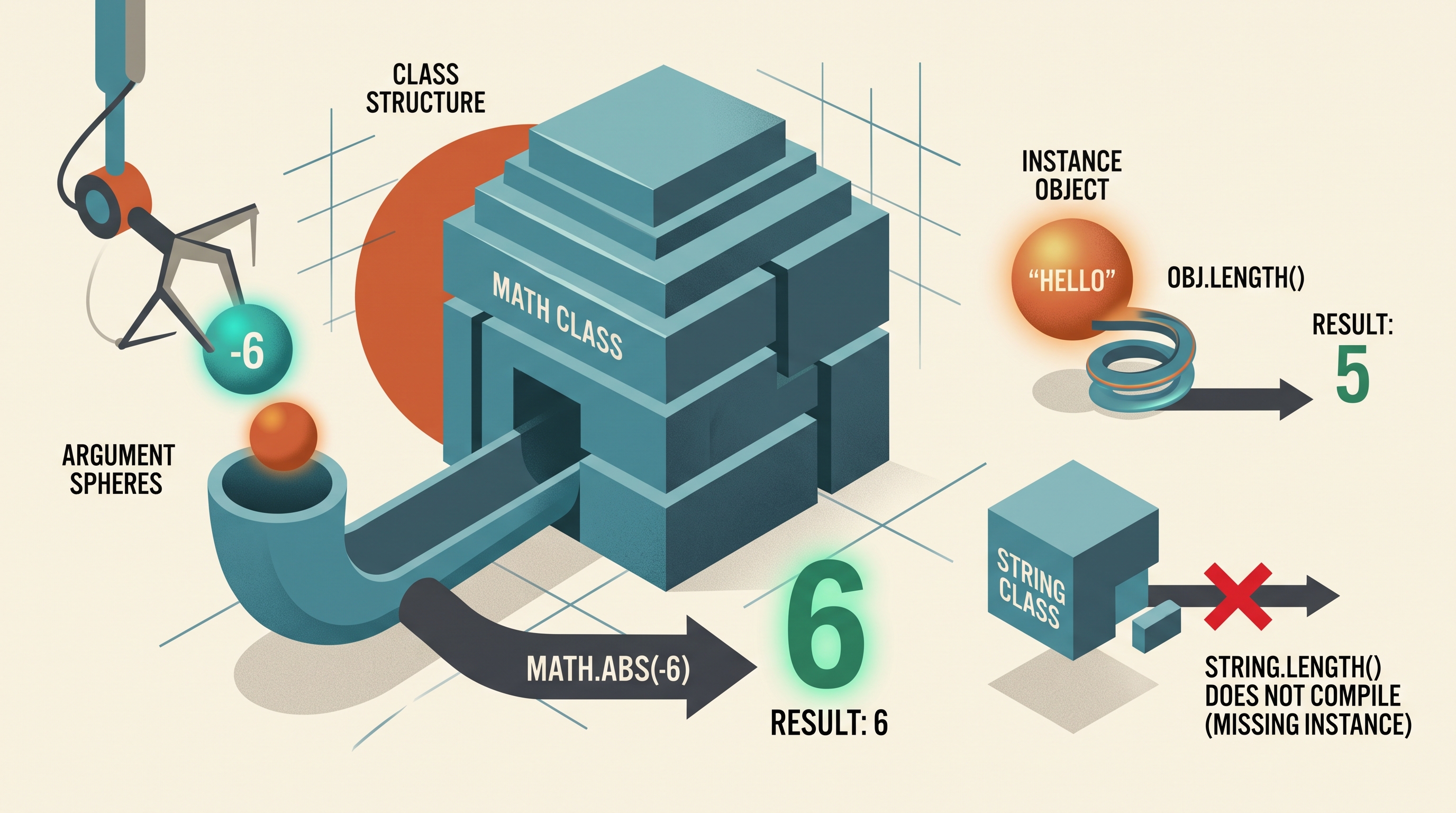
Misconception check: “Every method after a class name is valid if the method name sounds reasonable.” Not so. Math.sqrt(25) compiles, but String.length() does not: the first is a class-method call, while the second incorrectly tries to call an instance method without an object.
Retrieval check: For each expression, identify whether it compiles and whether it calls a class or instance method: Math.abs(-6), "hello".length(), and String.length(). The first two compile; Math.abs is a class-method call, "hello".length() is an instance-method call, and String.length() does not compile.
Source Materials
- AP Computer Science A Course and Exam Description
- AP Computer Science A Course and Exam Description Clarifications and Corrections
- AP Computer Science A Course Overview
- AP Computer Science A Course at a Glance
- AP Computer Science A Course at a Glance Poster
- Adopt AP Computer Science A
- AP Computer Science A
- AP Computer Science A
- The method call removeNextByFlavor("grape") returns null because no grape-flavored candy is found. The contents of box are unchanged.