From the free course AP Computer Science A on Lykke
3.5 Methods: How to Write Them
Key concepts: Method signatures and parameters · Return statements and flow of control · Writing program code to call methods · Writing methods to satisfy specifications · Using expressions and conditional statements in methods · Predicting and comparing method output · Explaining and correcting compilation or logic errors · Creating classes with constructors and instance variables · Maintaining object state across method calls · String manipulation and substring operations
A method is a named block of Java code that performs a task and optionally sends a value back to the statement that called it.
3.5 Methods: How to Write Them
A method is a named block of Java code that performs a task and optionally sends a value back to the statement that called it. Good method design begins before typing: identify the task, determine the required inputs, predict the result, and implement the method exactly according to its specification.
Learning Objective 3.5.A: Create and call methods that satisfy given specifications.
Essential Knowledge 3.5.A.1: A method’s signature identifies its name, return type, and parameter list.
Essential Knowledge 3.5.A.2: Parameters allow a method to receive information from its caller.
Essential Knowledge 3.5.A.3: A return statement sends control back to the point where the method was called.
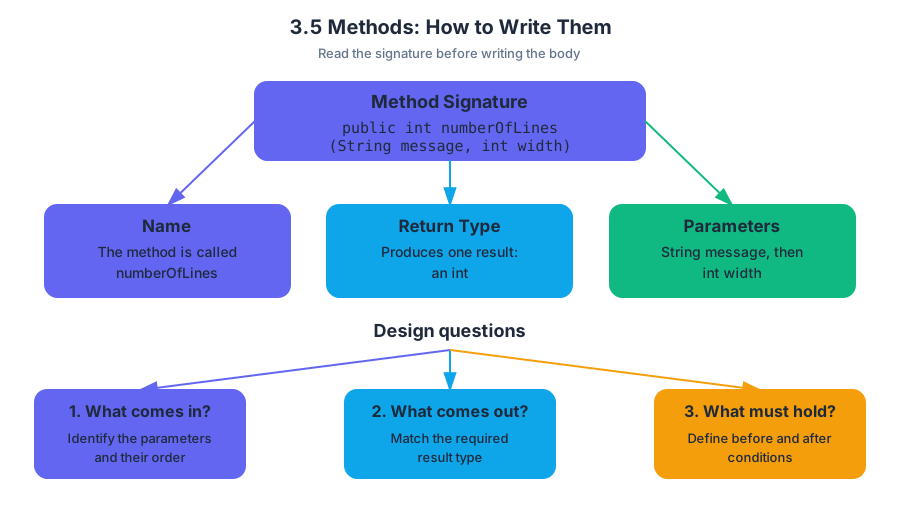
Read the signature before writing the body
A method signature is the method’s “contract label.” It tells you the method’s name, the type of value it returns, and the number, order, and types of its parameters.
For example:
public int numberOfLines(String message, int width)
This signature requires a method named numberOfLines that receives a String and an int, then returns an int. The caller must supply both arguments in that order; a method with the same name but a different parameter list is a different method.
When designing a method, ask three questions:
- What information must the method receive?
- What type of result must it produce?
- What must be true before and after it runs?
The first question identifies the parameters. The third connects directly to the method’s precondition, a requirement that must be true before the call, and postcondition, the result guaranteed after successful completion.
Return statements control the caller’s execution
A return statement does two things at once: it provides the method’s result and immediately transfers control back to the statement that made the call. Any statements after that return in the same execution path are unreachable.
public int doubleValue(int value)
{
    return 2 * value;
}
If the program evaluates doubleValue(7), the method computes $14$, returns it, and the call expression is replaced by $14$:
int result = doubleValue(7); // result becomes 14
A void method does not return a value, although it may use return; to leave the method early.
Misconception check: Printing a value is not returning a value.
System.out.println(value);displays data, butreturn value;gives data back to the caller.
Implement the specification, including boundary cases
Suppose a sign displays a message across lines of a fixed positive width. The specification might require numberOfLines to return the number of full or partial lines. The empty message has length $0$, while a message shorter than the width still occupies one line.
A direct implementation uses integer division, but it must handle an incomplete final line and reject an invalid width:
public int numberOfLines(String message, int width)
{
    if (width <= 0)
    {
        throw new IllegalArgumentException();
    }

    if (message.length() == 0)
    {
        return 0;
    }

    int lines = message.length() / width;

    if (message.length() % width != 0)
    {
        lines++;
    }

    return lines;
}
For message equal to "RAIN" and width equal to $3$, integer division gives $4 / 3 = 1$, but the remainder is nonzero, so the method returns $2$. For message equal to "GO" and width equal to $5$, division gives $0$ with a remainder, so the method correctly returns $1$.
A loop-based solution can repeatedly consume groups of width characters, but the positive-width precondition is essential. Without if (width <= 0) throw new IllegalArgumentException();, a loop that increments by width never advances when width is $0$, causing an infinite loop.
Methods can combine strings, conditions, and loops
A method can process input incrementally. For example, a word source whose getNextWord() method returns one word at a time and eventually returns null can be summarized with a loop:
String result = "";
int numWords = 0;
String word = getNextWord();

while (word != null)
{
    result += word;
    numWords++;
    word = getNextWord();
}
The update numWords++ increases the counter by $1$; += appends text to the current string. The crucial progress step is the repeated call to getNextWord(). Omitting it means the condition never changes.
A complete specification may require careful string logic
A method such as getAbbreviation may need to manipulate an input string, test conditions, compare strings, and use substring. Empty strings deserve explicit attention: calling substring(0, 1) on an empty string causes an error.
When comparing contents, use .equals, not ==:
if (firstName.equals(""))
{
    return lastName;
}
return firstName.substring(0, 1) + "-" + lastName;
For a SignedText object storing a first name and last name, getSignature returns only the last name when the first name is empty; otherwise it returns the first initial, a dash, and the last name. Another method such as addSignature can call getSignature(), determine whether the signature already appears at the beginning or end of a supplied string, and use substring to reposition or add it.
Misconception check:
SignedText.firstNameis invalid for an ordinary instance variable. Instance data belongs to an object, so a method accesses it through the current instance context, commonly usingfirstNameorthis.firstName.
Preserve object state across calls
A local variable declared inside a method exists only during that method call. If a SignedText object must remember its first and last names for later calls, those values must be stored in instance variables initialized when the object is created. Replacing them with local variables causes later methods to lose the object’s data.
Use Skill 3.A — Write program code to create objects and call methods when constructing an object and invoking its methods. Use Skill 3.B — Write program code to define a new type by creating a class when declaring the class, instance variables, and method headers. Use Skill 3.C — Write program code to satisfy method specifications using expressions, conditional statements, and iterative statements when implementing the algorithm.
Predict, then compare
Before running a call, trace its parameters, conditions, string indexes, loop updates, and return path. Then write a small test program that compares the predicted output with the actual output. This catches incorrect empty-string handling, off-by-one substring boundaries, mistaken == comparisons, missing returns, and loops that fail to progress.
Retrieval check: For a method public String label(int n), what must be true about its return statement? Why would declaring String firstName inside the method fail to preserve a name for the next method call? Finally, what must a loop-based numberOfLines implementation guarantee before it begins?

Source Materials
- AP Computer Science A Course and Exam Description
- AP Computer Science A Course and Exam Description Clarifications and Corrections
- AP Computer Science A Course Overview
- AP Computer Science A Course at a Glance
- AP Computer Science A Course at a Glance Poster
- Adopt AP Computer Science A
- AP Computer Science A
- AP Computer Science A