From the free course Introduction to Literature on Lykke
Course Introduction and Open Educational Resources
Key concepts: Open Educational Resources (OER) · Lumen Learning support · Digital Courseware · Accessibility · Continuous improvement
An overview of the course goals, the use of Open Educational Resources (OER), and the technical support available through Lumen Learning.
Course Introduction and Open Educational Resources
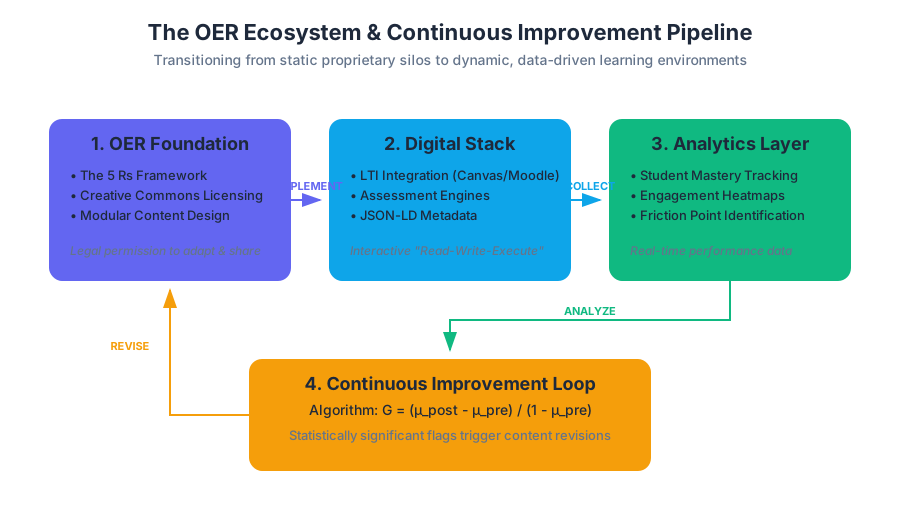
The landscape of higher education is undergoing a fundamental shift from proprietary, static knowledge silos to dynamic, Open Educational Resources (OER). This transition is not merely an economic adjustment to reduce student costs; it represents a pedagogical evolution. In this course, we move beyond the traditional "anthology" model—a heavy, expensive, and unchangeable tome—toward a modular, digitally-native ecosystem. This ecosystem is designed for continuous improvement, high accessibility, and deep integration with modern digital courseware standards.
By utilizing OER, we leverage the collective intelligence of the global academic community. Unlike traditional textbooks, which are updated in multi-year cycles by a handful of editors, OER allows for real-time revisions based on student performance data and emerging literary scholarship. This section serves as a technical and conceptual roadmap for navigating this environment, understanding the licensing that makes it possible, and utilizing the support structures provided by Lumen Learning.
The Architecture of Open Educational Resources (OER)
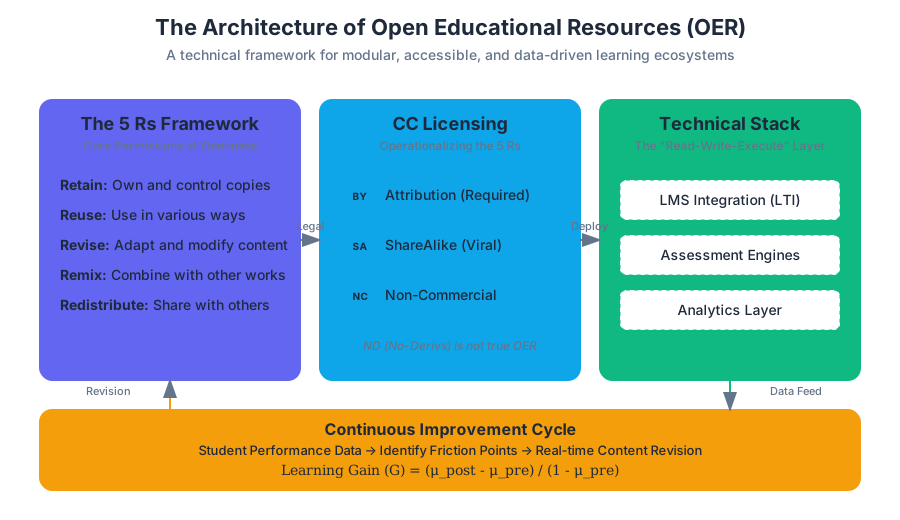
At its core, an Open Educational Resource is defined by its legal permission to be modified and shared. While "free" is a common byproduct, the technical definition hinges on the 5 Rs of Openness. These permissions allow instructors to tailor the "Introduction to Literature" curriculum to specific cultural contexts, historical periods, or student needs without infringing on copyright.
The 5 Rs Framework
| Permission | Technical Definition | Application in Literature |
|---|---|---|
| Retain | The right to make, own, and control copies of the content. | Students keep the digital text forever; no expiring access codes. |
| Reuse | The right to use the content in a wide range of ways. | Using a poem in a lecture, a video, or a printed handout. |
| Revise | The right to adapt, adjust, modify, or alter the content. | Modernizing the language of a 19th-century analysis for clarity. |
| Remix | The right to combine the original or revised content with other material. | Merging a lesson on Hamlet with a contemporary feminist critique. |
| Redistribute | The right to share copies of the original content or revisions. | Sharing a custom-built literature module with other universities. |
Creative Commons (CC) Licensing
To operationalize the 5 Rs, OER utilizes Creative Commons licenses. These are legal tools that sit on top of traditional copyright, telling the user exactly what they can and cannot do. Understanding these licenses is critical for maintaining academic integrity and legal compliance.
Definition: Creative Commons (CC) A set of public copyright licenses that enable the free distribution of an otherwise copyrighted "work." A CC license is used when an author wants to give other people the right to share, use, and build upon a work that they (the author) have created.
| License Component | Symbol | Requirement |
|---|---|---|
| Attribution (BY) | BY |
Credit must be given to the original creator. |
| ShareAlike (SA) | SA |
Adaptations must be shared under the same license. |
| Non-Commercial (NC) | NC |
The work cannot be used for primary commercial gain. |
| No-Derivatives (ND) | ND |
The work can be shared but not modified (Not true OER). |
Digital Courseware vs. Static Content
A common misconception is that OER is simply a "free PDF." While a PDF version of this course is available for offline reading, the Digital Courseware environment is a sophisticated software layer that facilitates learning through interactivity.
The Technical Stack of Modern Courseware
Traditional textbooks are "read-only." Modern OER courseware is "read-write-execute." It utilizes a stack that includes:
- LMS Integration (LTI): Seamlessly connecting content to platforms like Canvas, Blackboard, or Moodle.
- Assessment Engines: Real-time quiz generation with randomized variables.
- Analytics Layer: Tracking student engagement and mastery levels to provide "early warnings" to instructors.
Continuous Improvement and Data-Driven Learning
One of the most powerful features of the Lumen Learning OER platform is Continuous Improvement. In a traditional publishing model, if a paragraph in a chapter on "Poetic Meter" is confusing, it might take five years for a new edition to fix it. In an OER environment, we use Learning Data Analytics to identify "friction points."
The Improvement Algorithm
If a statistically significant number of students miss a specific quiz question, the system flags the associated content. The "Learning Gain" can be modeled as:
$$G = \frac{\mu_{post} - \mu_{pre}}{1 - \mu_{pre}}$$
Where:
- $G$ is the normalized learning gain.
- $\mu_{pre}$ is the mean score on a pre-test.
- $\mu_{post}$ is the mean score on a post-test.
If $G$ falls below a certain threshold for a specific concept (e.g., iambic pentameter), the content is targeted for a Remediated Revision Cycle.
Accessibility and Universal Design for Learning (UDL)
Accessibility is not an "add-on" feature; it is a core technical requirement. This course adheres to WCAG 2.1 (Web Content Accessibility Guidelines) at the AA level. This ensures that all students, regardless of physical or cognitive ability, can interact with the material.
Technical Accessibility Standards
| Feature | Technical Implementation | UDL Principle |
|---|---|---|
| Screen Reader Support | Semantic HTML5 (e.g., <nav>, <article>, aria-labels). |
Perception |
| Keyboard Navigation | Logical tabindex and focus visible states. |
Physical Action |
| Alt-Text | Descriptive strings for all non-textual content. | Comprehension |
| Color Contrast | Minimum 4.5:1 ratio for text against background. | Perception |
| Closed Captioning | VTT/SRT files for all embedded video content. | Language & Symbols |
Support Systems: Lumen Learning and Faculty Resources
Navigating a digital-first course requires robust support. Lumen Learning provides a multi-tiered support structure for both students and faculty.
Support Tiers
- Self-Service: The Lumen Support Portal contains a knowledge base of articles covering common issues like browser compatibility, LTI login errors, and quiz resets.
- Technical Tickets: For bugs or system outages, users can submit tickets that are routed to senior systems engineers.
- Faculty Office Hours: Live sessions where instructors can discuss pedagogical strategies and course customization.
Common Troubleshooting Workflow
Literary Genres and Modular Content
The "Introduction to Literature" OER is organized into distinct modules based on genre and convention. This modularity allows the course to be non-linear; an instructor can choose to begin with Poetry or Creative Nonfiction depending on the syllabus goals.
Genre Frameworks
| Genre | Key Conventions | OER Focus |
|---|---|---|
| Fiction | Narrative, Character, Setting, Theme. | Short stories and novellas with public domain status. |
| Poetry | Meter, Rhyme, Imagery, Form (Sonnet, Haiku). | Interactive audio recordings of poems to emphasize rhythm. |
| Drama | Dialogue, Stage Directions, Conflict. | Video clips of performances alongside the script. |
| Creative Nonfiction | Truth-telling, Personal Narrative, Essay. | Contemporary essays licensed under CC-BY. |
Academic Writing and MLA Style
A critical component of this course is the transition from reading to Literary Analysis. The OER provides integrated guides on MLA (Modern Language Association) Style, ensuring students can cite both traditional print sources and digital-native OER materials correctly.
Key Insight: The "Open" Citation When citing OER, the "Version" or "Last Modified" date becomes as important as the author, because the content is subject to continuous improvement.
Common Pitfalls in OER Usage
- Assuming "Free" means "Public Domain": Most OER requires attribution (CC-BY). You cannot claim the work as your own.
- The "Print-Only" Trap: Students who only use the PDF version miss out on interactive self-checks and videos that are essential for mastering complex concepts like Critical Theory.
- Ignoring the "Help" Button: Many technical issues are known browser-side conflicts (like blocked third-party cookies) that can be solved in seconds via the support documentation.
Conclusion
This course is more than a collection of readings; it is a living document. By engaging with these Open Educational Resources, you are participating in a global movement toward equitable, accessible, and high-quality education. The modular nature of the content, backed by the technical infrastructure of Lumen Learning, ensures that the material you study today is the most refined and effective version available. As you progress through the modules on Fiction, Poetry, and Drama, remember that the digital tools at your disposal—the interactive quizzes, the accessibility features, and the support systems—are designed to facilitate a deeper, more resilient understanding of literature.
Source Materials
Study Introduction to Literature on Lykke
This course page is free to open: signed out, you can read its first two sections, and signing in, on any plan, opens the rest. The free Lykke Chrome extension syncs your own Canvas courses, so ChatGPT, Claude and Muse can answer from your classes and deadlines. It only reads Canvas.
Add the free extensionSign in to open every sectionAll sections of Introduction to Literature · Browse more course pages