From the free course TPW: Technical & Professional Writing on Lykke
Lists and Formatting for Readability
Key concepts: Parallel Construction · Bulleted vs. Numbered Lists · In-sentence Lists · Nested Lists · Readability
Using lists and parallel construction to highlight key points and improve document flow.
Lists and Formatting for Readability
In the architecture of technical communication, lists serve as the primary structural element for decomposing complex information into digestible, "scannable" units. While prose is designed for narrative flow, lists are designed for utility. They function as a cognitive shortcut, allowing a reader to bypass the linear constraints of a paragraph to find specific data points, instructions, or requirements.
Effective list design is not merely a matter of aesthetics; it is a fundamental application of Information Mapping and Cognitive Load Theory. By utilizing white space and vertical alignment, a writer signals to the reader that the information contained within the list is distinct, categorized, and high-priority.
The Cognitive Science of Readability
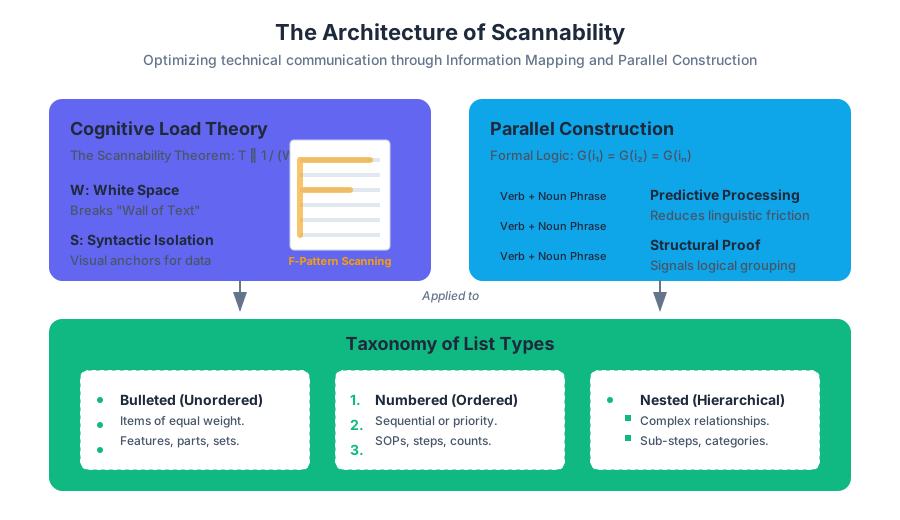
To understand why lists are effective, we must examine how the human eye processes a page. Eye-tracking studies, such as those conducted by the Nielsen Norman Group, consistently demonstrate that users read in an F-Pattern. They scan the top horizontally, move down the page, and scan again, eventually focusing primarily on the left margin.
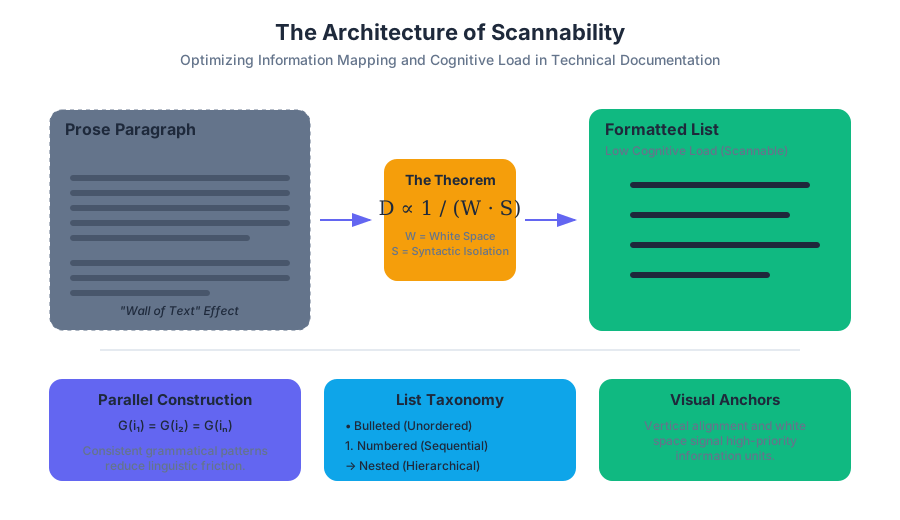
The Scannability Theorem: The time required to locate a specific datum $D$ in a block of text $T$ is inversely proportional to the amount of white space $W$ surrounding $D$ and the degree of syntactic isolation $S$ applied to $D$.
Lists maximize both $W$ and $S$. By breaking the "wall of text," lists provide visual anchors that prevent "reader fatigue"—a state where the cognitive cost of processing dense prose exceeds the reader's motivation to continue.
| Feature | Prose Paragraph | Formatted List |
|---|---|---|
| Cognitive Load | High (requires linear parsing) | Low (allows non-linear scanning) |
| Visual Emphasis | Low (uniform density) | High (distinct margins and bullets) |
| Information Density | High (context-heavy) | Moderate (fact-heavy) |
| Primary Use Case | Explanation, Nuance, Narrative | Instructions, Features, Requirements |
Parallel Construction: The Logic of Symmetry
Parallel Construction (or parallelism) is the most critical grammatical requirement for professional lists. It dictates that every item in a list must follow the same grammatical pattern. If the first item begins with a present-tense imperative verb, every subsequent item must also begin with a present-tense imperative verb.
Why Parallelism Matters
Parallelism functions like a mathematical proof for the reader's brain. When the syntax is consistent, the reader can "predict" the structure of the next item, allowing them to focus entirely on the content rather than the phrasing. When a list is non-parallel, the reader must mentally "reset" their linguistic expectations for each bullet point, which creates friction and reduces comprehension.
The Formal Logic of Parallelism
Let $L$ be a list such that $L = {i_1, i_2, i_3, \dots, i_n}$. Let $G(x)$ be a function that returns the grammatical structure of item $x$. For $L$ to be parallel, the condition $G(i_1) = G(i_2) = \dots = G(i_n)$ must hold true.
Worked Example: Correcting Non-Parallelism
Consider a list describing the features of a new software module:
-
Non-Parallel:
- Fast data processing. (Noun phrase)
- It encrypts files. (Clause)
- User-friendly interface. (Adjective-noun)
- To improve security. (Infinitive phrase)
-
Parallel (Noun-focused):
- High-speed data processing.
- Advanced file encryption.
- Intuitive user interface.
- Enhanced security protocols.
Taxonomy of List Types
Technical writers must choose the appropriate list type based on the Rhetorical Situation (the relationship between the audience, purpose, and context).
| List Type | Primary Purpose | Visual Cue |
|---|---|---|
| Bulleted | Items of equal weight; no specific order. | Dots, squares, or custom glyphs. |
| Numbered | Sequential steps, priorities, or counts. | Arabic numerals or letters. |
| In-sentence | Short lists (3 or fewer items) within a paragraph. | Commas or semicolons. |
| Nested | Hierarchical relationships or sub-steps. | Indentation and varying markers. |
Bulleted Lists (Unordered)
Bulleted lists are used when the order of items is arbitrary. They are ideal for listing features, parts of a system, or membership requirements.
- Best Practice: Use a "lead-in" sentence (a stem) followed by a colon.
- Punctuation: If the items are fragments, no terminal punctuation is needed. If they are full sentences, use periods.
Numbered Lists (Ordered)
Numbered lists imply a hierarchy or a temporal sequence. They are the standard for Standard Operating Procedures (SOPs) and troubleshooting guides.
- Best Practice: If a step contains multiple sub-actions, use a nested list rather than a long, complex sentence.
In-sentence Lists (Run-in)
These are used for brevity. They do not provide the same "scannability" as vertical lists but maintain the flow of a paragraph.
- Example: "The system requires three components: (1) a stable power supply, (2) an active internet connection, and (3) a registered user account."
Lists in Digital Environments
In modern documentation, lists are often generated via Markdown or rendered through CSS. Understanding the underlying structure is vital for ensuring accessibility (WCAG compliance).
Nested Lists and Information Hierarchy
Nested lists are used to show subordination. In technical manuals, a high-level step may require several sub-steps.
The "Rule of Three" for Depth
While lists improve readability, excessive nesting (more than three levels deep) can have the opposite effect. As the indentation increases, the line length decreases, and the reader's "mental stack" becomes overloaded.
- Primary Step
- Sub-action A
- Detail i
- Detail ii
- Sub-action B
- Sub-action A
- Primary Step 2
Complexity Analysis of Nested Lists
The cognitive load $C$ of a nested list can be modeled by the depth $d$ and the number of items $n$ at each level.
$$C = \sum_{i=1}^{d} (n_i \cdot w_i)$$
Where $w_i$ is a weighting factor that increases with depth. As $d > 3$, $w_i$ grows exponentially, leading to a breakdown in comprehension.
| Depth Level | Cognitive Weight ($w$) | Recommended Usage |
|---|---|---|
| Level 1 (Root) | 1.0 | Main concepts or primary steps. |
| Level 2 | 1.5 | Supporting details or sub-tasks. |
| Level 3 | 3.0 | Specific technical parameters or exceptions. |
| Level 4+ | 8.0+ | Avoid. Use a separate table or subsection instead. |
Formatting Mechanics: Punctuation and Capitalization
Standardizing the "look and feel" of lists is essential for professional branding. Most organizations follow a specific style guide (e.g., Microsoft, IEEE, or Chicago).
Capitalization
- Sentence Case: Capitalize the first word of every list item. This is the standard for technical writing as it treats each item as a distinct unit of thought.
- Lowercase: Only used for very short, fragmented lists that complete a sentence stem (rare in modern professional contexts).
Punctuation (The "All or Nothing" Rule)
- No Punctuation: Use for lists consisting entirely of short phrases or fragments.
- Full Stops: Use if any single item in the list is a complete sentence. For consistency, if one item has a period, all items should have a period.
- Semicolons: Historically used for complex lists where items contain internal commas. This is increasingly rare in digital documentation, as nested lists are preferred for clarity.
Lead-in Sentences
The lead-in sentence (the "stem") should clearly define the relationship of the items.
- Complete Lead-in: "The following tools are required for the installation:" (Use a colon).
- Partial Lead-in: "To complete the installation, you must:" (Use a colon; items should complete the sentence).
Common Pitfalls and Anti-Patterns
Even experienced writers fall into traps that undermine the effectiveness of their lists.
- The "Kitchen Sink" List: Including too many items (usually more than 7–9) in a single list. This violates Miller's Law (the magic number $7 \pm 2$).
- Solution: Group related items into sub-categories with their own headings.
- Over-Listing: Using lists for narrative content that requires nuance or transition.
- Solution: If you find yourself writing "bulleted paragraphs," revert to standard prose.
- Mismatched Numbers: Using a numbered list for items that have no chronological order.
- Solution: Switch to bullets to avoid implying a false sense of priority.
- Inconsistent Lead-ins: Mixing complete sentences and fragments after the same stem.
Example of a "Kitchen Sink" Anti-Pattern
A list of 15 disparate server settings is impossible to memorize or scan.
- Refactored: Break the list into "Network Settings," "Security Settings," and "Hardware Specs."
Summary of Best Practices
To ensure your lists achieve maximum readability:
- Audit for Parallelism: Check the first word of every item.
- Evaluate the Stem: Ensure the lead-in clearly introduces the list.
- Check for White Space: Ensure there is adequate padding between the list and the surrounding text.
- Limit Depth: Never exceed three levels of nesting.
- Choose the Right Marker: Numbers for sequence, bullets for sets.
Further Reading
- The Elements of Style by Strunk and White (for parallelism).
- Don't Make Me Think by Steve Krug (for scannability and web usability).
- The Chicago Manual of Style (for formal punctuation rules).
Source Materials
Study TPW: Technical & Professional Writing on Lykke
This course page is free to open: signed out, you can read its first two sections, and signing in, on any plan, opens the rest. The free Lykke Chrome extension syncs your own Canvas courses, so ChatGPT, Claude and Muse can answer from your classes and deadlines. It only reads Canvas.
Add the free extensionSign in to open every sectionAll sections of TPW: Technical & Professional Writing · Browse more course pages