From the free course TPW: Technical & Professional Writing on Lykke
Digital Communication and Netiquette
Key concepts: Netiquette · Digital Permanence · Acceptable Use Policy (AUP) · User Authentication · Conflict Resolution
Guidelines for professional online behavior, including email etiquette, platform security, and acceptable use policies.
Digital Communication and Netiquette
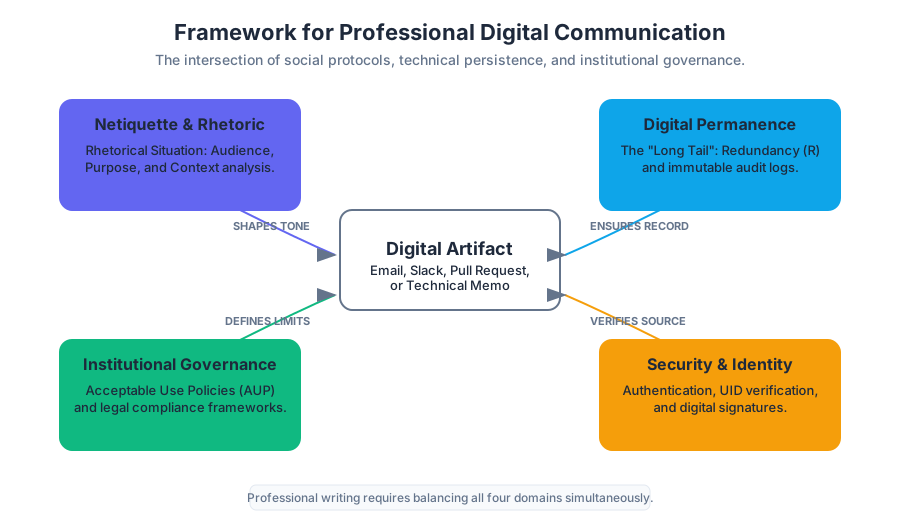
In the contemporary professional landscape, the distinction between "writing" and "digital communication" has effectively evaporated. Every memorandum, report, and proposal is mediated through digital layers, making an understanding of the technical and social protocols of these layers essential for any technical communicator. This section explores the intersection of human behavior (Netiquette), technical reality (Digital Permanence), institutional governance (Acceptable Use Policies), and security (Authentication), providing a comprehensive framework for professional conduct in the digital age.
Netiquette: The Rhetoric of Digital Interaction
Netiquette, a portmanteau of "network" and "etiquette," refers to the social and professional code of conduct governing online interaction. In technical and professional writing (TPW), netiquette is not merely about "politeness"; it is a specialized application of Rhetorical Analysis. A professional must evaluate the Audience, Purpose, and Context of every digital artifact—whether it is a Slack message, an email, or a pull request comment.
The Core Pillars of Professional Netiquette
- Human-Centricity (The Empathy Gap): Digital interfaces often mask the humanity of the recipient. The "Online Disinhibition Effect" suggests that users are more likely to be blunt or aggressive when shielded by a screen. Professional netiquette requires a conscious effort to bridge this gap.
- Efficiency and Clarity: Respecting the recipient's "cognitive load" is a primary netiquette rule. This aligns with the P.A.L.E.S. Criteria (Purpose, Audience, Layout, Ethics, and Style) found in technical communication.
- Cultural and Contextual Awareness: Digital communication is global. Symbols, idioms, and even time zones must be accounted for to maintain professional synergy.
| Feature | Academic Digital Tone | Professional Digital Tone |
|---|---|---|
| Primary Goal | Demonstrate knowledge/learning | Facilitate action/decision-making |
| Structure | Narrative/Argumentative | Scannable (Headings, Bullets) |
| Response Time | Flexible (Days) | Expected (Hours/Business Day) |
| Formatting | Standardized (APA/MLA) | Functional (AUP compliant, accessible) |
Definition: The Rhetorical Situation in Netiquette The rhetorical situation consists of the Exigence (the need that sparks the communication), the Audience (the individuals who can act on the information), and the Constraints (the digital platform's limitations and the organization's policies).
Digital Permanence: The "Long Tail" of Professional Writing
Digital Permanence is the technical reality that digital data, once created and transmitted, is nearly impossible to fully "delete." For the professional writer, this means that every draft, every "private" message, and every archived email is a permanent record of their professional identity.
The Mechanics of Persistence
Digital information persists through three primary mechanisms:
- Redundancy (Backups): Enterprise systems automatically replicate data across multiple servers and geographic regions to prevent data loss.
- Caching and Indexing: Search engines and internal corporate databases index content, creating "snapshots" that remain even if the original source is modified.
- The "Streisand Effect": In a social context, attempting to remove information often leads to its further replication.
The Probability of Data Persistence
We can model the probability of a digital artifact $A$ remaining accessible over time $t$ as a function of its replication factor $R$ and the decay rate of the storage medium $\lambda$.
$$P(A_{exists}) = 1 - (1 - e^{-\lambda t})^R$$
As $R$ (the number of servers/backups) increases, the probability of the information disappearing approaches zero, even as time $t$ increases. This is why professional writers must assume a Public-Permanent status for all workplace communication.
% Pseudocode for a Distributed Persistence Logic
% Explaining why "Deleting" a message often fails in professional environments.

Algorithm: DeleteMessage(message_id, user_auth)
    1. Check user_auth.permissions
    2. Mark message_id as "HIDDEN" in Primary_Database
    3. Send "PURGE" request to CDN_Nodes
    4. IF (Backup_Interval_Reached) THEN
           Message remains in Cold_Storage_Archive (Immutable)
    5. RETURN "Message hidden from UI, but retained in audit logs."
Acceptable Use Policy (AUP): The Legal Framework
An Acceptable Use Policy (AUP) is a document outlining the constraints and practices that a user must agree to for access to a corporate or institutional network. It serves as a legal and ethical contract between the organization (e.g., Central Oregon Community College) and the user.
Key Components of a Standard AUP
Organizations use AUPs to mitigate risk, protect intellectual property, and ensure that resources are used for their intended purpose.
| AUP Clause | Technical Implication | Professional Rationale |
|---|---|---|
| Prohibited Content | Content filtering/Firewalls | Prevents hostile work environments and legal liability. |
| Resource Allocation | Bandwidth throttling | Ensures critical business systems remain operational. |
| Privacy Expectation | SSL Decryption/Log Monitoring | Establishes that "private" use of company gear is not private. |
| Intellectual Property | Data Loss Prevention (DLP) | Protects the organization's proprietary research and data. |
User Authentication and Security
In the context of TPW, User Authentication is the process of verifying the identity of a user attempting to access a system. This is the first line of defense in maintaining the integrity of professional documents.
The Three Factors of Authentication
- Knowledge: Something you know (Password, PIN).
- Possession: Something you have (Smartphone, Security Key, Token).
- Inherence: Something you are (Fingerprint, Facial Recognition).
Theorem: The Strength of Multi-Factor Authentication (MFA) The security of an authentication system increases exponentially with the addition of independent factors. If the probability of compromising a password is $P_p$ and a physical token is $P_t$, the probability of a total breach $P_b$ is $P_p \times P_t$, assuming the factors are uncorrelated.
Account Recovery and Localization
A professional login interface (as seen in the TPW platform) must account for human error and diversity.
- Account Recovery: Uses "Out-of-Band" (OOB) communication (email/SMS) to reset credentials, maintaining the chain of trust.
- Language Localization: Professionalism requires accessibility. Providing interfaces in English (US, UK, Canada) or Français is not just a courtesy; it is a requirement for global technical communication.
Conflict Resolution in Digital Spaces
Digital communication lacks the non-verbal cues (tone of voice, body language) that facilitate understanding in person. This often leads to "Team Friction." Effective Conflict Resolution in a digital environment requires a structured, evidence-based approach.
Strategies for Digital De-escalation
- The 24-Hour Rule: If a digital interaction triggers an emotional response, wait 24 hours before responding. This allows the "Exigence" to settle and the "Purpose" to remain professional.
- Medium Switching: If a text-based conflict persists, move to a high-bandwidth medium (Video call or Face-to-Face).
- Goal Alignment: Re-center the conversation on the shared project goals rather than personal grievances.
| Strategy | When to Use | Digital Implementation |
|---|---|---|
| Competing | Urgent issues where a "right" answer is critical. | Explicit "Admin" override in project management software. |
| Collaborating | When both sets of concerns are too important to be compromised. | Shared "Living Documents" (Google Docs, Notion) with comments. |
| Compromising | When goals are important but not worth the effort of potential disruption. | Version control branching and merging (Git). |
| Avoiding | When an issue is trivial or symptomatic of a larger problem. | Muting notifications or "parking" a thread for later. |
Common Pitfalls in Digital Professionalism
- The "Reply All" Trap: Failing to analyze the audience before hitting send, leading to information overload for uninvolved parties.
- Informality Creep: Treating professional emails like text messages (e.g., using emojis, lack of capitalization). While some cultures allow this, it is safer to maintain a formal baseline.
- Ignoring Metadata: Forgetting that document properties (Author name, Edit time, Comments) are often preserved in the final PDF or Word file sent to a client.
- AUP Complacency: Assuming that because "everyone does it" (e.g., checking personal social media on a work laptop), it is not a violation of policy.
Source Materials
Study TPW: Technical & Professional Writing on Lykke
This course page is free to open: signed out, you can read its first two sections, and signing in, on any plan, opens the rest. The free Lykke Chrome extension syncs your own Canvas courses, so ChatGPT, Claude and Muse can answer from your classes and deadlines. It only reads Canvas.
Add the free extensionSign in to open every sectionAll sections of TPW: Technical & Professional Writing · Browse more course pages