From the free course Systems Programming in C and Unix Environments on Lykke
Processes and Inter-Process Communication
Key concepts: Process Lifecycle · fork(), exec(), wait() · Zombie and Orphan Processes · Signal Handling · Pipes
Managing the process lifecycle using fork, exec, and wait, and understanding process states.
Processes and Inter-Process Communication
In the realm of systems programming, the process is the fundamental unit of work. While a "program" is a passive collection of instructions stored on disk (an executable file), a process is the active execution of those instructions. It is a container provided by the Operating System (OS) that isolates a running program from others, providing it with its own virtual address space, execution state, and resource handles.
Understanding process management is not merely an academic exercise; it is the cornerstone of building resilient, concurrent, and high-performance software. Whether you are writing a shell, a web server, or a distributed database, you must master the mechanics of how processes are born, how they transform, how they synchronize, and how they communicate.
The Process Abstraction and Lifecycle
A process is an OS abstraction representing a running program. To the kernel, a process is defined by its Process Control Block (PCB), which tracks essential metadata.
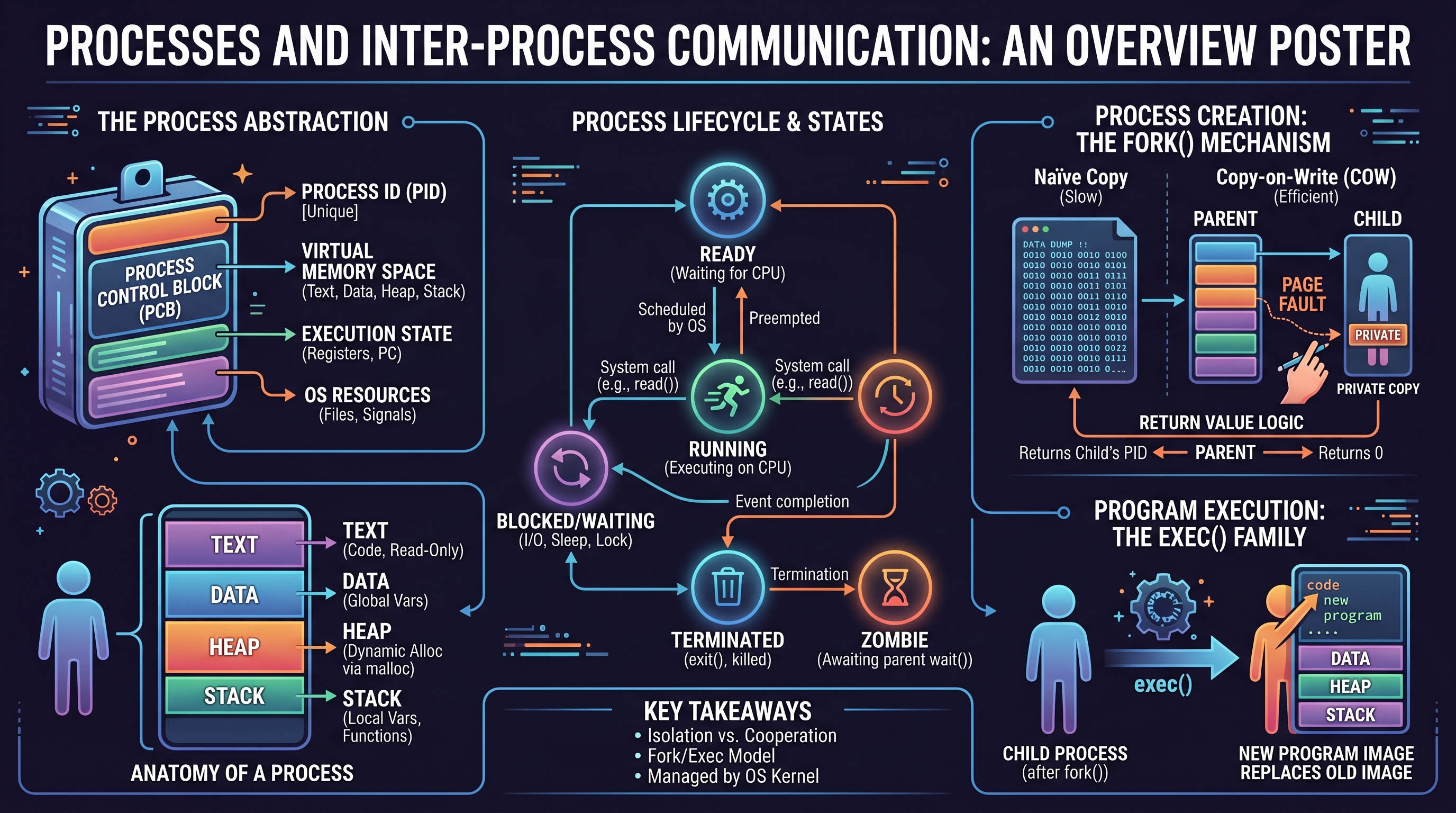
Definition: Process A process is an execution context consisting of a unique Process ID (PID), a virtual memory space (containing text, data, heap, and stack), processor state (registers and program counter), and a set of OS resources (open file descriptors, environment variables, and signal dispositions).
The Anatomy of a Process
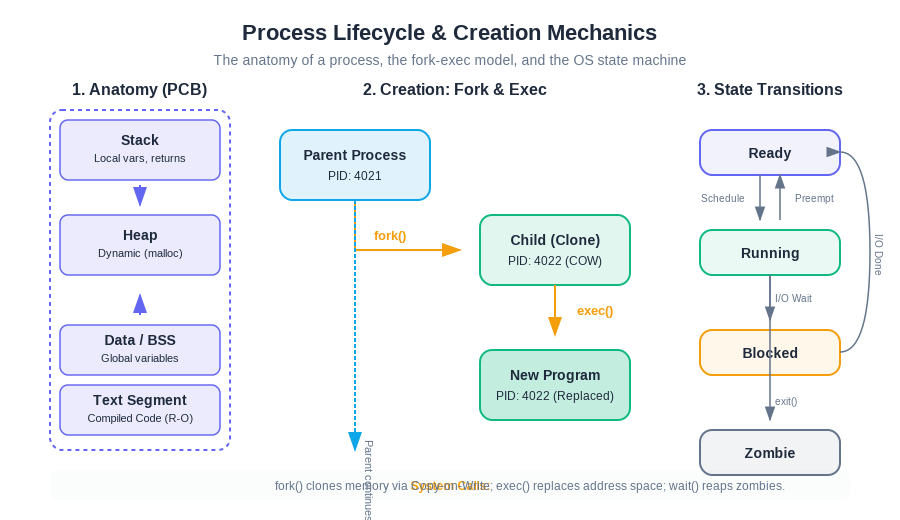
When a program is loaded into memory, the OS organizes its virtual address space into several distinct segments:
- Text Segment: Read-only instructions (the compiled code).
- Data Segment: Initialized and uninitialized (
bss) global and static variables. - Heap: Dynamically allocated memory (via
mallocorbrk). - Stack: Local variables, function parameters, and return addresses.
Process States
A process moves through various states during its existence. This lifecycle is managed by the OS scheduler.
| State | Description | Transition Trigger |
|---|---|---|
| Ready | The process is prepared to run but is waiting for CPU time. | Admitted by scheduler or preempted from Running. |
| Running | The process's instructions are currently being executed by the CPU. | Scheduled by the OS. |
| Blocked/Waiting | The process cannot proceed until an event occurs (e.g., I/O completion). | System call (e.g., read()), sleep, or lock acquisition. |
| Terminated | The process has finished execution or was killed. | exit() call or unhandled signal. |
| Zombie | The process has finished, but its entry remains in the process table. | Termination before the parent calls wait(). |
Process Creation: The fork() Mechanism
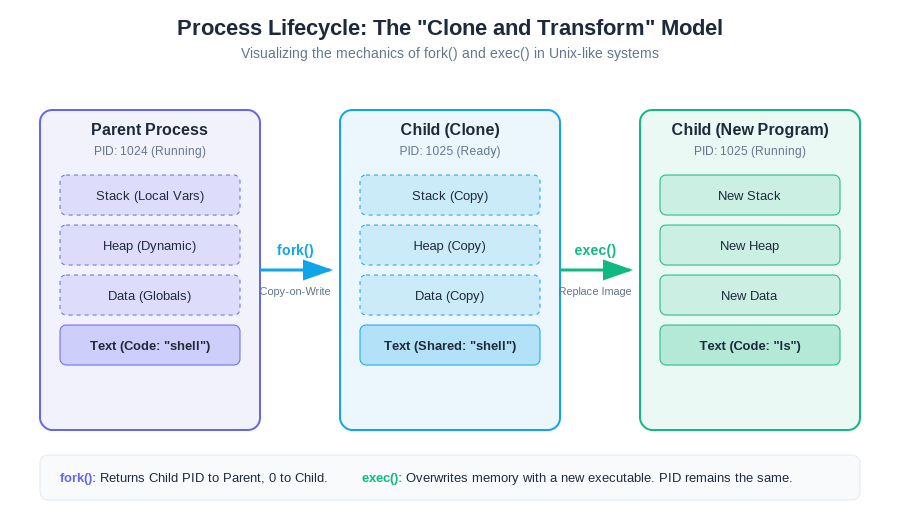
In Unix-like systems, process creation follows a unique "clone and transform" model. The fork() system call is the primary method for creating new processes.
What it is
fork() creates a new process (the child) by making an exact duplicate of the calling process (the parent).
How it works: Copy-on-Write (COW)
Naively copying the entire memory space of a parent (which could be gigabytes) to a child would be prohibitively slow. Modern operating systems use Copy-on-Write (COW). Both processes initially share the same physical memory pages. These pages are marked as read-only. If either process attempts to modify a page, a page fault occurs, and the kernel then creates a private copy of that page for the writing process.
The Return Value Logic
The most striking feature of fork() is that it is called once but returns twice:
- In the parent process,
fork()returns the PID of the newly created child. - In the child process,
fork()returns0. - If creation fails,
-1is returned in the parent.
#include <stdio.h>
#include <unistd.h>
#include <sys/types.h>

int main() {
    pid_t pid = fork();

    if (pid < 0) {
        perror("fork failed");
        return 1;
    } else if (pid == 0) {
        // This block executes in the CHILD
        printf("Child: My PID is %d, My Parent's PID is %d\n", getpid(), getppid());
    } else {
        // This block executes in the PARENT
        printf("Parent: My PID is %d, My Child's PID is %d\n", getpid(), pid);
    }
    return 0;
}
Common Pitfalls
- Resource Leakage: The child inherits copies of the parent's open file descriptors. If the child doesn't need them, they should be closed to avoid leaking resources.
- Fork Bombs: Calling
fork()in an infinite loop can exhaust the OS process table, crashing the system.
Program Execution: The exec() Family
While fork() creates a copy, we often want the child to run a different program. This is the role of the exec() family of system calls.
What it is
An exec() call replaces the current process image with a new program image. It loads the executable file into the current process's address space, overwriting the text, data, heap, and stack segments.
Why it matters
By separating fork() and exec(), Unix allows the child process to manipulate its environment (like redirecting file descriptors or changing permissions) after it is a separate process but before it starts running the new program. This is how shells implement I/O redirection (ls > file.txt).
The exec Variants
The exec family consists of several functions that differ in how they accept arguments and handle environment variables.
| Function | Argument Passing | Path Searching | Environment |
|---|---|---|---|
execl |
List (comma-separated) | Full path required | Inherited |
execv |
Vector (array of strings) | Full path required | Inherited |
execlp |
List (comma-separated) | Searches PATH |
Inherited |
execvp |
Vector (array of strings) | Searches PATH |
Inherited |
execve |
Vector (array of strings) | Full path required | Explicitly provided |
Crucial Insight:
exec()only returns if an error occurs. If successful, the original program is gone, and execution begins at themain()of the new program.
Synchronization: wait() and waitpid()
A parent process often needs to know when its child has finished and what its exit status was. This synchronization is handled by wait().
Mechanics of Reaping
When a child process terminates, it doesn't disappear immediately. It enters the Zombie state. It stays in the process table so the parent can read its exit status. The act of reading this status is called reaping.
wait(int *status): Blocks the parent until any child finishes.waitpid(pid_t pid, int *status, int options): Blocks until a specific child finishes.
Status Macros
The status integer filled by wait is encoded. We use macros to decode it:
WIFEXITED(status): True if the child terminated normally.WEXITSTATUS(status): Returns the actual exit code (0-255).WIFSIGNALED(status): True if the child was killed by a signal.
#include <sys/wait.h>
#include <unistd.h>
#include <stdio.h>

int main() {
    pid_t pid = fork();
    if (pid == 0) {
        printf("Child performing task...\n");
        _exit(42); // Exit with status 42
    } else {
        int status;
        waitpid(pid, &status, 0); // Wait for specific child
        if (WIFEXITED(status)) {
            printf("Child exited with code: %d\n", WEXITSTATUS(status));
        }
    }
    return 0;
}
Zombie and Orphan Processes
The relationship between parent and child processes requires careful management to avoid system clutter.
Zombie Processes
A Zombie is a process that has completed execution but still has an entry in the process table. This happens because the parent has not yet called wait().
- The Danger: While zombies don't consume CPU or memory, they consume a slot in the process table. If the table fills up, no new processes can be created.
- The Cure: The parent must call
wait()orwaitpid().
Orphan Processes
An Orphan is a process whose parent has terminated before it.
- The Solution: The OS handles this by having the
initprocess (PID 1) "adopt" the orphan.initperiodically callswait()to reap any adopted children that have finished.
Inter-Process Communication: Pipes
Since processes are isolated by their virtual address spaces, they cannot communicate via global variables. They require Inter-Process Communication (IPC) mechanisms provided by the kernel. The simplest and most common is the Pipe.
What it is
A pipe is a unidirectional communication channel that acts as a FIFO (First-In, First-Out) buffer in kernel memory.
How it works
The pipe(int pipefd[2]) system call creates a pipe and returns two file descriptors:
pipefd[0]is the read end.pipefd[1]is the write end.
Implementation in a Forked Environment
Because file descriptors are inherited across fork(), a pipe created before forking allows the parent and child to communicate. To establish a unidirectional flow:
- Call
pipe(). - Call
fork(). - Each process closes the end of the pipe it doesn't need.
#include <stdio.h>
#include <unistd.h>
#include <string.h>

int main() {
    int fd[2];
    pipe(fd); // fd[0] is read, fd[1] is write

    if (fork() == 0) {
        close(fd[1]); // Child closes write end
        char buffer[100];
        read(fd[0], buffer, 100);
        printf("Child received: %s\n", buffer);
        close(fd[0]);
    } else {
        close(fd[0]); // Parent closes read end
        char *msg = "Hello from Parent!";
        write(fd[1], msg, strlen(msg) + 1);
        close(fd[1]);
    }
    return 0;
}
Variations: Named Pipes (FIFOs)
Standard pipes are "anonymous" and only exist between related processes. Named Pipes (created via mkfifo) exist as files in the filesystem, allowing unrelated processes to communicate.
Signal Handling
Signals are software interrupts sent to a process to notify it of an event. They are the primary method for asynchronous communication.
Common Signals
| Signal | Name | Default Action | Trigger |
|---|---|---|---|
SIGINT |
Interrupt | Terminate | Ctrl+C from terminal |
SIGKILL |
Kill | Terminate (Immediate) | kill -9 (Cannot be caught) |
SIGTERM |
Terminate | Terminate | Polite request to stop |
SIGCHLD |
Child Status | Ignore | Child stopped or terminated |
SIGSEGV |
Segmentation Fault | Core Dump | Invalid memory access |
Handling Signals
A process can respond to a signal in three ways:
- Default Action: Let the OS handle it (usually termination).
- Ignore: Discard the signal (except
SIGKILLandSIGSTOP). - Catch: Execute a custom Signal Handler function.
The sigaction Interface
While the older signal() function exists, sigaction() is the modern, robust way to handle signals. It allows for fine-grained control over which signals are blocked while the handler is running.
#include <stdio.h>
#include <signal.h>
#include <unistd.h>

void handle_sigint(int sig) {
    printf("\nCaught signal %d. Graceful shutdown...\n", sig);
}

int main() {
    struct sigaction sa;
    sa.sa_handler = &handle_sigint;
    sa.sa_flags = SA_RESTART; // Restart system calls if interrupted
    sigemptyset(&sa.sa_mask);

    sigaction(SIGINT, &sa, NULL);

    while(1) {
        printf("Working...\n");
        sleep(2);
    }
    return 0;
}
Pitfall: Async-Signal Safety
Signal handlers can interrupt a process at any time, including in the middle of a printf() or malloc() call. Because these functions use global state/locks, calling them inside a signal handler can lead to deadlocks or memory corruption. Only async-signal-safe functions (like write(), _exit(), or wait()) should be used inside handlers.
Summary of Process Management
The power of systems programming in C lies in the granular control over these primitives. By combining fork, exec, wait, pipe, and signals, one can construct complex systems:
- Shells: Use
fork/execto run commands andpipeto connect them. - Servers: Use
forkto handle multiple client connections simultaneously. - Daemons: Use
forkandsetsidto run background tasks independent of a terminal.
Mastering these concepts requires a shift in thinking: from a linear flow of execution to a concurrent world where multiple processes evolve, communicate, and synchronize in a shared environment.
Source Materials
Study Systems Programming in C and Unix Environments on Lykke
This course page is free to open: signed out, you can read its first two sections, and signing in, on any plan, opens the rest. The free Lykke Chrome extension syncs your own Canvas courses, so ChatGPT, Claude and Muse can answer from your classes and deadlines. It only reads Canvas.
Add the free extensionSign in to open every sectionAll sections of Systems Programming in C and Unix Environments · Browse more course pages