From the free course Systems Programming in C and Unix Environments on Lykke
The C Preprocessor and Build Systems
Key concepts: Preprocessor Directives (#include, #define) · Macro Pitfalls · Conditional Compilation · Header Files vs. Source Files · Makefiles
Exploration of source-to-source transformation using the preprocessor and automating compilation with Make.
The C Preprocessor and Build Systems
In the hierarchy of the C translation process, the C Preprocessor (CPP) occupies a unique and often misunderstood position. It is not, strictly speaking, part of the C compiler's semantic analysis engine. Instead, it is a source-to-source translator—a sophisticated text processing tool that operates on the source code before the compiler (the cc1 component in GCC) ever sees a single token of actual C logic.
The preprocessor acts as a bridge between the human-readable organization of a project and the machine-oriented requirements of the compiler. It handles the modularization of code through file inclusion, the abstraction of constants and logic through macros, and the adaptation of source code to different environments via conditional compilation. Understanding the preprocessor is the difference between writing "scripts" in C and engineering robust, portable, and scalable systems.
The Compilation Pipeline: Where the Preprocessor Lives
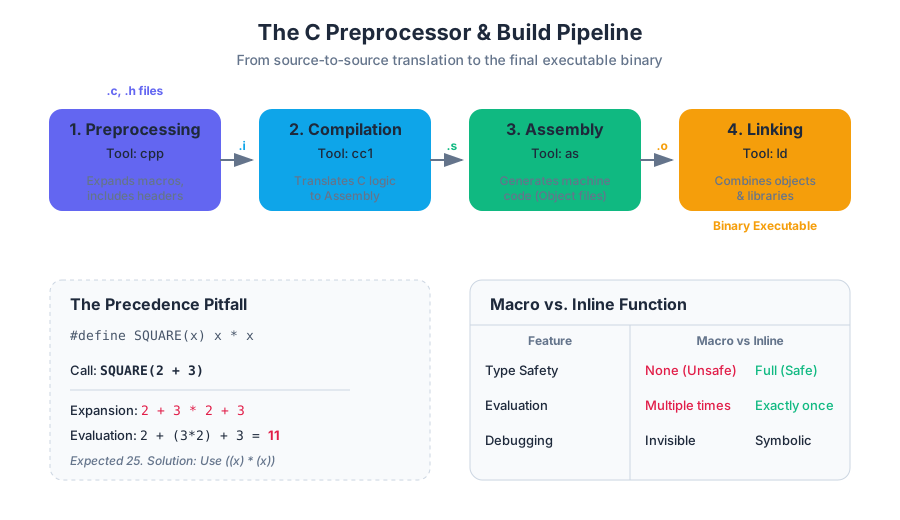
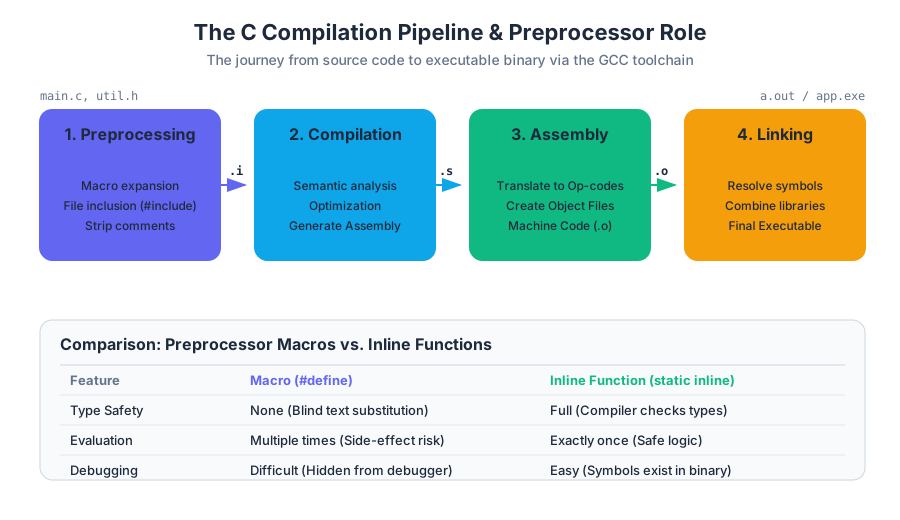
To understand the preprocessor, one must first locate it within the standard GCC toolchain. When a developer executes gcc main.c, several distinct stages occur in sequence. The preprocessor is the very first stage.
| Stage | Tool | Input | Output | Description |
|---|---|---|---|---|
| Preprocessing | cpp |
.c, .h |
.i |
Expands macros, handles includes, and strips comments. |
| Compilation | cc1 |
.i |
.s |
Translates preprocessed C into assembly language. |
| Assembly | as |
.s |
.o |
Translates assembly into machine code (object files). |
| Linking | ld |
.o, .a |
Executable | Combines object files and libraries into a final binary. |
Key Insight: Because the preprocessor operates purely on text, it has no concept of C's type system, scope, or control flow. It simply follows directives to rearrange or substitute text. This "blindness" is the source of both its immense power and its most dangerous pitfalls.
Preprocessor Directives: The Language of the CPP
All preprocessor directives begin with the # character. They must be the first non-whitespace character on a line. Unlike C statements, they do not end with a semicolon; the end of the line marks the end of the directive.
File Inclusion: #include
The #include directive is the mechanism for C's modularity. It literally instructs the preprocessor to "stop what you are doing, open this other file, and paste its entire contents right here."
- System Headers:
#include <stdio.h>searches in standard system directories (e.g.,/usr/include). - User Headers:
#include "my_header.h"typically searches the current directory first, then falls back to system paths.
A common mistake among beginners is including .c files. While the preprocessor will technically allow this, it violates the principle of separate compilation. If file_a.c includes file_b.c, and both are later linked together, the linker will encounter "multiple definition" errors because the functions in file_b.c were compiled twice—once as part of file_a.o and once as file_b.o.
Macro Substitution: #define
The #define directive creates a macro, which is a rule for text substitution. Macros come in two flavors: Object-like (constants) and Function-like (logic).
#define PI 3.14159          // Object-like macro
#define SQUARE(x) (x * x)   // Function-like macro
When the preprocessor encounters PI, it replaces it with 3.14159. When it encounters SQUARE(5), it replaces it with (5 * 5).
Macro Pitfalls: The Hazards of Text Substitution
Because macros are expanded before the compiler checks types or precedence, they are notorious for introducing subtle, hard-to-debug errors. There are two primary categories of macro bugs: Precedence Violations and Side Effect Double-Evaluation.
1. The Precedence Pitfall
Consider the SQUARE(x) macro defined as x * x. If a developer writes SQUARE(2 + 3), they expect 25. However, the preprocessor performs a literal substitution:
Derivation of Failure:
SQUARE(2 + 3)$\rightarrow$2 + 3 * 2 + 3Following the standard order of operations (multiplication before addition):2 + (3 * 2) + 3$\rightarrow$2 + 6 + 3$\rightarrow$11
The Solution: Always wrap macro arguments and the entire macro expression in parentheses.
#define SQUARE(x) ((x) * (x))
Now: ((2 + 3) * (2 + 3)) $\rightarrow$ 5 * 5 $\rightarrow$ 25.
2. The Side Effect Pitfall
Even with parentheses, macros can fail if an argument is passed that has a side effect (like i++).
Consider: #define MAX(a, b) ((a) > (b) ? (a) : (b))
If we call MAX(i++, j), the expansion becomes:
((i++) > (j) ? (i++) : (j))
If i is indeed greater than j, the expression i++ is evaluated twice: once for the comparison and once for the result. The variable i is incremented twice, which is almost certainly not what the programmer intended.
| Feature | Macro (#define) |
Inline Function (static inline) |
|---|---|---|
| Type Checking | None (unsafe) | Full (safe) |
| Evaluation | Multiple times (dangerous) | Exactly once (safe) |
| Scope | Global to the file | Respects C scope rules |
| Debugging | Difficult (hidden in .i file) |
Easy (symbols exist in debugger) |
Conditional Compilation: Architecting Portability
Conditional compilation allows developers to include or exclude portions of code based on defined symbols. This is essential for writing code that runs on multiple Operating Systems or for including debug-only logging.
Directives:
#ifdef SYMBOL: Include code ifSYMBOLis defined.#ifndef SYMBOL: Include code ifSYMBOLis not defined.#if,#elif,#else,#endif: General logic.
The Header Guard Pattern
One of the most critical uses of conditional compilation is the Header Guard. In large projects, a header file might be included multiple times through nested dependencies. Without guards, this leads to redefinition errors.
/* my_library.h */
#ifndef MY_LIBRARY_H
#define MY_LIBRARY_H

struct User {
    int id;
    char name[50];
};

void print_user(struct User u);

#endif
If this file is included twice, the second time the preprocessor reaches #ifndef MY_LIBRARY_H, the symbol is already defined, and the entire content is skipped. Modern compilers also support #pragma once, which is a non-standard but widely supported and more efficient alternative to manual guards.
Build Systems: The Logic of make
As a C project grows from a single file to dozens or hundreds, manual compilation becomes impossible. Recompiling every file when only one has changed is a waste of resources. This is where Build Automation tools like make come in.
A Makefile is essentially a description of a Directed Acyclic Graph (DAG) where nodes are files and edges are dependencies.
The Structure of a Rule
A Makefile consists of rules with the following syntax:
target: dependencies
	command
Note: The command MUST be preceded by a literal Tab character, not spaces.
How make Decides to Build
The "algorithm" of make is based on the Modification Timestamp (mtime) of files.
- For a given
target,makechecks themtimeof all itsdependencies. - If any dependency has a newer
mtimethan thetarget, or if thetargetdoes not exist,makeexecutes thecommand. - If the
targetis newer than all its dependencies,makeskips the rule.
Example Makefile for a Modular Project
CC = gcc
CFLAGS = -Wall -Wextra -g

# The final executable
myapp: main.o utils.o
	$(CC) $(CFLAGS) -o myapp main.o utils.o

# Object file rules
main.o: main.c utils.h
	$(CC) $(CFLAGS) -c main.c

utils.o: utils.c utils.h
	$(CC) $(CFLAGS) -c utils.c

# Clean utility
clean:
	rm -f *.o myapp
Advanced Makefile Concepts
To make Makefiles maintainable, we use variables and pattern rules.
| Variable Type | Syntax | Description |
|---|---|---|
| Recursive | VAR = val |
Evaluated when used; can reference other variables defined later. |
| Static | VAR := val |
Evaluated once, immediately at the point of definition. |
| Conditional | VAR ?= val |
Assigns val only if VAR is not already defined. |
| Automatic | $@ |
Represents the name of the current target. |
| Automatic | $^ |
Represents the names of all dependencies. |
| Automatic | $< |
Represents the name of the first dependency. |
Phony Targets
Targets like clean are not actual files. If a file named clean were ever created in the directory, make clean would stop working because make would think the target is "up to date." To prevent this, we use the .PHONY directive:
.PHONY: clean
clean:
	rm -f $(OBJS) $(EXEC)
Common Pitfalls in Build Systems
- Missing Dependencies: If
main.cincludesutils.h, bututils.his not listed as a dependency formain.o, changing the header will not trigger a recompile ofmain.o. This leads to "stale" binaries and bizarre runtime bugs. - Space vs. Tab: Using spaces instead of tabs in a Makefile is the most common cause of
Makefile: *** missing separatorerrors. - Circular Dependencies: If
Adepends onBandBdepends onA,makewill error out. - Over-Engineering: For very small projects, a complex Makefile is overhead. For very large projects, handwritten Makefiles become unmanageable, leading to the use of meta-build systems like CMake or Meson.
Summary of the Preprocessor and Build Workflow
The transition from source code to executable is a multi-step pipeline. The preprocessor handles the "meta-programming" aspects—cleaning up the code and preparing it for the compiler. The build system manages the "orchestration"—ensuring that the pipeline runs efficiently and only when necessary.
Theorem of Minimal Recompilation: In a correctly configured build system, the time to perform an incremental build after a change to a single source file $S$ should be proportional to the number of files that transitively depend on $S$, not the total size of the project.
By mastering #define, header guards, and the dependency logic of make, a systems programmer ensures that their code is not just a collection of instructions, but a professional, maintainable software product.
Source Materials
Study Systems Programming in C and Unix Environments on Lykke
This course page is free to open: signed out, you can read its first two sections, and signing in, on any plan, opens the rest. The free Lykke Chrome extension syncs your own Canvas courses, so ChatGPT, Claude and Muse can answer from your classes and deadlines. It only reads Canvas.
Add the free extensionSign in to open every sectionAll sections of Systems Programming in C and Unix Environments · Browse more course pages