From the free course Systems Programming in C and Unix Environments on Lykke
File Systems and POSIX I/O Streams
Key concepts: POSIX File Model · File Descriptors (STDIN/STDOUT/STDERR) · System Calls (open, read, write, close) · Vectored I/O (writev) · i-nodes and d-nodes
Understanding the POSIX file model and using system calls for low-level I/O operations.
File Systems and POSIX I/O Streams
In the landscape of systems programming, the Unix philosophy is famously distilled into a single, powerful mantra: "Everything is a file." This abstraction is not merely a convenience; it is the architectural bedrock of the POSIX (Portable Operating System Interface) standard. By treating hardware devices, network sockets, inter-process communication channels, and traditional disk-based data as uniform streams of bytes, POSIX allows developers to use a singular, consistent API to interact with the entire universe of system resources.
Understanding the POSIX I/O model requires peeling back the layers of the operating system to see how the kernel manages state, how the file system organizes physical bits into logical structures, and how the transition from user-space to kernel-space occurs through system calls.
The POSIX File Model: The Stream Abstraction
At its core, a POSIX file is an ordered stream of bytes. Unlike older record-oriented file systems, the kernel does not impose any internal structure on the data within a file. Whether a file contains a JPEG image, a C source file, or a compiled executable, the operating system treats it as a linear sequence of bytes starting at offset 0.
What it is
The POSIX model defines a file as a resource that can be opened, read from, written to, and closed. Most files also support the concept of a file offset (or "seek pointer"), which tracks the current position within the stream where the next I/O operation will occur.
Why it matters
This uniformity allows for polymorphism at the system level. A program designed to read text from a file on disk can, without modification, read text from a keyboard or a network pipe. This is the foundation of shell redirection and piping (cat file.txt | grep "search"), where the output of one process is seamlessly mapped to the input of another.
How it works: The File Descriptor
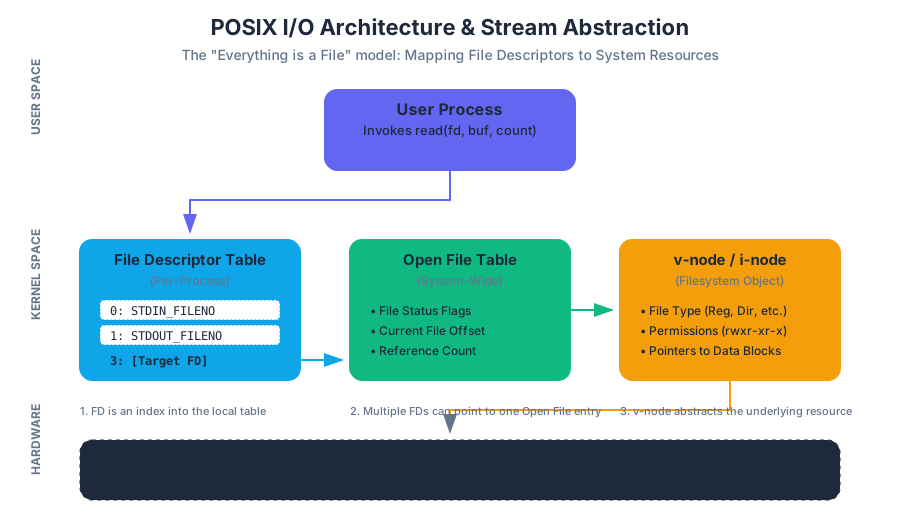
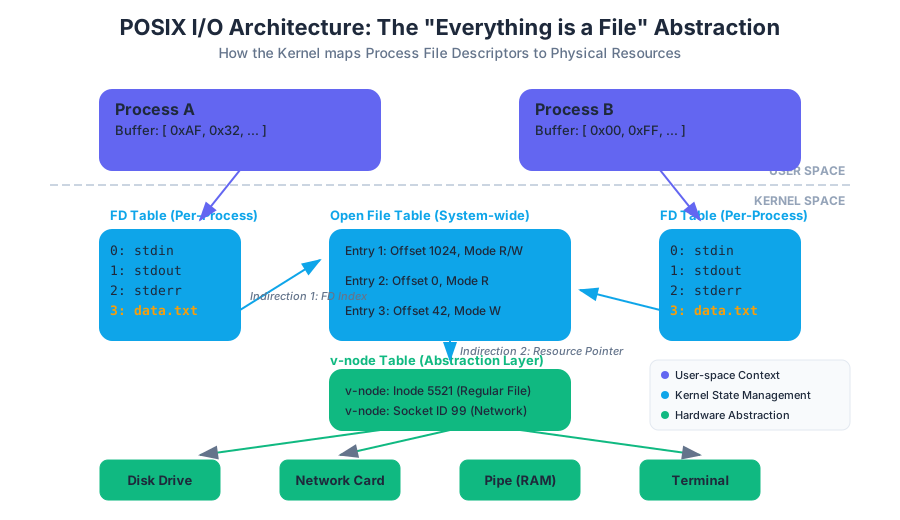
When a process requests access to a file, the kernel does not return a direct pointer to the data. Instead, it returns a File Descriptor (FD).
Definition: A File Descriptor is a small, non-negative integer that serves as an index into a per-process File Descriptor Table maintained by the kernel.
Each entry in this table points to an entry in the system-wide Open File Table, which in turn points to the v-node (virtual node) representing the actual file on disk. This indirection allows the kernel to manage permissions, file offsets, and sharing between processes safely.
| Descriptor | Name | Constant (unistd.h) | Default Mapping |
|---|---|---|---|
0 |
Standard Input | STDIN_FILENO |
Keyboard / Terminal Input |
1 |
Standard Output | STDOUT_FILENO |
Screen / Terminal Output |
2 |
Standard Error | STDERR_FILENO |
Screen / Terminal Output |
Core System Calls: The Interface to the Kernel
To interact with the file system, a C program bypasses the standard library's buffered I/O (like printf or fopen) and invokes system calls directly. These calls trigger a context switch from user mode to kernel mode.
open(): Gaining Access
The open() system call establishes a connection between a path in the file system and a file descriptor.
#include <fcntl.h>

int fd = open("data.txt", O_RDWR | O_CREAT, S_IRUSR | S_IWUSR);
The flags argument determines the access mode:
O_RDONLY: Read-only.O_WRONLY: Write-only.O_RDWR: Read and write.O_CREAT: Create the file if it doesn't exist.O_TRUNC: If the file exists, truncate its length to 0.
read() and write(): Data Transfer
These calls are the workhorses of I/O. They transfer a specified number of bytes between a user-space buffer and the kernel's file buffer.
ssize_t read(int fd, void *buf, size_t count);
ssize_t write(int fd, const void *buf, size_t count);
The Mechanics of Return Values:
It is a common mistake to assume read() will always return the exact number of bytes requested (count). In reality, read() returns the number of bytes actually read, which might be less than count due to:
- Reaching the End of File (EOF).
- Interruption by a signal.
- Reading from a pipe or network socket where data is arriving slowly.
Worked Example: Robust File Copy
A robust implementation must handle "short reads" and "short writes" by wrapping the system calls in a loop.
#include <unistd.h>
#include <fcntl.h>
#include <errno.h>

void safe_copy(int src_fd, int dest_fd) {
    char buffer[4096];
    ssize_t bytes_read, bytes_written;

    while ((bytes_read = read(src_fd, buffer, sizeof(buffer))) > 0) {
        char *ptr = buffer;
        while (bytes_read > 0) {
            bytes_written = write(dest_fd, ptr, bytes_read);
            if (bytes_written <= 0) {
                if (errno == EINTR) continue; // Interrupted, try again
                return; // Actual error
            }
            bytes_read -= bytes_written;
            ptr += bytes_written;
        }
    }
}
Vectored I/O: Scatter-Gather Operations
Standard read and write operations require data to be stored in a single contiguous buffer. However, high-performance applications (like web servers or database engines) often need to write data that is spread across multiple memory locations—for example, a fixed-size header in one buffer and a variable-size payload in another.
What it is
Vectored I/O, also known as Scatter-Gather I/O, allows a single system call to read into or write from multiple buffers. In POSIX, this is implemented via readv() and writev().
How it works
The programmer populates an array of struct iovec structures, each specifying a pointer to a buffer and its length.
struct iovec {
    void  *iov_base; /* Starting address */
    size_t iov_len;  /* Number of bytes to transfer */
};
Why it matters: Atomicity and Performance
- Atomicity: On many systems,
writev()is atomic. The kernel guarantees that the data from all buffers is written as a single, contiguous block, preventing other processes from interleaving their writes. - Efficiency: It reduces the number of system calls. Instead of calling
write()three times (header, body, footer), which involves three context switches, the program callswritev()once.
Concrete Example: Writing a Network Packet
#include <sys/uio.h>

struct header { uint32_t id; uint32_t len; };
char *body = "Payload data...";
char *footer = "\r\n";

struct iovec iov[3];
struct header h = {1, strlen(body)};

iov[0].iov_base = &h;
iov[0].iov_len = sizeof(h);
iov[1].iov_base = body;
iov[1].iov_len = strlen(body);
iov[2].iov_base = footer;
iov[2].iov_len = 2;

ssize_t total_written = writev(STDOUT_FILENO, iov, 3);
| Feature | write() |
writev() |
|---|---|---|
| Buffer Count | Single contiguous buffer | Multiple non-contiguous buffers |
| System Calls | One per buffer | One for all buffers |
| Atomicity | Atomic for the single buffer | Atomic for the entire vector |
| Use Case | Simple stream writing | Protocol headers, log entries, database pages |
File System Structure: i-nodes and d-nodes
To understand how the kernel finds data.txt on a physical disk, we must look at the internal metadata structures: i-nodes and d-nodes.
The i-node (Index Node)
An i-node is a data structure that describes a file system object (file or directory). Crucially, the i-node contains everything except the file's name and the actual data content.
Key Insight: A file is defined by its i-node number, not its name. Multiple names (hard links) can point to the same i-node.
i-node Metadata Includes:
- File type (regular, directory, symbolic link, etc.)
- Permissions (read, write, execute)
- Owner and Group IDs
- File size in bytes
- Timestamps (Access, Modify, Change)
- Block Pointers: A list of pointers to the physical disk blocks where the data resides.
The d-node (Directory Entry)
A d-node (or dirent) is a simple mapping. It resides within a directory file and links a human-readable string (the filename) to an i-node number.
| Filename | i-node Number |
|---|---|
. |
1024 (Current Directory) |
.. |
512 (Parent Directory) |
notes.txt |
2048 |
script.sh |
4096 |
The Path Resolution Process
When you call open("/home/user/file.txt", ...):
- The kernel starts at the root i-node (usually i-node 2).
- It reads the data blocks of the root directory to find the d-node for
home. - It gets the i-node number for
home, fetches that i-node, and reads its blocks to finduser. - This continues until the i-node for
file.txtis reached. - The kernel then checks permissions in that final i-node before granting a File Descriptor.
Advanced Concept: Buffered I/O vs. System I/O
A common point of confusion for students is the difference between read() (system call) and fread() (C standard library function).
User-Space Buffering
The C library (stdio.h) maintains its own buffer in user-space (typically 4KB or 8KB).
- When you call
fgetc(), the library reads a large chunk from the kernel viaread()and stores it. - Subsequent calls to
fgetc()return bytes from this user-space buffer without needing a costly system call.
Comparison Table
| Feature | System I/O (read/write) |
Standard I/O (fread/fwrite) |
|---|---|---|
| Layer | Kernel Interface | User-space Library |
| Buffering | None (Direct) | Managed Buffer (FILE *) |
| Efficiency | High for large, aligned blocks | High for many small operations |
| Portability | POSIX-specific | ANSI C (Cross-platform) |
| Identifier | File Descriptor (int) | File Stream (FILE *) |
Common Pitfalls and Edge Cases
- Leaking File Descriptors: Every
open()must have a correspondingclose(). Processes have a limit on the number of open FDs (often 1024). Failing to close files in a loop will eventually causeopen()to fail withEMFILE. - Ignoring Return Values: Assuming
write()wrote all requested bytes is a recipe for data corruption. Always check the return value. - Mixing
FILE *and FDs: Usingprintfandwriteon the same output stream without callingfflush()can result in out-of-order output, as theprintfdata sits in a user-space buffer whilewritegoes straight to the kernel. - The "Zombie" File: If you
unlink()(delete) a file while a process has it open, the d-node is removed, but the i-node and data blocks remain on disk until the process closes the FD. This is a common way to create temporary files that are guaranteed to be deleted.
Source Materials
Study Systems Programming in C and Unix Environments on Lykke
This course page is free to open: signed out, you can read its first two sections, and signing in, on any plan, opens the rest. The free Lykke Chrome extension syncs your own Canvas courses, so ChatGPT, Claude and Muse can answer from your classes and deadlines. It only reads Canvas.
Add the free extensionSign in to open every sectionAll sections of Systems Programming in C and Unix Environments · Browse more course pages