From the free course Java Programming and Algorithmic Thinking Fundamentals on Lykke
Standard Libraries and I/O
Key concepts: StdIn (Standard Input) · StdOut (Standard Output) · StdDraw (Standard Drawing) · Tokenization · Data Type Conversion
Using specialized libraries for input, output, and graphical visualization in the Rutgers environment.
Standard Libraries and I/O
The transition from writing "toy" programs with hard-coded values to developing robust, data-driven applications requires a sophisticated understanding of Input/Output (I/O). In the Java ecosystem, while the native java.util.Scanner and java.io packages provide comprehensive functionality, they often introduce syntactic noise that obscures the underlying algorithmic logic for those mastering the fundamentals. To bridge this gap, we utilize a suite of standard libraries—StdIn, StdOut, and StdDraw—designed to provide a clean, "token-based" interface for data processing and visualization.
This section explores the mechanics of data streams, the nuances of tokenization, the mathematical precision of formatted output, and the abstraction of graphical rendering. By decoupling a program from its data source, we move toward the ideal of Modular Programming, where code is a general-purpose engine capable of processing any compatible data stream.
The Architecture of Standard Streams
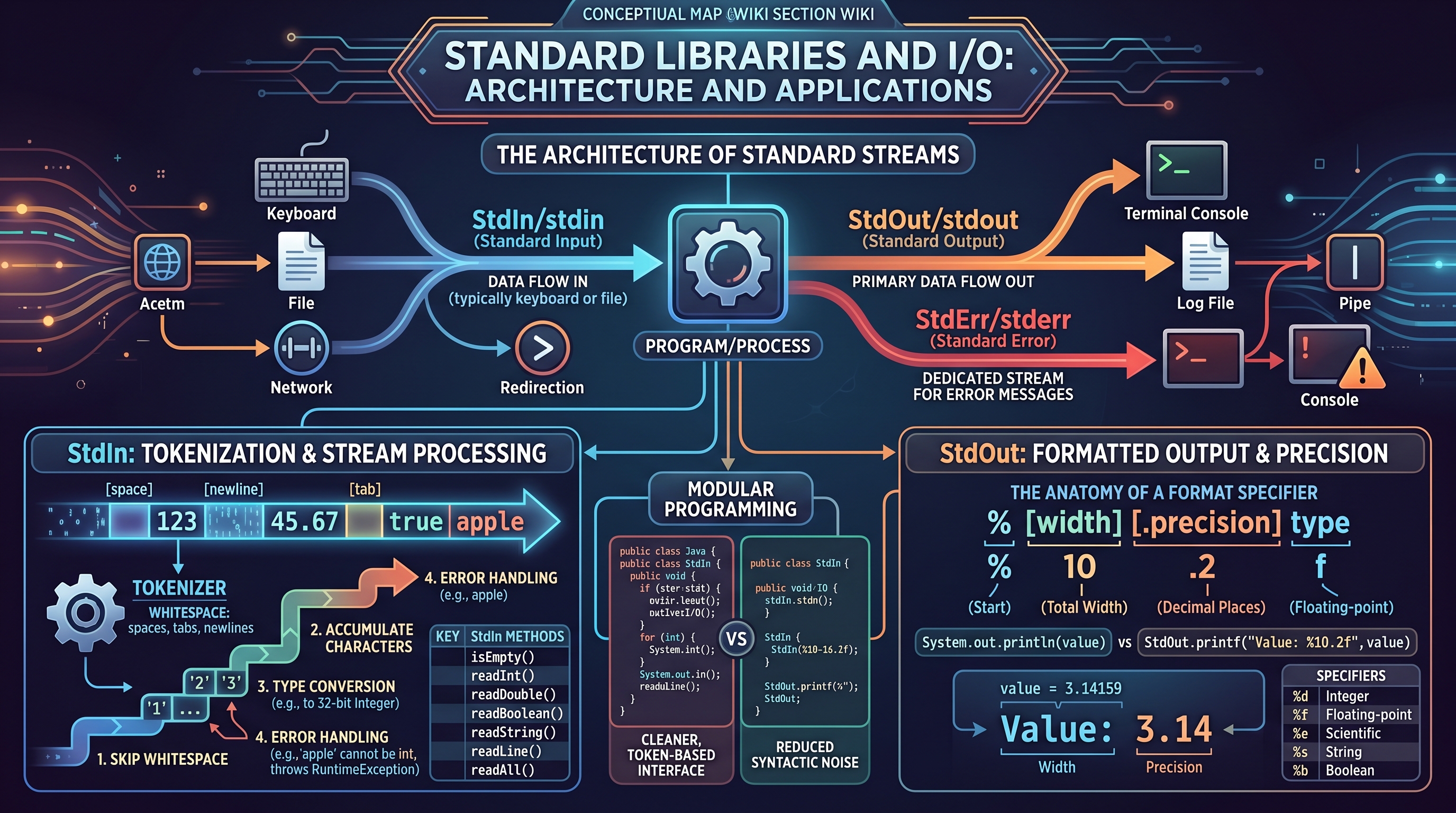
At the heart of modern computing lies the Unix-inspired concept of Standard Streams. Every program, when executed, is automatically connected to three fundamental abstractions:
- Standard Input (StdIn/stdin): A stream of data flowing into the program (typically from the keyboard or a file).
- Standard Output (StdOut/stdout): A stream of data flowing out of the program (typically to the terminal console).
- Standard Error (StdErr/stderr): A dedicated stream for error messages, separate from the primary output.
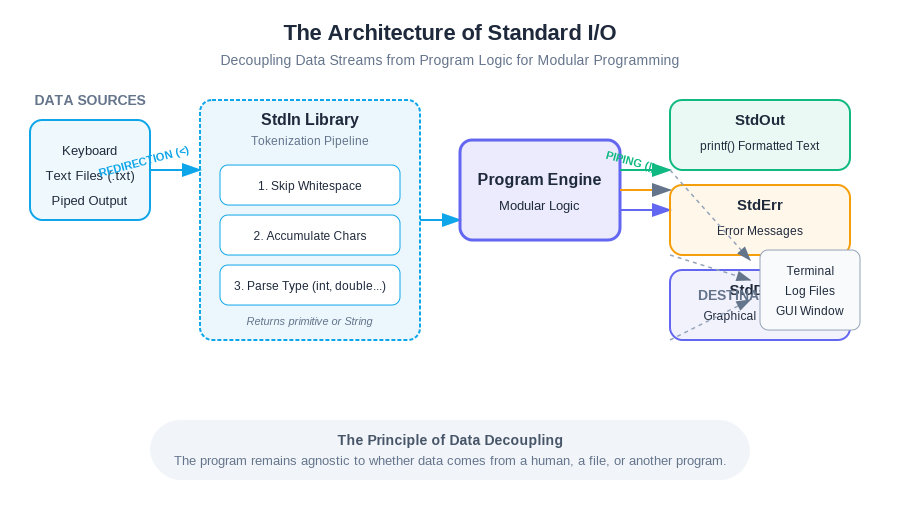
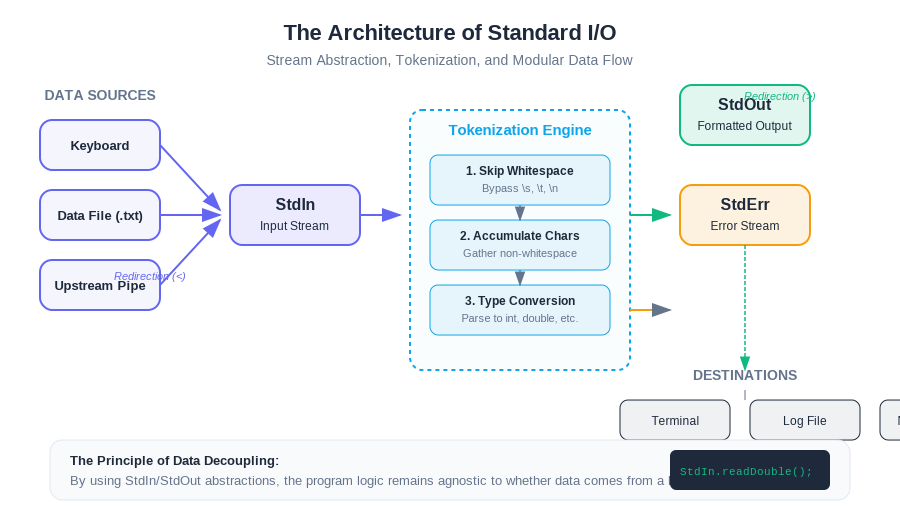
The power of this model lies in its flexibility. Through Redirection and Piping, a program does not need to know whether its input is coming from a human typing at a keyboard or a 10-terabyte text file.
The Principle of Data Decoupling: A well-designed program should be agnostic to its data source. By writing code that interacts with
StdInandStdOut, we ensure the program can be integrated into larger pipelines without modification.
StdIn: Tokenization and Stream Processing
The StdIn library simplifies the process of reading data by treating the input stream as a sequence of tokens separated by whitespace (spaces, tabs, or newlines).
The Mechanics of Tokenization
When you call a method like StdIn.readInt(), the library performs a multi-step process:
- Skip Whitespace: It bypasses any leading spaces, tabs, or line breaks.
- Accumulate Characters: It gathers subsequent non-whitespace characters until it hits the next whitespace.
- Type Conversion: It attempts to parse those characters into the requested data type (e.g., converting the string "123" into the integer value
123). - Error Handling: If the characters cannot be converted (e.g., trying to read "apple" as an
int), the program throws aRuntimeExpression.
| Method | Return Type | Description |
|---|---|---|
isEmpty() |
boolean |
Returns true if there are no more tokens in the input stream. |
readInt() |
int |
Reads the next token and converts it to a 32-bit integer. |
readDouble() |
double |
Reads the next token and converts it to a 64-bit float. |
readBoolean() |
boolean |
Reads the next token (true/false) and converts it to a boolean. |
readString() |
String |
Reads the next token and returns it as a String. |
readLine() |
String |
Reads the remainder of the current line, including whitespace. |
readAll() |
String |
Reads the entire remaining input stream as a single String. |
Concrete Example: Processing an Arbitrary Stream
Consider a program designed to calculate the average of a sequence of numbers. By using StdIn.isEmpty(), the program can process a list of any length.
public class Average {
    public static void main(String[] args) {
        double sum = 0.0;
        int count = 0;

        // The loop continues until the input stream is exhausted (Ctrl+D or EOF)
        while (!StdIn.isEmpty()) {
            double value = StdIn.readDouble();
            sum += value;
            count++;
        }

        if (count > 0) {
            double avg = sum / count;
            StdOut.println("Average: " + avg);
        }
    }
}
StdOut: Formatted Output and Precision
While System.out.println() is sufficient for basic debugging, professional-grade software requires control over how data is presented. StdOut.printf() (Print Formatted) allows for precise control over decimal places, field widths, and alignment.
The Anatomy of a Format String
A format string consists of static text and format specifiers that act as placeholders for variables. A specifier follows the pattern: % [width] [.precision] type.
| Specifier | Type | Description | Example (value = 3.14159) |
|---|---|---|---|
%d |
Integer | Decimal integer. | %d -> 3 |
%f |
Floating-point | Fixed-point decimal. | %.2f -> 3.14 |
%e |
Scientific | Exponential notation. | %e -> 3.141590e+00 |
%s |
String | String representation. | %s -> "3.14159" |
%10s |
String | Right-justified in 10 spaces. | "%10s" -> " 3.14159" |
Why Precision Matters
In financial applications or scientific simulations, the difference between 3.3333333333 and 3.33 is not just aesthetic—it represents the limits of measurement or the requirements of a specific protocol. Using StdOut.printf("%8.2f", val) ensures that the output is always 8 characters wide with exactly 2 decimal places, creating perfectly aligned tables in the console.
Data Type Conversion: Parsing vs. Casting
A common point of confusion for students is the difference between Casting and Parsing.
- Casting: Changing the type of a value that is already in binary form (e.g.,
(int) 3.14). This is a low-level reinterpretation of bits or a truncation. - Parsing: The algorithmic process of taking a
String(a sequence of ASCII/Unicode characters) and calculating its numerical equivalent.
The Parsing Algorithm (Simplified)
When Integer.parseInt("123") is called, the computer executes a logic similar to this:
$$Value = (1 \times 10^2) + (2 \times 10^1) + (3 \times 10^0)$$
This involves iterating through the string, checking for non-numeric characters, and handling signs (+/-).
| Operation | Context | Example |
|---|---|---|
| Casting | Primitive to Primitive | int x = (int) 3.9; // x becomes 3 |
| Parsing | String to Primitive | int x = Integer.parseInt("123"); |
| Concatenation | Primitive to String | String s = "" + 123; |
| ToString | Object to String | String s = Double.toString(3.14); |
StdDraw: Visualizing Logic
StdDraw is a library that abstracts away the complexities of Java's Swing and AWT frameworks, providing a simple "canvas" for 2D graphics. It operates on a Cartesian coordinate system, defaulting to a range of $[0, 1]$ for both $x$ and $y$.
Coordinate Transformations
A senior engineer recognizes that the default $0.0$ to $1.0$ scale is rarely ideal for real-world data. StdDraw.setXscale(min, max) and StdDraw.setYscale(min, max) allow the programmer to map the canvas directly to the problem domain (e.g., mapping $x$ to years $1900-2024$ and $y$ to global population).
The Double Buffering Technique
For animation, StdDraw uses Double Buffering. Instead of drawing directly to the screen (which causes flickering), the library draws to an off-screen "buffer." Only when StdDraw.show() is called is the entire frame flipped onto the screen.
The Animation Loop Pattern:
StdDraw.enableDoubleBuffering(): Turn on the buffer.- Clear:
StdDraw.clear()to wipe the previous frame. - Draw: Perform all geometric calculations and drawing commands.
- Show:
StdDraw.show()to display the completed frame. - Pause:
StdDraw.pause(milliseconds)to control the frame rate (FPS).
public class BouncingBall {
    public static void main(String[] args) {
        double rx = 0.48, ry = 0.86;     // position
        double vx = 0.015, vy = 0.023;   // velocity
        double radius = 0.05;            // size

        StdDraw.enableDoubleBuffering();

        while (true) {
            // Physics: update position based on velocity
            if (Math.abs(rx + vx) > 1.0 - radius) vx = -vx;
            if (Math.abs(ry + vy) > 1.0 - radius) vy = -vy;
            rx += vx;
            ry += vy;

            // Graphics: clear and redraw
            StdDraw.clear(StdDraw.LIGHT_GRAY);
            StdDraw.setPenColor(StdDraw.BLACK);
            StdDraw.filledCircle(rx, ry, radius);

            StdDraw.show();
            StdDraw.pause(20); // ~50 frames per second
        }
    }
}
Redirection and Piping: The Power User’s Workflow
The true utility of StdIn and StdOut is realized at the command line. By using shell operators, we can connect programs together.
1. Input Redirection (<)
Instead of typing 1,000 numbers by hand, you can tell the OS to feed a file into your program's StdIn.
java Average < data.txt
2. Output Redirection (>)
Instead of printing to the console, save the results to a file.
java RandomSequence 1000 > numbers.txt
3. Piping (|)
Connect the StdOut of one program directly to the StdIn of another.
java RandomSequence 1000 | java Average
In this example, the RandomSequence program generates numbers, and Average consumes them. The numbers never touch the hard drive; they exist only in a memory buffer between the two processes.
Common Pitfalls and Edge Cases
1. The "Trailing Newline" Problem
When mixing readInt() and readLine(), be careful. readInt() consumes the number but leaves the "Enter" key (newline character) in the buffer. A subsequent readLine() will immediately see that newline and return an empty string.
Solution: Call StdIn.readLine() once after readInt() to "flush" the remaining newline character.
2. Infinite Loops with isEmpty()
If you use while(!StdIn.isEmpty()) but forget to actually read a token inside the loop, the condition will always be true, and the program will hang.
Solution: Ensure every path through the loop consumes at least one token.
3. Coordinate System Confusion
In StdDraw, the origin $(0,0)$ is by default at the bottom-left. This differs from many other graphics libraries (like standard Java AWT or HTML5 Canvas) where $(0,0)$ is at the top-left.
Solution: Always explicitly set your scales using setXscale and setYscale to avoid assumptions.
4. Performance of StdOut
Printing to the console is an "expensive" I/O operation. If you are printing millions of lines, your program will be throttled by the terminal's rendering speed.
Solution: For massive data, consider writing to a file or using a StringBuilder to aggregate output before printing.
Summary of Library Interplay
The synergy between these libraries allows for a "Filter" model of programming. Data is read (StdIn), processed using logic and arrays, and then either visualized (StdDraw) or passed forward (StdOut).
| Library | Primary Abstraction | Key Responsibility |
|---|---|---|
StdIn |
The Token Stream | Sanitizing and converting raw input into typed data. |
StdOut |
The Formatted Stream | Presenting processed data with mathematical precision. |
StdDraw |
The Canvas | Translating abstract data into spatial representations. |
By mastering these tools, you move beyond writing code that "works" to writing code that "integrates"—the hallmark of a professional developer.
Source Materials
Study Java Programming and Algorithmic Thinking Fundamentals on Lykke
This course page is free to open: signed out, you can read its first two sections, and signing in, on any plan, opens the rest. The free Lykke Chrome extension syncs your own Canvas courses, so ChatGPT, Claude and Muse can answer from your classes and deadlines. It only reads Canvas.
Add the free extensionSign in to open every sectionAll sections of Java Programming and Algorithmic Thinking Fundamentals · Browse more course pages