From the free course Java Programming and Algorithmic Thinking Fundamentals on Lykke
String Manipulation
Key concepts: String Methods (charAt, indexOf) · Value Equality (.equals()) · Reference Equality (==) · String Initialization · Palindrome Detection
In-depth look at the String class, text processing, and the difference between value and reference equality.
String Manipulation
In the hierarchy of data representation, the String occupies a unique position in the Java ecosystem. While primitive types like int and double represent atomic numerical values, a String is a sophisticated object—a sequence of characters that serves as the primary medium for human-computer interaction. To the novice, a String is merely "text"; to the senior engineer, it is an immutable, heap-allocated object governed by specific memory-management rules and a rich API.
Understanding string manipulation is not merely about learning methods like substring() or indexOf(). It requires a deep comprehension of how Java handles object references, the distinction between value and identity, and the algorithmic efficiency of text processing. This article provides a rigorous exploration of the String class, from its underlying memory architecture to the implementation of classical algorithms like palindrome detection.
The Anatomy of a String: Initialization and Memory
What it is
In Java, a String is a non-primitive data type that represents a sequence of Unicode characters. Unlike a simple array of characters (char[]), the String class encapsulates the data and provides a suite of methods to interact with it. Crucially, Strings are immutable: once a String object is created, its internal character sequence cannot be altered.
Why it matters
Immutability provides several critical advantages:
- Security: Sensitive data (like passwords or file paths) cannot be changed by a called method.
- Thread Safety: Multiple threads can share a String instance without fear of corruption.
- Caching: Because Strings are constant, the Java Virtual Machine (JVM) can optimize memory through a process called interning.
How it works: The String Pool
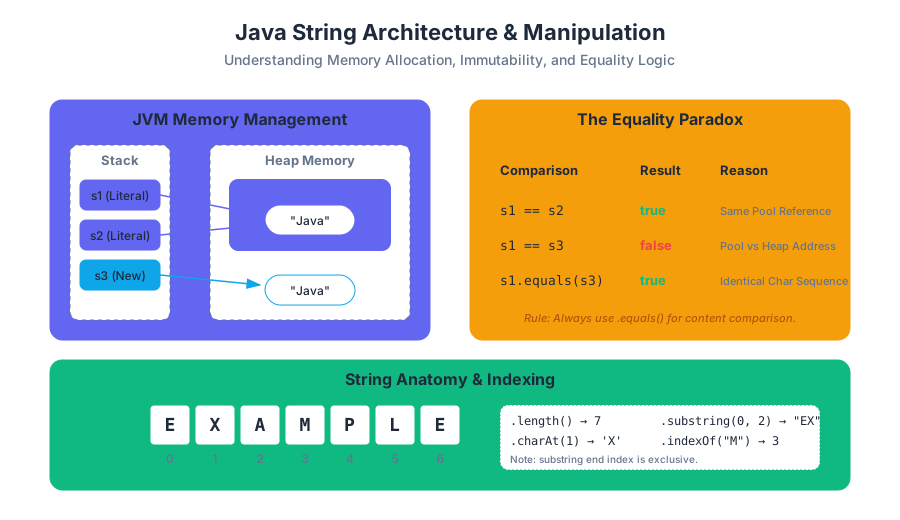
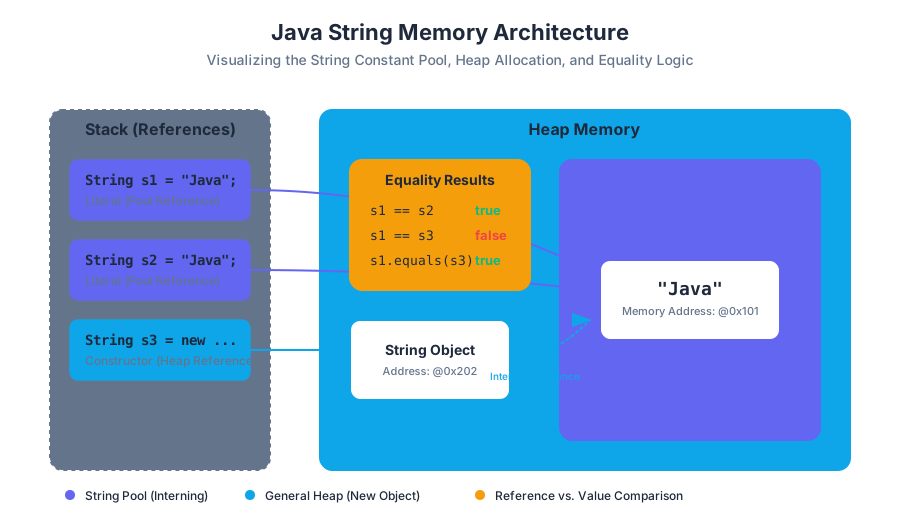
When you initialize a String using a literal (e.g., String s = "Java"), the JVM checks the String Constant Pool—a special memory region within the Heap. If the literal already exists, the new variable simply points to the existing object. If you use the new keyword, you bypass this optimization, forcing the creation of a new object in the general Heap.
| Initialization Method | Syntax | Memory Location | Interning Behavior |
|---|---|---|---|
| Literal | String s = "Hello"; |
String Constant Pool | Reuses existing instances |
| Constructor | String s = new String("Hello"); |
General Heap | Always creates a new object |
| Concatenation | String s = "A" + "B"; |
String Constant Pool | Handled at compile-time for constants |
Common Pitfalls: The "New" Trap
A common mistake among junior developers is using new String("text"). This is almost always redundant and inefficient, as it creates two objects (the literal in the pool and the object on the heap) where one would suffice.
Core String API: Navigation and Search
What it is
The String class provides methods to probe the contents of the character sequence without modifying the original object. The most fundamental of these are length(), charAt(), and indexOf().
Mechanics of Indexing
Java uses 0-based indexing. For a string of length $N$, the valid indices are the set of integers $I = {0, 1, \dots, N-1}$. Accessing an index $i \notin I$ results in a StringIndexOutOfBoundsException.
Essential Methods Table
| Method | Return Type | Complexity | Description |
|---|---|---|---|
length() |
int |
$O(1)$ | Returns the number of 16-bit Unicode characters. |
charAt(int i) |
char |
$O(1)$ | Returns the character at the specified index. |
indexOf(String s) |
int |
$O(N \cdot M)$ | Returns the index of the first occurrence of substring s, or -1 if not found. |
substring(int b, int e) |
String |
$O(N)$ | Returns a new string from index b (inclusive) to e (exclusive). |
toLowerCase() |
String |
$O(N)$ | Returns a new string with all characters converted to lowercase. |
Concrete Example: Parsing a Domain
Consider the task of extracting the domain name from an email address. We can combine indexOf and substring to achieve this dynamically.
public class EmailParser {
    public static void main(String[] args) {
        String email = "professor.falken@wargames.edu";

        // Find the position of the '@' symbol
        int atSymbolIndex = email.indexOf("@");

        if (atSymbolIndex != -1) {
            // Extract everything after the '@'
            String domain = email.substring(atSymbolIndex + 1);
            System.out.println("Domain: " + domain);
        } else {
            System.out.println("Invalid email format.");
        }
    }
}
The Equality Paradox: == vs. .equals()
What it is
In Java, there is a vital distinction between Reference Equality and Value Equality.
- Reference Equality (
==): Checks if two variables point to the exact same memory address. - Value Equality (
.equals()): Checks if two objects represent the same sequence of characters.
Why it matters
Because of the String Pool, two literals might share a reference, making == appear to work correctly. However, as soon as strings are generated dynamically (e.g., via StdIn or substring), they reside at different memory addresses. Using == on these strings will return false, even if their text is identical. This is perhaps the single most frequent source of logic errors in Java programming.
Derivation of Logic
Let $S_1$ and $S_2$ be String references.
- $S_1 == S_2 \implies \text{Address}(S_1) = \text{Address}(S_2)$
- $S_1.equals(S_2) \implies \forall i \in [0, \text{length}), S_1[i] = S_2[i]$
The Golden Rule of Strings: Never use
==to compare the content of two strings. Always use the.equals()method.
Comparison Table: Equality Operators
| Feature | == Operator |
.equals() Method |
|---|---|---|
| Type of Check | Identity (Reference) | Content (State) |
| Compares | Memory Addresses | Character Sequences |
| Use Case | Checking if two references are the same object | Comparing user input, file data, or logic |
| Null Safety | Safe (returns false if one is null) | Throws NullPointerException if called on a null object |
Concrete Example: The Reference Trap
public class EqualityDemo {
    public static void main(String[] args) {
        String s1 = "hello";
        String s2 = "hello";
        String s3 = new String("hello");

        // s1 and s2 point to the same literal in the String Pool
        System.out.println(s1 == s2);      // true

        // s3 is a new object on the heap, despite having the same value
        System.out.println(s1 == s3);      // false

        // Value equality is consistent
        System.out.println(s1.equals(s3)); // true
    }
}
Algorithmic Application: Palindrome Detection
What it is
A palindrome is a string that reads the same forward and backward (e.g., "racecar", "madam", "12321"). Detecting a palindrome is a classic exercise in string traversal and conditional logic.
How it works: The Two-Pointer Approach
The most efficient way to check for a palindrome is to compare characters from both ends of the string, moving toward the center. If any pair of characters fails to match, the string is not a palindrome.
Algorithm Steps:
- Initialize
leftpointer to 0. - Initialize
rightpointer tolength() - 1. - While
left < right:- Compare
charAt(left)andcharAt(right). - If not equal, return
false. - Increment
left, decrementright.
- Compare
- If the loop completes, return
true.
Complexity Analysis
- Time Complexity: $O(N)$, where $N$ is the length of the string. We visit each character at most once.
- Space Complexity: $O(1)$, as we only store two integer pointers regardless of the string size.
Implementation in Java
public class PalindromeChecker {
    public static boolean isPalindrome(String s) {
        if (s == null) return false;

        int left = 0;
        int right = s.length() - 1;

        while (left < right) {
            if (s.charAt(left) != s.charAt(right)) {
                return false; // Mismatch found
            }
            left++;
            right--;
        }
        return true; // Symmetric throughout
    }

    public static void main(String[] args) {
        String test = "racecar";
        if (isPalindrome(test)) {
            System.out.println(test + " is a palindrome.");
        }
    }
}
Variations: Case Sensitivity and Recursion
In many real-world applications, palindromes are considered case-insensitive ("Madam" should be a palindrome). This is handled by calling s.toLowerCase() before processing. Alternatively, the problem can be solved recursively:
- Base Case: If
length <= 1, returntrue. - Recursive Step: If
charAt(0) == charAt(length-1), returnisPalindrome(substring(1, length-1)).
Advanced Manipulation: Immutability and the StringBuilder
The Problem with Concatenation
Because Strings are immutable, every time you perform a concatenation (s = s + "!"), Java does not modify the existing string. Instead, it:
- Creates a new
StringBuilder(or similar buffer). - Copies the old string.
- Appends the new characters.
- Converts the result back to a new
Stringobject.
In a loop running $N$ times, this results in $O(N^2)$ time complexity because of the repeated copying of increasingly large strings.
The Solution: StringBuilder
For intensive string construction (like building a large report or reversing a long string), use the StringBuilder class. It maintains a mutable array of characters, allowing for $O(1)$ appends.
| Feature | String |
StringBuilder |
|---|---|---|
| Mutability | Immutable | Mutable |
| Performance | Slow for frequent modifications | High performance for modifications |
| Memory | Creates new objects for each change | Modifies the same internal buffer |
| Thread Safety | Naturally Thread-Safe | Not Thread-Safe |
Worked Example: String Reversal
public class Reversal {
    public static String reverse(String s) {
        StringBuilder sb = new StringBuilder();
        for (int i = s.length() - 1; i >= 0; i--) {
            sb.append(s.charAt(i));
        }
        return sb.toString();
    }
}
Common Pitfalls and Best Practices
1. The null vs. Empty String Distinction
A null string means the reference points to nothing. An empty string ("") is a valid String object with a length of 0. Calling .length() on a null reference will crash your program.
2. Off-by-One Errors in substring()
The substring(start, end) method is inclusive of the start index but exclusive of the end index. This design allows the length of the resulting substring to be calculated simply as end - start.
3. Ignoring Return Values
Since Strings are immutable, methods like toUpperCase() do not change the string you call them on. They return a new string.
- Incorrect:
s.toUpperCase(); - Correct:
s = s.toUpperCase();
4. Parsing Command-Line Arguments
Strings are the default format for command-line input. To use them as numbers, you must use wrapper class methods:
int count = Integer.parseInt(args[0]);
double price = Double.parseDouble(args[1]);
Summary of String Manipulation Complexity
To conclude, the following table summarizes the computational costs of the operations discussed. As a developer, choosing the right operation for the scale of your data is the hallmark of professional engineering.
| Operation | Method | Complexity | Notes |
|---|---|---|---|
| Access | charAt() |
$O(1)$ | Direct array indexing internally. |
| Search | indexOf() |
$O(N \cdot M)$ | Can be optimized by JVM (Boyer-Moore). |
| Comparison | .equals() |
$O(N)$ | Must check every character in worst case. |
| Concatenation | + operator |
$O(N)$ | Linear time due to new object creation. |
| Building | StringBuilder.append() |
$O(1)$ | Amortized constant time. |
| Extraction | substring() |
$O(N)$ | Copies the character range. |
Source Materials
Study Java Programming and Algorithmic Thinking Fundamentals on Lykke
This course page is free to open: signed out, you can read its first two sections, and signing in, on any plan, opens the rest. The free Lykke Chrome extension syncs your own Canvas courses, so ChatGPT, Claude and Muse can answer from your classes and deadlines. It only reads Canvas.
Add the free extensionSign in to open every sectionAll sections of Java Programming and Algorithmic Thinking Fundamentals · Browse more course pages