Java Programming and Algorithmic Thinking Fundamentals
Institution: MIT
1937 study materials · 10 sections
This course provides a comprehensive introduction to computer science using the Java programming language. It covers fundamental concepts ranging from basic syntax and control flow to complex topics like recursion, object-oriented programming, and algorithm analysis. Students learn to design, implement, and debug modular programs while exploring data structures such as arrays and ArrayLists, preparing them for advanced computational problem-solving.
Course Sections
Foundations of Java and Programming
Key concepts: Java Program Structure (Main Method) · Variable Types (int, boolean, double) · String Concatenation · Command-Line Arguments · Arithmetic Operators
Introduction to the basic structure of Java programs, variable types, and simple console operations.
Foundations of Java and Programming
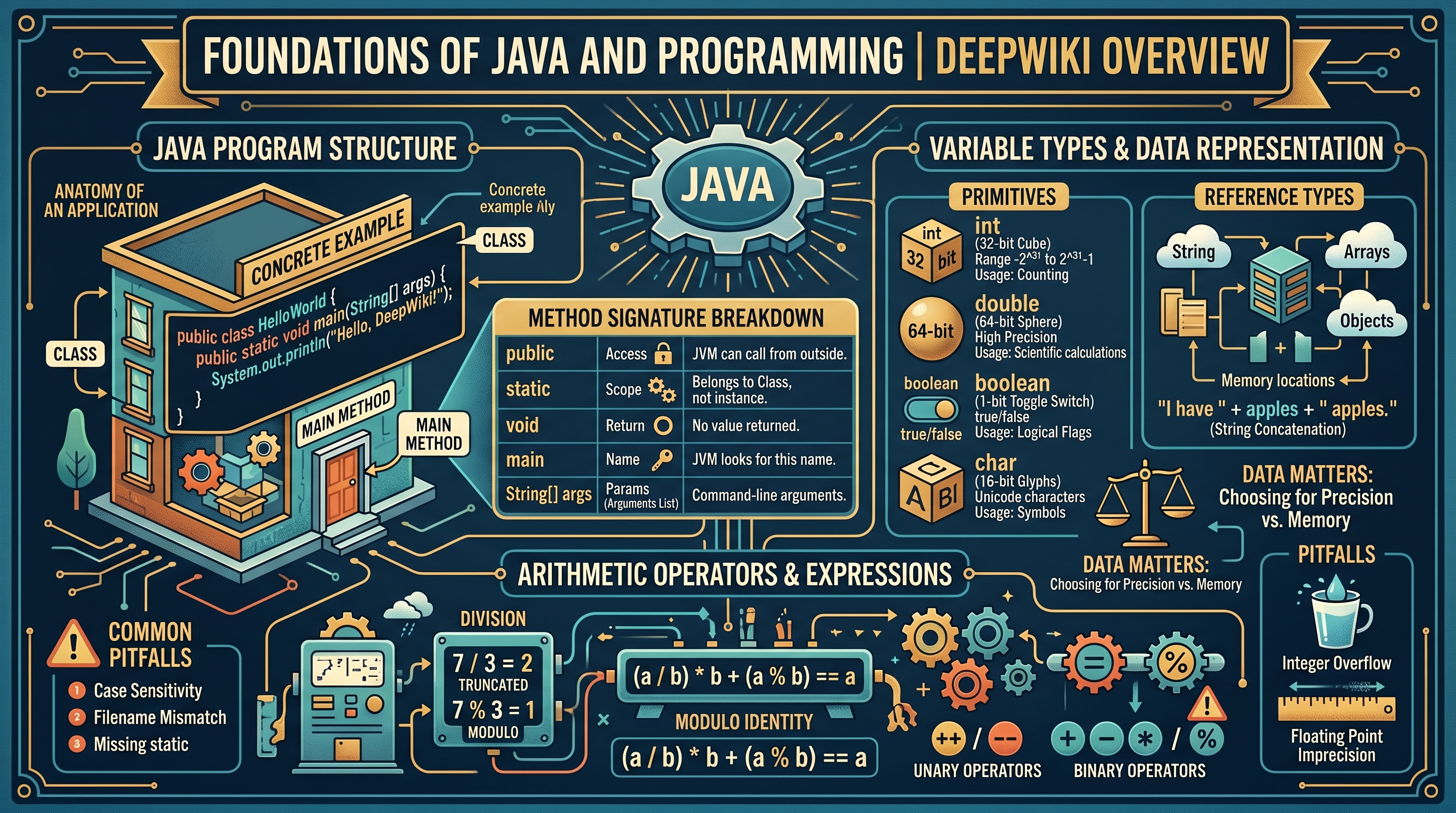
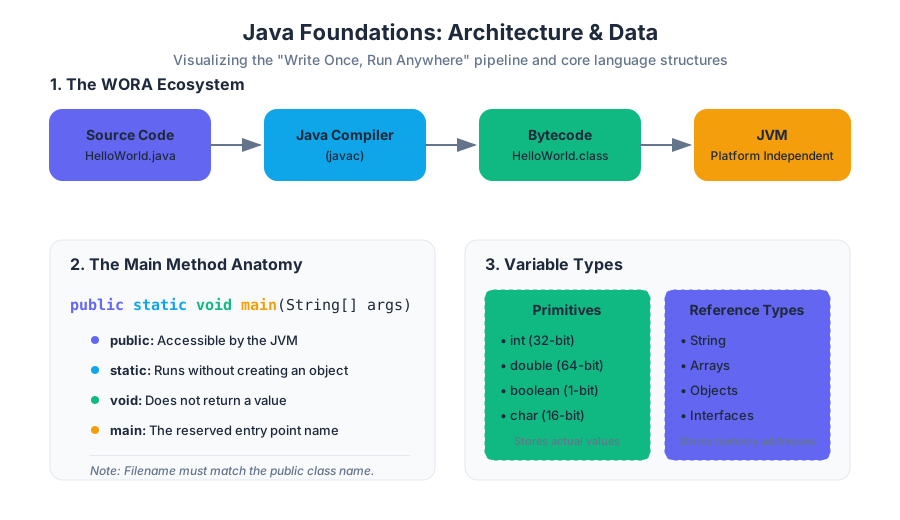
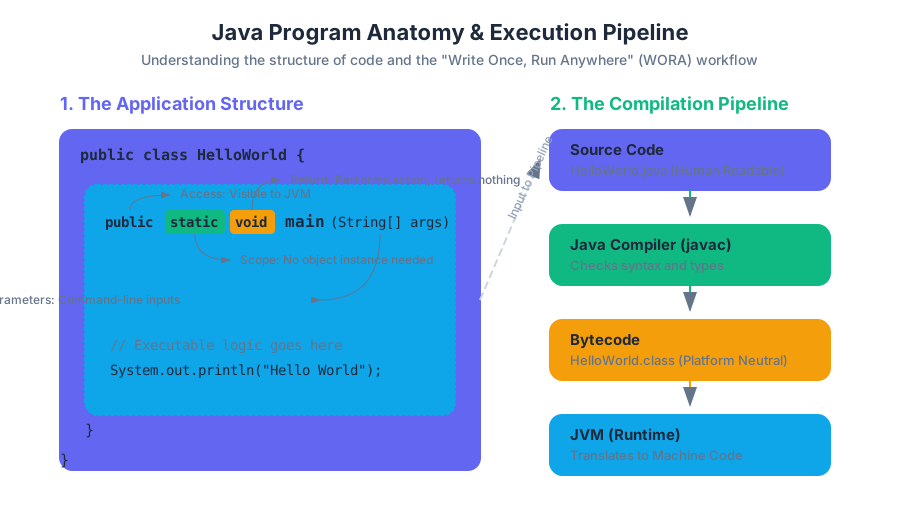
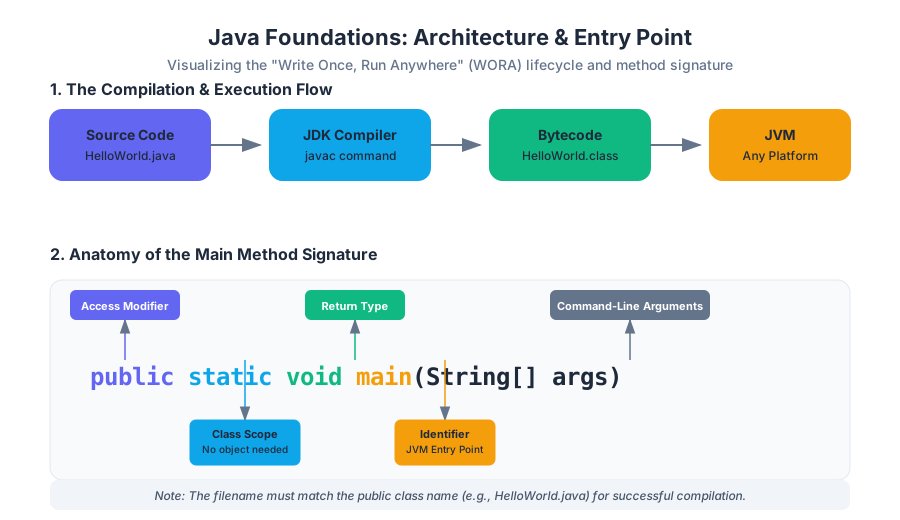
Java is more than just a programming language; it is a platform-independent ecosystem designed around the philosophy of "Write Once, Run Anywhere" (WORA). At its core, Java is a high-level, class-based, object-oriented language that abstracts away the complexities of memory management through the Java Virtual Machine (JVM). This section explores the foundational architecture of a Java program, the mechanics of data storage, and the logical structures that allow developers to transform raw data into meaningful computation.
Java Program Structure: The Anatomy of an Application
What it is
In Java, every line of executable code must reside inside a class. The entry point for any standalone application is the main method. This method follows a strict signature: public static void main(String[] args).
Why it matters
The rigid structure of the main method allows the JVM to locate the starting point of a program without ambiguity. By enforcing a class-centric model, Java encourages encapsulation from the very first line of code, ensuring that even simple scripts are organized into logical units.
How it works: The Method Signature Breakdown
To understand how a Java program executes, one must parse the components of the main method:
| Keyword | Purpose | Technical Implication |
|---|---|---|
public |
Access Modifier | Allows the JVM to call the method from outside the class. |
static |
Scope | The method belongs to the class itself, not a specific instance. The JVM can run it without "new-ing" up an object. |
void |
Return Type | The method performs actions but does not return a value to the caller. |
main |
Identifier | The reserved name the JVM looks for to begin execution. |
String[] args |
Parameter | An array of strings representing command-line arguments passed by the user. |
Concrete Example
public class HelloWorld {
    public static void main(String[] args) {
        // This is a single-line comment
        System.out.println("Hello, DeepWiki!");
    }
}
Common Pitfalls
- Case Sensitivity: Java is case-sensitive.
Mainis not the same asmain. - Filename Mismatch: The name of the
public classmust exactly match the filename (e.g.,HelloWorld.java). - Missing
static: Forgettingstaticwill result in a runtime error because the JVM cannot instantiate your class automatically to run the method.
Variable Types and Data Representation
What it is
A variable is a reserved location in memory used to store data. Java is a statically-typed language, meaning every variable must have a declared type before it can be used. This allows the compiler to verify type safety and allocate the appropriate amount of memory.
Why it matters
Choosing the correct data type is a balance between precision and resource management. In high-performance systems, using a 64-bit double when a 32-bit float suffices can lead to unnecessary memory overhead.
How it works: Primitive vs. Reference Types
Java categorizes data into two main groups: Primitives (basic values) and Reference Types (objects/arrays).
| Type | Size (bits) | Range | Default Value | Usage |
|---|---|---|---|---|
int |
32 | -2^31 to 2^31-1 | 0 | Standard integers for counting/indexing. |
double |
64 | ~1.8e308 (15 decimal digits) | 0.0 | High-precision floating-point numbers. |
boolean |
1 (virtual) | true or false |
false |
Logical flags and control flow. |
char |
16 | Unicode characters | '\u0000' | Single symbols or letters. |
long |
64 | -2^63 to 2^63-1 | 0L | Large integers (e.g., timestamps). |
String Concatenation
While not a primitive, String is a fundamental class in Java. The + operator is overloaded to perform string concatenation. When a String is added to any other type, Java automatically converts that type to its string representation.
int apples = 5;
String message = "I have " + apples + " apples."; // Result: "I have 5 apples."
Common Pitfalls
- Integer Overflow: Adding 1 to
Integer.MAX_VALUEresults in a negative number due to two's complement arithmetic. - Floating Point Imprecision:
doublevalues are approximations.0.1 + 0.2does not exactly equal0.3due to binary representation limits.
Arithmetic Operators and Expressions
What it is
Arithmetic operators are symbols used to perform mathematical calculations. Java supports standard binary operators (+, -, *, /, %) and unary operators (++, --).
How it works: Integer Division vs. Modulo
One of the most significant points of confusion for new developers is integer division. If both operands are integers, the result is truncated (not rounded).
The Modulo Identity: For any integers
aandb, the expression(a / b) * b + (a % b)will always equala.
Operator Precedence and Associativity
Java follows a specific order of operations, similar to PEMDAS, but expanded for programming-specific symbols.
| Precedence | Operator | Description |
|---|---|---|
| 1 | ++, -- |
Post-increment/decrement |
| 2 | *, /, % |
Multiplicative |
| 3 | +, - |
Additive |
| 4 | <, >, <=, >= |
Relational |
| 5 | ==, != |
Equality |
Concrete Example: The IntOps Program
public class IntOps {
    public static void main(String[] args) {
        int a = 17;
        int b = 5;

        int sum  = a + b;  // 22
        int quot = a / b;  // 3 (Integer division)
        int rem  = a % b;  // 2 (Remainder)

        System.out.println(a + " / " + b + " = " + quot + " rem " + rem);
    }
}
Command-Line Arguments and Parsing
What it is
Command-line arguments are inputs provided to a program at the moment of execution. These are captured by the String[] args parameter in the main method.
Why it matters
Arguments allow a program to be dynamic. Instead of hard-coding values, a developer can write a generic tool (like a file compressor or a calculator) that operates on different data every time it is run.
How it works: Type Conversion
Because args is an array of Strings, numeric inputs must be converted using wrapper classes.
Integer.parseInt(args[0]): Converts a String to anint.Double.parseDouble(args[1]): Converts a String to adouble.
Concrete Example
Running a program with java MyProg 10 20:
public class MyProg {
    public static void main(String[] args) {
        int first = Integer.parseInt(args[0]); // first = 10
        int second = Integer.parseInt(args[1]); // second = 20
        System.out.println("Sum: " + (first + second));
    }
}
Common Pitfalls
- ArrayIndexOutOfBoundsException: Occurs if you try to access
args[0]but the user provided no arguments. - NumberFormatException: Occurs if you try to parse "hello" as an integer.
Logic and Control Flow
What it is
Control flow refers to the order in which individual statements are executed. Java uses conditional statements (if, else) and loops (while, for) to break the linear progression of code.
Relational and Logical Operators
Control flow relies on boolean expressions—statements that evaluate to either true or false.
| Operator | Meaning | Example |
|---|---|---|
&& |
Logical AND | (x > 0 && x < 10) |
| ` | ` | |
! |
Logical NOT | !(x > 5) |
== |
Equal to | x == 10 |
!= |
Not equal to | x != 0 |
Short-Circuit Evaluation
Java employs short-circuiting for logical operators.
- In
A && B, ifAis false,Bis never evaluated because the whole expression must be false. - In
A || B, ifAis true,Bis never evaluated because the whole expression must be true.
Iterative Structures: While vs. For
whileloop: Used when the number of iterations is not known beforehand (e.g., reading until the end of a file).forloop: Used when iterating over a specific range or collection.
// For loop anatomy: initialization; condition; increment
for (int i = 0; i < 5; i++) {
    System.out.println("Iteration: " + i);
}
Arrays and Data Collections
What it is
An array is a container object that holds a fixed number of values of a single type. The length of an array is established when the array is created.
How it works: Memory and Indexing
Arrays in Java are zero-indexed. An array of size N has indices ranging from 0 to N-1. Unlike primitives, arrays are stored on the heap, and the variable itself is a reference (a memory address).
Common Array Algorithms
- Traversal: Visiting every element using a loop.
- Accumulation: Summing all elements.
- Extrema Finding: Iterating to find the
minormax. - Swapping: Using a temporary variable to exchange two elements.
// Swapping elements at index i and j
int temp = arr[i];
arr[i] = arr[j];
arr[j] = temp;
Reference Aliasing vs. Deep Copying
If you set int[] b = a;, both variables point to the same memory location. Changing b[0] will change a[0]. To create a true independent copy, you must allocate a new array and copy elements individually or use System.arraycopy().
| Operation | Syntax | Memory Impact |
|---|---|---|
| Declaration | int[] a; |
Creates a reference variable (null). |
| Initialization | a = new int[10]; |
Allocates memory for 10 integers on the heap. |
| Access | a[5] = 20; |
Direct memory access via offset calculation. |
| Aliasing | int[] b = a; |
Two references pointing to one memory block. |
Methods and Modular Programming
What it is
A method is a block of code which only runs when it is called. It allows for abstraction (hiding complexity) and reusability (DRY - Don't Repeat Yourself).
Anatomy of a Method Signature
public static double calculateAverage(int[] numbers) { ... }
- Return Type:
double(the output of the method). - Parameters:
int[] numbers(the input required).
Pass-by-Value
It is a common misconception that Java passes objects by reference. In reality, Java is always pass-by-value. When you pass an array to a method, you are passing the value of the reference (the memory address). This means the method can modify the contents of the array, but it cannot make the original variable point to a different array.
Concrete Example: Modular Design
public class Stats {
    public static double findSum(double[] a) {
        double sum = 0.0;
        for (double val : a) sum += val;
        return sum;
    }

    public static void main(String[] args) {
        double[] data = {1.1, 2.2, 3.3};
        double total = findSum(data);
        System.out.println("Total: " + total);
    }
}
Standard Libraries and I/O (StdIn/StdOut)
What it is
While Java provides System.out and Scanner, many academic environments use standard libraries (like StdIn, StdOut, and StdDraw) to simplify the interface for reading and visualizing data.
Why it matters
Standard Java I/O is verbose. StdIn allows for "tokenized" reading, where the library automatically handles whitespace and type conversion, allowing students to focus on logic rather than regex or buffer management.
Standard Drawing (StdDraw)
StdDraw provides a simple way to produce graphical output. It uses a coordinate system (default 0.0 to 1.0) to render points, lines, and shapes.
| Method | Description |
|---|---|
StdDraw.line(x0, y0, x1, y1) |
Draws a line segment between two points. |
StdDraw.setPenRadius(r) |
Changes the thickness of the drawing line. |
StdDraw.filledSquare(x, y, r) |
Draws a solid square centered at (x, y). |
StdDraw.show() |
Displays the offscreen buffer (used for animation). |
Summary of Foundations
The journey from a simple main method to modular, array-driven programs represents the transition from "writing scripts" to "building systems." By understanding the interplay between memory (variables/arrays), logic (control flow), and abstraction (methods), a programmer gains the tools necessary to solve complex computational problems efficiently.
Logic and Control Flow
Key concepts: Conditional Statements (if-else, else-if) · Iterative Loops (while and for) · Boolean Logic · Relational Operators · Nested Control Structures
Exploration of conditional branching and iterative processes to control program execution.
Logic and Control Flow
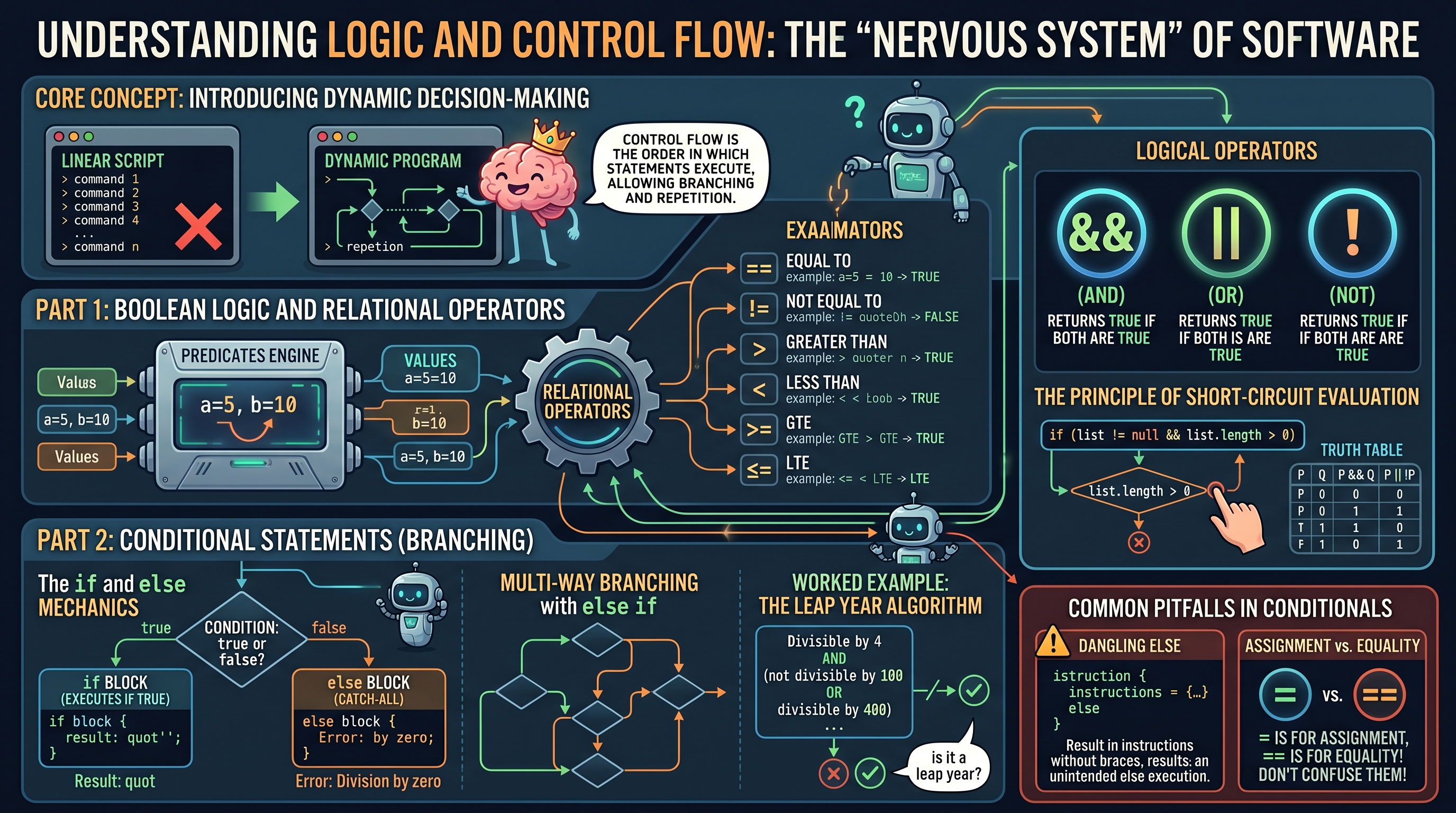
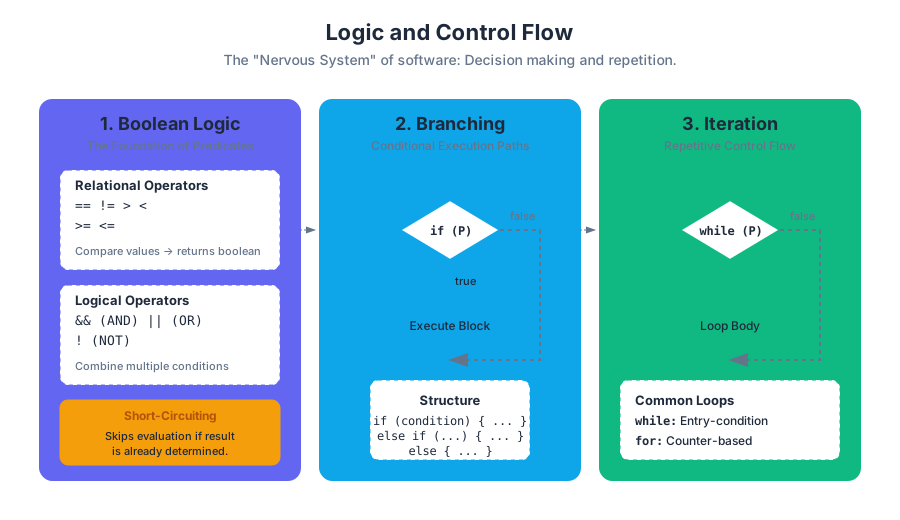
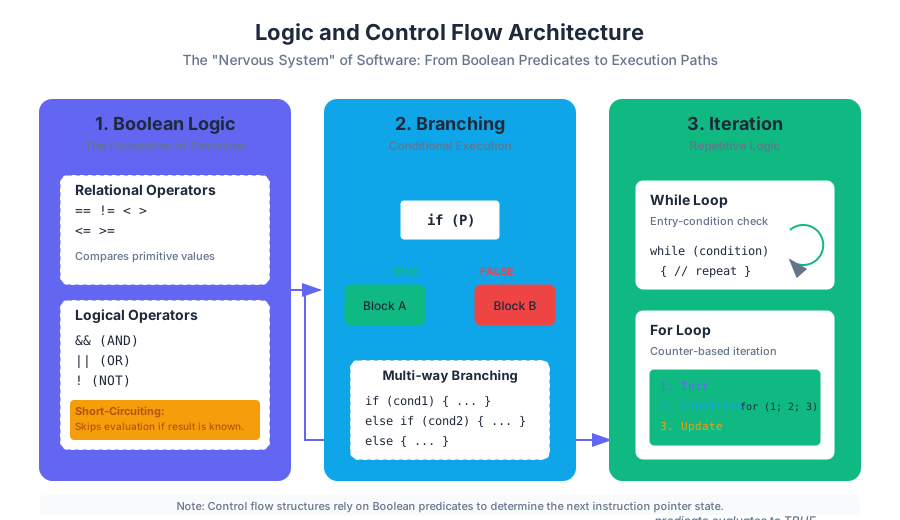
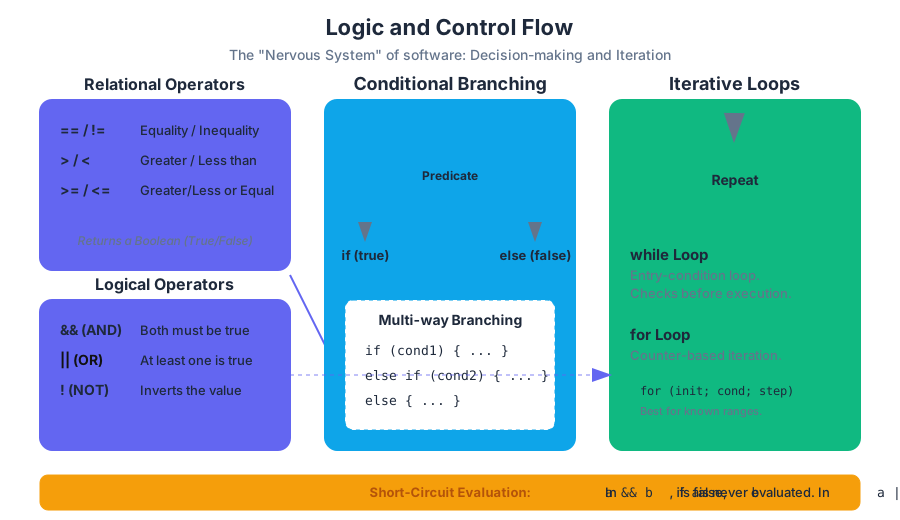
In the realm of computational theory, a program is more than a linear sequence of instructions; it is a dynamic entity capable of responding to varying inputs and environmental states. Control Flow refers to the order in which individual statements, instructions, or function calls are executed or evaluated. Without control flow, a program would be a static script, executing from top to bottom and terminating regardless of the data it encounters. By implementing Logic and Control Flow, we introduce the "nervous system" of the software, allowing for decision-making (branching) and repetition (iteration).
Boolean Logic and Relational Operators
At the core of every control flow decision lies Boolean Logic, a branch of algebra in which the values of the variables are the truth values true and false. In Java and most C-style languages, these decisions are driven by predicates—expressions that evaluate to a boolean result.
Relational Operators
Relational operators are the primary tools used to compare primitive data types. They establish a relationship between two operands and return a boolean value based on the validity of that relationship.
| Operator | Description | Example (a=5, b=10) |
Result |
|---|---|---|---|
== |
Equal to | a == b |
false |
!= |
Not equal to | a != b |
true |
> |
Greater than | a > b |
false |
< |
Less than | a < b |
true |
>= |
Greater than or equal to | a >= 5 |
true |
<= |
Less than or equal to | b <= 10 |
true |
Logical Operators
To handle complex decision-making, we combine simple relational expressions using Logical Operators. These follow the laws of Boolean Algebra, specifically conjunction, disjunction, and negation.
- AND (
&&): Returnstrueonly if both operands aretrue. - OR (
||): Returnstrueif at least one operand istrue. - NOT (
!): A unary operator that inverts the boolean value.
The Principle of Short-Circuit Evaluation: In Java, the
&&and||operators exhibit "short-circuit" behavior. Fora && b, ifaisfalse, the system does not evaluatebbecause the entire expression cannot possibly betrue. Similarly, fora || b, ifaistrue,bis skipped. This is critical for preventing errors, such as checking if an object is null before accessing its members:if (list != null && list.length > 0).
Truth Tables
Truth tables serve as the formal proof for logical operations. They define the output for every possible combination of inputs.
| P | Q | P && Q (AND) | P || Q (OR) | !P (NOT) |
| :--- | :--- | :--- | :--- | :--- |
| true | true | true | true | false |
| true | false | false | true | false |
| false | true | false | true | true |
| false | false | false | false | true |
Conditional Statements (if-else, else-if)
Conditional Statements are the fundamental branching mechanism in programming. They allow the execution path to diverge based on the evaluation of a boolean predicate.
The if and else Mechanics
The if statement evaluates a condition. If the condition is true, the subsequent block of code executes. If an else block is provided, it serves as the "catch-all" for when the condition is false.
// Basic conditional logic for error handling
if (b == 0) {
    System.out.println("Error: Division by zero is undefined.");
} else {
    int quot = a / b;
    System.out.println("Result: " + quot);
}
Multi-way Branching with else if
When a problem requires more than two possible outcomes, we use the else if ladder. This structure ensures that only one block of code in the chain is executed—the first one whose condition evaluates to true.
Worked Example: The Leap Year Algorithm
A year is a leap year if it is divisible by 4, unless it is divisible by 100, in which case it must also be divisible by 400. This logic requires a combination of relational operators and logical nesting.
public class LeapYear {
    public static void main(String[] args) {
        int year = Integer.parseInt(args[0]);
        boolean isLeapYear;

        // Divisible by 4 AND (not divisible by 100 OR divisible by 400)
        isLeapYear = (year % 4 == 0);
        isLeapYear = isLeapYear && (year % 100 != 0);
        isLeapYear = isLeapYear || (year % 400 == 0);

        if (isLeapYear) {
            System.out.println(year + " is a leap year.");
        } else {
            System.out.println(year + " is not a leap year.");
        }
    }
}
Common Pitfalls in Conditionals
- The Dangling Else: In nested
ifstatements without braces, anelsealways associates with the closest precedingif. Always use curly braces{}to avoid ambiguity. - Assignment vs. Equality: Using
=(assignment) instead of==(equality) inside a condition is a frequent source of logic errors. - Redundant Logic: Writing
if (condition == true)is unnecessary;if (condition)is sufficient and cleaner.
Iterative Loops (while and for)
Iteration allows a program to execute a block of code multiple times. This is the cornerstone of processing large datasets, such as arrays, or performing simulations.
The while Loop
The while loop is an entry-condition loop. It checks the condition before executing the loop body. If the condition is initially false, the body never executes.
Syntax:
while (condition) {
    // statements to repeat
}
The for Loop
The for loop is a specialized iteration structure designed for cases where the number of iterations is known or follows a specific counter-based pattern. It encapsulates initialization, condition, and increment/update in a single line.
Syntax:
for (initialization; condition; increment) {
    // statements to repeat
}
Comparison of Iterative Structures
| Feature | while Loop |
for Loop |
|---|---|---|
| Best Use Case | When the number of iterations is unknown (e.g., reading until end of file). | When iterating over a range or a collection (e.g., arrays). |
| Readability | Can become cluttered if counters are managed manually. | Highly readable; counter logic is localized. |
| Termination | Relies on a state change within the loop body. | Relies on a counter reaching a limit. |
| Risk | High risk of infinite loops if the condition is never met. | Lower risk of infinite loops, but "off-by-one" errors are common. |
Worked Example: Summing an Array
Using a for loop to traverse an array and accumulate a total is a foundational pattern in software engineering.
public class ArraySum {
    public static void main(String[] args) {
        // Assume args contains integers passed via command line
        int[] nums = new int[args.length];
        int sum = 0;

        // Parsing and Populating
        for (int i = 0; i < args.length; i++) {
            nums[i] = Integer.parseInt(args[i]);
        }

        // Accumulation Loop
        for (int i = 0; i < nums.length; i++) {
            sum += nums[i]; // sum = sum + nums[i]
        }

        System.out.println("The total sum is: " + sum);
    }
}
Nested Control Structures
Real-world logic often requires Nesting—placing one control structure inside another. This allows for the representation of multi-dimensional data and complex decision trees.
Nested if Statements
Nested conditionals are used to refine decisions. For example, in the "cats" example from the source materials, we first check if the input is valid (non-negative), and then perform further checks on the total sum.
if (anaCats < 0 || ellenCats < 0) {
    System.out.println("Can't have negative cats.");
} else {
    int totalCats = anaCats + ellenCats;
    if (totalCats > 20) {
        System.out.println("You might need a mansion.");
    } else if (totalCats > 10) {
        System.out.println("You might need a bigger house!");
    }
}
Nested Loops and Complexity
Nested loops are frequently used to process 2D grids or compare every element in a list with every other element. However, engineers must be wary of Computational Complexity. A loop running $n$ times inside another loop running $n$ times results in $O(n^2)$ complexity.
// Printing a multiplication table
for (int i = 1; i <= 10; i++) {
    for (int j = 1; j <= 10; j++) {
        System.out.print((i * j) + "\t");
    }
    System.out.println(); // New line after each row
}
Advanced Patterns in Logic
Variable Swapping
Swapping the values of two variables is a classic operation that requires a temporary storage location to prevent data loss.
int a = 10;
int b = 20;

int temp = a; // temp = 10
a = b;        // a = 20
b = temp;     // b = 10
Accumulators and Flags
- Accumulator: A variable (like
sumorcount) that is updated during each iteration of a loop to gather a final result. - Flag: A boolean variable used to signal that a certain condition has been met (e.g.,
boolean found = false;). Once the target is located in a loop, the flag is set totrue.
Sentinel Values
A Sentinel Value is a special value used to terminate a loop. For instance, if reading a list of positive test scores, a user might enter -1 to signal they are finished. The loop condition would be while (score != -1).
Standard Libraries and I/O Integration
Control flow is often driven by external data. Java's standard libraries, such as StdIn and StdOut, provide streamlined methods for integrating user input into logic structures.
StdIn.readInt(): Reads the next integer from standard input, allowing loops to process data dynamically.StdIn.isEmpty(): A boolean method that returnstruewhen there is no more data to read. This is the idiomatic way to write awhileloop for data processing.
// Reading until the end of input
while (!StdIn.isEmpty()) {
    double value = StdIn.readDouble();
    // process value...
}
Summary of Best Practices
- Keep Conditions Simple: If a boolean expression is too complex, break it into smaller boolean variables with descriptive names.
- Avoid Deep Nesting: If you find yourself nesting four or five levels deep, consider refactoring your code into Methods to improve readability.
- Initialize Counters Correctly: Always double-check your loop boundaries. Remember that arrays in Java are 0-indexed, meaning a loop should typically run from
0tolength - 1. - Use Final Else: In an
if-else ifchain, always include a finalelseto handle unexpected cases or provide an error message.
| Concept | Primary Purpose | Key Operator/Keyword |
|---|---|---|
| Selection | Branching execution based on data. | if, else |
| Iteration | Repeating logic for efficiency. | for, while |
| Comparison | Evaluating relationships between values. | ==, !=, <, > |
| Combination | Merging multiple logical predicates. | &&, ` |
Arrays and Data Collections
Key concepts: Array Initialization and Indexing · Reference Aliasing vs. Deep Copying · Standard and Enhanced For-Loops · Linear Search · 2D Arrays
Introduction to one-dimensional and two-dimensional arrays for managing collections of data.
Arrays and Data Collections
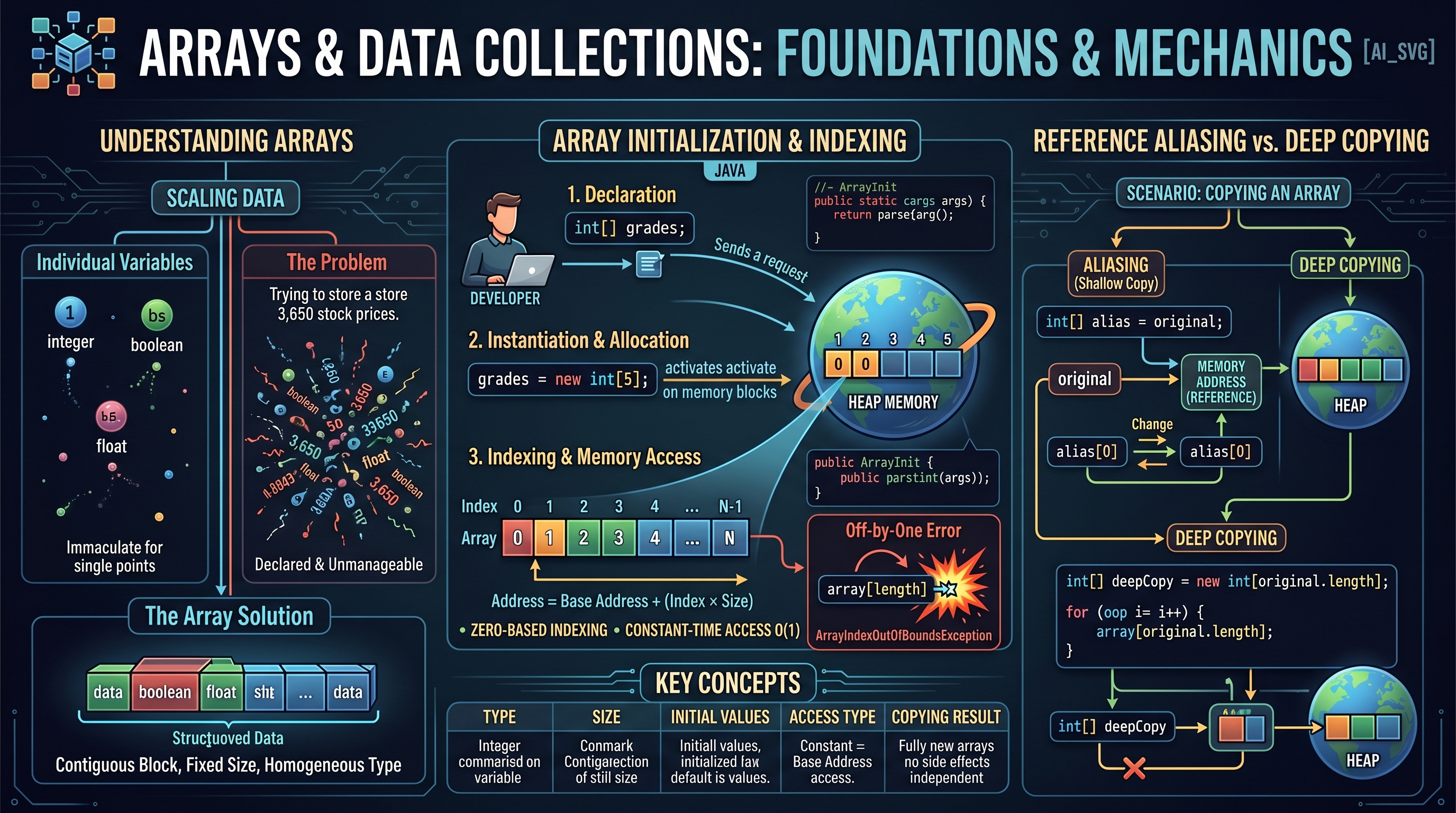
In the architecture of computer science, the array stands as the most fundamental data structure for organizing information. While individual variables allow us to store discrete data points—a single integer, a solitary boolean, a lone floating-point number—they fail to scale when we encounter datasets of significant magnitude. Imagine representing the daily closing prices of a stock over a decade; declaring 3,650 individual variables is not only impractical but computationally unmanageable.
An array solves this by providing a contiguous block of memory capable of storing a fixed-size, sequential collection of elements of the same type. In Java, arrays are treated as objects, a distinction that has profound implications for how they are stored in memory, passed to methods, and manipulated during execution.
Array Initialization and Indexing
What it is
An array is a collection of variables of the same type, referenced by a single name. Each individual value in the array is called an element, and its position is identified by an index.
Why it matters
Arrays provide constant-time access ($O(1)$ complexity) to any element if the index is known. This efficiency is possible because the computer calculates the memory address of an element using a simple formula: $$\text{Address} = \text{Base Address} + (\text{Index} \times \text{Size of Element})$$
How it works: Declaration and Instantiation
In Java, creating an array is a two-step process (often combined into one):
- Declaration: Informing the compiler of the array's name and the type of data it will hold.
- Instantiation: Using the
newkeyword to allocate a specific amount of memory on the heap.
// Declaration
int[] grades;

// Instantiation (allocating space for 5 integers)
grades = new int[5];

// Combined syntax
double[] prices = new double[100];
Indexing and Bounds
Java utilizes zero-based indexing. For an array of length $N$, the valid indices are $0, 1, 2, \dots, N-1$. Accessing an index outside of this range (e.g., grades[5] for an array of size 5) results in the dreaded ArrayIndexOutOfBoundsException.
| Feature | Description |
|---|---|
| Type Homogeneity | All elements must be of the same declared type. |
| Fixed Size | Once instantiated, the size cannot be changed. |
| Default Values | Numeric types initialize to 0 or 0.0, booleans to false, and objects to null. |
| Length Property | Accessed via arrayName.length (note: no parentheses). |
Concrete Example: Command-Line Parsing
As seen in the source materials, arrays are often populated using command-line arguments (args[]).
public class ArrayInit {
    public static void main(String[] args) {
        // args is an array of Strings provided by the OS
        int n = args.length;
        int[] nums = new int[n];

        for (int i = 0; i < n; i++) {
            // Parsing String to int and storing in the array
            nums[i] = Integer.parseInt(args[i]);
        }
    }
}
Common Pitfalls: The Off-by-One Error
The most common mistake for beginners is attempting to access array[array.length]. Because indexing starts at 0, the final element is always at length - 1.
Reference Aliasing vs. Deep Copying
What it is
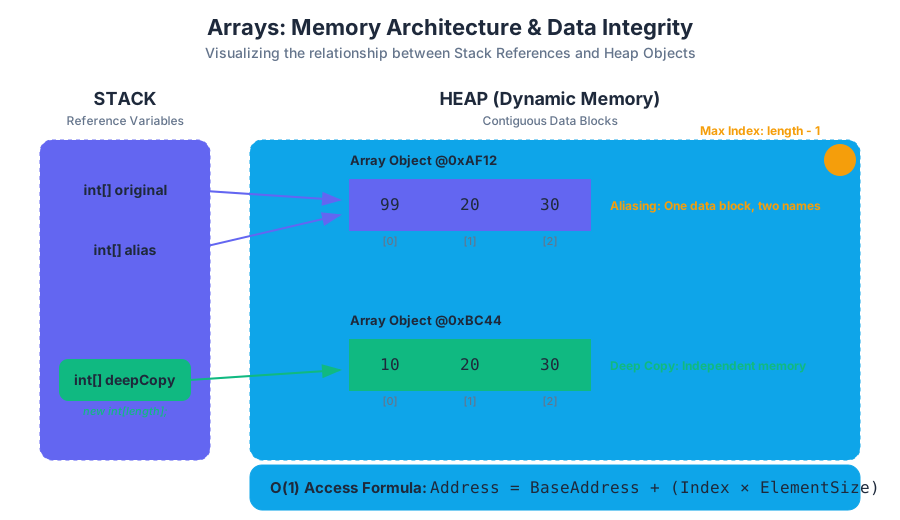
In Java, an array variable does not "hold" the array data; it holds a reference (a memory address) to where the data lives on the heap.
- Aliasing: When two variables point to the same memory address.
- Deep Copying: Creating a brand new array and copying the actual values from the original into the new one.
Why it matters
Understanding the distinction is critical for data integrity. If you "copy" an array using the assignment operator (=), you are only copying the address, not the data. Changing an element through one variable will change it for the other, as they both point to the same physical memory.
How it works: The Mechanics of Memory
When you execute int[] b = a;, Java performs a shallow copy of the reference.
The Aliasing Theorem: If $A$ and $B$ are aliases, then the operation $A[i] = v$ implies that $B[i]$ also equals $v$, for all valid $i$.
To create a truly independent copy, you must perform a Deep Copy:
- Create a new array of the same length.
- Iterate through the original array.
- Assign each value to the corresponding index in the new array.
Concrete Example: Aliasing vs. Deep Copy
int[] original = {10, 20, 30};

// ALIASING (Shallow Copy)
int[] alias = original;
alias[0] = 99;
// original[0] is now also 99!

// DEEP COPYING
int[] deepCopy = new int[original.length];
for (int i = 0; i < original.length; i++) {
    deepCopy[i] = original[i];
}
deepCopy[0] = 55;
// original[0] remains 99. deepCopy is independent.
Comparison Table: Copying Methods
| Method | Type | Result | Use Case |
|---|---|---|---|
b = a |
Reference Assignment | Aliasing | Passing arrays to methods (efficient). |
for loop copy |
Manual Deep Copy | Independent Array | When the original data must be preserved. |
a.clone() |
Built-in Method | Deep Copy (1D) | Quick duplication of 1D arrays. |
System.arraycopy() |
System Method | Deep Copy | High-performance copying of large blocks. |
Traversal: Standard and Enhanced For-Loops
What it is
Traversal is the process of visiting every element in a data structure exactly once. In Java, this is primarily achieved through two types of loops.
Why it matters
Most array-based algorithms—finding a sum, searching for a value, or calculating an average—require a full traversal. Choosing the right loop type improves code readability and reduces errors.
How it works: Standard vs. Enhanced
- Standard For-Loop: Uses an index variable (usually
i) to access elements. - Enhanced For-Loop (For-Each): Introduced in Java 5, it abstracts the indexing away to provide a cleaner syntax.
double[] measurements = {1.2, 3.5, 2.0, 4.8};

// Standard For-Loop: Provides index access
for (int i = 0; i < measurements.length; i++) {
    System.out.println("Element at " + i + ": " + measurements[i]);
}

// Enhanced For-Loop: Read-only, cleaner
for (double val : measurements) {
    System.out.println("Value: " + val);
}
Comparison of Loop Capabilities
| Feature | Standard for |
Enhanced for |
|---|---|---|
| Index Access | Yes (can use i) |
No |
| Modification | Yes (can change arr[i]) |
No (variable is a local copy) |
| Direction | Any (forward, backward, skip) | Forward only |
| Multiple Arrays | Can traverse multiple simultaneously | One array at a time |
Common Pitfall: Modifying with Enhanced For-Loops
A common mistake is trying to initialize or change an array using an enhanced for-loop:
for (int x : myIntArray) {
    x = 10; // This does NOT change the array. It only changes the local variable 'x'.
}
Linear Search and Extrema Algorithms
What it is
Linear Search is the simplest searching algorithm. It examines each element of a collection sequentially until a match is found or the end of the collection is reached.
Why it matters
While more advanced algorithms like Binary Search exist, Linear Search is the only option for unsorted data. It serves as the baseline for algorithmic complexity ($O(n)$).
How it works: The Search Logic
- Initialize a "found" flag or a "target index" variable (often to -1).
- Iterate through the array from index 0 to $n-1$.
- Compare the current element to the target.
- If they match, record the index and break the loop.
Concrete Example: Finding the Maximum and Searching
public class ArrayAlgorithms {
    public static void main(String[] args) {
        int[] data = {4, 12, 7, 19, 3, 21, 8};
        int target = 19;

        // 1. Finding Maximum
        int max = data[0]; // Assume first is max
        for (int i = 1; i < data.length; i++) {
            if (data[i] > max) {
                max = data[i];
            }
        }

        // 2. Linear Search
        int foundIndex = -1;
        for (int i = 0; i < data.length; i++) {
            if (data[i] == target) {
                foundIndex = i;
                break; // Efficiency: stop once found
            }
        }
    }
}
Variations: Swapping and Shifting
- Swapping: To swap
a[i]anda[j], a temporary variable is required:int temp = a[i]; a[i] = a[j]; a[j] = temp; - Shifting: Moving elements to the left or right (used in queues or when deleting elements). Shifting requires careful loop direction to avoid overwriting data before it is moved.
2D Arrays: Grids and Matrices
What it is
A 2D Array is essentially an "array of arrays." It is used to represent data in a grid format, such as a chessboard, a spreadsheet, or pixels in an image.
Why it matters
Many real-world problems are multidimensional. Scientific computing, image processing, and game development rely heavily on matrix operations.
How it works: Row-Major Order
In Java, 2D arrays are stored in row-major order. When you declare int[][] matrix = new int[3][4];, you are creating an array with 3 elements, where each element is itself an array of 4 integers.
matrix.lengthreturns the number of rows.matrix[i].lengthreturns the number of columns in rowi.
Concrete Example: Matrix Summation
To process a 2D array, nested loops are required. The outer loop typically iterates through rows, while the inner loop iterates through columns.
int[][] table = {
    {1, 2, 3},
    {4, 5, 6},
    {7, 8, 9}
};

int totalSum = 0;
for (int row = 0; row < table.length; row++) {
    for (int col = 0; col < table[row].length; col++) {
        totalSum += table[row][col];
    }
}
Complexity and Performance
Accessing table[row][col] is still $O(1)$, but traversing the entire matrix is $O(R \times C)$, where $R$ is rows and $C$ is columns. In Java, 2D arrays can be ragged (or "jagged"), meaning each row can have a different number of columns.
| Structure | Declaration | Access Logic |
|---|---|---|
| 1D Array | int[] a |
a[i] |
| 2D Array | int[][] a |
a[row][col] |
| 3D Array | int[][][] a |
a[x][y][z] |
Summary of Array Operations Complexity
| Operation | Complexity | Note |
|---|---|---|
| Access by Index | $O(1)$ | Direct memory calculation. |
| Search (Unsorted) | $O(n)$ | Must check every element in worst case. |
| Insertion (Start) | $O(n)$ | Must shift all existing elements to the right. |
| Deletion (Start) | $O(n)$ | Must shift all existing elements to the left. |
| Traversal | $O(n)$ | Linear time relative to size. |
Professor's Note: While arrays are powerful due to their speed and simplicity, their fixed-size nature is their greatest limitation. In advanced software engineering, we often use
ArrayListorLinkedListto handle dynamic data, but the underlying principles of indexing and memory references remain identical to those covered here.
Standard Libraries and I/O
Key concepts: StdIn (Standard Input) · StdOut (Standard Output) · StdDraw (Standard Drawing) · Tokenization · Data Type Conversion
Using specialized libraries for input, output, and graphical visualization in the Rutgers environment.
Standard Libraries and I/O
The transition from writing "toy" programs with hard-coded values to developing robust, data-driven applications requires a sophisticated understanding of Input/Output (I/O). In the Java ecosystem, while the native java.util.Scanner and java.io packages provide comprehensive functionality, they often introduce syntactic noise that obscures the underlying algorithmic logic for those mastering the fundamentals. To bridge this gap, we utilize a suite of standard libraries—StdIn, StdOut, and StdDraw—designed to provide a clean, "token-based" interface for data processing and visualization.
This section explores the mechanics of data streams, the nuances of tokenization, the mathematical precision of formatted output, and the abstraction of graphical rendering. By decoupling a program from its data source, we move toward the ideal of Modular Programming, where code is a general-purpose engine capable of processing any compatible data stream.
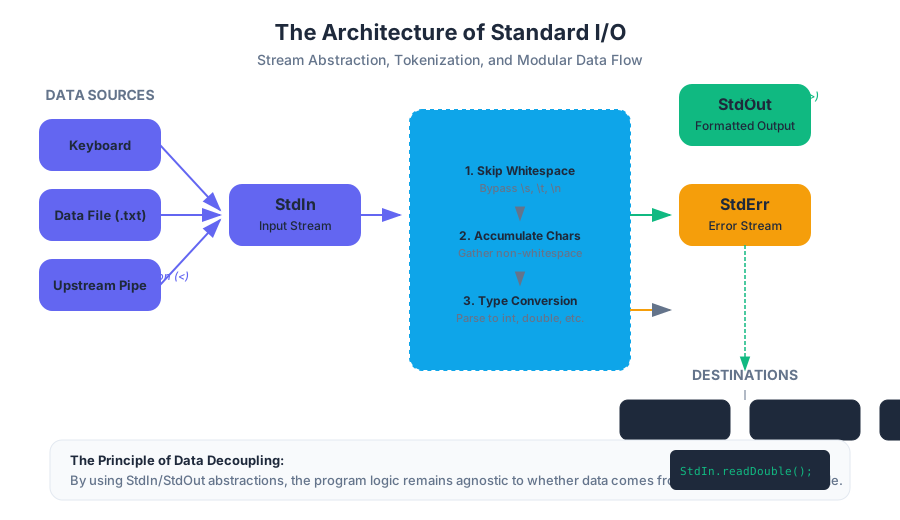
The Architecture of Standard Streams
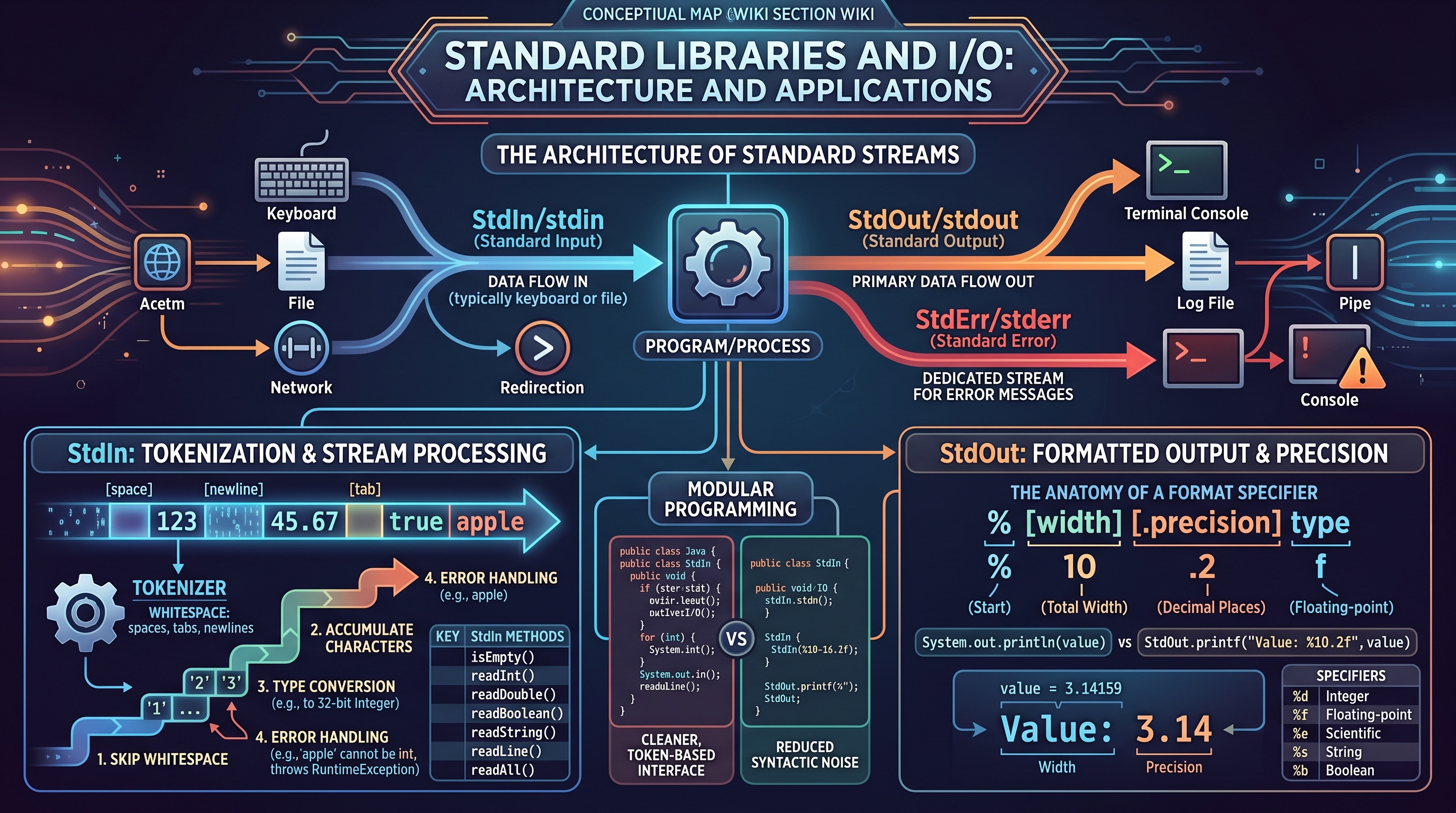
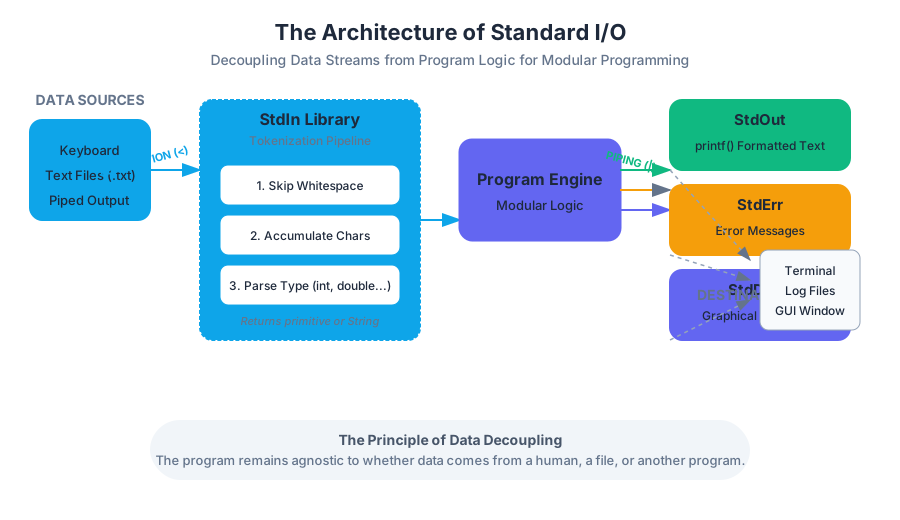
At the heart of modern computing lies the Unix-inspired concept of Standard Streams. Every program, when executed, is automatically connected to three fundamental abstractions:
- Standard Input (StdIn/stdin): A stream of data flowing into the program (typically from the keyboard or a file).
- Standard Output (StdOut/stdout): A stream of data flowing out of the program (typically to the terminal console).
- Standard Error (StdErr/stderr): A dedicated stream for error messages, separate from the primary output.
The power of this model lies in its flexibility. Through Redirection and Piping, a program does not need to know whether its input is coming from a human typing at a keyboard or a 10-terabyte text file.
The Principle of Data Decoupling: A well-designed program should be agnostic to its data source. By writing code that interacts with
StdInandStdOut, we ensure the program can be integrated into larger pipelines without modification.
StdIn: Tokenization and Stream Processing
The StdIn library simplifies the process of reading data by treating the input stream as a sequence of tokens separated by whitespace (spaces, tabs, or newlines).
The Mechanics of Tokenization
When you call a method like StdIn.readInt(), the library performs a multi-step process:
- Skip Whitespace: It bypasses any leading spaces, tabs, or line breaks.
- Accumulate Characters: It gathers subsequent non-whitespace characters until it hits the next whitespace.
- Type Conversion: It attempts to parse those characters into the requested data type (e.g., converting the string "123" into the integer value
123). - Error Handling: If the characters cannot be converted (e.g., trying to read "apple" as an
int), the program throws aRuntimeExpression.
| Method | Return Type | Description |
|---|---|---|
isEmpty() |
boolean |
Returns true if there are no more tokens in the input stream. |
readInt() |
int |
Reads the next token and converts it to a 32-bit integer. |
readDouble() |
double |
Reads the next token and converts it to a 64-bit float. |
readBoolean() |
boolean |
Reads the next token (true/false) and converts it to a boolean. |
readString() |
String |
Reads the next token and returns it as a String. |
readLine() |
String |
Reads the remainder of the current line, including whitespace. |
readAll() |
String |
Reads the entire remaining input stream as a single String. |
Concrete Example: Processing an Arbitrary Stream
Consider a program designed to calculate the average of a sequence of numbers. By using StdIn.isEmpty(), the program can process a list of any length.
public class Average {
    public static void main(String[] args) {
        double sum = 0.0;
        int count = 0;

        // The loop continues until the input stream is exhausted (Ctrl+D or EOF)
        while (!StdIn.isEmpty()) {
            double value = StdIn.readDouble();
            sum += value;
            count++;
        }

        if (count > 0) {
            double avg = sum / count;
            StdOut.println("Average: " + avg);
        }
    }
}
StdOut: Formatted Output and Precision
While System.out.println() is sufficient for basic debugging, professional-grade software requires control over how data is presented. StdOut.printf() (Print Formatted) allows for precise control over decimal places, field widths, and alignment.
The Anatomy of a Format String
A format string consists of static text and format specifiers that act as placeholders for variables. A specifier follows the pattern: % [width] [.precision] type.
| Specifier | Type | Description | Example (value = 3.14159) |
|---|---|---|---|
%d |
Integer | Decimal integer. | %d -> 3 |
%f |
Floating-point | Fixed-point decimal. | %.2f -> 3.14 |
%e |
Scientific | Exponential notation. | %e -> 3.141590e+00 |
%s |
String | String representation. | %s -> "3.14159" |
%10s |
String | Right-justified in 10 spaces. | "%10s" -> " 3.14159" |
Why Precision Matters
In financial applications or scientific simulations, the difference between 3.3333333333 and 3.33 is not just aesthetic—it represents the limits of measurement or the requirements of a specific protocol. Using StdOut.printf("%8.2f", val) ensures that the output is always 8 characters wide with exactly 2 decimal places, creating perfectly aligned tables in the console.
Data Type Conversion: Parsing vs. Casting
A common point of confusion for students is the difference between Casting and Parsing.
- Casting: Changing the type of a value that is already in binary form (e.g.,
(int) 3.14). This is a low-level reinterpretation of bits or a truncation. - Parsing: The algorithmic process of taking a
String(a sequence of ASCII/Unicode characters) and calculating its numerical equivalent.
The Parsing Algorithm (Simplified)
When Integer.parseInt("123") is called, the computer executes a logic similar to this:
$$Value = (1 \times 10^2) + (2 \times 10^1) + (3 \times 10^0)$$
This involves iterating through the string, checking for non-numeric characters, and handling signs (+/-).
| Operation | Context | Example |
|---|---|---|
| Casting | Primitive to Primitive | int x = (int) 3.9; // x becomes 3 |
| Parsing | String to Primitive | int x = Integer.parseInt("123"); |
| Concatenation | Primitive to String | String s = "" + 123; |
| ToString | Object to String | String s = Double.toString(3.14); |
StdDraw: Visualizing Logic
StdDraw is a library that abstracts away the complexities of Java's Swing and AWT frameworks, providing a simple "canvas" for 2D graphics. It operates on a Cartesian coordinate system, defaulting to a range of $[0, 1]$ for both $x$ and $y$.
Coordinate Transformations
A senior engineer recognizes that the default $0.0$ to $1.0$ scale is rarely ideal for real-world data. StdDraw.setXscale(min, max) and StdDraw.setYscale(min, max) allow the programmer to map the canvas directly to the problem domain (e.g., mapping $x$ to years $1900-2024$ and $y$ to global population).
The Double Buffering Technique
For animation, StdDraw uses Double Buffering. Instead of drawing directly to the screen (which causes flickering), the library draws to an off-screen "buffer." Only when StdDraw.show() is called is the entire frame flipped onto the screen.
The Animation Loop Pattern:
StdDraw.enableDoubleBuffering(): Turn on the buffer.- Clear:
StdDraw.clear()to wipe the previous frame. - Draw: Perform all geometric calculations and drawing commands.
- Show:
StdDraw.show()to display the completed frame. - Pause:
StdDraw.pause(milliseconds)to control the frame rate (FPS).
public class BouncingBall {
    public static void main(String[] args) {
        double rx = 0.48, ry = 0.86;     // position
        double vx = 0.015, vy = 0.023;   // velocity
        double radius = 0.05;            // size

        StdDraw.enableDoubleBuffering();

        while (true) {
            // Physics: update position based on velocity
            if (Math.abs(rx + vx) > 1.0 - radius) vx = -vx;
            if (Math.abs(ry + vy) > 1.0 - radius) vy = -vy;
            rx += vx;
            ry += vy;

            // Graphics: clear and redraw
            StdDraw.clear(StdDraw.LIGHT_GRAY);
            StdDraw.setPenColor(StdDraw.BLACK);
            StdDraw.filledCircle(rx, ry, radius);

            StdDraw.show();
            StdDraw.pause(20); // ~50 frames per second
        }
    }
}
Redirection and Piping: The Power User’s Workflow
The true utility of StdIn and StdOut is realized at the command line. By using shell operators, we can connect programs together.
1. Input Redirection (<)
Instead of typing 1,000 numbers by hand, you can tell the OS to feed a file into your program's StdIn.
java Average < data.txt
2. Output Redirection (>)
Instead of printing to the console, save the results to a file.
java RandomSequence 1000 > numbers.txt
3. Piping (|)
Connect the StdOut of one program directly to the StdIn of another.
java RandomSequence 1000 | java Average
In this example, the RandomSequence program generates numbers, and Average consumes them. The numbers never touch the hard drive; they exist only in a memory buffer between the two processes.
Common Pitfalls and Edge Cases
1. The "Trailing Newline" Problem
When mixing readInt() and readLine(), be careful. readInt() consumes the number but leaves the "Enter" key (newline character) in the buffer. A subsequent readLine() will immediately see that newline and return an empty string.
Solution: Call StdIn.readLine() once after readInt() to "flush" the remaining newline character.
2. Infinite Loops with isEmpty()
If you use while(!StdIn.isEmpty()) but forget to actually read a token inside the loop, the condition will always be true, and the program will hang.
Solution: Ensure every path through the loop consumes at least one token.
3. Coordinate System Confusion
In StdDraw, the origin $(0,0)$ is by default at the bottom-left. This differs from many other graphics libraries (like standard Java AWT or HTML5 Canvas) where $(0,0)$ is at the top-left.
Solution: Always explicitly set your scales using setXscale and setYscale to avoid assumptions.
4. Performance of StdOut
Printing to the console is an "expensive" I/O operation. If you are printing millions of lines, your program will be throttled by the terminal's rendering speed.
Solution: For massive data, consider writing to a file or using a StringBuilder to aggregate output before printing.
Summary of Library Interplay
The synergy between these libraries allows for a "Filter" model of programming. Data is read (StdIn), processed using logic and arrays, and then either visualized (StdDraw) or passed forward (StdOut).
| Library | Primary Abstraction | Key Responsibility |
|---|---|---|
StdIn |
The Token Stream | Sanitizing and converting raw input into typed data. |
StdOut |
The Formatted Stream | Presenting processed data with mathematical precision. |
StdDraw |
The Canvas | Translating abstract data into spatial representations. |
By mastering these tools, you move beyond writing code that "works" to writing code that "integrates"—the hallmark of a professional developer.
Methods and Modular Programming
Key concepts: Method Signatures · Return Types · Parameter Passing · Code Reusability · Modular Design
Designing reusable code through static methods, parameter passing, and return values.
Methods and Modular Programming
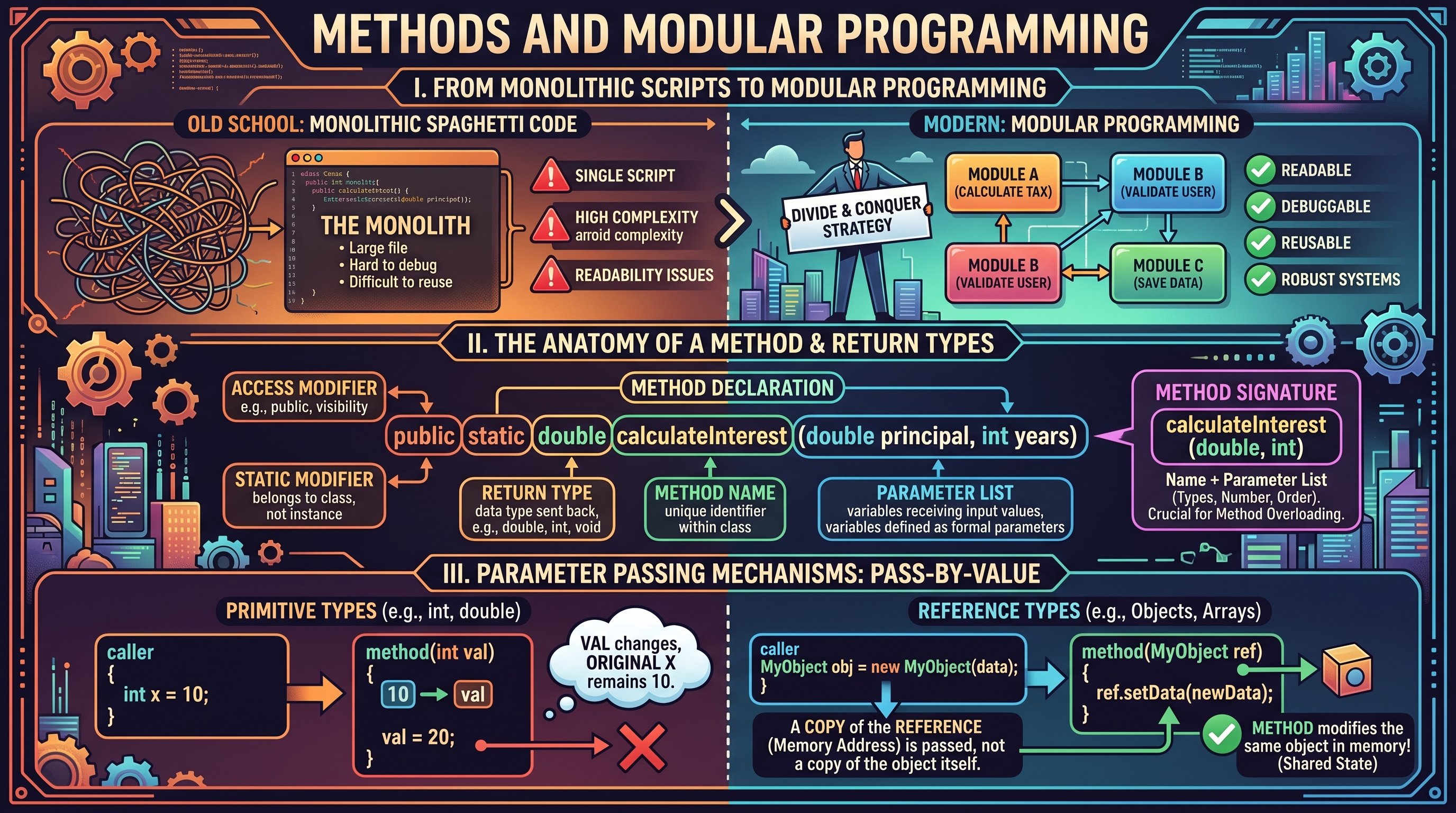
In the evolution of software engineering, the transition from monolithic scripts to modular programming represents a fundamental shift in how we manage complexity. At its core, modular programming is the practice of dividing a program into separate, independent sub-units—called methods (or functions)—each responsible for a specific, well-defined task. This "divide and conquer" strategy allows developers to build systems that are not only easier to read and debug but also significantly more robust and reusable.
The Anatomy of a Method: Signatures and Return Types
A method is a programmed procedure that is defined within a class. In Java, methods are the primary vehicle for expressing behavior. To understand methods, one must first master the Method Signature, which acts as the method's unique identity within the scope of a class.
1. What it is
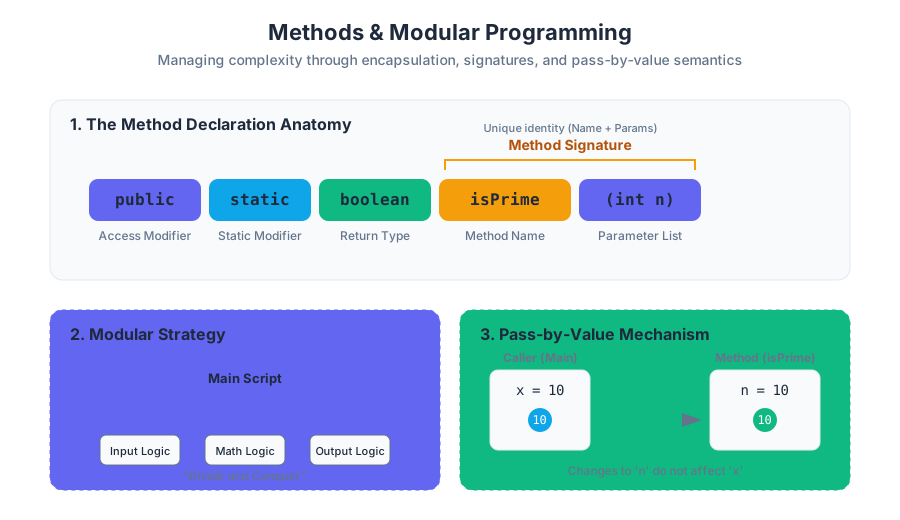
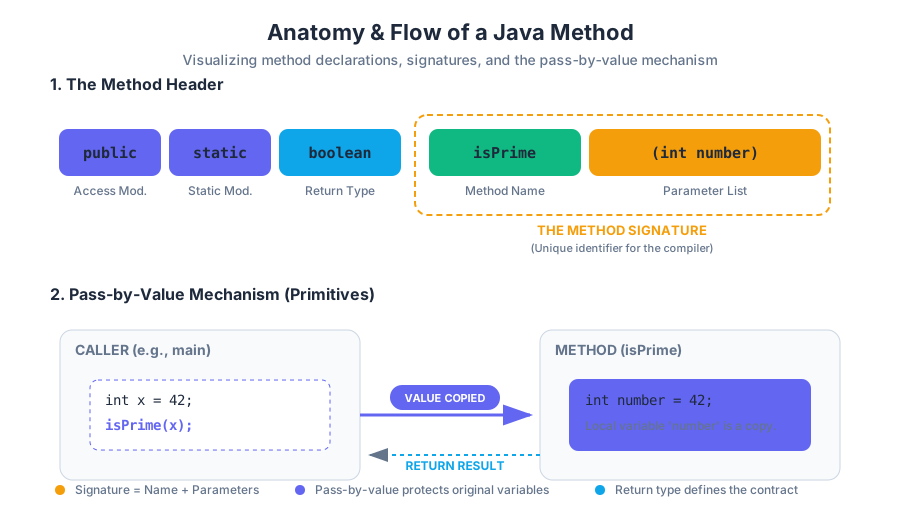
The Method Signature consists of the method name and the parameter list (the number, type, and order of its arguments). Note that in Java, the return type is not part of the signature for the purposes of method overloading, though it is a required part of the method declaration.
Definition: Method Declaration A complete method declaration includes the access modifier (e.g.,
public), the static modifier (if applicable), the Return Type, the Method Name, the Parameter List, and the Method Body.
2. Why it matters
Signatures allow the compiler to distinguish between different methods. This enables Method Overloading, where multiple methods share the same name but operate on different types of data (e.g., Math.abs(int) vs. Math.abs(double)). The Return Type ensures type safety, guaranteeing that a method providing a result adheres to the contract expected by the caller.
3. How it works: The Method Header
The structure of a method header follows a strict syntax:
public static <return_type> <name>(<parameter_list>)
| Component | Purpose | Example |
|---|---|---|
| Access Modifier | Defines visibility (who can call this). | public |
| Static Modifier | Indicates the method belongs to the class, not an instance. | static |
| Return Type | The data type of the value sent back to the caller. | double, int, void |
| Method Name | The identifier used to invoke the method. | calculateInterest |
| Parameter List | The variables that receive input values. | (double principal, int years) |
4. Concrete Example: Primality Testing
Consider a method designed to determine if an integer is prime. This encapsulates a specific mathematical logic that can be reused across various applications.
public class PrimeLibrary {
    /**
     * Determines if a number is prime.
     * @param n The integer to check.
     * @return true if prime, false otherwise.
     */
    public static boolean isPrime(int n) {
        if (n <= 1) return false;
        for (int i = 2; i <= Math.sqrt(n); i++) {
            if (n % i == 0) return false;
        }
        return true;
    }

    public static void main(String[] args) {
        int testValue = Integer.parseInt(args[0]);
        if (isPrime(testValue)) {
            System.out.println(testValue + " is a prime number.");
        } else {
            System.out.println(testValue + " is composite.");
        }
    }
}
5. Variations: The void Return Type
Not all methods return a value. The void keyword indicates that a method performs an action (a "side effect") rather than a calculation. Common examples include printing to the console or modifying the state of an array.
6. Common Pitfalls
- Missing Return Statement: If a method specifies a return type (e.g.,
int), every possible execution path must end in areturnstatement. - Signature Confusion: Attempting to define two methods with the same name and parameters but different return types will result in a compilation error.
Parameter Passing: The "Pass-by-Value" Mechanism
One of the most misunderstood concepts in introductory programming is how data is actually moved from the caller to the method. Java strictly employs a Pass-by-Value semantics.
1. What it is
Pass-by-Value means that when a method is called, the JVM creates a copy of the argument's value and assigns it to the method's formal parameter. The method operates on this copy, not the original variable.
2. Why it matters
This mechanism provides encapsulation and protection. A method cannot accidentally overwrite a local variable in the main method unless it is explicitly designed to return a new value or modify a reference type.
3. How it works: Primitives vs. References
The behavior of pass-by-value differs visually between primitive types (like int) and reference types (like arrays).
- Primitives: The actual numeric value is copied. Changes inside the method stay inside the method.
- References (Arrays/Objects): The memory address (the reference) is copied. While the method cannot change which array the original variable points to, it can modify the contents of that array because both the original and the copy point to the same memory location.
| Feature | Primitive Type (e.g., int) |
Reference Type (e.g., int[]) |
|---|---|---|
| What is passed? | A copy of the literal value. | A copy of the memory address. |
| Effect of modification | Local to the method. | Persists after the method returns. |
| Memory Location | Stack. | Heap (referenced from Stack). |
4. Concrete Example: The Swap Failure
A classic demonstration of pass-by-value is the attempt to swap two integers.
public class SwapExample {
    // This will NOT work
    public static void swap(int a, int b) {
        int temp = a;
        a = b;
        b = temp;
    }

    // This WILL work because it modifies the array contents
    public static void swapInArray(int[] arr, int i, int j) {
        int temp = arr[i];
        arr[i] = arr[j];
        arr[j] = temp;
    }

    public static void main(String[] args) {
        int x = 10, y = 20;
        swap(x, y);
        // x is still 10, y is still 20

        int[] nums = {10, 20};
        swapInArray(nums, 0, 1);
        // nums[0] is now 20, nums[1] is now 10
    }
}
5. Pitfalls: Shadowing and Scope
Variables declared inside a method (including parameters) have local scope. They exist only while the method is executing. If you name a local variable the same as a class-level variable, the local one "shadows" the class-level one, often leading to logic errors where the developer thinks they are updating a global state when they are only updating a temporary local copy.
Modular Design and Code Reusability
Modular design is the architectural philosophy of building a system from independent, interchangeable modules. In programming, this translates to writing methods that are orthogonal—meaning they do one thing well and do not rely on the internal state of other methods.
1. What it is
Modular design involves identifying repeated patterns and abstracting them into methods. Instead of writing a 500-line main method, a modular program consists of several 10-20 line methods that call each other.
2. Why it matters
- Maintainability: If a bug is found in the "calculate tax" logic, you only fix it in the
calculateTaxmethod, rather than searching through thousands of lines of code. - Readability: Code becomes self-documenting.
double total = applyDiscount(calculateTotal(cart));is much easier to read than the raw arithmetic. - Testing: You can test the
isPrimemethod in isolation before using it in a complex cryptography program.
3. How it works: The Pipeline Approach
Modular programming often follows a pipeline: Input → Transform → Output. Each stage of the pipeline is a method.
| Stage | Responsibility | Method Example |
|---|---|---|
| Data Acquisition | Reading from StdIn or files. |
readData() |
| Validation | Checking for errors or edge cases. | isValid(data) |
| Processing | The core logic/algorithm. | computeStatistics(data) |
| Presentation | Formatting and printing results. | printReport(results) |
4. Concrete Example: Array Processing Library
The following example demonstrates a modular approach to handling an array of doubles, separating the creation, printing, and calculation logic.
public class ArrayStats {

    // Module 1: Creation
    public static double[] createRandomArray(int n) {
        double[] a = new double[n];
        for (int i = 0; i < n; i++) a[i] = Math.random();
        return a;
    }

    // Module 2: Logic/Calculation
    public static double findAverage(double[] a) {
        double sum = 0;
        for (double val : a) sum += val;
        return sum / a.length;
    }

    // Module 3: Output
    public static void printArray(double[] a) {
        for (double val : a) {
            System.out.printf("%.2f ", val);
        }
        System.out.println();
    }

    public static void main(String[] args) {
        int size = 5;
        double[] data = createRandomArray(size);
        printArray(data);
        System.out.println("Average: " + findAverage(data));
    }
}
5. Variations: Library Classes
When methods are marked public static, they can be grouped into "Library" classes (like java.lang.Math). These classes do not represent objects; they are simply collections of related tools. This is the ultimate form of reusability.
Advanced Array Manipulation in Methods
Arrays and methods are frequently used together to implement complex algorithms like searching, sorting, and shuffling. Because arrays are passed by reference, methods can efficiently manipulate large datasets without the overhead of copying the entire array.
1. Searching and Sorting
Searching is the process of finding the index of a target value. Sorting is the process of arranging elements in a specific order (e.g., ascending).
2. Shuffling: The Fisher-Yates Algorithm
To shuffle an array, we iterate through it and swap each element with a randomly selected element that comes after it. This ensures a uniform distribution.
3. How it works: Implementation logic
The following code demonstrates three essential array operations: reversing, finding the maximum, and shuffling.
public class ArrayUtils {

    // Reverses the array in place
    public static void reverse(double[] a) {
        int n = a.length;
        for (int i = 0; i < n / 2; i++) {
            double temp = a[i];
            a[i] = a[n - 1 - i];
            a[n - 1 - i] = temp;
        }
    }

    // Finds the maximum value
    public static double findMax(double[] a) {
        double max = Double.NEGATIVE_INFINITY;
        for (double val : a) {
            if (val > max) max = val;
        }
        return max;
    }

    // Fisher-Yates Shuffle
    public static void shuffle(double[] a) {
        int n = a.length;
        for (int i = 0; i < n; i++) {
            int r = i + (int) (Math.random() * (n - i));
            double temp = a[r];
            a[r] = a[i];
            a[i] = temp;
        }
    }
}
4. Comparison of Common Array Method Patterns
| Algorithm | Time Complexity | Space Complexity | Modification Type |
|---|---|---|---|
| Linear Search | $O(n)$ | $O(1)$ | Read-only |
| In-place Reverse | $O(n)$ | $O(1)$ | Destructive (Modifies input) |
| Fisher-Yates Shuffle | $O(n)$ | $O(1)$ | Destructive (Modifies input) |
| Deep Copy | $O(n)$ | $O(n)$ | Non-destructive (Creates new) |
5. Common Pitfalls: The "Aliasing" Trap
When passing an array to a method, remember that the method works on the original array. If you need to preserve the original data, you must perform a Deep Copy before passing it or within the method itself.
// Correct way to copy an array to avoid aliasing
public static double[] copyArray(double[] original) {
    double[] copy = new double[original.length];
    for (int i = 0; i < original.length; i++) {
        copy[i] = original[i];
    }
    return copy;
}
Scope, Lifetime, and the Call Stack
To truly master methods, one must understand the underlying mechanics of the Call Stack.
1. What it is
The Call Stack is a data structure that stores information about the active subroutines of a computer program. Each time a method is called, a new Stack Frame is "pushed" onto the stack.
2. How it works
A stack frame contains:
- The values of the parameters passed to the method.
- The local variables declared within the method.
- The Return Address (where to go back in the code once the method finishes).
When the method reaches a return statement or the end of its block, its stack frame is "popped" off, and its local variables are destroyed. This is why variables inside a method are not accessible from main.
3. Visualizing the Stack
Imagine main calls methodA, and methodA calls methodB.
- Stack Level 0:
mainframe (containsargs, etc.) - Stack Level 1:
methodAframe (containsmethodAlocals) - Stack Level 2:
methodBframe (containsmethodBlocals)
Once methodB finishes, Level 2 is removed. Level 1 becomes active again.
4. Pitfalls: Stack Overflow
If a method calls itself (recursion) too many times without a base case, or if there is a circular dependency between methods, the stack will run out of memory, resulting in a StackOverflowError.
String Manipulation
Key concepts: String Methods (charAt, indexOf) · Value Equality (.equals()) · Reference Equality (==) · String Initialization · Palindrome Detection
In-depth look at the String class, text processing, and the difference between value and reference equality.
String Manipulation
In the hierarchy of data representation, the String occupies a unique position in the Java ecosystem. While primitive types like int and double represent atomic numerical values, a String is a sophisticated object—a sequence of characters that serves as the primary medium for human-computer interaction. To the novice, a String is merely "text"; to the senior engineer, it is an immutable, heap-allocated object governed by specific memory-management rules and a rich API.
Understanding string manipulation is not merely about learning methods like substring() or indexOf(). It requires a deep comprehension of how Java handles object references, the distinction between value and identity, and the algorithmic efficiency of text processing. This article provides a rigorous exploration of the String class, from its underlying memory architecture to the implementation of classical algorithms like palindrome detection.
The Anatomy of a String: Initialization and Memory
What it is
In Java, a String is a non-primitive data type that represents a sequence of Unicode characters. Unlike a simple array of characters (char[]), the String class encapsulates the data and provides a suite of methods to interact with it. Crucially, Strings are immutable: once a String object is created, its internal character sequence cannot be altered.
Why it matters
Immutability provides several critical advantages:
- Security: Sensitive data (like passwords or file paths) cannot be changed by a called method.
- Thread Safety: Multiple threads can share a String instance without fear of corruption.
- Caching: Because Strings are constant, the Java Virtual Machine (JVM) can optimize memory through a process called interning.
How it works: The String Pool
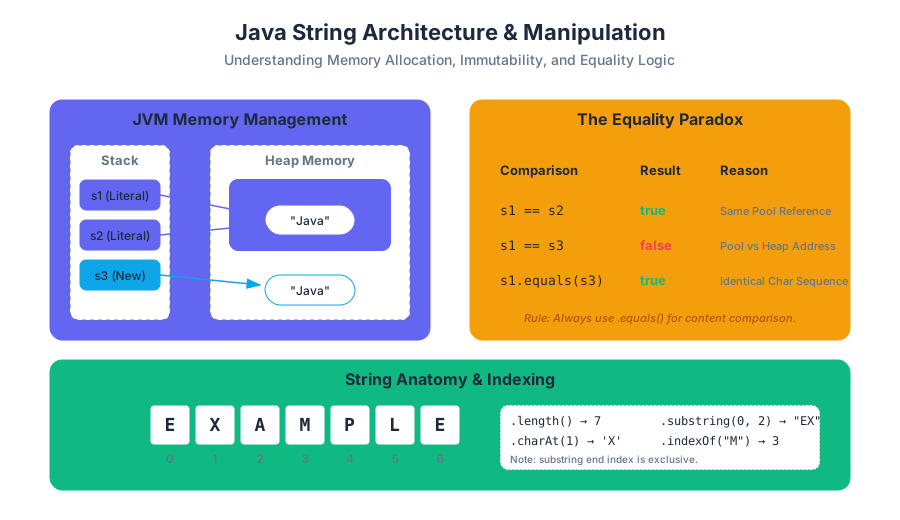
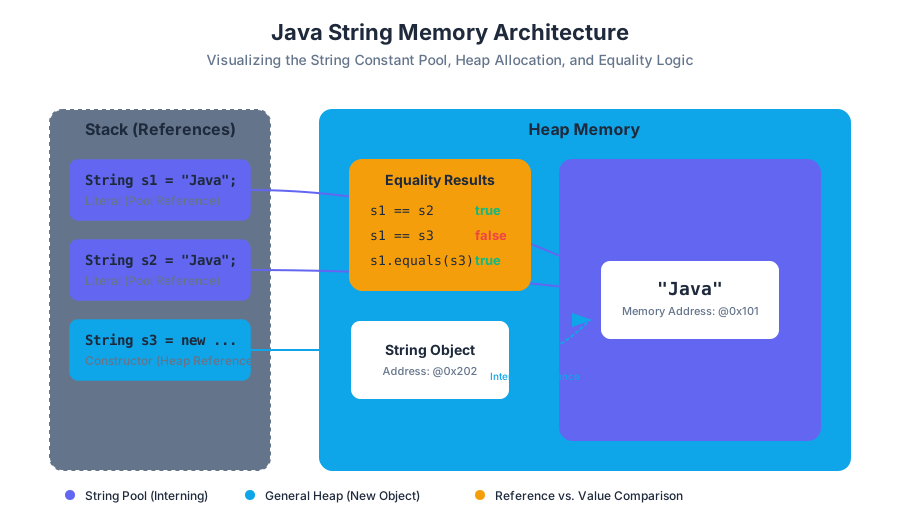
When you initialize a String using a literal (e.g., String s = "Java"), the JVM checks the String Constant Pool—a special memory region within the Heap. If the literal already exists, the new variable simply points to the existing object. If you use the new keyword, you bypass this optimization, forcing the creation of a new object in the general Heap.
| Initialization Method | Syntax | Memory Location | Interning Behavior |
|---|---|---|---|
| Literal | String s = "Hello"; |
String Constant Pool | Reuses existing instances |
| Constructor | String s = new String("Hello"); |
General Heap | Always creates a new object |
| Concatenation | String s = "A" + "B"; |
String Constant Pool | Handled at compile-time for constants |
Common Pitfalls: The "New" Trap
A common mistake among junior developers is using new String("text"). This is almost always redundant and inefficient, as it creates two objects (the literal in the pool and the object on the heap) where one would suffice.
Core String API: Navigation and Search
What it is
The String class provides methods to probe the contents of the character sequence without modifying the original object. The most fundamental of these are length(), charAt(), and indexOf().
Mechanics of Indexing
Java uses 0-based indexing. For a string of length $N$, the valid indices are the set of integers $I = {0, 1, \dots, N-1}$. Accessing an index $i \notin I$ results in a StringIndexOutOfBoundsException.
Essential Methods Table
| Method | Return Type | Complexity | Description |
|---|---|---|---|
length() |
int |
$O(1)$ | Returns the number of 16-bit Unicode characters. |
charAt(int i) |
char |
$O(1)$ | Returns the character at the specified index. |
indexOf(String s) |
int |
$O(N \cdot M)$ | Returns the index of the first occurrence of substring s, or -1 if not found. |
substring(int b, int e) |
String |
$O(N)$ | Returns a new string from index b (inclusive) to e (exclusive). |
toLowerCase() |
String |
$O(N)$ | Returns a new string with all characters converted to lowercase. |
Concrete Example: Parsing a Domain
Consider the task of extracting the domain name from an email address. We can combine indexOf and substring to achieve this dynamically.
public class EmailParser {
    public static void main(String[] args) {
        String email = "professor.falken@wargames.edu";

        // Find the position of the '@' symbol
        int atSymbolIndex = email.indexOf("@");

        if (atSymbolIndex != -1) {
            // Extract everything after the '@'
            String domain = email.substring(atSymbolIndex + 1);
            System.out.println("Domain: " + domain);
        } else {
            System.out.println("Invalid email format.");
        }
    }
}
The Equality Paradox: == vs. .equals()
What it is
In Java, there is a vital distinction between Reference Equality and Value Equality.
- Reference Equality (
==): Checks if two variables point to the exact same memory address. - Value Equality (
.equals()): Checks if two objects represent the same sequence of characters.
Why it matters
Because of the String Pool, two literals might share a reference, making == appear to work correctly. However, as soon as strings are generated dynamically (e.g., via StdIn or substring), they reside at different memory addresses. Using == on these strings will return false, even if their text is identical. This is perhaps the single most frequent source of logic errors in Java programming.
Derivation of Logic
Let $S_1$ and $S_2$ be String references.
- $S_1 == S_2 \implies \text{Address}(S_1) = \text{Address}(S_2)$
- $S_1.equals(S_2) \implies \forall i \in [0, \text{length}), S_1[i] = S_2[i]$
The Golden Rule of Strings: Never use
==to compare the content of two strings. Always use the.equals()method.
Comparison Table: Equality Operators
| Feature | == Operator |
.equals() Method |
|---|---|---|
| Type of Check | Identity (Reference) | Content (State) |
| Compares | Memory Addresses | Character Sequences |
| Use Case | Checking if two references are the same object | Comparing user input, file data, or logic |
| Null Safety | Safe (returns false if one is null) | Throws NullPointerException if called on a null object |
Concrete Example: The Reference Trap
public class EqualityDemo {
    public static void main(String[] args) {
        String s1 = "hello";
        String s2 = "hello";
        String s3 = new String("hello");

        // s1 and s2 point to the same literal in the String Pool
        System.out.println(s1 == s2);      // true

        // s3 is a new object on the heap, despite having the same value
        System.out.println(s1 == s3);      // false

        // Value equality is consistent
        System.out.println(s1.equals(s3)); // true
    }
}
Algorithmic Application: Palindrome Detection
What it is
A palindrome is a string that reads the same forward and backward (e.g., "racecar", "madam", "12321"). Detecting a palindrome is a classic exercise in string traversal and conditional logic.
How it works: The Two-Pointer Approach
The most efficient way to check for a palindrome is to compare characters from both ends of the string, moving toward the center. If any pair of characters fails to match, the string is not a palindrome.
Algorithm Steps:
- Initialize
leftpointer to 0. - Initialize
rightpointer tolength() - 1. - While
left < right:- Compare
charAt(left)andcharAt(right). - If not equal, return
false. - Increment
left, decrementright.
- Compare
- If the loop completes, return
true.
Complexity Analysis
- Time Complexity: $O(N)$, where $N$ is the length of the string. We visit each character at most once.
- Space Complexity: $O(1)$, as we only store two integer pointers regardless of the string size.
Implementation in Java
public class PalindromeChecker {
    public static boolean isPalindrome(String s) {
        if (s == null) return false;

        int left = 0;
        int right = s.length() - 1;

        while (left < right) {
            if (s.charAt(left) != s.charAt(right)) {
                return false; // Mismatch found
            }
            left++;
            right--;
        }
        return true; // Symmetric throughout
    }

    public static void main(String[] args) {
        String test = "racecar";
        if (isPalindrome(test)) {
            System.out.println(test + " is a palindrome.");
        }
    }
}
Variations: Case Sensitivity and Recursion
In many real-world applications, palindromes are considered case-insensitive ("Madam" should be a palindrome). This is handled by calling s.toLowerCase() before processing. Alternatively, the problem can be solved recursively:
- Base Case: If
length <= 1, returntrue. - Recursive Step: If
charAt(0) == charAt(length-1), returnisPalindrome(substring(1, length-1)).
Advanced Manipulation: Immutability and the StringBuilder
The Problem with Concatenation
Because Strings are immutable, every time you perform a concatenation (s = s + "!"), Java does not modify the existing string. Instead, it:
- Creates a new
StringBuilder(or similar buffer). - Copies the old string.
- Appends the new characters.
- Converts the result back to a new
Stringobject.
In a loop running $N$ times, this results in $O(N^2)$ time complexity because of the repeated copying of increasingly large strings.
The Solution: StringBuilder
For intensive string construction (like building a large report or reversing a long string), use the StringBuilder class. It maintains a mutable array of characters, allowing for $O(1)$ appends.
| Feature | String |
StringBuilder |
|---|---|---|
| Mutability | Immutable | Mutable |
| Performance | Slow for frequent modifications | High performance for modifications |
| Memory | Creates new objects for each change | Modifies the same internal buffer |
| Thread Safety | Naturally Thread-Safe | Not Thread-Safe |
Worked Example: String Reversal
public class Reversal {
    public static String reverse(String s) {
        StringBuilder sb = new StringBuilder();
        for (int i = s.length() - 1; i >= 0; i--) {
            sb.append(s.charAt(i));
        }
        return sb.toString();
    }
}
Common Pitfalls and Best Practices
1. The null vs. Empty String Distinction
A null string means the reference points to nothing. An empty string ("") is a valid String object with a length of 0. Calling .length() on a null reference will crash your program.
2. Off-by-One Errors in substring()
The substring(start, end) method is inclusive of the start index but exclusive of the end index. This design allows the length of the resulting substring to be calculated simply as end - start.
3. Ignoring Return Values
Since Strings are immutable, methods like toUpperCase() do not change the string you call them on. They return a new string.
- Incorrect:
s.toUpperCase(); - Correct:
s = s.toUpperCase();
4. Parsing Command-Line Arguments
Strings are the default format for command-line input. To use them as numbers, you must use wrapper class methods:
int count = Integer.parseInt(args[0]);
double price = Double.parseDouble(args[1]);
Summary of String Manipulation Complexity
To conclude, the following table summarizes the computational costs of the operations discussed. As a developer, choosing the right operation for the scale of your data is the hallmark of professional engineering.
| Operation | Method | Complexity | Notes |
|---|---|---|---|
| Access | charAt() |
$O(1)$ | Direct array indexing internally. |
| Search | indexOf() |
$O(N \cdot M)$ | Can be optimized by JVM (Boyer-Moore). |
| Comparison | .equals() |
$O(N)$ | Must check every character in worst case. |
| Concatenation | + operator |
$O(N)$ | Linear time due to new object creation. |
| Building | StringBuilder.append() |
$O(1)$ | Amortized constant time. |
| Extraction | substring() |
$O(N)$ | Copies the character range. |
Recursion
Key concepts: Base Case · Recursive Step · Call Stack · Fibonacci and Factorials · Recursive Array Traversal
Solving complex problems by breaking them into smaller, self-similar subproblems through self-calling functions.
Recursion
Recursion is one of the most elegant and powerful paradigms in computer science. At its core, recursion is a method of problem-solving where the solution to a complex problem depends on solutions to smaller instances of the same problem. In a programming context, a recursive method is a function that calls itself, either directly or indirectly, to perform a repetitive task.
While iteration (using for or while loops) is often more intuitive for beginners, recursion aligns more closely with the mathematical principle of induction. It allows developers to write clean, modular code for problems that involve nested structures, branching paths, or self-similar patterns. However, this elegance comes with a cost: recursion requires a deep understanding of memory management, specifically the call stack, to avoid performance bottlenecks or system crashes.
The Anatomy of a Recursive Function
To prevent a recursive method from calling itself indefinitely—a state known as infinite recursion—every recursive implementation must adhere to a strict structural contract. This contract consists of two primary components: the Base Case and the Recursive Step.
The Base Case
The base case is the "stop condition." It is the simplest possible instance of the problem, which can be solved directly without further recursion. Without a base case, a recursive function would continue to spawn new calls until the system runs out of memory.
Theorem of Termination: For a recursive algorithm to terminate, every recursive path must eventually reach a state that satisfies a base case.
The Recursive Step
The recursive step is the logic that reduces the current problem into a smaller or simpler version of itself. This step must move the state of the program closer to the base case. In Java, this involves calling the method again but passing modified arguments (e.g., n - 1 or a sub-section of an array).
| Component | Responsibility | Failure Result |
|---|---|---|
| Base Case | Terminate the recursion; return a known value. | StackOverflowError (Infinite Loop) |
| Recursive Step | Divide the problem; call the function again. | Logical error; problem never solves. |
| Convergence | Ensure arguments move toward the base case. | Infinite recursion or incorrect results. |
The Mechanics: The Call Stack
To understand how recursion works under the hood, one must understand the Call Stack. The stack is a LIFO (Last-In, First-Out) data structure maintained by the Java Virtual Machine (JVM) to track active methods.
When a method is called, the JVM creates a Stack Frame. This frame contains the method’s local variables, its parameters, and the return address (where the program should go once the method finishes). In recursion, each self-call adds a new frame to the top of the stack. These frames remain "active" and open until the base case is reached. Once the base case returns a value, the stack begins to unwind, passing results back down the chain until the original call is resolved.
Stack Trace of a Recursive Call
Consider a function countDown(3). The stack behavior would look like this:
countDown(3)is called $\rightarrow$ Frame 1 created.countDown(2)is called $\rightarrow$ Frame 2 created.countDown(1)is called $\rightarrow$ Frame 3 created.countDown(0)(Base Case) $\rightarrow$ Frame 4 created, then immediately popped.- Frames 3, 2, and 1 are popped in sequence as they complete.
Mathematical Classics: Factorials and Fibonacci
Recursion is most easily demonstrated through classic mathematical sequences. These examples highlight the relationship between mathematical definitions and code implementation.
The Factorial Function
The factorial of a non-negative integer $n$ (denoted as $n!$) is the product of all positive integers less than or equal to $n$. Mathematically, it is defined as:
- $n! = n \times (n-1)!$
- $0! = 1$ (Base Case)
public class MathRecursion {
    public static int factorial(int n) {
        // Base Case
        if (n == 0) {
            return 1;
        }
        // Recursive Step
        return n * factorial(n - 1);
    }

    public static void main(String[] args) {
        int input = Integer.parseInt(args[0]);
        System.out.println(input + "! = " + factorial(input));
    }
}
The Fibonacci Sequence
The Fibonacci sequence is a series of numbers where each number is the sum of the two preceding ones, usually starting with 0 and 1.
- $F(n) = F(n-1) + F(n-2)$
- $F(0) = 0, F(1) = 1$ (Base Cases)
While the recursive implementation of Fibonacci is syntactically beautiful, it is notoriously inefficient. This is because it performs redundant calculations. To calculate $F(5)$, the program calculates $F(3)$ multiple times across different branches of the recursion tree.
| Metric | Factorial (Recursive) | Fibonacci (Recursive) |
|---|---|---|
| Time Complexity | $O(n)$ | $O(2^n)$ (Exponential) |
| Space Complexity | $O(n)$ (Stack depth) | $O(n)$ (Stack depth) |
| Redundancy | None | Extremely High |
Recursive Array Traversal
Recursion is not limited to mathematical formulas; it is a robust tool for processing data collections like arrays. While a for loop is the standard way to traverse an array, recursion offers an alternative that is essential for understanding more complex data structures like Trees and Graphs.
To process an array recursively, we typically use a helper method or pass an index as a parameter to keep track of our current position.
Example: Summing an Array
To sum an array recursively, we think: "The sum of the array is the first element plus the sum of the rest of the array."
public class ArrayRecursion {
    public static int sum(int[] arr, int index) {
        // Base Case: If index reaches the end of the array
        if (index == arr.length) {
            return 0;
        }
        // Recursive Step: Current element + sum of remaining elements
        return arr[index] + sum(arr, index + 1);
    }

    public static void main(String[] args) {
        int[] numbers = {10, 20, 30, 40};
        int total = sum(numbers, 0);
        System.out.println("Total Sum: " + total);
    }
}
Recursive Linear Search
Similarly, we can search for a value by checking the current index and, if not found, recursing to the next index.
| Operation | Base Case | Recursive Step |
|---|---|---|
| Summing | index == length |
arr[i] + sum(i+1) |
| Searching | arr[i] == target OR i == length |
search(i+1) |
| Reversing | index < 0 |
print(arr[i]) then reverse(i-1) |
Advanced Concepts: Tail Recursion and Memoization
As we scale recursive solutions, we encounter two major optimizations: Tail Recursion and Memoization.
Tail Recursion
A recursive function is "tail-recursive" if the recursive call is the very last action in the function. In some languages (like Scala or Haskell), the compiler can optimize tail-recursive calls to reuse the same stack frame, effectively turning the recursion into a loop.
Note: Standard Java (JVM) does not currently support Tail Call Optimization (TCO), meaning even tail-recursive functions will consume stack space.
Memoization
Memoization is a technique used to solve the "redundant calculation" problem seen in the Fibonacci sequence. By storing the results of expensive function calls in a table (usually an array or HashMap), we can look up the result if the same inputs occur again.
public class FibonacciMemo {
    private static long[] memo;

    public static long fib(int n) {
        if (n <= 1) return n;
        if (memo[n] != 0) return memo[n]; // Return cached value

        memo[n] = fib(n - 1) + fib(n - 2); // Store result
        return memo[n];
    }

    public static void main(String[] args) {
        int n = 50;
        memo = new long[n + 1];
        System.out.println(fib(n));
    }
}
By adding memoization, the time complexity of Fibonacci drops from $O(2^n)$ to $O(n)$, making it viable for large inputs.
Common Pitfalls and Best Practices
Recursion is a "sharp tool"—powerful but dangerous if mishandled. Senior engineers look for these common mistakes during code reviews:
- Missing Base Case: This is the most common cause of
StackOverflowError. Always write the base case first. - Excessive Memory Usage: Each recursive call consumes stack memory. For very deep recursions (e.g., processing an array with 1,000,000 elements), recursion may be inappropriate in Java compared to iteration.
- The "Leap of Faith": When writing the recursive step, beginners often try to mentally trace every single call. Instead, assume the recursive call already works for the smaller sub-problem, and focus only on how to combine that result with the current step.
- Static Variables: Avoid using static variables to track state across recursive calls, as this makes the function non-reentrant and difficult to debug. Pass state through method parameters instead.
Comparison: Recursion vs. Iteration
| Feature | Recursion | Iteration |
|---|---|---|
| Implementation | Uses method calls. | Uses loops (for, while). |
| State | Stored in the Call Stack. | Stored in local variables. |
| Code Clarity | Often cleaner for complex logic (Trees). | Often clearer for simple linear logic. |
| Overhead | High (Stack frame allocation). | Low (Simple pointer/counter updates). |
| Termination | Reaching the Base Case. | Loop condition becomes false. |
Summary of Recursive Patterns
Recursion is frequently categorized by how the recursive calls are structured within the method:
- Linear Recursion: The method makes exactly one recursive call per execution. (Example: Factorial).
- Binary Recursion: The method makes two recursive calls. (Example: Fibonacci, Merge Sort).
- Multiple Recursion: The method makes more than two recursive calls. (Example: Solving a Sudoku puzzle or N-Queens).
- Mutual Recursion: Method A calls Method B, and Method B calls Method A.
Understanding these patterns allows developers to choose the right recursive strategy for the problem at hand, ensuring that the code is both readable and performant.
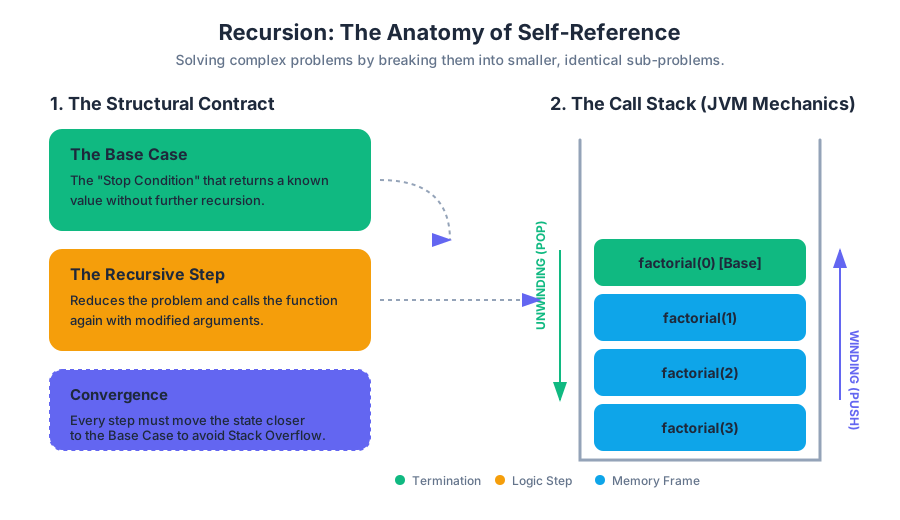
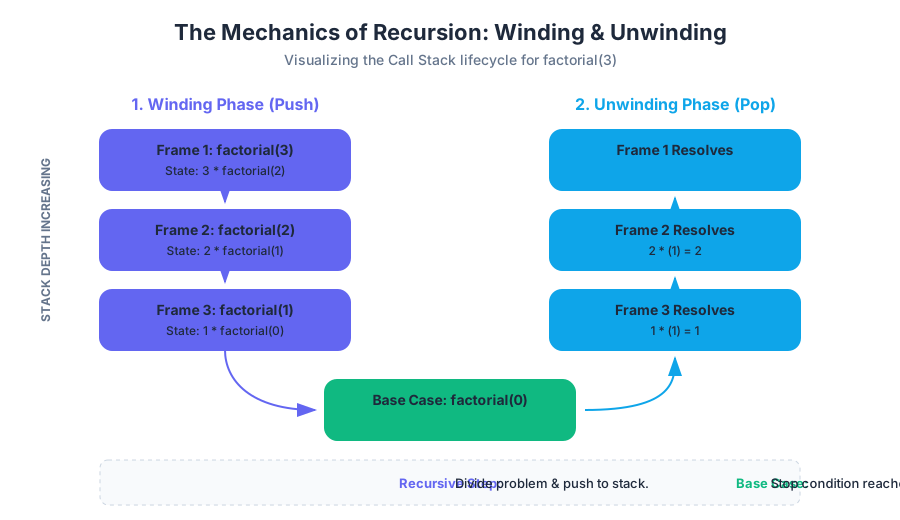
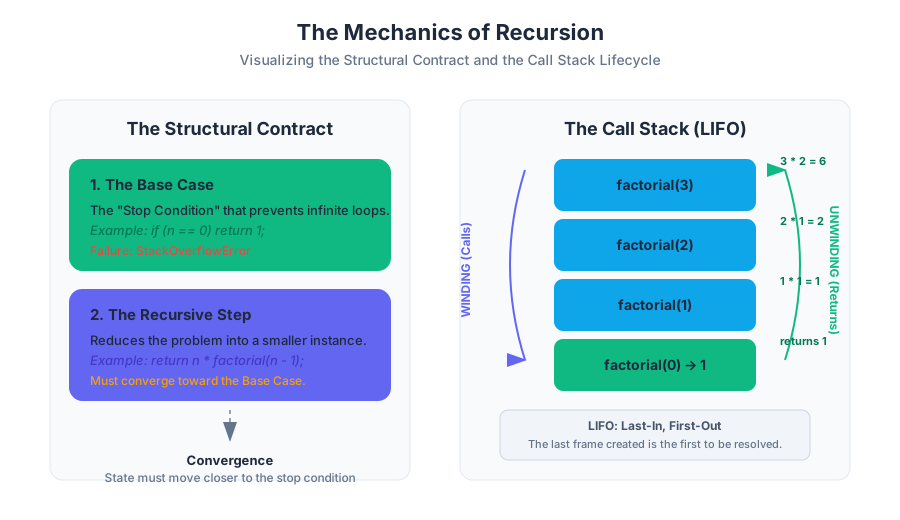
Object-Oriented Programming (OOP)
Key concepts: Classes and Objects · Constructors and Overloading · Encapsulation (Private vs. Public) · Static vs. Instance Variables · Method Overriding (toString, equals)
Designing custom data types using classes, encapsulation, and object-oriented principles.
Object-Oriented Programming (OOP)
Object-Oriented Programming (OOP) represents a fundamental shift in software engineering, moving away from the procedural focus on "actions" and "logic" toward a focus on "data" and "objects." In procedural programming, we write functions or blocks of code that perform computations on data. In OOP, we define data types that encompass both the data itself and the operations that can be performed on that data. This paradigm allows for higher levels of abstraction, making it possible to model complex real-world systems—such as banking engines, social networks, or physical simulations—with clarity and maintainability.
The Core Philosophy: Abstraction and Modeling
At its heart, OOP is about abstraction. An abstraction is a simplified representation of something complex. For instance, a Student object in a university database does not need to store a student's favorite color or childhood pet; it only needs to store the data relevant to the domain, such as studentID, gpa, and enrolledCourses. By defining these attributes and the methods that manipulate them, we create a "black box" that other parts of the program can interact with without needing to understand its internal complexity.
Classes and Objects: The Blueprint and the Instance
The distinction between a Class and an Object is the most critical concept in OOP. A class is a template or a blueprint. It defines what data a particular type of object will hold and what actions it can perform. An object, conversely, is a concrete instance of that class, occupying space in memory.
Definition: A Class is a compile-time construct that defines a new data type. An Object is a runtime entity that is created (instantiated) based on the class definition.
Memory Allocation: Stack vs. Heap
When we declare a primitive variable like int x = 5;, the value is typically stored on the Stack. However, when we create an object using the new keyword, the object itself is allocated on the Heap, and the variable we use to reference it stores the memory address (a reference) rather than the object itself.
| Feature | Class | Object |
|---|---|---|
| Nature | A template or blueprint. | A concrete instance. |
| Existence | Exists in the source code / bytecode. | Exists in the computer's RAM (Heap). |
| Memory | Does not occupy memory for data. | Occupies memory to store its state. |
| Quantity | Defined once per type. | Can have infinite instances. |
Implementation Example: A Simple Point Class
public class Point {
    // Instance variables (State)
    public double x;
    public double y;

    // Method (Behavior)
    public double distanceToOrigin() {
        return Math.sqrt(x * x + y * y);
    }
}

// Usage in another class
public class Main {
    public static void main(String[] args) {
        Point p1 = new Point(); // Instantiation
        p1.x = 3.0;
        p1.y = 4.0;
        System.out.println(p1.distanceToOrigin()); // Outputs 5.0
    }
}
Encapsulation: The Principle of Least Privilege
Encapsulation is the practice of bundling data and methods within a single unit and restricting access to the inner workings of that unit. This is achieved using Access Modifiers. The primary goal is to protect the "internal state" of an object from corruption by outside code.
Private vs. Public
private: The member is only accessible within the class it is defined. This is used for variables to prevent direct modification.public: The member is accessible from any other class. This is used for methods that define the "interface" of the object.
The "Getter and Setter" Pattern
To allow controlled access to private data, we use accessor (getter) and mutator (setter) methods. This allows us to implement validation logic. For example, a setGPA method can check if the value is between 0.0 and 4.0 before updating the variable.
| Modifier | Class | Package | Subclass | World |
|---|---|---|---|---|
public |
Yes | Yes | Yes | Yes |
protected |
Yes | Yes | Yes | No |
default |
Yes | Yes | No | No |
private |
Yes | No | No | No |
The Golden Rule of Encapsulation: Always default to
privatefor instance variables. Only providepublicaccess through methods if absolutely necessary.
Constructors and Overloading
A Constructor is a special method that is called automatically when an object is instantiated. It has no return type (not even void) and must have the exact same name as the class. Its primary purpose is to initialize the object's state.
The this Keyword
Inside a constructor or method, the keyword this refers to the current instance of the object. It is frequently used to disambiguate between instance variables and parameters with the same name.
Constructor Overloading
Java allows a class to have multiple constructors, provided they have different signatures (the number, type, or order of parameters). This provides flexibility in how objects are created.
public class Student {
    private String name;
    private int id;
    private double gpa;

    // Default Constructor
    public Student() {
        this.name = "Unknown";
        this.id = 0;
        this.gpa = 0.0;
    }

    // Parameterized Constructor
    public Student(String name, int id) {
        this.name = name;
        this.id = id;
        this.gpa = 0.0; // Default GPA
    }

    // Overloaded Constructor
    public Student(String name, int id, double gpa) {
        this.name = name;
        this.id = id;
        this.gpa = gpa;
    }
}
Static vs. Instance Variables
Understanding the static keyword is vital for managing memory and defining shared behavior.
Instance Variables (Non-Static)
Every time you create a new object, the JVM allocates a new set of instance variables. If you have 1,000 Student objects, you have 1,000 different name variables in memory.
Static Variables (Class Variables)
A static variable is shared by all instances of a class. There is only one copy of a static variable, regardless of how many objects are created. These are often used for constants (like Math.PI) or counters (to track how many objects have been created).
Static Methods
Static methods can be called without creating an instance of the class (e.g., Math.sqrt()). However, a static method cannot access instance variables because it does not belong to any specific object.
| Feature | Instance (Non-Static) | Static |
|---|---|---|
| Ownership | Owned by the specific Object. | Owned by the Class. |
| Memory | Allocated per object. | Allocated once when class is loaded. |
| Access | Can access static and instance members. | Can only access other static members. |
| Invocation | objectName.method() |
ClassName.method() |
Method Overriding: toString and equals
In Java, every class implicitly inherits from the Object class. The Object class provides several default methods that are often insufficient for custom data types. Method Overriding allows a subclass to provide a specific implementation of a method already defined in its parent class.
The toString() Method
By default, toString() returns a string consisting of the class name and the object's memory address (e.g., Student@1a2b3c4d). To make this useful, we override it to return a readable representation of the object's data.
The equals() Method
The == operator, when used with objects, checks for referential equality—it asks, "Do these two variables point to the exact same spot in memory?" Usually, we want logical equality—"Do these two objects contain the same data?"
To implement equals() correctly, we must follow a specific contract. It must be:
- Reflexive:
x.equals(x)is true. - Symmetric: If
x.equals(y), theny.equals(x). - Transitive: If
x.equals(y)andy.equals(z), thenx.equals(z).
Worked Example: Overriding in a Complex Number Class
public class Complex {
    private final double re; // Real part
    private final double im; // Imaginary part

    public Complex(double re, double im) {
        this.re = re;
        this.im = im;
    }

    @Override
    public String toString() {
        return re + " + " + im + "i";
    }

    @Override
    public boolean equals(Object other) {
        // 1. Check for identity (same memory address)
        if (this == other) return true;

        // 2. Check for null
        if (other == null) return false;

        // 3. Check for class compatibility
        if (this.getClass() != other.getClass()) return false;

        // 4. Cast and compare fields
        Complex that = (Complex) other;
        return (this.re == that.re) && (this.im == that.im);
    }
}
Common Pitfalls in OOP
1. The NullPointerException (NPE)
Because object variables are references, they can be null. Attempting to call a method on a null reference is the most common error in Java.
Fix: Always initialize objects before use, or use null-checks.
2. Aliasing Issues
When you assign one object variable to another (p2 = p1), you are not copying the object; you are copying the reference. Both variables now point to the same object. Modifying p1 will change p2.
Fix: To create a true copy, you must create a new object using a "copy constructor."
3. Over-Engineering
Beginners often create deep inheritance hierarchies or excessive getters/setters for data that doesn't need them. Fix: Follow the YAGNI (You Ain't Gonna Need It) principle. Keep classes focused and minimal.
4. Confusing static and instance
Attempting to call a non-static method from public static void main is a classic error.
Fix: Remember that main is static; it exists before any objects do. To use instance methods, you must first instantiate the class inside main.
Summary of OOP Benefits
- Modularity: Code can be developed and debugged independently.
- Information Hiding: Internal details are hidden, reducing the "surface area" for bugs.
- Reusability: Classes can be reused across different projects.
- Pluggability: If an object isn't working, you can swap it for another object of the same type with a different internal implementation.
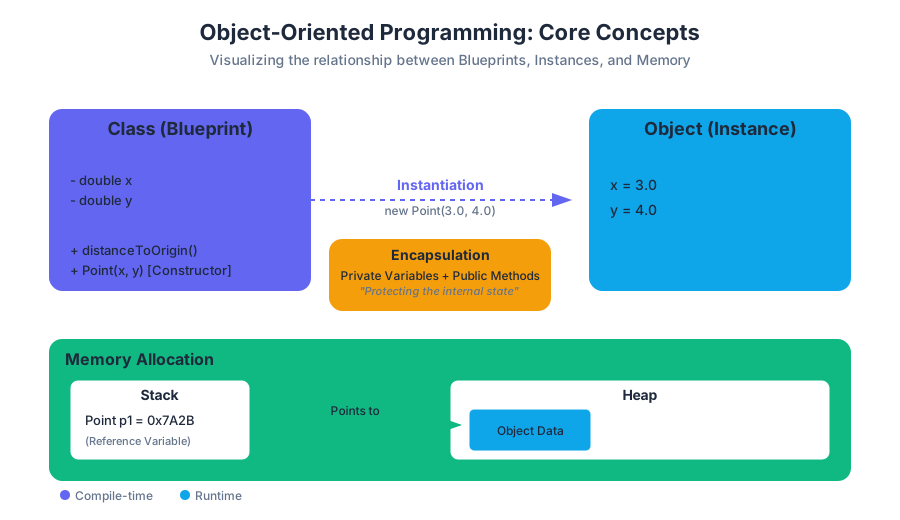
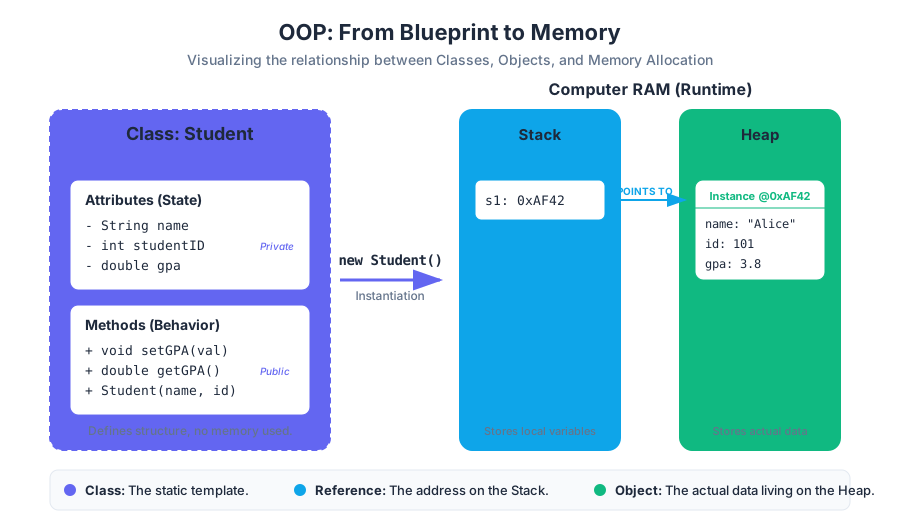
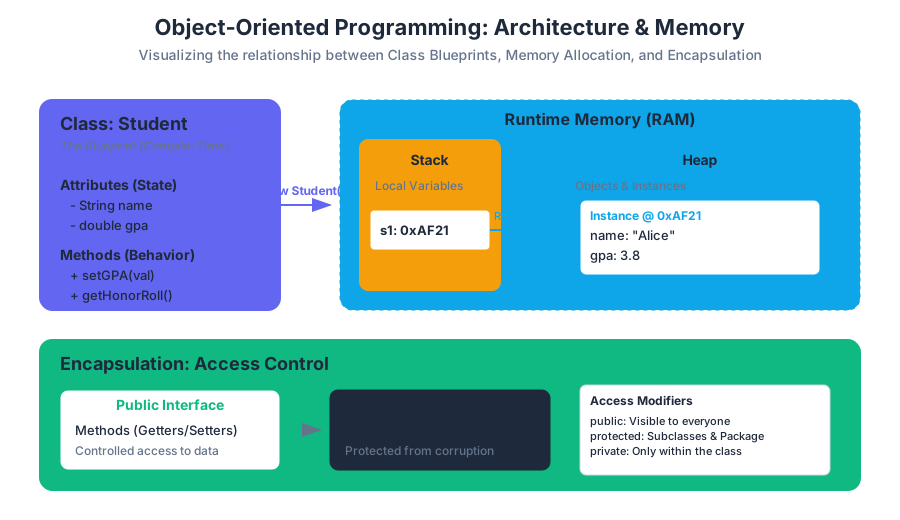
Searching and Sorting Algorithms
Key concepts: Binary Search · Selection Sort · Insertion Sort · Merge Sort · Algorithm Complexity Analysis
Implementation and performance analysis of fundamental algorithms for organizing and finding data.
Searching and Sorting Algorithms
In the realm of computer science, the ability to organize and retrieve data efficiently is not merely a convenience—it is a fundamental requirement for scalable systems. Whether you are building a search engine, a financial trading platform, or a simple mobile application, the choice of searching and sorting algorithms dictates the performance boundaries of your software. This section explores the mechanics, mathematical foundations, and practical implementations of the industry's most essential algorithms, alongside the analytical tools used to measure their efficacy.
Algorithm Complexity Analysis
Before examining specific algorithms, we must establish a rigorous framework for evaluation. Algorithm Complexity Analysis is the study of how the resource requirements of an algorithm (typically time and memory) scale as the size of the input data, denoted as $n$, increases.
The Big O Notation
We use Big O Notation to describe the "asymptotic upper bound" of an algorithm. It allows us to ignore constant factors and hardware-specific variations, focusing instead on the growth rate.
Definition: An algorithm is $O(f(n))$ if there exist constants $c$ and $n_0$ such that the execution time $T(n) \le c \cdot f(n)$ for all $n > n_0$.
Common Complexity Classes
| Notation | Name | Description | Example |
|---|---|---|---|
| $O(1)$ | Constant | Time remains the same regardless of $n$. | Accessing an array element by index. |
| $O(\log n)$ | Logarithmic | Time increases linearly as $n$ increases exponentially. | Binary Search. |
| $O(n)$ | Linear | Time increases in direct proportion to $n$. | Linear Search. |
| $O(n \log n)$ | Linearithmic | The standard for efficient sorting. | Merge Sort. |
| $O(n^2)$ | Quadratic | Time increases with the square of $n$. | Selection Sort, Insertion Sort. |
| $O(2^n)$ | Exponential | Time doubles with each additional element. | Recursive Fibonacci (naive). |
Why Complexity Matters
Consider an input size of $n = 1,000,000$. An $O(n)$ algorithm might take a fraction of a second, while an $O(n^2)$ algorithm would perform $1,000,000,000,000$ operations, potentially taking hours or days on standard hardware. As a professor would emphasize: Efficiency is not about saving microseconds; it is about making the impossible possible.
Linear Search
Linear Search (or Sequential Search) is the most intuitive method for finding a target value within a collection. It involves examining each element of the array one by one until the target is found or the end of the array is reached.
How it Works
- Start at the first element (index 0).
- Compare the current element with the target
key. - If they match, return the current index.
- If they do not match, move to the next index.
- If the end of the array is reached without a match, return -1.
Java Implementation
public class SearchUtils {
    /**
     * Performs a linear search on an integer array.
     * @param a the array to search
     * @param key the value to find
     * @return the index of the key, or -1 if not found
     */
    public static int linearSearch(int[] a, int key) {
        for (int i = 0; i < a.length; i++) {
            if (a[i] == key) {
                return i; // Found the key
            }
        }
        return -1; // Key not present
    }
}
Complexity Analysis
- Best Case: $O(1)$ (The key is the first element).
- Worst Case: $O(n)$ (The key is the last element or not present).
- Average Case: $O(n/2)$, which simplifies to $O(n)$.
Common Pitfalls: Linear search is inefficient for large datasets. However, it is the only option if the data is unsorted and we have no additional information about the structure.
Binary Search
Binary Search is a vastly more efficient algorithm that operates on the "divide and conquer" principle. However, it carries a strict prerequisite: the array must be sorted.
The Logic of Halving
Imagine searching for a name in a physical phone book. You don't start at page one; you open to the middle. If the name you seek is alphabetically "less than" the names on the page, you discard the entire right half of the book and repeat the process with the left half.
How it Works
- Maintain two pointers,
lowandhigh, representing the current search range. - Calculate the middle index:
mid = low + (high - low) / 2. - Compare
a[mid]with thekey:- If
a[mid] == key, returnmid. - If
a[mid] < key, setlow = mid + 1(search the right half). - If
a[mid] > key, sethigh = mid - 1(search the left half).
- If
- Repeat until
low > high.
Java Implementation
public static int binarySearch(int[] a, int key) {
    int low = 0;
    int high = a.length - 1;

    while (low <= high) {
        int mid = low + (high - low) / 2; // Prevents integer overflow
        if (key < a[mid]) {
            high = mid - 1;
        } else if (key > a[mid]) {
            low = mid + 1;
        } else {
            return mid;
        }
    }
    return -1;
}
Mathematical Derivation of Complexity
In each step, we reduce the search space by half. After $k$ steps, the remaining search space is $n / 2^k$. The algorithm terminates when the search space is reduced to 1. $$n / 2^k = 1 \implies n = 2^k \implies k = \log_2 n$$ Thus, the complexity is $O(\log n)$.
Selection Sort
Selection Sort is a simple, comparison-based sorting algorithm. It maintains two sub-arrays in a given array: one which is already sorted and the other which is unsorted.
Mechanics
In every iteration of selection sort, the minimum element (considering ascending order) from the unsorted sub-array is picked and moved to the beginning of the sorted sub-array.
Worked Example
Array: [64, 25, 12, 22, 11]
- Find the min in
[64, 25, 12, 22, 11]. It's11. Swap with64. Result:[11, 25, 12, 22, 64] - Find the min in
[25, 12, 22, 64]. It's12. Swap with25. Result:[11, 12, 25, 22, 64] - Find the min in
[25, 22, 64]. It's22. Swap with25. Result:[11, 12, 22, 25, 64] - Array is sorted.
Java Implementation
public static void selectionSort(double[] a) {
    int n = a.length;
    for (int i = 0; i < n - 1; i++) {
        int minIdx = i;
        for (int j = i + 1; j < n; j++) {
            if (a[j] < a[minIdx]) {
                minIdx = j;
            }
        }
        // Swap the found minimum element with the first element
        double temp = a[minIdx];
        a[minIdx] = a[i];
        a[i] = temp;
    }
}
Complexity and Performance
- Time Complexity: $O(n^2)$ in all cases (best, average, worst) because the nested loops always execute.
- Space Complexity: $O(1)$ (In-place).
- Pitfall: It is inefficient on large lists and generally performs worse than insertion sort.
Insertion Sort
Insertion Sort works similarly to the way you sort playing cards in your hands. The array is virtually split into a sorted and an unsorted part. Values from the unsorted part are picked and placed at the correct position in the sorted part.
How it Works
- Iterate from
index 1ton-1. - Compare the current element (
key) to its predecessor. - If the
keyelement is smaller than its predecessor, compare it to the elements before. Move the greater elements one position up to make space for the swapped element.
Java Implementation
public static void insertionSort(double[] a) {
    int n = a.length;
    for (int i = 1; i < n; i++) {
        double key = a[i];
        int j = i - 1;

        // Move elements of a[0..i-1] that are greater than key
        // to one position ahead of their current position
        while (j >= 0 && a[j] > key) {
            a[j + 1] = a[j];
            j = j - 1;
        }
        a[j + 1] = key;
    }
}
Variations and Extensions
Insertion sort is highly efficient for nearly sorted data. In such cases, the inner while loop rarely runs, leading to a near $O(n)$ performance. This makes it a popular choice as a "base case" for more complex algorithms like Timsort or Quicksort.
| Feature | Selection Sort | Insertion Sort |
|---|---|---|
| Best Case | $O(n^2)$ | $O(n)$ |
| Swaps | $O(n)$ | $O(n^2)$ |
| Stability | Usually Unstable | Stable |
| Use Case | When memory writes are costly | Small or nearly sorted arrays |
Merge Sort
Merge Sort is a sophisticated, recursive algorithm that exemplifies the "Divide, Conquer, and Combine" strategy. It is significantly faster than selection or insertion sort for large datasets.
The Divide and Conquer Strategy
- Divide: Divide the unsorted list into $n$ sub-lists, each containing one element (a list of one element is considered sorted).
- Conquer: Repeatedly merge sub-lists to produce new sorted sub-lists until there is only one sub-list remaining.
The Merge Step
The core of the algorithm is the merge() function, which takes two sorted arrays and combines them into a single sorted array.
Java Implementation
public class MergeSort {
    public static void sort(double[] a) {
        if (a.length <= 1) return;
        double[] aux = new double[a.length];
        sort(a, aux, 0, a.length - 1);
    }

    private static void sort(double[] a, double[] aux, int lo, int hi) {
        if (hi <= lo) return;
        int mid = lo + (hi - lo) / 2;
        sort(a, aux, lo, mid);       // Sort left half
        sort(a, aux, mid + 1, hi);   // Sort right half
        merge(a, aux, lo, mid, hi);  // Merge results
    }

    private static void merge(double[] a, double[] aux, int lo, int mid, int hi) {
        // Copy to aux[]
        for (int k = lo; k <= hi; k++) {
            aux[k] = a[k];
        }

        // Merge back to a[]
        int i = lo, j = mid + 1;
        for (int k = lo; k <= hi; k++) {
            if      (i > mid)           a[k] = aux[j++];
            else if (j > hi)            a[k] = aux[i++];
            else if (aux[j] < aux[i])   a[k] = aux[j++];
            else                        a[k] = aux[i++];
        }
    }
}
Complexity Analysis
Merge sort consistently performs at $O(n \log n)$ time complexity.
- Log n levels: The array is split in half $\log n$ times.
- N work per level: At each level of the recursion tree, the total number of comparisons and movements is proportional to $n$.
- Space Complexity: Unlike the previous sorts, Merge Sort requires $O(n)$ additional space for the auxiliary array.
Comparative Summary of Sorting Algorithms
Choosing the right algorithm depends on the specific constraints of your environment (e.g., memory limits, data size, initial order).
| Algorithm | Best Time | Avg Time | Worst Time | Space | Stable? |
|---|---|---|---|---|---|
| Selection Sort | $O(n^2)$ | $O(n^2)$ | $O(n^2)$ | $O(1)$ | No |
| Insertion Sort | $O(n)$ | $O(n^2)$ | $O(n^2)$ | $O(1)$ | Yes |
| Merge Sort | $O(n \log n)$ | $O(n \log n)$ | $O(n \log n)$ | $O(n)$ | Yes |
Key Insights for Engineers
- Stability: A sort is stable if it preserves the relative order of equal elements. This is crucial when sorting objects by multiple criteria (e.g., sorting a list of transactions by date, then by amount).
- In-place: An algorithm is in-place if it requires only a constant amount of extra memory ($O(1)$). Selection and Insertion sort are in-place; Merge Sort is not.
- Adaptive: An algorithm is adaptive if its performance improves when the input is partially sorted. Insertion sort is the quintessential adaptive algorithm.
Common Pitfalls in Implementation
- Integer Overflow: In Binary Search, calculating
mid = (low + high) / 2can cause an overflow iflow + highexceedsInteger.MAX_VALUE. Uselow + (high - low) / 2instead. - Off-by-One Errors: Pay close attention to loop boundaries (e.g.,
i < nvsi <= n) and the calculation of themidpoint in recursive calls. - Recursion Depth: For extremely large arrays, recursive algorithms like Merge Sort can trigger a
StackOverflowErrorif the recursion depth is too great, though this is rare for $O(\log n)$ depth.
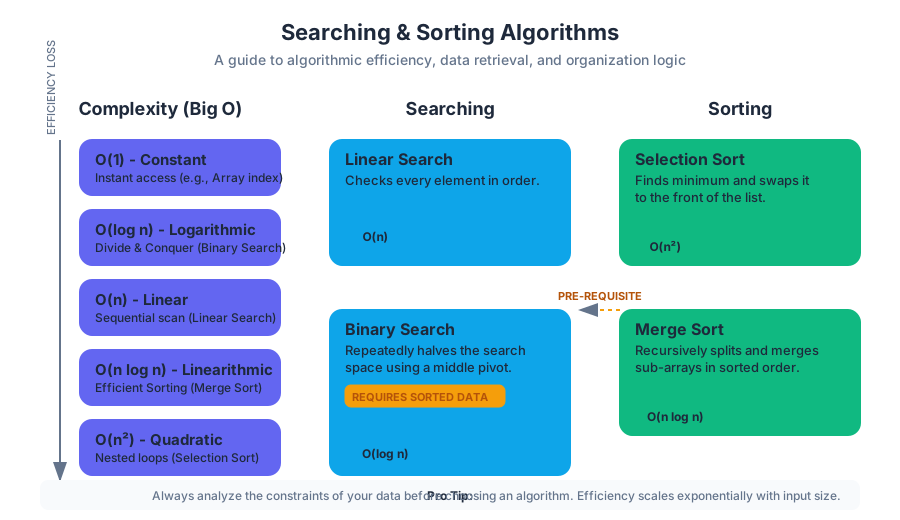
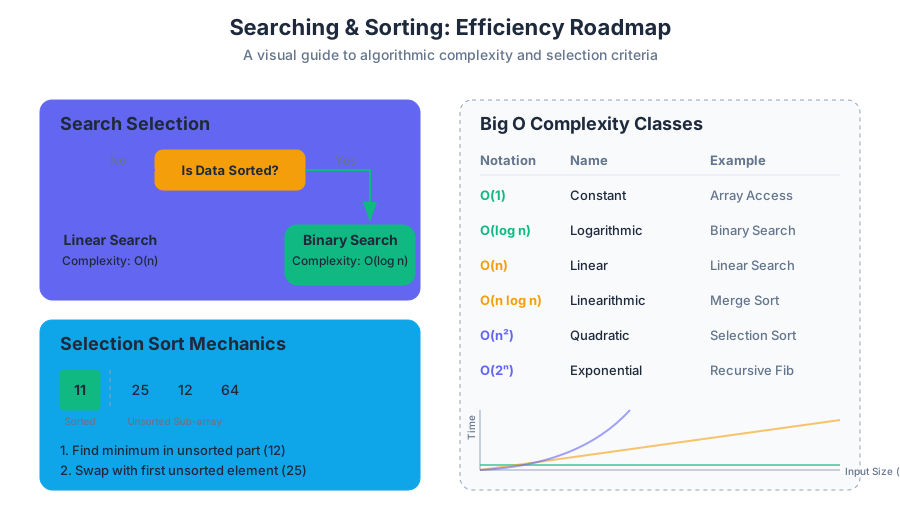
Advanced Data Structures: ArrayList
Key concepts: ArrayList vs. Fixed-size Arrays · Dynamic Resizing · Automatic Element Shifting · ArrayList Methods (add, set, remove) · Generics (Basic usage)
Transitioning from fixed-size arrays to dynamic arrays using the Java ArrayList class.
Advanced Data Structures: ArrayList
In the landscape of computer science, the tension between memory efficiency and developer productivity often dictates the choice of data structures. While the standard array is the bedrock of contiguous data storage, its rigid nature—defined by a fixed size at the moment of instantiation—presents significant hurdles for modern software engineering. Enter the ArrayList.
The ArrayList is a part of the Java Collections Framework and serves as a resizable-array implementation of the List interface. It provides a sophisticated abstraction over the primitive array, offering the speed of index-based access while removing the manual labor of memory management and element shifting.
The Architecture of Fluidity: ArrayList vs. Fixed-Size Arrays
To understand the ArrayList, one must first appreciate the limitations of the primitive array (T[]). In Java, an array is a container object that holds a fixed number of values of a single type. The length of an array is established when the array is created; after creation, its length is immutable.
The Problem of Static Allocation
When you declare int[] data = new int[10];, the JVM allocates a contiguous block of memory for exactly ten integers. If your application suddenly needs an eleventh integer, you are forced into a manual "migrate and replace" pattern:
- Create a new, larger array.
- Copy all elements from the old array to the new one.
- Update the reference to point to the new array.
- Allow the old array to be garbage collected.
The ArrayList automates this entire lifecycle. It maintains an internal array (often called the backing array) and a counter variable, size, which tracks how many elements are currently "active" within that backing array.
| Feature | Primitive Array (T[]) |
ArrayList<T> |
|---|---|---|
| Size | Fixed (Static) | Dynamic (Resizable) |
| Flexibility | Low; requires manual resizing | High; grows automatically |
| Performance | Slightly faster (no abstraction overhead) | High, with occasional resizing cost |
| Type Support | Primitives (int, double) and Objects |
Objects only (uses Wrapper classes) |
| Generics | Does not support generics natively | Fully supports Generics |
| Metadata | Only .length |
Rich API (size(), isEmpty(), etc.) |
Dynamic Resizing: The Amortized Analysis of Growth
The most critical feature of an ArrayList is its ability to grow. However, memory cannot simply "expand" into adjacent slots, as those slots might be occupied by other objects. Instead, the ArrayList uses a Geometric Expansion strategy.
The Mechanics of the Growth Algorithm
When an element is added via add(), the ArrayList first checks if the current size is equal to the capacity (the length of the internal backing array). If size == capacity:
- A new capacity is calculated. In the OpenJDK implementation, this is typically
oldCapacity + (oldCapacity >> 1), effectively a 1.5x growth factor. - A new array is allocated with this new capacity.
- The contents are transferred using
Arrays.copyOf(which internally uses the highly optimizedSystem.arraycopy). - The new element is inserted into the first available slot.
Proof of Efficiency: Amortized Time Complexity
A common concern is that resizing is an $O(n)$ operation because every element must be copied. If we resize frequently, does the add() operation become slow?
Through Amortized Analysis, we can prove that the cost of $N$ insertions is $O(N)$, making the average cost per insertion $O(1)$.
Theorem: If a dynamic array grows by a constant factor $k$ (where $k > 1$), then a sequence of $N$ insertions takes $O(N)$ total time.
Derivation: Assume a growth factor of 2. Resizes occur at sizes 1, 2, 4, 8... $2^i$. The total work for $N$ insertions (where $N = 2^k$) is: $Total Work = N (insertions) + (1 + 2 + 4 + 8 + ... + N) (copies)$ The summation $1 + 2 + 4 + ... + N$ is a geometric series that sums to $2N - 1$. Therefore, $Total Work = N + 2N - 1 \approx 3N$. $3N / N = 3$, which is a constant $O(1)$.
If we had chosen to grow the array by a fixed amount (e.g., capacity + 1), the total work would be $1 + 2 + 3 + ... + N$, which is $O(N^2)$, leading to an unacceptable $O(N)$ per insertion.
Automatic Element Shifting
Unlike a linked list where nodes are scattered in memory, an ArrayList must maintain contiguity. This requirement introduces a performance trade-off when inserting or removing elements from the middle of the list.
The remove(int index) Operation
When an element is removed from the middle of an ArrayList, a "hole" is created. To maintain the contract of an array-based list, all elements to the right of the deleted index must be shifted one position to the left.
- Access: The element at
indexis saved to be returned. - Shift:
numMoved = size - index - 1. IfnumMoved > 0, the elements are shifted. - Cleanup: The last element in the array is set to
nullto assist the Garbage Collector. - Update:
sizeis decremented.
The add(int index, E element) Operation
Similarly, inserting at a specific index requires shifting all subsequent elements to the right to make room.
| Operation | Best Case | Worst Case | Average Case | Reason |
|---|---|---|---|---|
add(e) |
$O(1)$ | $O(n)$ | $O(1)$ | Amortized constant time; $O(n)$ only on resize. |
add(i, e) |
$O(1)$ | $O(n)$ | $O(n)$ | Inserting at the end is fast; at the start requires $n$ shifts. |
remove(i) |
$O(1)$ | $O(n)$ | $O(n)$ | Removing the last element is fast; the first requires $n$ shifts. |
get(i) |
$O(1)$ | $O(1)$ | $O(1)$ | Direct memory address calculation. |
set(i, e) |
$O(1)$ | $O(1)$ | $O(1)$ | Direct replacement at index. |
Core Methods and Usage Patterns
The ArrayList API is designed for ease of use. Below are the primary methods used in daily development.
Implementation Example
import java.util.ArrayList;

public class InventoryManager {
    public static void main(String[] args) {
        // 1. Initialization with Generics
        ArrayList<String> tools = new ArrayList<>();

        // 2. Adding elements (Appends to end)
        tools.add("Hammer");
        tools.add("Screwdriver");
        tools.add("Wrench");

        // 3. Size vs. Capacity
        System.out.println("Current size: " + tools.size()); // Outputs 3

        // 4. Accessing elements (0-indexed)
        String primaryTool = tools.get(0);

        // 5. Updating elements
        tools.set(1, "Impact Driver"); // Replaces Screwdriver

        // 6. Removing elements
        tools.remove(2); // Removes Wrench; size is now 2

        // 7. Iteration (Enhanced For-Loop)
        for (String tool : tools) {
            System.out.println("Tool: " + tool);
        }
    }
}
Generics and the Type Safety Paradigm
ArrayList utilizes Java Generics, denoted by the angle brackets <T>. This allows the list to be "parameterized" with a type, ensuring that the compiler can catch type mismatches at compile-time rather than throwing ClassCastException at runtime.
The Primitive Limitation and Wrapper Classes
ArrayList can only store Objects, not primitives. This is due to how Generics are implemented in Java (via Type Erasure), where the generic type is replaced by Object at runtime. Since primitives like int do not inherit from Object, they cannot be stored directly.
To solve this, Java provides Wrapper Classes and a mechanism called Autoboxing.
| Primitive | Wrapper Class | Autoboxing Example |
|---|---|---|
int |
Integer |
list.add(5); $\rightarrow$ list.add(Integer.valueOf(5)); |
double |
Double |
double d = list.get(0); $\rightarrow$ list.get(0).doubleValue(); |
boolean |
Boolean |
list.add(true); |
char |
Character |
list.add('A'); |
Warning: While Autoboxing is convenient, it carries a performance penalty. In high-performance loops, creating thousands of
Integerobjects can lead to significant memory pressure and GC overhead compared to a primitiveint[].
Advanced Iteration and Modification
While the enhanced for-loop is the standard for reading an ArrayList, it has a critical limitation: you cannot modify the list's structure (add or remove) while iterating over it. Doing so throws a ConcurrentModificationException.
The Iterator Pattern
To safely remove elements during iteration, one must use an Iterator explicitly.
ArrayList<Integer> scores = new ArrayList<>();
// ... populate scores ...

Iterator<Integer> it = scores.iterator();
while (it.hasNext()) {
    Integer score = it.next();
    if (score < 50) {
        it.remove(); // This is the safe way to remove during a loop
    }
}
Common Pitfalls and Best Practices
- The Capacity Lag: An
ArrayListgrows, but it rarely shrinks automatically. If you populate a list with 1,000,000 items and then remove 999,999 of them, the backing array still occupies memory for 1,000,000 items. UsetrimToSize()to release that memory. - Initial Capacity: If you know you will store 5,000 items, initialize the list with
new ArrayList<>(5000);. This prevents the overhead of multiple resize/copy cycles. - Off-by-One Errors in Removal: When removing elements in a standard
forloop (not an iterator), the indices shift. If you remove indexi, the next element moves to indexi. If your loop then increments toi+1, you have skipped an element. - Reference Semantics:
ArrayList<T>stores references to objects. If you modify an object retrieved from a list, the object inside the list is modified (because they are the same object in memory).
Summary of Complexity
| Method | Time Complexity | Notes |
|---|---|---|
get(index) |
$O(1)$ | Random access is the primary strength. |
add(element) |
$O(1)$* | Amortized constant time. |
add(index, element) |
$O(n)$ | Linear time due to shifting. |
remove(index) |
$O(n)$ | Linear time due to shifting. |
indexOf(element) |
$O(n)$ | Requires a linear search. |
size() |
$O(1)$ | Stored as a field. |
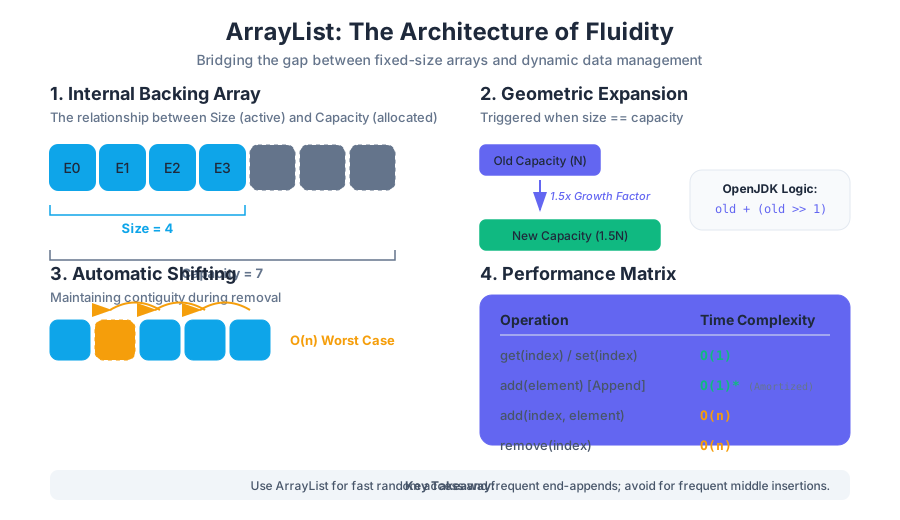
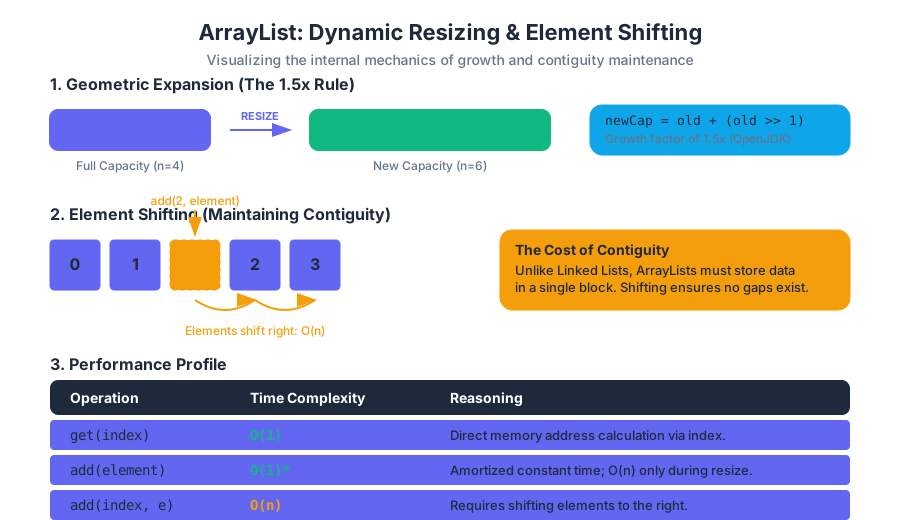
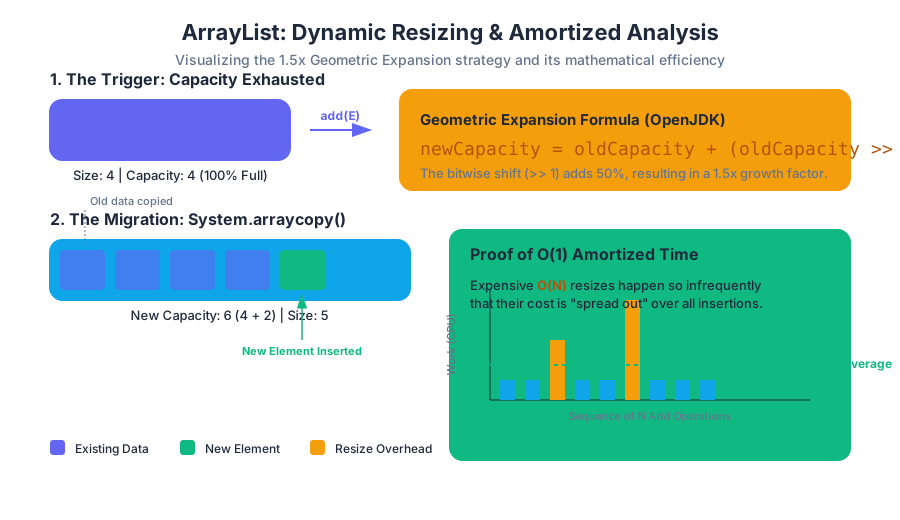
Source Materials
Study Java Programming and Algorithmic Thinking Fundamentals with AI — Free on Lykke
Sign up for free to generate personalized flashcards, quizzes, and study guides from this course. Chat with an AI tutor that knows the material.
Get Started FreeView this course wiki on Lykke · Browse all public course wikis