From the free course Java Programming and Algorithmic Thinking Fundamentals on Lykke
Object-Oriented Programming (OOP)
Key concepts: Classes and Objects · Constructors and Overloading · Encapsulation (Private vs. Public) · Static vs. Instance Variables · Method Overriding (toString, equals)
Designing custom data types using classes, encapsulation, and object-oriented principles.
Object-Oriented Programming (OOP)
Object-Oriented Programming (OOP) represents a fundamental shift in software engineering, moving away from the procedural focus on "actions" and "logic" toward a focus on "data" and "objects." In procedural programming, we write functions or blocks of code that perform computations on data. In OOP, we define data types that encompass both the data itself and the operations that can be performed on that data. This paradigm allows for higher levels of abstraction, making it possible to model complex real-world systems—such as banking engines, social networks, or physical simulations—with clarity and maintainability.
The Core Philosophy: Abstraction and Modeling
At its heart, OOP is about abstraction. An abstraction is a simplified representation of something complex. For instance, a Student object in a university database does not need to store a student's favorite color or childhood pet; it only needs to store the data relevant to the domain, such as studentID, gpa, and enrolledCourses. By defining these attributes and the methods that manipulate them, we create a "black box" that other parts of the program can interact with without needing to understand its internal complexity.
Classes and Objects: The Blueprint and the Instance
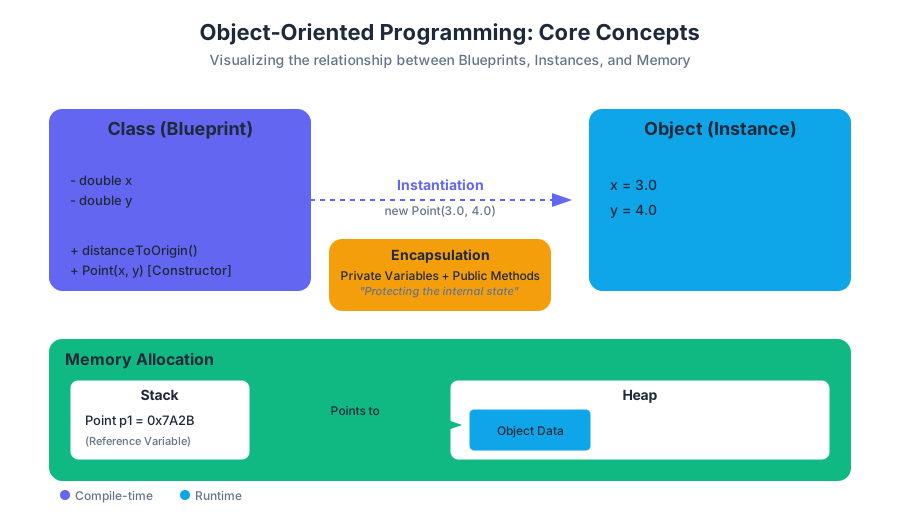
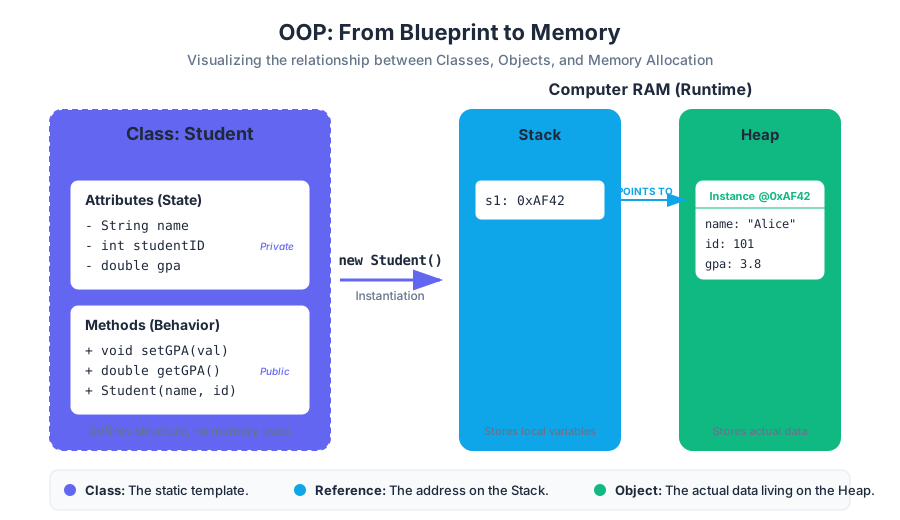
The distinction between a Class and an Object is the most critical concept in OOP. A class is a template or a blueprint. It defines what data a particular type of object will hold and what actions it can perform. An object, conversely, is a concrete instance of that class, occupying space in memory.
Definition: A Class is a compile-time construct that defines a new data type. An Object is a runtime entity that is created (instantiated) based on the class definition.
Memory Allocation: Stack vs. Heap
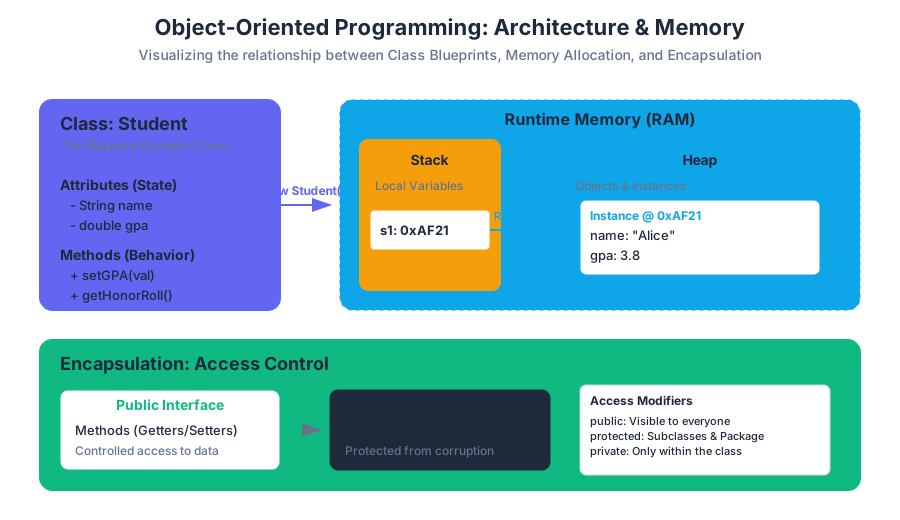
When we declare a primitive variable like int x = 5;, the value is typically stored on the Stack. However, when we create an object using the new keyword, the object itself is allocated on the Heap, and the variable we use to reference it stores the memory address (a reference) rather than the object itself.
| Feature | Class | Object |
|---|---|---|
| Nature | A template or blueprint. | A concrete instance. |
| Existence | Exists in the source code / bytecode. | Exists in the computer's RAM (Heap). |
| Memory | Does not occupy memory for data. | Occupies memory to store its state. |
| Quantity | Defined once per type. | Can have infinite instances. |
Implementation Example: A Simple Point Class
public class Point {
    // Instance variables (State)
    public double x;
    public double y;

    // Method (Behavior)
    public double distanceToOrigin() {
        return Math.sqrt(x * x + y * y);
    }
}

// Usage in another class
public class Main {
    public static void main(String[] args) {
        Point p1 = new Point(); // Instantiation
        p1.x = 3.0;
        p1.y = 4.0;
        System.out.println(p1.distanceToOrigin()); // Outputs 5.0
    }
}
Encapsulation: The Principle of Least Privilege
Encapsulation is the practice of bundling data and methods within a single unit and restricting access to the inner workings of that unit. This is achieved using Access Modifiers. The primary goal is to protect the "internal state" of an object from corruption by outside code.
Private vs. Public
private: The member is only accessible within the class it is defined. This is used for variables to prevent direct modification.public: The member is accessible from any other class. This is used for methods that define the "interface" of the object.
The "Getter and Setter" Pattern
To allow controlled access to private data, we use accessor (getter) and mutator (setter) methods. This allows us to implement validation logic. For example, a setGPA method can check if the value is between 0.0 and 4.0 before updating the variable.
| Modifier | Class | Package | Subclass | World |
|---|---|---|---|---|
public |
Yes | Yes | Yes | Yes |
protected |
Yes | Yes | Yes | No |
default |
Yes | Yes | No | No |
private |
Yes | No | No | No |
The Golden Rule of Encapsulation: Always default to
privatefor instance variables. Only providepublicaccess through methods if absolutely necessary.
Constructors and Overloading
A Constructor is a special method that is called automatically when an object is instantiated. It has no return type (not even void) and must have the exact same name as the class. Its primary purpose is to initialize the object's state.
The this Keyword
Inside a constructor or method, the keyword this refers to the current instance of the object. It is frequently used to disambiguate between instance variables and parameters with the same name.
Constructor Overloading
Java allows a class to have multiple constructors, provided they have different signatures (the number, type, or order of parameters). This provides flexibility in how objects are created.
public class Student {
    private String name;
    private int id;
    private double gpa;

    // Default Constructor
    public Student() {
        this.name = "Unknown";
        this.id = 0;
        this.gpa = 0.0;
    }

    // Parameterized Constructor
    public Student(String name, int id) {
        this.name = name;
        this.id = id;
        this.gpa = 0.0; // Default GPA
    }

    // Overloaded Constructor
    public Student(String name, int id, double gpa) {
        this.name = name;
        this.id = id;
        this.gpa = gpa;
    }
}
Static vs. Instance Variables
Understanding the static keyword is vital for managing memory and defining shared behavior.
Instance Variables (Non-Static)
Every time you create a new object, the JVM allocates a new set of instance variables. If you have 1,000 Student objects, you have 1,000 different name variables in memory.
Static Variables (Class Variables)
A static variable is shared by all instances of a class. There is only one copy of a static variable, regardless of how many objects are created. These are often used for constants (like Math.PI) or counters (to track how many objects have been created).
Static Methods
Static methods can be called without creating an instance of the class (e.g., Math.sqrt()). However, a static method cannot access instance variables because it does not belong to any specific object.
| Feature | Instance (Non-Static) | Static |
|---|---|---|
| Ownership | Owned by the specific Object. | Owned by the Class. |
| Memory | Allocated per object. | Allocated once when class is loaded. |
| Access | Can access static and instance members. | Can only access other static members. |
| Invocation | objectName.method() |
ClassName.method() |
Method Overriding: toString and equals
In Java, every class implicitly inherits from the Object class. The Object class provides several default methods that are often insufficient for custom data types. Method Overriding allows a subclass to provide a specific implementation of a method already defined in its parent class.
The toString() Method
By default, toString() returns a string consisting of the class name and the object's memory address (e.g., Student@1a2b3c4d). To make this useful, we override it to return a readable representation of the object's data.
The equals() Method
The == operator, when used with objects, checks for referential equality—it asks, "Do these two variables point to the exact same spot in memory?" Usually, we want logical equality—"Do these two objects contain the same data?"
To implement equals() correctly, we must follow a specific contract. It must be:
- Reflexive:
x.equals(x)is true. - Symmetric: If
x.equals(y), theny.equals(x). - Transitive: If
x.equals(y)andy.equals(z), thenx.equals(z).
Worked Example: Overriding in a Complex Number Class
public class Complex {
    private final double re; // Real part
    private final double im; // Imaginary part

    public Complex(double re, double im) {
        this.re = re;
        this.im = im;
    }

    @Override
    public String toString() {
        return re + " + " + im + "i";
    }

    @Override
    public boolean equals(Object other) {
        // 1. Check for identity (same memory address)
        if (this == other) return true;

        // 2. Check for null
        if (other == null) return false;

        // 3. Check for class compatibility
        if (this.getClass() != other.getClass()) return false;

        // 4. Cast and compare fields
        Complex that = (Complex) other;
        return (this.re == that.re) && (this.im == that.im);
    }
}
Common Pitfalls in OOP
1. The NullPointerException (NPE)
Because object variables are references, they can be null. Attempting to call a method on a null reference is the most common error in Java.
Fix: Always initialize objects before use, or use null-checks.
2. Aliasing Issues
When you assign one object variable to another (p2 = p1), you are not copying the object; you are copying the reference. Both variables now point to the same object. Modifying p1 will change p2.
Fix: To create a true copy, you must create a new object using a "copy constructor."
3. Over-Engineering
Beginners often create deep inheritance hierarchies or excessive getters/setters for data that doesn't need them. Fix: Follow the YAGNI (You Ain't Gonna Need It) principle. Keep classes focused and minimal.
4. Confusing static and instance
Attempting to call a non-static method from public static void main is a classic error.
Fix: Remember that main is static; it exists before any objects do. To use instance methods, you must first instantiate the class inside main.
Summary of OOP Benefits
- Modularity: Code can be developed and debugged independently.
- Information Hiding: Internal details are hidden, reducing the "surface area" for bugs.
- Reusability: Classes can be reused across different projects.
- Pluggability: If an object isn't working, you can swap it for another object of the same type with a different internal implementation.
Source Materials
- Variables.java
- Week 01 - Algorithmic Thinking and Design-FT-S25.pdf
- Week 02 - Implementation and Counting-FT-F25.pdf
- Week 03 - Elements of Programming-FT.pdf
- Week 04 - 1 - Conditionals and Loops-FT.pdf
- Week 04 - 2 - Conditionals and Loops-FT.pdf
- Week 06 - 1 - Input and Output.pdf
- Week 06 - 2 - Input and Output.pdf
Study Java Programming and Algorithmic Thinking Fundamentals on Lykke
This course page is free to open: signed out, you can read its first two sections, and signing in, on any plan, opens the rest. The free Lykke Chrome extension syncs your own Canvas courses, so ChatGPT, Claude and Muse can answer from your classes and deadlines. It only reads Canvas.
Add the free extensionSign in to open every sectionAll sections of Java Programming and Algorithmic Thinking Fundamentals · Browse more course pages