From the free course Java Programming and Algorithmic Thinking Fundamentals on Lykke
Methods and Modular Programming
Key concepts: Method Signatures · Return Types · Parameter Passing · Code Reusability · Modular Design
Designing reusable code through static methods, parameter passing, and return values.
Methods and Modular Programming
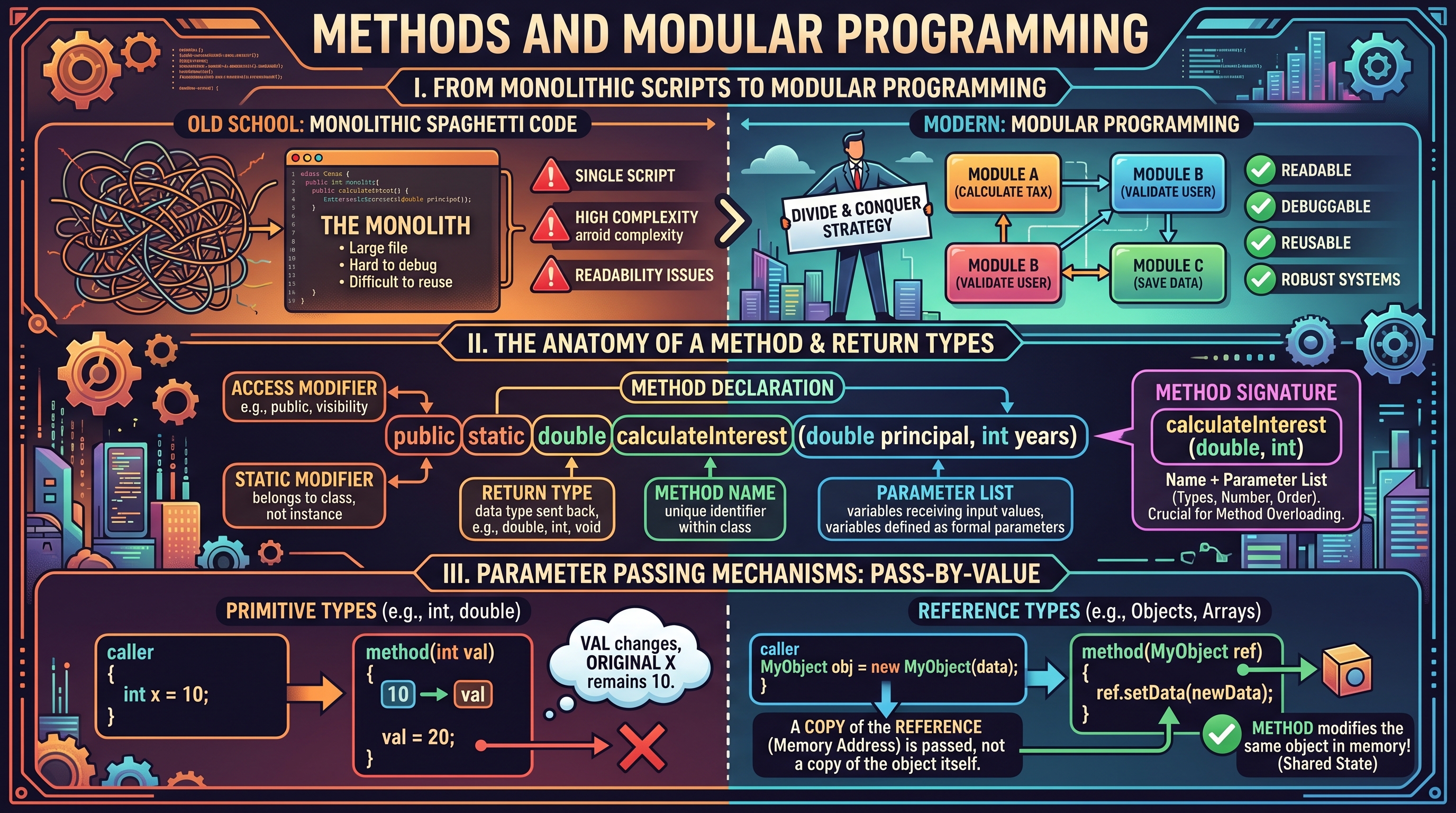
In the evolution of software engineering, the transition from monolithic scripts to modular programming represents a fundamental shift in how we manage complexity. At its core, modular programming is the practice of dividing a program into separate, independent sub-units—called methods (or functions)—each responsible for a specific, well-defined task. This "divide and conquer" strategy allows developers to build systems that are not only easier to read and debug but also significantly more robust and reusable.
The Anatomy of a Method: Signatures and Return Types
A method is a programmed procedure that is defined within a class. In Java, methods are the primary vehicle for expressing behavior. To understand methods, one must first master the Method Signature, which acts as the method's unique identity within the scope of a class.
1. What it is
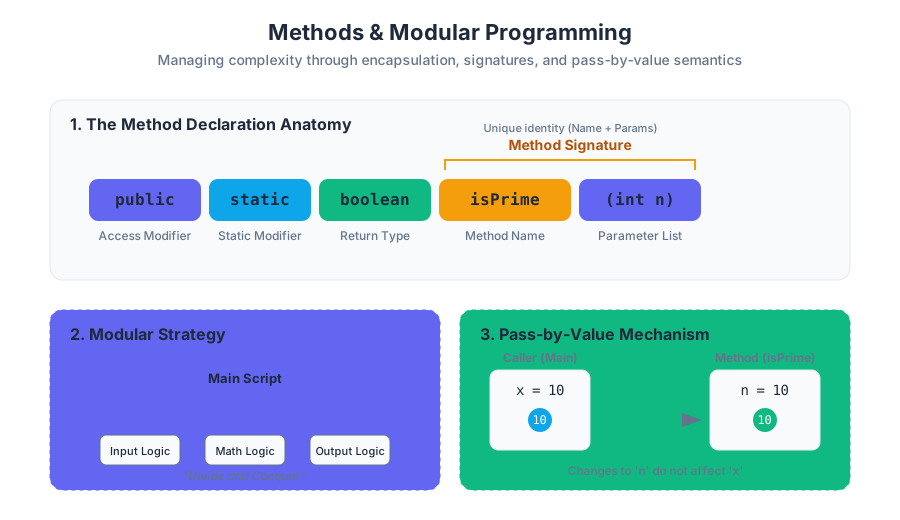
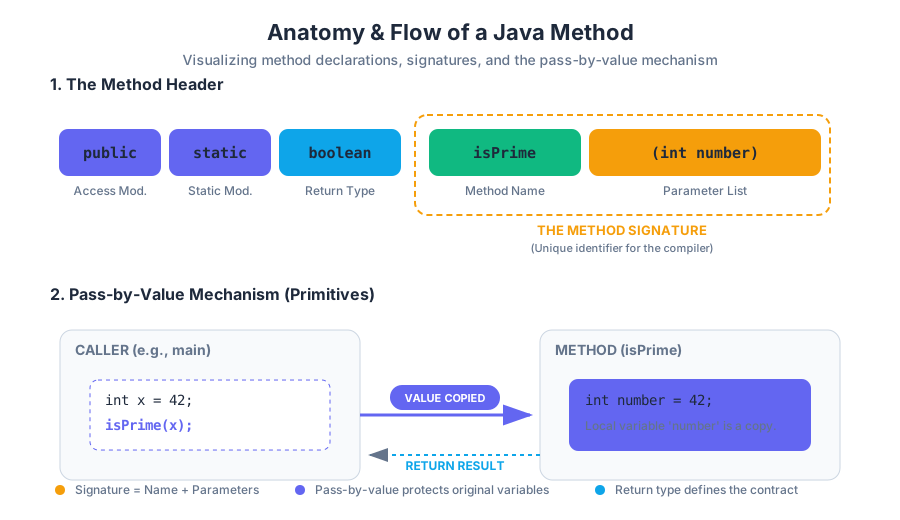
The Method Signature consists of the method name and the parameter list (the number, type, and order of its arguments). Note that in Java, the return type is not part of the signature for the purposes of method overloading, though it is a required part of the method declaration.
Definition: Method Declaration A complete method declaration includes the access modifier (e.g.,
public), the static modifier (if applicable), the Return Type, the Method Name, the Parameter List, and the Method Body.
2. Why it matters
Signatures allow the compiler to distinguish between different methods. This enables Method Overloading, where multiple methods share the same name but operate on different types of data (e.g., Math.abs(int) vs. Math.abs(double)). The Return Type ensures type safety, guaranteeing that a method providing a result adheres to the contract expected by the caller.
3. How it works: The Method Header
The structure of a method header follows a strict syntax:
public static <return_type> <name>(<parameter_list>)
| Component | Purpose | Example |
|---|---|---|
| Access Modifier | Defines visibility (who can call this). | public |
| Static Modifier | Indicates the method belongs to the class, not an instance. | static |
| Return Type | The data type of the value sent back to the caller. | double, int, void |
| Method Name | The identifier used to invoke the method. | calculateInterest |
| Parameter List | The variables that receive input values. | (double principal, int years) |
4. Concrete Example: Primality Testing
Consider a method designed to determine if an integer is prime. This encapsulates a specific mathematical logic that can be reused across various applications.
public class PrimeLibrary {
    /**
     * Determines if a number is prime.
     * @param n The integer to check.
     * @return true if prime, false otherwise.
     */
    public static boolean isPrime(int n) {
        if (n <= 1) return false;
        for (int i = 2; i <= Math.sqrt(n); i++) {
            if (n % i == 0) return false;
        }
        return true;
    }

    public static void main(String[] args) {
        int testValue = Integer.parseInt(args[0]);
        if (isPrime(testValue)) {
            System.out.println(testValue + " is a prime number.");
        } else {
            System.out.println(testValue + " is composite.");
        }
    }
}
5. Variations: The void Return Type
Not all methods return a value. The void keyword indicates that a method performs an action (a "side effect") rather than a calculation. Common examples include printing to the console or modifying the state of an array.
6. Common Pitfalls
- Missing Return Statement: If a method specifies a return type (e.g.,
int), every possible execution path must end in areturnstatement. - Signature Confusion: Attempting to define two methods with the same name and parameters but different return types will result in a compilation error.
Parameter Passing: The "Pass-by-Value" Mechanism
One of the most misunderstood concepts in introductory programming is how data is actually moved from the caller to the method. Java strictly employs a Pass-by-Value semantics.
1. What it is
Pass-by-Value means that when a method is called, the JVM creates a copy of the argument's value and assigns it to the method's formal parameter. The method operates on this copy, not the original variable.
2. Why it matters
This mechanism provides encapsulation and protection. A method cannot accidentally overwrite a local variable in the main method unless it is explicitly designed to return a new value or modify a reference type.
3. How it works: Primitives vs. References
The behavior of pass-by-value differs visually between primitive types (like int) and reference types (like arrays).
- Primitives: The actual numeric value is copied. Changes inside the method stay inside the method.
- References (Arrays/Objects): The memory address (the reference) is copied. While the method cannot change which array the original variable points to, it can modify the contents of that array because both the original and the copy point to the same memory location.
| Feature | Primitive Type (e.g., int) |
Reference Type (e.g., int[]) |
|---|---|---|
| What is passed? | A copy of the literal value. | A copy of the memory address. |
| Effect of modification | Local to the method. | Persists after the method returns. |
| Memory Location | Stack. | Heap (referenced from Stack). |
4. Concrete Example: The Swap Failure
A classic demonstration of pass-by-value is the attempt to swap two integers.
public class SwapExample {
    // This will NOT work
    public static void swap(int a, int b) {
        int temp = a;
        a = b;
        b = temp;
    }

    // This WILL work because it modifies the array contents
    public static void swapInArray(int[] arr, int i, int j) {
        int temp = arr[i];
        arr[i] = arr[j];
        arr[j] = temp;
    }

    public static void main(String[] args) {
        int x = 10, y = 20;
        swap(x, y);
        // x is still 10, y is still 20

        int[] nums = {10, 20};
        swapInArray(nums, 0, 1);
        // nums[0] is now 20, nums[1] is now 10
    }
}
5. Pitfalls: Shadowing and Scope
Variables declared inside a method (including parameters) have local scope. They exist only while the method is executing. If you name a local variable the same as a class-level variable, the local one "shadows" the class-level one, often leading to logic errors where the developer thinks they are updating a global state when they are only updating a temporary local copy.
Modular Design and Code Reusability
Modular design is the architectural philosophy of building a system from independent, interchangeable modules. In programming, this translates to writing methods that are orthogonal—meaning they do one thing well and do not rely on the internal state of other methods.
1. What it is
Modular design involves identifying repeated patterns and abstracting them into methods. Instead of writing a 500-line main method, a modular program consists of several 10-20 line methods that call each other.
2. Why it matters
- Maintainability: If a bug is found in the "calculate tax" logic, you only fix it in the
calculateTaxmethod, rather than searching through thousands of lines of code. - Readability: Code becomes self-documenting.
double total = applyDiscount(calculateTotal(cart));is much easier to read than the raw arithmetic. - Testing: You can test the
isPrimemethod in isolation before using it in a complex cryptography program.
3. How it works: The Pipeline Approach
Modular programming often follows a pipeline: Input → Transform → Output. Each stage of the pipeline is a method.
| Stage | Responsibility | Method Example |
|---|---|---|
| Data Acquisition | Reading from StdIn or files. |
readData() |
| Validation | Checking for errors or edge cases. | isValid(data) |
| Processing | The core logic/algorithm. | computeStatistics(data) |
| Presentation | Formatting and printing results. | printReport(results) |
4. Concrete Example: Array Processing Library
The following example demonstrates a modular approach to handling an array of doubles, separating the creation, printing, and calculation logic.
public class ArrayStats {

    // Module 1: Creation
    public static double[] createRandomArray(int n) {
        double[] a = new double[n];
        for (int i = 0; i < n; i++) a[i] = Math.random();
        return a;
    }

    // Module 2: Logic/Calculation
    public static double findAverage(double[] a) {
        double sum = 0;
        for (double val : a) sum += val;
        return sum / a.length;
    }

    // Module 3: Output
    public static void printArray(double[] a) {
        for (double val : a) {
            System.out.printf("%.2f ", val);
        }
        System.out.println();
    }

    public static void main(String[] args) {
        int size = 5;
        double[] data = createRandomArray(size);
        printArray(data);
        System.out.println("Average: " + findAverage(data));
    }
}
5. Variations: Library Classes
When methods are marked public static, they can be grouped into "Library" classes (like java.lang.Math). These classes do not represent objects; they are simply collections of related tools. This is the ultimate form of reusability.
Advanced Array Manipulation in Methods
Arrays and methods are frequently used together to implement complex algorithms like searching, sorting, and shuffling. Because arrays are passed by reference, methods can efficiently manipulate large datasets without the overhead of copying the entire array.
1. Searching and Sorting
Searching is the process of finding the index of a target value. Sorting is the process of arranging elements in a specific order (e.g., ascending).
2. Shuffling: The Fisher-Yates Algorithm
To shuffle an array, we iterate through it and swap each element with a randomly selected element that comes after it. This ensures a uniform distribution.
3. How it works: Implementation logic
The following code demonstrates three essential array operations: reversing, finding the maximum, and shuffling.
public class ArrayUtils {

    // Reverses the array in place
    public static void reverse(double[] a) {
        int n = a.length;
        for (int i = 0; i < n / 2; i++) {
            double temp = a[i];
            a[i] = a[n - 1 - i];
            a[n - 1 - i] = temp;
        }
    }

    // Finds the maximum value
    public static double findMax(double[] a) {
        double max = Double.NEGATIVE_INFINITY;
        for (double val : a) {
            if (val > max) max = val;
        }
        return max;
    }

    // Fisher-Yates Shuffle
    public static void shuffle(double[] a) {
        int n = a.length;
        for (int i = 0; i < n; i++) {
            int r = i + (int) (Math.random() * (n - i));
            double temp = a[r];
            a[r] = a[i];
            a[i] = temp;
        }
    }
}
4. Comparison of Common Array Method Patterns
| Algorithm | Time Complexity | Space Complexity | Modification Type |
|---|---|---|---|
| Linear Search | $O(n)$ | $O(1)$ | Read-only |
| In-place Reverse | $O(n)$ | $O(1)$ | Destructive (Modifies input) |
| Fisher-Yates Shuffle | $O(n)$ | $O(1)$ | Destructive (Modifies input) |
| Deep Copy | $O(n)$ | $O(n)$ | Non-destructive (Creates new) |
5. Common Pitfalls: The "Aliasing" Trap
When passing an array to a method, remember that the method works on the original array. If you need to preserve the original data, you must perform a Deep Copy before passing it or within the method itself.
// Correct way to copy an array to avoid aliasing
public static double[] copyArray(double[] original) {
    double[] copy = new double[original.length];
    for (int i = 0; i < original.length; i++) {
        copy[i] = original[i];
    }
    return copy;
}
Scope, Lifetime, and the Call Stack
To truly master methods, one must understand the underlying mechanics of the Call Stack.
1. What it is
The Call Stack is a data structure that stores information about the active subroutines of a computer program. Each time a method is called, a new Stack Frame is "pushed" onto the stack.
2. How it works
A stack frame contains:
- The values of the parameters passed to the method.
- The local variables declared within the method.
- The Return Address (where to go back in the code once the method finishes).
When the method reaches a return statement or the end of its block, its stack frame is "popped" off, and its local variables are destroyed. This is why variables inside a method are not accessible from main.
3. Visualizing the Stack
Imagine main calls methodA, and methodA calls methodB.
- Stack Level 0:
mainframe (containsargs, etc.) - Stack Level 1:
methodAframe (containsmethodAlocals) - Stack Level 2:
methodBframe (containsmethodBlocals)
Once methodB finishes, Level 2 is removed. Level 1 becomes active again.
4. Pitfalls: Stack Overflow
If a method calls itself (recursion) too many times without a base case, or if there is a circular dependency between methods, the stack will run out of memory, resulting in a StackOverflowError.
Source Materials
- Week 01 - Algorithmic Thinking and Design-FT-S25.pdf
- Week 01 - Algorithmic Thinking and Design-FT-F24.pdf
- Week 1 - Algorithmic Thinking and Design.pdf
- Week 1 - Algorithmic Thinking and Design.pdf
- Week 01 - Algorithmic Thinking and Design-FT-S25.pdf
- Week 1 - Algorithmic Thinking and Design.pdf
- Week 1 - Algorithmic Thinking and Design.pdf
- Week 1 - Algorithmic Thinking and Design.pdf
Study Java Programming and Algorithmic Thinking Fundamentals on Lykke
This course page is free to open: signed out, you can read its first two sections, and signing in, on any plan, opens the rest. The free Lykke Chrome extension syncs your own Canvas courses, so ChatGPT, Claude and Muse can answer from your classes and deadlines. It only reads Canvas.
Add the free extensionSign in to open every sectionAll sections of Java Programming and Algorithmic Thinking Fundamentals · Browse more course pages