From the free course Java Programming and Algorithmic Thinking Fundamentals on Lykke
Foundations of Java and Programming
Key concepts: Java Program Structure (Main Method) · Variable Types (int, boolean, double) · String Concatenation · Command-Line Arguments · Arithmetic Operators
Introduction to the basic structure of Java programs, variable types, and simple console operations.
Foundations of Java and Programming
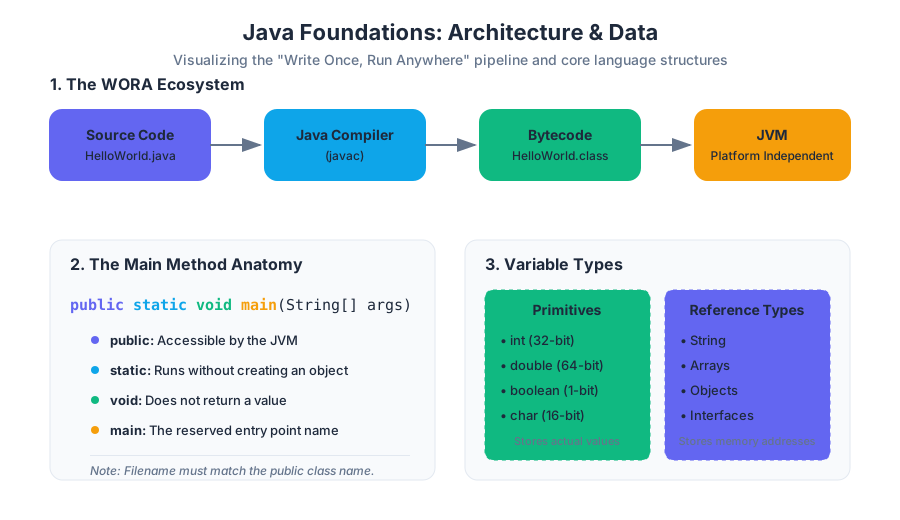
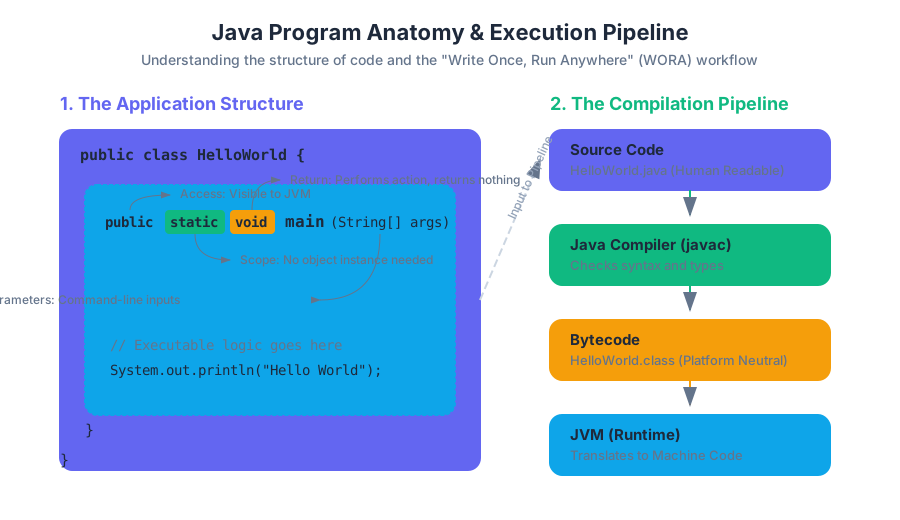
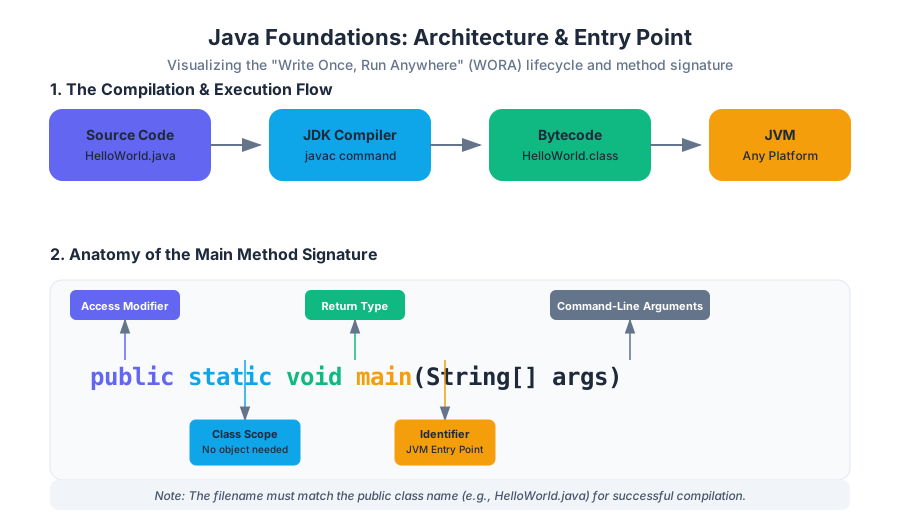
Java is more than just a programming language; it is a platform-independent ecosystem designed around the philosophy of "Write Once, Run Anywhere" (WORA). At its core, Java is a high-level, class-based, object-oriented language that abstracts away the complexities of memory management through the Java Virtual Machine (JVM). This section explores the foundational architecture of a Java program, the mechanics of data storage, and the logical structures that allow developers to transform raw data into meaningful computation.
Java Program Structure: The Anatomy of an Application
What it is
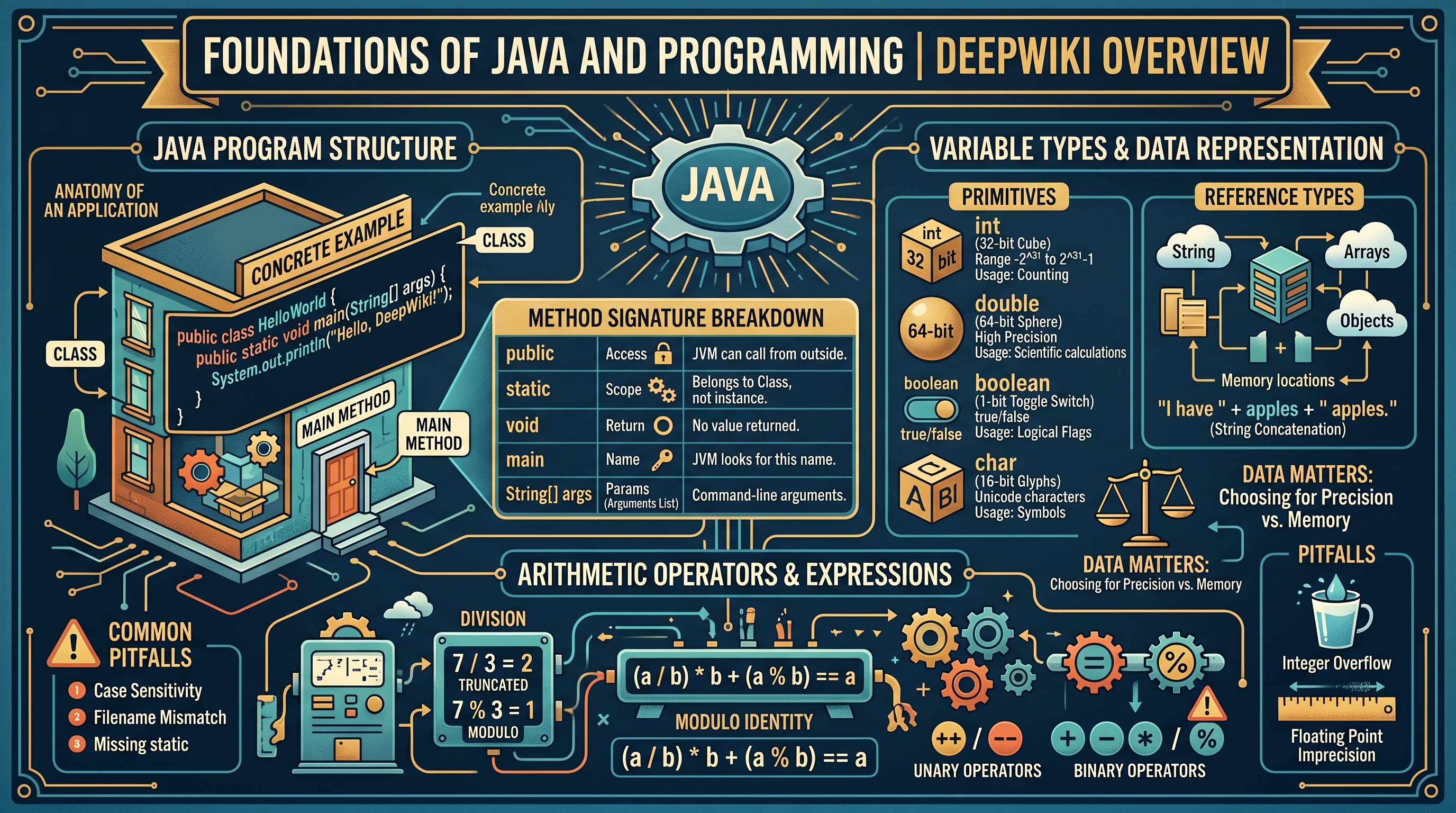
In Java, every line of executable code must reside inside a class. The entry point for any standalone application is the main method. This method follows a strict signature: public static void main(String[] args).
Why it matters
The rigid structure of the main method allows the JVM to locate the starting point of a program without ambiguity. By enforcing a class-centric model, Java encourages encapsulation from the very first line of code, ensuring that even simple scripts are organized into logical units.
How it works: The Method Signature Breakdown
To understand how a Java program executes, one must parse the components of the main method:
| Keyword | Purpose | Technical Implication |
|---|---|---|
public |
Access Modifier | Allows the JVM to call the method from outside the class. |
static |
Scope | The method belongs to the class itself, not a specific instance. The JVM can run it without "new-ing" up an object. |
void |
Return Type | The method performs actions but does not return a value to the caller. |
main |
Identifier | The reserved name the JVM looks for to begin execution. |
String[] args |
Parameter | An array of strings representing command-line arguments passed by the user. |
Concrete Example
public class HelloWorld {
    public static void main(String[] args) {
        // This is a single-line comment
        System.out.println("Hello, DeepWiki!");
    }
}
Common Pitfalls
- Case Sensitivity: Java is case-sensitive.
Mainis not the same asmain. - Filename Mismatch: The name of the
public classmust exactly match the filename (e.g.,HelloWorld.java). - Missing
static: Forgettingstaticwill result in a runtime error because the JVM cannot instantiate your class automatically to run the method.
Variable Types and Data Representation
What it is
A variable is a reserved location in memory used to store data. Java is a statically-typed language, meaning every variable must have a declared type before it can be used. This allows the compiler to verify type safety and allocate the appropriate amount of memory.
Why it matters
Choosing the correct data type is a balance between precision and resource management. In high-performance systems, using a 64-bit double when a 32-bit float suffices can lead to unnecessary memory overhead.
How it works: Primitive vs. Reference Types
Java categorizes data into two main groups: Primitives (basic values) and Reference Types (objects/arrays).
| Type | Size (bits) | Range | Default Value | Usage |
|---|---|---|---|---|
int |
32 | -2^31 to 2^31-1 | 0 | Standard integers for counting/indexing. |
double |
64 | ~1.8e308 (15 decimal digits) | 0.0 | High-precision floating-point numbers. |
boolean |
1 (virtual) | true or false |
false |
Logical flags and control flow. |
char |
16 | Unicode characters | '\u0000' | Single symbols or letters. |
long |
64 | -2^63 to 2^63-1 | 0L | Large integers (e.g., timestamps). |
String Concatenation
While not a primitive, String is a fundamental class in Java. The + operator is overloaded to perform string concatenation. When a String is added to any other type, Java automatically converts that type to its string representation.
int apples = 5;
String message = "I have " + apples + " apples."; // Result: "I have 5 apples."
Common Pitfalls
- Integer Overflow: Adding 1 to
Integer.MAX_VALUEresults in a negative number due to two's complement arithmetic. - Floating Point Imprecision:
doublevalues are approximations.0.1 + 0.2does not exactly equal0.3due to binary representation limits.
Arithmetic Operators and Expressions
What it is
Arithmetic operators are symbols used to perform mathematical calculations. Java supports standard binary operators (+, -, *, /, %) and unary operators (++, --).
How it works: Integer Division vs. Modulo
One of the most significant points of confusion for new developers is integer division. If both operands are integers, the result is truncated (not rounded).
The Modulo Identity: For any integers
aandb, the expression(a / b) * b + (a % b)will always equala.
Operator Precedence and Associativity
Java follows a specific order of operations, similar to PEMDAS, but expanded for programming-specific symbols.
| Precedence | Operator | Description |
|---|---|---|
| 1 | ++, -- |
Post-increment/decrement |
| 2 | *, /, % |
Multiplicative |
| 3 | +, - |
Additive |
| 4 | <, >, <=, >= |
Relational |
| 5 | ==, != |
Equality |
Concrete Example: The IntOps Program
public class IntOps {
    public static void main(String[] args) {
        int a = 17;
        int b = 5;

        int sum  = a + b;  // 22
        int quot = a / b;  // 3 (Integer division)
        int rem  = a % b;  // 2 (Remainder)

        System.out.println(a + " / " + b + " = " + quot + " rem " + rem);
    }
}
Command-Line Arguments and Parsing
What it is
Command-line arguments are inputs provided to a program at the moment of execution. These are captured by the String[] args parameter in the main method.
Why it matters
Arguments allow a program to be dynamic. Instead of hard-coding values, a developer can write a generic tool (like a file compressor or a calculator) that operates on different data every time it is run.
How it works: Type Conversion
Because args is an array of Strings, numeric inputs must be converted using wrapper classes.
Integer.parseInt(args[0]): Converts a String to anint.Double.parseDouble(args[1]): Converts a String to adouble.
Concrete Example
Running a program with java MyProg 10 20:
public class MyProg {
    public static void main(String[] args) {
        int first = Integer.parseInt(args[0]); // first = 10
        int second = Integer.parseInt(args[1]); // second = 20
        System.out.println("Sum: " + (first + second));
    }
}
Common Pitfalls
- ArrayIndexOutOfBoundsException: Occurs if you try to access
args[0]but the user provided no arguments. - NumberFormatException: Occurs if you try to parse "hello" as an integer.
Logic and Control Flow
What it is
Control flow refers to the order in which individual statements are executed. Java uses conditional statements (if, else) and loops (while, for) to break the linear progression of code.
Relational and Logical Operators
Control flow relies on boolean expressions—statements that evaluate to either true or false.
| Operator | Meaning | Example |
|---|---|---|
&& |
Logical AND | (x > 0 && x < 10) |
| ` | ` | |
! |
Logical NOT | !(x > 5) |
== |
Equal to | x == 10 |
!= |
Not equal to | x != 0 |
Short-Circuit Evaluation
Java employs short-circuiting for logical operators.
- In
A && B, ifAis false,Bis never evaluated because the whole expression must be false. - In
A || B, ifAis true,Bis never evaluated because the whole expression must be true.
Iterative Structures: While vs. For
whileloop: Used when the number of iterations is not known beforehand (e.g., reading until the end of a file).forloop: Used when iterating over a specific range or collection.
// For loop anatomy: initialization; condition; increment
for (int i = 0; i < 5; i++) {
    System.out.println("Iteration: " + i);
}
Arrays and Data Collections
What it is
An array is a container object that holds a fixed number of values of a single type. The length of an array is established when the array is created.
How it works: Memory and Indexing
Arrays in Java are zero-indexed. An array of size N has indices ranging from 0 to N-1. Unlike primitives, arrays are stored on the heap, and the variable itself is a reference (a memory address).
Common Array Algorithms
- Traversal: Visiting every element using a loop.
- Accumulation: Summing all elements.
- Extrema Finding: Iterating to find the
minormax. - Swapping: Using a temporary variable to exchange two elements.
// Swapping elements at index i and j
int temp = arr[i];
arr[i] = arr[j];
arr[j] = temp;
Reference Aliasing vs. Deep Copying
If you set int[] b = a;, both variables point to the same memory location. Changing b[0] will change a[0]. To create a true independent copy, you must allocate a new array and copy elements individually or use System.arraycopy().
| Operation | Syntax | Memory Impact |
|---|---|---|
| Declaration | int[] a; |
Creates a reference variable (null). |
| Initialization | a = new int[10]; |
Allocates memory for 10 integers on the heap. |
| Access | a[5] = 20; |
Direct memory access via offset calculation. |
| Aliasing | int[] b = a; |
Two references pointing to one memory block. |
Methods and Modular Programming
What it is
A method is a block of code which only runs when it is called. It allows for abstraction (hiding complexity) and reusability (DRY - Don't Repeat Yourself).
Anatomy of a Method Signature
public static double calculateAverage(int[] numbers) { ... }
- Return Type:
double(the output of the method). - Parameters:
int[] numbers(the input required).
Pass-by-Value
It is a common misconception that Java passes objects by reference. In reality, Java is always pass-by-value. When you pass an array to a method, you are passing the value of the reference (the memory address). This means the method can modify the contents of the array, but it cannot make the original variable point to a different array.
Concrete Example: Modular Design
public class Stats {
    public static double findSum(double[] a) {
        double sum = 0.0;
        for (double val : a) sum += val;
        return sum;
    }

    public static void main(String[] args) {
        double[] data = {1.1, 2.2, 3.3};
        double total = findSum(data);
        System.out.println("Total: " + total);
    }
}
Standard Libraries and I/O (StdIn/StdOut)
What it is
While Java provides System.out and Scanner, many academic environments use standard libraries (like StdIn, StdOut, and StdDraw) to simplify the interface for reading and visualizing data.
Why it matters
Standard Java I/O is verbose. StdIn allows for "tokenized" reading, where the library automatically handles whitespace and type conversion, allowing students to focus on logic rather than regex or buffer management.
Standard Drawing (StdDraw)
StdDraw provides a simple way to produce graphical output. It uses a coordinate system (default 0.0 to 1.0) to render points, lines, and shapes.
| Method | Description |
|---|---|
StdDraw.line(x0, y0, x1, y1) |
Draws a line segment between two points. |
StdDraw.setPenRadius(r) |
Changes the thickness of the drawing line. |
StdDraw.filledSquare(x, y, r) |
Draws a solid square centered at (x, y). |
StdDraw.show() |
Displays the offscreen buffer (used for animation). |
Summary of Foundations
The journey from a simple main method to modular, array-driven programs represents the transition from "writing scripts" to "building systems." By understanding the interplay between memory (variables/arrays), logic (control flow), and abstraction (methods), a programmer gains the tools necessary to solve complex computational problems efficiently.
Source Materials
Study Java Programming and Algorithmic Thinking Fundamentals on Lykke
This course page is free to open: signed out, you can read its first two sections, and signing in, on any plan, opens the rest. The free Lykke Chrome extension syncs your own Canvas courses, so ChatGPT, Claude and Muse can answer from your classes and deadlines. It only reads Canvas.
Add the free extensionSign in to open every sectionAll sections of Java Programming and Algorithmic Thinking Fundamentals · Browse more course pages