From the free course Introduction to Computer Science and Programming in Python on Lykke
Testing and Debugging
Key concepts: Black Box Testing · Glass Box Testing · Path Completeness · Boundary Conditions
Covers strategies for ensuring code correctness and identifying logical errors.
Testing and Debugging
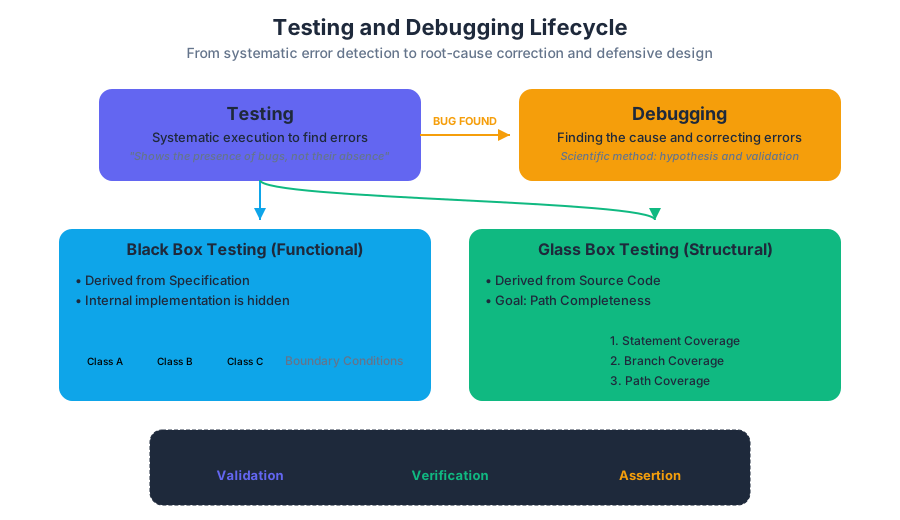
In the lifecycle of software development, writing code is often the easiest part. Ensuring that the code performs correctly under all possible circumstances—and identifying why it fails when it inevitably does—is the hallmark of a senior engineer. We must distinguish between two fundamental activities: Testing is the systematic process of executing a program with the intent of finding errors, while Debugging is the process of finding the cause of those errors and correcting them.
As we move from simple scripts to complex systems, our approach must shift from "trial and error" to a rigorous, scientific methodology. We do not test to prove a program is correct; as Edsger W. Dijkstra famously noted, "Program testing can be used to show the presence of bugs, but never to show their absence." Instead, we test to increase our confidence in the software's reliability.
The Philosophy of Defensive Programming
Before diving into specific testing methodologies, we must adopt the mindset of Defensive Programming. This is the practice of designing software to continue functioning under unforeseen circumstances. It involves:
- Validation: Ensuring the software meets the requirements (Are we building the right product?).
- Verification: Ensuring the software functions correctly (Are we building the product right?).
- Assertion: Using
assertstatements to document assumptions in the code that must be true for the subsequent logic to be valid.
Black Box Testing
Black Box Testing (also known as functional testing) treats the software as a "black box"—the internal implementation, data structures, and algorithms are invisible to the tester. The test cases are derived solely from the specification (the documentation describing what the code is supposed to do).
The Principle of Equivalence Partitioning
Since we cannot test every possible input (the input space is often infinite), we use Equivalence Partitioning. We divide the input data into partitions of equivalent data from which test cases can be derived. An equivalence class represents a set of inputs that the program should treat identically.
Definition: An Equivalence Class is a subset of the input domain where the behavior of the program is expected to be the same for any element within that subset. If one test case in a class uncovers an error, all other test cases in that class are likely to uncover the same error.
| Feature | Black Box Testing | Glass Box Testing |
|---|---|---|
| Focus | Requirements and Specifications | Internal Logic and Code Structure |
| Tester Knowledge | No knowledge of implementation | Full knowledge of source code |
| Goal | Validate output against input | Ensure all code paths are executed |
| Benefit | Unbiased; finds missing functions | Finds "hidden" logic errors |
| Limitation | Cannot test hidden code paths | Cannot find missing requirements |
Implementation Example: Bisection Search
Consider a function designed to find the square root of a number using the bisection method. In Black Box testing, we look at the signature and the docstring, not the while loop logic.
def find_square_root(x: float, epsilon: float = 0.01) -> float:
    """
    Computes the square root of x using bisection search.
    Precondition: x >= 0, epsilon > 0
    Returns: y such that y*y is within epsilon of x.
    """
    if x < 0:
        raise ValueError("Cannot compute square root of negative number")

    low = 0.0
    high = max(1.0, x)
    ans = (high + low) / 2.0

    while abs(ans**2 - x) >= epsilon:
        if ans**2 < x:
            low = ans
        else:
            high = ans
        ans = (high + low) / 2.0
    return ans

# Black Box Test Suite based on Specification
def test_find_square_root():
    # Test Case 1: Perfect square
    assert abs(find_square_root(16.0) - 4.0) < 0.01
    # Test Case 2: Float input
    assert abs(find_square_root(0.25) - 0.5) < 0.01
    # Test Case 3: Large number
    assert abs(find_square_root(1000000.0) - 1000.0) < 0.01
    # Test Case 4: Boundary (Zero)
    assert abs(find_square_root(0.0) - 0.0) < 0.01
Glass Box Testing
Glass Box Testing (or White Box Testing) uses the internal structure of the code to design test cases. The goal is to ensure that the "plumbing" of the program is sound. We look at the control flow graph of the program and attempt to achieve various levels of coverage.
Path Completeness
A test suite is said to be Path Complete if it exercises every possible path through the program's control flow. This is the gold standard of Glass Box testing, but it is often unattainable in practice due to loops and complex branching.
- Statement Coverage: Every line of code is executed at least once.
- Branch Coverage: Every outcome of every decision point (e.g., both the
TrueandFalsebranches of anifstatement) is executed. - Path Coverage: Every distinct sequence of statements from the start to the end of the function is executed.
Complexity of Path Coverage
For a program with $n$ sequential if statements, there are $2^n$ possible paths. If a program contains a loop that can run up to $k$ times, and there are $m$ paths inside the loop, the number of paths grows exponentially ($m^k$). This is known as Path Explosion.
ALGORITHM: CalculatePathComplexity(ControlFlowGraph G)
    1. Identify all decision nodes (if, while, for, switch)
    2. For each node, count the number of outgoing edges (e)
    3. Cyclomatic Complexity M = E - N + 2P
       where:
       E = number of edges
       N = number of nodes
       P = number of connected components (usually 1)
    4. RETURN M (The minimum number of tests for branch coverage)
Boundary Conditions
Errors rarely occur in the "middle" of an input range. They cluster at the Edges. Boundary condition testing focuses on the values at the limits of the input domain, just inside and just outside the boundaries.
Common Boundary Categories
When testing a function, you should always consider the following "Stress" inputs:
- Numeric:
0,1,-1,max_int,min_int,float.epsilon,NaN,Infinity. - Collections (Lists/Strings): Empty list
[], empty string"", single element, duplicate elements, very large collections. - Types: Passing a float where an integer is expected, or
Nonewhere an object is expected.
| Data Type | Boundary Test Cases | Logic to Check |
|---|---|---|
| Integers | 0, 1, -1, 2^31-1, -2^31 |
Overflow, off-by-one errors, division by zero |
| Floats | 0.0, 1e-7, 1e30, NaN |
Precision loss, epsilon comparison errors |
| Strings | "", " ", \0, very long strings |
Null terminators, whitespace handling, memory allocation |
| Lists | [], [x], [x, x, x] |
Indexing errors, empty iteration, aliasing |
The Danger of Off-by-One Errors (OBOE)
In C-style languages, boundary conditions often manifest as buffer overflows. If a loop runs from 0 to n instead of 0 to n-1, it accesses memory outside the allocated bounds.
#include <stdio.h>

// A classic boundary condition failure: Buffer Overflow
void vulnerable_function(int *arr, int size) {
    // If size is 10, and we loop <= size, we hit the 11th element (index 10)
    for (int i = 0; i <= size; i++) {
        arr[i] = i * 2; // Potential memory corruption at arr[size]
    }
}

int main() {
    int data[10];
    vulnerable_function(data, 10); // Boundary error triggered here
    return 0;
}
The Debugging Process: A Scientific Approach
When a test fails, we move into the Debugging phase. Debugging is not a random walk through the code; it is an application of the Scientific Method.
- Study the Data: Examine the failing test case and the resulting error message (the symptom).
- Form a Hypothesis: Propose a reason for the failure that is consistent with all observed data.
- Design an Experiment: Create a small, repeatable test case that would prove or disprove the hypothesis.
- Execute and Observe: Run the experiment. If the hypothesis is disproved, return to step 2.
- Fix and Verify: Once the root cause is found, fix it and run all previous tests (Regression Testing) to ensure no new bugs were introduced.
Binary Search Debugging
If you have a large block of code and don't know where the error lies, use Binary Search. Comment out half the code. Does the error persist? If yes, the bug is in the remaining half. If no, it was in the commented-out half. Repeat this until you isolate the specific line.
Tools of the Trade
Modern debugging relies on more than just print statements.
| Tool Type | Example | Purpose |
|---|---|---|
| Interactive Debugger | pdb, gdb, VS Code Debugger |
Set breakpoints, step through code, inspect variable state |
| Unit Test Framework | pytest, JUnit, Mocha |
Automate the execution of test suites |
| Linters / Static Analysis | pylint, ESLint, SonarQube |
Catch syntax and stylistic errors before execution |
| Profilers | cProfile, Valgrind |
Identify performance bottlenecks and memory leaks |
Automation with Pytest
In professional environments, we use CLI tools to run hundreds of tests in seconds. This ensures that a fix for one bug doesn't break a different feature.
# Running tests with coverage reporting
$ pytest --cov=my_project tests/

# Output:
# ========================= test session starts =========================
# platform linux -- Python 3.9.1, pytest-6.2.2
# rootdir: /home/user/project
# collected 45 items
#
# tests/test_math.py ......................................... [ 91%]
# tests/test_api.py ....                                       [100%]
#
# ----------- coverage: platform linux, python 3.9.1 -----------
# Name                 Stmts   Miss  Cover
# ----------------------------------------
# my_project/math.py      50      2    96%
# my_project/api.py      120     15    88%
# ----------------------------------------
# TOTAL                  170     17    90%
# ========================= 45 passed in 0.82s =========================
Integration and Regression Testing
Once individual functions (units) are tested, we must perform Integration Testing to ensure that different modules work together. A function might work perfectly in isolation but fail when passed a specific object type from another module.
Finally, we perform Regression Testing. Every time a bug is fixed, the test case that uncovered that bug should be added to the permanent test suite. This prevents the bug from "re-emerging" in future versions of the software—a surprisingly common occurrence in large-scale engineering.
Key Insight: The goal of debugging is not just to make the error go away, but to understand why the error occurred. If you fix a bug by "tweaking" the code until it works without understanding the underlying logic, you are likely just hiding the symptom while the disease remains.
Summary of Best Practices
- Test Early, Test Often: It is much cheaper to find a bug during development than after deployment.
- Write Tests for the Specification, not the Code: This ensures your tests remain valid even if you rewrite the internal implementation.
- Automate: If a test isn't automated, it won't be run.
- Isolate: Use "Mocks" or "Stubs" to isolate the unit you are testing from external dependencies like databases or APIs.
- Document: A test case is a form of documentation. It tells the next engineer exactly how the code is expected to behave.
Source Materials
- Introduction to Computer Science and Programming in Python
- Introduction to Computer Science and Programming in Python
- Introduction to Computer Science and Programming in Python
- Introduction to Computer Science and Programming in Python
- Introduction to Computer Science and Programming in Python
- Introduction to Computer Science and Programming in Python
- Introduction to Computer Science and Programming in Python
- Introduction to Computer Science and Programming in Python
Study Introduction to Computer Science and Programming in Python on Lykke
This course page is free to open: signed out, you can read its first two sections, and signing in, on any plan, opens the rest. The free Lykke Chrome extension syncs your own Canvas courses, so ChatGPT, Claude and Muse can answer from your classes and deadlines. It only reads Canvas.
Add the free extensionSign in to open every sectionAll sections of Introduction to Computer Science and Programming in Python · Browse more course pages