From the free course Introduction to Computer Science and Programming in Python on Lykke
Python Basics: Variables and Expressions
Key concepts: Shell vs. Editor · Variable Assignment · Variable Bindings · Floating-point arithmetic
Covers the mechanics of the Python environment, variable assignment, and basic arithmetic.
Python Basics: Variables and Expressions
In the study of computer science, we distinguish between the syntax of a language (its formal structure) and its semantics (the meaning derived from that structure). To master Python, one must move beyond merely memorizing keywords and begin to understand the underlying mental model of how the Python interpreter manages state and evaluates logic. This section explores the fundamental building blocks of Python programs: the environments in which code lives, the mechanism of binding names to data, and the nuances of numerical representation.
The Execution Environment: Shell vs. Editor
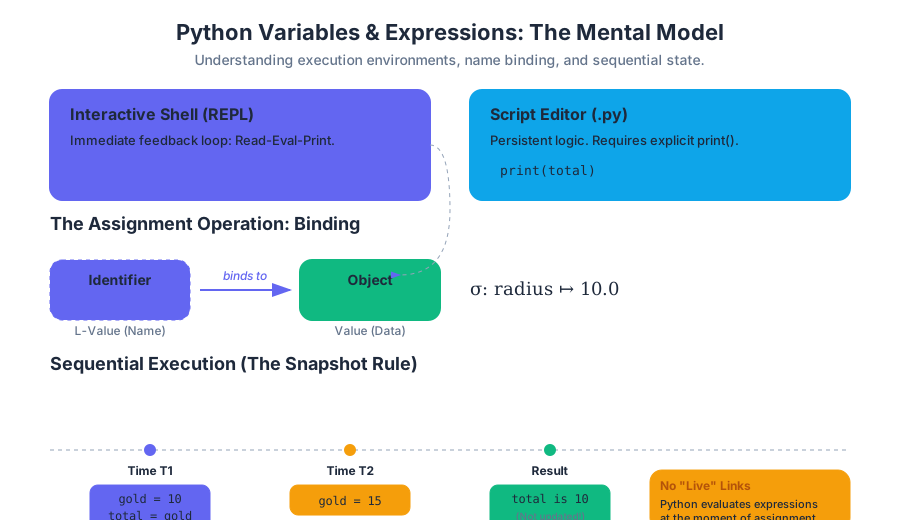
A Python developer operates within two primary contexts: the Interactive Shell (often called the REPL: Read-Eval-Print Loop) and the Script Editor. Understanding the distinction between these is critical for debugging and experimentation.
The Interactive Shell (REPL)
The Shell is a conversational interface. When you type an expression, the interpreter immediately reads it, evaluates it, and prints the result. It is the laboratory of the Python programmer—a place to test small snippets of code, inspect object attributes, or perform quick calculations.
The Script Editor
In contrast, the Editor is used to compose "permanent" programs. Code written here is saved to a .py file and executed in its entirety. Unlike the Shell, the Editor does not automatically print the result of every expression. To see an output from a script, the programmer must explicitly invoke the print() function.
| Feature | Interactive Shell (REPL) | Script Editor (.py file) |
|---|---|---|
| Primary Use | Experimentation, debugging, quick math | Building applications, automation, reusable logic |
| Feedback Loop | Immediate (per line) | Delayed (per execution) |
| Persistence | Lost when the session ends | Saved to disk |
| Output Behavior | Implicitly prints expression results | Requires explicit print() calls |
| Typical Prompt | >>> |
None (Standard text editor) |
Implementation Example: The REPL Interaction
The following block demonstrates a low-level interaction with the Python interpreter, showing how the type and id of objects are inspected in real-time.
# Interacting with the CPython interpreter directly
import sys

# Define a value
x = 42

# Inspecting the object in the shell environment
print(f"Value: {x}")
print(f"Type: {type(x)}")
print(f"Memory Address: {id(x)}")

# Checking the reference count (low-level CPython detail)
# Note: sys.getrefcount(x) will be higher than expected because
# the function itself creates a temporary reference.
print(f"Reference Count: {sys.getrefcount(x)}")
The Mechanics of Variable Assignment
In Python, the statement x = 5 is not a mathematical equation asserting that $x$ is equal to $5$. Instead, it is an assignment operation. Specifically, it is an instruction to the interpreter to bind the identifier (name) on the left to the object (value) on the right.
Syntax Rules for Identifiers
Python enforces strict rules on what constitutes a valid variable name. An identifier must start with a letter or an underscore (_) and can be followed by letters, underscores, or digits. It is case-sensitive (Total and total are distinct).
The L-Value Rule: In an assignment statement, the left-hand side (L-value) must be a valid, single identifier. It cannot be a literal or a complex expression.
| Statement | Validity | Reason |
|---|---|---|
pi = 3.14159 |
Valid | Simple identifier assignment. |
radius_2 = 10 |
Valid | Alphanumeric identifier. |
2_radius = 10 |
Invalid | Identifiers cannot start with a digit. |
x + y = 10 |
Invalid | The L-value must be a name, not an expression. |
5 = x |
Invalid | A literal (5) cannot be assigned a new value. |
Mathematical Derivation of Assignment
We can represent the state of a program as a mapping $\sigma$ from a set of identifiers $I$ to a set of values $V$.
$$ \sigma: I \to V $$
When an assignment $i = e$ is executed, where $i \in I$ and $e$ is an expression that evaluates to $v \in V$, the mapping is updated:
$$ \sigma' = \sigma[i \mapsto v] $$
This means that only the identifier $i$ is updated in the environment. Any other identifier $j$ that was previously defined using $i$ remains mapped to its original value unless explicitly recalculated.
# Pseudocode representation of the Assignment Logic
PROCEDURE Assign(identifier, expression):
    value = EVALUATE(expression)
    IF IS_VALID_IDENTIFIER(identifier):
        ENVIRONMENT.BIND(identifier, value)
    ELSE:
        RAISE SyntaxError("Invalid L-value")
END PROCEDURE
Variable Bindings and Sequential Execution
One of the most common pitfalls for beginners is the "Spreadsheet Misconception." In a spreadsheet, if cell C1 depends on A1, changing A1 automatically updates C1. Python does not work this way.
Python executes code sequentially. When a variable is assigned, it captures the value of the expression at that specific moment in time. If the components of that expression change later, the bound variable remains unchanged.
Worked Example: The Olympic Medal Tally
Consider a script tracking medal counts. If we calculate a total and then update one of the individual counts, the total does not "react" to the change.
# Executing a Python script from the CLI to observe sequential behavior
# Save this as 'medals.py' and run: python3 medals.py

cat << 'EOF' > medals.py
gold = 10
silver = 5
bronze = 8

# Calculate total at Time T1
total = gold + silver + bronze
print(f"Total at T1: {total}") # Output: 23

# Update gold count at Time T2
gold = 15
print(f"Gold updated to: {gold}")

# The 'total' variable is still bound to the result of the T1 calculation
print(f"Total at T2 (without recalculation): {total}") # Output: 23

# To update 'total', we must re-execute the assignment
total = gold + silver + bronze
print(f"Total at T3 (after recalculation): {total}") # Output: 28
EOF

python3 medals.py
The Memory Model: Names vs. Objects
In languages like C++, a variable is often viewed as a "box" in memory where a value is stored. In Python, it is more accurate to think of variables as tags or labels attached to objects.
- Object Creation: The interpreter creates an object (e.g., the integer
23) in memory. - Binding: The name
totalis pointed to that object. - Reassignment: If we say
total = 28, we don't change the number23into28. Instead, we create a new object28and move thetotaltag to it.
Floating-Point Arithmetic and Numerical Representation
Python handles two primary types of numbers: Integers (int), which have arbitrary precision, and Floating-point numbers (float), which represent real numbers using the IEEE 754 standard.
The Precision Problem
Because computers use binary (base 2) to represent numbers, they cannot perfectly represent certain decimal (base 10) fractions. For example, the fraction $1/10$ (0.1) results in a repeating binary sequence, much like $1/3$ results in $0.333...$ in decimal.
This leads to subtle rounding errors that can compromise equality checks.
Theorem of Floating Point Inexactness: For any finite binary representation, there exists a set of decimal fractions that cannot be represented exactly, leading to a representational error $\epsilon$.
| Expression | Expected Result | Actual Python Result |
|---|---|---|
0.1 + 0.2 |
0.3 |
0.30000000000000004 |
0.1 + 0.1 + 0.1 == 0.3 |
True |
False |
2.0 ** 3 |
8.0 |
8.0 |
1 / 3 |
0.333... |
0.3333333333333333 |
Low-Level Representation (C Perspective)
To understand why 0.1 is problematic, we can look at how a double-precision float is structured in memory according to the IEEE 754 standard.
// C code to inspect the binary representation of a float
#include <stdio.h>

void print_binary(unsigned long long n) {
    for (int i = 63; i >= 0; i--) {
        printf("%llu", (n >> i) & 1);
        if (i == 63 || i == 52) printf(" "); // Separate sign, exponent, mantissa
    }
    printf("\n");
}

int main() {
    double val = 0.1;
    unsigned long long *ptr = (unsigned long long *)&val;

    printf("Value: %f\n", val);
    printf("Binary (Sign | Exponent | Mantissa):\n");
    print_binary(*ptr);

    return 0;
}
Best Practices for Arithmetic
- Avoid Equality on Floats: Never use
==with floats. Instead, check if the difference is within a small tolerance (epsilon):abs(x - y) < 1e-9. - Use the
decimalModule: For financial applications where precision is paramount, Python provides thedecimallibrary to avoid binary rounding issues. - Integer Division: Use
//for floor division and%for the modulo (remainder) operator.
Expressions and Operator Precedence
An expression is a combination of values, variables, and operators that the Python interpreter evaluates to produce a single value. The order in which these operations are performed is governed by operator precedence.
Precedence Hierarchy
Python follows standard algebraic rules (PEMDAS/BODMAS), but includes additional operators for programming.
| Precedence | Operator | Description |
|---|---|---|
| 1 (Highest) | ** |
Exponentiation |
| 2 | *, /, //, % |
Multiplication, Division, Floor Div, Modulo |
| 3 | +, - |
Addition, Subtraction |
| 4 | ==, !=, >, < |
Comparisons |
| 5 (Lowest) | and, or, not |
Logical Operators |
Complex Expression Evaluation
Consider the expression: result = 10 + 5 * 2 ** 3.
- Exponentiation:
2 ** 3= 8. - Multiplication:
5 * 8= 40. - Addition:
10 + 40= 50. The variableresultis bound to the object50.
Common Pitfalls and Misconceptions
1. The "Identifier vs. String" Confusion
New programmers often confuse variable names with string literals.
x = 5:xis a name pointing to the value 5.x = "y":xis a name pointing to the string "y".x = y:xis a name pointing to whateveryis currently pointing to. Ifyis undefined, this raises aNameError.
2. Case Sensitivity
temp = 32 and Temp = 32 are two different entries in the interpreter's symbol table. Accessing temp when you defined Temp will result in a failure.
3. Overwriting Built-ins
Python allows you to use built-in function names as variable names (e.g., print = 5). While syntactically valid, this "shadows" the built-in function, making it inaccessible for the remainder of the script.
Pro-Tip: Always avoid using names like
list,str,int, or
Source Materials
- Introduction to Computer Science and Programming in Python
- Introduction to Computer Science and Programming in Python
- Introduction to Computer Science and Programming in Python
- Introduction to Computer Science and Programming in Python
- Introduction to Computer Science and Programming in Python
- Introduction to Computer Science and Programming in Python
- Introduction to Computer Science and Programming in Python
- Introduction to Computer Science and Programming in Python
Study Introduction to Computer Science and Programming in Python on Lykke
This course page is free to open: signed out, you can read its first two sections, and signing in, on any plan, opens the rest. The free Lykke Chrome extension syncs your own Canvas courses, so ChatGPT, Claude and Muse can answer from your classes and deadlines. It only reads Canvas.
Add the free extensionSign in to open every sectionAll sections of Introduction to Computer Science and Programming in Python · Browse more course pages