From the free course Introduction to Computer Science and Programming in Python on Lykke
List Operations and Aliasing
Key concepts: Aliasing · Side Effects · extend() vs append() · List Sorting
Deep dive into list manipulation and the memory management concepts of aliasing.
List Operations and Aliasing
In the realm of high-level programming, particularly within Python, the distinction between objects and variable names is the most frequent source of "logic bugs" for intermediate developers. While primitive types like integers and strings are immutable—meaning their value cannot be changed in place—lists are mutable dynamic arrays. This mutability introduces a layer of complexity known as Aliasing, where multiple identifiers refer to the exact same memory location. Understanding the mechanics of how lists are stored, modified, and passed through functions is not merely an academic exercise; it is a prerequisite for writing predictable, thread-safe, and memory-efficient code.
The Architecture of Mutability
To understand list operations, one must first understand the Python memory model. In Python, a list is not a contiguous block of data values (like a C-array of integers); rather, it is a contiguous block of references to other objects. When you create a list, the Python interpreter allocates a "header" object that tracks the list's size, its allocated capacity, and a pointer to the array of references.
Definition: Mutability An object is considered mutable if its state or content can be changed after it is created without changing its identity (memory address). In Python,
list,dict, andsetare the primary mutable built-in types.
Because the list object itself stays at the same memory address even when its contents change, any variable pointing to that address will see the changes. This is the fundamental driver behind side effects.
Aliasing: The Identity Crisis
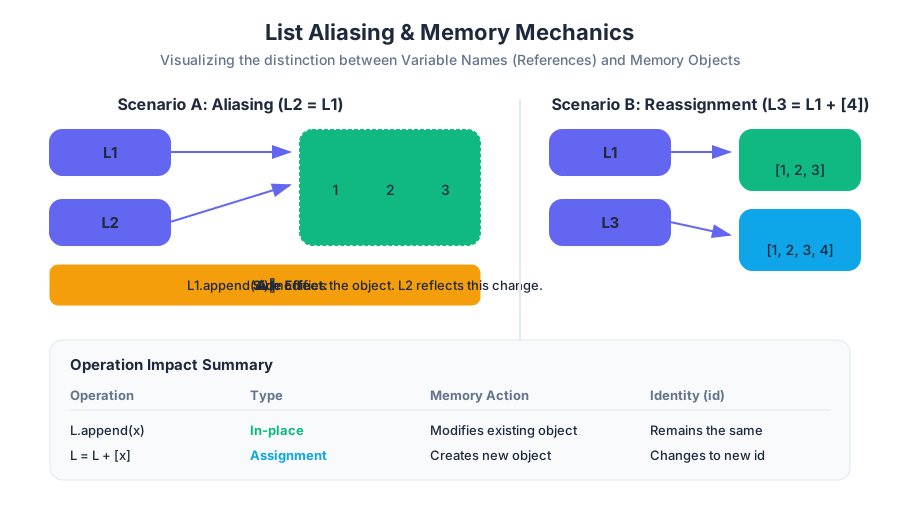
Aliasing occurs when more than one variable name is bound to the same object. In Python, the assignment operator (=) does not copy the data; it copies the reference.
Why it Matters
In a large-scale system, an alias might be created deep within a library or a helper function. If that function mutates the list, the original caller’s data is altered. This violates the principle of Least Astonishment, where a developer expects a variable to remain constant unless explicitly changed.
Mechanics and Implementation
When you execute L2 = L1, you are not creating a new list. You are creating a new entry in the local symbol table that points to the same id() (memory address) as L1.
# Block 1: Low-level implementation and identity verification
import ctypes

def get_memory_address(obj):
    """Returns the hex memory address of a Python object."""
    return hex(id(obj))

# Initialize a list
L1 = [1, 2, 3]
# Create an alias
L2 = L1

print(f"L1 Address: {get_memory_address(L1)}")
print(f"L2 Address: {get_memory_address(L2)}")
print(f"Are they the same object? {L1 is L2}")

# Mutate L1
L1.append(4)

# Observe the side effect on L2
print(f"L2 after L1 mutation: {L2}") # Output: [1, 2, 3, 4]

# Verification via C-style pointer inspection
# In CPython, id(x) is the memory address of the object
address = id(L1)
value_at_address = ctypes.cast(address, ctypes.py_object).value
print(f"Object at {hex(address)} is {value_at_address}")
To visualize this from a systems perspective, consider how this would look in a lower-level language like C, where the "aliasing" is explicitly handled via pointers.
/* Block 2: C-representation of List Aliasing */
#include <stdio.h>
#include <stdlib.h>

typedef struct {
    int *data;
    size_t size;
} PythonList;

int main() {
    // Allocate a "list"
    PythonList *L1 = malloc(sizeof(PythonList));
    L1->data = malloc(3 * sizeof(int));
    L1->size = 3;
    L1->data[0] = 1; L1->data[1] = 2; L1->data[2] = 3;

    // Aliasing: L2 is just another pointer to the same address
    PythonList *L2 = L1;

    printf("L1 Address: %p\n", (void*)L1);
    printf("L2 Address: %p\n", (void*)L2);

    // Mutating through L1 affects L2 because they share the pointer
    L1->data[0] = 99;
    printf("L2[0] value: %d\n", L2->data[0]); // Output: 99

    return 0;
}
Side Effects and Function Scope
A side effect is any change to the state of the program that occurs outside the local scope of a function, other than returning a value. Because lists are passed by assignment (often called "pass-by-object-reference"), passing a list to a function creates a local alias.
The Mutation Trap
If a function uses methods like .append(), .extend(), or .pop(), it modifies the original object. If it uses assignment like L = L + [new_item], it creates a new local object and breaks the alias, leaving the original list unchanged.
| Operation | Type | Effect on Original List | Memory Impact |
|---|---|---|---|
L.append(x) |
In-place | Mutates | Modifies existing object |
L.extend(iter) |
In-place | Mutates | Modifies existing object |
L.sort() |
In-place | Mutates | Modifies existing object |
L = L + [x] |
Assignment | No change | Creates new object |
L[:] = [x] |
Slice Assignment | Mutates | Overwrites existing object contents |
Append vs. Extend: Structural Mutation
One of the most common points of confusion for those new to Python is the difference between append() and extend(). While both increase the size of the list, they handle the input argument with different levels of "flatness."
append(object)
The append method takes a single object and adds it to the end of the list as a single element. If you append a list to another list, you create a nested structure (a list within a list).
extend(iterable)
The extend method takes an iterable (list, tuple, string, etc.) and appends each element of that iterable to the list individually. It "flattens" the input by one level.
Mathematical Derivation of Complexity
Let $L$ be the original list of size $n$, and $M$ be the input collection of size $m$.
append(M): Complexity is $O(1)$ amortized. It performs a single pointer assignment.extend(M): Complexity is $O(m)$. It must iterate through $M$ and perform $m$ assignments.
# Block 3: Performance comparison using CLI timeit
# Comparing append vs extend for building a list

# Scenario: Adding 1000 elements one by one vs adding a list of 1000 elements
python3 -m timeit -s "l = []" "for i in range(1000): l.append(i)"
python3 -m timeit -s "l = []; r = list(range(1000))" "l.extend(r)"

# Results typically show extend() is significantly faster for bulk operations
# because the resizing logic and pointer overhead happen in a single C-loop.
The Mechanics of Sorting
Python provides two ways to sort a list: the list.sort() method and the sorted() built-in function. This distinction is the quintessential example of the "In-place vs. New Object" paradigm.
list.sort()
This method sorts the list in-place. It returns None. It is highly memory efficient because it does not require a copy of the list. It uses the Timsort algorithm, which has a worst-case time complexity of $O(n \log n)$ and a space complexity of $O(n)$.
sorted(iterable)
This function takes any iterable and returns a new list containing the elements in sorted order. The original iterable remains untouched.
| Feature | list.sort() |
sorted(list) |
|---|---|---|
| Return Value | None |
A new list |
| Original List | Modified | Unchanged |
| Memory Usage | Low (In-place) | Higher (Creates copy) |
| Flexibility | Lists only | Any iterable |
The Timsort Theorem Timsort is a hybrid stable sorting algorithm, derived from merge sort and insertion sort, designed to perform well on many kinds of real-world data. It leverages "runs" of already-sorted data to minimize comparisons.
Mitigating Aliasing: Cloning and Deep Copies
To avoid the pitfalls of aliasing, a developer must clone the list. Cloning creates a new object with the same values, breaking the reference link.
Shallow Copy
A shallow copy creates a new list object, but the elements inside the list are still references to the same objects as the original.
- Syntax:
L_copy = L[:]orL_copy = L.copy()orL_copy = list(L)
Deep Copy
If a list contains other mutable objects (like nested lists), a shallow copy is insufficient. The inner lists will still be aliased. A Deep Copy recursively copies every object found in the original.
# Block 4: Shallow vs Deep Copy Edge Cases
import copy

# A nested list
original = [[1, 2], [3, 4]]

# Shallow Copy
shallow = list(original)
# Deep Copy
deep = copy.deepcopy(original)

# Mutating an inner element
original[0][0] = "CHANGED"

print(f"Original: {original}")
print(f"Shallow: {shallow}") # Output will show "CHANGED"!
print(f"Deep: {deep}")       # Output remains [[1, 2], [3, 4]]

# Conclusion: Shallow copies only copy the top-level references.
Common Pitfalls and Best Practices
- The "None" Return Trap: Beginners often write
L = L.sort(). Sincesort()returnsNone, the variableLis now destroyed, replaced byNone. - Mutable Default Arguments: Never use an empty list as a default argument in a function definition (e.g.,
def func(x, L=[])). The list is created once at definition time and aliased across every call to the function. - Iteration while Mutating: Modifying a list (adding/removing items) while iterating over it leads to skipped elements or index errors. Always iterate over a copy:
for item in L[:].
Complexity Summary Table
| Operation | Average Case | Notes |
|---|---|---|
Indexing L[i] |
$O(1)$ | Direct memory offset calculation |
Slicing L[i:j] |
$O(k)$ | Where $k$ is the slice length |
| Append | $O(1)$ | Amortized constant time |
| Insert/Delete | $O(n)$ | Requires shifting all subsequent elements |
| Sort | $O(n \log n)$ | Timsort efficiency |
Membership x in L |
$O(n)$ | Linear search |
Source Materials
- Introduction to Computer Science and Programming in Python
- Introduction to Computer Science and Programming in Python
- Introduction to Computer Science and Programming in Python
- Introduction to Computer Science and Programming in Python
- Introduction to Computer Science and Programming in Python
- Introduction to Computer Science and Programming in Python
- Introduction to Computer Science and Programming in Python
- Introduction to Computer Science and Programming in Python
Study Introduction to Computer Science and Programming in Python on Lykke
This course page is free to open: signed out, you can read its first two sections, and signing in, on any plan, opens the rest. The free Lykke Chrome extension syncs your own Canvas courses, so ChatGPT, Claude and Muse can answer from your classes and deadlines. It only reads Canvas.
Add the free extensionSign in to open every sectionAll sections of Introduction to Computer Science and Programming in Python · Browse more course pages