From the free course Introduction to Computer Science and Programming in Python on Lykke
Introduction to Computational Thinking
Key concepts: Algorithm fundamentals · Growth mindset · Active learning · Creativity vs. Logic · Rubber Ducking
Explores the philosophy of programming as a foundational skill and the mindset required for effective problem-solving.
Introduction to Computational Thinking
Computational thinking is the conceptual foundation of modern problem-solving. It is not merely the act of writing code in a specific programming language like Python or C++; rather, it is a high-level mental framework used to decompose complex problems into discrete, manageable steps that a processing agent (human or machine) can execute. As a discipline, it sits at the intersection of mathematical logic and creative engineering.
The Nature of Computation: Declarative vs. Imperative
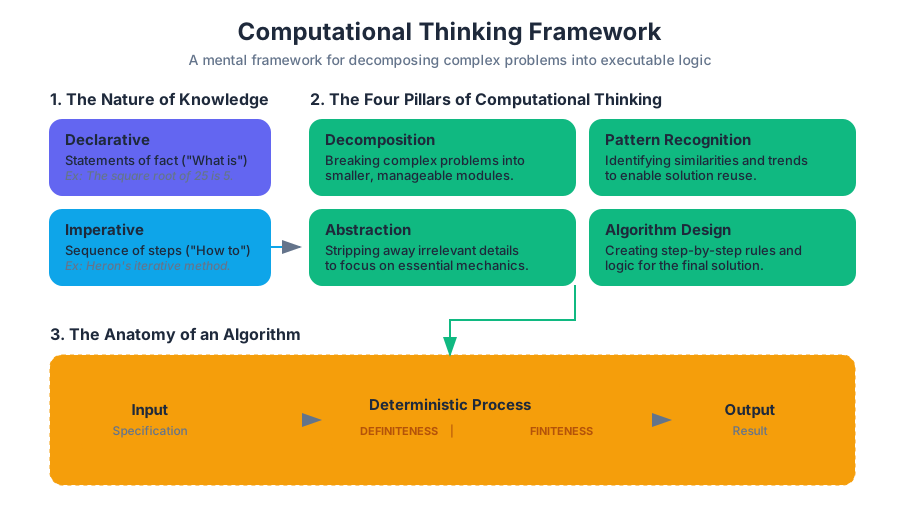
To understand computational thinking, one must first distinguish between two fundamental types of knowledge: Declarative and Imperative.
- Declarative Knowledge consists of statements of fact. It describes "what is." For example, the statement "The square root of a number $x$ is a number $y$ such that $y \cdot y = x$" is declarative. It defines the relationship but provides no instructions on how to find $y$.
- Imperative Knowledge is a "how-to" description. It is a sequence of steps—an algorithm—that leads to a result. To find a square root imperatively, one might use Heron's method (an iterative approximation).
Definition: Algorithm An algorithm is a finite, deterministic sequence of instructions where each step is precisely defined and can be executed with a finite amount of effort in a finite amount of time.
| Knowledge Type | Focus | Example | Computational Role |
|---|---|---|---|
| Declarative | Truth/State | $A = \pi r^2$ | Defining goals and constraints. |
| Imperative | Process/Action | 1. Measure $r$; 2. Square it; 3. Multiply by $\pi$. | Executing the solution. |
Algorithm Fundamentals: The "Recipe" of Logic
At the heart of computational thinking is the Algorithm. While often compared to a cooking recipe, a computational algorithm requires a much higher degree of precision. A recipe might say "add a pinch of salt," which is ambiguous. An algorithm requires exact parameters (e.g., add(0.5, grams, salt)).
The Anatomy of an Algorithm
Every effective algorithm must possess four primary characteristics:
- Input Specification: Clearly defined data that the algorithm acts upon.
- Output Specification: The result produced after execution.
- Definiteness: Each step must be unambiguous.
- Finiteness: The algorithm must eventually terminate (avoiding infinite loops).
Worked Example: Bisection Search
Bisection search is a classic example of computational thinking applied to numerical approximation. If we want to find the square root of $x$, we don't just guess randomly. we use a structured "guess and check" strategy that halves the search space with every iteration.
# Low-level implementation of Bisection Search for Square Root
def find_square_root(x, epsilon=0.01):
    """
    Finds the square root of x within a margin of error (epsilon).
    Demonstrates the 'Guess and Check' imperative approach.
    """
    if x < 0:
        return None

    low = 0.0
    high = max(1.0, x)
    ans = (high + low) / 2.0
    num_guesses = 0

    while abs(ans**2 - x) >= epsilon:
        print(f"Low: {low:.4f}, High: {high:.4f}, Current Guess: {ans:.4f}")
        num_guesses += 1
        if ans**2 < x:
            low = ans
        else:
            high = ans
        ans = (high + low) / 2.0

    print(f"Total Guesses: {num_guesses}")
    return ans

# Execution
result = find_square_root(25)
print(f"Final result: {result}")
The Four Pillars of Computational Thinking
To think computationally is to apply four specific techniques to a problem. These pillars allow a senior engineer to look at a massive system (like a global logistics network) and see it as a series of solvable computational tasks.
1. Decomposition
Decomposition is the process of breaking a complex problem into smaller, more manageable parts. In software engineering, this is often achieved through Functions or Modules. By solving the "small" problems, the "large" problem is solved by extension.
2. Pattern Recognition
This involves identifying similarities or trends within a problem or across different problems. If you realize that "sorting a list of names" and "sorting a list of prices" use the same underlying logic, you have identified a pattern that can be generalized.
3. Abstraction
Abstraction is the art of stripping away irrelevant details to focus on the essential mechanics. When you use a print() function in Python, you are using an abstraction. You do not need to know how the CPU communicates with the video driver to display characters; you only need to know the function's interface.
4. Algorithm Design
The final step is creating the step-by-step rules for the solution. This often involves choosing the right Data Structures (Lists, Tuples, Dictionaries) and Control Flow (Branching and Iteration).
| Pillar | Action | Goal |
|---|---|---|
| Decomposition | Break down | Reduce complexity. |
| Pattern Recognition | Find similarities | Enable reuse of solutions. |
| Abstraction | Generalize | Focus on the "what," not the "how." |
| Algorithm Design | Step-by-step logic | Create the executable path. |
Creativity vs. Logic: The Programmer's Paradox
A common misconception is that programming is a purely logical, "left-brain" activity. In reality, computational thinking requires immense creativity.
- Logic is the syntax and the constraints. It is the "grammar" of the language. It ensures the program runs without crashing.
- Creativity is the architecture. There are infinite ways to solve a problem; the creative programmer finds the one that is most efficient, readable, and elegant.
Consider the problem of finding a prime number. The logic dictates the mathematical definition of a prime. The creativity lies in deciding whether to use a Sieve of Eratosthenes (memory-heavy but fast) or a simple trial division (memory-light but slow).
Growth Mindset and Active Learning in Computation
Programming is a high-failure activity. Your code will fail more often than it succeeds, especially during the development phase. This necessitates a Growth Mindset—the belief that intelligence and technical skill can be developed through persistence and effort.
The "Guess and Check" Methodology
In computational thinking, "guessing" is not a sign of ignorance but a formal strategy. We make an initial approximation, evaluate the result, and use the error to inform the next guess. This is the basis of most machine learning algorithms today.
Active Learning vs. Passive Consumption
You cannot learn computational thinking by watching videos or reading code alone. It requires Active Learning:
- Experimentation: Changing a variable in the shell to see what happens.
- Debugging: Intentionally breaking code to understand the error messages.
- Refactoring: Rewriting working code to make it more efficient.
| Mindset Attribute | Fixed Mindset | Growth Mindset (Computational) |
|---|---|---|
| View of Errors | Failure; lack of ability. | Data; a bug to be squashed. |
| Approach to Difficulty | Avoidance; frustration. | Decomposition; breaking it down. |
| View of Success | Innate "math person" talent. | Result of iteration and practice. |
The Mechanics of Logic: Branching and Iteration
To translate computational thoughts into reality, we use two primary logical structures: Branching and Iteration.
Branching (Conditionals)
Branching allows the program to make decisions. It is the implementation of "If this, then that." Mathematically, this is represented as a piecewise function.
Iteration (Loops)
Iteration allows the program to repeat a task. This is where computers excel far beyond humans. A computer can execute a loop a billion times without fatigue or variance in precision.
\text{Algorithm for Summation } S = \sum_{i=1}^{n} i:
\\
1. \text{ Set } total = 0
\\
2. \text{ For each } i \in \{1, 2, ..., n\}:
\\
\quad a. total \leftarrow total + i
\\
3. \text{ Return } total
Rubber Ducking: The Psychology of Debugging
Rubber Ducking (or Rubber Duck Debugging) is a formal technique where a programmer explains their logic, line-by-line, to an inanimate object.
Why it works
The transition from Internal Speech (vague, non-linear thoughts) to External Speech (structured, linear language) forces the brain to reconcile gaps in logic. When you tell a "duck" exactly what a line of code is supposed to do, you often realize that the code is actually doing something else.
"The duck doesn't need to know Python. The duck only needs to listen while you realize your own mistake."
Variable Bindings and the Computational Model
A critical part of computational thinking is understanding how a computer stores and updates information. In Python, variables are not "boxes" that hold values; they are labels or bindings that point to objects in memory.
The Sequential Execution Trap
Beginners often assume that if a = b + c, then a will automatically update whenever b or c changes. This is "spreadsheet thinking," not computational thinking. In a sequential execution model, the assignment happens at a specific point in time and does not create a permanent mathematical link.
// Demonstrating Variable Binding and Memory in C
#include <stdio.h>

int main() {
    int x = 10;
    int y = 5;
    int sum = x + y;

    printf("Initial Sum: %d\n", sum); // Output: 15

    x = 20; // Reassigning x

    // In computational thinking, we must realize 'sum' is still 15.
    // The binding of 'sum' was to the VALUE of (x+y) at time T=0.
    printf("Sum after changing x: %d\n", sum); // Output: 15

    return 0;
}
Practical Application: Shell vs. Editor
Computational thinking is practiced in two distinct environments:
- The Interactive Shell: Used for immediate feedback and "Guess and Check." It is the laboratory where you test small hypotheses.
- The Script/Editor: Used for building permanent, complex algorithms. It is the factory where you assemble the components tested in the shell.
Example: Environment Interaction
# Using the shell to inspect the computational environment
# 1. Check Python version
python3 --version

# 2. Use the interactive interpreter as a calculator (Active Learning)
python3 -c "print(15 * 8 / 2)"

# 3. List files to see script structure
ls -R | grep ".py"
Common Pitfalls in Computational Thinking
- Syntactic Over-focus: Spending too much time worrying about commas and brackets instead of the underlying logic.
- Lack of Edge Case Consideration: Designing an algorithm that works for "normal" input but crashes on
0,None, or negative numbers. - Premature Optimization: Trying to make a program fast before ensuring it is correct.
- The "Magic" Fallacy: Assuming the computer "knows" what you mean. Computers are literal; they do exactly what you say, not what you intend.
Summary of Computational Thinking
Computational thinking is a transformative way of looking at the world. By mastering decomposition, abstraction, and algorithmic design, you gain the ability to automate the mundane and solve the impossible. Whether you are using Python to analyze genomic data or using a rubber duck to fix a web server, you are participating in the same lineage of rigorous, creative logic that defines the modern era.
Source Materials
- Introduction to Computer Science and Programming in Python
- Introduction to Computer Science and Programming in Python
- Introduction to Computer Science and Programming in Python
- Introduction to Computer Science and Programming in Python
- Introduction to Computer Science and Programming in Python
- Introduction to Computer Science and Programming in Python
- Introduction to Computer Science and Programming in Python
- Introduction to Computer Science and Programming in Python
Study Introduction to Computer Science and Programming in Python on Lykke
This course page is free to open: signed out, you can read its first two sections, and signing in, on any plan, opens the rest. The free Lykke Chrome extension syncs your own Canvas courses, so ChatGPT, Claude and Muse can answer from your classes and deadlines. It only reads Canvas.
Add the free extensionSign in to open every sectionAll sections of Introduction to Computer Science and Programming in Python · Browse more course pages