From the free course Introduction to Computer Science and Programming in Python on Lykke
Functions and Decomposition
Key concepts: Function Definitions · Return vs. Print · Scope · Implicit Return (None)
Introduces the concept of breaking programs into reusable, modular components.
Functions and Decomposition
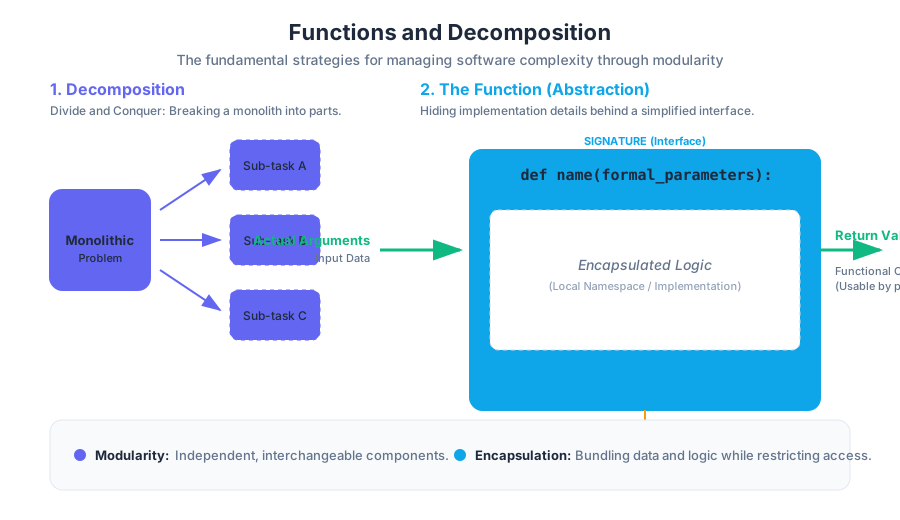
In the realm of software engineering and computational theory, the transition from writing linear scripts to architecting modular systems marks the birth of a professional programmer. As programs grow in complexity, the human mind struggles to maintain a "flat" mental model of thousands of lines of code. To combat this, we employ two fundamental strategies: Decomposition and Abstraction.
Decomposition is the process of breaking a large, monolithic problem into smaller, self-contained sub-problems. Abstraction, conversely, is the practice of hiding the internal details of those sub-problems behind a simplified interface. Together, these concepts are realized through the Function—the primary unit of modularity in almost every modern programming language.
The Philosophy of Modularity: Decomposition and Abstraction
Before diving into syntax, one must understand the "Why." Why not simply write one long list of instructions? The answer lies in the limits of human cognition and the necessity of code reuse.
Decomposition: Divide and Conquer
Decomposition allows a developer to divide a project among multiple team members or simply manage their own cognitive load. By breaking a task like "Build a Search Engine" into "Web Crawler," "Indexer," and "Query Processor," we transform an impossible task into a series of manageable ones.
Abstraction: The Black Box
Abstraction allows us to use a piece of code without needing to understand how it works internally. When you use the math.sqrt() function, you do not need to know if it uses Newton’s method or a lookup table; you only need to know the input (a number) and the output (its square root). This is often referred to as the Black Box model.
| Concept | Goal | Real-World Analogy |
|---|---|---|
| Decomposition | Divide a complex task into smaller parts. | A restaurant kitchen divided into stations (grill, salad, pastry). |
| Abstraction | Hide implementation details; focus on the interface. | A car's steering wheel; you don't need to see the rack and pinion to turn. |
| Modularity | Create interchangeable, independent components. | Lego bricks that can be combined in various ways. |
| Encapsulation | Bundle data and methods while restricting access. | A medicine capsule containing specific ingredients. |
Anatomy of a Function Definition
In Python, a function is a reusable block of code that is executed only when called. The definition of a function establishes its Signature (name and parameters) and its Body (the logic).
Definition: Function A function is a mapping from a set of inputs (domain) to a set of outputs (codomain), encapsulated within a named block that defines a local namespace.
The Syntax of def
The def keyword signals the start of a function definition. This is followed by the function name, a set of parentheses containing formal parameters, and a colon. The indented block that follows is the function's scope.
def calculate_bisection_root(objective_function, low, high, epsilon=1e-7):
    """
    Finds the root of a function within a given interval [low, high]
    using the Bisection Method.

    Parameters:
    objective_function (callable): The function to evaluate.
    low (float): Lower bound of the interval.
    high (float): Upper bound of the interval.
    epsilon (float): Convergence threshold.

    Returns:
    float: The approximate root of the function.
    """
    if objective_function(low) * objective_function(high) >= 0:
        raise ValueError("The function must have different signs at the boundaries.")

    ans = (high + low) / 2.0
    while (high - low) / 2.0 > epsilon:
        if objective_function(ans) == 0:
            return ans
        elif objective_function(low) * objective_function(ans) < 0:
            high = ans
        else:
            low = ans
        ans = (high + low) / 2.0
    return ans
Formal Parameters vs. Actual Arguments
A common point of confusion is the distinction between parameters and arguments.
- Formal Parameters: The variables listed in the function definition (e.g.,
low,highabove). They act as placeholders. - Actual Arguments: The real values passed to the function when it is invoked (e.g.,
calculate_bisection_root(f, 0, 10)).
Mapping Inputs to Outputs
Mathematically, a function $f$ can be represented as:
f: X \to Y
\text{where } X \text{ is the set of inputs (Arguments) and } Y \text{ is the set of outputs (Return Values).}
In a more programmatic pseudocode representation:
ALGORITHM FunctionInvocation(func_name, args):
    1. Create a new local symbol table (Stack Frame).
    2. Bind actual arguments to formal parameters in the local table.
    3. Execute the function body line by line.
    4. If 'return' is encountered, exit and yield the value to the caller.
    5. If the end is reached without 'return', yield 'None'.
    6. Destroy the local symbol table.
Return vs. Print: The Fundamental Distinction
For beginners, the difference between return and print() is often the most significant hurdle. This stems from the fact that both appear to "output" something to the screen during interactive testing. However, their roles in a program's architecture are diametrically opposed.
The print() Function
print() is a side effect. It communicates with the external world (the console) but does not provide data back to the program's internal logic. A value that is printed is "lost" to the program; it cannot be stored in a variable for later calculation.
The return Statement
return is the functional output. It terminates the function's execution and hands a value back to the line of code that called it. This allows for Composition, where the output of one function becomes the input of another.
| Feature | print() |
return |
|---|---|---|
| Purpose | Human-readable output (debugging/logging). | Program-readable output (data flow). |
| Data Flow | Exits the program environment to the console. | Stays within the program environment. |
| Function Execution | Continues after the print statement. | Immediately terminates the function. |
| Variable Assignment | Returns None; cannot be assigned. |
Can be assigned to a variable for future use. |
| Analogy | A chef shouting "Order up!" | A chef handing the plate to the waiter. |
Example: The Cost of Confusion
Consider a scenario where we need to calculate the total cost of an item including tax.
# INCORRECT: Using print instead of return
def calculate_tax_print(price):
    print(price * 0.05)

# CORRECT: Using return
def calculate_tax_return(price):
    return price * 0.05

# Usage
subtotal = 100
tax = calculate_tax_print(subtotal) # tax is now None!
# total = subtotal + tax  <-- This will throw a TypeError: int + NoneType

tax_actual = calculate_tax_return(subtotal) # tax_actual is 5.0
total = subtotal + tax_actual # total is 105.0 (Success)
Implicit Return and the None Type
In Python, every function returns something. If you do not explicitly include a return statement, or if the function reaches the end of its body without hitting a return, Python executes an Implicit Return.
The None Singleton
Noneis a special constant in Python representing the absence of a value. It is the sole instance of theNoneTypeclass.
When a function lacks a return, it implicitly returns None. This is why calling print(print("Hello")) results in:
Hello(from the inner print)None(from the outer print, because the inner print returnedNone)
Scope and the Symbol Table
Scope refers to the region of a program where a particular variable name is "visible" or accessible. Python uses a system of Namespaces (symbol tables) to manage these variables.
The LEGB Rule
Python resolves variable names using the LEGB priority:
- Local: Variables defined inside the current function.
- Enclosing: Variables in the local scope of any enclosing functions (relevant in nested functions).
- Global: Variables defined at the top level of the script or module.
- Built-in: Names pre-defined by Python (e.g.,
len,range,ValueError).
The Stack Frame
When a function is called, the Python interpreter creates a Stack Frame. This is a private block of memory that stores the function's local variables. Once the function returns, this frame is "popped" off the stack and destroyed, meaning local variables cease to exist.
Scope Isolation Example
x = 10 # Global Scope

def outer_function():
    x = 20 # Enclosing Scope (local to outer_function)

    def inner_function():
        x = 30 # Local Scope (local to inner_function)
        print(f"Inner x: {x}")

    inner_function()
    print(f"Outer x: {x}")

outer_function()
print(f"Global x: {x}")
Output:
Inner x: 30
Outer x: 20
Global x: 10
Each x exists in a different symbol table. Modifying the local x inside inner_function has no effect on the x in outer_function or the global x.
Argument Passing Mechanics
Python uses a mechanism often called Pass-by-Object-Reference (or Call-by-Sharing).
- If you pass an immutable object (like an integer, string, or tuple), the function cannot modify the original variable in the caller's scope. It can only rebind the local name to a new object.
- If you pass a mutable object (like a list or dictionary), the function can modify the contents of that object, and those changes will be visible to the caller.
Default Arguments and the "Mutable Default" Trap
One of the most common pitfalls in Python is using a mutable object (like a list) as a default argument.
# DANGEROUS: The list is created once at definition time, not at call time.
def append_to_list(val, my_list=[]):
    my_list.append(val)
    return my_list

print(append_to_list(1)) # [1]
print(append_to_list(2)) # [1, 2] -- Unexpected!

# SAFE: Use None as a placeholder
def append_to_list_safe(val, my_list=None):
    if my_list is None:
        my_list = []
    my_list.append(val)
    return my_list
Practical Application: Decomposition in Action
To illustrate the power of decomposition, let's look at a task: Analyzing a text file for word frequency.
Instead of one giant loop, we decompose it into three distinct functions.
import string

def clean_text(raw_text):
    """Removes punctuation and converts to lowercase."""
    return raw_text.translate(str.maketrans('', '', string.punctuation)).lower()

def count_frequencies(word_list):
    """Creates a dictionary mapping words to their occurrence count."""
    freq_map = {}
    for word in word_list:
        freq_map[word] = freq_map.get(word, 0) + 1
    return freq_map

def get_top_n(freq_map, n=5):
    """Returns the top N most frequent words."""
    return sorted(freq_map.items(), key=lambda item: item[1], reverse=True)[:n]

# The 'Orchestrator' logic
raw_data = "The quick brown fox jumps over the lazy dog. The dog was not amused!"
words = clean_text(raw_data).split()
frequencies = count_frequencies(words)
top_words = get_top_n(frequencies, 3)

print(f"Analysis Complete. Top words: {top_words}")
Real-World Invocation (CLI)
In a professional environment, these functions might be part of a larger utility invoked via the command line.
# Example of how a decomposed script might be used in a pipeline
cat document.txt | python3 word_analyzer.py --top 10 --exclude-stopwords
Summary of Best Practices
- Function Length: A function should ideally do one thing and do it well. If a function is longer than a single screen (20-30 lines), it is likely a candidate for further decomposition.
- Docstrings: Always include a docstring explaining the parameters, return type, and purpose. This is the "User Manual" for your abstraction.
- Pure Functions: Whenever possible, write Pure Functions—functions that have no side effects (like printing or modifying global variables) and always return the same output for the same input. These are much easier to test and debug.
- Avoid Global Variables: Relying on global variables inside functions breaks abstraction, as the function now depends on the state of the entire program rather than just its inputs.
Source Materials
- Introduction to Computer Science and Programming in Python
- Introduction to Computer Science and Programming in Python
- Download transcript
- Introduction to Computer Science and Programming in Python
- Introduction to Computer Science and Programming in Python
- Introduction to Computer Science and Programming in Python
- Introduction to Computer Science and Programming in Python
- Download transcript
Study Introduction to Computer Science and Programming in Python on Lykke
This course page is free to open: signed out, you can read its first two sections, and signing in, on any plan, opens the rest. The free Lykke Chrome extension syncs your own Canvas courses, so ChatGPT, Claude and Muse can answer from your classes and deadlines. It only reads Canvas.
Add the free extensionSign in to open every sectionAll sections of Introduction to Computer Science and Programming in Python · Browse more course pages