From the free course Introduction to Computer Science and Programming in Python on Lykke
Exception Handling and Errors
Key concepts: TypeError · try/except blocks · Runtime Errors · Input Validation
Explains how to handle runtime errors gracefully using Python's error-handling blocks.
Exception Handling and Errors
In the lifecycle of software development, the "Happy Path"—the sequence of execution where everything goes exactly as planned—is often the shortest part of the story. Real-world computing is messy. Networks fail, users provide malformed input, and hardware resources are exhausted. To build resilient systems, a programmer must move beyond writing code that works to writing code that fails gracefully.
Exception handling is the architectural discipline of managing these deviations. It is not merely a way to "stop the crash"; it is a control flow mechanism that allows a program to preserve its state, clean up resources, and provide meaningful feedback when the unexpected occurs.
The Taxonomy of Errors: Syntax vs. Runtime vs. Semantic
Before mastering the try/except block, we must distinguish between the different categories of "broken" code. Not all errors are created equal, and not all can be caught by the program itself.
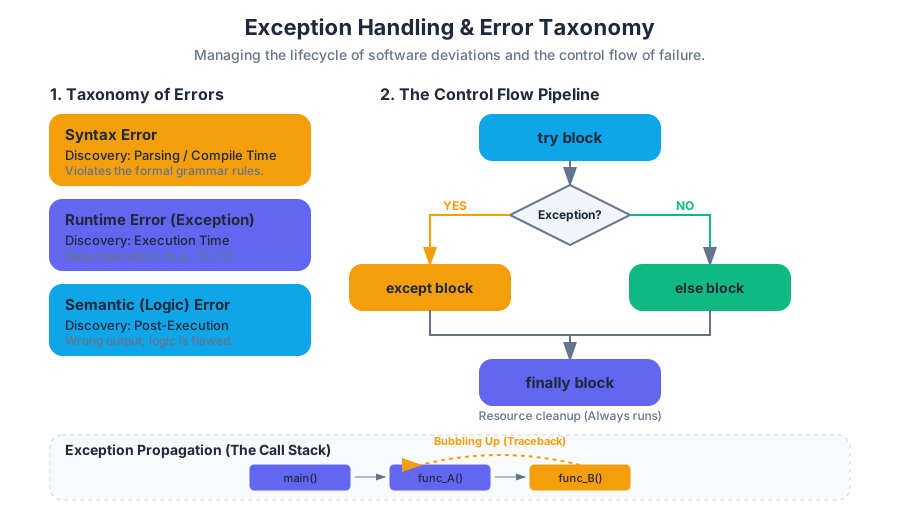
| Error Category | Discovery Phase | Definition | Example |
|---|---|---|---|
| Syntax Error | Parsing/Compile Time | The code violates the formal grammar of the language. | if x = 5: (missing = for comparison) |
| Runtime Error (Exception) | Execution Time | The code is syntactically correct but encounters an illegal operation during run. | 10 / 0 (ZeroDivisionError) |
| Semantic (Logic) Error | Post-Execution | The program runs without crashing but produces the wrong output. | Using + instead of * in a formula. |
The Exception Axiom: An exception is an event that occurs during the execution of a program that disrupts the normal flow of instructions. When an error occurs within a method, the method creates an object—the Exception Object—and hands it off to the runtime system.
The Mechanics of the Try-Except Block
The primary mechanism for handling runtime errors is the try/except block. In Python, this follows the philosophy of EAFP (Easier to Ask for Forgiveness than Permission), contrasting with the LBYL (Look Before You Leap) approach common in languages like C.
The Control Flow Pipeline
- The
tryblock: The interpreter attempts to execute the code within this scope. - The Exception Trigger: If an error occurs, execution of the
tryblock stops immediately. - The Handler Search: The interpreter looks for an
exceptblock that matches the type of exception raised. - The
exceptblock: If a match is found, the code inside the handler executes. - The
elseblock (Optional): Executes only if thetryblock succeeded without any exceptions. - The
finallyblock (Optional): Executes regardless of whether an exception occurred, typically used for resource cleanup (closing files, releasing database locks).
Implementation: Robust Data Processing
The following Python implementation demonstrates a sophisticated handler for processing a list of mixed data types, a common task in data engineering where "dirty data" is the norm.
def process_sensor_data(data_list):
    """
    Processes a list of raw sensor readings.
    Handles TypeErrors and ValueErrors while ensuring system integrity.
    """
    results = []
    for record in data_list:
        try:
            # Attempt to normalize and cast the data
            # Potential TypeError: record is not a string/number
            # Potential ValueError: string cannot be converted to float
            normalized_val = float(record)

            if normalized_val < 0:
                raise ValueError(f"Negative reading encountered: {normalized_val}")

            results.append(normalized_val ** 2)

        except TypeError as te:
            print(f"[CRITICAL] Incompatible data type: {type(record)}. Error: {te}")
            continue # Skip to next record

        except ValueError as ve:
            print(f"[WARNING] Skipping invalid value '{record}': {ve}")
            continue

        except Exception as e:
            # Catch-all for unforeseen issues (e.g., MemoryError)
            print(f"[FATAL] Unexpected error: {e}")
            raise # Re-raise the exception to be handled by the caller

        else:
            # This runs if the try block succeeded
            print(f"Successfully processed: {record}")

        finally:
            # This runs every iteration, used here for telemetry
            print("Cleanup: Ready for next record.")

    return results

# Example invocation
data = ["10.5", "20", "invalid_str", None, -5.2]
print(process_sensor_data(data))
The Logic of Propagation: The Call Stack
When an exception is raised and not caught within the current function, it "bubbles up" the call stack. This is known as Exception Propagation. If the exception reaches the entry point of the program (the global scope) without being caught, the interpreter terminates the program and prints a Traceback.
Mathematical Representation of Exception Propagation
Let $F_n$ be a sequence of function calls where $F_0$ is the main entry point. If an exception $\epsilon$ occurs at $F_k$:
- If $F_k$ has a handler for $\epsilon$, it is resolved.
- If not, $F_k$ is popped from the stack, and $\epsilon$ is passed to $F_{k-1}$.
- This continues until $k=0$. If $F_0$ has no handler, the program state $\Sigma$ is terminated.
ALGORITHM: ExceptionPropagation(Exception e, Stack s)
    WHILE s is NOT empty:
        f = s.peek()
        IF f.hasHandler(e):
            f.executeHandler(e)
            RETURN
        ELSE:
            s.pop()
    TERMINATE_PROGRAM(e.traceback)
TypeError: The Sentinel of Type Safety
A TypeError is one of the most frequent exceptions in Python. It occurs when an operation or function is applied to an object of an inappropriate type. Because Python is dynamically typed, it does not check types until the code actually runs.
Common Triggers for TypeError
- Unsupported Operand Types: Trying to add a string to an integer (
"5" + 5). - Inappropriate Iteration: Trying to loop over a non-iterable object (e.g.,
for x in 100:). - Incorrect Function Arguments: Passing the wrong number of arguments or an object that the function cannot process (e.g.,
len(5)).
| Operation | Cause of TypeError | Corrective Action |
|---|---|---|
len(1024) |
Integers have no __len__ method. |
Convert to string: len(str(1024)) |
'Age: ' + 25 |
Cannot concatenate str and int. |
Explicit cast: 'Age: ' + str(25) |
math.sqrt('9') |
sqrt expects a float/int. |
Cast input: math.sqrt(float('9')) |
Input Validation and Defensive Programming
Defensive programming is the practice of anticipating failure. While try/except handles errors after they happen, Input Validation seeks to prevent them from occurring in the first place.
LBYL vs. EAFP
In the LBYL (Look Before You Leap) style, you check conditions explicitly before performing an operation. In EAFP (Easier to Ask for Forgiveness than Permission), you assume the operation will work and catch the fallout if it doesn't.
| Feature | LBYL (Look Before You Leap) | EAFP (Ask Forgiveness) |
|---|---|---|
| Philosophy | Pre-emptive checking. | Reactive handling. |
| Performance | Slower if checks are redundant. | Faster on the "Happy Path." |
| Readability | Can lead to "if-nesting" hell. | Cleaner, logic-focused code. |
| Concurrency | Risk of TOCTOU (Time-of-check to time-of-use) bugs. | Thread-safe for atomic operations. |
Real-World Usage: CLI and Environment Validation
In systems programming, we often deal with external environments (files, network ports) where LBYL is dangerous due to race conditions. Here, EAFP is the gold standard.
# A shell script demonstrating manual error code checking (The C/Unix style)
# This is the "Look Before You Leap" equivalent in systems scripting.

FILE="/etc/config_data.json"

if [[ -f "$FILE" ]]; then
    echo "File exists, attempting to read..."
    # Attempt to read; even if it exists, it might be unreadable (permissions)
    cat "$FILE"
    if [[ $? -ne 0 ]]; then
        echo "Error: Read failed despite file existence." >&2
        exit 1
    fi
else
    echo "Error: Configuration file missing." >&2
    exit 1
fi
Raising Exceptions and Custom Errors
As a developer, you are not limited to catching built-in exceptions; you can also raise them to signal that your code has reached an invalid state. Furthermore, for complex applications, defining Custom Exception Classes allows you to categorize errors specific to your domain (e.g., InsufficientFundsError in a banking app).
Custom Exceptions in Object-Oriented Programming
By inheriting from the base Exception class, you create a new type that can be caught specifically by your application's error-handling logic.
class ValidationError(Exception):
    """Base class for validation errors in this module."""
    pass

class PasswordTooShortError(ValidationError):
    """Raised when the password does not meet minimum length."""
    def __init__(self, length, minimum=8):
        self.length = length
        self.minimum = minimum
        super().__init__(f"Password length {length} is less than {minimum}")

def register_user(username, password):
    if len(password) < 8:
        raise PasswordTooShortError(len(password))
    print(f"User {username} registered successfully.")

try:
    register_user("alice", "123")
except PasswordTooShortError as e:
    print(f"Registration failed: {e}")
Common Pitfalls and Best Practices
- The "Silent Killer" (Bare Except): Using
except:without specifying an exception type. This catches everything, includingKeyboardInterrupt(Ctrl+C), making it impossible to stop the program.- Fix: Always catch specific exceptions (
except ValueError:).
- Fix: Always catch specific exceptions (
- Over-Handling: Wrapping your entire program in one giant
tryblock. This obscures where the error actually occurred.- Fix: Keep
tryblocks as small as possible, covering only the lines that are likely to fail.
- Fix: Keep
- Ignoring the Traceback: Catching an exception and printing a generic "Error occurred" message.
- Fix: Use
logging.exception()to record the full stack trace for debugging.
- Fix: Use
- Resource Leaks: Opening a file in a
tryblock but forgetting to close it in theexceptblock.- Fix: Use the
finallyblock or, better yet, Context Managers (withstatements).
- Fix: Use the
Summary of Built-in Exceptions
| Exception | Meaning |
|---|---|
AttributeError |
Attempting to access a non-existent attribute of an object. |
IndexError |
Sequence subscript is out of range. |
KeyError |
Dictionary key is not found. |
NameError |
Local or global name is not defined. |
RuntimeError |
A general error that doesn't fit other categories. |
StopIteration |
Raised by next() to signal that an iterator has no more items. |
Source Materials
- Introduction to Computer Science and Programming in Python
- Introduction to Computer Science and Programming in Python
- Introduction to Computer Science and Programming in Python
- Introduction to Computer Science and Programming in Python
- Introduction to Computer Science and Programming in Python
- Introduction to Computer Science and Programming in Python
- Introduction to Computer Science and Programming in Python
- Introduction to Computer Science and Programming in Python
Study Introduction to Computer Science and Programming in Python on Lykke
This course page is free to open: signed out, you can read its first two sections, and signing in, on any plan, opens the rest. The free Lykke Chrome extension syncs your own Canvas courses, so ChatGPT, Claude and Muse can answer from your classes and deadlines. It only reads Canvas.
Add the free extensionSign in to open every sectionAll sections of Introduction to Computer Science and Programming in Python · Browse more course pages