From the free course Introduction to Computer Science and Programming in Python on Lykke
Data Structures: Tuples and Lists
Key concepts: Tuples · List Mutation · Indexing · Trailing Commas
Introduces compound data types for storing collections of information.
Data Structures: Tuples and Lists
In the realm of computation, we have moved from simple scalar types—integers, floats, and booleans—to the concept of compound data structures. While a single variable can hold a single value, a data structure allows us to organize and store collections of data. In Python, the two most fundamental sequential structures are Tuples and Lists.
Understanding these is not merely a matter of syntax; it is a study of memory management, the philosophy of immutability, and the mechanics of aliasing. A senior engineer chooses between a list and a tuple not based on habit, but based on the requirements of data integrity and computational efficiency.
The Nature of Sequences
Both tuples and lists are classified as sequences. A sequence is an ordered collection of objects where each element is associated with an integer index. This ordering is crucial: it allows for deterministic retrieval and predictable iteration.
Definition: Sequence A sequence $S$ is a mapping from a set of indices ${0, 1, \dots, n-1}$ to a set of elements $E$, where $n$ is the length of the sequence. For any index $i$, $S[i]$ returns the element at that position.
| Feature | Tuples | Lists |
|---|---|---|
| Syntax | (element1, element2) |
[element1, element2] |
| Mutability | Immutable (cannot change) | Mutable (can change) |
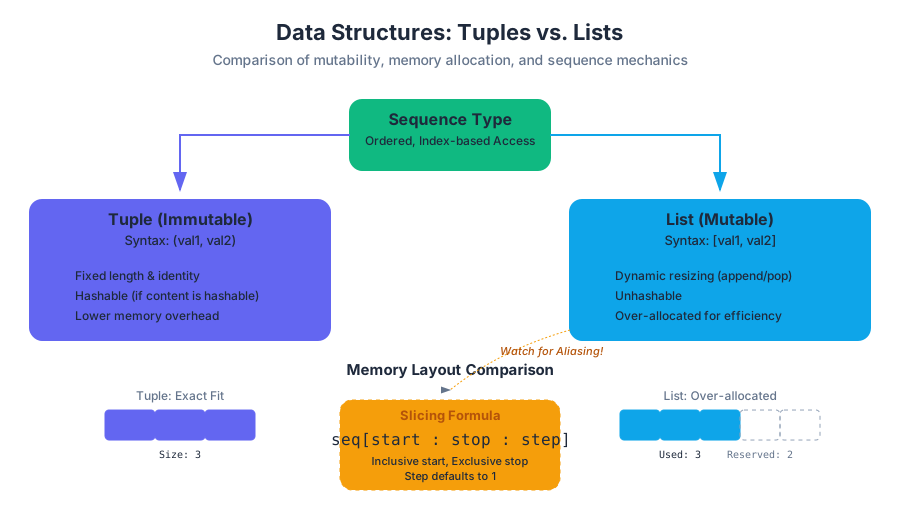
| Memory Overhead | Lower (fixed size) | Higher (dynamic resizing) |
| Common Use Case | Fixed records, function returns | Collections of similar items, stacks |
| Hashability | Hashable (if elements are hashable) | Unhashable |
Tuples: The Immutable Record
A Tuple is an immutable sequence of Python objects. Once a tuple is created, its length and the identity of its elements cannot be altered. This immutability provides a "contract" of safety: if you pass a tuple to a function, you are guaranteed that the function cannot modify the structure of that data.
The Syntax of Singleton Tuples
A common pitfall for beginners is the definition of a single-element tuple. Because parentheses () are also used for grouping expressions (e.g., (2 + 3) * 5), Python requires a trailing comma to distinguish a tuple from a parenthesized expression.
t = (5)$\rightarrow$ Evaluates to the integer5.t = (5,)$\rightarrow$ Evaluates to a tuple containing the integer5.
Tuple Unpacking and Return Values
Tuples are the engine behind Python's ability to return multiple values from a function. This is technically the return of a single tuple object, which is then "unpacked" by the caller.
# First code block: Low-level implementation and advanced unpacking
def get_coordinate_metrics(points):
    """
    Calculates the bounding box of a set of 2D points.
    Demonstrates tuple creation and nested unpacking.
    """
    if not points:
        return (0, 0, 0, 0)

    # Initialize min/max with first point
    min_x = max_x = points[0][0]
    min_y = max_y = points[0][1]

    for (x, y) in points: # Unpacking in loop header
        if x < min_x: min_x = x
        if x > max_x: max_x = x
        if y < min_y: min_y = y
        if y > max_y: max_y = y

    # Returning a tuple (parentheses are optional but recommended)
    return (min_x, max_x, min_y, max_y)

# Usage
data = [(1.2, 3.4), (0.5, 9.1), (4.5, 2.2)]
x_low, x_high, y_low, y_high = get_coordinate_metrics(data)

print(f"Bounds: X[{x_low}:{x_high}], Y[{y_low}:{y_high}]")
Lists: The Dynamic Array
A List is a mutable sequence. Unlike tuples, lists are designed to grow, shrink, and change. In the underlying CPython implementation, a list is an array of pointers to other objects. When you "mutate" a list, you are changing which pointers are stored in that array, or changing the size of the array itself.
List Mutation and Memory
Because lists are mutable, they require a more complex memory strategy. To avoid reallocating memory every time an element is added (an $O(N)$ operation), Python uses over-allocation. It reserves more space than is currently needed, allowing append operations to occur in amortized $O(1)$ time.
# Second code block: Mathematical derivation of List Growth
# Let C be the capacity of the underlying array and N be the number of elements.
# When N > C, a new array is allocated with capacity C'.

C' = (N >> 3) + (N < 9 ? 3 : 6) + N

# This growth factor (roughly 1.125x) ensures that:
# 1. Memory is not wasted excessively (unlike a 2x doubling strategy).
# 2. The frequency of reallocations decreases as the list grows.
# 3. The cost of copying elements is spread out (amortized) over many appends.
Indexing and Slicing
Both structures support Indexing (accessing a single element) and Slicing (accessing a sub-sequence). Python uses zero-based indexing, which aligns with the mathematical concept of an "offset" from the start of the memory block.
The Slicing Formula
The syntax sequence[start:stop:step] follows a specific logic:
- Start: The index of the first element to include (inclusive).
- Stop: The index to stop at (exclusive).
- Step: The increment between indices.
| Expression | Result | Description |
|---|---|---|
L[0] |
First element | Standard access |
L[-1] |
Last element | Negative indexing (wraps around) |
L[1:4] |
[L[1], L[2], L[3]] |
Basic slice |
L[::-1] |
Reversed sequence | Slice with negative step |
L[:2] |
First two elements | Omitted start defaults to 0 |
L[2:] |
From index 2 to end | Omitted stop defaults to length |
Mutation, Aliasing, and Cloning
This is the most critical concept for any developer to master. When you assign a list to a new variable, you are not creating a copy of the data. You are creating an alias.
The Pointer Problem
Consider the following:
L1 = [1, 2, 3]
L2 = L1
L2.append(4)
print(L1) # Outputs [1, 2, 3, 4]
In this example, L1 and L2 point to the same object in memory. This is known as aliasing. If you want a distinct copy, you must perform cloning.
Cloning Techniques
- Slicing:
L2 = L1[:] - Factory Method:
L2 = list(L1) - Deep Copy: For nested lists,
copy.deepcopy(L1)is required to copy the internal objects as well.
Methods of List Manipulation
Lists come equipped with a suite of methods that modify the list "in-place." These methods typically return None, reinforcing the idea that the object itself has changed rather than a new object being created.
| Method | Complexity | Action |
|---|---|---|
append(x) |
$O(1)$* | Adds x to the end of the list. |
extend(iterable) |
$O(K)$ | Appends all elements from the iterable. |
insert(i, x) |
$O(N)$ | Inserts x at index i, shifting subsequent elements. |
pop(i) |
$O(N)$ | Removes and returns element at i (defaults to last). |
remove(x) |
$O(N)$ | Removes the first occurrence of value x. |
sort() |
$O(N \log N)$ | Sorts the list in-place using Timsort. |
reverse() |
$O(N)$ | Reverses the elements in-place. |
Theorem: The Mutability Trap Never iterate over a list while mutating its length. Because the iterator tracks the current index, removing an element shifts all subsequent elements to the left, causing the iterator to skip the next item.
# Third code block: Real-world usage via CLI and Python one-liners
# Scenario: Filtering a list of system logs and extracting PIDs

cat system.log | python3 -c "
import sys
# Read lines into a list, strip whitespace, and filter for 'ERROR'
logs = [line.strip() for line in sys.stdin if 'ERROR' in line]
# Extract PIDs (assuming format 'ERROR [PID]: message')
pids = [log.split('[')[1].split(']')[0] for log in logs]
# Convert to a tuple for immutable storage/hashing
unique_pids = tuple(set(pids))
print(f'Unique Error PIDs: {unique_pids}')
"
Advanced Concept: Nested Data Structures
Tuples and lists can contain other tuples and lists. This allows for the representation of complex data, such as matrices or trees. However, nesting introduces complexity in mutability.
The "Immutable" Tuple with Mutable Elements
A tuple is immutable in that its bindings cannot change. However, if a tuple contains a list, that list can still be modified.
# Fourth code block: Edge case - Nested Mutability
# A tuple containing a mutable list
entry = ("ID_001", [10, 20, 30])

try:
    # This will fail: Tuples don't support item assignment
    entry[0] = "ID_002"
except TypeError as e:
    print(f"Expected Error: {e}")

# This will SUCCEED: The list inside the tuple is being mutated
entry[1].append(40)
print(f"Modified Entry: {entry}")
# Result: ('ID_001', [10, 20, 30, 40])
Performance Considerations
When choosing between these structures, consider the scale of your data.
- Iteration Speed: Tuples are slightly faster to iterate over than lists.
- Memory Footprint: Tuples are more memory-efficient. A list must store its size, its allocated capacity, and the pointer to the array. A tuple only stores its size and the pointers.
- Safety: Use tuples for fixed configurations, dictionary keys (lists cannot be keys because they are not hashable), and returning multiple values. Use lists for collections that will change during the program's execution.
Summary of Best Practices
- Default to Tuples for data that shouldn't change. It signals intent to other developers and prevents accidental bugs.
- Use List Comprehensions for creating lists. They are more readable and often faster than manual loops with
append. - Be Wary of Aliasing. If you pass a list to a function and that function modifies it, the original list is changed. If this is not desired, pass a clone:
my_function(my_list[:]). - Trailing Commas are mandatory for single-element tuples:
(x,).
Source Materials
- Introduction to Computer Science and Programming in Python
- Introduction to Computer Science and Programming in Python
- Download transcript
- Introduction to Computer Science and Programming in Python
- Introduction to Computer Science and Programming in Python
- Introduction to Computer Science and Programming in Python
- Introduction to Computer Science and Programming in Python
- Download transcript
Study Introduction to Computer Science and Programming in Python on Lykke
This course page is free to open: signed out, you can read its first two sections, and signing in, on any plan, opens the rest. The free Lykke Chrome extension syncs your own Canvas courses, so ChatGPT, Claude and Muse can answer from your classes and deadlines. It only reads Canvas.
Add the free extensionSign in to open every sectionAll sections of Introduction to Computer Science and Programming in Python · Browse more course pages