From the free course Introduction to Computer Science and Programming in Python on Lykke
Control Flow: Iteration and Loops
Key concepts: while loops · for loops · range() · break statement
Explains how to repeat tasks efficiently using loops and how to control loop termination.
Control Flow: Iteration and Loops
In the realm of computation, the ability to execute a sequence of instructions once is trivial. The true power of a computer lies in its capacity to perform repetitive tasks with absolute precision and at immense speeds. This concept, known as iteration, allows us to move beyond simple linear scripts and into the domain of complex algorithms.
Iteration is the process of repeatedly executing a block of code, typically until a specific condition is met or a collection of data is exhausted. Without iteration, processing a million-record database would require a million lines of code; with iteration, it requires only a few.
The Philosophy of Iteration: Definite vs. Indefinite
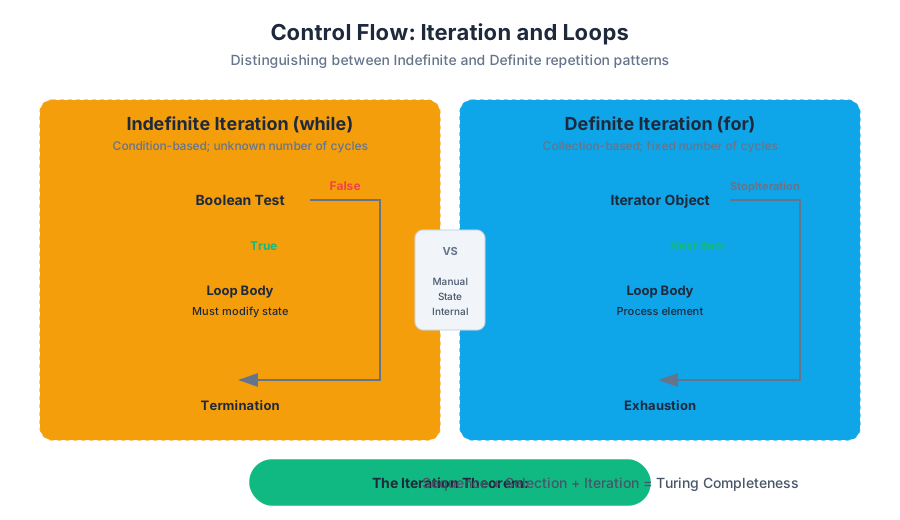
Before diving into syntax, we must distinguish between the two fundamental patterns of repetition:
- Indefinite Iteration: The number of repetitions is not known beforehand. The loop continues as long as a certain logical condition remains true. This is modeled by the
whileloop. - Definite Iteration: The number of repetitions is determined at the start of the loop, usually based on the size of a data structure or a specific range of integers. This is modeled by the
forloop.
The Iteration Theorem: Any computable function can be implemented using only three control structures: sequence, selection (if-statements), and iteration (loops). This underscores that loops are not just a convenience, but a mathematical necessity for general-purpose computing.
While Loops: The Mechanics of Indefinite Iteration
A while loop evaluates a boolean expression before each pass through the loop body. If the expression evaluates to True, the code block is executed. If it evaluates to False, the program skips the block and continues with the next statement in the sequence.
Syntax and Logic Flow
The logic of a while loop is inherently risky. Because the termination depends on a condition that must be modified inside the loop, it is the primary source of "infinite loops"—programs that never terminate because the exit condition is never reached.
| Component | Role | Requirement |
|---|---|---|
| Initialization | Setting the starting state | Must happen before the loop starts |
| Condition | The boolean test | Evaluated at the start of every iteration |
| Loop Body | The work being done | Must eventually affect the Condition |
| Termination | The transition to False |
Essential to prevent system hangs |
Low-Level Implementation
In lower-level languages like C, the while loop is a direct abstraction of a "jump" instruction in assembly.
#include <stdio.h>

/**
 * A robust implementation of a countdown timer.
 * Demonstrates manual state management and boundary conditions.
 */
int main() {
    int counter = 10; // Initialization

    // The condition is checked at the start of each cycle
    while (counter > 0) {
        printf("T-minus %d seconds...\n", counter);

        // Critical: The state must change to ensure eventual termination
        counter--;
    }

    printf("Liftoff!\n");
    return 0;
}
The "Lost Forest" Problem: A Case Study in Indefinite Iteration
A classic pedagogical example involves a user trapped in a "Lost Forest." The program must repeatedly ask the user which direction they want to move. The loop only terminates when the user chooses the correct path. This perfectly illustrates indefinite iteration because the programmer cannot know if the user will take one try or one thousand tries to escape.
Mathematical Representation of Loop Invariants
To prove a loop is correct, computer scientists use a Loop Invariant: a property that is true before and after each iteration.
\text{Let } S \text{ be the set of all possible user inputs.} \\
\text{Let } f(s) \text{ be a function where } f(s) = 1 \text{ if } s \text{ is the exit, else } 0. \\
\text{The loop continues while } \sum_{i=1}^{n} f(s_i) = 0. \\
\text{Termination occurs when } \exists s_n \text{ such that } f(s_n) = 1.
For Loops: Iterating Over Sequences
The for loop in modern languages like Python is more sophisticated than the traditional "counter" loops found in older languages. It is an implementation of the Iterator Pattern, designed to traverse elements in a sequence (strings, lists, tuples, or ranges) automatically.
The Iterator Protocol
When you write for element in sequence:, the interpreter performs the following steps:
- Calls
iter(sequence)to get an iterator object. - Repeatedly calls
next()on that iterator to get the next item. - Catches the
StopIterationexception to terminate the loop gracefully when no items remain.
| Feature | while Loop |
for Loop |
|---|---|---|
| Primary Use | When the end condition is dynamic | When the collection size is known |
| Complexity | Higher risk of infinite loops | Generally safer and more readable |
| State | Manual management (e.g., i += 1) |
Internalized management |
| Performance | Slightly faster in low-level byte manipulation | Optimized for object traversal |
The range() Function: Efficient Definite Iteration
In Python, for loops are frequently paired with the range() function. It is important to understand that range() does not create a list of numbers in memory. Instead, it is a lazy generator (or more accurately, an immutable sequence type) that yields numbers one at a time, making it extremely memory-efficient.
Range Parameters: range(start, stop, step)
- start: The starting integer (inclusive). Defaults to 0.
- stop: The integer at which to stop (exclusive). The loop ends before reaching this number.
- step: The increment between each number. Can be negative for counting downwards.
# Real-world usage: Calculating a weighted moving average
# Demonstrates range() with custom steps and slicing logic

data_points = [10.5, 12.2, 11.8, 13.5, 14.2, 15.1, 14.8]
window_size = 3

print(f"Processing {len(data_points)} samples...")

# Iterate through the list using indices provided by range
for i in range(len(data_points) - window_size + 1):
    window = data_points[i : i + window_size]
    average = sum(window) / window_size
    print(f"Window {i}: {window} -> Avg: {average:.2f}")
Control Flow Alteration: The Break Statement
Sometimes, we need to exit a loop prematurely—before the condition becomes false or the sequence is exhausted. The break statement provides this "emergency exit."
Why use break?
- Efficiency: If you are searching for an item in a list of a billion elements and find it at index 10, there is no need to check the remaining 999,999,990 elements.
- Input Validation: Often used in "infinite" loops (
while True) where the exit condition is complex and checked in the middle of the loop body rather than the start.
The "Search and Destroy" Pattern
Consider a system monitoring a server log for a specific error code. Once found, the system should stop scanning and trigger an alert.
# A conceptual shell-style representation of a loop with a break condition
# Searching for a 'CRITICAL' error in a log file

log_file="server.log"

while read -r line; do
    echo "Checking: $line"
    if [[ "$line" == *"CRITICAL"* ]]; then
        echo "CRITICAL ERROR FOUND. Terminating scan."
        break  # Exits the 'while' loop immediately
    fi
done < "$log_file"

echo "Scan complete or aborted."
Common Pitfalls and Edge Cases
Even senior engineers encounter bugs in loop logic. Understanding these common failure modes is essential for writing robust code.
1. The Off-By-One Error
This occurs when a loop iterates one time too many or one time too few. This is usually caused by a misunderstanding of whether the stop value in a range() or a comparison operator (like < vs <=) is inclusive.
2. Modifying a Collection While Iterating
Never add or remove items from a list while you are looping over it. This shifts the indices and causes the loop to skip elements or crash.
- Solution: Iterate over a copy of the list or use a list comprehension to create a new, filtered list.
3. The Infinite While Loop
If the variables involved in a while condition are never updated inside the loop, the program will hang.
- Debugging Tip: Always include a "safety counter" or print statements during development to track the state of the loop variables.
| Pitfall | Symptom | Prevention |
|---|---|---|
| Infinite Loop | Program stops responding, CPU spikes | Ensure condition variables change |
| Off-By-One | Last item missing or IndexError |
Remember range(n) goes 0 to n-1 |
| Mutation Error | Items skipped during iteration | Iterate over list(my_list[:]) (a copy) |
| Shadowing | Iterator variable overwrites data | Use unique names (e.g., for idx in...) |
Advanced Concept: Nested Loops and Complexity
Loops can be placed inside other loops. This is common when dealing with multi-dimensional data, such as matrices, images (pixels in rows and columns), or coordinate systems.
However, nesting loops significantly impacts Computational Complexity.
- A single loop over $n$ elements is $O(n)$ (Linear time).
- A nested loop (a loop inside a loop) over $n$ elements is $O(n^2)$ (Quadratic time).
If $n = 1,000,000$, an $O(n)$ algorithm takes a million operations, while an $O(n^2)$ algorithm takes a trillion operations. This is the difference between a program that finishes in milliseconds and one that takes hours.
Summary of Best Practices
- Prefer
foroverwhile: If you can define the bounds of your iteration, use aforloop. It is more idiomatic and less prone to errors. - Keep Loop Bodies Small: If a loop body is more than 10–15 lines, consider moving the logic into a separate function. This improves readability and testability.
- Use
breakSparingly: While powerful,breakcan make code harder to follow because it creates multiple exit points. Use it when it clearly simplifies the logic. - Leverage
enumerate(): When you need both the item and its index in aforloop, usefor i, val in enumerate(sequence):instead of manual counters.
Further Reading
- The Art of Computer Programming by Donald Knuth (Volume 1: Fundamental Algorithms)
- Structure and Interpretation of Computer Programs (SICP) - Section on Iterative vs. Recursive processes.
- Python Documentation: "The Iterator Protocol" and "Itertools Module."
Source Materials
- Introduction to Computer Science and Programming in Python
- Introduction to Computer Science and Programming in Python
- Introduction to Computer Science and Programming in Python
- Introduction to Computer Science and Programming in Python
- Introduction to Computer Science and Programming in Python
- Introduction to Computer Science and Programming in Python
- Introduction to Computer Science and Programming in Python
- Introduction to Computer Science and Programming in Python
Study Introduction to Computer Science and Programming in Python on Lykke
This course page is free to open: signed out, you can read its first two sections, and signing in, on any plan, opens the rest. The free Lykke Chrome extension syncs your own Canvas courses, so ChatGPT, Claude and Muse can answer from your classes and deadlines. It only reads Canvas.
Add the free extensionSign in to open every sectionAll sections of Introduction to Computer Science and Programming in Python · Browse more course pages