From the free course Computing on Lykke
Strings and Iteration Patterns
Key concepts: String immutability · String formatting · Accumulator pattern
Manipulating text and using patterns to process sequences of data.
Strings and Iteration Patterns
In the architecture of modern software, strings are rarely just "text." They are the primary medium for data serialization (JSON, XML), the interface for human-computer interaction, and the substrate upon which most natural language processing (NLP) is built. To the uninitiated, a string is a simple sequence of characters. To the senior engineer, a string is an immutable data structure with specific memory allocation behaviors and a set of algorithmic constraints that dictate the efficiency of every iteration.
This article explores the deep mechanics of string handling, focusing on the architectural implications of immutability, the evolution of string formatting, and the ubiquitous accumulator pattern used to transform raw sequences into structured data.
String Immutability: The Architecture of Persistence
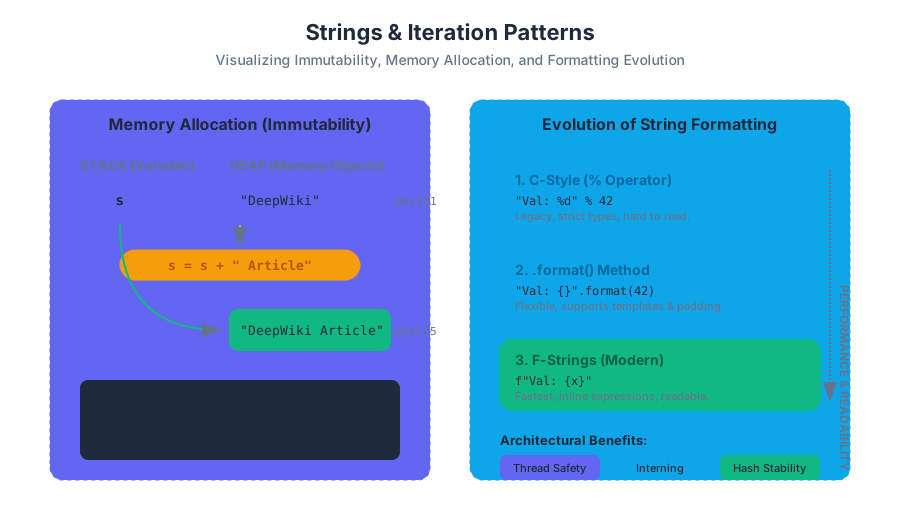
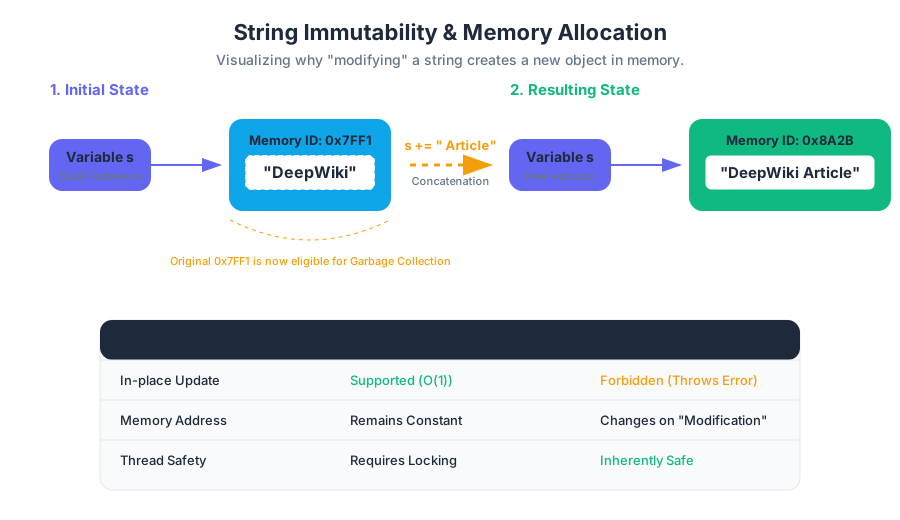
In many high-level languages—most notably Python, Java, and C#—strings are immutable. This means that once a string object is allocated in memory, its contents cannot be altered. Any operation that appears to "modify" a string actually creates an entirely new string object in a different memory location.
Why Immutability?
The design choice to make strings immutable is not arbitrary; it is a fundamental optimization for security, memory management, and concurrency:
- Thread Safety: Because strings cannot change, they are inherently thread-safe. Multiple threads can read the same string without the risk of one thread modifying the data while another is processing it, eliminating the need for complex locking mechanisms.
- String Interning: Languages can optimize memory by storing only one copy of each distinct string literal. This is known as interning. If two variables are assigned the string
"DeepWiki", they can both point to the same memory address. - Hashing Stability: Strings are frequently used as keys in hash maps (dictionaries). If a string were mutable, changing its value would change its hash code, making it impossible to retrieve the associated value from the map.
Memory Implications
When we perform a concatenation like s = s + "!", the runtime must:
- Calculate the length of the new string.
- Allocate a new block of memory sufficient for the combined length.
- Copy the characters from the old string to the new block.
- Copy the new characters to the new block.
- Update the variable
sto point to the new address.
| Property | Mutable (e.g., Lists) | Immutable (e.g., Strings) |
|---|---|---|
| In-place modification | Supported (list[0] = 'x') |
Forbidden (TypeError) |
| Memory Address | Remains constant during updates | Changes with every "modification" |
| Performance (Small updates) | $O(1)$ average | $O(n + m)$ |
| Hashability | No (cannot be dict keys) | Yes (can be dict keys) |
| Thread Safety | Requires manual locking | Inherently safe |
Low-Level Implementation: Memory Tracing
The following Python snippet demonstrates the shift in memory addresses (IDs) that occurs during "modification," proving that the original object is discarded.
# Demonstrating Immutability and Memory Allocation
def trace_string_id():
    base_str = "DeepWiki"
    original_id = id(base_str)
    print(f"Initial String: '{base_str}' | Memory Address: {original_id}")

    # Attempting to 'modify' the string
    base_str += " Article"
    new_id = id(base_str)
    print(f"Modified String: '{base_str}' | Memory Address: {new_id}")

    if original_id != new_id:
        print("Result: A new object was created. The original remains unchanged.")

    # Proof of Immutability: This will raise a TypeError
    try:
        base_str[0] = "d"
    except TypeError as e:
        print(f"Error caught: {e}")

trace_string_id()
String Formatting: The Evolution of Interpolation
String formatting is the process of building a dynamic string by injecting variables into a template. Historically, this has evolved from low-level buffer manipulation to sophisticated, type-safe interpolation.
The Three Eras of Formatting
- C-Style (% Operator): Inherited from the
printffunction in C. It uses placeholders like%sfor strings and%dfor integers. While powerful, it is error-prone regarding type matching and readability. - The
.format()Method: Introduced to provide more flexibility, allowing for positional and keyword arguments, as well as advanced alignment and padding. - F-Strings (Literal String Interpolation): The modern standard. F-strings are evaluated at runtime, allowing for embedded expressions and significantly higher performance because they are parsed into a series of constant strings and expressions rather than being processed as a template at runtime.
Comparative Performance and Syntax
| Method | Syntax Example | Pros | Cons |
|---|---|---|---|
| % Operator | "%s: %d" % (name, val) |
Familiar to C/C++ devs | Strict type requirements |
| .format() | "{}: {}".format(n, v) |
Flexible, good for templates | Verbose for simple cases |
| F-Strings | f"{name}: {val}" |
Fastest, most readable | Only available in Python 3.6+ |
| Template Strings | Template("$n").substitute(n=name) |
Secure for user-provided input | Limited features |
Systems-Level Representation: C Buffer Formatting
In lower-level languages like C, formatting requires manual buffer management, highlighting the risks of buffer overflows that modern languages handle automatically.
#include <stdio.h>
#include <string.h>

/**
 * Demonstrates the manual nature of string formatting in C.
 * Unlike Python f-strings, we must ensure the destination buffer
 * is large enough to hold the result.
 */
int main() {
    char buffer[100];
    char* title = "DeepWiki";
    int version = 2;
    float latency = 0.45;

    // snprintf is the 'safe' way to format, preventing buffer overflows
    int written = snprintf(buffer, sizeof(buffer),
                           "System: %s | V: %d | Latency: %.2fms",
                           title, version, latency);

    if (written >= sizeof(buffer)) {
        printf("Error: String truncated. Buffer too small.\n");
    } else {
        printf("Formatted Output: %s\n", buffer);
    }

    return 0;
}
The Accumulator Pattern: Building Results Iteratively
The Accumulator Pattern is a fundamental algorithmic structure where a variable (the "accumulator") is initialized before a loop and updated within the loop to build a final result. When applied to strings, this pattern is the engine behind data transformation, filtering, and custom serialization.
Mathematical Derivation of the Pattern
Let $S$ be the initial state of the accumulator. Let $I = {i_1, i_2, ..., i_n}$ be a sequence of inputs. Let $f(acc, input)$ be a transformation function.
The accumulator pattern follows the recurrence: $$acc_0 = S$$ $$acc_k = f(acc_{k-1}, i_k)$$ $$Result = acc_n$$
The Concatenation Trap
A common pitfall in the accumulator pattern is using += to build a string inside a loop. Because of immutability, each += operation creates a new string.
- First iteration: Copy 1 char.
- Second iteration: Copy 2 chars.
- $N^{th}$ iteration: Copy $N$ chars.
This results in an $O(N^2)$ time complexity, which is disastrous for large datasets. The industry-standard solution is to accumulate elements in a list (which is mutable and has $O(1)$ append time) and then use a
joinoperation to create the final string in a single $O(N)$ pass.
Real-World Usage: Log Sanitization Pipeline
In this example, we use the accumulator pattern to process a raw log file, filtering out sensitive information and building a sanitized report.
import re

def sanitize_logs(raw_logs):
    """
    Uses the Accumulator Pattern to filter PII from log sequences.
    Accumulates into a list to maintain O(n) complexity.
    """
    # 1. Initialize the accumulator
    sanitized_entries = []

    # 2. Iterate through the sequence
    for entry in raw_logs:
        # Transformation logic (f(acc, input))
        # Masking IP addresses with a regex
        clean_entry = re.sub(r'\d{1,3}\.\d{1,3}\.\d{1,3}\.\d{1,3}', '[REDACTED_IP]', entry)

        # Filtering logic
        if "DEBUG" not in clean_entry:
            # 3. Update the accumulator
            sanitized_entries.append(clean_entry)

    # 4. Finalize the result
    return "\n".join(sanitized_entries)

# Example CLI usage simulation
log_data = [
    "2023-10-01 10:00:01 INFO Connection from 192.168.1.1",
    "2023-10-01 10:00:02 DEBUG Handshake initiated",
    "2023-10-01 10:00:05 WARN Unauthorized access attempt by 10.0.0.55"
]

print(sanitize_logs(log_data))
Iteration Patterns: Beyond the Simple Loop
Iterating over strings is not limited to "for each character." Advanced patterns allow for complex parsing and data extraction.
1. Index-Based Iteration
Used when the position of the character matters (e.g., checking the character before the current one).
Theorem: For any string of length $L$, the valid index range is $[0, L-1]$. Accessing $L$ results in an
IndexError(Off-by-one error).
2. Slicing and Windowing
Slicing allows for the extraction of sub-sequences. A Sliding Window is a specific iteration pattern where we look at a fixed-size chunk of the string at each step. This is essential for tasks like finding DNA motifs or calculating rolling hashes.
| Pattern | Logic | Complexity | Use Case |
|---|---|---|---|
| Linear Scan | for char in string |
$O(N)$ | Counting characters, simple search |
| Reverse Scan | for i in range(len(s)-1, -1, -1) |
$O(N)$ | Palindrome checks, suffix parsing |
| Sliding Window | s[i : i+k] |
$O(N \cdot K)$ | Substring matching, N-grams |
| Two-Pointer | while left < right |
$O(N)$ | In-place reversals, sorting logic |
Example: The Sliding Window Pattern
This shell-style logic (using Python for clarity) demonstrates how to extract all 3-character sequences (trigrams) from a string, a common task in computational linguistics.
def get_trigrams(text):
    """
    Implements a sliding window iteration pattern.
    """
    trigrams = []
    # We stop at len - 2 to ensure the window (i, i+1, i+2) stays in bounds
    for i in range(len(text) - 2):
        window = text[i : i+3]
        trigrams.append(window)
    return trigrams

# Input: "ITERATION"
# Output: ['ITE', 'TER', 'ERA', 'RAT', 'ATI', 'TIO', 'ION']
print(f"Trigrams: {get_trigrams('ITERATION')}")
Common Pitfalls and Edge Cases
- The Off-By-One Error: When iterating by index, beginners often try to access
string[len(string)]. Remember that indexing is zero-based. - Unicode and Multi-byte Characters: In modern systems, one "character" (grapheme) might consist of multiple bytes or even multiple code points (e.g., emojis with skin tone modifiers). Simple iteration might split an emoji in half.
- Empty String Handling: Always ensure your accumulator logic handles
""gracefully. An empty string has a length of 0, and loops over it will not execute, which might leave your accumulator in an uninitialized or invalid state.
Key Insight: Always prefer
"".join(list_accumulator)overstring_accumulator += valuein performance-critical loops. The difference is the difference between linear $O(N)$ and quadratic $O(N^2)$ time.
Summary of Engineering Principles
Strings are the most common data type, but their simplicity is deceptive. By understanding that strings are immutable, we write safer, more predictable code. By mastering formatting, we create more maintainable and performant interfaces. And by applying the accumulator pattern correctly, we ensure our text-processing algorithms scale linearly with our data. Whether you are building a simple script or a massive distributed system, these patterns form the bedrock of efficient computation.
Source Materials
Study Computing on Lykke
This course page is free to open: signed out, you can read its first two sections, and signing in, on any plan, opens the rest. The free Lykke Chrome extension syncs your own Canvas courses, so ChatGPT, Claude and Muse can answer from your classes and deadlines. It only reads Canvas.
Add the free extensionSign in to open every section