From the free course Computing on Lykke
Loops and Repetition
Key concepts: While loops · For loops · range() function
Using loops to automate repetitive tasks and manage program flow.
Loops and Repetition
In the architecture of computation, repetition is the engine of utility. While conditional logic allows a program to "choose," loops allow a program to "scale." At its core, a loop is a control flow structure that executes a statement or a block of statements multiple times, either until a specific condition is met or until every element in a collection has been processed.
Without loops, the utility of a computer would be limited to the speed at which a human could write individual lines of code. With loops, we leverage the fundamental advantage of silicon over biology: the ability to perform billions of discrete, identical operations with zero fatigue and absolute precision.
The Mechanics of Iteration
Iteration is the process of repeatedly executing a set of instructions. In high-level languages like Python, this is abstracted into two primary forms: indefinite iteration (where the number of repetitions is not known beforehand) and definite iteration (where the number of repetitions is predetermined).
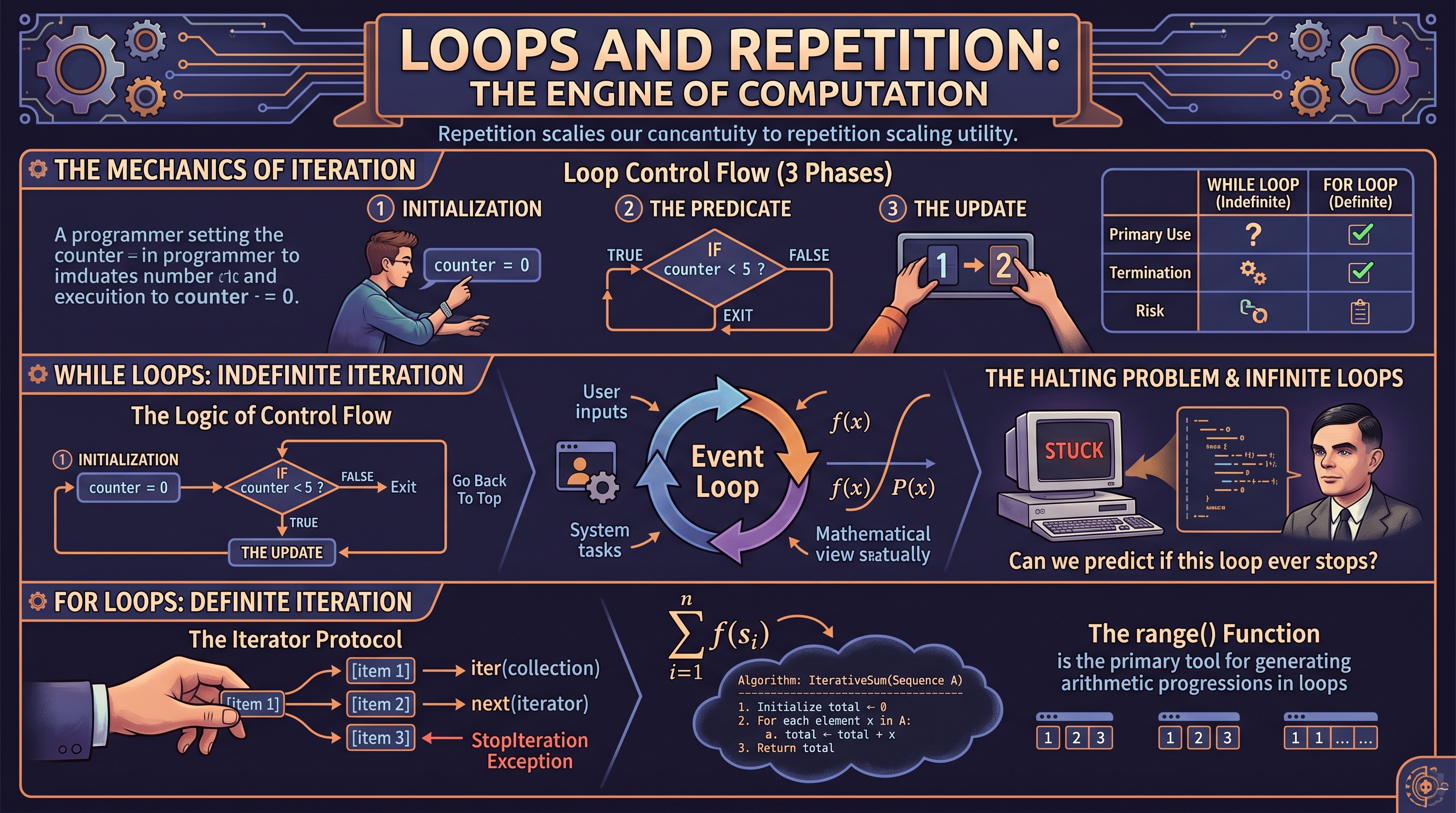
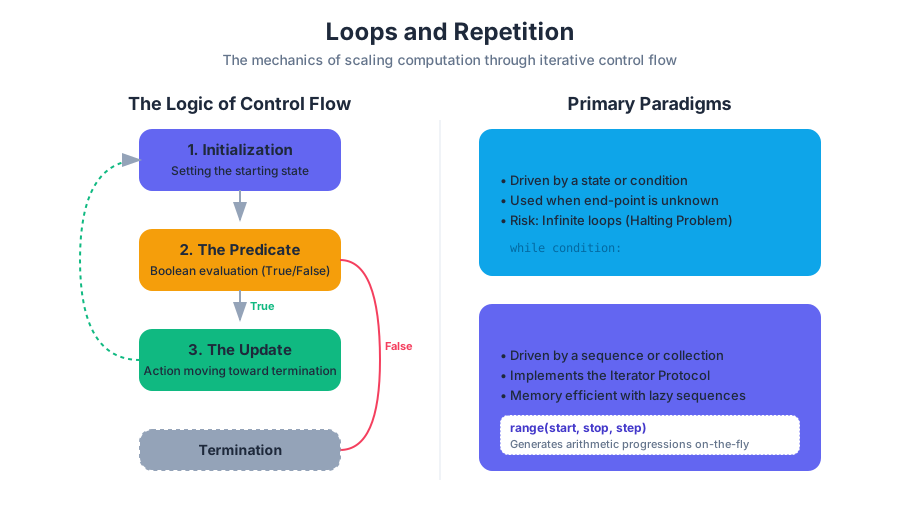
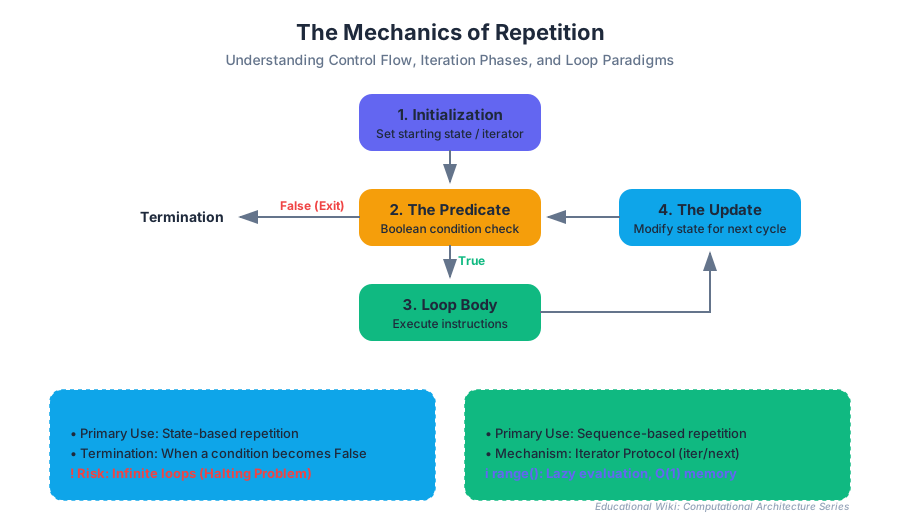
The Logic of Control Flow
Every loop consists of three conceptual phases:
- Initialization: Setting the starting state or the iterator.
- The Predicate (Condition): A Boolean evaluation that determines if the loop should continue.
- The Update (Side Effect): An action that moves the state closer to the termination condition.
| Feature | While Loop (Indefinite) | For Loop (Definite) |
|---|---|---|
| Primary Use | State-based repetition | Sequence-based repetition |
| Termination | When a condition becomes False |
When the sequence is exhausted |
| Risk | Infinite loops (Non-termination) | Index errors (less common in Python) |
| Memory | Minimal (stores only state) | Depends on the sequence size |
While Loops: Indefinite Iteration
A While Loop is the most fundamental form of repetition. It mirrors the logical structure of an if statement but returns to the top of the block after each execution. Mathematically, it can be viewed as a recursive function $f(x)$ that continues as long as $P(x)$ is true.
Definition: The While Loop A control structure that repeatedly executes a target statement as long as a given condition (the predicate) evaluates to
True.
Why It Matters
While loops are essential when the termination point depends on external factors—user input, a sensor reading, or a mathematical convergence—rather than a fixed count. In systems programming, the "Event Loop" is a perpetual while loop that keeps an operating system or application running.
Implementation and Memory
In low-level terms, a while loop is a combination of a comparison and a jump instruction.
// First code block: Low-level implementation in C
// Demonstrating the assembly-like logic of a while loop
#include <stdio.h>

int main() {
    int counter = 0;
    int threshold = 1000;

    // The loop header performs a comparison
    while (counter < threshold) {
        // Body of the loop
        if (counter % 100 == 0) {
            printf("Processing checkpoint: %d\n", counter);
        }

        // The Update: Critical to avoid infinite loops
        counter++;
    }
    // After the jump: condition is now false
    return 0;
}
The Halting Problem
A significant risk with while loops is the Infinite Loop. If the predicate never evaluates to False, the program enters a state of non-termination. This relates to Alan Turing’s "Halting Problem," which proves that there is no general algorithm that can determine, for any program and input, whether the program will eventually stop.
For Loops: Definite Iteration
A For Loop is designed to iterate over a pre-defined collection or sequence. In Python, the for loop is actually an implementation of the Iterator Pattern, which abstracts the process of moving through a data structure.
The Iterator Protocol
When you write for item in collection:, Python performs the following behind the scenes:
- Calls
iter(collection)to get an iterator object. - Repeatedly calls
next(iterator)to retrieve the next value. - Catches the
StopIterationexception to terminate the loop gracefully.
\text{For a set } S = \{s_1, s_2, \dots, s_n\}, \text{ a for loop computes: } \\
\sum_{i=1}^{n} f(s_i) \text{ or } \prod_{i=1}^{n} f(s_i)
Mathematical Derivation of Iteration
We can represent the state change in a loop using recurrence relations. If $x_n$ is the state after $n$ iterations:
Second code block: Mathematical representation and Pseudocode
Algorithm: IterativeSum(Sequence A)
----------------------------------
1. Initialize total ← 0
2. For each element x in A:
    a. total ← total + x
3. Return total

Mathematical Recurrence:
S[0] = 0
S[i] = S[i-1] + A[i]  for i > 0
The range() Function
The range() function is the primary tool for generating arithmetic progressions in Python. Unlike a list, range is a lazy sequence (an immutable sequence type). It does not store all numbers in memory; instead, it calculates them on the fly.
Parameters and Complexity
The range() function accepts up to three arguments: start, stop, and step.
| Parameter | Role | Default |
|---|---|---|
start |
The starting integer of the sequence | 0 |
stop |
The upper bound (exclusive) | Required |
step |
The increment between each number | 1 |
Insight: Memory Efficiency Because
rangeis a generator-like object,range(0, 1000000)takes the same amount of memory asrange(0, 10), regardless of the size of the range. It only stores the start, stop, and step values.
Practical Usage
range() is frequently used to iterate a specific number of times or to access elements by their index.
# Third code block: Real-world usage in Python
# Simulating a population growth model using range() and randomness
import random

def simulate_population(initial_pop, growth_rate, generations):
    population = initial_pop
    print(f"Starting Simulation: {population} individuals")

    for gen in range(1, generations + 1):
        # Apply growth rate with a random environmental factor
        factor = random.uniform(0.9, 1.1)
        population = int(population * growth_rate * factor)

        # Logging results every 5 generations
        if gen % 5 == 0:
            print(f"Generation {gen}: Population = {population}")

    return population

final_count = simulate_population(100, 1.05, 20)
Loop Control Flow: Break and Continue
Sometimes, the standard entry/exit points of a loop are insufficient. Control flow statements allow for more granular movement within the loop body.
break: Immediately terminates the loop and jumps to the first line of code after the loop block.continue: Skips the remainder of the current iteration and jumps back to the top of the loop (the predicate or next sequence item).else(Python specific): A unique clause that executes only if the loop finished "naturally" (i.e., it did not encounter abreak).
Control Statement Comparison
| Statement | Effect on Current Iteration | Effect on Loop State | Common Use Case |
|---|---|---|---|
break |
Terminated | Entire loop exits | Searching for an item (Early exit) |
continue |
Terminated | Moves to next iteration | Skipping invalid data/noise |
pass |
None (No-op) | Continues normally | Placeholder for future code |
Nested Loops and Algorithmic Complexity
A Nested Loop occurs when a loop is placed inside the body of another loop. This is common in processing multi-dimensional data, such as matrices or coordinate systems.
The Cost of Nesting
Nesting loops significantly impacts the Time Complexity of an algorithm.
- A single loop over $n$ items is $O(n)$ (Linear time).
- A loop over $n$ items inside another loop over $n$ items is $O(n^2)$ (Quadratic time).
# Fourth code block: Shell script demonstrating nested iteration
# Generating a grid of coordinates for a batch processing task
#!/bin/bash

ROWS=3
COLS=4

echo "Generating $ROWS x $COLS grid..."

for ((i=1; i<=ROWS; i++))
do
    for ((j=1; j<=COLS; j++))
    do
        printf "(%d,%d) " $i $j
    done
    echo "" # Newline after each row
done
Common Pitfalls and Best Practices
Even experienced engineers encounter subtle bugs when implementing repetition logic.
1. The Off-by-One Error
This occurs when a loop iterates one time too many or one time too few. This is often caused by confusion between inclusive and exclusive bounds (e.g., range(0, 10) stops at 9).
2. Modifying a Collection While Iterating
In many languages, including Python, adding or removing items from a list while you are looping over it can lead to skipped elements or runtime errors.
- Solution: Iterate over a copy of the list (
for item in my_list[:]) or collect items to be removed in a separate list and process them afterward.
3. Floating Point Precision in Predicates
Using floating-point numbers in a while loop condition is dangerous due to precision issues.
- Bad:
while x != 1.0:(x might become 0.99999999 and skip 1.0). - Good:
while x < 1.0:orwhile abs(x - 1.0) > 1e-9:.
Advanced Pattern: The Accumulator Pattern
The Accumulator Pattern is a common algorithmic design where a variable (the accumulator) is updated in every iteration of a loop to maintain a running total, a concatenated string, or a filtered list.
# Fifth code block: Accumulator Pattern in Data Modeling
# Filtering a dictionary of sensor data and calculating an average

sensor_data = {
    "sensor_a": 22.5,
    "sensor_b": None,
    "sensor_c": 25.8,
    "sensor_d": 19.2,
    "sensor_e": "Error"
}

def calculate_clean_average(data):
    total = 0.0      # Accumulator 1: Sum
    count = 0        # Accumulator 2: Count

    for sensor, value in data.items():
        # Type checking to ensure we only process floats/ints
        if isinstance(value, (int, float)):
            total += value
            count += 1
        else:
            print(f"Skipping invalid data at {sensor}: {value}")

    return total / count if count > 0 else 0

avg = calculate_clean_average(sensor_data)
print(f"Average Temperature: {avg:.2f}")
Summary of Loop Types
| Loop Type | Best For... | Key Syntax (Python) |
|---|---|---|
| For-in | Iterating over lists, strings, or dicts | for item in collection: |
| For-range | Repeating an action $N$ times | for i in range(n): |
| While | Waiting for a condition to change | while condition: |
| Nested | Multi-dimensional arrays/grids | for x in row: for y in col: |
Conclusion
Loops are the primary mechanism for scaling logic. Whether you are traversing a simple list with a for loop, managing a complex state machine with a while loop, or generating efficient numeric sequences with range(), understanding the underlying mechanics of iteration is vital. By mastering control flow statements and being mindful of algorithmic complexity, you can write code that is not only functional but also performant and robust.
Source Materials
Study Computing on Lykke
This course page is free to open: signed out, you can read its first two sections, and signing in, on any plan, opens the rest. The free Lykke Chrome extension syncs your own Canvas courses, so ChatGPT, Claude and Muse can answer from your classes and deadlines. It only reads Canvas.
Add the free extensionSign in to open every section