From the free course Computing on Lykke
Introduction to Computational Thinking
Key concepts: Computational thinking · Sequence and state · Program execution
An introduction to how computers interpret instructions and the foundational concept of computational thinking.
Introduction to Computational Thinking
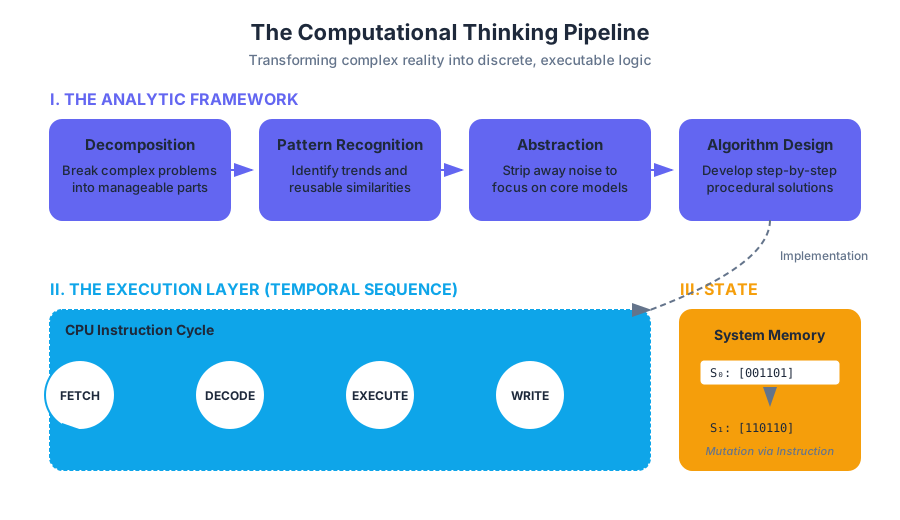
Computational thinking is not merely the act of writing code; it is a fundamental analytic skill that involves solving problems, designing systems, and understanding human behavior by drawing on the concepts fundamental to computer science. While a programmer uses a language to communicate with a machine, a computational thinker uses a framework to decompose reality into discrete, executable logic.
The Pillars of Computational Thinking
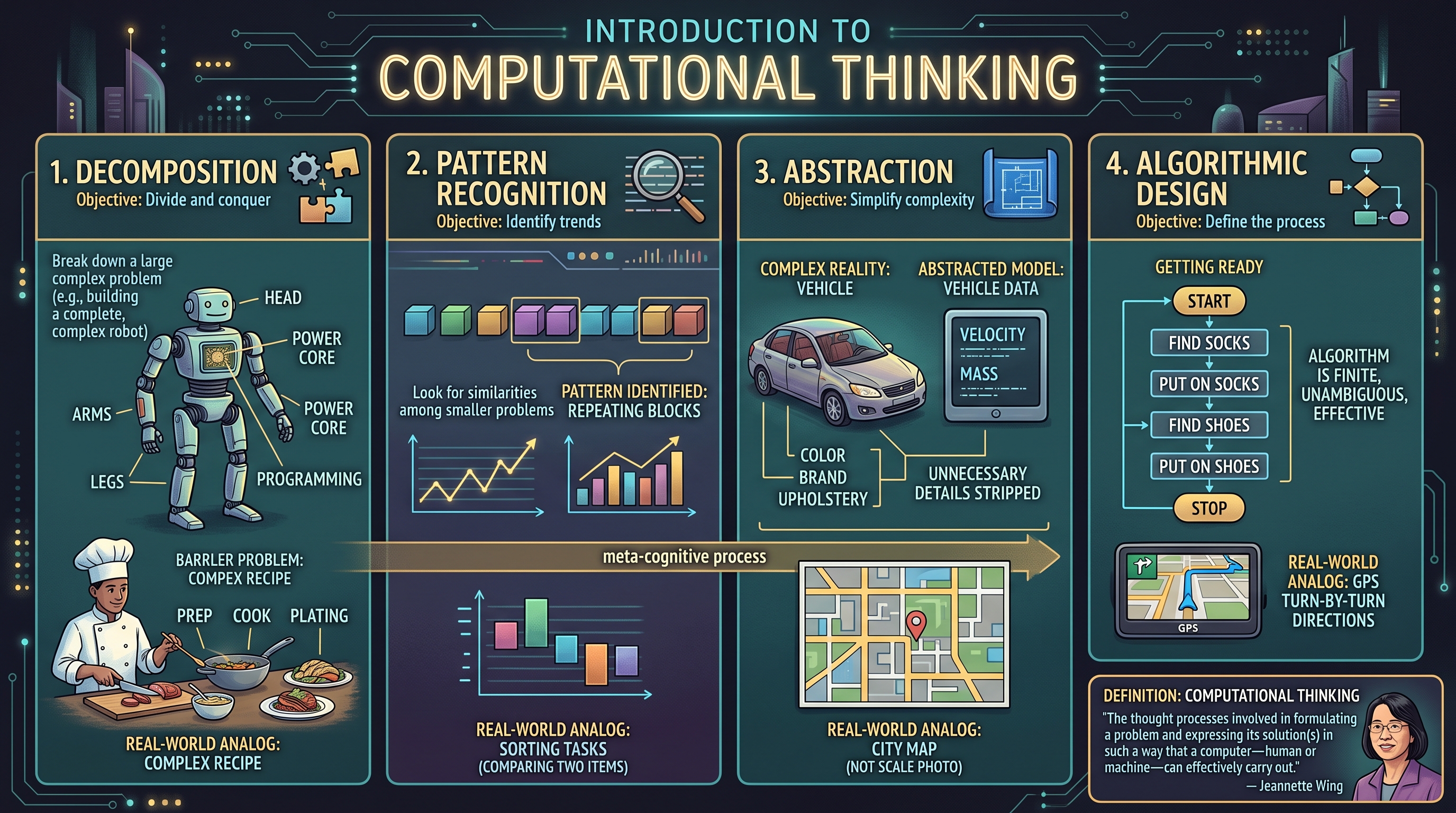
At its core, computational thinking is a meta-cognitive process. It allows us to take a complex, often ambiguous problem and reformulate it into a format that a procedural agent—be it a human following a recipe or a CPU executing binary—can resolve with precision.
1. Decomposition
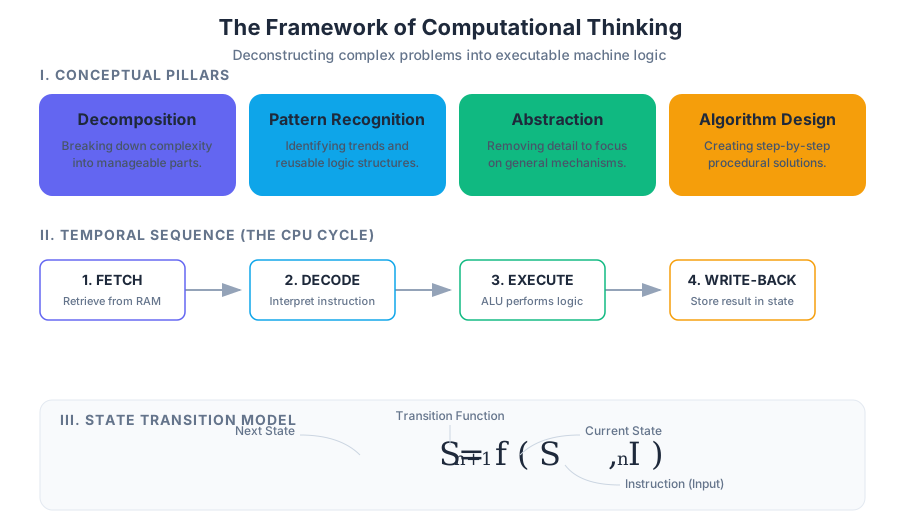
Decomposition is the practice of breaking a complex problem down into smaller, more manageable parts. In software engineering, this is often referred to as modularity. By isolating components, we reduce the cognitive load required to solve any single piece of the puzzle.
2. Pattern Recognition
Once a problem is decomposed, we look for similarities among the smaller problems. Recognizing these patterns allows us to apply previously discovered solutions to new contexts, leading to efficiency and the creation of reusable logic.
3. Abstraction
Abstraction involves stripping away the unnecessary details to focus on the general mechanisms that matter. It is the process of creating a "model" of the problem. For instance, when modeling a vehicle in a simulation, we might care about its velocity and mass, but ignore its color or the brand of its upholstery.
4. Algorithmic Design
This is the culmination of the previous three steps: developing a step-by-step strategy for solving the problem. An algorithm must be finite, unambiguous, and effective.
| Pillar | Objective | Real-World Analog |
|---|---|---|
| Decomposition | Divide and conquer | Breaking a large recipe into prep, cooking, and plating. |
| Pattern Recognition | Identify trends | Noticing that all "sorting" tasks involve comparing two items. |
| Abstraction | Simplify complexity | Using a map instead of a 1:1 scale photograph of a city. |
| Algorithm Design | Define the process | Writing the turn-by-turn directions for a GPS. |
Definition: Computational Thinking "The thought processes involved in formulating a problem and expressing its solution(s) in such a way that a computer—human or machine—can effectively carry out." — Jeannette Wing
Sequence and the Temporal Nature of Execution
In computing, the sequence refers to the specific, linear order in which instructions are processed. Because computers are deterministic, the order of operations is the primary determinant of the final outcome. A single transposed line of code can be the difference between a successful transaction and a system crash.
The Fetch-Decode-Execute Cycle
To understand sequence, one must understand how the hardware processes it. Every instruction follows a rigid lifecycle within the Central Processing Unit (CPU):
- Fetch: The instruction is retrieved from memory (RAM) based on the current value of the Program Counter.
- Decode: The Control Unit interprets the binary instruction to determine what operation is required.
- Execute: The Arithmetic Logic Unit (ALU) performs the operation.
- Write-back: The result is stored back into memory or a register.
Determinism and Linearity
Unless directed otherwise by control flow structures (like loops or conditionals), a program executes from the top down. This linearity ensures that the state of the system at line $n$ is a direct result of all operations from lines $1$ to $n-1$.
Worked Example: The Importance of Sequence
Consider a simple banking operation. If we reverse the sequence of "Check Balance" and "Withdraw Funds," we risk an overdraft because the state was not validated before the mutation occurred.
| Step | Correct Sequence | Incorrect Sequence | Result of Error |
|---|---|---|---|
| 1 | Check if balance > $100 | Deduct $100 | Negative balance allowed |
| 2 | Deduct $100 | Check if balance > $100 | Logic check happens too late |
| 3 | Update Database | Update Database | Integrity compromised |
State: The Memory of the Machine
If sequence is the "verb" of computation, state is the "noun." State represents the condition of a system at a specific point in time, stored in the computer's memory as variables, data structures, or register values.
Variables as State Containers
A variable is a symbolic name for a memory location. When we assign a value to a variable, we are modifying the state of the program.
State Transitions
A program is essentially a State Machine. It moves from an initial state $S_0$ through a series of transitions $T$ triggered by instructions, eventually reaching a final state $S_{final}$.
$$S_{n+1} = f(S_n, I)$$
Where $S$ is the state and $I$ is the instruction. This mathematical representation highlights that the next state is strictly a function of the current state and the current instruction.
Implementation: Low-Level State Management
In systems programming, managing state often requires direct interaction with memory addresses. The following C example demonstrates how state is modified by manipulating memory directly.
#include <stdio.h>

/**
 * Demonstrates state transition through pointer manipulation.
 * In low-level systems, 'state' is literally the bits stored
 * at a specific hex address in RAM.
 */
int main() {
    // Initial State: memory is allocated for an integer
    int system_state = 100;
    int *state_ptr = &system_state;

    printf("Initial State Value: %d at Address: %p\n", system_state, (void*)state_ptr);

    // Transition: Instruction modifies the value at the address
    *state_ptr = 250;

    // Final State: The value at the memory location has changed
    if (system_state == 250) {
        printf("State Transition Successful. New Value: %d\n", system_state);
    }

    return 0;
}
Program Execution and Tracing
Program execution is the process by which a computer interprets the source code and transforms it into actions. This can happen via Compilation (translating the whole program to machine code at once) or Interpretation (translating and executing line-by-line).
Tracing Logic
Tracing is a mental or manual technique used by programmers to track the value of variables as they change through a sequence. It is the most effective way to debug logic errors.
Formal Representation of Execution
We can represent the execution of a simple algorithm using a Trace Table. This allows us to visualize the "movement" of state through the sequence.
ALGORITHM: SumFirstN
1. INPUT n
2. SET total = 0
3. SET counter = 1
4. WHILE counter <= n:
5.    total = total + counter
6.    counter = counter + 1
7. OUTPUT total

TRACE TABLE (Input n = 3):
| Line | n | total | counter | counter <= n |
|------|---|-------|---------|--------------|
| 1    | 3 | ?     | ?       | ?            |
| 2    | 3 | 0     | ?       | ?            |
| 3    | 3 | 0     | 1       | ?            |
| 4    | 3 | 0     | 1       | True         |
| 5    | 3 | 1     | 1       | True         |
| 6    | 3 | 1     | 2       | True         |
| 4    | 3 | 1     | 2       | True         |
| 5    | 3 | 3     | 2       | True         |
| 6    | 3 | 3     | 3       | True         |
| 4    | 3 | 3     | 3       | True         |
| 5    | 3 | 6     | 3       | True         |
| 6    | 3 | 6     | 4       | True         |
| 4    | 3 | 6     | 4       | False        |
| 7    | 3 | 6     | 4       | -            |
Data Types and Arithmetic Expressions
Computational thinking requires us to categorize data. Computers do not "know" what a number or a letter is; they only know bits. Data Types provide the context the computer needs to interpret those bits correctly.
Primitive Data Types
Most languages support a core set of primitives:
- Integers: Whole numbers (e.g.,
42,-7). - Floats/Doubles: Decimal numbers (e.g.,
3.14159). - Booleans: Truth values (
True,False). - Strings: Sequences of characters (
"Hello World").
Operator Precedence
When executing arithmetic expressions, computers follow a strict hierarchy known as Order of Operations (often PEMDAS/BODMAS). In computational thinking, we must be explicit about this to avoid "off-by-one" errors or precision loss.
| Operator Category | Symbols | Precedence Level |
|---|---|---|
| Parentheses | () |
1 (Highest) |
| Exponentiation | ** or ^ |
2 |
| Multiplication/Division | *, /, //, % |
3 |
| Addition/Subtraction | +, - |
4 (Lowest) |
Real-World Usage: Data Normalization
In a real-world scenario, such as a data pipeline, we use computational thinking to transform raw input into a standardized format.
import math

def process_sensor_data(raw_value, scale_factor, offset):
    """
    Example of an arithmetic expression in a real-world pipeline.
    Applies a linear transformation and rounds to significant digits.
    """
    # Computational Step: Normalize the input
    # Formula: (value * scale) + offset
    normalized = (raw_value * scale_factor) + offset

    # Abstraction: We only care about 2 decimal places for this state
    final_state = round(normalized, 2)

    return final_state

# Usage in a simulated environment
current_temp_raw = 1024
celsius = process_sensor_data(current_temp_raw, 0.03125, -20.0)
print(f"Processed State: {celsius}°C")
Common Pitfalls in Computational Thinking
Even experienced engineers fall into traps when translating human logic into machine execution.
1. Logic Errors vs. Syntax Errors
A Syntax Error is a "grammar" mistake in the code that prevents it from running. A Logic Error is a flaw in the computational thinking process itself—the code runs, but it produces the wrong result. Logic errors are far more dangerous because they do not trigger immediate failures.
2. The "Off-By-One" Error
This occurs frequently in sequence design, particularly when dealing with loops or list indexing. It happens when a programmer fails to account for whether a sequence is zero-indexed or one-indexed.
3. Floating Point Imprecision
Computers represent decimals in binary, which cannot perfectly represent certain fractions (like 0.1).
- Pitfall: Comparing two floats for equality (
if x == 0.3). - Solution: Use a small "epsilon" range for comparisons (
if abs(x - 0.3) < 0.00001).
4. State Side Effects
Modifying a global state from within a local sequence can lead to unpredictable behavior. This is why modern computational thinking emphasizes immutability and pure functions where possible.
| Error Type | Cause | Detection Method |
|---|---|---|
| Syntax | Incorrect language usage | Compiler/Interpreter feedback |
| Runtime | Illegal operations (e.g., Divide by Zero) | Crash reports / Exceptions |
| Logic | Flawed algorithm design | Unit testing / Manual tracing |
| Semantic | Meaningless but valid code | Peer review / Static analysis |
Debugging: The Scientific Method of Code
Debugging is the application of the scientific method to computational thinking. When a program fails, we:
- Observe the incorrect behavior.
- Hypothesize which part of the sequence or state is flawed.
- Experiment by modifying the code.
- Analyze the results to see if the state now matches expectations.
The Rubber Duck Technique
A famous debugging method involves explaining your code, line-by-line, to an inanimate object (like a rubber duck). This forces the brain to switch from "skimming" to "executing" the logic, often revealing gaps in the sequence that were previously overlooked.
Summary of Execution Flow
To master computational thinking, one must visualize the program not as a static document, but as a dynamic flow of data.
- Input: Data enters the system (Initial State).
- Process: The sequence of instructions manipulates the data.
- Storage: Intermediate states are saved in variables.
- Output: The final state is presented to the user or another system.
This cycle is the heartbeat of every piece of software, from the simplest script to the most complex artificial intelligence. By mastering the relationship between sequence and state, you gain the ability to build robust, scalable, and efficient solutions to any problem.
Source Materials
Study Computing on Lykke
This course page is free to open: signed out, you can read its first two sections, and signing in, on any plan, opens the rest. The free Lykke Chrome extension syncs your own Canvas courses, so ChatGPT, Claude and Muse can answer from your classes and deadlines. It only reads Canvas.
Add the free extensionSign in to open every section