From the free course Computing on Lykke
Conditionals and Branching
Key concepts: Boolean expressions · Comparison operators · if-elif-else structures
Enabling programs to make decisions based on specific conditions using if-statements.
Conditionals and Branching: The Logic of Decision Making
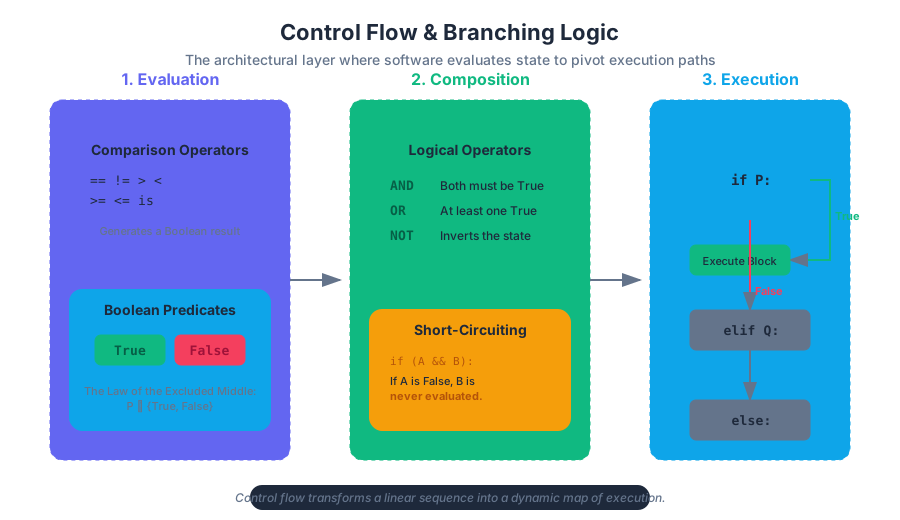
In the realm of computational theory, a program without branching is merely a list—a linear sequence of instructions that executes identically regardless of input. To transform a calculator into an autonomous agent, we require Conditionals and Branching. This is the architectural layer where software gains the ability to "decide," pivoting its execution path based on the state of the system or the nuances of user input.
At its core, branching is the implementation of Control Flow, the order in which individual statements, instructions, or function calls are executed. By evaluating the "truthiness" of specific expressions, a program can bypass certain blocks of code or repeat others, effectively creating a dynamic map of execution.
The Foundation: Boolean Expressions and Predicates
Before a program can branch, it must evaluate a condition. This evaluation results in a Boolean value—named after George Boole, who defined an algebraic system of logic in the mid-19th century. In modern computing, a Boolean expression (or predicate) is any statement that resolves to exactly one of two states: True or False.
The Law of the Excluded Middle
In classical logic, the Law of the Excluded Middle states that for any proposition, either that proposition is true, or its negation is true. In programming, we use this to ensure that our branching logic is exhaustive and deterministic.
Definition: Boolean Expression A formal representation of a truth-value, denoted as $P \in {True, False}$. In a programming context, this is often the result of a comparison between two variables or a variable and a literal.
Comparison Operators: The Mechanics of Evaluation
To generate Boolean values, we utilize Comparison Operators. These operators act as the bridge between raw data and logical decisions. While they appear simple, their implementation varies across languages, particularly regarding type coercion and identity.
| Operator | Name | Mathematical Symbol | Description | Example (Python) |
|---|---|---|---|---|
== |
Equality | $=$ | Returns True if values are equivalent |
5 == 5.0 (True) |
!= |
Inequality | $\neq$ | Returns True if values are different |
"a" != "b" (True) |
> |
Greater Than | $>$ | True if left is strictly greater than right | 10 > 5 (True) |
< |
Less Than | $<$ | True if left is strictly less than right | 2 < -1 (False) |
>= |
Greater or Equal | $\geq$ | True if left is greater than or equal to right | 5 >= 5 (True) |
<= |
Less or Equal | $\leq$ | True if left is less than or equal to right | 3 <= 4 (True) |
Value vs. Identity
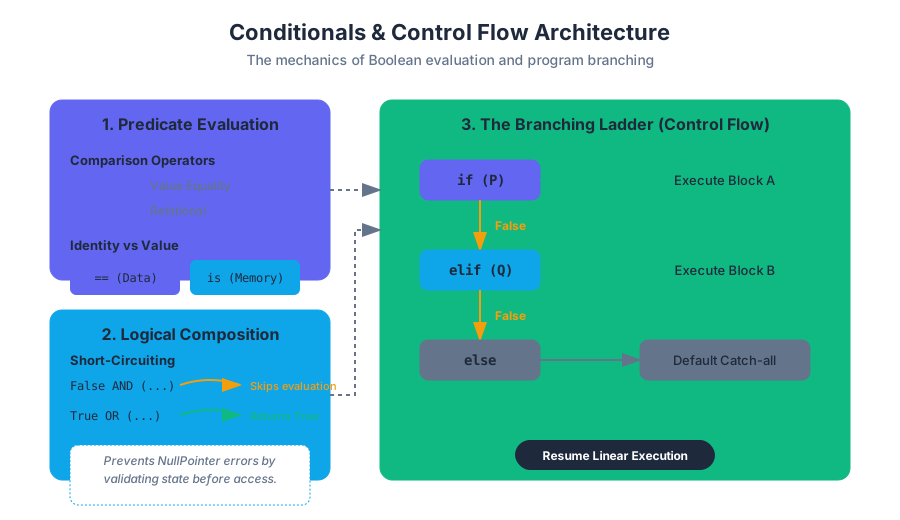
A common pitfall for senior engineers is confusing Value Equality (==) with Identity Equality (is in Python, === in some contexts).
- Value Equality: Do these two objects represent the same data?
- Identity Equality: Do these two variables point to the exact same memory address?
# Code Block 1: Low-level implementation of a validation engine
# Language: Python
# Purpose: Demonstrates complex conditional logic and identity vs value

def validate_transaction(account_id, amount, security_token):
    """
    Validates a financial transaction using multi-stage branching.
    """
    MIN_BALANCE = 100.0
    SYSTEM_TOKEN = "SECRET_HEX_0x45"

    # 1. Identity check (Security)
    if security_token is not SYSTEM_TOKEN:
        # Note: In Python, small strings are interned, but for
        # security, we'd usually use a constant-time comparison.
        return "ERROR: Invalid Security Identity"

    # 2. Value comparison (Business Logic)
    if amount <= 0:
        return "ERROR: Transaction amount must be positive"

    # 3. State-based branching
    current_balance = get_balance_from_db(account_id)

    if current_balance - amount < MIN_BALANCE:
        # Branching based on a calculated predicate
        return "ERROR: Insufficient funds to maintain minimum balance"
    else:
        # The 'Happy Path'
        process_funds(account_id, amount)
        return "SUCCESS: Transaction Complete"

def get_balance_from_db(uid): return 500.0 # Mock
def process_funds(uid, amt): pass # Mock
Logical Operators: Composing Complexity
Rarely is a decision based on a single factor. We use Logical Operators to combine multiple Boolean expressions into a single compound condition.
- AND (
and): ReturnsTrueonly if both operands are true. - OR (
or): ReturnsTrueif at least one operand is true. - NOT (
not): Reverses the Boolean state (Unary operator).
Truth Tables for Logical Composition
| A | B | A AND B | A OR B | NOT A |
|---|---|---|---|---|
| True | True | True | True | False |
| True | False | False | True | False |
| False | True | False | True | True |
| False | False | False | False | True |
Short-Circuit Evaluation
Modern compilers and interpreters optimize logical expressions via Short-Circuiting.
- In an
ANDoperation, if the first operand isFalse, the entire expression is immediatelyFalse, and the second operand is never evaluated. - In an
ORoperation, if the first operand isTrue, the entire expression is immediatelyTrue.
This is critical for preventing errors. For example: if (obj != null && obj.isActive()). Without short-circuiting, calling obj.isActive() on a null object would crash the program.
Branching Structures: if, elif, and else
The if statement is the primary mechanism for branching. It evaluates a predicate and, if true, executes the indented block of code.
The if-elif-else Ladder
When multiple mutually exclusive conditions exist, we use the elif (else-if) structure. This is more efficient than nested if statements because the program stops checking conditions as soon as one evaluates to True.
f(x) =
\begin{cases}
\text{Action A} & \text{if } x > 0 \\
\text{Action B} & \text{if } x < 0 \\
\text{Action C} & \text{otherwise}
\end{cases}
Pseudocode Representation of Multi-way Branching
// Code Block 2: Pseudocode for a Traffic Control Algorithm
// Purpose: Illustrating the logic flow of an if-elif-else structure

ALGORITHM TrafficLightControl(sensor_data):
    IF sensor_data.emergency_vehicle_detected IS true THEN
        SET light_status TO "RED" FOR ALL directions
        SET emergency_lane TO "GREEN"
    ELSE IF sensor_data.pedestrian_waiting IS true AND sensor_data.timer > 30 THEN
        SET light_status TO "YELLOW"
        WAIT 3 seconds
        SET light_status TO "RED"
        ACTIVATE pedestrian_walk_signal
    ELSE IF sensor_data.car_count > 10 THEN
        EXTEND green_light_duration BY 15 seconds
    ELSE
        MAINTAIN default_cycle
    END IF
END ALGORITHM
Nested Conditionals and Cyclomatic Complexity
A Nested Conditional is an if statement located inside the block of another if statement. While powerful, excessive nesting leads to "Spaghetti Code" and high Cyclomatic Complexity—a metric used to measure the number of linearly independent paths through a program's source code.
Theorem: The Arrow Anti-pattern Code that heavily utilizes nested conditionals often forms a "shape" like an arrow pointing to the right. This is generally considered a sign that the logic should be refactored into guard clauses or a lookup table.
Advanced Branching: Switch and Pattern Matching
In many languages (C, Java, JavaScript), the switch statement provides a cleaner way to branch based on the value of a single variable. In Python 3.10+, this was introduced as Structural Pattern Matching using match and case.
Performance Comparison: If-Else vs. Switch
| Feature | If-Else Ladder | Switch / Match |
|---|---|---|
| Execution | Linear ($O(N)$) | Often Jump Table ($O(1)$) |
| Flexibility | Any Boolean expression | Usually discrete values/patterns |
| Readability | Poor for many conditions | High for many conditions |
| Use Case | Ranges, complex logic | Enumerations, specific constants |
/* Code Block 3: Low-level branching in C */
/* Purpose: Demonstrates the 'switch' statement and fall-through behavior */

#include <stdio.h>

void process_status(int status_code) {
    switch (status_code) {
        case 200:
            printf("OK: Request successful.\n");
            break;
        case 404:
            printf("Error: Resource not found.\n");
            break;
        case 500:
        case 503:
            /* Fall-through: both 500 and 503 execute this block */
            printf("Critical: Server-side failure.\n");
            break;
        default:
            printf("Unknown Status Code.\n");
    }
}
Real-World Application: Configuration and DevOps
Branching isn't limited to application code; it is fundamental to infrastructure as code (IaC) and CI/CD pipelines. Here, conditionals determine which environment to deploy to or which tests to run.
# Code Block 4: Conditional Logic in GitHub Actions (YAML)
# Purpose: Real-world usage of conditionals in a DevOps pipeline

jobs:
  deploy:
    runs-on: ubuntu-latest
    # Conditional: Only run this job if the push was to the 'main' branch
    if: github.ref == 'refs/heads/main'
    steps:
      - name: Checkout code
        uses: actions/checkout@v2

      - name: Deploy to Production
        run: |
          echo "Deploying to production server..."
          ./deploy_script.sh --env=prod
Common Pitfalls and Edge Cases
Even experienced developers fall prey to subtle logic errors when implementing branches.
1. The Floating Point Trap
Never use == with floating-point numbers. Due to binary precision limits, 0.1 + 0.2 does not exactly equal 0.3.
- Solution: Check if the absolute difference is less than a small epsilon:
abs(a - b) < 1e-9.
2. Assignment vs. Equality
In languages like C or Java, using = (assignment) instead of == (equality) inside an if statement is a valid syntax but a logical disaster.
- Example:
if (x = 5)setsxto 5 and then evaluates toTrue.
3. Algorithmic Bias
Conditionals encode the developer's assumptions. If a conditional structure in a hiring algorithm filters out candidates based on a "years of experience" threshold without considering non-traditional paths, it introduces Algorithmic Bias. Branching logic must be audited for fairness and inclusivity.
| Pitfall | Description | Corrective Action |
|---|---|---|
| Dangling Else | Ambiguity in nested if/else logic | Use explicit braces {} or indentation |
| Redundant Checks | Checking if (x == True) |
Use if x: directly |
| Dead Code | A branch that can never be reached | Use static analysis tools to prune |
| Over-nesting | Logic buried 5+ levels deep | Use "Guard Clauses" to return early |
Summary of Best Practices
- Favor Readability: If an
ifstatement has more than three conditions, break them into named Boolean variables. - Return Early: Use guard clauses to handle errors or edge cases at the top of a function, reducing the need for an
elseblock. - Be Explicit: Use parentheses to group logical operations, even if operator precedence makes them optional.
- Avoid Magic Numbers: Use named constants instead of raw numbers in comparisons (e.g.,
if status == STATUS_ACTIVEinstead ofif status == 1).
Source Materials
Study Computing on Lykke
This course page is free to open: signed out, you can read its first two sections, and signing in, on any plan, opens the rest. The free Lykke Chrome extension syncs your own Canvas courses, so ChatGPT, Claude and Muse can answer from your classes and deadlines. It only reads Canvas.
Add the free extensionSign in to open every section