From the free course Computer Applications and Information Technology on Lykke
Data Management and Database Systems
Key concepts: Database Management Systems (DBMS) · Information Retrieval · Microsoft Access · Data Modeling · Data Privacy
A deep dive into how data is structured, stored, and retrieved using Database Management Systems (DBMS).
Data Management and Database Systems
In the taxonomy of modern information systems, data management represents the foundational layer upon which all higher-level logic—from business intelligence to artificial intelligence—is constructed. While a spreadsheet might suffice for a personal budget, enterprise-scale operations demand a more rigorous architecture. This section explores the transition from flat-file data storage to the sophisticated world of Database Management Systems (DBMS), the mathematical rigor of Data Modeling, and the critical imperatives of Data Privacy.
The Database Management System (DBMS)
A Database Management System (DBMS) is a specialized software suite designed to define, create, maintain, and control access to a database. It acts as an intermediary between the end-user and the physical data stored on disk, ensuring that data remains consistent, accessible, and secure.
Definition: A DBMS is a collection of programs that enables users to store, modify, and extract information from a database. It provides an abstraction layer that hides the physical details of data storage (such as file formats and hardware addresses) from the logical view of the data.
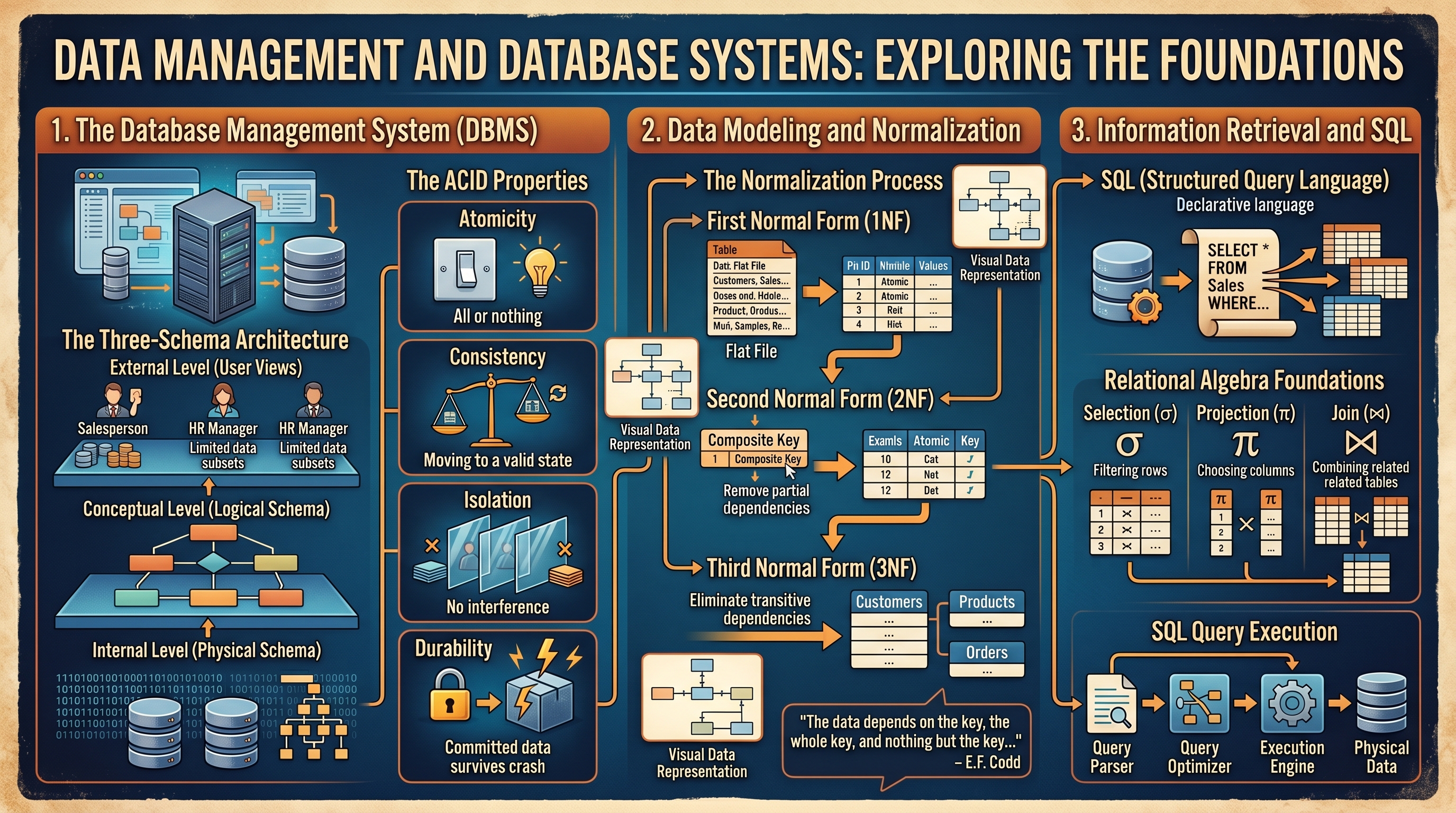
The Three-Schema Architecture
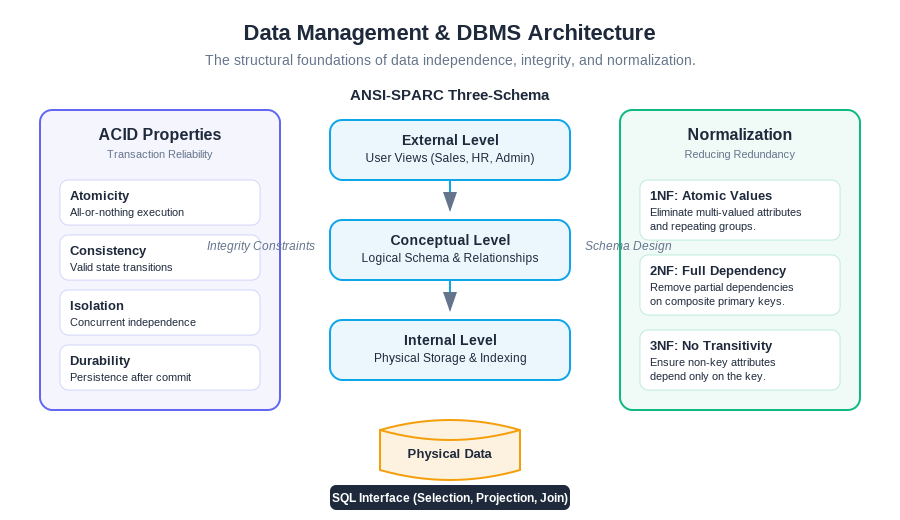
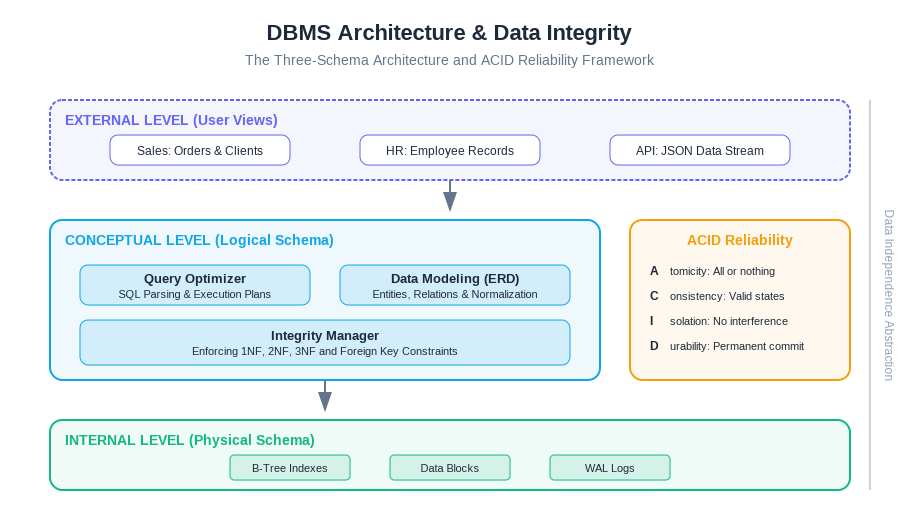
To achieve data independence, most modern DBMS implementations follow the ANSI-SPARC three-schema architecture:
- External Level (User Views): How individual users see the data (e.g., a salesperson sees customer orders, while HR sees employee records).
- Conceptual Level (Logical Schema): The community view of the entire database structure, defining entities, relationships, and constraints.
- Internal Level (Physical Schema): How the data is actually stored on the storage media, including indexing structures and block sizes.
The ACID Properties
For a DBMS to be considered reliable, especially in financial or mission-critical environments, it must adhere to the ACID properties:
| Property | Description | Technical Implication |
|---|---|---|
| Atomicity | "All or nothing." Transactions are atomic units. | If a power failure occurs mid-transaction, the system rolls back to the start. |
| Consistency | Data must move from one valid state to another. | Integrity constraints (e.g., non-negative bank balance) are never violated. |
| Isolation | Concurrent transactions do not interfere with each other. | Intermediate states of a transaction are invisible to other transactions. |
| Durability | Once committed, data remains committed even after a crash. | Changes are written to non-volatile storage (WAL - Write Ahead Logging). |
Data Modeling and Normalization
Data Modeling is the process of creating a visual representation of an entire information system or parts of it to communicate connections between data points and structures. The most common tool for this is the Entity-Relationship Diagram (ERD).
The Normalization Process
Normalization is a systematic approach of decomposing tables to eliminate data redundancy and undesirable characteristics like Insertion, Update, and Deletion Anomalies. It is governed by a series of "Normal Forms" (NF).
- First Normal Form (1NF): Eliminate duplicate columns and ensure all attributes are atomic (no multi-valued attributes).
- Second Normal Form (2NF): Meet 1NF and ensure all non-key attributes are fully functionally dependent on the entire primary key (eliminate partial dependencies).
- Third Normal Form (3NF): Meet 2NF and ensure no non-key attribute is transitively dependent on the primary key.
The Normalization Mantra: "The data depends on the key [1NF], the whole key [2NF], and nothing but the key [3NF], so help me Codd." (Referring to Edgar F. Codd, the father of the relational model).
Worked Example: Normalizing a Sales Record
Consider a flat table: Sales(OrderID, CustomerID, CustomerName, ProductID, Price).
- 1NF: Ensure each cell has one value.
- 2NF: If
OrderIDandProductIDform a composite key,CustomerNamedepends only onCustomerID, not the whole key. We must split this. - 3NF: If
Pricedepends onProductID, andProductIDis part of the key, but we have other attributes depending on other things, we ensure no "chains" of dependency exist.
Information Retrieval and SQL
Information Retrieval (IR) in the context of databases is primarily achieved through Structured Query Language (SQL). SQL is a declarative language, meaning the user specifies what they want, and the DBMS's query optimizer determines how to get it.
Relational Algebra Foundations
SQL is grounded in relational algebra. Every SELECT statement is essentially a combination of:
- Selection ($\sigma$): Filtering rows based on a condition.
- Projection ($\pi$): Choosing specific columns.
- Join ($\bowtie$): Combining rows from two or more tables based on a related column.
Code Block 1: Low-Level SQL Implementation
The following example demonstrates the creation of a relational schema with strict integrity constraints and a trigger for automated data management.
-- Creating a robust schema for a Library System
CREATE TABLE Authors (
    AuthorID INT PRIMARY KEY GENERATED ALWAYS AS IDENTITY,
    FullName VARCHAR(255) NOT NULL,
    BirthYear INT CHECK (BirthYear > 0 AND BirthYear <= EXTRACT(YEAR FROM CURRENT_DATE))
);

CREATE TABLE Books (
    ISBN VARCHAR(13) PRIMARY KEY,
    Title VARCHAR(500) NOT NULL,
    AuthorID INT,
    StockCount INT DEFAULT 0,
    CONSTRAINT fk_author
        FOREIGN KEY(AuthorID)
        REFERENCES Authors(AuthorID)
        ON DELETE SET NULL
);

-- A Trigger to prevent negative stock levels
CREATE OR REPLACE FUNCTION check_stock_level()
RETURNS TRIGGER AS $$
BEGIN
    IF NEW.StockCount < 0 THEN
        RAISE EXCEPTION 'Stock count cannot be negative for ISBN %', NEW.ISBN;
    END IF;
    RETURN NEW;
END;
$$ LANGUAGE plpgsql;

CREATE TRIGGER trg_stock_check
BEFORE UPDATE ON Books
FOR EACH ROW EXECUTE FUNCTION check_stock_level();
Code Block 2: Relational Algebra and Query Logic (Pseudocode)
Understanding how the DBMS processes a join is crucial for optimization. Below is the logic for a Nested Loop Join, the most basic join algorithm.
ALGORITHM NestedLoopJoin(Table R, Table S, Condition C):
    ResultBuffer = []
    FOR EACH row r IN R:
        FOR EACH row s IN S:
            IF C(r, s) IS TRUE:
                combined_row = concatenate(r, s)
                APPEND combined_row TO ResultBuffer
    RETURN ResultBuffer

COMPLEXITY ANALYSIS:
    Time Complexity: O(|R| * |S|)
    Space Complexity: O(1) (excluding result set)
    Optimization: If S is indexed on the join key, complexity drops to O(|R| * log|S|)
Microsoft Access: Desktop Database Management
Microsoft Access occupies a unique niche as a "Desktop DBMS." Unlike enterprise systems (SQL Server, Oracle, PostgreSQL), Access combines a relational engine (ACE/Jet) with a graphical user interface (GUI) and software development tools.
Key Components of Access
- Tables: The physical storage of data.
- Queries: The SQL-based engine for data manipulation.
- Forms: The user interface for data entry.
- Reports: The output mechanism for data visualization.
Comparison: Access vs. Enterprise RDBMS
| Feature | Microsoft Access | SQL Server / PostgreSQL |
|---|---|---|
| Architecture | File-server (Client processes data) | Client-server (Server processes data) |
| Max Size | 2 GB | Terabytes / Petabytes |
| Concurrent Users | 1–10 (ideal) | Thousands |
| Deployment | Local/Shared Drive | Cloud / Dedicated Server |
| Use Case | Rapid Prototyping, Small Business | Enterprise Applications, Web Backends |
Data Privacy and Security
As databases aggregate vast amounts of sensitive information, Data Privacy becomes a legal and ethical mandate. This involves protecting data from unauthorized access (Security) and ensuring that data is handled according to the rights of the individual (Privacy).
Security Mechanisms
- Authentication: Verifying who the user is (e.g., Multi-Factor Authentication).
- Authorization: Defining what the user can do (Role-Based Access Control - RBAC).
- Encryption:
- At Rest: Encrypting the physical files on the disk (AES-256).
- In Transit: Using TLS/SSL to protect data moving over the network.
Data Masking and Anonymization
For testing or analytical purposes, sensitive data must often be "masked."
- Static Masking: Creating a copy of the database with scrambled data.
- Dynamic Masking: Scrambling data on-the-fly based on the user's permissions.
Code Block 3: Real-World Usage (Python for Data Privacy)
In modern pipelines, we often use Python to interact with databases while ensuring sensitive fields are hashed or encrypted before storage.
import hashlib
import sqlite3
from cryptography.fernet import Fernet

# Generate a key for symmetric encryption
key = Fernet.generate_key()
cipher_suite = Fernet(key)

def process_user_data(email, ssn):
    """
    Hashes the email for indexing and encrypts the SSN for privacy.
    """
    # Hashing (One-way) for the unique identifier
    hashed_email = hashlib.sha256(email.encode()).hexdigest()

    # Encryption (Two-way) for sensitive data
    encrypted_ssn = cipher_suite.encrypt(ssn.encode())

    # Database interaction
    conn = sqlite3.connect('secure_storage.db')
    cursor = conn.cursor()
    cursor.execute("INSERT INTO users (email_hash, ssn_blob) VALUES (?, ?)",
                   (hashed_email, encrypted_ssn))
    conn.commit()
    conn.close()
    print(f"User {hashed_email[:10]}... stored securely.")

# Example Invocation
process_user_data("professor@university.edu", "999-00-1234")
Common Pitfalls in Data Management
- Over-Normalization: While 3NF is great for integrity, it can lead to "Join Hell," where a simple query requires joining 10+ tables, severely degrading performance. In read-heavy systems, some denormalization is often necessary.
- Ignoring Indexing: Without indexes, the DBMS must perform a "Full Table Scan" for every query. However, too many indexes slow down
INSERTandUPDATEoperations because the index must be updated along with the table. - The "Flat File" Mindset: Treating a database like an Excel sheet (e.g., putting multiple values in one cell or creating columns like
Phone1,Phone2,Phone3) violates the fundamental principles of the relational model. - Lack of Backup Testing: A backup is only as good as its last successful restore. Many organizations discover their backups are corrupted only when a disaster occurs.
Advanced Retrieval: Query Optimization
When a user submits a query, the DBMS does not execute it immediately. It passes through a Query Optimizer.
The Optimization Pipeline
- Parser: Checks the SQL syntax.
- Binder: Checks if the tables and columns actually exist.
- Optimizer: Evaluates multiple "Execution Plans." It uses statistics (histograms of data distribution) to decide whether to use an index or a sequential scan.
- Executor: Runs the chosen plan and returns the results.
Code Block 4: Performance Comparison (CLI)
Using the EXPLAIN ANALYZE command in PostgreSQL to see how the optimizer handles a query before and after adding an index.
# 1. Querying without an index
psql -d university -c "EXPLAIN ANALYZE SELECT * FROM students WHERE last_name = 'Smith';"

# Output: Seq Scan on students  (cost=0.00..18.50 rows=1 width=244) (actual time=0.050..0.052 rows=1 loops=1)

# 2. Adding a B-Tree index
psql -d university -c "CREATE INDEX idx_lastname ON students(last_name);"

# 3. Querying with an index
psql -d university -c "EXPLAIN ANALYZE SELECT * FROM students WHERE last_name = 'Smith';"

# Output: Index Scan using idx_lastname on students (cost=0.15..8.17 rows=1 width=244) (actual time=0.012..0.013 rows=1 loops=1)
# Result: Execution time decreased by ~75%!
Conclusion
Data management is the art of balancing the rigid constraints of mathematical logic (Normalization) with the messy realities of hardware performance and human error. By leveraging a robust DBMS, adhering to ACID properties, and maintaining a focus on privacy, organizations can transform raw data into a strategic asset.
- DBMS: Database Management System; software that manages and interacts with the database.
- ACID: Atomicity, Consistency, Isolation, Durability; the four pillars of reliable transactions.
- Normalization: The process of organizing data to reduce redundancy and improve integrity.
- 3NF: Third Normal Form; a state where all attributes depend only on the primary key.
- Relational Algebra: The mathematical foundation of SQL queries ($\sigma, \pi, \bowtie$).
- Primary Key: A unique identifier for a record in a table.
- Foreign Key: A field that links one table to the primary key of another.
- RBAC: Role-Based Access Control; a method of regulating access based on user roles.
-
Which ACID property ensures that a transaction is rolled back if a system failure occurs mid-execution?
- A) Consistency
- B) Durability
- C) Atomicity
- D) Isolation (Answer: C)
-
In the context of normalization, what is a "transitive dependency"?
- A) When a non-key attribute depends on another non-key attribute.
- B) When a primary key depends on a foreign key.
- C) When a table has no primary key.
- D) When a column has multiple values. (Answer: A)
-
Why is Microsoft Access considered a "Desktop DBMS" rather than an "Enterprise DBMS"?
- A) It does not support SQL.
- B) It uses a file-server architecture where the client does the processing.
- C) It cannot store more than 1,000 records.
- D) It does not support relationships between tables. (Answer: B)
-
What is the primary purpose of a Database Index?
- A) To encrypt sensitive data.
- B) To reduce the physical size of the database on disk.
- C) To speed up data retrieval at the cost of slower writes.
- D) To ensure that no two rows are identical. (Answer: C)
Data Management Mastery Checklist
- Understand the Shift: Can you explain why a company would move from Excel to a SQL-based DBMS?
- Normalization Drill: Given a sample invoice, can you break it down into 1NF, 2NF, and 3NF tables?
- SQL Proficiency: Can you write a
JOINquery that connects three tables and filters the results? - Security Awareness: Do you know the difference between encryption "at rest" and "in transit"?
- Tool Selection: When would you recommend Microsoft Access over a system like PostgreSQL?
- Performance: Do you understand how a B-Tree index speeds up a search from $O(N)$ to $O(\log N)$?
Source Materials
- Information Systems
- Workplace Software and Skills (OpenStax)
- Computer Applications and Information Technology
- Introduction to Computer Applications and Concepts (Lumen)
- 2: Data Management and Information Systems Business Strategies
- Computer Fundamentals for Technical Students (Heisserer)
- Business Computers 365 (Lacher)
- 6: Enterprise Security, Data Privacy, and Risk Management
Study Computer Applications and Information Technology on Lykke
This course page is free to open: signed out, you can read its first two sections, and signing in, on any plan, opens the rest. The free Lykke Chrome extension syncs your own Canvas courses, so ChatGPT, Claude and Muse can answer from your classes and deadlines. It only reads Canvas.
Add the free extensionSign in to open every sectionAll sections of Computer Applications and Information Technology · Browse more course pages