From the free course Computer Applications and Information Technology on Lykke
Workplace Software and Digital Literacy
Key concepts: Microsoft Office Suite · Google Suite · Windows Desktop Management · File Hierarchy · Internet Security
Developing proficiency in essential workplace tools, including Microsoft Office, Google Suite, and operating system management.
Workplace Software and Digital Literacy
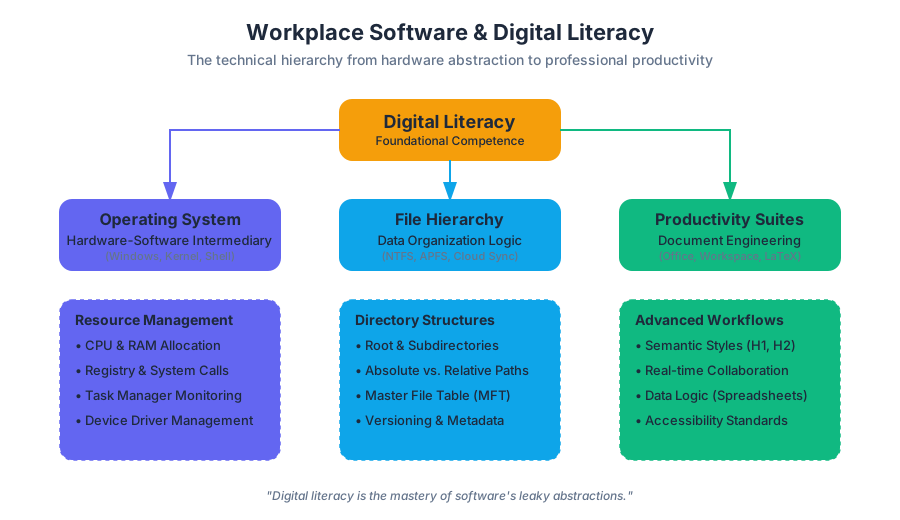
Digital literacy is the foundational competence required to navigate, evaluate, and create information using a wide range of digital technologies. In the modern professional landscape, this transcends the mere ability to "use a computer." It involves a deep understanding of the abstraction layers between hardware and software, the cognitive logic of data organization, and the ethical implications of digital communication. This article explores the technical and theoretical underpinnings of workplace software, ranging from operating system management to the sophisticated logic of productivity suites and the imperatives of cybersecurity.
The Operating System: Windows Desktop and Resource Management
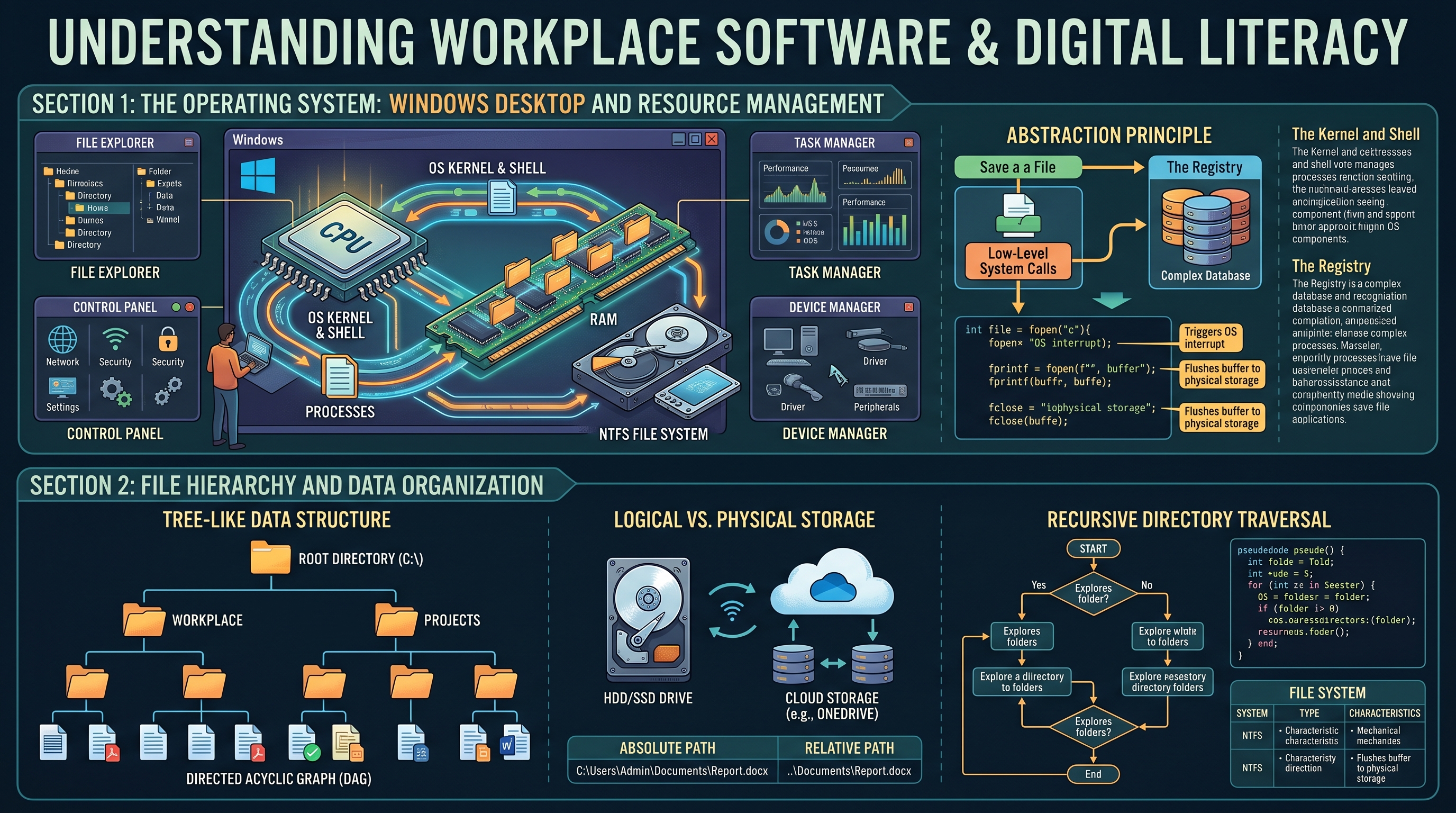
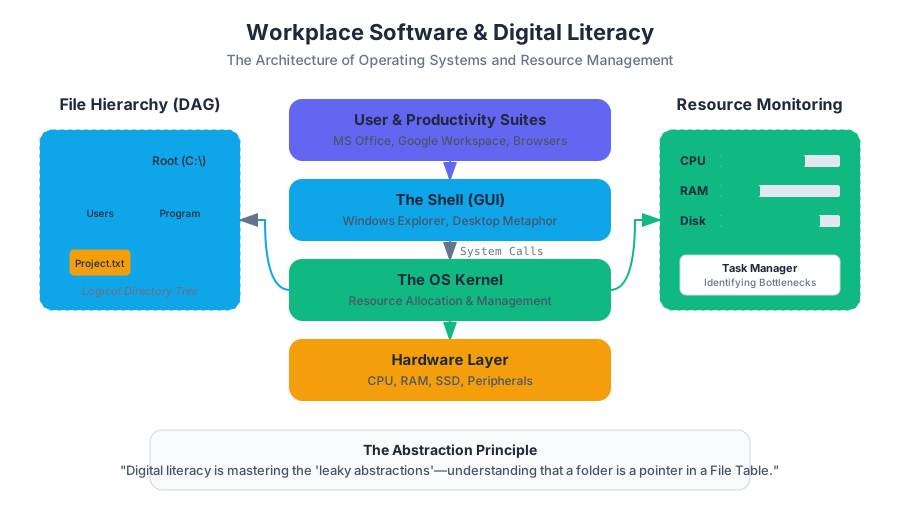
The Operating System (OS) serves as the intermediary between computer hardware and the user. In a workplace context, Windows remains the dominant environment, providing a Graphical User Interface (GUI) that abstracts complex system calls into manageable visual metaphors.
The Architecture of Windows Management
At its core, Windows manages four primary resources: Processors (CPU), Memory (RAM), Storage, and I/O Devices. A digitally literate professional understands that the "Desktop" is not just a visual space but a high-level directory within a complex file system.
- The Kernel and Shell: The Kernel is the core of the OS that handles hardware operations, while the Shell (Windows Explorer) is the interface users interact with.
- The Registry: A hierarchical database that stores low-level settings for the OS and applications.
- Task Management: The ability to monitor resource allocation through the Task Manager, identifying "bottlenecks" where CPU or RAM usage exceeds capacity.
The Abstraction Principle: Digital literacy is the process of mastering the "leaky abstractions" of software—understanding that while a folder looks like a physical object, it is actually a pointer in a File Allocation Table or Master File Table (MFT).
| Component | Function | Professional Use Case |
|---|---|---|
| File Explorer | Navigation of the directory tree | Managing project assets and versioning |
| Control Panel / Settings | Configuration of system parameters | Network setup and peripheral management |
| Task Manager | Process and performance monitoring | Troubleshooting unresponsive applications |
| Device Manager | Hardware driver management | Resolving hardware conflicts (e.g., printers, displays) |
Low-Level System Interaction
To understand how an OS handles a simple task like saving a document, one must look at the system calls involved. The following C code demonstrates the low-level logic of file creation, which is what happens "under the hood" when you click "Save" in Word.
#include <stdio.h>
#include <stdlib.h>

/*
   A low-level demonstration of file I/O in a Windows/POSIX environment.
   This simulates the 'Save' function of workplace software.
*/

int main() {
    FILE *fptr;
    char content[] = "Digital Literacy: Understanding System Calls";

    // Open file for writing (wb = write binary/text)
    // This triggers an OS interrupt to allocate disk sectors
    fptr = fopen("C:\\Workplace\\Project_Alpha.txt", "w");

    if (fptr == NULL) {
        printf("Error: Insufficient permissions or disk space.\n");
        exit(1);
    }

    fprintf(fptr, "%s", content);
    fclose(fptr); // Flushes buffer to physical storage

    return 0;
}
File Hierarchy and Data Organization
A critical component of digital literacy is the mastery of File Hierarchies. Data is organized in a tree-like structure, starting from a Root Directory (e.g., C:\) and branching into subdirectories.
Logical vs. Physical Storage
Modern professionals must distinguish between local storage (Hard Disk Drives/Solid State Drives) and cloud-based storage (OneDrive, Google Drive). The logic of the path remains the same, but the latency and synchronization mechanics differ.
- Absolute Path: The full address of a file starting from the root (e.g.,
C:\Users\Admin\Documents\Report.docx). - Relative Path: The address relative to the current working directory (e.g.,
..\Documents\Report.docx).
Mathematical Representation of a Directory Tree
A file system can be modeled as a Directed Acyclic Graph (DAG), specifically a tree $T = (V, E)$, where $V$ represents files/folders and $E$ represents the containment relationship.
Algorithm: Recursive Directory Traversal
-----------------------------------------
function traverse(directory):
    for each item in directory:
        if item is file:
            process(item)
        else if item is folder:
            traverse(item) // Recursive call to enter sub-directory
| File System | Max File Size | Features |
|---|---|---|
| NTFS | 16 EB | Journaling, Permissions (ACLs), Encryption |
| FAT32 | 4 GB | High compatibility, no security features |
| exFAT | 16 EB | Optimized for flash drives/SD cards |
| APFS | 8 EB | Apple's modern system, optimized for SSDs |
The Productivity Suite: Microsoft Office vs. Google Workspace
The "Big Two" productivity suites—Microsoft Office and Google Workspace—represent different philosophies of workplace software. Microsoft Office (Word, Excel, PowerPoint) focuses on feature-rich, "heavy" client-side processing. Google Workspace (Docs, Sheets, Slides) prioritizes cloud-native collaboration and real-time synchronization.
Word Processing and Document Engineering
Professional word processing is not just typing; it is Document Engineering. This involves:
- Styles and Semantics: Using
H1,H2, andBodytags to create a logical document structure that is accessible to screen readers. - Pagination and Section Breaks: Managing different headers/footers within a single file.
- Metadata: Understanding that a
.docxfile is actually a zipped collection of XML files containing author data, edit time, and version history.
Spreadsheets: The Engine of Business Logic
A spreadsheet (Excel/Sheets) is a reactive programming environment. Each cell is a variable, and formulas define the relationship between those variables.
The Spreadsheet Theorem: Any business process that can be defined as a finite set of mathematical rules can be modeled in a spreadsheet.
For complex data analysis, professionals often move beyond basic arithmetic to logical functions and lookups. Consider the evolution from a simple SUM to a relational XLOOKUP.
\text{Total Revenue} = \sum_{i=1}^{n} (Quantity_i \times Price_i)
Data Analysis with Python (The Modern Spreadsheet Extension)
In high-level digital literacy, professionals use tools like Python's pandas library to handle datasets that exceed Excel's 1,048,576 row limit.
import pandas as pd

# Load a massive workplace dataset
df = pd.read_csv('quarterly_sales_2023.csv')

# Perform a 'Pivot Table' style operation programmatically
summary = df.groupby('Department')['Revenue'].agg(['sum', 'mean', 'std'])

# Filter for underperforming sectors
underperforming = summary[summary['sum'] < 50000]

print(underperforming)
Internet Security and the Human Firewall
As workplace software becomes increasingly interconnected, Internet Security is no longer just an IT department concern—it is a core digital literacy skill.
The CIA Triad
The foundation of information security is the CIA Triad:
- Confidentiality: Ensuring data is only accessible to authorized users (Encryption, MFA).
- Integrity: Ensuring data is not altered during transit or storage (Hashing, Digital Signatures).
- Availability: Ensuring systems are accessible when needed (Backups, DDoS protection).
Threat Vectors in the Workplace
The most common entry point for cyberattacks is not a technical exploit, but Social Engineering.
| Threat Type | Mechanism | Mitigation |
|---|---|---|
| Phishing | Deceptive emails to steal credentials | Email filtering, User education, MFA |
| Ransomware | Encrypts local files and demands payment | Offline backups, "Least Privilege" access |
| Man-in-the-Middle | Intercepting data on public Wi-Fi | VPN usage, HTTPS/TLS encryption |
| Spoofing | Faking a trusted IP or email address | SPF/DKIM records, Certificate validation |
Security via Command Line
A digitally literate user can use basic network tools to verify the security of their environment.
# Check the route your data takes to a server (identifying potential intercepts)
tracert google.com

# View active network connections on your machine
netstat -an | findstr "ESTABLISHED"

# Verify the integrity of a downloaded file using SHA-256
certutil -hashfile "C:\Downloads\Update.exe" SHA256
Databases and Information Systems
While spreadsheets are excellent for calculation, Databases (like Microsoft Access or SQL Server) are designed for data integrity and complex relationships. Digital literacy includes knowing when to move from a "Flat File" (Excel) to a "Relational Database" (Access).
Relational Logic
In a database, data is normalized to prevent redundancy. Instead of repeating a customer's address in every order row, the order table links to a customer ID.
| Feature | Spreadsheet (Excel) | Database (Access/SQL) |
|---|---|---|
| Data Structure | Flat (Rows/Columns) | Relational (Linked Tables) |
| Data Integrity | Low (Cells can contain anything) | High (Strict Data Types) |
| Capacity | Limited by RAM | Limited by Disk Space |
| Concurrency | Difficult for multiple editors | Designed for multi-user access |
Ethics and Information Literacy
The final pillar of digital literacy is Ethics and Information Literacy. This involves the critical evaluation of digital sources and the responsible use of technology.
- The CRAAP Test: Evaluating information based on Currency, Relevance, Authority, Accuracy, and Purpose.
- Digital Governance: Adhering to organizational policies regarding data privacy (GDPR, CCPA) and acceptable use.
- Accessibility (A11y): Ensuring digital content is usable by people with disabilities, such as providing Alt-text for images in PowerPoint or using high-contrast colors.
The Ethics of Automation: As AI and automation enter the workplace software suite (e.g., Copilot), the ethical professional must validate AI-generated output for bias, hallucination, and intellectual property infringement.
Summary of Workplace Digital Literacy Concepts
To master the digital workplace, one must view software not as a static set of tools, but as a dynamic ecosystem. Proficiency in the Microsoft Office and Google Suites provides the "vocabulary" of business, while an understanding of Windows management and file hierarchies provides the "grammar." Finally, a robust approach to internet security and ethics ensures that these tools are used safely and responsibly.
Key Takeaways:
- Operating Systems are resource managers; understanding them helps in troubleshooting and efficiency.
- File Hierarchies are logical trees; proper organization is the difference between data and noise.
- Spreadsheets are reactive programs; they are the primary tool for business logic and modeling.
- Security is a shared responsibility; the "Human Firewall" is the most important layer of defense.
- Information Literacy is the ability to discern truth and value in an era of information overload.
Source Materials
- Workplace Software and Skills (OpenStax)
- Computer Fundamentals for Technical Students (Heisserer)
- Introduction to Computer Applications and Concepts (Lumen)
- Computer Applications
- Computer Applications and Information Technology
- Word Processing (Saylor)
- 6: Enterprise Security, Data Privacy, and Risk Management
- Information Systems
Study Computer Applications and Information Technology on Lykke
This course page is free to open: signed out, you can read its first two sections, and signing in, on any plan, opens the rest. The free Lykke Chrome extension syncs your own Canvas courses, so ChatGPT, Claude and Muse can answer from your classes and deadlines. It only reads Canvas.
Add the free extensionSign in to open every sectionAll sections of Computer Applications and Information Technology · Browse more course pages