From the free course Computer Applications and Information Technology on Lykke
IT Hardware and System Architecture
Key concepts: Computer Hardware · Network Hardware · Computer Architecture · Computer Organization · Internal vs. External Components
A technical look at the physical components of computer systems, including internal architecture and networking hardware.
IT Hardware and System Architecture
The physical substrate of the digital age is not a monolithic entity but a complex, hierarchical arrangement of components designed to transform electrical signals into logic, and logic into information. In the study of Information Technology, Hardware refers to the tangible, physical elements of a computer system, while System Architecture provides the conceptual blueprint that governs how these elements interact. To understand modern computing, one must distinguish between the "what" (Architecture) and the "how" (Organization), while navigating the intricate landscape of internal processing, external interfacing, and network communication.
The Fundamental Dichotomy: Architecture vs. Organization
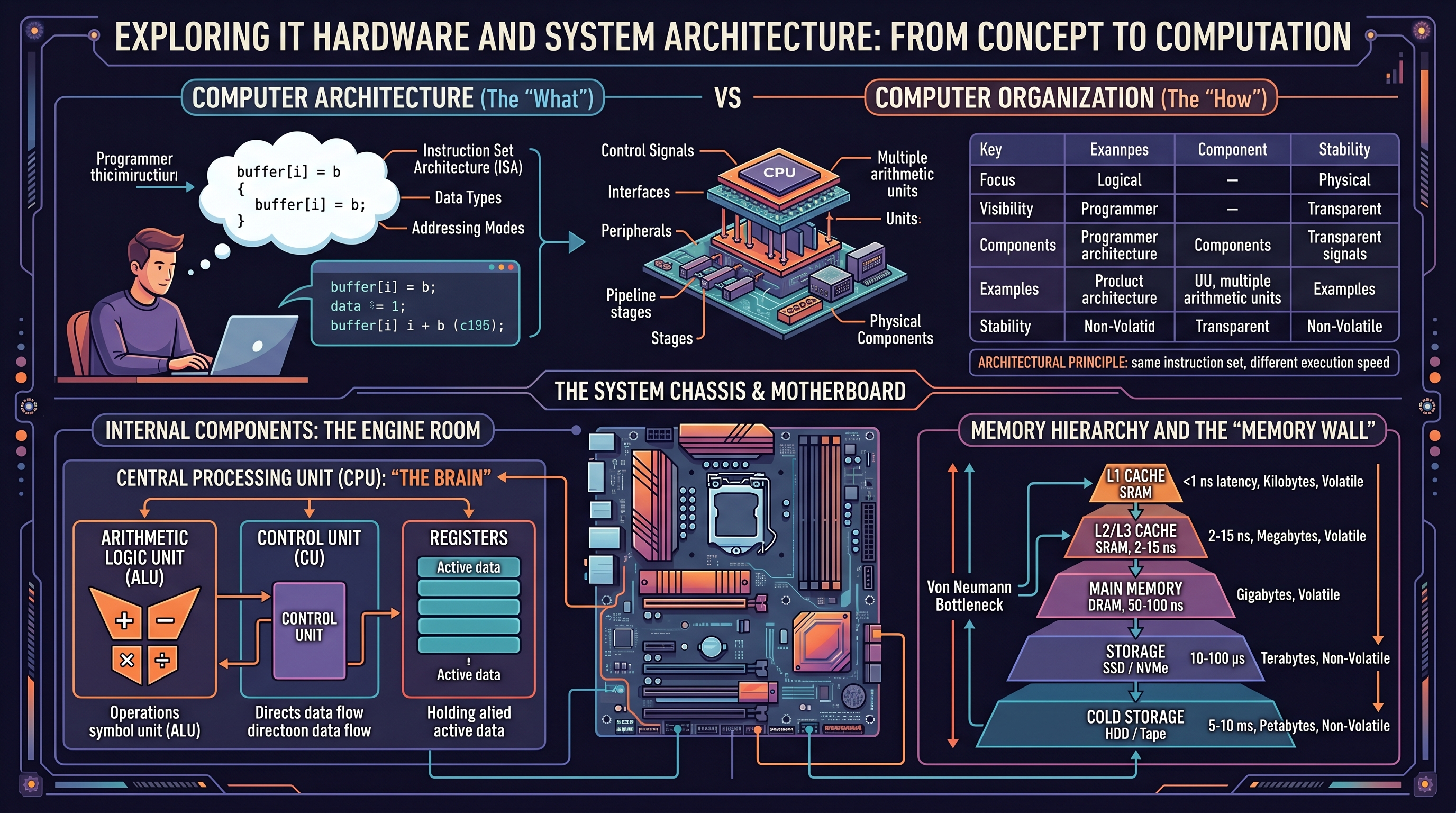
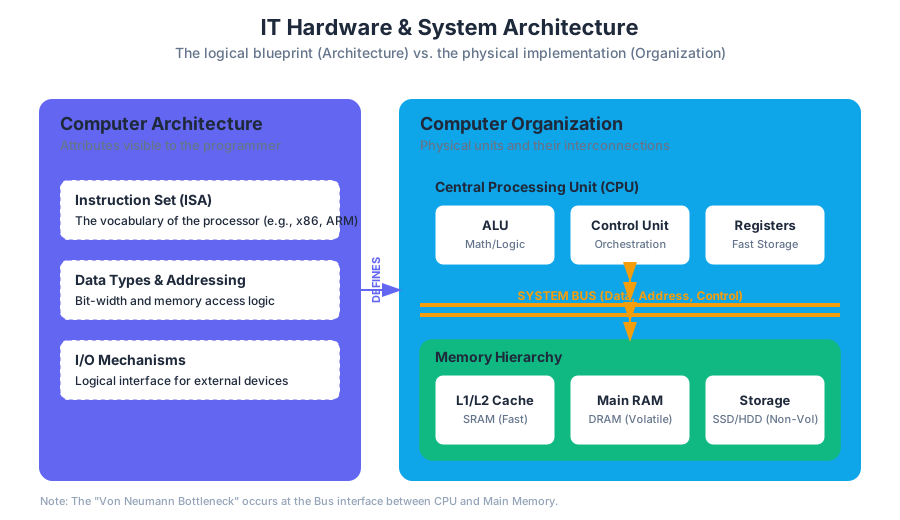
In professional discourse, the terms "Computer Architecture" and "Computer Organization" are often used interchangeably, yet they represent distinct layers of system design.
- Computer Architecture refers to those attributes of a system visible to a programmer—or, more specifically, those attributes that have a direct impact on the logical execution of a program. This includes the Instruction Set Architecture (ISA), the number of bits used to represent various data types (e.g., integers, floating points), I/O mechanisms, and techniques for addressing memory.
- Computer Organization refers to the operational units and their interconnections that realize the architectural specifications. It involves hardware details transparent to the programmer, such as control signals, interfaces between the computer and peripherals, and the memory technology used.
The Architectural Principle: If two different computers execute the same instruction set (e.g., x86_64), they share the same architecture, even if one uses a high-speed pipeline and the other uses a simpler, slower organizational structure.
Comparison of Architecture and Organization
| Feature | Computer Architecture (The "What") | Computer Organization (The "How") |
|---|---|---|
| Focus | Logical design and Instruction Set | Physical implementation and hardware |
| Visibility | Visible to the software/programmer | Transparent to the software |
| Components | Data types, Addressing modes, ISA | Control signals, Interfaces, Peripherals |
| Example | Whether a "Multiply" instruction exists | Whether that instruction is implemented by a dedicated multiply unit or by repeated addition |
| Stability | Changes slowly (to maintain compatibility) | Changes rapidly with technology (Moore's Law) |
Internal Components: The Engine Room
The internal components of a computer system are those housed within the main chassis, primarily attached to or integrated with the Motherboard (the system's main printed circuit board). These components facilitate the core "Fetch-Decode-Execute" cycle.
The Central Processing Unit (CPU)
The CPU is the "brain" of the system. It consists of three primary sub-elements:
- Arithmetic Logic Unit (ALU): Performs mathematical (addition, subtraction) and logical (AND, OR, NOT) operations.
- Control Unit (CU): Directs the operation of the processor. It tells the memory, ALU, and I/O devices how to respond to the instructions that have been sent to the processor.
- Registers: High-speed storage locations directly inside the CPU used to hold data currently being processed.
Memory Hierarchy and the "Memory Wall"
Modern systems use a hierarchical approach to memory to balance speed, capacity, and cost. This is necessitated by the Von Neumann Bottleneck, where the CPU's processing speed far outstrips the rate at which data can be fetched from main memory.
| Layer | Type | Speed (Latency) | Capacity | Volatility |
|---|---|---|---|---|
| L1 Cache | SRAM | < 1 ns | Kilobytes | Volatile |
| L2/L3 Cache | SRAM | 2 - 15 ns | Megabytes | Volatile |
| Main Memory | DRAM (RAM) | 50 - 100 ns | Gigabytes | Volatile |
| Storage | SSD / NVMe | 10 - 100 μs | Terabytes | Non-Volatile |
| Cold Storage | HDD / Tape | 5 - 10 ms | Petabytes | Non-Volatile |
Low-Level Hardware Interaction
To see how these internal components interact, consider a C snippet that performs a memory-intensive operation. At the hardware level, this involves moving data from RAM into registers, performing an ALU operation, and writing it back.
/*
 * A low-level look at memory access and pointer arithmetic.
 * This demonstrates how the CPU interacts with specific memory addresses.
 */
#include <stdio.h>
#include <stdint.h>

void process_data(uint32_t *buffer, size_t size) {
    for (size_t i = 0; i < size; i++) {
        // At the hardware level:
        // 1. Load address of buffer[i] into a register
        // 2. Fetch value from RAM/Cache into another register
        // 3. ALU performs the addition
        // 4. Store the result back to the memory address
        buffer[i] = buffer[i] + 0xDEADBEEF;
    }
}

int main() {
    uint32_t data[4] = {1, 2, 3, 4};
    process_data(data, 4);
    return 0;
}
Computer Organization: The Bus and Interconnects
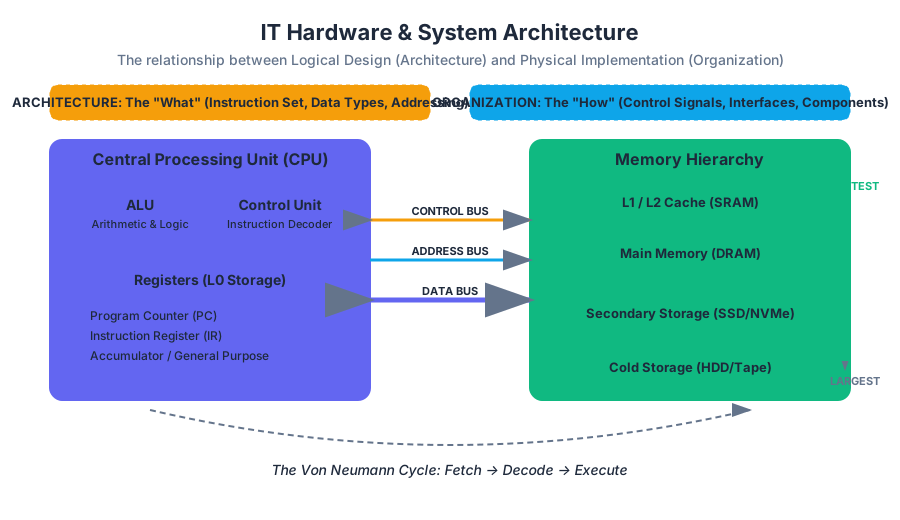
The "glue" that holds the internal components together is the System Bus. A bus is a communication system that transfers data between components inside a computer, or between computers.
- Data Bus: Carries the actual data being processed.
- Address Bus: Carries the information about where the data needs to go (the memory address).
- Control Bus: Carries control signals (read/write commands, clock signals) from the Control Unit.
The Fetch-Execute Cycle Logic
The operation of these buses and the CPU can be represented through the following pseudocode, which simulates the fundamental loop of a computer system:
ALGORITHM FetchExecuteCycle:
    WHILE system_power == ON:
        // 1. FETCH
        MAR <- ProgramCounter              // Move PC to Memory Address Register
        InstructionRegister <- Memory[MAR] // Fetch instruction from memory
        ProgramCounter <- ProgramCounter + 1 // Increment PC for next cycle

        // 2. DECODE
        OpCode, Operands <- Decode(InstructionRegister)

        // 3. EXECUTE
        IF OpCode == ADD:
            Register[A] <- Register[A] + Register[B]
        ELSE IF OpCode == LOAD:
            Register[A] <- Memory[Operands]
        ELSE IF OpCode == STORE:
            Memory[Operands] <- Register[A]

        // 4. CHECK INTERRUPTS
        IF InterruptPending():
            HandleInterrupt()
External Components: Peripherals and I/O
External hardware, or Peripherals, allows the computer to interact with the outside world. These are categorized into Input, Output, and Storage devices.
- Input Devices: Keyboards, mice, scanners, and microphones. They convert physical actions or analog signals into digital data.
- Output Devices: Monitors, printers, and speakers. They convert digital data into human-readable or audible formats.
- External Storage: USB flash drives, external hard drives, and cloud-connected NAS (Network Attached Storage).
Interfacing Standards
The connection between internal and external components is governed by interface standards. These standards ensure that hardware from different manufacturers can communicate.
| Standard | Primary Use | Max Data Rate (Approx) | Key Feature |
|---|---|---|---|
| PCIe 5.0 | Internal GPUs, NVMe | 64 GB/s (x16) | Low latency, point-to-point |
| USB4 | External Peripherals | 40 - 80 Gbps | Universal, power delivery |
| Thunderbolt 4 | High-end Docking/Video | 40 Gbps | Daisy-chaining, PCIe tunneling |
| SATA III | Legacy HDDs/SSDs | 6 Gbps | Mature, widely compatible |
Network Hardware: The Connective Tissue
In the modern IT landscape, a computer is rarely an island. Network Hardware facilitates communication between discrete systems, forming the backbone of the internet and corporate intranets.
Key Networking Devices
- Network Interface Card (NIC): The hardware component (often integrated into the motherboard) that connects a computer to a computer network.
- Switch: A Layer 2 (Data Link) device that connects devices within a Local Area Network (LAN) and uses MAC addresses to forward data to the correct destination.
- Router: A Layer 3 (Network) device that forwards data packets between computer networks, typically connecting a LAN to the Wide Area Network (WAN) or the Internet using IP addresses.
- Access Point (AP): A device that allows wireless devices to connect to a wired network using Wi-Fi.
Real-World Networking Configuration
To manage these hardware components, administrators often use Command Line Interfaces (CLI) to inspect the physical and logical state of the network hardware.
# Inspecting the Network Interface Card (NIC) status on Linux
ip link show

# Viewing the routing table (how the hardware decides where to send packets)
ip route show

# Checking the ARP cache (mapping hardware MAC addresses to IP addresses)
arp -a

# Using ethtool to check physical link speed and duplex mode
sudo ethtool eth0
System Performance and Amdahl's Law
When designing or upgrading IT hardware, engineers must consider the theoretical limits of performance. One of the most critical "laws" in system architecture is Amdahl's Law, which predicts the maximum improvement to an overall system when only a part of the system is improved.
Amdahl's Law: The speedup of a program using multiple processors in parallel computing is limited by the time needed for the sequential fraction of the program.
The formula is expressed as: $$S_{latency}(s) = \frac{1}{(1 - p) + \frac{p}{s}}$$
Where:
- $S_{latency}$ is the theoretical speedup of the whole task.
- $s$ is the speedup of the part of the task that benefits from improved system resources.
- $p$ is the proportion of execution time that the part benefiting from improved resources originally occupied.
Worked Example: If you upgrade a server's CPU to be 10x faster ($s = 10$), but the software spends 40% of its time waiting for the hard drive (a part that wasn't upgraded), then $p = 0.60$ (the 60% of the time spent on the CPU). $$S = \frac{1}{(1 - 0.6) + \frac{0.6}{10}} = \frac{1}{0.4 + 0.06} = \frac{1}{0.46} \approx 2.17$$ Despite a 1000% increase in CPU speed, the total system performance only improves by ~117% because of the hardware bottleneck in the storage system.
Common Pitfalls in Hardware Selection
- Over-provisioning: Buying high-end CPUs for tasks that are I/O bound (e.g., a database server with slow disks).
- Ignoring Thermal Throttling: High-performance internal components generate significant heat. Without adequate cooling, the hardware will intentionally slow down (throttle) to prevent physical damage, nullifying the performance gains of expensive parts.
- Bottleneck Misalignment: Pairing a top-tier GPU with a budget CPU, or a 10Gbps NIC with a Cat5 cable that only supports 100Mbps.
- Volatility Misconceptions: Assuming that data in RAM is safe during a power outage. Only non-volatile storage (SSD/HDD) retains data without power.
Source Materials
- Information Technology Hardware
- Introduction to Computer Applications and Concepts (Lumen)
- Computer Applications and Information Technology
- Information Systems
- Workplace Software and Skills (OpenStax)
- Computer Fundamentals for Technical Students (Heisserer)
- Introduction to Spreadsheets (Lumen)
- Computer Applications
Study Computer Applications and Information Technology on Lykke
This course page is free to open: signed out, you can read its first two sections, and signing in, on any plan, opens the rest. The free Lykke Chrome extension syncs your own Canvas courses, so ChatGPT, Claude and Muse can answer from your classes and deadlines. It only reads Canvas.
Add the free extensionSign in to open every sectionAll sections of Computer Applications and Information Technology · Browse more course pages