Think Python, 2nd edition
Institution: MIT
3 study materials · 3 sections
Think Python, 2nd Edition, is an introductory computer science course designed to teach programming through the Python language. It emphasizes a concise, jargon-free approach, focusing on fundamental concepts like debugging, data structures, and algorithm analysis. The course transitions from basic syntax to complex object-oriented programming, providing a comprehensive foundation for aspiring software developers.
Course Sections
Introduction and Pedagogical Goals
Key concepts: Trap door effect · Pedagogical goals · Python 3 transition · Open-source collaboration · Debugging techniques
This section outlines the history and philosophy of the course, emphasizing a concise approach to teaching computer science and the transition to Python 3.
Introduction and Pedagogical Goals
The transition from "learning a programming language" to "thinking like a computer scientist" represents a fundamental shift in cognitive approach. Allen B. Downey’s Think Python is designed not merely as a syntax manual, but as a pedagogical framework for navigating this shift. This article explores the underlying philosophy of the text, the technical evolution of its curriculum, and the specific strategies used to mitigate the cognitive load on novice programmers.
The Philosophy of "Think Like a Computer Scientist"
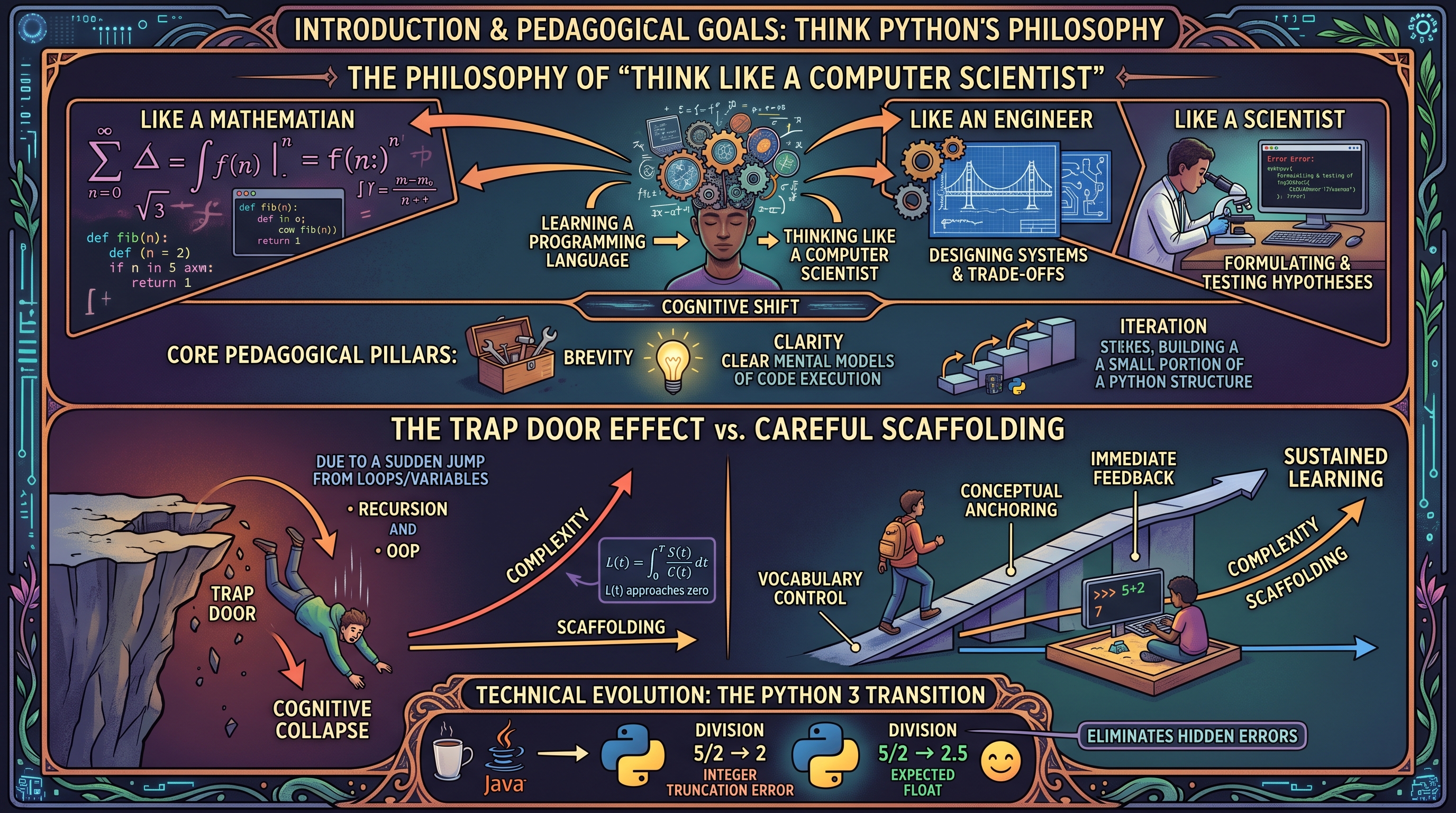
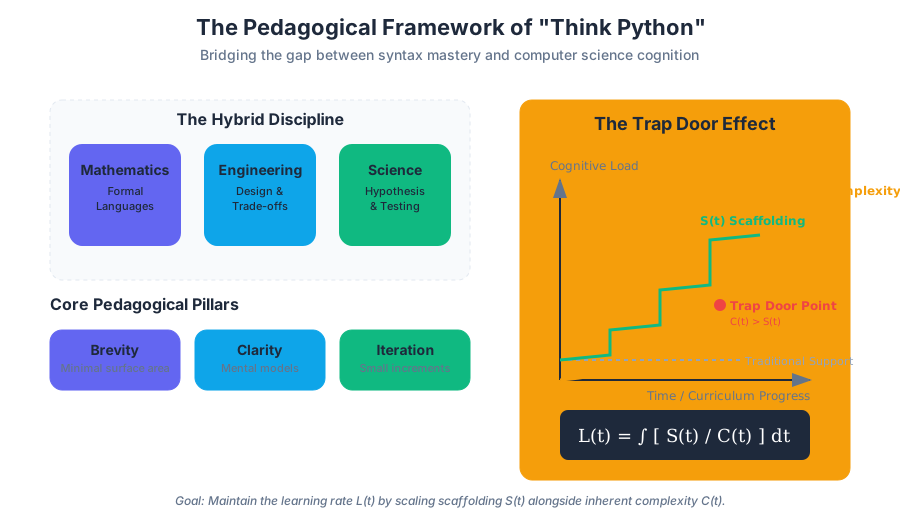
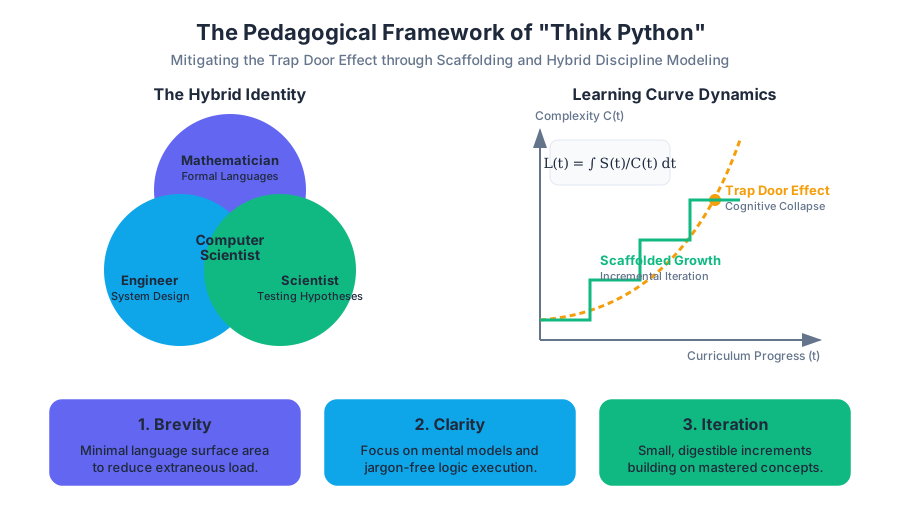
At its core, the pedagogical goal of Think Python is to treat computer science as a hybrid discipline that combines the best features of mathematics, engineering, and natural science. Like mathematicians, computer scientists use formal languages to denote ideas (specifically computations). Like engineers, they design things, assembling components into systems and evaluating trade-offs between alternatives. Like scientists, they observe the behavior of complex systems, form hypotheses, and test predictions.
The Core Pedagogical Pillars
The curriculum is built upon three primary pillars:
- Brevity: Minimizing the "surface area" of the language to prevent students from being overwhelmed by extraneous features.
- Clarity: Using jargon-free explanations and focusing on the mental models required to understand code execution.
- Iteration: Introducing concepts in small, digestible increments that build upon one another, avoiding the "trap door effect."
| Feature | Traditional Computer Science Pedagogy | Think Python Approach |
|---|---|---|
| Language Focus | Comprehensive coverage of syntax and libraries. | Minimalist subset of the language to teach logic. |
| Error Handling | Debugging is an afterthought or a "lab" activity. | Debugging is integrated into every chapter as a core skill. |
| Progression | Steep learning curves with complex "capstone" projects. | Incremental scaffolding with frequent "check-ins." |
| Jargon | High usage of formal CS terminology early on. | Concepts introduced via analogy and refined into formal terms. |
The Trap Door Effect: Scaffolding vs. Cognitive Collapse
One of the most significant contributions of Downey’s pedagogical research is the identification and mitigation of the Trap door effect.
Definition: Trap Door Effect The "Trap Door Effect" refers to a specific point in a curriculum where the complexity of new concepts increases exponentially, causing students who were previously succeeding to suddenly lose their grasp of the material. It is characterized by a disconnect between the instructor's perception of "logical next steps" and the student's actual cognitive capacity to synthesize those steps.
Mechanics of the Trap Door
In many introductory courses, the transition from simple procedural programming (loops and variables) to abstract concepts like recursion or object-oriented design acts as a trap door. If the scaffolding—the temporary support structures provided to students—is removed too early, the student "falls through."
Think Python mitigates this through careful scaffolding:
- Vocabulary Control: Introducing only the terms necessary for the current task.
- Conceptual Anchoring: Relating new abstract concepts (like
fruitful functions) to previously mastered ones (likevoid functions). - Immediate Feedback: Encouraging the use of the Python interpreter as a "sandbox" to test hypotheses in real-time.
Mathematical Representation of Learning Curves
We can model the learning curve $L(t)$ as a function of time $t$, where $C$ represents the complexity of the material. In a "Trap Door" scenario, $C$ increases non-linearly.
L(t) = \int_{0}^{T} \frac{S(t)}{C(t)} dt
Where:
- $S(t)$ is the scaffolding/support provided.
- $C(t)$ is the inherent complexity of the concept.
- If $C(t)$ grows faster than $S(t)$, the learning rate $L(t)$ approaches zero, leading to the "Trap Door" collapse.
The Python 3 Transition and Technical Evolution
The evolution of Think Python from its origins as a Java-based text (How to Think Like a Computer Scientist) to a Python 2 resource, and finally to Python 3, reflects broader shifts in the software engineering industry. The move to Python 3 was not merely a syntax update; it was a pedagogical decision to align with modern standards of "clean code" and better internal consistency.
Key Technical Shifts in the Transition
The transition addressed several "gotchas" that previously hindered student progress:
| Concept | Python 2 Behavior | Python 3 Behavior | Pedagogical Benefit |
|---|---|---|---|
| Division | 5 / 2 resulted in 2 (integer truncation). |
5 / 2 results in 2.5 (float). |
Eliminates "hidden" logic errors for beginners. |
| Print Statement | print "Hello" (Statement). |
print("Hello") (Function). |
Reinforces the concept that functions take arguments. |
| Unicode | Strings were ASCII by default; Unicode was separate. | All strings are Unicode by default. | Simplifies internationalization and modern data handling. |
| Iterators | Many functions (like range) returned lists. |
Functions return iterators (memory efficient). | Introduces lazy evaluation concepts early. |
Code Example: The "Think Like a Scientist" Approach
To illustrate the pedagogical goal of debugging and incremental development, consider the implementation of a recursive function. Instead of presenting the final code, the text encourages a "scaffolded" approach.
# Step 1: Define the base case and the recursive step
# Step 2: Add print statements to visualize the "stack" (Scaffolding)

def factorial(n):
    """
    Computes the factorial of n recursively.
    Demonstrates the 'stack' of function calls.
    """
    space = ' ' * (4 * n)
    print(f"{space}factorial", n)

    if not isinstance(n, int):
        print(f"{space}Factorial is only defined for integers.")
        return None
    elif n < 0:
        print(f"{space}Factorial is not defined for negative integers.")
        return None
    elif n == 0:
        print(f"{space}returning 1")
        return 1
    else:
        recurse = factorial(n - 1)
        result = n * recurse
        print(f"{space}returning", result)
        return result

# Usage
factorial(3)
Debugging Techniques: The Scientific Method of Coding
In Think Python, debugging is not treated as a sign of failure but as an essential part of the programming process. The text categorizes errors into three distinct types, providing a specific "search strategy" for each.
The Taxonomy of Errors
- Syntax Errors: The structure of the program is invalid. Python cannot even begin execution.
- Runtime Errors (Exceptions): The program is syntactically correct but encounters an impossible operation (e.g., dividing by zero).
- Semantic Errors: The program runs without crashing but produces the wrong output. This is the hardest to solve as it indicates a flaw in the programmer's mental model.
| Error Type | Detection Time | Common Cause | Mitigation Strategy |
|---|---|---|---|
| Syntax | Compile/Parse time | Typos, missing colons, mismatched parens. | Use a linter or IDE with real-time feedback. |
| Runtime | Execution time | Invalid input, file not found, index out of range. | Defensive programming (checking preconditions). |
| Semantic | Post-execution | Logical flaws, incorrect formula, scope issues. | Unit testing and "rubber ducking." |
The Debugging Pipeline
The text advocates for a systematic approach to resolving semantic errors, mirroring the scientific method:
- Observation: Look at the output. What is it doing?
- Hypothesis: Why is it doing that? (e.g., "I think the loop is terminating one iteration too early.")
- Experiment: Change the code to test the hypothesis (e.g., change
<to<=). - Analysis: Did the change fix the problem? Did it break something else?
Open-Source Collaboration and the "Green Tea" Philosophy
The history of Think Python is inextricably linked to the open-source movement. Originally published under the GNU Free Documentation License, the book itself is a product of collaborative refinement.
The Evolution of the Text
- Java Roots: Started as a way to make Java less intimidating for high school students.
- The Python Pivot: Realizing that Python’s low syntactic overhead allowed students to focus on algorithms rather than boilerplate.
- Community Contributions: Hundreds of students and teachers have submitted corrections and suggestions, making it one of the most "vetted" textbooks in existence.
Key Insight: The "Smallest Possible Step" The book’s success is attributed to the "Smallest Possible Step" principle. If a student gets stuck, it is usually because the step between two concepts was too large. Open-source feedback allowed Downey to identify these "gaps" and insert intermediate concepts, effectively smoothing the learning curve.
Comparative Analysis: Language Choice in Pedagogy
Why Python instead of C++ or Java for beginners?
// C implementation of "Hello World"
// Requires understanding of headers, main function, and return types.
#include <stdio.h>

int main() {
    printf("Hello, World!\n");
    return 0;
}
# Python implementation of "Hello World"
# Zero boilerplate; focus is entirely on the output.
print("Hello, World!")
The difference in cognitive load is stark. In C, the student must accept "magic code" (like #include) on faith. In Python, every character on the screen is directly related to the task at hand.
Programming Fundamentals: A Glossary of Terms
To "think like a computer scientist," one must master the formal language used to describe computation. Below are the foundational terms introduced in the early chapters of the curriculum.
Program Execution and State
- Problem Solving: The process of formulating a problem, finding a solution, and expressing it.
- High-level Language: A programming language like Python that is designed to be easy for humans to read and write.
- Low-level Language: A programming language that is designed to be easy for a computer to run; also called “machine code” or “assembly language.”
- Interpret: To execute a program in a high-level language by translating it one line at a time.
- Prompt: Characters displayed by the interpreter to indicate that it is ready for user input.
Data Structures and Variables
- Value: One of the basic units of data, like a number or string, that a program manipulates.
- Type: A category of values. The types we have seen so far are integers (type
int), floating-point numbers (typefloat), and strings (typestr). - Variable: A name that refers to a value.
- Assignment: A statement that assigns a value to a variable.
- State Diagram: A graphical representation of a set of variables and the values they refer to.
Logic and Control Flow
- Keyword: A reserved word that is used by the compiler to parse a program; you cannot use keywords like
if,def, andwhileas variable names. - Expression: A combination of variables, operators, and values that represents a single result.
- Statement: A section of code that represents a command or action. So far, the statements we have seen are assignments and print statements.
- Evaluate: To simplify an expression by performing the operations in order to yield a single value.
Advanced Debugging: The "Wolf Fence" Algorithm
A specific technique mentioned in the context of debugging complex systems is the Wolf Fence Algorithm. This is a mental model for isolating errors in large codebases.
How it works:
- You have a wolf in Alaska. You want to find it.
- Build a fence across the middle of Alaska.
- Wait to see which side the wolf is on (by adding print statements or assertions).
- Repeat the process on the side containing the wolf until you have a very small area.
Implementation in Code (Shell/CLI)
In a real-world scenario, this often involves using git bisect to find the specific commit that introduced a bug.
# Start the bisect process
git bisect start

# Tell git the current version is bad
git bisect bad HEAD

# Tell git a known good version (e.g., a tag from last month)
git bisect good v2.4.0

# Git will now check out a commit in the middle.
# You run your tests:
python3 test_suite.py

# If it passes:
git bisect good
# If it fails:
git bisect bad

# Repeat until the "wolf" (the bug) is caught in a single commit.
Summary of Pedagogical Goals
The ultimate goal of the Think Python curriculum is to move the student through the following stages of competence:
- Unconscious Incompetence: The student doesn't know what they don't know (Syntax errors are confusing).
- Conscious Incompetence: The student realizes they have a bug but doesn't know how to fix it (Runtime errors).
- Conscious Competence: The student can solve problems but must think deeply about every line (Semantic debugging).
- Unconscious Competence: The student "thinks like a computer scientist," intuitively breaking problems into small, testable functions.
- Trap Door Effect: A sudden increase in difficulty that causes students to lose comprehension.
- Semantic Error: A bug where the code runs but produces the wrong result.
- High-level Language: A language like Python that is human-readable and requires translation.
- Scaffolding: Temporary support (like print statements) used during the learning or development process.
- Formal Language: Languages designed by people for specific applications, such as chemistry, math, or programming.
- Fruitful Function: A function that returns a value.
- State Diagram: A visual tool used to track variable values during execution.
- What is the primary difference between a Syntax Error and a Semantic Error?
- A) Syntax errors happen at runtime; semantic errors happen at compile time.
- B) Syntax errors prevent the program from running; semantic errors result in incorrect output.
- C) Syntax errors are easier to fix than semantic errors.
- D) Both B and C.
- Why did Think Python transition to Python 3?
- A) To make the code run faster.
- B) To remove pedagogical "gotchas" like integer division and inconsistent print syntax.
- C) Because Python 2 was no longer available.
- D) To introduce more complex object-oriented features earlier.
- How does the "Trap Door Effect" impact curriculum design?
- A) It suggests that instructors should make the course as hard as possible from day one.
- B) It requires instructors to provide extra support (scaffolding) during known difficult transitions.
- C) It refers to the use of
try/exceptblocks in Python. - D) It is a method for optimizing recursive functions.
- Which of the following is an example of "scaffolding" in a programming context?
- A) Writing a 1000-line program in one sitting.
- B) Using temporary
printstatements to check variable values. - C) Deleting all comments to make code "cleaner."
- D) Using a low-level language like C to understand memory.
Key Objectives:
- Master the Vocabulary: Ensure you can distinguish between an expression and a statement.
- Embrace the Interpreter: Use the Python REPL to test small snippets of code before adding them to a larger script.
- Develop a Debugging Mindset: When your code fails, don't just change things randomly. Form a hypothesis, test it, and observe the result.
- Understand the Stack: Visualize how functions call other functions and how local variables are isolated within their scope.
- Respect the Scaffolding: Don't be afraid to use "temporary" code to help you understand what is happening under the hood. Even senior engineers use print statements and debuggers daily.
Core Programming Foundations
Key concepts: Programming Fundamentals · Functions and Scope · Control Flow (Recursion and Iteration) · Data Structures (Strings and Lists) · Debugging and Error Handling
Covers the essential building blocks of programming, including program execution, variable management, and function design based on the first ten chapters.
Core Programming Foundations
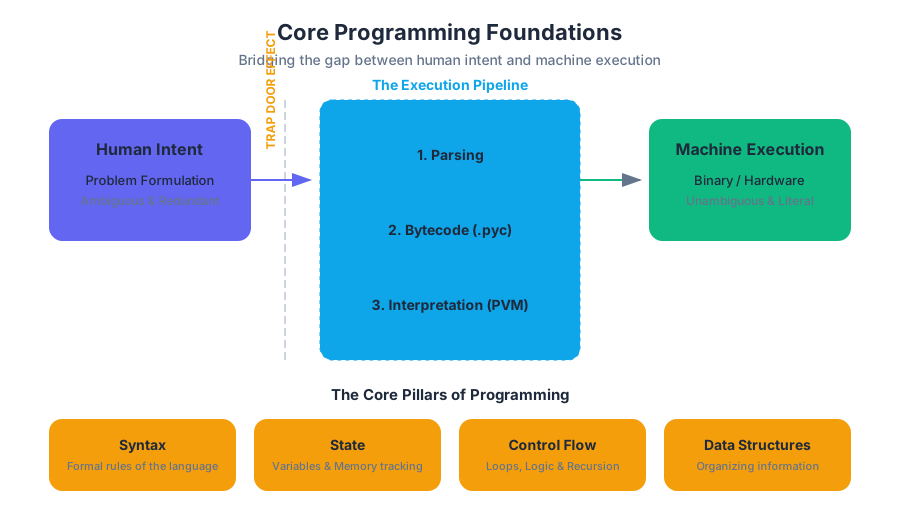
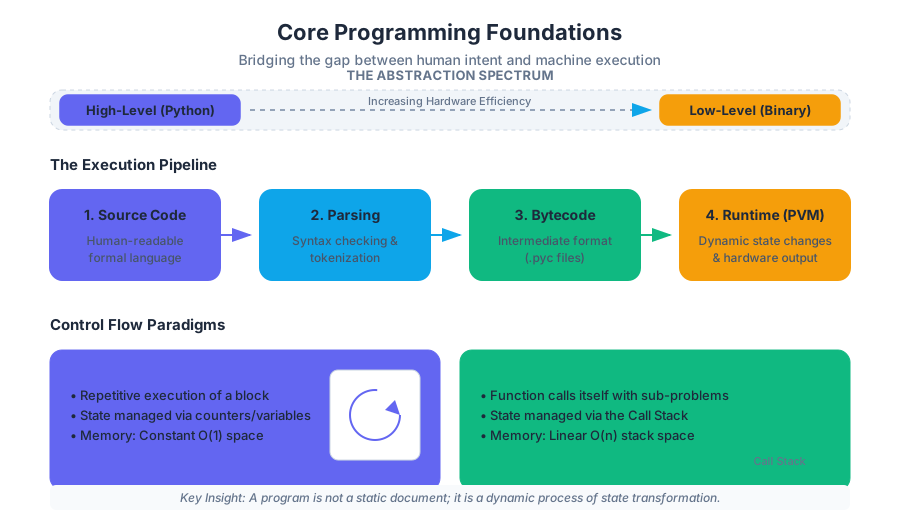
The transition from natural language to formal programming is often described as the trap door effect: a sudden realization that the computer does exactly what you tell it to do, rather than what you intended. Mastering the core foundations of programming—syntax, state, control flow, and data structures—is the process of learning to bridge this gap between human intent and machine execution.
Programming Fundamentals: The Way of the Program
At its essence, programming is the process of problem solving: formulating a problem, finding a solution, and expressing that solution in a formal language. Unlike natural languages, which are ambiguous and redundant, formal languages (like Python, C, or Java) are designed to be unambiguous and literal.
High-Level vs. Low-Level Languages
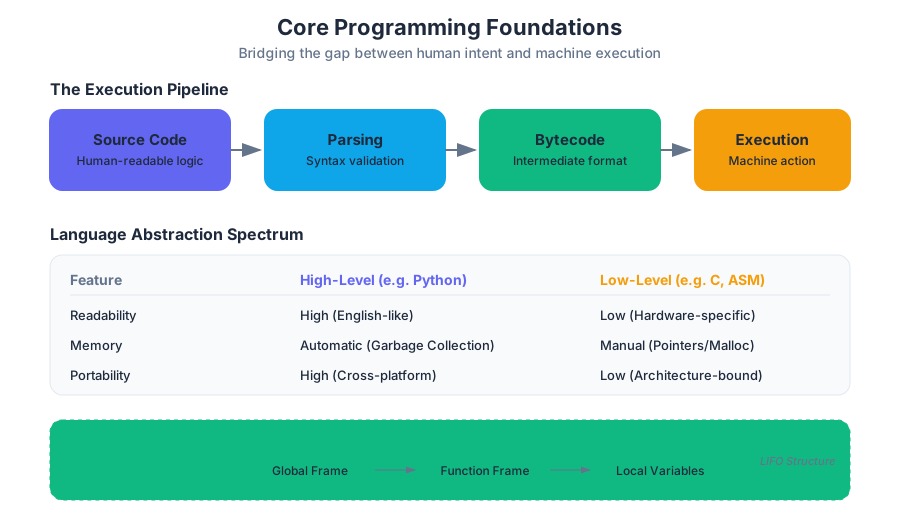
Computers can only execute machine code (binary). Programming languages exist on a spectrum of abstraction. High-level languages like Python are designed for human readability and portability across different operating systems. Low-level languages (assembly or machine code) are designed for hardware efficiency.
| Feature | High-Level Languages (e.g., Python) | Low-Level Languages (e.g., C, Assembly) |
|---|---|---|
| Readability | High; resembles English/Math. | Low; resembles hardware instructions. |
| Portability | High; runs on many CPUs via interpreters/compilers. | Low; often specific to a CPU architecture. |
| Memory Management | Automatic (Garbage Collection). | Manual (Pointers, malloc). |
| Execution Speed | Slower (due to abstraction layers). | Faster (direct hardware access). |
The Execution Pipeline
A program is a sequence of instructions. In Python, the interpreter reads the source code and executes it line-by-line. This involves several stages:
- Parsing: The interpreter reads the code and checks for syntax errors.
- Compiling to Bytecode: The source code is converted into a lower-level format (
.pycfiles). - Interpretation: The Python Virtual Machine (PVM) executes the bytecode.
Key Insight: A program is not a static document; it is a dynamic process. The state of a program changes with every assignment and every function call.
# First code block: Low-level logic in Python (The Euclidean Algorithm)
# Demonstrating fundamental variable assignment, state change, and mathematical logic.

def compute_gcd(a, b):
    """Computes the Greatest Common Divisor using the Euclidean Algorithm."""
    while b != 0:
        # Simultaneous assignment ensures state is updated correctly
        # without needing a temporary variable.
        a, b = b, a % b
    return a

# Execution and State Tracking
num1, num2 = 48, 18
result = compute_gcd(num1, num2)
print(f"The GCD of {num1} and {num2} is: {result}")
Functions and Scope
Functions are the primary tool for encapsulation (wrapping a piece of code in a named unit) and generalization (making code applicable to different data via parameters).
The Anatomy of a Function
A function definition consists of a header and a body. The header specifies the name and the parameters—variables that receive the arguments passed during a call.
| Term | Definition | Example |
|---|---|---|
| Parameter | A variable defined in the function header. | def add(x, y): (x and y are parameters) |
| Argument | The actual value passed to the function. | add(5, 10) (5 and 10 are arguments) |
| Local Variable | A variable defined inside a function. | Only exists while the function is executing. |
| Global Variable | A variable defined outside all functions. | Accessible throughout the script. |
Scope and the Stack Diagram
The scope of a variable is the region of the program where it is accessible. Python uses lexical scoping, meaning a function can see variables in its local scope and the global scope, but not the local scopes of other functions. To track this, we use stack diagrams, which represent the "stack" of function calls currently in progress.
# Second code block: Pseudocode / Stack Representation
# Visualizing how the computer manages memory during function calls.

FUNCTION calculate_area(radius):
    DEFINE pi = 3.14159
    DEFINE area = pi * (radius ** 2)
    RETURN area

MAIN:
    DEFINE r = 5
    DEFINE result = CALL calculate_area(r)
    PRINT result

# STACK TRACE AT EXECUTION:
# [Global Frame]: r -> 5, result -> undefined
#   [calculate_area Frame]: radius -> 5, pi -> 3.14159, area -> 78.539
# [Global Frame]: r -> 5, result -> 78.539
Control Flow: Recursion and Iteration
Control flow determines the order in which statements are executed. While linear execution is the default, complex logic requires repetition and branching.
Iteration (Loops)
Iteration is the repetitive execution of a block of code. Python provides while loops (indefinite iteration) and for loops (definite iteration over a sequence).
Recursion
Recursion occurs when a function calls itself. Every recursive function must have:
- Base Case: A condition that stops the recursion.
- Recursive Step: A call to the function with a "smaller" or "simpler" version of the original problem.
Theorem (The Leap of Faith): To understand recursion, one must assume the recursive call works correctly for the sub-problem, rather than trying to trace every nested call mentally.
| Comparison | Iteration | Recursion |
|---|---|---|
| Implementation | Uses for or while loops. |
Uses self-referential function calls. |
| State Management | Managed via loop variables/counters. | Managed via the call stack. |
| Memory Usage | Constant (O(1) extra space). | Linear (O(n) space for the stack). |
| Best For | Traversing lists, simple counting. | Tree traversal, divide-and-conquer. |
Data Structures: Strings and Lists
Data structures allow us to organize and store data efficiently. In Python, Strings and Lists are both sequences, but they differ fundamentally in their mutability.
Strings: Immutable Sequences
A string is a sequence of characters. In Python, strings are immutable, meaning once a string object is created, it cannot be modified. Any "modification" (like upper() or replace()) actually creates a new string object.
Lists: Mutable Sequences
A list is an ordered collection of values (elements). Lists are mutable, meaning you can change, add, or remove elements in-place without creating a new list.
| Property | Strings | Lists |
|---|---|---|
| Syntax | 'hello' |
[1, 2, 3] |
| Mutability | Immutable | Mutable |
| Type of Elements | Characters only | Any type (heterogeneous) |
| Indexing/Slicing | Supported | Supported |
| In-place methods | None | append(), sort(), pop() |
Memory Aliasing and Cloning
Because lists are mutable, two variables can refer to the same list object in memory. This is called aliasing.
a = [1, 2, 3]; b = a:aandbpoint to the same object. Changingachangesb.a = [1, 2, 3]; b = a[:]:bis a clone (copy). Changingadoes not affectb.
# Third code block: Real-world usage (CLI / Data Processing)
# Using Python lists and strings to process system logs via the command line.

# Imagine a file 'access.log' with lines like: "2023-10-01 12:00:01 ERROR Database connection failed"
# We can use a one-liner to extract unique error messages.

python3 -c "
import sys
logs = sys.stdin.readlines()
# List comprehension: Filter for ERROR, split the string, and grab the message
errors = [line.split('ERROR ')[1].strip() for line in logs if 'ERROR' in line]
# Use a set to find unique errors, then sort them
unique_errors = sorted(list(set(errors)))
print('\n'.join(unique_errors))
" < access.log
Debugging and Error Handling
Debugging is the experimental process of finding the cause of a "bug." It is a form of scientific inquiry: you hypothesize the cause, test it, and observe the results.
The Three Types of Errors
- Syntax Errors: The code violates the rules of the language. The interpreter catches these before running the program.
- Runtime Errors (Exceptions): The code is syntactically correct but fails during execution (e.g.,
ZeroDivisionError,IndexError). - Semantic Errors: The program runs without crashing but produces the wrong output. These are the hardest to find.
Debugging Strategies
- Incremental Development: Write a few lines, test, and repeat. Never write 100 lines of code without running it.
- Scaffolding: Use
print()statements to inspect the state of variables at key points. - Rubber Ducking: Explain your code line-by-line to an inanimate object (or a colleague). The act of verbalizing the logic often reveals the flaw.
Common Pitfalls
- Off-by-one errors: Forgetting that Python indices start at 0 and end at
len - 1. - Infinite Recursion: Failing to reach a base case, leading to a
RecursionError(Stack Overflow). - Mutable Default Arguments: Using a list as a default parameter in a function, which persists across calls.
# Fourth code block: Edge cases and Error Handling
# Demonstrating robust error handling for a common data structure operation.

def get_element_safe(data_list, index):
    """Safely retrieves an element from a list with error handling."""
    try:
        # Attempt to access the index
        return data_list[index]
    except IndexError:
        # Handle the case where the index is out of bounds
        return f"Error: Index {index} is out of range for list of length {len(data_list)}."
    except TypeError:
        # Handle the case where the index is not an integer
        return f"Error: Index must be an integer, not {type(index).__name__}."

# Examples
my_list = ["Alpha", "Beta", "Gamma"]
print(get_element_safe(my_list, 1))    # Success
print(get_element_safe(my_list, 10))   # IndexError handled
print(get_element_safe(my_list, "1"))  # TypeError handled
Summary of Core Foundations
The journey from a novice to a proficient programmer involves moving from "coding by coincidence" (guessing until it works) to "coding by design." By understanding how functions manage scope, how control flow dictates logic, and how data structures store state, a developer gains the ability to decompose complex problems into manageable, debuggable components.
Advanced Concepts and Object-Oriented Programming
Key concepts: Object-Oriented Programming · Algorithm Analysis · Software Development Life Cycle · Advanced Data Structures · Syntax and Semantics
Explores advanced topics including algorithm analysis, object-oriented programming, and the software development life cycle.
Advanced Concepts and Object-Oriented Programming
The transition from procedural programming to Object-Oriented Programming (OOP) and formal Algorithm Analysis marks the evolution of a student into a software engineer. While early programming focuses on "how to make the computer do X," advanced computer science focuses on "how to design a system that is maintainable, scalable, and efficient." This article synthesizes the core tenets of software design, the mathematical rigor of complexity analysis, and the architectural patterns that define modern development.
Syntax and Semantics: The Foundation of Meaning
Before diving into complex architectures, one must distinguish between the syntax (the rules governing the structure of a program) and the semantics (the meaning or logic of the program). In high-level languages like Python, syntax errors are caught by the interpreter, but semantic errors—often called logic errors—are the primary source of bugs in professional software.
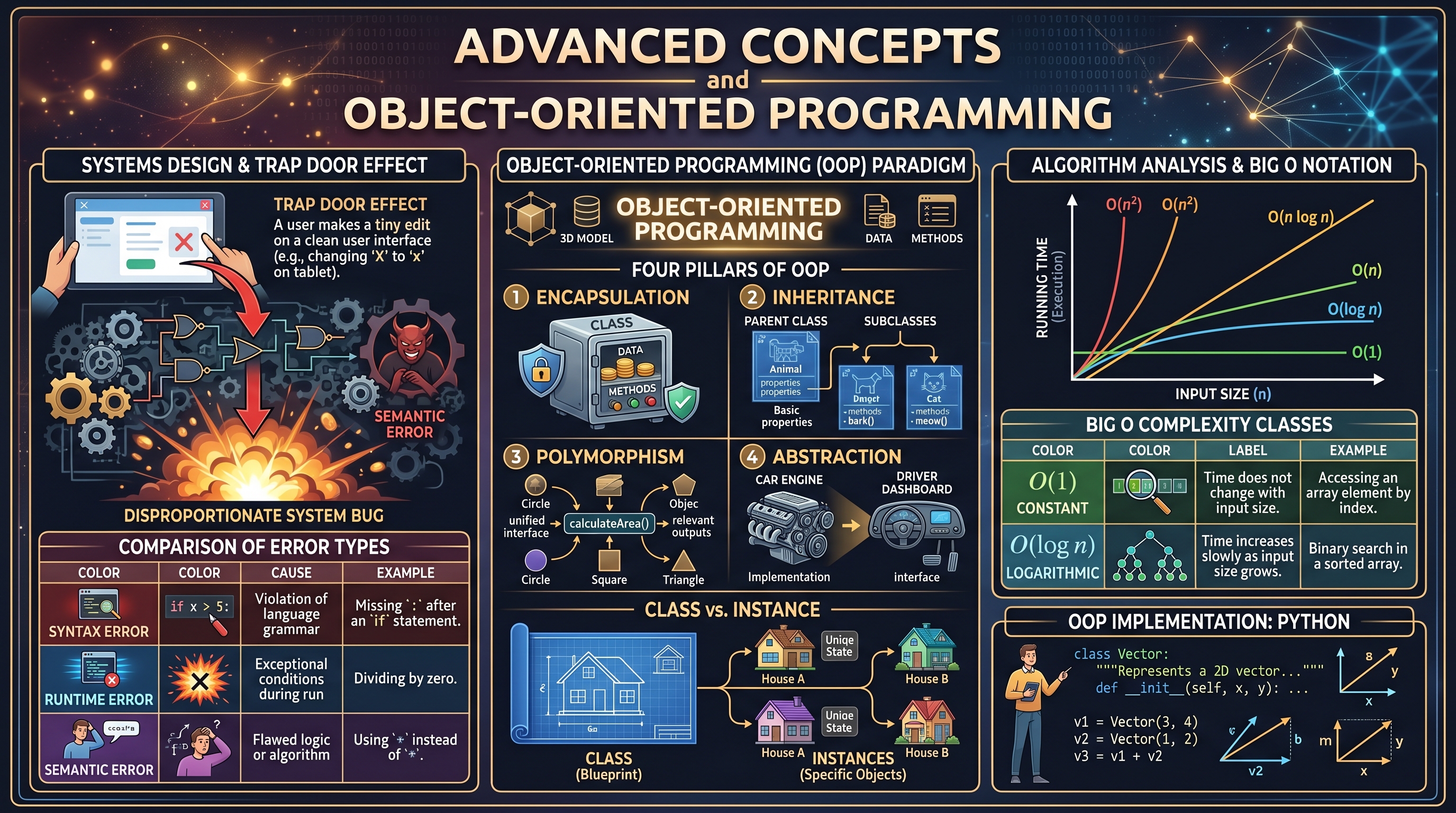
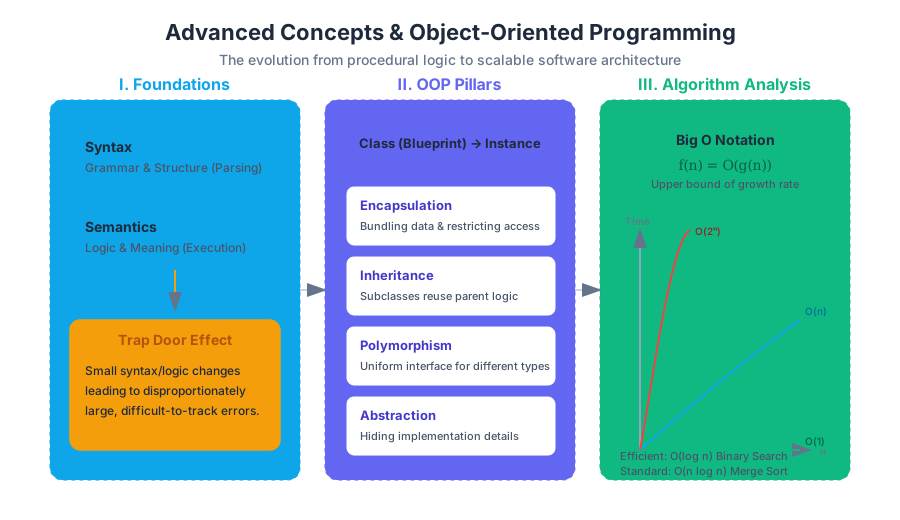
Allen Downey, in Think Python, highlights the Trap Door Effect: a phenomenon where a small, seemingly insignificant change in syntax or logic leads to a disproportionately large and difficult-to-track error in the program's output. Understanding the relationship between the two is critical for effective debugging.
Comparison of Error Types
| Error Type | Detection Phase | Cause | Example |
|---|---|---|---|
| Syntax Error | Parsing/Compile Time | Violation of language grammar | Missing a colon : after an if statement. |
| Runtime Error | Execution Time | Exceptional conditions during run | Dividing by zero or accessing a non-existent index. |
| Semantic Error | Post-Execution | Flawed logic or algorithm | Using + instead of * in a formula. |
Object-Oriented Programming (OOP)
Object-Oriented Programming is a paradigm based on the concept of "objects," which can contain data (in the form of attributes or properties) and code (in the form of methods). OOP is designed to bridge the gap between the real world and the digital world by modeling entities as self-contained units.
Core Pillars of OOP
- Encapsulation: Bundling the data and the methods that operate on that data into a single unit (a class) and restricting access to some of the object's components.
- Inheritance: A mechanism where a new class (subclass) inherits the attributes and methods of an existing class (parent class), promoting code reuse.
- Polymorphism: The ability of different types to be treated as instances of the same class through a uniform interface, often achieved via method overriding.
- Abstraction: Hiding complex implementation details and showing only the necessary features of an object.
Definition: Class vs. Instance A Class is a blueprint or template for creating objects. An Instance is a specific object created from a particular class, possessing its own unique state but sharing the structure defined by the class.
Implementation: The Pythonic Approach
In Python, every value is an object. When we define a class, we are essentially defining a new type. The following example demonstrates a non-trivial implementation of a Vector class, utilizing operator overloading to provide intuitive semantics.
import math

class Vector:
    """Represents a 2D vector with coordinate-based arithmetic."""

    def __init__(self, x=0, y=0):
        self.x = x
        self.y = y

    def __str__(self):
        return f"Vector({self.x}, {self.y})"

    def __add__(self, other):
        """Overloads the '+' operator for Vector addition."""
        if isinstance(other, Vector):
            return Vector(self.x + other.x, self.y + other.y)
        raise TypeError("Operand must be of type Vector")

    def magnitude(self):
        """Calculates the Euclidean norm of the vector."""
        return math.sqrt(self.x**2 + self.y**2)

    def __lt__(self, other):
        """Allows comparison based on magnitude (Polymorphism)."""
        return self.magnitude() < other.magnitude()

# Usage
v1 = Vector(3, 4)
v2 = Vector(1, 2)
v3 = v1 + v2
print(f"Resultant: {v3}, Magnitude: {v3.magnitude():.2f}")
print(f"Is v1 < v2? {v1 < v2}")
Algorithm Analysis and Big O Notation
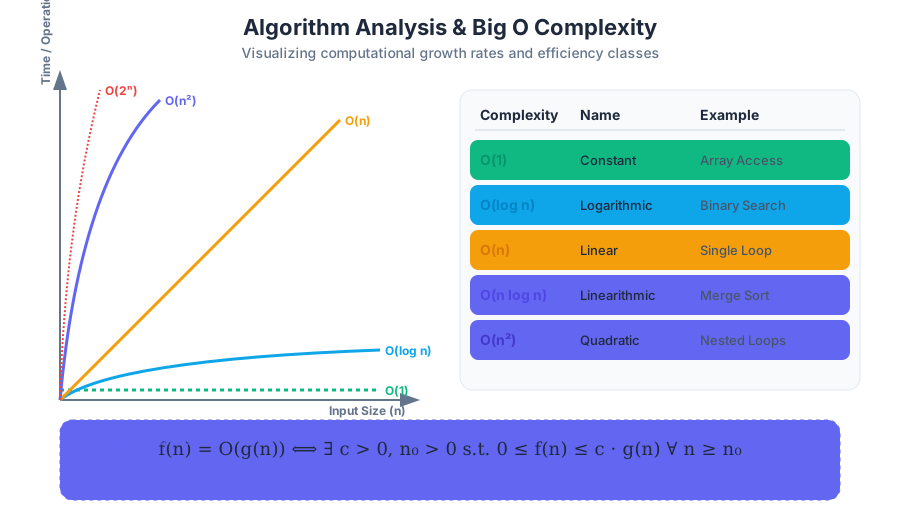
Algorithm Analysis is the process of predicting the resources (usually time or memory) required by an algorithm. This is not measured in seconds—as hardware varies—but in the growth rate of the execution time relative to the input size ($n$).
Big O Complexity Classes
We use Big O Notation to describe the upper bound of an algorithm's running time, focusing on the "worst-case" scenario.
| Notation | Name | Description | Example |
|---|---|---|---|
| $O(1)$ | Constant | Time does not change with input size. | Accessing an array element by index. |
| $O(\log n)$ | Logarithmic | Time increases slowly as $n$ grows. | Binary search in a sorted list. |
| $O(n)$ | Linear | Time increases proportionally to $n$. | Iterating through a list once. |
| $O(n \log n)$ | Linearithmic | Standard for efficient sorting. | Merge Sort or Quick Sort. |
| $O(n^2)$ | Quadratic | Time increases with the square of $n$. | Nested loops (e.g., Bubble Sort). |
| $O(2^n)$ | Exponential | Time doubles with each addition to $n$. | Recursive Fibonacci calculation. |
Mathematical Foundation
The formal definition of Big O provides a rigorous way to compare algorithms:
f(n) = O(g(n)) \iff \exists c > 0, n_0 > 0 \text{ s.t. } 0 \le f(n) \le c \cdot g(n) \text{ for all } n \ge n_0
This states that for sufficiently large $n$, the function $f(n)$ will never exceed $g(n)$ multiplied by some constant $c$. This allows engineers to ignore hardware-specific constants and focus on the fundamental efficiency of the logic.
Advanced Data Structures
While basic lists and strings are sufficient for simple scripts, advanced software requires structures optimized for specific operations like searching, sorting, or mapping.
Dictionaries and Hashing
A Dictionary (or Hash Map) is perhaps the most important data structure in modern programming. It stores key-value pairs and provides $O(1)$ average-time complexity for lookups. This is achieved through hashing, where a "hash function" converts a key into an index in an underlying array.
Tuples and Sets
- Tuples: Immutable sequences. They are used for fixed collections of data and can be used as keys in dictionaries (unlike lists) because they are hashable.
- Sets: Unordered collections of unique elements. They are optimized for membership testing (
x in set) and mathematical operations like union and intersection.
Performance Comparison: List vs. Set
| Operation | List ($n$ elements) | Set ($n$ elements) |
|---|---|---|
| Append/Add | $O(1)$ | $O(1)$ |
Search (in) |
$O(n)$ | $O(1)$ |
| Delete | $O(n)$ | $O(1)$ |
| Ordered? | Yes | No |
Software Development Life Cycle (SDLC)
Writing code is only one phase of the Software Development Life Cycle (SDLC). Professional development follows a structured process to ensure that the software meets user needs and is maintainable over time.
Phases of the SDLC
- Planning and Requirement Analysis: Defining the scope and objectives.
- Design: Architecting the system, choosing data structures, and defining the OOP hierarchy.
- Implementation (Coding): The actual writing of the source code.
- Testing: Verifying that the code works as intended (Unit testing, Integration testing).
- Deployment: Releasing the software to a production environment.
- Maintenance: Fixing bugs and adding new features over time.
Real-World Context: CI/CD Pipelines
In modern DevOps, the SDLC is often automated using Continuous Integration and Continuous Deployment (CI/CD). This ensures that every change is tested and analyzed before it reaches the user.
# Example GitHub Actions Workflow for SDLC Automation
name: Python Package CI

on: [push]

jobs:
  build:
    runs-on: ubuntu-latest
    steps:
    - uses: actions/checkout@v3
    - name: Set up Python
      uses: actions/setup-python@v4
      with:
        python-version: '3.10'
    - name: Install dependencies
      run: |
        python -m pip install --upgrade pip
        pip install flake8 pytest
    - name: Lint with flake8
      run: |
        # Stop the build if there are Python syntax errors or undefined names
        flake8 . --count --select=E9,F63,F7,F82 --show-source --statistics
    - name: Test with pytest
      run: |
        pytest tests/
Low-Level Perspectives: OOP in C
To truly understand OOP, it is helpful to see how it is implemented at a lower level. In a language like C, which lacks native class support, developers use structs and function pointers to simulate objects. This reveals that an "object" is simply a block of memory with a specific layout.
#include <stdio.h>
#include <stdlib.h>

// The "Class" structure
typedef struct Shape {
    int x, y;
    void (*draw)(struct Shape*); // Function pointer (Method)
} Shape;

// A "Method" implementation
void drawCircle(Shape* self) {
    printf("Drawing circle at (%d, %d)\n", self->x, self->y);
}

int main() {
    // Manual instantiation and "constructor"
    Shape* myCircle = malloc(sizeof(Shape));
    myCircle->x = 10;
    myCircle->y = 20;
    myCircle->draw = drawCircle;

    // "Method" invocation
    myCircle->draw(myCircle);

    free(myCircle);
    return 0;
}
Common Pitfalls and Debugging Techniques
As systems grow in complexity, debugging becomes a systematic process rather than a guessing game.
The "Trap Door" of Mutable Defaults
A common mistake in Python OOP is using mutable objects (like lists) as default arguments in methods. Because default arguments are evaluated only once at definition time, every instance of the class shares the same list.
Misunderstanding Big O
A common misconception is that $O(n^2)$ is always slower than $O(n)$. For very small values of $n$, the constant factors (which Big O ignores) might make the "slower" algorithm perform better. Analysis must always consider the expected input size.
Debugging Strategies
- Reading: Examine your code, read it back to yourself, and check that it says what you meant to say.
- Running: Experiment by making small changes and running different variations.
- Ruminating: Take time to think about the error. What kind of error is it? What was the last thing you changed?
- Retreating: If you are stuck, undo the recent changes until you have a working program again, then rebuild.
Summary of Advanced Concepts
| Concept | Key Takeaway |
|---|---|
| OOP | Use classes to group data and behavior; leverage inheritance for reuse. |
| Algorithm Analysis | Optimize for growth rates ($O(n)$) rather than raw speed. |
| Data Structures | Choose the right tool (e.g., Sets for uniqueness, Dicts for mapping). |
| SDLC | Software is a process, not just a product; testing and maintenance are vital. |
| Semantics | Logic errors are harder to find than syntax errors; use systematic debugging. |
Source Materials
Study Think Python, 2nd edition with AI — Free on Lykke
Sign up for free to generate personalized flashcards, quizzes, and study guides from this course. Chat with an AI tutor that knows the material.
Get Started FreeView this course wiki on Lykke · Browse all public course wikis