From the free course Think Python, 2nd edition on Lykke
Introduction and Pedagogical Goals
Key concepts: Trap door effect · Pedagogical goals · Python 3 transition · Open-source collaboration · Debugging techniques
This section outlines the history and philosophy of the course, emphasizing a concise approach to teaching computer science and the transition to Python 3.
Introduction and Pedagogical Goals
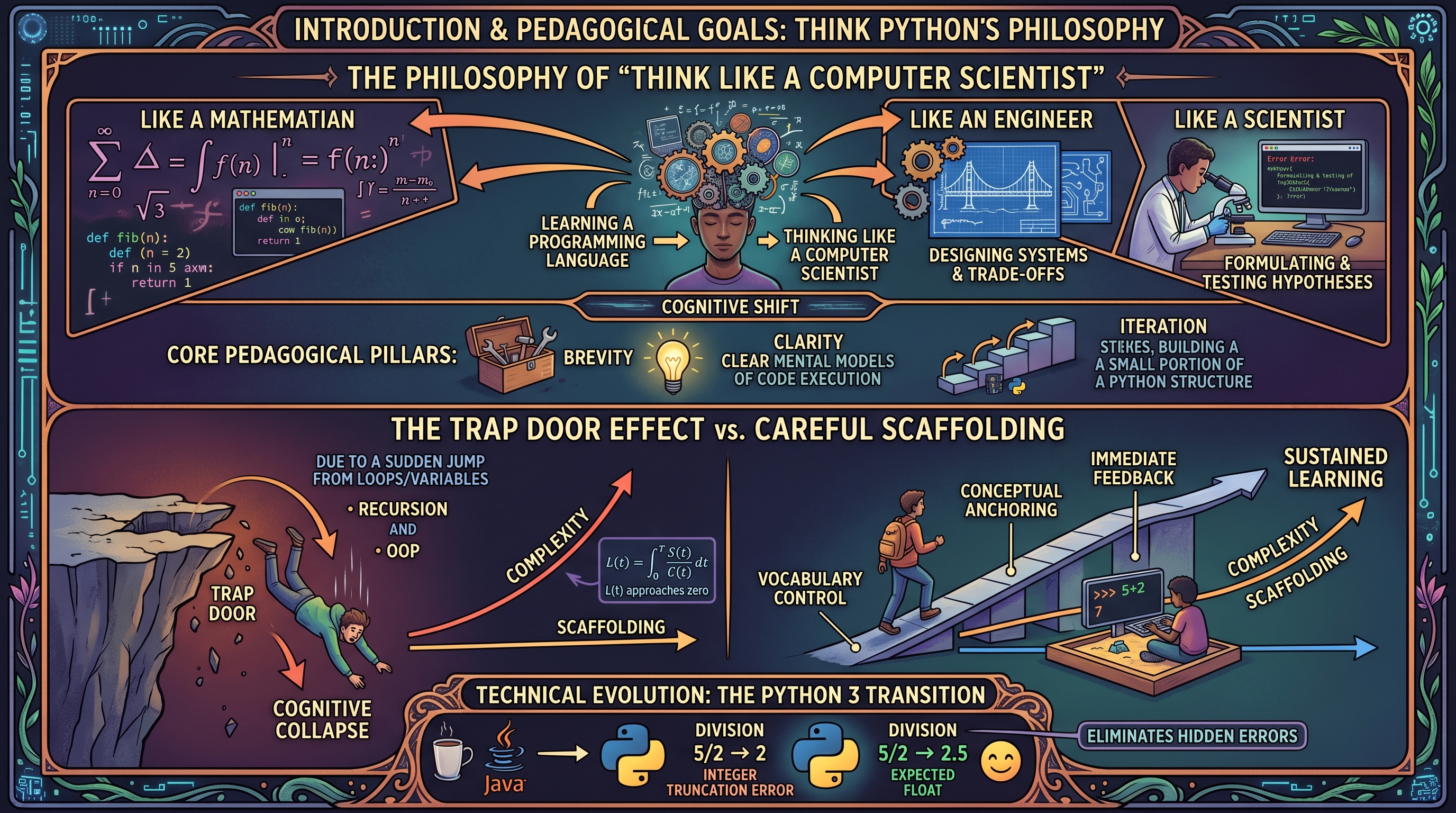
The transition from "learning a programming language" to "thinking like a computer scientist" represents a fundamental shift in cognitive approach. Allen B. Downey’s Think Python is designed not merely as a syntax manual, but as a pedagogical framework for navigating this shift. This article explores the underlying philosophy of the text, the technical evolution of its curriculum, and the specific strategies used to mitigate the cognitive load on novice programmers.
The Philosophy of "Think Like a Computer Scientist"
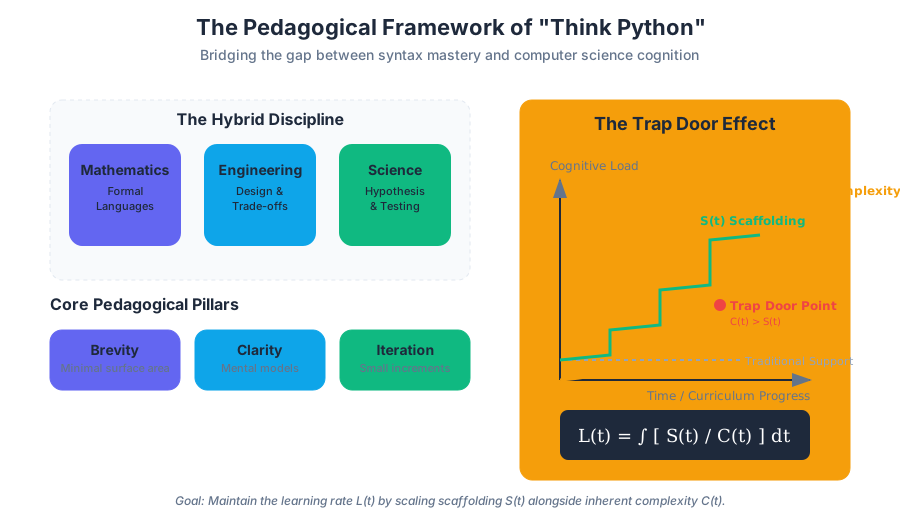
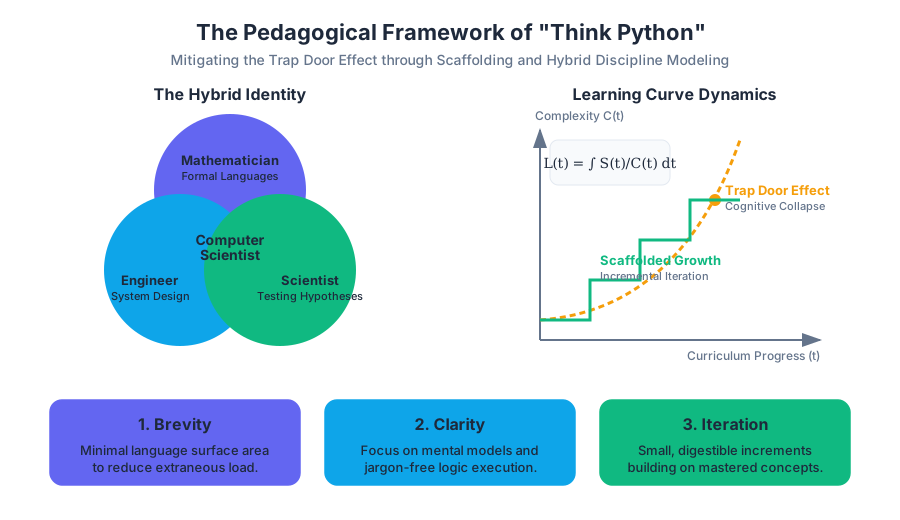
At its core, the pedagogical goal of Think Python is to treat computer science as a hybrid discipline that combines the best features of mathematics, engineering, and natural science. Like mathematicians, computer scientists use formal languages to denote ideas (specifically computations). Like engineers, they design things, assembling components into systems and evaluating trade-offs between alternatives. Like scientists, they observe the behavior of complex systems, form hypotheses, and test predictions.
The Core Pedagogical Pillars
The curriculum is built upon three primary pillars:
- Brevity: Minimizing the "surface area" of the language to prevent students from being overwhelmed by extraneous features.
- Clarity: Using jargon-free explanations and focusing on the mental models required to understand code execution.
- Iteration: Introducing concepts in small, digestible increments that build upon one another, avoiding the "trap door effect."
| Feature | Traditional Computer Science Pedagogy | Think Python Approach |
|---|---|---|
| Language Focus | Comprehensive coverage of syntax and libraries. | Minimalist subset of the language to teach logic. |
| Error Handling | Debugging is an afterthought or a "lab" activity. | Debugging is integrated into every chapter as a core skill. |
| Progression | Steep learning curves with complex "capstone" projects. | Incremental scaffolding with frequent "check-ins." |
| Jargon | High usage of formal CS terminology early on. | Concepts introduced via analogy and refined into formal terms. |
The Trap Door Effect: Scaffolding vs. Cognitive Collapse
One of the most significant contributions of Downey’s pedagogical research is the identification and mitigation of the Trap door effect.
Definition: Trap Door Effect The "Trap Door Effect" refers to a specific point in a curriculum where the complexity of new concepts increases exponentially, causing students who were previously succeeding to suddenly lose their grasp of the material. It is characterized by a disconnect between the instructor's perception of "logical next steps" and the student's actual cognitive capacity to synthesize those steps.
Mechanics of the Trap Door
In many introductory courses, the transition from simple procedural programming (loops and variables) to abstract concepts like recursion or object-oriented design acts as a trap door. If the scaffolding—the temporary support structures provided to students—is removed too early, the student "falls through."
Think Python mitigates this through careful scaffolding:
- Vocabulary Control: Introducing only the terms necessary for the current task.
- Conceptual Anchoring: Relating new abstract concepts (like
fruitful functions) to previously mastered ones (likevoid functions). - Immediate Feedback: Encouraging the use of the Python interpreter as a "sandbox" to test hypotheses in real-time.
Mathematical Representation of Learning Curves
We can model the learning curve $L(t)$ as a function of time $t$, where $C$ represents the complexity of the material. In a "Trap Door" scenario, $C$ increases non-linearly.
L(t) = \int_{0}^{T} \frac{S(t)}{C(t)} dt
Where:
- $S(t)$ is the scaffolding/support provided.
- $C(t)$ is the inherent complexity of the concept.
- If $C(t)$ grows faster than $S(t)$, the learning rate $L(t)$ approaches zero, leading to the "Trap Door" collapse.
The Python 3 Transition and Technical Evolution
The evolution of Think Python from its origins as a Java-based text (How to Think Like a Computer Scientist) to a Python 2 resource, and finally to Python 3, reflects broader shifts in the software engineering industry. The move to Python 3 was not merely a syntax update; it was a pedagogical decision to align with modern standards of "clean code" and better internal consistency.
Key Technical Shifts in the Transition
The transition addressed several "gotchas" that previously hindered student progress:
| Concept | Python 2 Behavior | Python 3 Behavior | Pedagogical Benefit |
|---|---|---|---|
| Division | 5 / 2 resulted in 2 (integer truncation). |
5 / 2 results in 2.5 (float). |
Eliminates "hidden" logic errors for beginners. |
| Print Statement | print "Hello" (Statement). |
print("Hello") (Function). |
Reinforces the concept that functions take arguments. |
| Unicode | Strings were ASCII by default; Unicode was separate. | All strings are Unicode by default. | Simplifies internationalization and modern data handling. |
| Iterators | Many functions (like range) returned lists. |
Functions return iterators (memory efficient). | Introduces lazy evaluation concepts early. |
Code Example: The "Think Like a Scientist" Approach
To illustrate the pedagogical goal of debugging and incremental development, consider the implementation of a recursive function. Instead of presenting the final code, the text encourages a "scaffolded" approach.
# Step 1: Define the base case and the recursive step
# Step 2: Add print statements to visualize the "stack" (Scaffolding)

def factorial(n):
    """
    Computes the factorial of n recursively.
    Demonstrates the 'stack' of function calls.
    """
    space = ' ' * (4 * n)
    print(f"{space}factorial", n)

    if not isinstance(n, int):
        print(f"{space}Factorial is only defined for integers.")
        return None
    elif n < 0:
        print(f"{space}Factorial is not defined for negative integers.")
        return None
    elif n == 0:
        print(f"{space}returning 1")
        return 1
    else:
        recurse = factorial(n - 1)
        result = n * recurse
        print(f"{space}returning", result)
        return result

# Usage
factorial(3)
Debugging Techniques: The Scientific Method of Coding
In Think Python, debugging is not treated as a sign of failure but as an essential part of the programming process. The text categorizes errors into three distinct types, providing a specific "search strategy" for each.
The Taxonomy of Errors
- Syntax Errors: The structure of the program is invalid. Python cannot even begin execution.
- Runtime Errors (Exceptions): The program is syntactically correct but encounters an impossible operation (e.g., dividing by zero).
- Semantic Errors: The program runs without crashing but produces the wrong output. This is the hardest to solve as it indicates a flaw in the programmer's mental model.
| Error Type | Detection Time | Common Cause | Mitigation Strategy |
|---|---|---|---|
| Syntax | Compile/Parse time | Typos, missing colons, mismatched parens. | Use a linter or IDE with real-time feedback. |
| Runtime | Execution time | Invalid input, file not found, index out of range. | Defensive programming (checking preconditions). |
| Semantic | Post-execution | Logical flaws, incorrect formula, scope issues. | Unit testing and "rubber ducking." |
The Debugging Pipeline
The text advocates for a systematic approach to resolving semantic errors, mirroring the scientific method:
- Observation: Look at the output. What is it doing?
- Hypothesis: Why is it doing that? (e.g., "I think the loop is terminating one iteration too early.")
- Experiment: Change the code to test the hypothesis (e.g., change
<to<=). - Analysis: Did the change fix the problem? Did it break something else?
Open-Source Collaboration and the "Green Tea" Philosophy
The history of Think Python is inextricably linked to the open-source movement. Originally published under the GNU Free Documentation License, the book itself is a product of collaborative refinement.
The Evolution of the Text
- Java Roots: Started as a way to make Java less intimidating for high school students.
- The Python Pivot: Realizing that Python’s low syntactic overhead allowed students to focus on algorithms rather than boilerplate.
- Community Contributions: Hundreds of students and teachers have submitted corrections and suggestions, making it one of the most "vetted" textbooks in existence.
Key Insight: The "Smallest Possible Step" The book’s success is attributed to the "Smallest Possible Step" principle. If a student gets stuck, it is usually because the step between two concepts was too large. Open-source feedback allowed Downey to identify these "gaps" and insert intermediate concepts, effectively smoothing the learning curve.
Comparative Analysis: Language Choice in Pedagogy
Why Python instead of C++ or Java for beginners?
// C implementation of "Hello World"
// Requires understanding of headers, main function, and return types.
#include <stdio.h>

int main() {
    printf("Hello, World!\n");
    return 0;
}
# Python implementation of "Hello World"
# Zero boilerplate; focus is entirely on the output.
print("Hello, World!")
The difference in cognitive load is stark. In C, the student must accept "magic code" (like #include) on faith. In Python, every character on the screen is directly related to the task at hand.
Programming Fundamentals: A Glossary of Terms
To "think like a computer scientist," one must master the formal language used to describe computation. Below are the foundational terms introduced in the early chapters of the curriculum.
Program Execution and State
- Problem Solving: The process of formulating a problem, finding a solution, and expressing it.
- High-level Language: A programming language like Python that is designed to be easy for humans to read and write.
- Low-level Language: A programming language that is designed to be easy for a computer to run; also called “machine code” or “assembly language.”
- Interpret: To execute a program in a high-level language by translating it one line at a time.
- Prompt: Characters displayed by the interpreter to indicate that it is ready for user input.
Data Structures and Variables
- Value: One of the basic units of data, like a number or string, that a program manipulates.
- Type: A category of values. The types we have seen so far are integers (type
int), floating-point numbers (typefloat), and strings (typestr). - Variable: A name that refers to a value.
- Assignment: A statement that assigns a value to a variable.
- State Diagram: A graphical representation of a set of variables and the values they refer to.
Logic and Control Flow
- Keyword: A reserved word that is used by the compiler to parse a program; you cannot use keywords like
if,def, andwhileas variable names. - Expression: A combination of variables, operators, and values that represents a single result.
- Statement: A section of code that represents a command or action. So far, the statements we have seen are assignments and print statements.
- Evaluate: To simplify an expression by performing the operations in order to yield a single value.
Advanced Debugging: The "Wolf Fence" Algorithm
A specific technique mentioned in the context of debugging complex systems is the Wolf Fence Algorithm. This is a mental model for isolating errors in large codebases.
How it works:
- You have a wolf in Alaska. You want to find it.
- Build a fence across the middle of Alaska.
- Wait to see which side the wolf is on (by adding print statements or assertions).
- Repeat the process on the side containing the wolf until you have a very small area.
Implementation in Code (Shell/CLI)
In a real-world scenario, this often involves using git bisect to find the specific commit that introduced a bug.
# Start the bisect process
git bisect start

# Tell git the current version is bad
git bisect bad HEAD

# Tell git a known good version (e.g., a tag from last month)
git bisect good v2.4.0

# Git will now check out a commit in the middle.
# You run your tests:
python3 test_suite.py

# If it passes:
git bisect good
# If it fails:
git bisect bad

# Repeat until the "wolf" (the bug) is caught in a single commit.
Summary of Pedagogical Goals
The ultimate goal of the Think Python curriculum is to move the student through the following stages of competence:
- Unconscious Incompetence: The student doesn't know what they don't know (Syntax errors are confusing).
- Conscious Incompetence: The student realizes they have a bug but doesn't know how to fix it (Runtime errors).
- Conscious Competence: The student can solve problems but must think deeply about every line (Semantic debugging).
- Unconscious Competence: The student "thinks like a computer scientist," intuitively breaking problems into small, testable functions.
- Trap Door Effect: A sudden increase in difficulty that causes students to lose comprehension.
- Semantic Error: A bug where the code runs but produces the wrong result.
- High-level Language: A language like Python that is human-readable and requires translation.
- Scaffolding: Temporary support (like print statements) used during the learning or development process.
- Formal Language: Languages designed by people for specific applications, such as chemistry, math, or programming.
- Fruitful Function: A function that returns a value.
- State Diagram: A visual tool used to track variable values during execution.
- What is the primary difference between a Syntax Error and a Semantic Error?
- A) Syntax errors happen at runtime; semantic errors happen at compile time.
- B) Syntax errors prevent the program from running; semantic errors result in incorrect output.
- C) Syntax errors are easier to fix than semantic errors.
- D) Both B and C.
- Why did Think Python transition to Python 3?
- A) To make the code run faster.
- B) To remove pedagogical "gotchas" like integer division and inconsistent print syntax.
- C) Because Python 2 was no longer available.
- D) To introduce more complex object-oriented features earlier.
- How does the "Trap Door Effect" impact curriculum design?
- A) It suggests that instructors should make the course as hard as possible from day one.
- B) It requires instructors to provide extra support (scaffolding) during known difficult transitions.
- C) It refers to the use of
try/exceptblocks in Python. - D) It is a method for optimizing recursive functions.
- Which of the following is an example of "scaffolding" in a programming context?
- A) Writing a 1000-line program in one sitting.
- B) Using temporary
printstatements to check variable values. - C) Deleting all comments to make code "cleaner."
- D) Using a low-level language like C to understand memory.
Key Objectives:
- Master the Vocabulary: Ensure you can distinguish between an expression and a statement.
- Embrace the Interpreter: Use the Python REPL to test small snippets of code before adding them to a larger script.
- Develop a Debugging Mindset: When your code fails, don't just change things randomly. Form a hypothesis, test it, and observe the result.
- Understand the Stack: Visualize how functions call other functions and how local variables are isolated within their scope.
- Respect the Scaffolding: Don't be afraid to use "temporary" code to help you understand what is happening under the hood. Even senior engineers use print statements and debuggers daily.
Source Materials
Study Think Python, 2nd edition on Lykke
This course page is free to open: signed out, you can read its first two sections, and signing in, on any plan, opens the rest. The free Lykke Chrome extension syncs your own Canvas courses, so ChatGPT, Claude and Muse can answer from your classes and deadlines. It only reads Canvas.
Add the free extensionSign in to open every sectionAll sections of Think Python, 2nd edition · Browse more course pages