From the free course Technical Writing on Lykke
Professional Communication Formats
Key concepts: Netiquette · Professional Texting Etiquette · E-mail Formatting · Memo Structure · Traditional Block-Style Letters
Explores the various channels of workplace communication, from digital messaging to formal letters and memos.
Professional Communication Formats
In the modern technical landscape, communication is not merely the transmission of information; it is a high-stakes protocol that governs organizational efficiency, legal liability, and professional reputation. As workplaces transition from traditional physical offices to hybrid and fully remote environments, the mastery of Professional Communication Formats—ranging from high-velocity instant messaging to formal, high-latency external letters—becomes a foundational skill for engineers, managers, and executives alike.
Effective communication requires a deep understanding of Audience Awareness and Contextual Bandwidth. Every message sent leaves a Digital Footprint, a permanent record that can be audited, archived, or leaked. Consequently, selecting the appropriate channel and adhering to established Netiquette (network etiquette) is as critical as the technical content of the message itself.
The Foundation: Audience Analysis and Adaptation
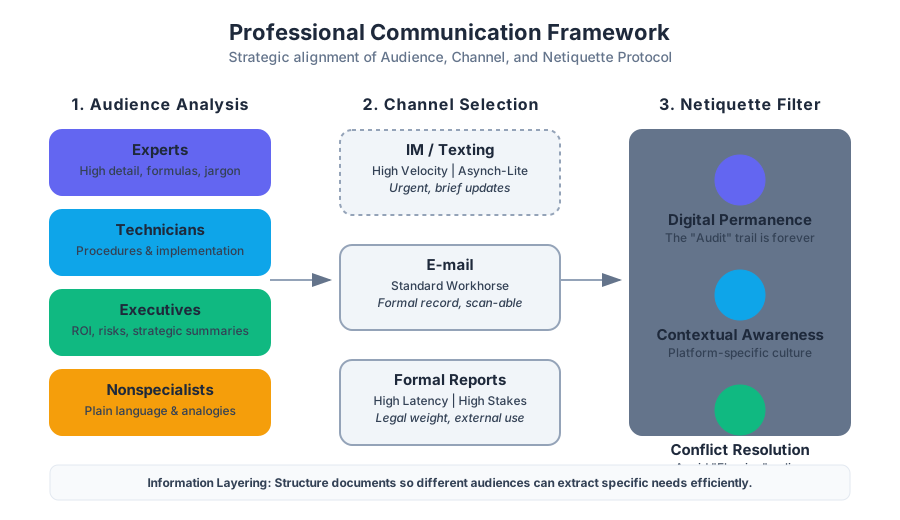
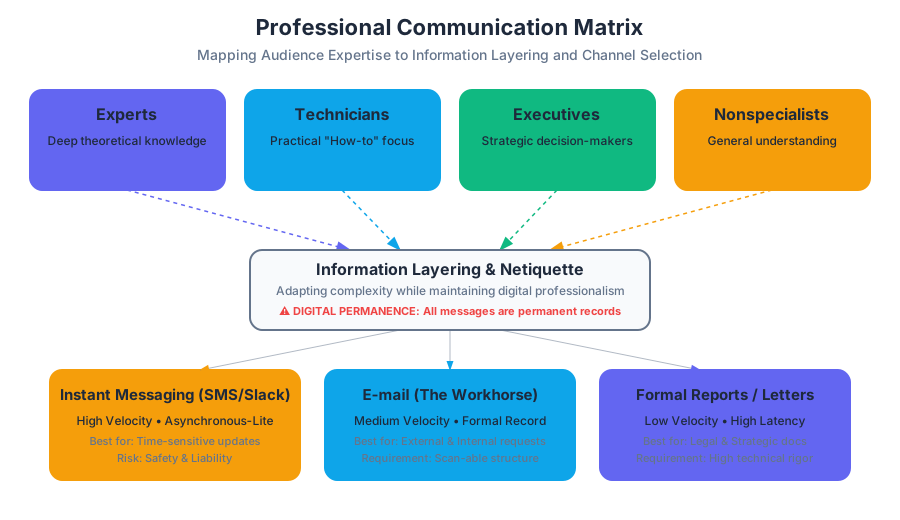
Before selecting a format, a communicator must perform an Audience Analysis. In technical writing, audiences are rarely monolithic; they are categorized based on their technical expertise, organizational role, and information needs.
Definition: Audience Analysis is the process of identifying the background, knowledge level, and specific needs of a reader to tailor the complexity, tone, and structure of a document.
The Four Primary Audience Categories
| Audience Type | Characteristics | Primary Goal | Required Detail Level |
|---|---|---|---|
| Experts | Deep theoretical and practical knowledge. | Peer review, technical validation. | High (formulas, raw data, jargon). |
| Technicians | Practical "how-to" knowledge; builders/maintainers. | Implementation, troubleshooting. | Moderate (schematics, procedures). |
| Executives | Decision-makers; focus on "the bottom line." | Strategic planning, budget approval. | Low (summaries, ROI, risks). |
| Nonspecialists | Little to no prior knowledge of the specific field. | General understanding, usage. | Lowest (plain language, analogies). |
Information Layering
When addressing a Mixed Audience, writers employ Information Layering. This involves structuring a document so that different readers can extract what they need without being overwhelmed. For example, a technical report might include an Executive Summary for decision-makers, a Methodology section for experts, and an Appendix for technicians.
Netiquette and Digital Permanence
The term Netiquette refers to the social and professional code of conduct for online interaction. Unlike face-to-face communication, digital communication lacks non-verbal cues (tone of voice, body language), increasing the risk of Misinterpretation.
Core Principles of Netiquette
- Digital Permanence: Every email, text, and Slack message is potentially permanent. Once sent, the author loses control over the distribution of the content.
- Contextual Awareness: Understanding the culture of the platform (e.g., the difference between a LinkedIn post and a GitHub issue comment).
- Conflict Resolution (Flaming): Avoiding "flame wars"—heated, emotional exchanges. Professionalism dictates moving high-conflict discussions to synchronous channels (video calls or in-person).
- Privacy and Attribution: Respecting the privacy of others and giving proper credit for intellectual property.
Professional Texting Etiquette
While once reserved for personal use, Short Message Service (SMS) and instant messaging (Slack, Teams, WhatsApp) are now integral to business. However, their high-speed nature introduces significant risks regarding Safety and Liability.
The Protocol of Professional Texting
Texting should be reserved for brief, time-sensitive exchanges. It is an Asynchronous-Lite medium—faster than email but less formal than a memo.
- Clarity over Brevity: Avoid excessive abbreviations (e.g., "u" for "you") that might obscure meaning.
- Audience Sensitivity: Only text colleagues or clients if a prior relationship exists or if the situation is an emergency.
- Safety: Never text while driving or operating machinery. In many jurisdictions, texting while driving is a significant legal liability for the employer if the employee is on the clock.
Implementation: Readability Scoring
To ensure clarity, writers often use algorithms to check the "grade level" of their communication. Below is a low-level implementation of a basic readability logic.
import re

def calculate_flesch_reading_ease(text):
    """
    Calculates the Flesch Reading Ease score.
    Formula: 206.835 - 1.015 * (total_words / total_sentences) - 84.6 * (total_syllables / total_words)
    """
    sentences = len(re.findall(r'[.!?]+', text))
    words = len(re.findall(r'\w+', text))

    # Simplified syllable count (vowel groups)
    syllables = len(re.findall(r'[aeiouy]+', text.lower()))

    if sentences == 0 or words == 0:
        return 0

    score = 206.835 - 1.015 * (words / sentences) - 84.6 * (syllables / words)
    return round(score, 2)

# Example professional text
msg = "The server migration is scheduled for 02:00 UTC. Please confirm your availability."
print(f"Readability Score: {calculate_flesch_reading_ease(msg)}")
# Scores > 60 are considered standard/professional.
E-mail: The Modern Workhorse
E-mail has largely replaced the traditional hard-copy letter for external correspondence and the memo for internal communication. It serves as a formal record of decisions and requests.
E-mail Structure and Formatting
A professional e-mail must be Scan-able. Readers often skim e-mails on mobile devices, meaning the most important information must be prominent.
- Subject Line: Must be descriptive and specific (e.g., "URGENT: Server Downtime - Oct 12" vs. "Question").
- Salutation: Use professional greetings (e.g., "Dear Dr. Smith," or "Hello Team,").
- The "Ask": State the purpose of the e-mail in the first two sentences.
- Closing and Signature: Include a professional sign-off and a signature block with contact information.
Netiquette in E-mail
- Reply All: Use sparingly to avoid "inbox bloat."
- CC vs. BCC: Use
CC(Carbon Copy) for visibility andBCC(Blind Carbon Copy) to protect privacy in mass mailings. - Response Time: Aim for a 24-hour response window during business days.
Internal Communication: The Memo
A Memo (Memorandum) is an internal document used to communicate policies, procedures, or official updates to a broad audience within an organization. Unlike e-mail, which is often one-to-one, a memo is typically One-to-All.
The "Grapevine" and Objectivity
Memos are often issued to counteract "The Grapevine"—the informal, often inaccurate, unofficial communication network within a company. By providing a clear, objective "source of truth," memos stabilize organizational culture.
Memo Structure (Direct Format)
Memos follow a rigid header format and a three-part body structure:
- Header:
- To: (Recipient names/titles)
- From: (Author name/title)
- Date: (Full date)
- Subject: (Clear, concise topic)
- Declaration: The opening paragraph stating the purpose or the new policy.
- Discussion: The "why" and "how"—detailed explanation and supporting data.
- Summary: A call to action or a point of contact for further questions.
Example: Automated Memo Configuration
In a DevOps or automated environment, memos or status updates might be generated via configuration files.
# internal_memo_template.yaml
document_type: Memorandum
metadata:
  classification: INTERNAL_ONLY
  retention_period: 5_YEARS
header:
  to: "All Engineering Staff"
  from: "Chief Technology Officer"
  date: "2023-10-27"
  subject: "Mandatory Migration to OAuth 2.0"
body:
  declaration: |
    Effective immediately, all internal services must transition
    from basic auth to OAuth 2.0 to comply with new security audits.
  discussion: |
    Recent penetration testing identified vulnerabilities in our
    legacy API endpoints. OAuth 2.0 provides the necessary
    tokenization to mitigate these risks.
  summary: |
    Migration must be completed by EOY. Contact the Security Team
    for implementation guides.
External Communication: Traditional Block-Style Letters
Despite the digital shift, the Traditional Block-Style Letter remains the gold standard for formal external communication, such as job applications, letters of inquiry, and legal notices.
The Five Main Areas
- Heading: The sender's address and the date.
- Introduction: The recipient's address and a formal salutation.
- Body: The core message, usually 1–3 paragraphs.
- Conclusion: A summary and a call to action.
- Signature: A formal closing (e.g., "Sincerely,"), the handwritten signature, and the typed name.
| Feature | Memo | Letter | |
|---|---|---|---|
| Audience | Internal (Co-workers) | External (Clients/Public) | Both |
| Format | Header (To/From/Date/Sub) | Block Style (Addresses) | Digital Header |
| Tone | Objective/Direct | Formal/Persuasive | Variable |
| Signature | Not required (initials only) | Required (Handwritten) | Digital Signature Block |
Proposals: The Persuasive Peak
A Proposal is a formal offer to complete a project, solve a problem, or provide a service. It is a persuasive document that must "sell" the writer's capability to the audience.
Types of Proposals
- Solicited: Written in response to a Request for Proposals (RFP)—a formal announcement by an organization looking for bids.
- Unsolicited: Initiated by the writer to suggest an improvement or a new project.
- Internal: A proposal to a manager or executive within the same company.
- External: A bid sent to a different organization or a government entity.
Standard Proposal Components
- Introduction: Defines the problem and the proposed solution.
- Background/Feasibility: Demonstrates that the writer understands the context and that the project is possible.
- Project Description: The "What"—technical details of the solution.
- Methodology and Schedule: The "How" and "When"—a timeline of milestones.
- Cost Analysis: The "How Much"—a detailed budget including labor, materials, and overhead.
Real-World Usage: Dispatching a Proposal Notification
In a professional setting, once a proposal is ready, it may be dispatched via an API to stakeholders.
# Example: Sending a proposal notification via a REST API
curl -X POST https://api.company-portal.com/v1/notifications \
     -H "Authorization: Bearer $API_TOKEN" \
     -H "Content-Type: application/json" \
     -d '{
           "recipient_group": "executive_board",
           "priority": "high",
           "subject": "Proposal: Infrastructure Upgrade Q4",
           "message": "The feasibility report and cost analysis for the Q4 upgrade are now available for review.",
           "link": "https://internal.docs.com/proposals/infra-q4-2023.pdf",
           "action_required": true,
           "deadline": "2023-11-05T17:00:00Z"
         }'
Common Pitfalls in Professional Communication
- Tone Mismatch: Using an overly casual tone in a formal letter or an overly formal tone in a quick Slack message.
- The "Wall of Text": Failing to use white space, bullet points, and headings, which makes documents unreadable.
- Vague Subject Lines: Using subjects like "Update" or "Meeting" which provide no context in a crowded inbox.
- Failure to Proofread: Typos in a professional document signal a lack of attention to detail, which can be fatal in technical fields.
- Ignoring the "Human Element": Forgetting that behind every screen is a person. Netiquette reminds us to maintain empathy and respect, even in digital spaces.
Summary of Communication Selection
To choose the right format, evaluate the message against the following parameters:
| Parameter | High (Formal) | Low (Informal) |
|---|---|---|
| Latency | High (Letters/Memos) | Low (Text/Slack) |
| Complexity | High (Proposals/Reports) | Low (Status Updates) |
| Permanence | High (All Digital/Print) | High (All Digital) |
| Audience | External/Executives | Peers/Technicians |
Source Materials
Study Technical Writing on Lykke
This course page is free to open: signed out, you can read its first two sections, and signing in, on any plan, opens the rest. The free Lykke Chrome extension syncs your own Canvas courses, so ChatGPT, Claude and Muse can answer from your classes and deadlines. It only reads Canvas.
Add the free extensionSign in to open every sectionAll sections of Technical Writing · Browse more course pages