Technical Writing
Institution: MIT
47 study materials · 6 sections
This course provides a comprehensive foundation in technical writing, emphasizing the clear delivery of specialized information to diverse audiences in professional settings. Students explore essential communication formats, including emails, memos, and proposals, while mastering the principles of document design and ethical conduct. Key focus areas include audience analysis, information literacy, and the iterative research process required for high-quality technical reports and workplace documentation.
Course Sections
Introduction to Technical Writing
Key concepts: Technical Communication · Audience Adaptation · Subject Matter Experts (SMEs) · Creative Commons Licensing · Professional Ethics
Defines technical writing as a professional discipline and outlines the administrative and ethical framework of the field.
Introduction to Technical Writing
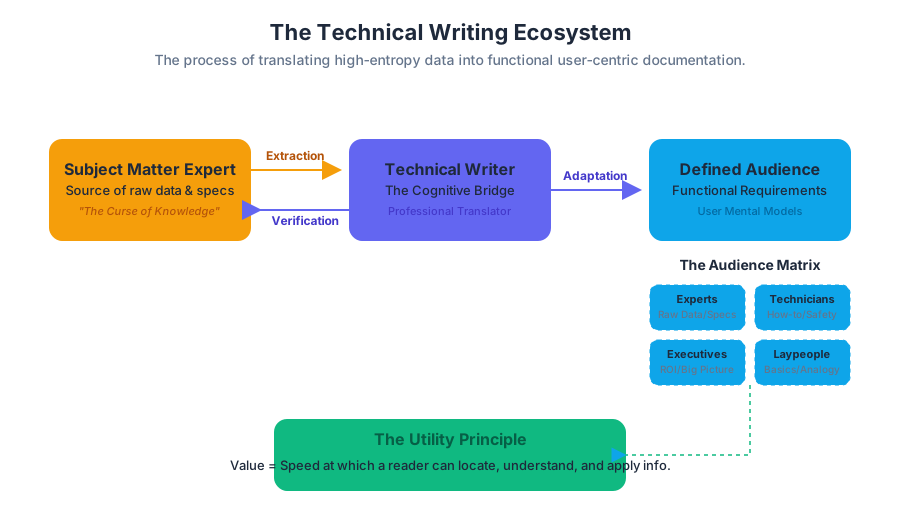
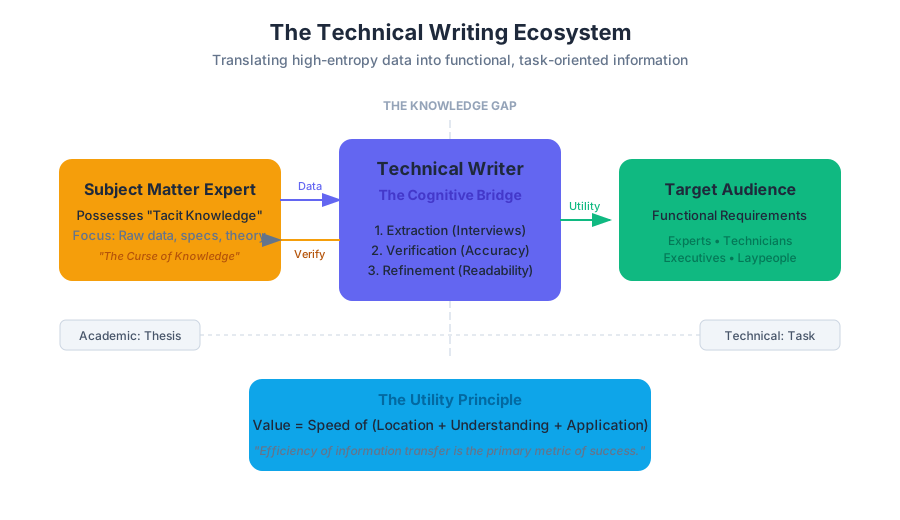
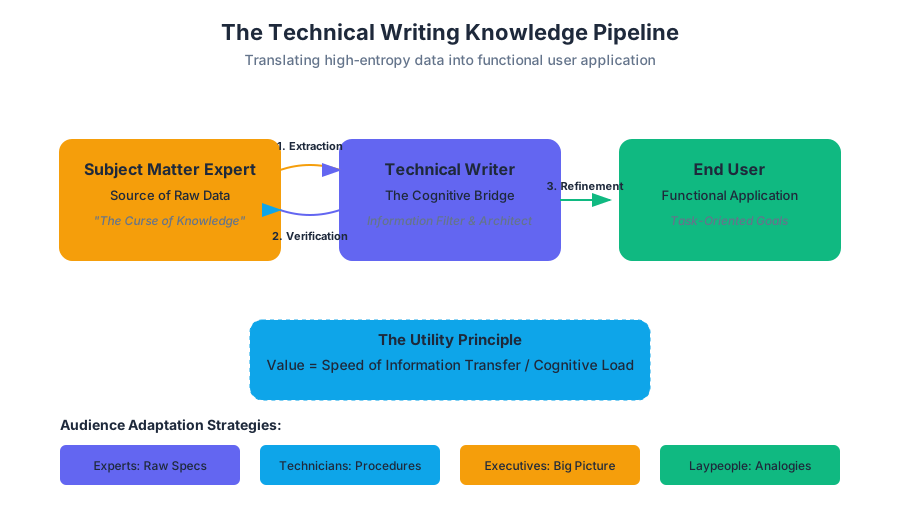
Technical writing is the specialized discipline of transmitting complex, objective, and task-oriented information to a defined audience. Unlike creative or academic writing, which may prioritize aesthetic expression or the exploration of abstract theories, technical writing is fundamentally utilitarian. It serves as a cognitive bridge between the high-entropy data of a Subject Matter Expert (SME) and the functional requirements of an end-user.
In the modern industrial and digital landscape, technical writing is the "operating system" of professional communication. It encompasses everything from API documentation and engineering proposals to safety manuals and progress reports. Its primary metric of success is not the elegance of the prose, but the efficiency of information transfer.
The Taxonomy of Technical Communication
Technical communication is a broad umbrella that includes any form of communication that explains technology, provides instructions, or documents processes. It is characterized by its focus on the reader’s needs rather than the writer’s voice.
Technical vs. Academic Writing
To understand technical writing, one must distinguish it from the academic writing prevalent in university settings. While both value accuracy, their structural goals and audience expectations diverge significantly.
| Feature | Academic Writing | Technical Writing |
|---|---|---|
| Primary Goal | To demonstrate knowledge or argue a thesis. | To enable a task or inform a decision. |
| Audience | Professors, scholars, and peers. | Users, stakeholders, technicians, and executives. |
| Tone | Reflective, complex, and often discursive. | Objective, concise, and direct. |
| Structure | Linear (Intro, Body, Conclusion). | Modular (Headed sections, tables, lists). |
| Visuals | Secondary (Supporting charts). | Primary (Diagrams, screenshots, schematics). |
| Outcome | Intellectual engagement. | Functional application or problem resolution. |
Definition: The Utility Principle Technical writing follows the Utility Principle: the value of a document is directly proportional to the speed at which a reader can locate, understand, and apply the information contained within it.
Audience Adaptation: The Core Mechanic
The most critical phase of technical writing is Audience Analysis. A document that is technically perfect but written for the wrong audience is a failure. Adaptation is the process of modulating technical depth, vocabulary, and document design to match the reader's "mental model."
The Audience Matrix
Technical writers typically categorize audiences based on their proximity to the subject matter.
| Audience Type | Knowledge Level | Primary Need | Adaptation Strategy |
|---|---|---|---|
| Experts | High (SMEs, Engineers) | Raw data, specs, theory. | Use jargon, provide deep technical details. |
| Technicians | Moderate (Operators) | How-to, troubleshooting. | Focus on procedures and safety warnings. |
| Executives | Low to Moderate | ROI, timelines, "Big Picture." | Summarize, focus on business impact. |
| Laypeople | Low (General Users) | Basics, ease of use. | Define all terms, use analogies, simplify UI. |
Implementing Readability Algorithms
To quantify the "adaptation" to an audience, technical writers often use readability indices. These are mathematical models that estimate the grade level required to understand a text based on sentence length and syllable count.
Below is a Python implementation of the Flesch-Kincaid Grade Level algorithm, a standard metric in technical communication.
import re

def calculate_readability(text):
    """
    Calculates the Flesch-Kincaid Grade Level of a given text.
    Formula: 0.39 * (total_words / total_sentences) +
             11.8 * (total_syllables / total_words) - 15.59
    """
    sentences = len(re.split(r'[.!?]+', text)) - 1
    words = len(text.split())

    # Simplified syllable count (heuristic)
    def count_syllables(word):
        word = word.lower()
        count = 0
        vowels = "aeiouy"
        if word[0] in vowels:
            count += 1
        for index in range(1, len(word)):
            if word[index] in vowels and word[index - 1] not in vowels:
                count += 1
        if word.endswith("e"):
            count -= 1
        if count == 0:
            count = 1
        return count

    syllables = sum(count_syllables(w) for w in text.split())

    if sentences == 0 or words == 0:
        return 0

    grade_level = (0.39 * (words / sentences)) + (11.8 * (syllables / words)) - 15.59
    return round(grade_level, 2)

# Example usage for a technical snippet
sample_text = "The internal combustion engine converts chemical energy into mechanical work."
print(f"Flesch-Kincaid Grade Level: {calculate_readability(sample_text)}")
Subject Matter Experts (SMEs) and the Knowledge Pipeline
The technical writer rarely possesses the same depth of knowledge as the Subject Matter Expert (SME)—the engineer, scientist, or developer who created the technology. The writer’s role is that of a "professional translator."
The SME-Writer Interaction Model
- Extraction: The writer interviews the SME to capture "tacit knowledge" (what the SME knows but hasn't written down).
- Verification: The writer produces a draft and returns it to the SME for technical accuracy.
- Refinement: The writer simplifies the SME's jargon-heavy feedback into user-centric language.
The Curse of Knowledge
SMEs often suffer from the Curse of Knowledge, a cognitive bias where they assume the reader has the same background information they do. The technical writer acts as a proxy for the user, identifying "information gaps" that the SME might overlook.
Professional Ethics and Information Literacy
Technical writing is not just about clarity; it is about integrity. Because technical documents often involve safety protocols (e.g., medical device manuals) or legal obligations (e.g., contracts), ethical lapses can have catastrophic consequences.
The Ethics of Clarity
In technical writing, "obfuscation" is an ethical violation. Using overly complex language to hide a product defect or a project delay is a breach of professional conduct.
Information Literacy in the Workplace
Information literacy is the ability to find, evaluate, and synthesize information. In a professional setting, this involves:
- Source Triangulation: Comparing SME interviews with existing documentation and legacy code.
- Fact-Checking: Verifying data points before they are codified into a report.
- Objectivity: Reporting incidents without bias.
Case Study: The Incident Report
An incident report must be a neutral, chronological account of an event. Consider the following structural requirements for a professional incident report:
| Component | Purpose | Requirement |
|---|---|---|
| Header | Metadata | Date, Time, Location, Case ID. |
| Summary | Immediate Context | A one-sentence overview of the event. |
| Narrative | Chronology | Step-by-step account using objective verbs (e.g., "observed," "stated," not "felt"). |
| Disposition | Resolution | What actions were taken to mitigate the issue. |
Intellectual Property and Creative Commons Licensing
In the collaborative world of technical documentation, understanding Intellectual Property (IP) and licensing is paramount. Many modern technical resources are developed as Open Educational Resources (OER).
Creative Commons (CC) Framework
Creative Commons licenses allow creators to maintain copyright while granting others the permission to share and adapt their work. This is vital for technical manuals that need to be updated by multiple contributors over time.
The formula for a CC license is a combination of several conditions:
$$License = \sum (BY, NC, SA, ND)$$
Where:
- BY (Attribution): Credit must be given to the creator.
- NC (Non-Commercial): The work cannot be used for profit.
- SA (Share-Alike): Adaptations must be shared under the same license.
- ND (No-Derivatives): The work cannot be altered.
The CC BY-NC-SA 4.0 License
The textbook material this article is based on is licensed under CC BY-NC-SA 4.0. This means you are free to:
- Share: Copy and redistribute the material.
- Adapt: Remix, transform, and build upon the material.
Under the following terms:
- You must give appropriate credit.
- You may not use the material for commercial purposes.
- If you remix the material, you must distribute your contributions under the same license.
Document Design and the CRAP Principles
Technical writing is visual. A wall of text is a barrier to information. Writers use the CRAP principles of graphic design to enhance readability:
- Contrast: Use bold headings and white space to make key elements stand out.
- Repetition: Maintain consistent formatting (e.g., all "Warnings" should look the same).
- Alignment: Ensure every element has a visual connection to another element on the page.
- Proximity: Group related items (e.g., a caption should be physically close to its image).
Docs-as-Code Workflow
Modern technical writing, especially in software, often follows a Docs-as-Code philosophy. This involves writing documentation in Markdown or reStructuredText and using version control (Git) to manage changes.
Below is an example of a GitHub Actions configuration that automates the deployment of technical documentation when a writer pushes a change to the repository.
name: Deploy Technical Docs

on:
  push:
    branches:
      - main

jobs:
  build-and-deploy:
    runs-on: ubuntu-latest
    steps:
      - name: Checkout Repository
        uses: actions/checkout@v3

      - name: Setup Static Site Generator
        run: |
          sudo apt-get update
          sudo apt-get install -y hugo

      - name: Build Documentation Site
        run: hugo --minify

      - name: Deploy to Production Server
        uses: peaceiris/actions-gh-pages@v3
        with:
          github_token: ${{ secrets.GITHUB_TOKEN }}
          publish_dir: ./public
Common Pitfalls in Technical Writing
Even experienced writers fall into traps that degrade the quality of technical communication.
- The Passive Voice: "The button was pressed by the user" is slower to process than "The user pressed the button."
- Ambiguous Pronouns: Using "it" or "this" when multiple objects are present. (e.g., "The server crashed after the update. It was expected." — Was the crash expected, or the update?)
- Jargon Overload: Using "synergistic paradigm shift" when you mean "improved workflow."
- Lack of White Space: Dense paragraphs discourage readers. Technical writing should be "scannable."
Comparison of Clarity
| Poor (Wordy/Passive) | Improved (Direct/Active) |
|---|---|
| It is recommended that the system be restarted by the administrator. | The administrator should restart the system. |
| The utilization of this device is contingent upon the initialization of the battery. | Charge the battery before using the device. |
| An error occurred during the process of data transmission. | The system failed to send the data. |
Conclusion
Technical writing is an essential professional skill that transforms information into action. By mastering audience adaptation, ethical reporting, and document design, writers ensure that specialized knowledge is not locked away in the minds of experts but is accessible to those who need it to perform their jobs safely and effectively. Whether through a progress report, a proposal, or a complex manual, the goal remains the same: clarity above all.
- Technical Communication: The delivery of specialized information to specific audiences in professional settings.
- Audience Adaptation: Modifying content, tone, and design to meet the specific needs of the reader.
- SME (Subject Matter Expert): A person with deep authority and knowledge in a specific technical field.
- CC BY-NC-SA: A Creative Commons license requiring Attribution, Non-Commercial use, and Share-Alike distribution.
- CRAP Principles: Contrast, Repetition, Alignment, and Proximity—the four pillars of document design.
- Information Literacy: The ability to find, evaluate, and use information effectively in a professional context.
- Flesch-Kincaid Grade Level: A formula used to measure the readability and complexity of a text.
- Docs-as-Code: A philosophy where documentation is written and managed using the same tools as software code.
-
What is the primary difference between technical and academic writing?
- A) Technical writing is longer.
- B) Technical writing is utilitarian and task-oriented, while academic writing is thesis-oriented.
- C) Academic writing uses more images.
- D) Technical writing is only for engineers. (Correct: B)
-
Which "CRAP" principle is violated if a manual uses three different fonts for its "Warning" boxes?
- A) Contrast
- B) Repetition
- C) Alignment
- D) Proximity (Correct: B)
-
What is the "Curse of Knowledge" in the context of SMEs?
- A) Knowing too much makes you a bad writer.
- B) Assuming the audience knows as much as the expert does.
- C) Forgetting technical details over time.
- D) Refusing to share information with technical writers. (Correct: B)
-
Under a CC BY-NC-SA 4.0 license, can you sell a modified version of the textbook?
- A) Yes, as long as you give credit.
- B) No, because of the "NC" (Non-Commercial) clause.
- C) Yes, if you share it under the same license.
- D) Only if the original author gives written permission. (Correct: B)
-
Which readability metric is calculated using sentence length and syllable count?
- A) The SME Index
- B) The CRAP Score
- C) The Flesch-Kincaid Grade Level
- D) The Utility Principle (Correct: C)
Key Objectives for Mastery:
- Analyze the Audience: Before writing, identify if your reader is an Expert, Technician, Executive, or Layperson. Adjust your vocabulary and depth accordingly.
- Bridge the Gap: Practice interviewing SMEs. Identify "tacit knowledge" and translate it into "explicit instructions."
- Design for Scannability: Use the CRAP principles. Break up text with headings, bulleted lists, and tables.
- Maintain Objectivity: In reports and proposals, stick to verifiable facts. Use active voice and avoid emotional or biased language.
- Respect IP: Always check the license of the materials you use. If using OER, ensure you follow the Attribution and Share-Alike requirements.
- Iterate and Verify: Technical writing is a process of drafting, SME review, and user testing. Never assume the first draft is technically accurate or user-friendly.
Professional Communication Formats
Key concepts: Netiquette · Professional Texting Etiquette · E-mail Formatting · Memo Structure · Traditional Block-Style Letters
Explores the various channels of workplace communication, from digital messaging to formal letters and memos.
Professional Communication Formats
In the modern technical landscape, communication is not merely the transmission of information; it is a high-stakes protocol that governs organizational efficiency, legal liability, and professional reputation. As workplaces transition from traditional physical offices to hybrid and fully remote environments, the mastery of Professional Communication Formats—ranging from high-velocity instant messaging to formal, high-latency external letters—becomes a foundational skill for engineers, managers, and executives alike.
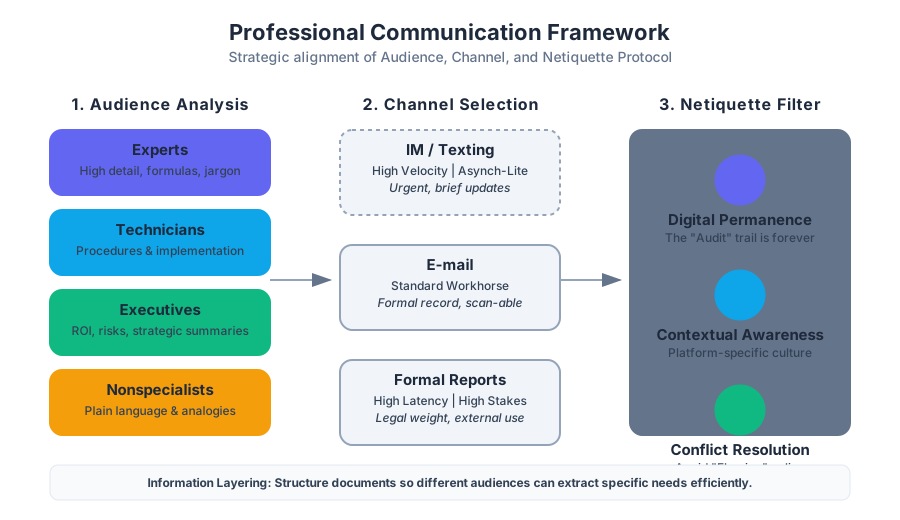
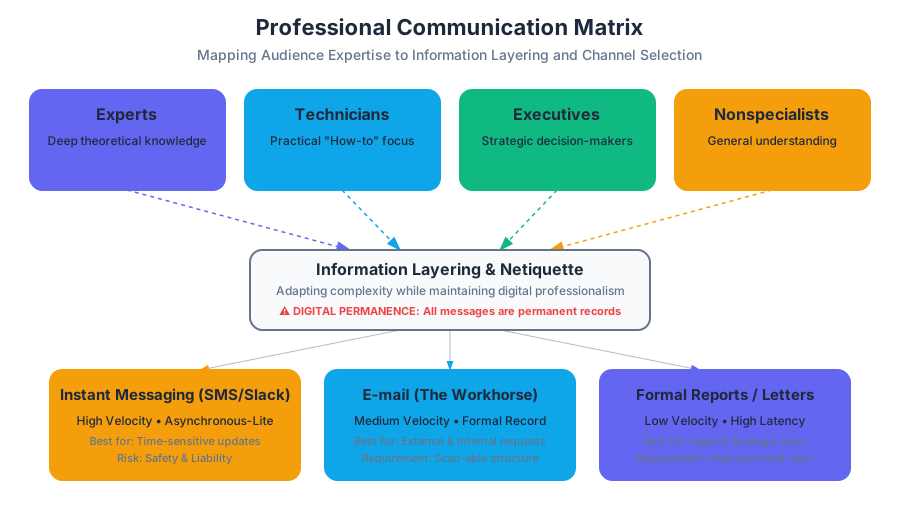
Effective communication requires a deep understanding of Audience Awareness and Contextual Bandwidth. Every message sent leaves a Digital Footprint, a permanent record that can be audited, archived, or leaked. Consequently, selecting the appropriate channel and adhering to established Netiquette (network etiquette) is as critical as the technical content of the message itself.
The Foundation: Audience Analysis and Adaptation
Before selecting a format, a communicator must perform an Audience Analysis. In technical writing, audiences are rarely monolithic; they are categorized based on their technical expertise, organizational role, and information needs.
Definition: Audience Analysis is the process of identifying the background, knowledge level, and specific needs of a reader to tailor the complexity, tone, and structure of a document.
The Four Primary Audience Categories
| Audience Type | Characteristics | Primary Goal | Required Detail Level |
|---|---|---|---|
| Experts | Deep theoretical and practical knowledge. | Peer review, technical validation. | High (formulas, raw data, jargon). |
| Technicians | Practical "how-to" knowledge; builders/maintainers. | Implementation, troubleshooting. | Moderate (schematics, procedures). |
| Executives | Decision-makers; focus on "the bottom line." | Strategic planning, budget approval. | Low (summaries, ROI, risks). |
| Nonspecialists | Little to no prior knowledge of the specific field. | General understanding, usage. | Lowest (plain language, analogies). |
Information Layering
When addressing a Mixed Audience, writers employ Information Layering. This involves structuring a document so that different readers can extract what they need without being overwhelmed. For example, a technical report might include an Executive Summary for decision-makers, a Methodology section for experts, and an Appendix for technicians.
Netiquette and Digital Permanence
The term Netiquette refers to the social and professional code of conduct for online interaction. Unlike face-to-face communication, digital communication lacks non-verbal cues (tone of voice, body language), increasing the risk of Misinterpretation.
Core Principles of Netiquette
- Digital Permanence: Every email, text, and Slack message is potentially permanent. Once sent, the author loses control over the distribution of the content.
- Contextual Awareness: Understanding the culture of the platform (e.g., the difference between a LinkedIn post and a GitHub issue comment).
- Conflict Resolution (Flaming): Avoiding "flame wars"—heated, emotional exchanges. Professionalism dictates moving high-conflict discussions to synchronous channels (video calls or in-person).
- Privacy and Attribution: Respecting the privacy of others and giving proper credit for intellectual property.
Professional Texting Etiquette
While once reserved for personal use, Short Message Service (SMS) and instant messaging (Slack, Teams, WhatsApp) are now integral to business. However, their high-speed nature introduces significant risks regarding Safety and Liability.
The Protocol of Professional Texting
Texting should be reserved for brief, time-sensitive exchanges. It is an Asynchronous-Lite medium—faster than email but less formal than a memo.
- Clarity over Brevity: Avoid excessive abbreviations (e.g., "u" for "you") that might obscure meaning.
- Audience Sensitivity: Only text colleagues or clients if a prior relationship exists or if the situation is an emergency.
- Safety: Never text while driving or operating machinery. In many jurisdictions, texting while driving is a significant legal liability for the employer if the employee is on the clock.
Implementation: Readability Scoring
To ensure clarity, writers often use algorithms to check the "grade level" of their communication. Below is a low-level implementation of a basic readability logic.
import re

def calculate_flesch_reading_ease(text):
    """
    Calculates the Flesch Reading Ease score.
    Formula: 206.835 - 1.015 * (total_words / total_sentences) - 84.6 * (total_syllables / total_words)
    """
    sentences = len(re.findall(r'[.!?]+', text))
    words = len(re.findall(r'\w+', text))

    # Simplified syllable count (vowel groups)
    syllables = len(re.findall(r'[aeiouy]+', text.lower()))

    if sentences == 0 or words == 0:
        return 0

    score = 206.835 - 1.015 * (words / sentences) - 84.6 * (syllables / words)
    return round(score, 2)

# Example professional text
msg = "The server migration is scheduled for 02:00 UTC. Please confirm your availability."
print(f"Readability Score: {calculate_flesch_reading_ease(msg)}")
# Scores > 60 are considered standard/professional.
E-mail: The Modern Workhorse
E-mail has largely replaced the traditional hard-copy letter for external correspondence and the memo for internal communication. It serves as a formal record of decisions and requests.
E-mail Structure and Formatting
A professional e-mail must be Scan-able. Readers often skim e-mails on mobile devices, meaning the most important information must be prominent.
- Subject Line: Must be descriptive and specific (e.g., "URGENT: Server Downtime - Oct 12" vs. "Question").
- Salutation: Use professional greetings (e.g., "Dear Dr. Smith," or "Hello Team,").
- The "Ask": State the purpose of the e-mail in the first two sentences.
- Closing and Signature: Include a professional sign-off and a signature block with contact information.
Netiquette in E-mail
- Reply All: Use sparingly to avoid "inbox bloat."
- CC vs. BCC: Use
CC(Carbon Copy) for visibility andBCC(Blind Carbon Copy) to protect privacy in mass mailings. - Response Time: Aim for a 24-hour response window during business days.
Internal Communication: The Memo
A Memo (Memorandum) is an internal document used to communicate policies, procedures, or official updates to a broad audience within an organization. Unlike e-mail, which is often one-to-one, a memo is typically One-to-All.
The "Grapevine" and Objectivity
Memos are often issued to counteract "The Grapevine"—the informal, often inaccurate, unofficial communication network within a company. By providing a clear, objective "source of truth," memos stabilize organizational culture.
Memo Structure (Direct Format)
Memos follow a rigid header format and a three-part body structure:
- Header:
- To: (Recipient names/titles)
- From: (Author name/title)
- Date: (Full date)
- Subject: (Clear, concise topic)
- Declaration: The opening paragraph stating the purpose or the new policy.
- Discussion: The "why" and "how"—detailed explanation and supporting data.
- Summary: A call to action or a point of contact for further questions.
Example: Automated Memo Configuration
In a DevOps or automated environment, memos or status updates might be generated via configuration files.
# internal_memo_template.yaml
document_type: Memorandum
metadata:
  classification: INTERNAL_ONLY
  retention_period: 5_YEARS
header:
  to: "All Engineering Staff"
  from: "Chief Technology Officer"
  date: "2023-10-27"
  subject: "Mandatory Migration to OAuth 2.0"
body:
  declaration: |
    Effective immediately, all internal services must transition
    from basic auth to OAuth 2.0 to comply with new security audits.
  discussion: |
    Recent penetration testing identified vulnerabilities in our
    legacy API endpoints. OAuth 2.0 provides the necessary
    tokenization to mitigate these risks.
  summary: |
    Migration must be completed by EOY. Contact the Security Team
    for implementation guides.
External Communication: Traditional Block-Style Letters
Despite the digital shift, the Traditional Block-Style Letter remains the gold standard for formal external communication, such as job applications, letters of inquiry, and legal notices.
The Five Main Areas
- Heading: The sender's address and the date.
- Introduction: The recipient's address and a formal salutation.
- Body: The core message, usually 1–3 paragraphs.
- Conclusion: A summary and a call to action.
- Signature: A formal closing (e.g., "Sincerely,"), the handwritten signature, and the typed name.
| Feature | Memo | Letter | |
|---|---|---|---|
| Audience | Internal (Co-workers) | External (Clients/Public) | Both |
| Format | Header (To/From/Date/Sub) | Block Style (Addresses) | Digital Header |
| Tone | Objective/Direct | Formal/Persuasive | Variable |
| Signature | Not required (initials only) | Required (Handwritten) | Digital Signature Block |
Proposals: The Persuasive Peak
A Proposal is a formal offer to complete a project, solve a problem, or provide a service. It is a persuasive document that must "sell" the writer's capability to the audience.
Types of Proposals
- Solicited: Written in response to a Request for Proposals (RFP)—a formal announcement by an organization looking for bids.
- Unsolicited: Initiated by the writer to suggest an improvement or a new project.
- Internal: A proposal to a manager or executive within the same company.
- External: A bid sent to a different organization or a government entity.
Standard Proposal Components
- Introduction: Defines the problem and the proposed solution.
- Background/Feasibility: Demonstrates that the writer understands the context and that the project is possible.
- Project Description: The "What"—technical details of the solution.
- Methodology and Schedule: The "How" and "When"—a timeline of milestones.
- Cost Analysis: The "How Much"—a detailed budget including labor, materials, and overhead.
Real-World Usage: Dispatching a Proposal Notification
In a professional setting, once a proposal is ready, it may be dispatched via an API to stakeholders.
# Example: Sending a proposal notification via a REST API
curl -X POST https://api.company-portal.com/v1/notifications \
     -H "Authorization: Bearer $API_TOKEN" \
     -H "Content-Type: application/json" \
     -d '{
           "recipient_group": "executive_board",
           "priority": "high",
           "subject": "Proposal: Infrastructure Upgrade Q4",
           "message": "The feasibility report and cost analysis for the Q4 upgrade are now available for review.",
           "link": "https://internal.docs.com/proposals/infra-q4-2023.pdf",
           "action_required": true,
           "deadline": "2023-11-05T17:00:00Z"
         }'
Common Pitfalls in Professional Communication
- Tone Mismatch: Using an overly casual tone in a formal letter or an overly formal tone in a quick Slack message.
- The "Wall of Text": Failing to use white space, bullet points, and headings, which makes documents unreadable.
- Vague Subject Lines: Using subjects like "Update" or "Meeting" which provide no context in a crowded inbox.
- Failure to Proofread: Typos in a professional document signal a lack of attention to detail, which can be fatal in technical fields.
- Ignoring the "Human Element": Forgetting that behind every screen is a person. Netiquette reminds us to maintain empathy and respect, even in digital spaces.
Summary of Communication Selection
To choose the right format, evaluate the message against the following parameters:
| Parameter | High (Formal) | Low (Informal) |
|---|---|---|
| Latency | High (Letters/Memos) | Low (Text/Slack) |
| Complexity | High (Proposals/Reports) | Low (Status Updates) |
| Permanence | High (All Digital/Print) | High (All Digital) |
| Audience | External/Executives | Peers/Technicians |
Audience Analysis and Adaptation
Key concepts: Experts · Technicians · Executives · Nonspecialists · Information Filtering
Focuses on the most critical aspect of technical writing: understanding and adapting to the reader's needs.
Audience Analysis and Adaptation
Overview
In the field of technical communication, Audience Analysis is the foundational heuristic used to determine the content, terminology, and structure of a document. It is the systematic process of identifying the intended reader’s background, knowledge level, and specific goals to ensure that the information provided is both accessible and actionable.
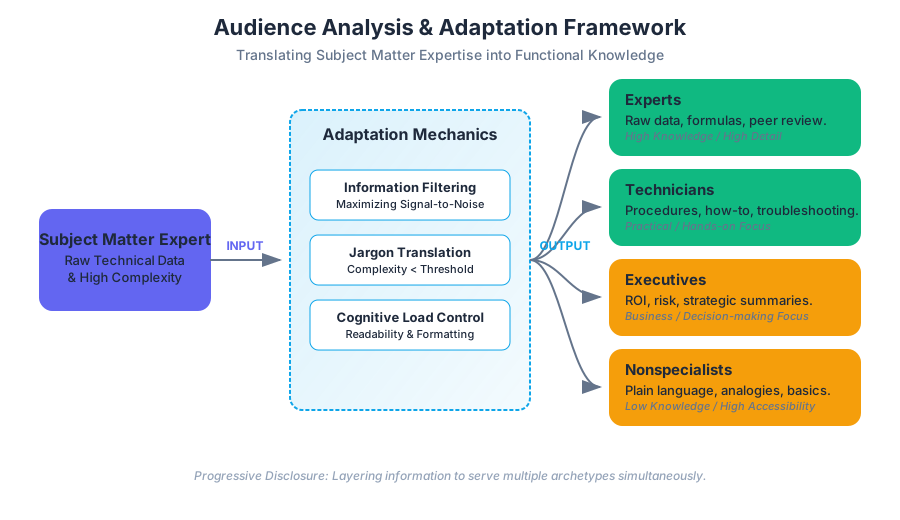
The primary failure mode in professional documentation is not a lack of technical accuracy, but a failure of adaptation. When a document is written without a clear understanding of the reader’s "mental model," the result is a mismatch in cognitive load: experts may find the text patronizingly simple, while nonspecialists may find it impenetrably dense. Effective technical writing functions as a bridge between a Subject Matter Expert (SME) and a specific stakeholder, translating raw technical data into "functional knowledge."
The Taxonomy of Readers
To effectively adapt information, writers must categorize their audience into distinct archetypes. While real-world readers often overlap, these four categories provide a framework for selecting the appropriate level of detail and tone.
| Audience Category | Primary Goal | Knowledge Base | Key Requirement |
|---|---|---|---|
| Experts | Theoretical understanding, peer review, or deep troubleshooting. | High; advanced degrees or decades of experience. | Raw data, complex formulas, and exhaustive technical detail. |
| Technicians | Practical application, maintenance, and operation. | Moderate to High; specialized hands-on training. | Clear procedures, troubleshooting tables, and "how-to" steps. |
| Executives | Decision-making, resource allocation, and risk assessment. | Low to Moderate (Technical); High (Business). | High-level summaries, ROI, and "bottom-line" impacts. |
| Nonspecialists | General understanding or basic usage. | Low to None; general public or casual users. | Plain language, analogies, and extensive definitions. |
Information Filtering: The Signal-to-Noise Ratio
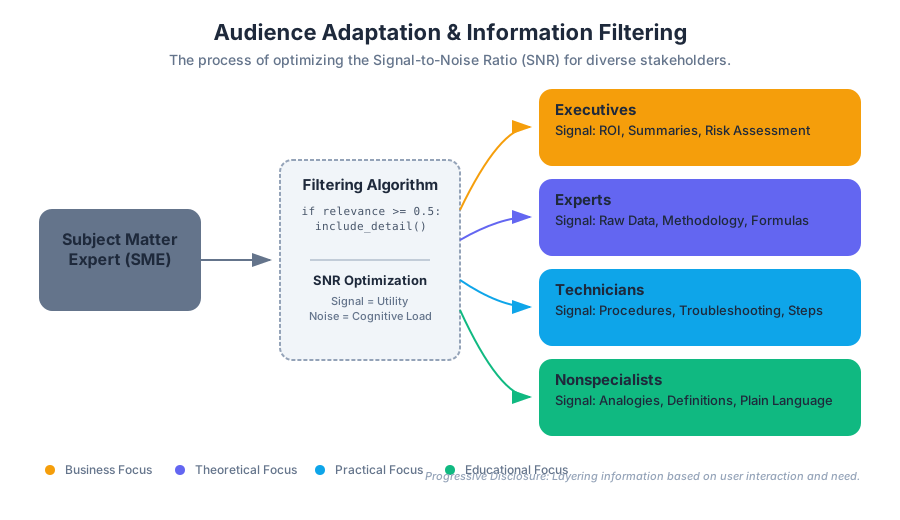
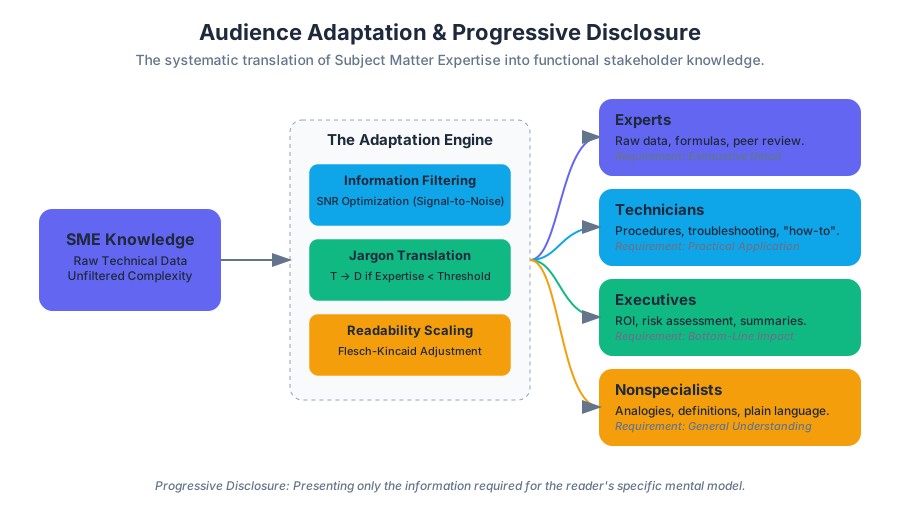
Information Filtering is the process of selecting specific data points for inclusion while omitting extraneous details that do not serve the reader's immediate purpose. In information theory, this can be viewed as maximizing the Signal-to-Noise Ratio (SNR) for the reader.
For an Expert, "signal" includes the specific parameters of an experiment (e.g., $p$-values, standard deviations, and methodology). For an Executive, those same details are "noise"; their "signal" is the conclusion and the financial implication of the results.
The Filtering Algorithm
When determining whether a piece of information should be included, writers should apply a conditional logic similar to the following implementation:
def filter_content(data_point, audience_profile):
    """
    Determines if a technical detail should be included based on audience needs.
    """
    relevance_score = 0

    # Define weightings for different audience types
    weights = {
        "expert": {"theory": 0.9, "implementation": 0.7, "business": 0.2},
        "technician": {"theory": 0.2, "implementation": 0.9, "business": 0.1},
        "executive": {"theory": 0.1, "implementation": 0.3, "business": 0.9},
        "nonspecialist": {"theory": 0.4, "implementation": 0.2, "business": 0.1}
    }

    # Calculate relevance based on the data point's attributes
    for attribute, value in data_point.items():
        relevance_score += value * weights[audience_profile].get(attribute, 0)

    # Threshold for inclusion (e.g., 0.5)
    return relevance_score >= 0.5

# Example: A data point about 'Transistor Gate Leakage Current'
gate_leakage_data = {"theory": 0.8, "implementation": 0.4, "business": 0.05}

print(f"Include for Expert? {filter_content(gate_leakage_data, 'expert')}")
print(f"Include for Executive? {filter_content(gate_leakage_data, 'executive')}")
Adaptation Mechanics: The Controls of Communication
Once the audience is identified and the information is filtered, the writer must apply specific "controls" to adapt the message.
1. Language and Terminology
The use of Jargon is a double-edged sword. For experts, jargon is a tool for precision and brevity. For nonspecialists, it is a barrier to entry.
The Jargon Translation Theorem: For any technical term $T$, if the reader's expertise $E < \text{Threshold}$, then $T$ must be replaced by a functional definition $D$ or an analogy $A$, such that $Complexity(D) < Complexity(T)$.
2. Sentence Economy and Readability
Readability formulas (like Flesch-Kincaid) quantify the difficulty of a text based on sentence length and syllable count. While these are not perfect, they serve as a useful proxy for Cognitive Load.
\text{Flesch-Kincaid Grade Level} = 0.39 \left( \frac{\text{total words}}{\text{total sentences}} \right) + 11.8 \left( \frac{\text{total syllables}}{\text{total words}} \right) - 15.59
3. Visual Formatting
Different audiences interact with documents differently. Experts often read linearly to find flaws in logic, whereas Executives and Technicians "scan" for specific data or instructions.
| Design Element | Expert Use Case | Executive Use Case |
|---|---|---|
| White Space | Minimal; maximize data density. | High; focus on readability and "breathing room." |
| Headings | Descriptive (e.g., "Methodology"). | Result-oriented (e.g., "Expected Savings"). |
| Graphics | Complex charts, raw data plots. | Infographics, high-level dashboards. |
| Appendices | Essential for full proof. | Ignored unless verification is needed. |
The Multi-Audience Problem: Progressive Disclosure
In the real world, a single document (like a project proposal or a safety manual) often has multiple readers. A CEO might read the first page, while a Lead Engineer reads the middle section, and a Maintenance Technician reads the final checklist.
To solve this, technical writers use Progressive Disclosure and Modular Design.
Implementation via Document Structure
- Executive Summary: For decision-makers (Executives).
- Introduction/Background: For nonspecialists or new team members.
- Technical Discussion: For Experts.
- Operational Procedures: For Technicians.
- Appendices: For raw data and mathematical proofs.
Technical Implementation: Conditional Tagging
In modern documentation pipelines (using tools like DITA, Sphinx, or Hugo), writers can use conditional tags to generate different versions of the same source file for different audiences.
# documentation_config.yml
project_name: "Quantum-Safe Encryption Suite"
outputs:
  - target: "internal_dev_guide"
    audience: "expert"
    include_tags: ["math_proofs", "api_reference", "low_level_c"]
    exclude_tags: ["marketing_fluff", "installation_wizard"]

  - target: "client_onboarding"
    audience: "nonspecialist"
    include_tags: ["installation_wizard", "glossary", "faq"]
    exclude_tags: ["math_proofs", "low_level_c"]
Subject Matter Experts (SMEs) and the "Curse of Knowledge"
A significant challenge in audience adaptation is the Curse of Knowledge: the cognitive bias where an individual, communicating with others, unknowingly assumes that the others have the background to understand.
Technical writers act as "professional outsiders." They interview SMEs to extract information but must resist adopting the SME's level of abstraction. The writer's role is to maintain the perspective of the target audience throughout the drafting process.
SME Interview Strategy
To adapt SME knowledge effectively, use the "Five Whys" or the "Functional Decomposition" method:
- What does this component do? (Function)
- How does it do it? (Mechanism)
- What happens if it fails? (Risk)
- How does the user interact with it? (Interface)
- Why does this matter to the project? (Value)
Ethics and Intercultural Adaptation
Audience analysis is not limited to technical proficiency; it also encompasses cultural and ethical considerations.
- Localization (L10n): Adapting content for a specific locale (units of measure, date formats, cultural idioms).
- Accessibility (A11y): Ensuring documents are readable by users with visual or cognitive impairments (Alt-text for images, high-contrast ratios).
- Ethical Clarity: Avoiding "dark patterns" in documentation, such as burying safety warnings in dense expert-level text where a technician might miss them.
| Adaptation Type | Example Change | Reason |
|---|---|---|
| Cultural | Changing "Red" for danger to "Yellow" or icons. | Color meanings vary globally (e.g., Red can mean luck in some cultures). |
| Linguistic | Avoiding "Break a leg" or "Ballpark figure." | Idioms do not translate well and confuse non-native speakers. |
| Technical | Converting $Fahrenheit$ to $Celsius$. | Global standardization for non-US audiences. |
Worked Example: Adapting a Progress Report
Consider a scenario where a software team is behind schedule on a critical security patch.
The Expert Version (Lead Developer):
"The race condition in the
auth_handler.cbuffer is persisting due to a mutex deadlock in the kernel-space transition. We are refactoring the semaphore logic to prevent priority inversion."
The Executive Version (CTO):
"We identified a core security flaw that could allow unauthorized access. We are currently rewriting the affected module. This will delay the release by 4 days but prevents a potential data breach."
The Technician Version (SysAdmin):
"Do not deploy version 2.1.4. Wait for patch 2.1.5. If 2.1.4 is already live, disable the 'Remote Auth' flag in the config file to mitigate risk."
Common Pitfalls in Adaptation
- Underestimating the Audience: Treating nonspecialists as unintelligent. This leads to "talking down" to the reader, which reduces engagement.
- Overestimating the Audience: The most common error. Assuming the reader remembers a specific acronym or knows the location of a specific tool.
- The "Kitchen Sink" Approach: Including every piece of information "just in case." This increases the search cost for the reader and obscures the important "signal."
- Inconsistent Tone: Shifting from highly formal expert language to casual nonspecialist language within the same section.
Summary of Adaptation Workflow
To ensure a document is perfectly tuned to its audience, follow this pipeline:
- Identify: Define the primary, secondary, and tertiary readers.
- Profile: Determine their technical baseline and their "pain points."
- Filter: Select only the data points necessary for their specific goals.
- Translate: Convert jargon into accessible language where necessary.
- Format: Use visual cues (bolding, tables, headers) to facilitate scanning.
- Validate: If possible, conduct usability testing with a member of the target audience.
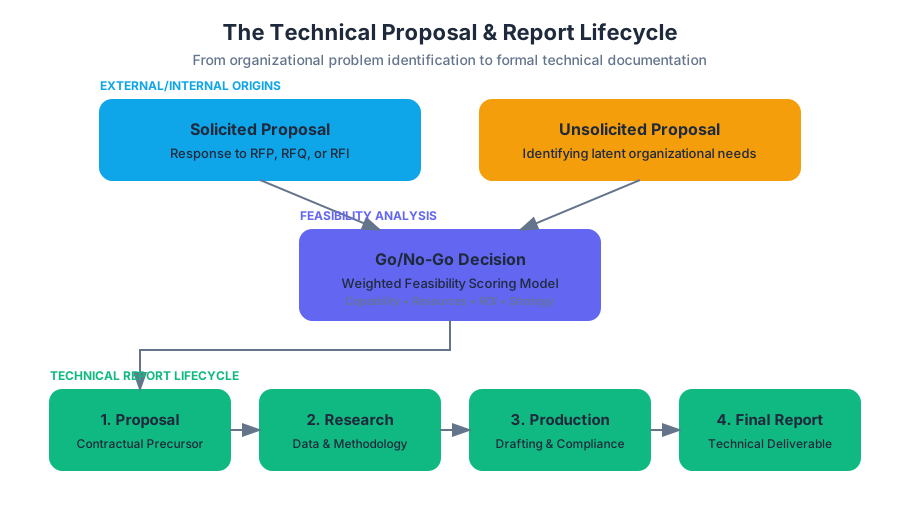
Proposals and the Technical Report Process
Key concepts: Request for Proposals (RFP) · Solicited vs. Unsolicited Proposals · Project Scope · Technical Report Lifecycle · Feasibility
Covers the creation of persuasive proposals and the multi-stage lifecycle of technical report writing.
Proposals and the Technical Report Process
In the professional engineering and technical communication landscape, a proposal serves as a foundational persuasive instrument. Far from being a mere administrative formality, a proposal is a high-stakes "contractual precursor" that bridges the gap between a perceived organizational problem and a researched, viable solution. It is the mechanism by which resources—capital, time, and personnel—are allocated to complex projects.
1. The Taxonomy of Proposals: Strategic Intent and Origins
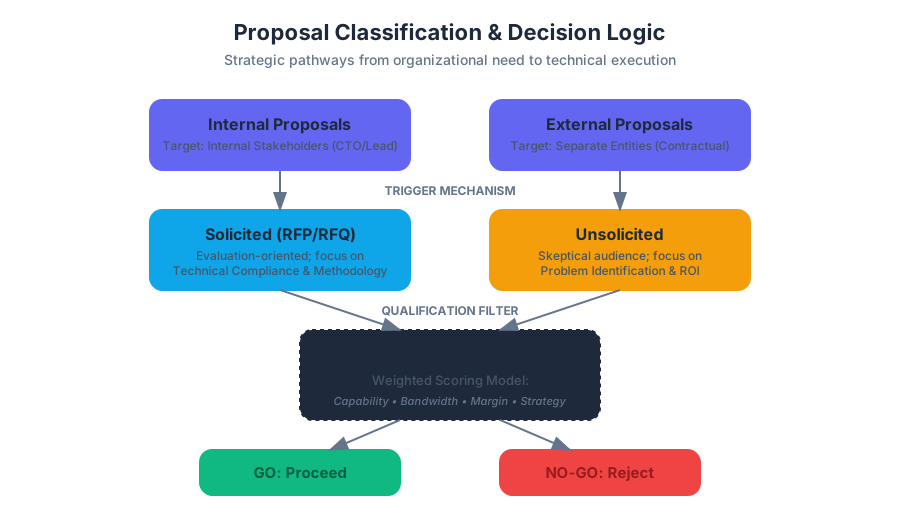
Proposals are categorized based on their origin, target audience, and the nature of the relationship between the proposer and the recipient. Understanding these distinctions is critical for setting the correct tone and level of technical detail.
Solicited vs. Unsolicited Proposals
A Solicited Proposal is a direct response to a formal request issued by an organization. This request is typically codified as a Request for Proposals (RFP), a Request for Quotations (RFQ), or a Request for Information (RFI). Because the recipient has already acknowledged a need, the writer can focus more on the "how" (methodology) and "how much" (budget) rather than the "why" (problem identification).
An Unsolicited Proposal is sent to a recipient who has not formally requested it. These are significantly more difficult to write because they must first convince the reader that a problem exists before pitching the solution. They function as a "cold call" in document form, requiring a high degree of persuasive "hooking" and a deep understanding of the recipient's latent pain points.
Internal vs. External Proposals
- Internal Proposals: Targeted at stakeholders within the same organization (e.g., a DevOps lead proposing a shift from Jenkins to GitHub Actions to the CTO). These rely on shared organizational context and often use internal jargon.
- External Proposals: Targeted at separate entities. These are legally sensitive documents that often form the basis of a contract. They require a more formal tone and a comprehensive explanation of the proposer's qualifications.
| Feature | Solicited Proposal | Unsolicited Proposal |
|---|---|---|
| Trigger | Formal RFP/RFQ issued by client | Proposer identifies a hidden need |
| Primary Goal | Outperform competitors on specific criteria | Prove a problem exists and offer a fix |
| Audience Mindset | Evaluation-oriented; looking for compliance | Skeptical; looking for ROI and urgency |
| Structure | Strictly follows RFP requirements | Flexible, problem-solution focused |
| Risk Level | Lower (budget is likely already allocated) | Higher (budget must be "found" or created) |
2. The RFP Mechanism and Technical Compliance
The Request for Proposals (RFP) is a document that outlines a project's requirements, the scope of work, and the criteria by which submissions will be judged. For a senior engineer or project manager, the RFP is the "source of truth."
Definition: Technical Compliance The degree to which a proposal meets the explicit requirements stated in an RFP. Failure to meet even a minor requirement (e.g., font size, page limit, or a specific ISO certification) can lead to immediate disqualification regardless of the technical merit of the solution.
The "Go/No-Go" Decision
Before writing, a team must perform a Feasibility Analysis. This involves evaluating whether the organization has the technical expertise, the available bandwidth, and the financial stability to execute the project if the proposal is accepted.
3. Project Scope and Feasibility Logic
Defining the Project Scope is the most critical technical task in the proposal process. Scope defines the boundaries of the project: what is included, and—equally importantly—what is excluded. This prevents "scope creep," where a project's requirements expand uncontrollably during execution.
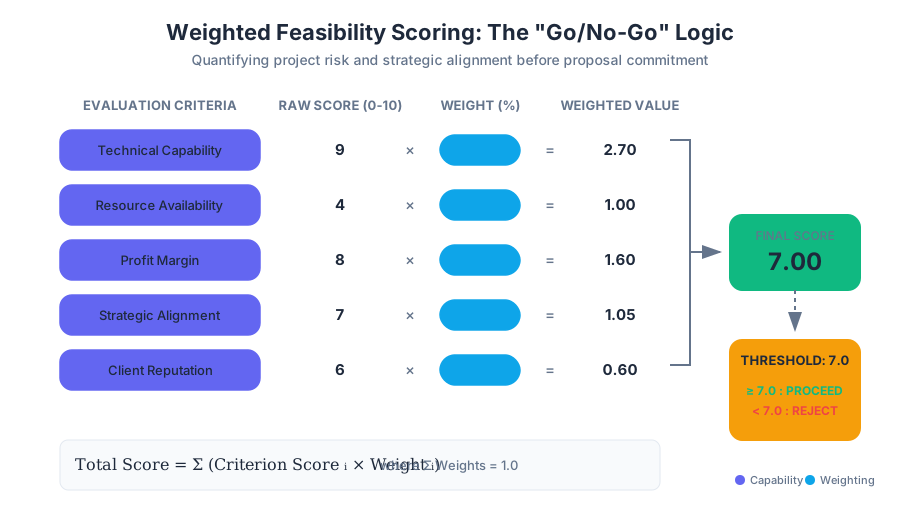
To determine feasibility, engineers often use a Weighted Scoring Model to evaluate potential projects against organizational goals.
Implementation: Weighted Feasibility Scoring
The following Python script demonstrates a programmatic approach to the "Go/No-Go" decision, allowing a team to quantify the risk and reward of a proposal opportunity.
import numpy as np

def calculate_proposal_score(criteria, weights):
    """
    Calculates the feasibility score of a project proposal.

    Args:
        criteria (dict): A dictionary of criteria scores (0-10).
        weights (dict): A dictionary of weights for each criterion (must sum to 1.0).

    Returns:
        float: The final weighted score.
    """
    if not np.isclose(sum(weights.values()), 1.0):
        raise ValueError("Weights must sum to 1.0")

    score = sum(criteria[key] * weights[key] for key in criteria)
    return round(score, 2)

# Configuration for a New Infrastructure Proposal
project_criteria = {
    "technical_capability": 9,  # We have the expertise
    "resource_availability": 4, # Team is currently overbooked
    "profit_margin": 8,         # High ROI
    "strategic_alignment": 7,   # Fits our 3-year plan
    "client_reputation": 6      # New client, moderate risk
}

project_weights = {
    "technical_capability": 0.30,
    "resource_availability": 0.25,
    "profit_margin": 0.20,
    "strategic_alignment": 0.15,
    "client_reputation": 0.10
}

final_score = calculate_proposal_score(project_criteria, project_weights)

print(f"Project Feasibility Score: {final_score}/10")
if final_score >= 7.0:
    print("Decision: PROCEED with Proposal.")
else:
    print("Decision: REJECT/NO-GO.")
4. The Technical Report Lifecycle
The proposal is not a standalone document; it is the genesis of a multi-stage Technical Report Lifecycle. This lifecycle ensures that information remains accurate, stakeholders remain informed, and the final output meets the rigorous standards of professional communication.
- The Proposal (Planning Phase): The "pitch." Defines the problem, scope, and methodology.
- The Progress Report (Execution Phase): Periodic updates. These serve to reassure stakeholders, document completed milestones, and flag "blockers" early.
- The Draft and Peer Review (Refinement Phase): The iterative stage where technical accuracy is verified and the CRAP (Contrast, Repetition, Alignment, Proximity) principles of document design are applied.
- The Final Technical Report (Completion Phase): The comprehensive document that includes the research findings, final graphics, and actionable recommendations.
Mathematical Derivation: Cost-Benefit Analysis (CBA)
A proposal must often include a financial justification. The Net Present Value (NPV) is frequently used to show the long-term value of the proposed solution.
NPV = \sum_{t=1}^{n} \frac{R_t}{(1 + i)^t} - Initial\_Investment
Where:
- $R_t$ = Net cash inflow-outflows during a single period $t$
- $i$ = Discount rate or return that could be earned in alternative investments
- $t$ = Number of timer periods
Pseudocode: Project Scheduling Logic (Gantt Logic)
In the methodology section, you must prove you can meet the deadline. This is often represented via a Gantt chart, calculated using the Critical Path Method (CPM).
FUNCTION CalculateProjectTimeline(Tasks):
    SET ProjectStart = CurrentDate
    FOR EACH Task IN Tasks:
        IF Task.Dependencies ARE Empty:
            Task.EarliestStart = ProjectStart
        ELSE:
            Task.EarliestStart = MAX(Dependency.FinishTime FOR Dependency IN Task.Dependencies)

        Task.FinishTime = Task.EarliestStart + Task.Duration

    RETURN MAX(Task.FinishTime FOR Task IN Tasks)
5. Essential Components of a Technical Proposal
A professional proposal follows a standardized structure to ensure that evaluators can find information quickly.
| Section | Purpose | Key Content |
|---|---|---|
| Executive Summary | High-level overview for decision-makers. | The "Bottom Line Up Front" (BLUF); the core value proposition. |
| Introduction | Sets the stage and defines the problem. | Problem statement, background, and scope of the proposal. |
| Technical Methodology | The "How." Proves technical competence. | Detailed steps, tools used (e.g., Python, AWS), and quality control. |
| Schedule/Milestones | Proves the project is time-feasible. | Gantt charts, delivery dates for progress reports. |
| Budget/Cost Analysis | The "How Much." Justifies the expense. | Itemized costs, labor hours, and ROI calculations. |
| Qualifications | Proves the team can do the work. | Resumes, past project performance, and certifications. |
6. Information Literacy and Source Evaluation
Technical writing is only as good as the data supporting it. Information Literacy in a professional context involves the ability to find, evaluate, and synthesize diverse sources—ranging from internal database logs to peer-reviewed journals and white papers.
The SIFT Method for Technical Sources:
- Stop: Check the reputation of the source.
- Investigate the source: Who wrote it? Is it a vendor-neutral white paper or a marketing brochure?
- Find better coverage: Look for consensus in the field.
- Trace claims to the original context: Did the study actually say what the blog post claims it said?
7. Ethics and Professional Conduct
Proposals are persuasive, but they must remain ethical. Over-promising on a project's capabilities or under-estimating costs (low-balling) to win a contract is a violation of professional ethics.
Key Insight: The Incident Report Connection In the same way an Incident Report (like those used in campus security or industrial safety) requires objective, factual reporting of a problem, a proposal requires an objective, factual assessment of a solution. Distorting the truth in a proposal leads to project failure, legal liability, and loss of professional reputation.
Example: Real-world Build Pipeline for Technical Reports
For large-scale engineering projects, reports are often generated using "Docs-as-Code" workflows. This ensures version control and consistency.
# .github/workflows/generate-report.yml
name: Build Technical Report
on:
  push:
    branches: [ main ]

jobs:
  build-pdf:
    runs-on: ubuntu-latest
    steps:
      - name: Checkout Code
        uses: actions/checkout@v3

      - name: Install Pandoc and LaTeX
        run: |
          sudo apt-get update
          sudo apt-get install -y pandoc texlive-xetex

      - name: Compile Markdown to PDF
        run: |
          pandoc proposal_v1.md \
          --from markdown \
          --template=company_template.tex \
          --pdf-engine=xelatex \
          -o final_technical_proposal.pdf

      - name: Upload Artifact
        uses: actions/upload-artifact@v3
        with:
          name: proposal-pdf
          path: final_technical_proposal.pdf
8. Common Pitfalls in the Proposal Process
- Audience Misalignment: Writing a highly technical methodology for a non-technical manager who only cares about the budget and timeline.
- Vague Scope: Using terms like "as needed" or "optimized" without defining the metrics. This leads to disputes during the final report phase.
- Ignoring the RFP's "Hidden" Requirements: Many RFPs include "soft" requirements, such as a commitment to sustainability or local hiring, which can be the tie-breaker in a competitive bid.
- Lack of Visual Planning: Failing to include graphics (flowcharts, diagrams, data visualizations) makes the document dense and difficult to parse.
9. Conclusion: The Persuasive Bridge
The technical report process is a journey from uncertainty to clarity. The proposal acts as the map for that journey. By combining rigorous audience analysis, ethical data synthesis, and clear project scoping, the technical writer transforms a complex problem into a manageable, fundable reality. Whether it is a solicited response to a government RFP or an internal push for better infrastructure, the proposal is the most powerful tool in a professional's arsenal for driving organizational change.
Information Literacy and Research
Key concepts: Information Literacy · Primary vs. Secondary Sources · Information Timeline · Peer Review Process · Iterative Research
Teaches the skills necessary to find, evaluate, and synthesize information for professional use.
Information Literacy and Research
Information literacy is the foundational framework for navigating the modern "infosphere." It is defined not merely as the ability to locate data, but as a set of integrated abilities encompassing the reflective discovery of information, the understanding of how information is produced and valued, and the use of information in creating new knowledge and participating ethically in communities of learning.
In the context of technical writing and professional communication, information literacy acts as the "signal processing" layer. It allows a writer to filter through the noise of raw data, social media, and anecdotal evidence to find the high-fidelity signals required to build authoritative documents such as technical reports, feasibility studies, and proposals.
The Taxonomy of Information Sources
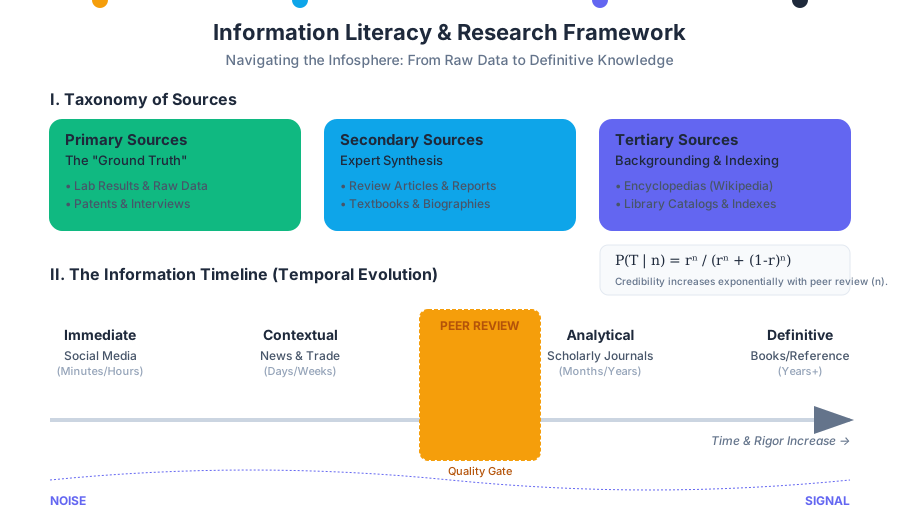
To conduct rigorous research, one must first categorize information based on its proximity to the event or data point in question. This classification determines the weight a source carries in a professional argument.
Primary, Secondary, and Tertiary Sources
The distinction between these sources is based on the degree of filtration and interpretation applied to the original data.
| Source Type | Definition | Examples in Technical Context | Role in Research |
|---|---|---|---|
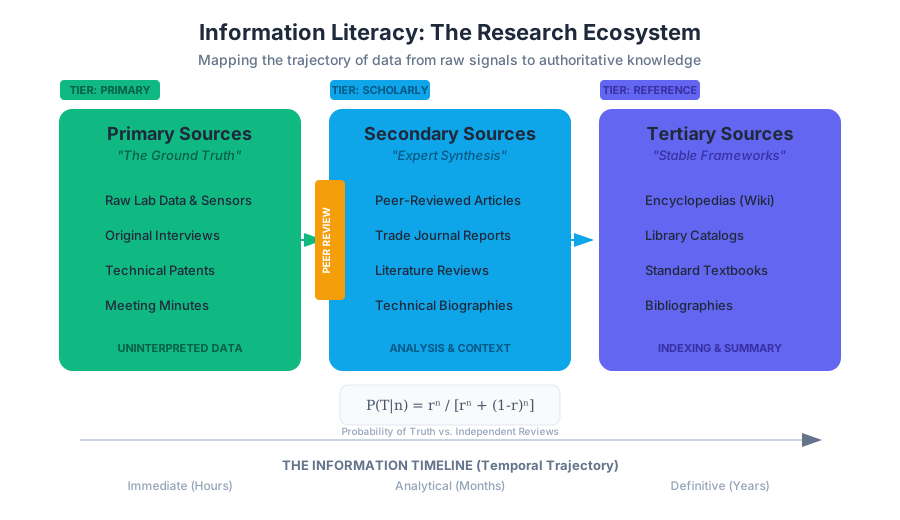
| Primary | Original, uninterpreted data or first-hand accounts. | Lab results, raw sensor data, patents, meeting minutes, original interviews. | Provides the "ground truth" for analysis. |
| Secondary | Interpretations, analyses, or summaries of primary data. | Review articles, textbooks, technical reports analyzing external data, biographies. | Provides context, expert synthesis, and historical perspective. |
| Tertiary | Collections or indexes of primary and secondary sources. | Encyclopedias, bibliographies, library catalogs, Wikipedia. | Useful for initial "backgrounding" and finding primary/secondary leads. |
Publication Tiers: Popular, Professional, and Scholarly
Beyond the source's proximity to data, we must evaluate the intent and rigor of the publication. Technical writers must navigate these tiers to ensure their audience—whether experts or nonspecialists—receives information at the appropriate level of complexity.
| Feature | Popular (General Public) | Professional (Trade/Technical) | Scholarly (Academic) |
|---|---|---|---|
| Audience | General public, nonspecialists. | Practitioners, technicians, engineers. | Researchers, professors, experts. |
| Authorship | Journalists or staff writers. | Industry professionals or specialists. | Ph.D. researchers or subject matter experts. |
| Review Process | Editorial review (style/fact-checking). | Editorial review (relevance/utility). | Double-blind peer review. |
| Purpose | To inform, entertain, or sell. | To update on industry trends/tools. | To advance theoretical or empirical knowledge. |
| References | Rarely cited formally. | Occasional industry citations. | Extensive, formal bibliographies. |
Definition: Information Literacy "The ability to recognize when information is needed and have the ability to locate, evaluate, and use effectively the needed information." — Association of College and Research Libraries (ACRL)
The Information Timeline
Information is not static; it evolves over a temporal trajectory. Understanding the Information Timeline is critical for technical writers to avoid using "stale" or "premature" data. When a significant event occurs (e.g., a new cybersecurity breach or a breakthrough in battery chemistry), information propagates through different channels at different speeds.
- The Immediate Phase (Minutes/Hours): Social media (X/Twitter), live news feeds, and blog posts. These are high-speed but low-veracity. They lack context and are prone to the "first-to-report" error bias.
- The Contextual Phase (Days/Weeks): News magazines and trade journals. These sources begin to synthesize the "why" and "how," providing a professional perspective on the event's impact on specific industries.
- The Analytical Phase (Months/Years): Scholarly journals. This is where the Peer Review Process occurs. The data is scrutinized by independent experts, ensuring the findings are reproducible and methodologically sound.
- The Definitive Phase (Years+): Books and Encyclopedias. These provide the most stable, long-term theoretical frameworks, though they may lack the cutting-edge updates of journals.
The Peer Review Process: The Gold Standard of Credibility
In technical and scholarly research, the peer review process serves as a quality-control gatekeeper. It is a rigorous system designed to minimize bias and maximize the reliability of published findings.
Mechanics of Peer Review
- Submission: A researcher submits a manuscript to a journal editor.
- Initial Screening: The editor checks for alignment with the journal's scope and basic quality.
- Blind Review: The manuscript is sent to 2–4 anonymous experts (peers) in the same field.
- Feedback Loop: Reviewers provide critiques, identify flaws in methodology, and suggest revisions.
- Decision: The editor decides to Accept, Revise and Resubmit, or Reject the paper.
Mathematical Representation of Credibility
We can model the probability of a finding being "true" ($P(T)$) based on the number of independent peer reviews ($n$) and the average reliability of a reviewer ($r$).
P(T | n) = \frac{r^n}{r^n + (1-r)^n}
Note: As $n$ increases, the probability of catching a systemic error increases exponentially, assuming reviewers are truly independent.
Iterative Research: The Non-Linear Workflow
Research is rarely a straight line from "Question" to "Answer." Instead, it is an iterative process where each discovery informs the next query. This is particularly relevant when drafting Proposals or Technical Reports.
The Iterative Loop
- Backgrounding: Using tertiary sources (encyclopedias) to define the scope and terminology.
- Primary Querying: Searching scholarly databases (IEEE Xplore, PubMed) using specific Boolean operators.
- Evaluation: Assessing the "Authority, Accuracy, Objectivity, Currency, and Coverage" (AAOCC) of the results.
- Refinement: Narrowing or broadening the research question based on the volume and quality of found data.
- Synthesis: Integrating the research into the document (e.g., the "Discussion" section of a memo or the "Background" section of a proposal).
Implementation: Algorithmic Information Retrieval
In the modern research environment, we often use programmatic tools to manage and filter information. Below is a Python implementation of a basic TF-IDF (Term Frequency-Inverse Document Frequency) logic, which is the underlying principle behind how many research databases rank the relevance of scholarly articles.
import math
from collections import Counter

def calculate_tfidf(term, document, all_documents):
    """
    Calculates the TF-IDF weight of a term in a document.
    Higher weights indicate terms that are more characteristic of a specific paper.
    """
    # Term Frequency: How often the word appears in the current document
    tf = document.count(term) / len(document)

    # Inverse Document Frequency: How rare the word is across all documents
    num_docs_with_term = sum(1 for doc in all_documents if term in doc)

    # Avoid division by zero
    if num_docs_with_term == 0:
        return 0

    idf = math.log(len(all_documents) / num_docs_with_term)

    return tf * idf

# Example: Analyzing three research abstracts
abstract_a = "lithium battery degradation in electric vehicles".split()
abstract_b = "thermal management of lithium ion cells".split()
abstract_c = "economic impact of electric vehicle adoption".split()
corpus = [abstract_a, abstract_b, abstract_c]

# Finding the importance of 'degradation' in Abstract A
score = calculate_tfidf("degradation", abstract_a, corpus)
print(f"TF-IDF Score for 'degradation': {score:.4f}")
Research Integration in Technical Writing
Information literacy is the engine that drives Audience Analysis and Proposal Development. A technical writer must adapt their research findings to the specific needs of their readers.
Audience-Specific Research Needs
| Audience Category | Primary Research Need | Preferred Source Type | Level of Detail |
|---|---|---|---|
| Experts | Theoretical validation, raw data. | Scholarly Journals, Patents. | High (formulas, raw data). |
| Technicians | Practical application, troubleshooting. | Trade Journals, Manuals. | Medium (procedures, specs). |
| Executives | Bottom-line impact, feasibility. | Professional Reports, White Papers. | Low (summaries, ROI). |
| Nonspecialists | General understanding, safety. | Popular Magazines, FAQs. | Very Low (analogies, basics). |
The Proposal Context
When writing a Proposal (a formal bid to complete a project), research integration is mandatory. A proposal must prove that the writer has "done their homework." This involves:
- Solicited vs. Unsolicited Contexts: If responding to a Request for Proposals (RFP), the research must directly map to the technical requirements outlined in the RFP.
- Feasibility: Using research to prove that the proposed solution is technically and economically viable.
- Scholarly Backing: Professional proposals often fail if they rely solely on "popular" sources. Integrating peer-reviewed data lends the author an "Ethos" (credibility) that is difficult to challenge.
Advanced Querying: Boolean and Proximity Logic
To move beyond "basic search," researchers use structured query languages. This ensures the results are precise and minimize the Information Overload common in broad searches.
-- Example: Querying a Research Metadata Database (PostgreSQL)
-- Goal: Find highly-cited papers on 'Solid State Batteries' published after 2020
-- that are NOT focused on 'Consumer Electronics'.

SELECT
    title,
    authors,
    citation_count,
    publication_year
FROM
    scholarly_articles
WHERE
    (abstract @@ to_tsquery('solid & state & battery'))
    AND publication_year > 2020
    AND NOT (keywords @> ARRAY['smartphone', 'laptop'])
ORDER BY
    citation_count DESC
LIMIT 50;
Common Pitfalls in Professional Research
- The "Wikipedia Trap": Using tertiary sources as final citations. Wikipedia is a map, not the destination. Always follow the citations to the primary source.
- Confirmation Bias: Searching only for data that supports your proposal's hypothesis while ignoring contradictory evidence. In technical writing, ignoring "safety and liability" data can lead to professional negligence.
- Ignoring the Timeline: Using a 10-year-old scholarly article for a fast-moving field like AI or cybersecurity.
- Misjudging Audience: Providing an executive with a 50-page deep dive into chemical equations when they only requested a cost-benefit analysis.
Professional Etiquette and Ethics in Research (Netiquette)
Information literacy extends to how we interact with information and its creators.
- Digital Permanence: Every search query, downloaded paper, and internal memo leaves a digital footprint. Professionalism in research includes respecting the privacy of data and the intellectual property of authors.
- Attribution: Failing to cite a source in a technical report isn't just an academic error; it can be a legal liability. Proper attribution protects the organization from plagiarism charges.
- Objectivity: Memos and reports must remain objective. Research should be presented without "flaming" (hostile language) or emotional bias, focusing instead on the Declaration-Discussion-Summary structure.
Practical Example: The Research Pipeline for a Feasibility Report
Imagine a technical writer tasked with proposing a transition to hydrogen-powered forklifts for a logistics company.
- Step 1 (Tertiary): Consult an encyclopedia or "Introduction to Hydrogen Fuel Cells" to understand the basic chemistry.
- Step 2 (Professional/Trade): Read Logistics Management or Material Handling 24/7 to see how other warehouses have implemented this technology.
- Step 3 (Scholarly): Search the Journal of Power Sources for peer-reviewed data on the degradation rates of hydrogen fuel cells in high-duty-cycle environments.
- Step 4 (Primary): Contact a vendor for a Request for Quote (RFQ) and raw specification sheets for specific forklift models.
- Step 5 (Synthesis): Combine these into a proposal, using the scholarly data to prove long-term viability and the trade data to prove industry relevance.
# A simple CLI workflow for a researcher using 'academic-cli'
# 1. Search for papers
academic search "hydrogen fuel cell forklift" --year-min 2018 --limit 5

# 2. Download the top PDF (assuming DOI is known)
academic download 10.1016/j.jpowsour.2021.230000 --output ./research/hydrogen_paper.pdf

# 3. Extract metadata for the bibliography
academic cite 10.1016/j.jpowsour.2021.230000 --format bibtex >> references.bib
Workplace Documentation and Reporting
Key concepts: Progress Reports · Incident Reporting · Conflict Resolution · Stakeholder Reassurance · Professional Conduct
Examines specific types of workplace reports, including progress reports and incident reports.
Workplace Documentation and Reporting
Workplace documentation is the systematic process of recording, organizing, and communicating specialized information within a professional environment. Far from being a mere administrative burden, it serves as the "nervous system" of an organization—transmitting vital signals between stakeholders, archiving institutional memory, and providing a factual basis for decision-making. In the context of technical writing, documentation is the bridge between expert knowledge (Subject Matter Experts or SMEs) and the diverse audiences who must act upon that knowledge.
Effective workplace reporting is governed by the principle of Audience Adaptation. A senior engineer, a project manager, and a financial stakeholder all require different levels of granularity and different rhetorical appeals. This article explores the mechanics of progress reports, the forensic precision of incident reporting, the nuances of professional conduct in conflict resolution, and the overarching goal of stakeholder reassurance.
Progress Reports: The Temporal Feedback Loop
A Progress Report (PR) is a periodic communication that synchronizes the current state of a project with its planned trajectory. It is defined by its focus on the "Delta"—the difference between what was promised in the initial proposal and what has been achieved at the time of writing.
Why It Matters
Progress reports solve the problem of Information Asymmetry. Without regular updates, stakeholders may experience "project anxiety," leading to micromanagement or the withdrawal of funding. PRs provide a structured mechanism for:
- Reassuring Stakeholders: Demonstrating that the project is under control.
- Early Detection: Identifying "scope creep" or technical bottlenecks before they become catastrophic.
- Course Correction: Allowing management to reallocate resources based on early findings.
Mechanics of the Progress Report
The standard structure of a PR follows a chronological and thematic logic:
- Summary: A high-level overview for executives.
- Work Completed: Tasks finished since the last report.
- Work in Progress: Current active sprints or investigations.
- Future Work: Tasks scheduled for the next interval.
- Assessment/Problems: A candid evaluation of risks and unexpected hurdles.
| Component | Purpose | Key Metric |
|---|---|---|
| Status Summary | High-level health check | Red/Amber/Green (RAG) status |
| Milestone Tracking | Comparison against the baseline | Variance (Days ahead/behind) |
| Resource Utilization | Tracking budget and man-hours | Burn rate |
| Risk Register | Identifying potential blockers | Probability vs. Impact score |
Implementation Example: Automated Status Aggregation
In modern enterprise environments, progress reports are often derived from task management systems. Below is a Python implementation that aggregates task data to generate a structured status report.
import datetime

class ProjectStatus:
    def __init__(self, project_name, tasks):
        self.project_name = project_name
        self.tasks = tasks  # List of dicts: {'name': str, 'status': str, 'hours': int}

    def generate_report(self):
        completed = [t for t in self.tasks if t['status'] == 'Done']
        ongoing = [t for t in self.tasks if t['status'] == 'In Progress']

        report = f"### Progress Report: {self.project_name}\n"
        report += f"Date: {datetime.date.today()}\n\n"

        report += "#### 1. Completed Tasks\n"
        for t in completed:
            report += f"- {t['name']} ({t['hours']} hrs)\n"

        report += "\n#### 2. Work in Progress\n"
        for t in ongoing:
            report += f"- {t['name']}\n"

        total_hours = sum(t['hours'] for t in self.tasks)
        report += f"\n**Total Effort to Date:** {total_hours} man-hours"
        return report

# Example Usage
tasks_db = [
    {'name': 'Database Migration', 'status': 'Done', 'hours': 40},
    {'name': 'API Documentation', 'status': 'In Progress', 'hours': 15},
    {'name': 'UI Refactor', 'status': 'Done', 'hours': 25}
]
print(ProjectStatus("Project Phoenix", tasks_db).generate_report())
Incident Reporting: Forensic Documentation
An Incident Report is a formal document that records an extraordinary event—such as an accident, a security breach, or a workplace conflict—that deviates from standard operations. Unlike progress reports, which are forward-looking, incident reports are forensic and objective.
The Anatomy of Objectivity
The primary goal of an incident report is to provide a factual record that can withstand legal or administrative scrutiny. This requires the writer to distinguish between observations (what was seen/heard) and inferences (what was assumed).
The Objectivity Theorem: The utility of an incident report is inversely proportional to the number of adjectives and adverbs used by the author.
Worked Example: The Sodexo Incident
Consider a real-world scenario documented in campus security records: a conflict between student demonstrators and a food service representative. A poor report might say, "An angry manager rudely destroyed a student's sign." A professional report, however, focuses on the sequence of events:
- Context: A focus group session was held at the Student Union Building.
- Action: The representative admitted to tearing a student's sign during a period of frustration.
- Resolution: A formal apology was issued, and campus police issued a warning regarding conduct.
Incident Data Schema
To ensure consistency, organizations often use standardized schemas for incident logging.
# Incident Report Schema (Open Incident Standard)
incident_id: "IR-2023-0404"
timestamp: "2023-04-04T13:10:00Z"
location: "Student Union Building, Room 202"
severity_level: 2 # 1: Minor, 2: Moderate, 3: Critical
participants:
  - role: "Subject"
    id: "EMP-992"
    action: "Destruction of property (signage)"
  - role: "Complainant"
    id: "STU-441"
    action: "Demonstration/Protest"
narrative: |
  During a focus group session, the subject engaged in a verbal
  disagreement with the complainant. The subject proceeded to
  physically tear a placard held by the complainant.
resolution_status: "Closed - Warning Issued"
Conflict Resolution and Professional Conduct
In the workplace, documentation is often the final stage of Conflict Resolution. Professional conduct dictates that disagreements are handled with "tact, skill, and an awareness that what you write may be there forever."
The Interest-Based Relational (IBR) Approach
When documenting or resolving conflicts, technical professionals should move away from "positions" (what people want) to "interests" (why they want it).
| Strategy | Focus | Outcome |
|---|---|---|
| Competing | Power and authority | Win/Loss (High tension) |
| Avoiding | Delaying the issue | Unresolved (Low tension) |
| Collaborating | Mutual interest | Win/Win (High effort) |
| Compromising | Middle ground | Partial satisfaction (Medium effort) |
Professionalism in Digital Spaces
Professional communication requires an understanding of Netiquette and the permanence of the written word. In technical writing, this extends to how we comment on code, how we respond to peer reviews, and how we document errors.
Stakeholder Reassurance and Persuasion
While technical writing is often seen as purely informational, it is fundamentally persuasive. Every report aims to persuade the reader that the project is viable, the team is competent, and the risks are managed.
The Proposal as a Pitch
A Proposal is a document designed to secure approval or funding for a project. It identifies a specific problem and offers a structured solution. The success of a proposal hinges on Audience Analysis:
- Primary Audience: The decision-maker with the authority to say "Yes."
- Secondary Audience: The technical experts who will vet the feasibility.
- Tertiary Audience: Those affected by the change (e.g., end-users).
Mathematical Modeling of Stakeholder Impact
Stakeholder management can be modeled as a function of Power ($P$) and Interest ($I$). The strategy for communication ($C$) is determined by the quadrant in which the stakeholder resides.
$$ C(P, I) = \begin{cases} \text{Manage Closely} & \text{if } P > \text{high}, I > \text{high} \ \text{Keep Satisfied} & \text{if } P > \text{high}, I < \text{low} \ \text{Keep Informed} & \text{if } P < \text{low}, I > \text{high} \ \text{Monitor} & \text{if } P < \text{low}, I < \text{low} \end{cases} $$
SQL Example: Stakeholder Communication Matrix
To manage large projects, technical writers may query internal databases to ensure the right reports reach the right people.
-- Query to identify high-power, high-interest stakeholders for a specific project
SELECT
    s.name,
    s.email,
    p.project_name,
    p.status_color
FROM
    Stakeholders s
JOIN
    ProjectAssignments pa ON s.id = pa.stakeholder_id
JOIN
    Projects p ON pa.project_id = p.id
WHERE
    s.power_rating >= 8
    AND s.interest_rating >= 8
    AND p.id = 'PROJ-PHOENIX';
Information Literacy and Document Design
A document’s effectiveness is not just in its content but in its Information Literacy and Design. Technical writers must be able to find, evaluate, and synthesize information from diverse sources.
The CRAP Principles of Design
In the "Open Oregon" technical writing framework, document readability is enhanced by four key principles:
- Contrast: Use color and size to highlight important information (e.g., warnings).
- Repetition: Maintain consistent formatting (e.g., all level-3 headings look the same).
- Alignment: Ensure every element has a visual connection to another element.
- Proximity: Group related items together to reduce cognitive load.
Source Evaluation (The CRAAP Test)
When researching for a technical report, sources must be vetted using the CRAAP criteria:
- Currency: Is the information up to date?
- Relevance: Does it specifically address the problem?
- Authority: Who is the author/organization?
- Accuracy: Is the data verifiable?
- Purpose: Is there a bias or commercial intent?
Common Pitfalls in Workplace Documentation
Even experienced writers fall into traps that undermine the credibility of their reports.
| Pitfall | Description | Correction |
|---|---|---|
| The "Kitchen Sink" Error | Including every minor detail in a progress report. | Use executive summaries and appendices. |
| Passive Aggression | Using incident reports to "settle scores." | Stick to observable actions and direct quotes. |
| Jargon Overload | Writing for experts when the audience is management. | Define terms or use analogies. |
| Vague Timelines | Using terms like "soon" or "eventually." | Use ISO 8601 dates (YYYY-MM-DD). |
Case Study: The Maintenance of External Links
In technical documentation, a common failure point is the "Link Rot." As noted in the Technical Writing textbook (McMurrey et al.), authors must implement procedures for reporting and fixing broken external links. This is an exercise in Intellectual Property management and User Experience (UX).
# A simple bash script to check for broken links in a documentation directory
#!/bin/bash

DOC_DIR="./docs"
LOG_FILE="link_errors.log"

echo "Starting link check in $DOC_DIR..." > $LOG_FILE

grep -rPo 'http(s)?://[^)]+' $DOC_DIR | while read -r line; do
    url=$(echo $line | cut -d: -f2-3)
    status=$(curl -o /dev/null -s -w "%{http_code}" "$url")

    if [ "$status" -ne 200 ]; then
        echo "BROKEN: $url (Status: $status) in $line" >> $LOG_FILE
    fi
done

echo "Check complete. Errors logged to $LOG_FILE."
Conclusion: The Professionalism of the Record
Workplace documentation is more than a trail of paper or a collection of digital files; it is a professional asset. By mastering progress reports, incident logs, and persuasive proposals, the technical writer ensures that the organization remains transparent, accountable, and efficient. Whether you are translating a complex algorithm for a stakeholder or documenting a sensitive workplace conflict, the goal remains the same: clarity, objectivity, and professional integrity.
- Audience Analysis: The process of adapting a document to the specific needs, background, and authority of the reader.
- CRAP Principles: Contrast, Repetition, Alignment, and Proximity—the four pillars of document design.
- Information Asymmetry: A situation where one party has more or better information than another, which progress reports aim to resolve.
- Forensic Objectivity: A writing style that focuses strictly on observable facts and data, avoiding emotional or subjective language.
- Stakeholder Reassurance: The psychological goal of reporting, intended to maintain trust and support for a project.
- SME (Subject Matter Expert): An individual with deep technical knowledge who provides the raw information for technical writers.
- Which principle of document design suggests that related items should be grouped together to reduce cognitive load?
- (A) Contrast
- (B) Alignment
- (C) Proximity
- (D) Repetition
- In an incident report, which of the following is considered an "observation" rather than an "inference"?
- (A) "The employee seemed angry."
- (B) "The employee raised their voice to approximately 80 decibels."
- (C) "The employee was clearly frustrated by the software."
- (D) "The employee intended to cause a disturbance."
- What is the primary function of a "Risk Register" in a progress report?
- (A) To list all completed tasks.
- (B) To identify potential blockers and their impact on the project.
- (C) To track the project's budget.
- (D) To provide an executive summary.
- According to the IBR approach to conflict resolution, what should be the primary focus?
- (A) Defending one's position.
- (B) Asserting authority.
- (C) Identifying mutual interests.
- (D) Avoiding the conflict entirely.
Key Concepts to Master:
- The Progress Report Structure: Understand the difference between "Work Completed," "Work in Progress," and "Future Work." Know how to use RAG (Red, Amber, Green) statuses.
- Incident Reporting Ethics: Practice converting subjective statements into objective observations. Remember the "Objectivity Theorem."
- Audience Tiers: Be able to identify Primary, Secondary, and Tertiary audiences for any given document.
- Document Design: Memorize the CRAP principles and be able to apply them to a layout.
- Information Literacy: Understand the CRAAP test for source evaluation and how it applies to workplace research.
- Professional Conduct: Learn the nuances of interest-based negotiation and digital netiquette.
Further Reading:
- Technical Writing by Allison Gross et al. (Open Oregon Educational Resources).
- The CRAAP Test (Meriam Library, CSU Chico).
- Interest-Based Relational (IBR) Approach (Fisher and Ury, "Getting to Yes").
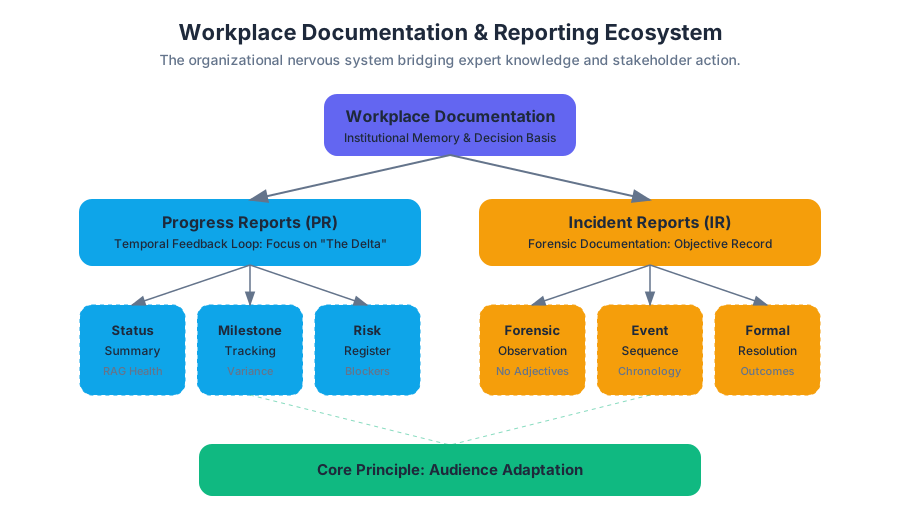
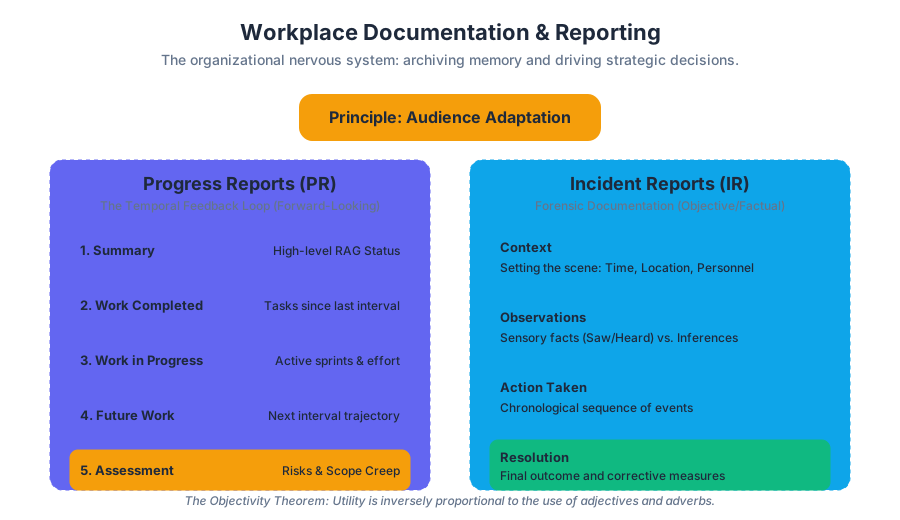
Source Materials
- download?type=pdf
- download?type=print_pdf
- Technical Writing
- Technical Writing
- Technical Writing
- PDF version of incident report
- Log In
- https://www.cocc.edu/departments/its/network-administration/files/cocc_acceptable_use_of_information_technology_resources_12.pdf/
- Technical Writing
- Technical Writing
- Primary, Secondary and Tertiary Sources
Study Technical Writing with AI — Free on Lykke
Sign up for free to generate personalized flashcards, quizzes, and study guides from this course. Chat with an AI tutor that knows the material.
Get Started FreeView this course wiki on Lykke · Browse all public course wikis