From the free course Start building with Claude on Lykke
Tool Use and Infrastructure
Key concepts: Tool Use (Function Calling) · Client-side Execution · API Schemas
Extending Claude's capabilities by allowing it to interact with external tools and APIs.
Tool Use and Infrastructure
Tool use, frequently referred to as function calling, represents the evolutionary bridge between Large Language Models (LLMs) as passive text generators and LLMs as active agents within a software ecosystem. While a standard LLM is confined to the knowledge present in its training weights, a tool-enabled model can interact with the real world in real-time—querying databases, executing code, browsing the web, or controlling hardware.
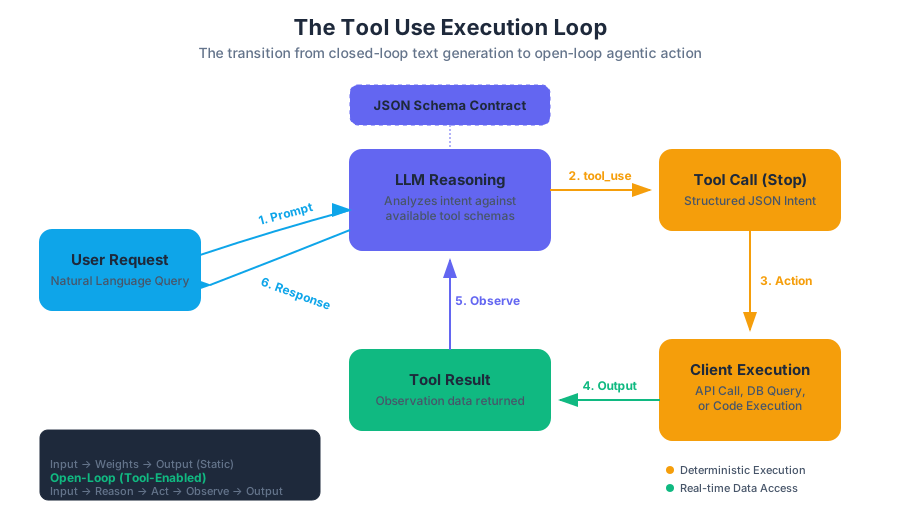
In the context of modern AI infrastructure, tool use is not merely an "add-on" feature; it is a fundamental architectural shift. It moves the model from a closed-loop system (input text → output text) to an open-loop system (input text → reasoning → action → observation → final output). This section explores the mechanics of tool definition, the lifecycle of a tool call, and the infrastructure required to support robust, secure, and scalable execution.
AI_SVGI_SVG## The Fundamental Mechanics of Tool Use
At its core, tool use is a structured negotiation between a model and a client application. The model does not "run" the tool itself. Instead, it expresses the intent to use a tool by generating a structured data block (typically JSON) that conforms to a schema provided by the developer.
Definition: Tool Use Tool use is a capability where an LLM is provided with a set of function signatures (schemas). When presented with a query, the model determines if a tool is required, selects the appropriate tool, and generates the arguments necessary to invoke that tool according to the defined schema.
Why Tool Use is Necessary
Standard LLMs suffer from several inherent limitations that tool use effectively mitigates:
- Knowledge Cutoffs: Models cannot know about events occurring after their training data was finalized. Tools allow them to fetch "live" data.
- Mathematical Precision: While LLMs are excellent at linguistic reasoning, they often struggle with high-precision arithmetic or complex algorithmic logic. Offloading these to a calculator or a Python interpreter ensures 100% accuracy.
- Side Effects: Models cannot inherently "do" things—like sending an email or updating a JIRA ticket. Tools provide the "hands" for the model's "brain."
| Feature | Standard Prompting | Retrieval-Augmented Generation (RAG) | Tool Use (Function Calling) |
|---|---|---|---|
| Data Source | Static Training Data | External Vector Database | Real-time APIs / Code Execution |
| Actionability | Read-only | Read-only | Read/Write (Stateful) |
| Precision | Probabilistic | Probabilistic (Contextual) | Deterministic (via Code/API) |
| Complexity | Low | Medium | High |
API Schemas: The Contract of Interaction
For a model to use a tool, it must understand the tool's "interface." This is achieved through API Schemas, almost universally implemented using the JSON Schema standard. A schema acts as a contract, defining exactly what parameters the tool expects, their types, and which ones are mandatory.
The quality of the tool's description within the schema is the single most important factor in tool-use performance. Because the model uses the description to decide when to call a tool, the description must be written as "model-facing documentation."
Implementation: Defining a Tool Schema
In a production environment, you often use high-level abstractions to generate these schemas. Below is a low-level implementation using Python's Pydantic library to generate a valid JSON schema for a weather tool.
from pydantic import BaseModel, Field
from typing import Optional, Literal
import json

class GetWeatherSchema(BaseModel):
    """
    Retrieves the current weather for a specific location.
    Use this tool whenever a user asks about weather, temperature, or forecasts.
    """
    location: str = Field(
        ...,
        description="The city and state, e.g. San Francisco, CA"
    )
    unit: Literal["celsius", "fahrenheit"] = Field(
        default="celsius",
        description="The unit of temperature to return"
    )
    include_forecast: bool = Field(
        default=False,
        description="Whether to include a 5-day forecast in the response"
    )

# Generating the JSON Schema for the LLM
tool_definition = {
    "name": "get_weather",
    "description": GetWeatherSchema.__doc__.strip(),
    "input_schema": GetWeatherSchema.model_json_schema()
}

print(json.dumps(tool_definition, indent=2))
The Execution Loop: A Step-by-Step Walkthrough
The lifecycle of tool use follows a specific "loop" pattern. It is a multi-turn conversation where the model and the client exchange control.
- User Request: The user asks a question (e.g., "What is the stock price of AAPL?").
- Tool Selection: The model analyzes the request against available tools. It decides
get_stock_priceis appropriate. - Tool Call (Stop Reason): The model outputs a
tool_useblock and stops generating text. The API response indicates astop_reasonoftool_use. - Client-Side Execution: The developer's code intercepts the
tool_useblock, extracts the arguments (e.g.,{"ticker": "AAPL"}), and executes the actual API call to a financial data provider. - Tool Result: The developer sends the result of the tool back to the model in a new message with the role
tool. - Final Response: The model processes the tool's output and generates a natural language response for the user.
Logic Flow: The Tool Use State Machine
The following logic represents the internal state transitions during a tool-enabled session.
STATE_MACHINE ToolExecutionLoop:
    INPUT: UserPrompt, Toolset

    STEP 1: Model.Generate(UserPrompt, Toolset)
    IF Response.Type == "text":
        RETURN Response.Text
    ELSE IF Response.Type == "tool_use":
        LET tool_id = Response.ToolID
        LET tool_name = Response.ToolName
        LET tool_args = Response.Arguments

        TRY:
            LET result = EXECUTE(tool_name, tool_args)
            GOTO STEP 2
        CATCH Error:
            LET result = "Error: " + Error.Message
            GOTO STEP 2

    STEP 2: Model.Generate(History + ToolResult(tool_id, result))
    GOTO STEP 1 (Recursion for multi-step reasoning)
AI_DEMOI_DEMO## Client-Side Execution and Infrastructure
One of the most critical aspects of tool use is where and how the code runs. Unlike managed agents where the provider might run the code, standard tool use requires the developer to manage the execution environment. This introduces significant security and infrastructure considerations.
Sandboxing and Security
When a model generates arguments for a tool, it is essentially generating input for your backend. If one of your tools is execute_sql or run_python_script, you are effectively giving the LLM (and by extension, the user) the ability to run code on your servers.
| Infrastructure Strategy | Description | Security Level | Latency |
|---|---|---|---|
| Local Process | Running tools in the same process as the API client. | Low: Risk of RCE or data leakage. | Very Low |
| Containerized (Docker) | Each tool call runs in a fresh, ephemeral container. | High: Isolated filesystem and network. | Medium |
| WebAssembly (Wasm) | Running code in a high-performance, secure sandbox. | Very High: Memory-safe, restricted syscalls. | Low |
| Serverless (Lambda) | Triggering a cloud function for each tool call. | High: Managed isolation, auto-scaling. | High (Cold starts) |
Real-World Implementation: Secure TypeScript Execution
In this example, we demonstrate how a client-side application might handle a tool call to a restricted "Calculator" tool using a safe evaluation pattern.
import { ClaudeClient } from '@anthropic-ai/sdk';

const client = new ClaudeClient({ apiKey: process.env.CLAUDE_API_KEY });

async function handleToolUse(message: any) {
  for (const content of message.content) {
    if (content.type === 'tool_use') {
      const { name, input, id } = content;

      let result;
      if (name === 'calculate_stochastic_volatility') {
        // Instead of eval(), we use a deterministic library call
        result = performMath(input.sigma, input.price_history);
      }

      // Send the result back to the model
      const finalResponse = await client.messages.create({
        model: 'claude-3-5-sonnet-20240620',
        messages: [
          { role: 'user', content: 'Calculate volatility for AAPL.' },
          { role: 'assistant', content: [content] },
          { role: 'user', content: [{ type: 'tool_result', tool_use_id: id, content: JSON.stringify(result) }] }
        ]
      });

      console.log(finalResponse.content[0].text);
    }
  }
}
Advanced Patterns: Parallelism and Forced Tool Use
As applications grow in complexity, simple one-by-one tool calling becomes a bottleneck. Modern infrastructure supports advanced orchestration patterns.
Parallel Tool Use
If a user asks, "What is the weather in London, Paris, and Tokyo?", a capable model can emit three tool_use blocks simultaneously. The infrastructure should be designed to execute these calls in parallel (e.g., using Promise.all in JavaScript or asyncio.gather in Python) to minimize latency.
Forced Tool Use (tool_choice)
Sometimes, you want to ensure the model always uses a tool, regardless of the user's input. This is useful for "Router" agents.
auto: The model decides whether to use a tool or text.any: The model must use at least one of the provided tools.tool: The model must use a specific tool.
| Parameter | Behavior | Best Use Case |
|---|---|---|
tool_choice: {"type": "auto"} |
Model chooses text or tool. | General purpose assistants. |
tool_choice: {"type": "any"} |
Model must call a tool. | Data extraction pipelines. |
tool_choice: {"type": "tool", "name": "x"} |
Model must call tool 'x'. | Specific sub-tasks (e.g., "Search"). |
Common Pitfalls and Best Practices
Even with perfect schemas, tool use can fail in subtle ways.
1. Argument Hallucination
The model might invent parameters that don't exist in the schema or provide values in the wrong format (e.g., "June 1st" instead of "2023-06-01").
- Solution: Use strict validation (like Pydantic or Zod) on the client side. If validation fails, send the error message back to the model as a
tool_resultso it can "self-correct."
2. Schema Drift
If your underlying API changes but your JSON schema provided to the model does not, the model will generate calls that result in 400 Bad Request errors.
- Solution: Generate your JSON schemas dynamically from your code's type definitions to ensure they are always in sync.
3. Context Window Bloat
Every tool call and result is added to the conversation history. Large tool outputs (e.g., a 500-row CSV) can quickly consume the context window.
- Solution: Summarize tool results before sending them back to the model, or use a "middle-man" tool that filters the data.
Example: Handling a Tool Error
When a tool fails, do not crash the application. Instead, inform the model of the failure so it can explain it to the user or try a different approach.
# Example of a raw API response where the tool execution failed
# The client sends this back to the model
curl https://api.anthropic.com/v1/messages \
  -H "x-api-key: $API_KEY" \
  -H "content-type: application/json" \
  -d '{
    "model": "claude-3-5-sonnet-20240620",
    "messages": [
      {
        "role": "user",
        "content": "Delete database table 'users'."
      },
      {
        "role": "assistant",
        "content": [{"type": "tool_use", "id": "call_123", "name": "db_query", "input": {"query": "DROP TABLE users"}}]
      },
      {
        "role": "user",
        "content": [
          {
            "type": "tool_result",
            "tool_use_id": "call_123",
            "content": "Error: Permission denied. User does not have DROP privileges.",
            "is_error": true
          }
        ]
      }
    ]
  }'
Infrastructure for Managed Agents
While the "Loop" described above is the standard for the Messages API, there is a rising trend toward Managed Agents. In this paradigm, the infrastructure provider (like Anthropic or AWS) manages the execution environment.
Managed agents simplify the developer experience by:
- Handling the Loop: The provider automatically re-invokes the model until a final answer is reached.
- State Management: The provider maintains the conversation state and tool outputs.
- Built-in Sandboxing: The provider runs the tools in a secure, managed environment.
However, for enterprise applications requiring custom authentication, private VPC access, or proprietary logic, the Client-side Execution model remains the gold standard for control and security.
Source Materials
Study Start building with Claude on Lykke
This course page is free to open: signed out, you can read its first two sections, and signing in, on any plan, opens the rest. The free Lykke Chrome extension syncs your own Canvas courses, so ChatGPT, Claude and Muse can answer from your classes and deadlines. It only reads Canvas.
Add the free extensionSign in to open every sectionAll sections of Start building with Claude · Browse more course pages