From the free course Start building with Claude on Lykke
Integrating with the Messages API
Key concepts: Messages API · JSON Request · Streaming · System Prompts
The fundamental method for interacting with Claude, focusing on request structures and response handling.
Integrating with the Messages API
The Messages API represents the modern standard for interacting with Large Language Models (LLMs). Unlike legacy "Text Completion" interfaces—which treated the model as a simple string-in, string-out function—the Messages API enforces a structured, role-based paradigm. This structure is not merely a syntactic preference; it is a fundamental shift that allows for more sophisticated steering, better state management in conversational contexts, and the seamless integration of multi-modal inputs and tool-use capabilities.
In this deep dive, we will explore the architectural underpinnings of the Messages API, the mechanics of stateful simulation over a stateless protocol, and the technical nuances of streaming and system-level orchestration.
AI_SVGI_SVG## The Architecture of a Message Request
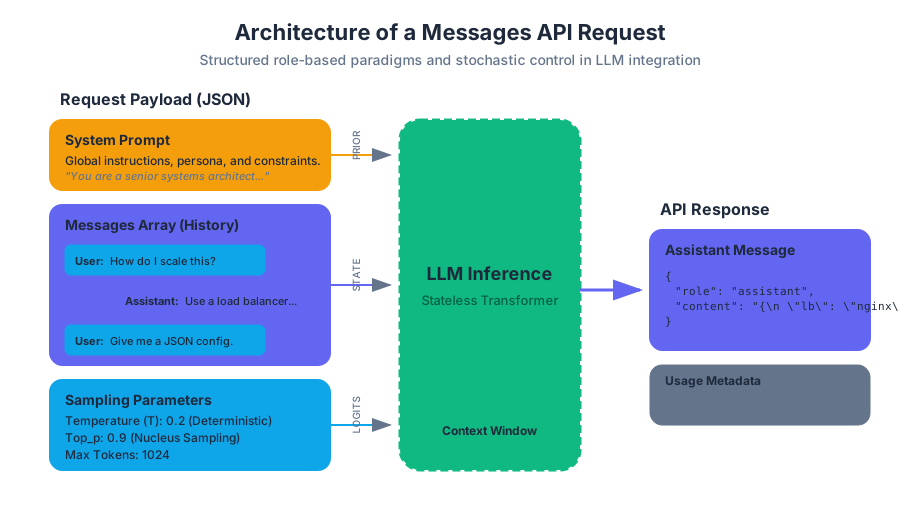
At its core, the Messages API is a RESTful interface that accepts a JSON payload representing a conversation history. Because LLMs are inherently stateless—they do not "remember" previous requests—the developer must provide the entire relevant history with every new request.
The fundamental unit of this API is the Message Object, which consists of a role and content.
| Component | Type | Description |
|---|---|---|
role |
String | Identifies the speaker. Valid values are user (the human) and assistant (the model). |
content |
String / Array | The actual data. Can be a simple string or a complex array of text and image blocks. |
model |
String | The specific model identifier (e.g., claude-3-5-sonnet-20240620). |
system |
String | (Optional) Instructions that guide the model's overall behavior and persona. |
The Role-Based Paradigm
The API enforces an alternating structure. A conversation must typically begin with a user message, followed by an assistant response. This structure mimics a Markov chain where the next state (the model's response) is conditioned on the sequence of all previous states (the message array).
Definition: Context Window Constraints The context window is the finite buffer of tokens the model can process at once. In the Messages API, every token in the
messagesarray, thesystemprompt, and the anticipated response counts toward this limit. Surpassing this limit results in a400 Bad Requestor truncated output.
System Prompts: The Latent Space Governor
The System Prompt is a distinct parameter, separate from the messages array. While user messages provide the "what" (the specific task), the system prompt defines the "how" (the constraints, persona, and behavioral boundaries).
Why System Prompts Matter
In the underlying transformer architecture, the system prompt is typically weighted or positioned such that it exerts a persistent influence over the entire generation process. It acts as a "prior" in a Bayesian sense, shifting the probability distribution of the model's vocabulary to favor certain styles or domains.
Implementation Mechanics
When a request is sent, the system prompt is concatenated with the message history in a format the model recognizes as high-priority instructions. This prevents "instruction drift," where a model might forget its initial constraints during a very long conversation.
| Feature | User Message | System Prompt |
|---|---|---|
| Persistence | Transient (part of the flow) | Persistent (global context) |
| Authority | Subject to model interpretation | High-level behavioral override |
| Use Case | Queries, data, specific tasks | Persona, safety rules, output format |
Stochastic Control: Sampling Parameters
Interacting with the Messages API requires fine-tuning the model's output through sampling parameters. These parameters control the Softmax layer of the neural network, determining how the model selects the next token from its vocabulary.
The Mathematics of Temperature
The most critical parameter is Temperature ($T$). It modifies the logits (raw scores) before the Softmax function is applied.
The probability $P$ of selecting token $i$ is given by:
$$P(x_i) = \frac{\exp(z_i / T)}{\sum_{j=1}^{V} \exp(z_j / T)}$$
Where:
- $z_i$ is the logit for token $i$.
- $V$ is the total vocabulary size.
- $T$ is the temperature.
As $T \to 0$, the distribution becomes "sharper," eventually becoming a one-hot vector (greedy decoding). As $T \to \infty$, the distribution becomes uniform, leading to maximum entropy (randomness).
Parameter Reference Table
| Parameter | Range | Effect | Recommended Use |
|---|---|---|---|
temperature |
0.0 - 1.0 | Controls randomness. | 0.0 for logic/code, 1.0 for creative writing. |
top_p |
0.0 - 1.0 | Nucleus sampling; cuts off the tail of the distribution. | Use as an alternative to temperature for diversity. |
max_tokens |
1 - 8192+ | Limits the length of the generated response. | Always set a limit to manage costs/latency. |
stop_sequences |
Array | Custom strings that trigger the end of generation. | Useful for templating or preventing run-on output. |
Implementation: The Pythonic Approach
The following example demonstrates a robust integration using the Anthropic Python SDK. It features a multi-turn conversation, a complex system prompt, and explicit error handling.
import anthropic
import os

# Initialize the client with an API key from environment variables
client = anthropic.Anthropic(api_key=os.environ.get("ANTHROPIC_API_KEY"))

def execute_structured_query(user_query: str):
    try:
        response = client.messages.create(
            model="claude-3-5-sonnet-20240620",
            max_tokens=1024,
            temperature=0.2, # Low temperature for factual consistency
            system="You are a senior systems architect. Respond only in structured JSON.",
            messages=[
                {
                    "role": "user",
                    "content": [
                        {
                            "type": "text",
                            "text": f"Analyze the following requirement: {user_query}"
                        }
                    ]
                }
            ]
        )

        # Accessing the content block safely
        return response.content[0].text

    except anthropic.APIConnectionError as e:
        print(f"The server could not be reached: {e.__cause__}")
    except anthropic.RateLimitError:
        print("Rate limit exceeded (429). Implement exponential backoff.")
    except anthropic.APIStatusError as e:
        print(f"Non-200 status code received: {e.status_code}, {e.response}")

# Example usage
# result = execute_structured_query("Design a scalable logging system for a microservices mesh.")
Streaming: Real-Time Token Delivery
For user-facing applications, waiting for a 1000-token response to complete can take 10-20 seconds, leading to a poor user experience. Streaming utilizes Server-Sent Events (SSE) to push tokens to the client as they are generated.
The SSE Protocol
In a streaming request, the server keeps the HTTP connection open and sends a series of data packets. Each packet is a JSON object representing a "chunk" of the message.
event: message_start
data: {"type": "message_start", "message": {"id": "msg_123", "role": "assistant", ...}}

event: content_block_start
data: {"type": "content_block_start", "index": 0, "content_block": {"type": "text", "text": ""}}

event: content_block_delta
data: {"type": "content_block_delta", "index": 0, "delta": {"type": "text_delta", "text": "Hello"}}

event: message_stop
data: {"type": "message_stop"}
AI_DEMOI_DEMO### Benefits of Streaming
- Reduced Perceived Latency: The Time To First Token (TTFT) is often under 500ms.
- Interactive UX: Text appears to be "typed" in real-time.
- Early Termination: If the model starts generating incorrect or harmful content, the client can close the connection immediately to save tokens and protect the user.
Advanced Implementation: TypeScript and SSE
Handling streams in a web environment requires managing the asynchronous nature of the events. This TypeScript example demonstrates how to consume a stream using the SDK's event listeners.
import Anthropic from '@anthropic-ai/sdk';

const anthropic = new Anthropic({
  apiKey: process.env.ANTHROPIC_API_KEY,
});

async function streamResponse(prompt: string) {
  const stream = await anthropic.messages.create({
    max_tokens: 1024,
    messages: [{ role: 'user', content: prompt }],
    model: 'claude-3-5-sonnet-20240620',
    stream: true,
  });

  for await (const event of stream) {
    if (event.type === 'content_block_delta' && event.delta.type === 'text_delta') {
      // Update the UI in real-time
      process.stdout.write(event.delta.text);
    }

    if (event.type === 'message_stop') {
      console.log('\n--- Stream Complete ---');
    }
  }
}

// streamResponse("Explain the concept of quantum entanglement in simple terms.");
Tool Use (Function Calling)
The Messages API is not limited to text. It can act as a reasoning engine that interacts with external tools. This is achieved by providing a tools definition in the request.
The Tool Execution Loop
- Request: The user sends a prompt + tool definitions.
- Model Intent: The model decides to use a tool and returns a
tool_useblock. - Client Execution: The developer's code executes the actual tool (e.g., a database query).
- Result Submission: The developer sends the tool result back to the model in a new
usermessage with atool_resultblock. - Final Response: The model interprets the tool output and provides a natural language answer.
| Tool Component | Description |
|---|---|
name |
The unique identifier for the tool (e.g., get_weather). |
description |
A detailed explanation of what the tool does (crucial for model selection). |
input_schema |
A JSON Schema defining the required parameters (e.g., lat, long). |
Raw HTTP Wire Format
Understanding the raw HTTP request is vital for debugging or for environments where an official SDK is unavailable.
POST /v1/messages HTTP/1.1
Host: api.anthropic.com
x-api-key: YOUR_API_KEY
anthropic-version: 2023-06-01
content-type: application/json

{
    "model": "claude-3-5-sonnet-20240620",
    "max_tokens": 1024,
    "system": "You are a helpful assistant.",
    "messages": [
        {"role": "user", "content": "What is the capital of France?"}
    ]
}
Common Pitfalls and Best Practices
1. Context Window Exhaustion
Developers often forget that the entire history is sent with every request. In long conversations, the token count grows quadratically if not managed. Solution: Implement a "sliding window" or "summarization" strategy where older messages are pruned or compressed.
2. Improper Role Alternation
The Messages API is strict about the sequence of roles. Sending two user messages in a row or starting with an assistant message will generally trigger an error.
Solution: Always validate the message array before submission. If multiple user inputs occur, concatenate them into a single user message.
3. Handling Stop Reasons
The API returns a stop_reason which indicates why the generation ended.
| Stop Reason | Meaning | Action Required |
|---|---|---|
end_turn |
Model finished naturally. | None. |
max_tokens |
Hit the length limit. | Increase max_tokens or prompt for a continuation. |
stop_sequence |
Hit a custom stop string. | Process the specific logic tied to that sequence. |
tool_use |
Model wants to call a tool. | Execute the tool and return the result. |
4. Safety and Content Filtering
LLMs have internal safety layers. If a request triggers these filters, the API may return an empty response or a specific error.
Solution: Check the stop_reason and handle cases where the model refuses to answer due to policy violations gracefully.
Source Materials
Study Start building with Claude on Lykke
This course page is free to open: signed out, you can read its first two sections, and signing in, on any plan, opens the rest. The free Lykke Chrome extension syncs your own Canvas courses, so ChatGPT, Claude and Muse can answer from your classes and deadlines. It only reads Canvas.
Add the free extensionSign in to open every sectionAll sections of Start building with Claude · Browse more course pages