From the free course pandas documentation on Lykke
Data Ingestion and Selection
Key concepts: read_csv · read_excel · Boolean indexing · loc vs iloc · isin() · notna()
Techniques for reading data from external files and navigating through datasets using labels and positions.
Data Ingestion and Selection
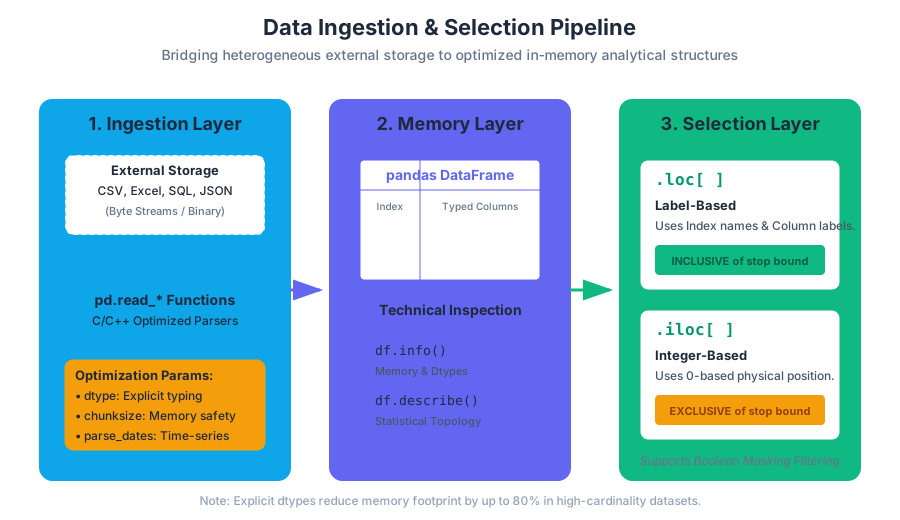
Data rarely originates within the sterile environment of a Python script. In the lifecycle of a data engineering pipeline, the Ingestion Layer serves as the critical interface between heterogeneous external storage systems—ranging from legacy flat files to enterprise-grade distributed databases—and the structured, in-memory representation required for analytical computation. Once data is resident in memory (typically as a pandas DataFrame), the Selection Layer provides the mechanism for dimensionality reduction, filtering, and feature isolation.
Mastering these two phases is not merely a matter of syntax; it is about understanding the memory layout of tabular data and the performance implications of how we access it.
AI_SVGI_SVG## 1. The Ingestion Layer: Bridging Storage and Memory
The ingestion process in pandas is governed by a suite of read_* functions. These are highly optimized wrappers around lower-level parsers (often written in C or C++) designed to convert byte streams into typed NumPy arrays.
1.1 The CSV Standard and read_csv
The Comma-Separated Values (CSV) format is the lingua franca of data exchange. Despite its ubiquity, it lacks a formal schema, making the read_csv function one of the most complex and parameter-rich tools in the pandas library.
Definition: Schema Inference The process by which a parser scans a subset of a file (the "sniff" phase) to automatically determine the data type (
dtype) of each column. While convenient, schema inference is computationally expensive and prone to errors in large datasets with sparse values.
| Parameter | Type | Purpose | Performance Impact |
|---|---|---|---|
filepath_or_buffer |
str/path/buffer | Source of the data (local path, URL, or S3/GCS) | High (I/O bound) |
sep |
str | Delimiter (default ,). Can use regex for complex formats. |
Low |
dtype |
dict | Explicitly defines column types (e.g., {'id': np.int32}) |
High (Reduces memory & prevents re-scanning) |
parse_dates |
list/bool | Converts columns to datetime64[ns] objects |
Medium |
chunksize |
int | Returns an iterable TextFileReader for out-of-memory processing |
Critical for Big Data |
low_memory |
bool | Internally process file in chunks to lower memory usage (C engine only) | Medium |
1.2 The Excel Ecosystem and read_excel
Unlike CSVs, Excel files (.xlsx, .xlsb) are binary formats (OpenXML) that contain metadata, multiple sheets, and formatting. read_excel relies on engines like openpyxl or pyxlsb to decode these structures.
1.3 Implementation: High-Performance Ingestion
The following example demonstrates a production-grade ingestion pattern using explicit dtypes and date parsing to minimize the memory footprint.
import pandas as pd
import numpy as np

# Defining a schema for ingestion to optimize memory and ensure type safety
schema = {
    'transaction_id': 'int64',
    'customer_id': 'category',  # Categorical saves massive memory for low-cardinality strings
    'amount': 'float32',        # float32 is often sufficient and uses 50% less RAM than float64
    'status': 'category'
}

def ingest_financial_data(file_path: str):
    """
    Ingests large-scale CSV data with optimized memory mapping.
    """
    try:
        # Using chunksize for a memory-efficient stream
        reader = pd.read_csv(
            file_path,
            sep=',',
            dtype=schema,
            parse_dates=['timestamp'],
            infer_datetime_format=True,
            engine='c', # Use the optimized C engine
            low_memory=False
        )
        return reader
    except FileNotFoundError as e:
        print(f"I/O Error: {e}")
        return None

# Execution
# df = ingest_financial_data("large_ledger.csv")
2. Data Inspection: The Technical Summary
Before selection can occur, an engineer must understand the topology of the data. This is achieved through inspection methods that reveal the "technical metadata" of the object.
df.head(n)/df.tail(n): Returns the first or last $n$ rows. Essential for visual verification of parsing success.df.info(): The most critical diagnostic tool. It displays theIndex,Columnnames,Non-Null Count, andDtype. Most importantly, it provides the memory usage estimate.df.describe(): Generates descriptive statistics (mean, std, quartiles) for numerical columns.
AI_DEMOI_DEMO## 3. The Mechanics of Selection: loc vs iloc
The most common source of bugs in pandas code is the confusion between label-based and position-based indexing. Pandas provides two primary accessors to resolve this ambiguity.
3.1 loc: Label-Based Selection
The .loc accessor is used when you want to access data based on the Index label or Column name. It is inclusive of both the start and the stop bounds.
Theorem: Label Alignment Pandas operations are intrinsically aligned by label. When using
.loc, the system searches the hash map of the index to find the corresponding physical memory address.
3.2 iloc: Integer-Based Selection
The .iloc accessor is strictly positional. It treats the DataFrame like a standard NumPy array or Python list, using 0-based indexing. Unlike .loc, it follows standard Python slicing conventions (inclusive of start, exclusive of stop).
3.3 Comparative Analysis
| Feature | .loc |
.iloc |
|---|---|---|
| Primary Input | Index Labels / Column Names | Integer Positions (0 to length-1) |
| Slicing Behavior | Inclusive of stop: ['a':'c'] includes 'c' |
Exclusive of stop: [0:2] excludes index 2 |
| Boolean Arrays | Accepted | Accepted (but less common) |
| Use Case | Semantic queries ("Get 'Sales' for 'March'") | Algorithmic queries ("Get the first 10 rows") |
3.4 Logic of Selection (Pseudocode)
Understanding how pandas resolves these calls internally can be visualized as a lookup strategy:
FUNCTION SelectData(Object, Key, Mode):
    IF Mode == "LABEL":
        # Search the Index Hash Table
        PhysicalIndex = Object.Index.Map.Get(Key)
        RETURN MemoryBlock[PhysicalIndex]

    ELSE IF Mode == "POSITION":
        # Direct Offset Calculation
        IF Key < 0 OR Key >= Object.Length:
            THROW IndexError
        RETURN MemoryBlock[Key]
END FUNCTION
4. Boolean Indexing: The Declarative Query
Boolean indexing allows for the selection of data based on the values within the DataFrame rather than their coordinates. This is a vectorized operation, meaning the condition is applied to every element in a column simultaneously.
4.1 Logical Operators
When combining multiple conditions, pandas requires the use of bitwise operators rather than Python's and/or keywords. This is because bitwise operators are overloaded to perform element-wise comparisons on arrays.
&(AND): Both conditions must be true.|(OR): At least one condition must be true.~(NOT): Inverts the boolean mask.
4.2 Vectorized Filtering with isin() and notna()
For more complex filtering, pandas provides specialized methods that are significantly faster than manual loops.
isin([list]): Returns a boolean mask whereTrueindicates the value exists in the provided list. This is essentially a vectorizedSQL INclause.notna(): Returns a mask identifying non-missing values. This is crucial for data cleaning pipelines whereNaN(Not a Number) values would break downstream mathematical models.
4.3 Real-World Usage Example
Consider a dataset of Titanic passengers. We want to find adult females who survived, excluding those with missing age data, and who traveled in 1st or 2nd class.
# Example of a CLI-based data exploration workflow
# 1. Download data
curl -O https://raw.githubusercontent.com/pandas-dev/pandas/main/doc/data/titanic.csv

# 2. Run a python snippet to perform complex selection
python3 -c "
import pandas as pd
df = pd.read_csv('titanic.csv')

# Complex Boolean Indexing
# Criteria: Female, Survived, Age known, Class in [1, 2]
mask = (
    (df['Sex'] == 'female') &
    (df['Survived'] == 1) &
    (df['Age'].notna()) &
    (df['Pclass'].isin([1, 2]))
)

subset = df.loc[mask, ['Name', 'Age', 'Pclass']]
print(f'Found {len(subset)} passengers matching criteria.')
print(subset.head())
"
5. Advanced Selection Patterns
5.1 Simultaneous Row and Column Selection
One of the most powerful features of .loc and .iloc is the ability to slice both axes at once. The syntax is df.loc[row_indexer, column_indexer].
# Select rows 10 through 20, and only columns 'Age' through 'Fare'
# Note: .loc is inclusive of 'Fare'
refined_view = df.loc[10:20, 'Age':'Fare']

# Select the first 5 rows and the first 3 columns by position
fast_slice = df.iloc[:5, :3]
5.2 The notna() and isna() Duality
Handling missing data is a prerequisite for any selection. Missing values in pandas are typically represented by np.nan (for floats/objects) or pd.NA (for nullable integers).
\text{Mask}_{i} =
\begin{cases}
1 & \text{if } x_i \neq \text{NaN} \\
0 & \text{if } x_i = \text{NaN}
\end{cases}
\quad \forall x \in \text{Column}
The notna() method generates this mask, allowing for the exclusion of incomplete records:
clean_df = df[df['email_address'].notna()]
6. Common Pitfalls and Performance Bottlenecks
6.1 The SettingWithCopyWarning
This is the most frequent warning encountered by beginners. It occurs when you attempt to modify a subset of a DataFrame that pandas cannot determine is a view or a copy.
- Bad:
df[df['A'] > 2]['B'] = 0(Chained indexing) - Good:
df.loc[df['A'] > 2, 'B'] = 0(Single-step access)
6.2 Memory Inefficiency in Ingestion
Loading a 1GB CSV into pandas can often result in a 4GB+ DataFrame in memory. This is because pandas defaults to 64-bit types (int64, float64).
| Data Type | Memory (per value) | Range |
|---|---|---|
int8 |
1 byte | -128 to 127 |
int64 |
8 bytes | $\pm 9 \times 10^{18}$ |
float32 |
4 bytes | Standard precision |
category |
Variable | Optimized for repeating strings |
Pro Tip: Always use df.info(memory_usage='deep') to get the true memory footprint, as object-type columns (strings) are otherwise not fully accounted for.
AI_STUDY_GUIDEI_STUDY_GUIDE--
Study Guide: Data Ingestion and Selection
Core Concepts to Master
- The I/O Pipeline: Understand that
read_csvis a complex parser. Know when to usedtypeto save memory andparse_datesto enable time-series functionality. - The Indexing Duality:
.loc= Labels (Semantic)..iloc= Positions (Numerical).
- Boolean Logic: Master the use of
&,|, and~. Remember that parentheses are mandatory around conditions due to operator precedence. - Vectorized Filters: Prefer
isin()over multiple==OR statements. Usenotna()to filter out null values before computation.
Practical Exercises
- Exercise 1: Load a dataset and use
df.info()to identify columns that could be downcast fromint64toint8or converted tocategory. - Exercise 2: Write a selection statement that finds all rows where a specific numerical column is above the mean AND a categorical column is in a specific list of values.
- Exercise 3: Compare the output of
df.loc[0:5]anddf.iloc[0:5]on a DataFrame where the index has been shuffled. Observe how.locfollows the labels while.ilocfollows the order.
Technical Vocabulary
- Vectorization: Performing operations on entire arrays rather than individual elements.
- Chained Indexing: The practice of using multiple sets of brackets (e.g.,
df[][]), which leads to unpredictable behavior. - Downcasting: Converting a data type to a lower-bit representation to save memory.
- Label Alignment: The internal mechanism that ensures data is matched based on index labels during operations.
Source Materials
Study pandas documentation on Lykke
This course page is free to open: signed out, you can read its first two sections, and signing in, on any plan, opens the rest. The free Lykke Chrome extension syncs your own Canvas courses, so ChatGPT, Claude and Muse can answer from your classes and deadlines. It only reads Canvas.
Add the free extensionSign in to open every sectionAll sections of pandas documentation · Browse more course pages