From the free course Learn Rust on Lykke
Domain-Specific Development
Key concepts: CLI Tools · WebAssembly (WASM) · Embedded Rust · Networking
Applying Rust to specialized fields like CLI, WebAssembly, and Embedded systems.
Domain-Specific Development
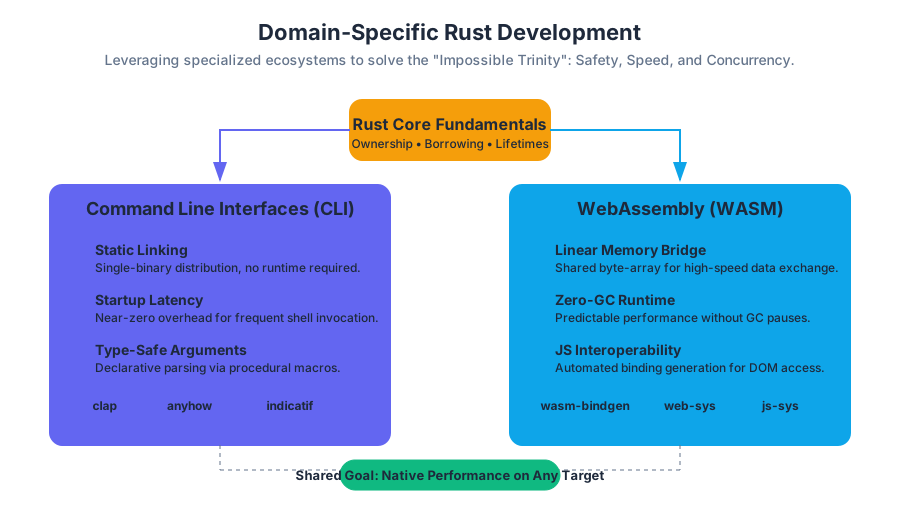
The evolution of Rust from a research project at Mozilla to a cornerstone of modern infrastructure is driven by its unique ability to provide high-level abstractions without sacrificing low-level control. While the language fundamentals—ownership, borrowing, and lifetimes—form the bedrock, the true power of Rust is realized when applied to specific domains. In these specialized environments, Rust addresses the "impossible trinity" of systems programming: safety, speed, and concurrency.
AI_SVGI_SVGomain-specific development in Rust is not merely about using the language; it is about leveraging a specialized ecosystem of crates, compiler targets, and architectural patterns. Whether it is the resource-constrained environment of an ARM Cortex-M microcontroller, the sandboxed execution of a browser’s WebAssembly engine, or the high-throughput requirements of a cloud-native networking stack, Rust provides a tailored approach to solving domain-specific challenges.
Command Line Interfaces (CLI)
The Command Line Interface (CLI) is perhaps the most accessible entry point for domain-specific Rust. Rust has become the preferred language for modernizing the Unix toolchain (e.g., bat replacing cat, fd replacing find).
What it is
A CLI Tool is a program designed to be executed from a shell or terminal, interacting with the user through text-based arguments, flags, and standard I/O streams (stdin, stdout, stderr). In Rust, this involves utilizing the standard library's std::env and std::process modules, often augmented by high-level frameworks.
Why it Matters
Rust is uniquely suited for CLIs for three reasons:
- Static Linking: Rust binaries typically bundle all dependencies, making distribution as simple as moving a single file.
- Startup Latency: Unlike VM-based languages (Java, Python), Rust has near-zero startup overhead, which is critical for tools that are invoked frequently.
- Type-Safe Arguments: Frameworks like
clapturn command-line arguments into strongly-typed Rust structs, catching errors at compile time rather than runtime.
Mechanics and Implementation
The core of a modern Rust CLI is the Declarative Parser. Instead of manually iterating over a vector of strings, developers define the interface as a data structure.
// First code block: Low-level implementation using the 'clap' derive feature
// This demonstrates the mapping of CLI arguments to a type-safe internal struct.

use clap::{Parser, Subcommand};
use std::path::PathBuf;

#[derive(Parser)]
#[command(name = "forge")]
#[command(about = "A high-performance build tool", long_about = None)]
struct Cli {
    /// Optional name to operate on
    name: Option<String>,

    /// Sets a custom config file
    #[arg(short, long, value_name = "FILE")]
    config: Option<PathBuf>,

    /// Turn debugging information on
    #[arg(short, long, action = clap::ArgAction::Count)]
    debug: u8,

    #[command(subcommand)]
    command: Option<Commands>,
}

#[derive(Subcommand)]
enum Commands {
    /// adds things to the configuration
    Add {
        name: Option<String>,
    },
}

fn main() {
    let cli = Cli::parse();

    // Accessing parsed values with full type safety
    if let Some(config_path) = cli.config.as_deref() {
        println!("Value for config: {}", config_path.display());
    }

    match &cli.command {
        Some(Commands::Add { name }) => {
            if let Some(n) = name {
                println!("Adding: {}", n);
            }
        }
        None => {}
    }
}
Comparison of CLI Ecosystem Crates
| Crate | Purpose | Key Strength |
|---|---|---|
clap |
Argument Parsing | Feature-rich, supports derive macros and subcommands. |
anyhow |
Error Handling | Flexible, idiomatic error reporting for applications. |
indicatif |
Progress Reporting | Beautiful progress bars and spinners for long-running tasks. |
confy |
Configuration | Zero-boilerplate config file management (TOML/YAML). |
dialoguer |
Interactive Prompts | Handling user input, passwords, and selections in the terminal. |
Common Pitfalls
- Ignoring
stderr: Beginners often print everything tostdout. In CLI design,stdoutis for data (pipes), whilestderris for logging and errors. - Blocking the Main Thread: For tools performing I/O, failing to handle signals (like
SIGINT) can leave the terminal in a broken state.
WebAssembly (WASM)
WebAssembly represents a paradigm shift for web development, allowing languages other than JavaScript to run in the browser at near-native speeds. Rust is currently the premier language for WASM due to its lack of a heavy runtime or garbage collector.
What it is
WebAssembly (WASM) is a binary instruction format for a stack-based virtual machine. It is designed as a portable compilation target for programming languages, enabling deployment on the web for client and server applications.
In the context of Rust, WASM development involves compiling code to the wasm32-unknown-unknown target and using "glue code" to bridge the gap between Rust’s memory model and the JavaScript engine.
How it Works: The Memory Bridge
Rust and JavaScript do not share a heap. When Rust runs in WASM, it operates within a Linear Memory—a contiguous array of raw bytes. To pass a string from Rust to JS, Rust must write the string into this linear memory and pass the pointer (offset) and length to JS. The wasm-bindgen library automates this tedious and error-prone process.
// Second code block: JavaScript side of the WASM interop
// This shows how a compiled Rust WASM module is instantiated and called.

import init, { greet, compute_heavy_logic } from './pkg/my_rust_lib.js';

async function run() {
    // Initialize the WASM module
    await init();

    // Call a Rust function directly
    // wasm-bindgen handles the conversion of JS strings to Rust UTF-8
    const result = greet("DeepWiki Reader");
    console.log(result);

    // Performance-critical calculation performed in Rust
    const data = new Float64Array([1.5, 2.5, 3.5]);
    const output = compute_heavy_logic(data);
    console.log("Calculated in Rust:", output);
}

run();
WASM vs. Native Execution
| Feature | Native (x86_64/ARM) | WebAssembly (WASM32) |
|---|---|---|
| Instruction Set | Hardware-specific (ISA) | Virtual, platform-independent |
| Memory Access | Direct virtual memory | Sandboxed Linear Memory |
| Standard Library | Full std access |
Restricted (no direct OS/File I/O) |
| Concurrency | OS Threads (pthreads) | Web Workers (shared memory via Atomics) |
| Security | Process-level isolation | Capability-based security model |
AI_DEMOI_DEMO### Variations: WASI
While WASM started in the browser, the WebAssembly System Interface (WASI) extends it to the server. WASI provides a standardized set of syscalls (like fd_read and fd_write), allowing Rust WASM binaries to run on any system with a WASI-compliant runtime (like Wasmtime or Wasmer), effectively acting as a "Docker-lite" for functions.
Embedded Rust
Embedded development involves writing software for microcontrollers—chips with kilobyte-scale RAM and no operating system. Historically dominated by C, this domain is being transformed by Rust’s ability to catch memory errors and race conditions at compile time.
What it is
Embedded Rust refers to the use of the no_std attribute, which informs the compiler that the program will not use the Rust standard library (which requires an OS). Instead, it relies on the core library and hardware-specific crates.
The Hardware Abstraction Hierarchy
Embedded Rust is built on a layered architecture that prevents the "spaghetti code" common in traditional embedded C.
- Peripheral Access Crate (PAC): Auto-generated from SVD files; provides low-level, unsafe access to hardware registers.
- Hardware Abstraction Layer (HAL): Provides type-safe, idiomatic Rust traits for hardware features (e.g.,
Spi,I2c,Gpio). - Board Support Crate (BSC): Maps the HAL to the specific pinout of a development board.
Concrete Example: Register Safety
In C, writing to a register often involves volatile pointers and bitwise masks, which is highly error-prone. In Rust, the PAC provides a "modify" API that ensures you only touch the bits you intend to.
// Third code block: Comparing C vs Rust for register manipulation
// C implementation (Unsafe, easy to flip wrong bits)
#define UART0_BASE 0x4000C000
#define UART_CR_OFFSET 0x30
#define UART_ENABLE (1 << 0)

void enable_uart() {
    uint32_t *cr = (uint32_t *)(UART0_BASE + UART_CR_OFFSET);
    *cr |= UART_ENABLE; // Bitwise OR can be dangerous if not careful
}
// Rust implementation (Type-safe, zero-cost abstraction)
// Using a Peripheral Access Crate (PAC)
pub fn enable_uart(uart: &mut UART0) {
    uart.cr.modify(|_, w| w.en().enabled());
    // The compiler ensures 'en()' is a valid field for the 'cr' register
}
Common Pitfalls: The panic Handler
In a no_std environment, the compiler doesn't know what to do if the program panics (e.g., an out-of-bounds array access). Developers must define a #[panic_handler]. A common mistake is using a handler that loops infinitely, which can make debugging difficult without a hardware debugger (JTAG/SWD).
Networking and Asynchronous I/O
Networking in Rust is synonymous with Asynchronous Programming. Because network I/O is orders of magnitude slower than CPU cycles, Rust uses a non-blocking model to handle thousands of concurrent connections on a single thread.
What it is
Networking in Rust leverages the Future trait and the async/await syntax. Unlike other languages, Rust does not include an asynchronous runtime in the standard library. Developers choose a runtime, with Tokio being the industry standard.
How it Works: The Reactor-Executor Pattern
- The Reactor: Interacts with the OS (using
epoll,kqueue, orIOCP) to register interest in I/O events. - The Executor: Schedules and runs Rust
Futureswhen the Reactor signals that an I/O resource is ready. - The Waker: A mechanism that notifies the Executor that a specific task can make progress.
Implementation: A High-Performance Echo Server
The following example demonstrates a non-blocking TCP server. Note how the tokio::spawn function allows handling multiple clients concurrently without the overhead of OS threads.
// Fourth code block: Asynchronous Networking with Tokio
// This implements a concurrent TCP echo server.

use tokio::net::TcpListener;
use tokio::io::{AsyncReadExt, AsyncWriteExt};

#[tokio::main]
async fn main() -> Result<(), Box<dyn std::error::Error>> {
    let listener = TcpListener::bind("127.0.0.1:8080").await?;
    println!("Server listening on port 8080");

    loop {
        // Asynchronously wait for a new connection
        let (mut socket, addr) = listener.accept().await?;
        println!("New connection from: {}", addr);

        // Spawn a new task for each connection
        // This task is managed by the Tokio executor, not a new OS thread
        tokio::spawn(async move {
            let mut buf = [0; 1024];

            loop {
                let n = match socket.read(&mut buf).await {
                    // socket closed
                    Ok(n) if n == 0 => return,
                    Ok(n) => n,
                    Err(e) => {
                        eprintln!("failed to read from socket; err = {:?}", e);
                        return;
                    }
                };

                // Write the data back
                if let Err(e) = socket.write_all(&buf[0..n]).await {
                    eprintln!("failed to write to socket; err = {:?}", e);
                    return;
                }
            }
        });
    }
}
Networking Framework Comparison
| Framework | Layer | Primary Use Case |
|---|---|---|
| Tokio | Runtime | The foundation for almost all async Rust. |
| Hyper | HTTP | Low-level, fast HTTP/1 and HTTP/2 implementation. |
| Axum | Web Framework | High-level, ergonomic routing built on Tokio/Hyper. |
| Tonic | gRPC | Protocol Buffers and gRPC implementation for microservices. |
| Quinn | QUIC | Implementation of the QUIC transport protocol. |
Pitfalls: Send and Sync in Async
In networking, tasks are often moved between threads by the executor. This requires all data captured by an async block to implement the Send trait. A common error is holding a std::sync::MutexGuard across an .await point, which is not Send and will cause a compilation error. The solution is to use tokio::sync::Mutex.
Synthesis: The Unified Rust Philosophy
Across all these domains, a unified philosophy emerges. Rust provides Zero-Cost Abstractions, meaning that the high-level safety features (like clap's argument parsing or tokio's async tasks) compile down to code that is as efficient as hand-written C.
- Memory Safety without GC: Crucial for Embedded and WASM where memory is scarce.
- Fearless Concurrency: Crucial for Networking where data races are catastrophic.
- Modern Tooling:
cargoprovides a consistent experience whether you are cross-compiling to a RISC-V chip or a browser.
The transition from a general-purpose learner to a domain expert involves mastering the specific "dialects" of these ecosystems—learning when to use no_std, how to optimize WASM binary size, or how to structure an async pipeline for maximum throughput.
AI_STUDY_GUIDEI_STUDY_GUIDE*Key Terms for Review:**
no_std: Attribute for environments without an OS.- Linear Memory: The memory model used by WebAssembly.
- Future: A trait representing a value that may not be available yet.
- PAC/HAL: The layers of hardware abstraction in Embedded Rust.
- Wasm-bindgen: The tool for JS-Rust interoperability.
- Tokio: The de-facto standard asynchronous runtime.
- Clap: The Command Line Argument Parser crate.
Source Materials
Study Learn Rust on Lykke
This course page is free to open: signed out, you can read its first two sections, and signing in, on any plan, opens the rest. The free Lykke Chrome extension syncs your own Canvas courses, so ChatGPT, Claude and Muse can answer from your classes and deadlines. It only reads Canvas.
Add the free extensionSign in to open every section