Learn Rust
Institution: MIT
1 study materials · 4 sections
Rust is a modern systems programming language designed for safety, speed, and concurrency. This course provides a structured path through the official Rust learning ecosystem, covering everything from fundamental concepts to domain-specific applications. Students will explore the language's unique ownership model, utilize powerful tooling like Cargo, and gain hands-on experience through interactive exercises and comprehensive documentation.
Course Sections
The Rust Programming Language (The Book)
Key concepts: Ownership · Borrowing · Lifetimes · Fearless Concurrency
An introduction to the core concepts of Rust, often referred to as 'The Book'.
The Rust Programming Language
Overview
Affectionately known as "The Book," this is the primary resource for learning Rust. It provides a high-level overview of the language, starting from the basics and moving into advanced systems programming concepts.
Key Concepts
- Ownership: Rust’s most unique feature, which manages memory through a set of rules the compiler checks at compile time.
- Borrowing and References: How Rust allows you to access data without taking ownership, ensuring memory safety without a garbage collector.
- Lifetimes: A mechanism to ensure that all references are valid for as long as they are used.
- Pattern Matching: Powerful control flow constructs like
matchandif letfor handling complex data structures.
Why This Matters
Understanding the concepts in The Book is essential for writing idiomatic Rust. It shifts the programmer's mindset from manual memory management or garbage collection to the 'Ownership' model, which eliminates entire classes of bugs like null pointer dereferences and data races.
Practical Learning: Rustlings and Rust By Example
Key concepts: Compiler Errors · Idiomatic Syntax · Standard Library Usage
Hands-on practice through small exercises and code-heavy examples.
Practical Learning: Rustlings and Rust By Example
The transition from theoretical understanding to engineering proficiency in Rust is often described as a "cliff." While reading The Rust Programming Language (the "Book") provides the conceptual scaffolding—explaining the stack, the heap, and the rules of ownership—it does not necessarily build the muscle memory required to navigate the strictures of the rustc compiler. To bridge this gap, the Rust ecosystem provides two primary pedagogical tools: Rustlings and Rust By Example (RBE).
These resources shift the focus from passive consumption to active problem-solving. Where the Book explains the why, Rustlings and RBE focus on the how. They treat the compiler not as a hurdle to be cleared, but as a collaborative partner in the development process.
AI_IMAGEI_IMAGE## The Philosophy of "Compiler-Driven Development"
In most languages, a compiler error is a failure. In Rust, particularly during the learning phase, a compiler error is a guided instruction. This is the core philosophy behind Rustlings. It is a suite of small, intentionally broken exercises that force the student to interact with the compiler's diagnostic engine.
The Feedback Loop
The learning process in Rustlings follows a specific iterative cycle:
- Observation: The student opens a file (e.g.,
variables1.rs) and observes code that refuses to compile. - Compilation: The
rustlings watchcommand triggersrustc, which generates a diagnostic report. - Diagnosis: The student analyzes the error code (e.g.,
E0384: cannot assign twice to immutable variable). - Rectification: The student applies the fix (adding
mut, changing a type, or adjusting a lifetime). - Validation: The compiler confirms the fix, and the student moves to the next challenge.
This cycle builds a mental model of the Borrow Checker—the component of the compiler responsible for enforcing memory safety without a garbage collector.
Decoding the Compiler: Error Anatomy and Resolution
Understanding Rust's error messages is a prerequisite for idiomatic coding. Rust's errors are uniquely verbose, often providing the exact line of code, the reason for the failure, and a suggested fix.
Definition: Diagnostic Metadata Every Rust error is associated with a unique identifier (e.g.,
E0502). These identifiers link to the Rust Error Index, a comprehensive database providing detailed explanations and examples of both the incorrect and corrected code.
Common Error Patterns in Practical Learning
| Error Code | Name | Cause | Typical Resolution |
|---|---|---|---|
| E0382 | Use of Moved Value | Attempting to use a variable after its ownership has been transferred. | Use .clone(), implement Copy, or pass by reference (&). |
| E0502 | Borrow Conflict | Having an active mutable borrow while attempting an immutable borrow (or vice versa). | Limit the scope of the borrow using {} or reorder operations. |
| E0597 | Value Does Not Live Long Enough | A reference points to a value that is dropped before the reference goes out of scope. | Extend the lifetime of the value or shorten the lifetime of the reference. |
| E0277 | Trait Not Implemented | Passing a type to a function that requires a specific behavior (trait) the type lacks. | Implement the trait or use a type that already satisfies the bound. |
Implementation: Resolving a Borrowing Conflict
The following example demonstrates a common scenario encountered in Rustlings: managing multiple references to a single data structure.
// A non-trivial example of resolving a borrow checker conflict
// Problem: We want to modify a vector while we have an active iterator.

fn main() {
    let mut data = vec![1, 2, 3, 4, 5];

    // WRONG: This would cause E0502 because 'data.iter()'
    // creates an immutable borrow that lasts for the duration of the loop.
    // for x in data.iter() {
    //     if *x > 3 {
    //         data.push(0); // Error: cannot borrow `data` as mutable because it is also borrowed as immutable
    //     }
    // }

    // RIGHT: Collect the indices or values first to release the borrow.
    let to_add: Vec<i32> = data
        .iter()
        .filter(|&&x| x > 3)
        .map(|_| 0)
        .collect();

    // The immutable borrow from the iterator is now finished.
    // We can safely perform mutable operations.
    for val in to_add {
        data.push(val);
    }

    println!("Updated data: {:?}", data);
}
Rust By Example: The Idiomatic Blueprint
While Rustlings focuses on fixing errors, Rust By Example (RBE) focuses on the "Golden Path"—the most efficient and idiomatic ways to use the language. RBE is a living document of code snippets that can be run directly in the browser via the Rust Playground.
Key Concepts in RBE
- Pattern Matching: Moving beyond
if/elseto exhaustivematchstatements andif letbindings. - Generics and Traits: Defining polymorphic behavior that maintains zero-cost abstraction.
- Error Handling: The transition from
panic!to the robustResult<T, E>andOption<T>patterns. - Macros: Metaprogramming to reduce boilerplate.
The Logic of Ownership Transfer (Pseudocode)
To understand what RBE teaches about memory, we can represent the Borrow Checker's logic as a set of state transitions for any given memory location.
ALGORITHM: BorrowChecker(Variable V, Scope S)
--------------------------------------------
1. Initialize State(V) = OWNED
2. For each instruction I in S:
    IF I is "let y = V":
        IF Type(V) implements Copy:
            State(V) remains OWNED
            State(y) = OWNED
        ELSE:
            State(V) = MOVED (Invalid for future use)
            State(y) = OWNED
    IF I is "let y = &V":
        IF State(V) is MUT_BORROWED:
            REJECT (Error E0502)
        ELSE:
            State(V) = IMM_BORROWED(count++)
    IF I is "let y = &mut V":
        IF State(V) is IMM_BORROWED OR State(V) is MUT_BORROWED:
            REJECT (Error E0499/E0502)
        ELSE:
            State(V) = MUT_BORROWED
    IF I is "end of scope of y":
        Decrement borrow count or restore State(V) to OWNED
AI_DEMOI_DEMO## Idiomatic Syntax and the Standard Library
A major hurdle for developers coming from C++ or Java is the "un-learning" of certain patterns. Rustlings and RBE emphasize Idiomatic Rust, which often favors functional programming paradigms over imperative ones.
Iterators vs. Loops
In many languages, a for loop with an index is the standard way to traverse a collection. In Rust, this is considered non-idiomatic and potentially slower due to bounds checking.
| Feature | Imperative (C-style) | Idiomatic (Rust-style) |
|---|---|---|
| Mechanism | for (int i=0; i<len; i++) |
for item in collection.iter() |
| Safety | Manual bounds checking; risk of OOB | Guaranteed memory safety via Iterators |
| Performance | Can be hindered by redundant checks | Optimizer removes bounds checks (Zero-cost) |
| Readability | Low (focus on mechanics) | High (focus on intent/transformation) |
Standard Library Mastery
Practical learning involves deep dives into the std library. Specifically, the Prelude—the small collection of items that Rust imports into every program automatically (like Option, Result, String, and Vec).
# Using Cargo to explore documentation locally
# This is a key step in the Rustlings workflow when you get stuck.

# Open the documentation for the standard library in your browser
cargo doc --std --open

# Search for a specific trait, for example, 'Iterator'
# This allows you to see all available methods like .map(), .fold(), .filter()
Advanced Learning: Domain-Specific Guides
Once the basics of Rustlings are mastered, the "Practical Learning" path branches into specialized domains. The Rust ecosystem provides "Books" for specific use cases, which function as extensions of the RBE philosophy.
- The CLI Book: Focuses on building production-grade command-line tools (handling arguments, environment variables, and terminal output).
- The Embedded Book: Teaches Rust for microcontrollers (no-std environment, memory-mapped I/O).
- The Rustonomicon: For those who need to write
unsafeRust. It explains the "dark arts" of pointers and manual memory management.
Real-World Usage: Handling Database Results
In a real-world application, the concepts of Option and Result (heavily emphasized in RBE) are used to handle the inherent uncertainty of I/O.
-- Conceptual Schema for a Rust-backed application
CREATE TABLE users (
    id SERIAL PRIMARY KEY,
    username TEXT NOT NULL,
    email TEXT, -- This is nullable, mapping to Option<String> in Rust
    last_login TIMESTAMP
);
// Rust implementation using the 'sqlx' crate pattern
// Demonstrating the practical application of Option and Result

use sqlx::{Postgres, Pool};

struct User {
    id: i32,
    username: String,
    email: Option<String>, // Maps to nullable column
}

async fn get_user(pool: &Pool<Postgres>, id: i32) -> Result<User, sqlx::Error> {
    // The query returns a Result. We use the '?' operator to
    // propagate the error if it occurs—a core Rustlings lesson.
    let user = sqlx::query_as!(User, "SELECT id, username, email FROM users WHERE id = $1", id)
        .fetch_one(pool)
        .await?;

    Ok(user)
}
Common Pitfalls in Practical Learning
Even with excellent resources, students often fall into "traps" that stem from their experience in other languages.
1. The "Clone Everything" Anti-pattern
When faced with a move error (E0382), a beginner's instinct is to call .clone(). While this satisfies the compiler, it incurs a performance penalty by copying data on the heap.
- The Fix: Learn to use references (
&T) or restructure the code to pass ownership only when necessary.
2. String vs. &str Confusion
Understanding the difference between String (owned, heap-allocated) and &str (a string slice/reference) is a recurring theme in Rustlings.
- The Pitfall: Trying to pass a
&strto a function that requires aString, or vice versa, without understanding the ownership implications.
3. Over-complicating Lifetimes
Beginners often try to add explicit lifetime annotations ('a) to everything.
- The Reality: Thanks to Lifetime Elision, the compiler can infer lifetimes in the vast majority of cases. If you find yourself writing many
'aand'bmarkers, your architecture might be overly coupled.
Summary of Learning Resources
| Resource | Primary Format | Best For | Technical Depth |
|---|---|---|---|
| The Book | Narrative Text | Conceptual foundations, theory | Medium |
| Rustlings | CLI Exercises | Muscle memory, compiler error resolution | High (Practical) |
| Rust By Example | Code Snippets | Syntax reference, idiomatic patterns | Medium |
| The Reference | Technical Spec | Exact language behavior, edge cases | Very High |
| Rustonomicon | Narrative Text | Unsafe Rust, memory internals | Extreme |
AI_STUDY_GUIDEI_STUDY_GUIDEhe journey through Rustlings and Rust By Example is not merely about learning a new syntax; it is about adopting a new mental model for software reliability. By the time a developer completes the Rustlings suite, they no longer "fight" the compiler. Instead, they leverage it to ensure that entire classes of bugs—data races, null pointer dereferences, and use-after-free errors—are mathematically impossible before the code even runs.

Core Tooling and Documentation
Key concepts: Cargo · Crates.io · rustdoc · Standard Library
Mastering the Rust ecosystem tools: Cargo, rustc, and the Standard Library.
Core Tooling and Documentation
The Rust programming language is frequently cited not just for its memory safety guarantees, but for its exceptional developer experience (DX). This experience is underpinned by a unified, first-class toolchain that integrates package management, compilation, documentation, and testing into a cohesive ecosystem. Unlike C or C++, where developers often struggle with fragmented build systems (Make, CMake, Ninja) and package managers (Conan, Vcpkg), Rust provides Cargo as the single point of entry for nearly all development tasks.
AI_IMAGEI_IMAGE## The Rust Toolchain: An Architectural Overview
At the heart of Rust's utility is the distinction between the language (syntax and semantics), the compiler (rustc), and the build toolchain (Cargo). This separation allows the language to evolve while the tooling provides a stable, high-level interface for the developer.
Definition: The Rust Toolchain A collection of programs including
rustc(the compiler),cargo(the build system/package manager),rustup(the toolchain installer/updater), andrustdoc(the documentation generator). Collectively, these tools ensure that a project written on one machine will compile and run identically on another.
The Role of rustup
Before diving into Cargo, one must understand rustup. It is the multiplexer for Rust versions. It manages installations of the Rust compiler and standard library for various platforms (targets). It allows developers to switch between Stable, Beta, and Nightly channels effortlessly.
| Component | Function | Scope |
|---|---|---|
| rustup | Manages Rust installations and toolchains. | System-level |
| rustc | The compiler; transforms .rs into binaries/libraries. |
File/Crate-level |
| Cargo | Orchestrates builds, dependencies, and workflows. | Project-level |
| rustdoc | Generates HTML documentation from source comments. | Project-level |
| clippy | A collection of lints to catch common mistakes. | Code-quality |
Cargo: More Than a Package Manager
Cargo is the "Swiss Army Knife" of Rust. It acts as a build system, a dependency resolver, and a test runner. Its primary responsibility is to orchestrate rustc calls to transform source code into a final artifact.
Dependency Resolution and the Manifest
Cargo uses two vital files to manage the state of a project:
Cargo.toml: The Manifest. This is written by the developer and specifies high-level dependencies, metadata, and build profiles.Cargo.lock: The Resolved State. This is generated by Cargo and contains the exact versions of every dependency in the tree, ensuring reproducible builds.
The Build Process Mechanics
When cargo build is invoked, the following pipeline occurs:
- Resolution: Cargo scans
Cargo.toml, fetches the dependency graph from Crates.io, and calculates a version set that satisfies all constraints. - Compilation: It invokes
rustcfor each dependency in the correct order (bottom-up). - Linking: Finally, it links the compiled crates into the final executable or library.
To demonstrate the power of Cargo's extensibility, consider a build script (build.rs). This is a Rust program that runs before the package is compiled, allowing for low-level system integration.
// build.rs - A non-trivial build script example
// This script detects the presence of a C library and links it,
// or generates code dynamically based on environment variables.

use std::env;
use std::fs;
use std::path::Path;

fn main() {
    // 1. Tell Cargo to rerun this script if 'config.json' changes
    println!("cargo:rerun-if-changed=config/settings.json");

    // 2. Access environment variables provided by Cargo
    let out_dir = env::var_os("OUT_DIR").unwrap();
    let dest_path = Path::new(&out_dir).join("generated_constants.rs");

    // 3. Logic to generate code dynamically
    let feature_enabled = env::var("CARGO_FEATURE_SPECIAL_OP").is_ok();
    let code = if feature_enabled {
        "pub const MODE: &str = \"special\";"
    } else {
        "pub const MODE: &str = \"standard\";"
    };

    fs::write(&dest_path, code).expect("Could not write generated file");

    // 4. Link a native system library (e.g., zlib)
    if cfg!(target_os = "linux") {
        println!("cargo:rustc-link-lib=z");
    }
}
Crates.io: The Central Nervous System
Crates.io is the official Rust package registry. A Crate is the unit of compilation in Rust; it can be a library (lib.rs) or a binary (main.rs).
Semantic Versioning (SemVer)
Rust's ecosystem relies heavily on SemVer. Cargo assumes that updates to the "Patch" or "Minor" versions are non-breaking.
0.1.2->0.1.3(Patch: Bug fixes)0.1.2->0.2.0(Minor: New features, potentially breaking if 0.x)1.2.3->2.0.0(Major: Breaking changes)
Dependency Specification in Cargo.toml
The manifest allows for granular control over where code comes from.
[package]
name = "deep_wiki_engine"
version = "0.1.0"
edition = "2021"

[dependencies]
# Version requirement from crates.io
serde = { version = "1.0", features = ["derive"] }

# Git dependency for unreleased fixes
tokio = { git = "https://github.com/tokio-rs/tokio", branch = "master" }

# Local path dependency for workspace development
internal_utils = { path = "../utils" }

[dev-dependencies]
# Only used during 'cargo test'
proptest = "1.0"

[build-dependencies]
# Only used in build.rs
cc = "1.0"
AI_DEMOI_DEMO## rustdoc: Documentation as First-Class Logic
In many languages, documentation is an afterthought or requires third-party tools (like Doxygen or JSDoc). In Rust, rustdoc is built-in. It parses Markdown within "doc comments" (/// or //!) and generates a searchable HTML site.
Documentation Tests (Doc-tests)
The most innovative feature of rustdoc is doc-tests. Code snippets inside documentation are not just examples; they are compiled and executed during cargo test. This prevents "documentation rot," where examples become outdated as the API changes.
/// Adds two numbers together.
///
/// # Examples
///
/// ```
/// let arg1 = 5;
/// let arg2 = 7;
/// let answer = deep_wiki_engine::add(arg1, arg2);
///
/// assert_eq!(answer, 12);
/// ```
///
/// # Panics
///
/// This function will panic if the result overflows a 64-bit integer.
pub fn add(a: i64, b: i64) -> i64 {
    a.checked_add(b).expect("Arithmetic overflow in add()")
}
rustdoc Attributes
Developers can control how documentation is generated using attributes.
| Attribute | Purpose |
|---|---|
#[doc(inline)] |
Inlines documentation for re-exported items. |
#[doc(hidden)] |
Prevents an item from appearing in the documentation. |
#[warn(missing_docs)] |
Triggers a compiler warning if a public item lacks doc comments. |
#[doc(alias = "name")] |
Allows users to find the item in the search bar using a different name. |
The Standard Library (std) and its Hierarchy
The Rust Standard Library is the foundation upon which almost all crates are built. However, Rust is unique in how it tiers its core functionality to support everything from bare-metal microcontrollers to massive web servers.
The Three Layers of Rust's Foundation
- core: The absolute minimum. No dependencies, no allocation, no OS assumptions. Used in embedded systems and OS kernels.
- alloc: Adds support for smart pointers and collections (
Vec,String,Box) that require a heap allocator but not an OS. - std: The full library. Includes
coreandalloc, plus OS-level abstractions like file I/O, networking (TcpStream), and concurrency (std::thread).
| Module | Contents | Requirement |
|---|---|---|
std::cmp |
Comparison traits (PartialEq, Ord) |
core |
std::vec |
Growable array (Vec<T>) |
alloc |
std::fs |
File system manipulation | std (OS needed) |
std::net |
TCP/UDP networking | std (OS needed) |
std::sync |
Atomic types and Mutexes | core / std |
The Prelude
To keep code ergonomic, Rust automatically imports a small set of items into every module. This is called the Prelude. It includes ubiquitous types like Option, Result, Clone, and Iter.
Advanced Tooling: Quality and Formatting
Beyond the core triad, the Rust ecosystem provides tools that enforce idiomatic style and catch logical errors.
rustfmt: The Great Equalizer
rustfmt is an opinionated formatter. By having a single standard for how Rust code should look, the community avoids "bikeshedding" (unproductive debates over trivialities like brace placement).
Clippy: The Static Analysis Engine
Named after the infamous Microsoft assistant, Clippy is a collection of over 500 lints. It catches "smells"—code that is technically correct but unidiomatic, inefficient, or prone to errors.
# Common CLI workflow for a senior Rust engineer

# 1. Update the toolchain
rustup update stable

# 2. Check if the code compiles without building a full binary (fast)
cargo check

# 3. Run lints and auto-fix simple issues
cargo clippy --fix -- -D warnings

# 4. Format all files in the project
cargo fmt

# 5. Run tests, including documentation examples
cargo test

# 6. Generate and open documentation in a browser
cargo doc --open --no-deps
Common Pitfalls and Misconceptions
1. The "Cargo.lock" Debate
A common mistake is ignoring Cargo.lock.
- Binaries: Must commit
Cargo.lock. This ensures that the exact same binary is produced in CI/CD and by other developers. - Libraries: Historically, people didn't commit it. However, the modern recommendation is to commit it to ensure tests run against a known-good state, though Cargo will ignore a library's lockfile when that library is used as a dependency in another project.
2. Feature Creep (Cargo Features)
Cargo allows "Conditional Compilation" via Features. A common pitfall is creating circular dependencies through features or failing to test all feature combinations.
// Example of conditional compilation in source code
#[cfg(feature = "network_logging")]
fn log_status(msg: &str) {
    // Send to remote server...
}

#[cfg(not(feature = "network_logging"))]
fn log_status(msg: &str) {
    println!("{}", msg);
}
3. Version Incompatibility
Sometimes two dependencies require different versions of the same "sub-dependency." Cargo handles this by allowing multiple versions of the same crate to be linked into the final binary (name mangling), but this can lead to confusing errors if you try to pass a type from crate_a (v1.0) to a function expecting crate_a (v2.0).
Summary of the Learning Ecosystem
The documentation for Rust is categorized by the "depth" of knowledge required:
- The Book (The Rust Programming Language): The conceptual foundation. Best for learning the "Why."
- Rust by Example (RBE): A collection of runnable code snippets. Best for learning the "How."
- Rustlings: Small exercises to get your hands dirty. Best for building "Muscle Memory."
- The Rustonomicon: For "Unsafe" Rust and deep internals. Best for those building low-level abstractions.
- The Reference: The formal specification of the language.

Domain-Specific Development
Key concepts: CLI Tools · WebAssembly (WASM) · Embedded Rust · Networking
Applying Rust to specialized fields like CLI, WebAssembly, and Embedded systems.
Domain-Specific Development
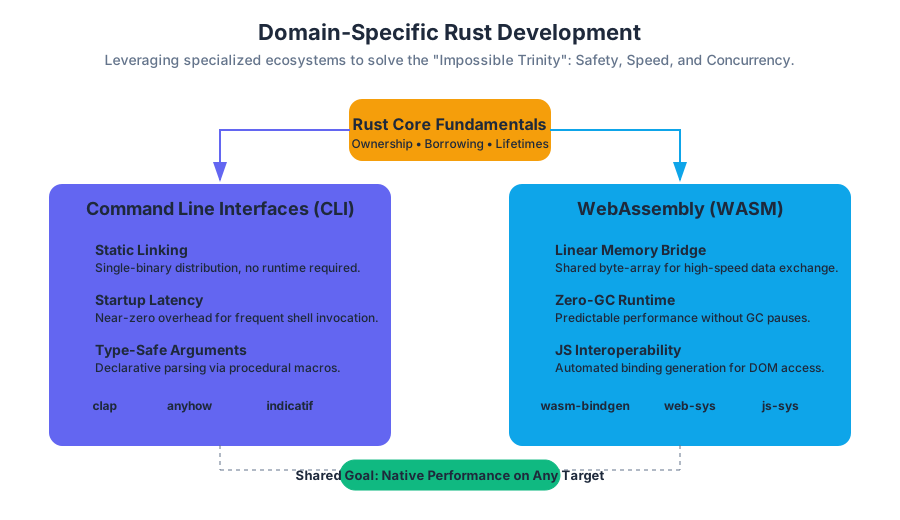
The evolution of Rust from a research project at Mozilla to a cornerstone of modern infrastructure is driven by its unique ability to provide high-level abstractions without sacrificing low-level control. While the language fundamentals—ownership, borrowing, and lifetimes—form the bedrock, the true power of Rust is realized when applied to specific domains. In these specialized environments, Rust addresses the "impossible trinity" of systems programming: safety, speed, and concurrency.
AI_SVGI_SVGomain-specific development in Rust is not merely about using the language; it is about leveraging a specialized ecosystem of crates, compiler targets, and architectural patterns. Whether it is the resource-constrained environment of an ARM Cortex-M microcontroller, the sandboxed execution of a browser’s WebAssembly engine, or the high-throughput requirements of a cloud-native networking stack, Rust provides a tailored approach to solving domain-specific challenges.
Command Line Interfaces (CLI)
The Command Line Interface (CLI) is perhaps the most accessible entry point for domain-specific Rust. Rust has become the preferred language for modernizing the Unix toolchain (e.g., bat replacing cat, fd replacing find).
What it is
A CLI Tool is a program designed to be executed from a shell or terminal, interacting with the user through text-based arguments, flags, and standard I/O streams (stdin, stdout, stderr). In Rust, this involves utilizing the standard library's std::env and std::process modules, often augmented by high-level frameworks.
Why it Matters
Rust is uniquely suited for CLIs for three reasons:
- Static Linking: Rust binaries typically bundle all dependencies, making distribution as simple as moving a single file.
- Startup Latency: Unlike VM-based languages (Java, Python), Rust has near-zero startup overhead, which is critical for tools that are invoked frequently.
- Type-Safe Arguments: Frameworks like
clapturn command-line arguments into strongly-typed Rust structs, catching errors at compile time rather than runtime.
Mechanics and Implementation
The core of a modern Rust CLI is the Declarative Parser. Instead of manually iterating over a vector of strings, developers define the interface as a data structure.
// First code block: Low-level implementation using the 'clap' derive feature
// This demonstrates the mapping of CLI arguments to a type-safe internal struct.

use clap::{Parser, Subcommand};
use std::path::PathBuf;

#[derive(Parser)]
#[command(name = "forge")]
#[command(about = "A high-performance build tool", long_about = None)]
struct Cli {
    /// Optional name to operate on
    name: Option<String>,

    /// Sets a custom config file
    #[arg(short, long, value_name = "FILE")]
    config: Option<PathBuf>,

    /// Turn debugging information on
    #[arg(short, long, action = clap::ArgAction::Count)]
    debug: u8,

    #[command(subcommand)]
    command: Option<Commands>,
}

#[derive(Subcommand)]
enum Commands {
    /// adds things to the configuration
    Add {
        name: Option<String>,
    },
}

fn main() {
    let cli = Cli::parse();

    // Accessing parsed values with full type safety
    if let Some(config_path) = cli.config.as_deref() {
        println!("Value for config: {}", config_path.display());
    }

    match &cli.command {
        Some(Commands::Add { name }) => {
            if let Some(n) = name {
                println!("Adding: {}", n);
            }
        }
        None => {}
    }
}
Comparison of CLI Ecosystem Crates
| Crate | Purpose | Key Strength |
|---|---|---|
clap |
Argument Parsing | Feature-rich, supports derive macros and subcommands. |
anyhow |
Error Handling | Flexible, idiomatic error reporting for applications. |
indicatif |
Progress Reporting | Beautiful progress bars and spinners for long-running tasks. |
confy |
Configuration | Zero-boilerplate config file management (TOML/YAML). |
dialoguer |
Interactive Prompts | Handling user input, passwords, and selections in the terminal. |
Common Pitfalls
- Ignoring
stderr: Beginners often print everything tostdout. In CLI design,stdoutis for data (pipes), whilestderris for logging and errors. - Blocking the Main Thread: For tools performing I/O, failing to handle signals (like
SIGINT) can leave the terminal in a broken state.
WebAssembly (WASM)
WebAssembly represents a paradigm shift for web development, allowing languages other than JavaScript to run in the browser at near-native speeds. Rust is currently the premier language for WASM due to its lack of a heavy runtime or garbage collector.
What it is
WebAssembly (WASM) is a binary instruction format for a stack-based virtual machine. It is designed as a portable compilation target for programming languages, enabling deployment on the web for client and server applications.
In the context of Rust, WASM development involves compiling code to the wasm32-unknown-unknown target and using "glue code" to bridge the gap between Rust’s memory model and the JavaScript engine.
How it Works: The Memory Bridge
Rust and JavaScript do not share a heap. When Rust runs in WASM, it operates within a Linear Memory—a contiguous array of raw bytes. To pass a string from Rust to JS, Rust must write the string into this linear memory and pass the pointer (offset) and length to JS. The wasm-bindgen library automates this tedious and error-prone process.
// Second code block: JavaScript side of the WASM interop
// This shows how a compiled Rust WASM module is instantiated and called.

import init, { greet, compute_heavy_logic } from './pkg/my_rust_lib.js';

async function run() {
    // Initialize the WASM module
    await init();

    // Call a Rust function directly
    // wasm-bindgen handles the conversion of JS strings to Rust UTF-8
    const result = greet("DeepWiki Reader");
    console.log(result);

    // Performance-critical calculation performed in Rust
    const data = new Float64Array([1.5, 2.5, 3.5]);
    const output = compute_heavy_logic(data);
    console.log("Calculated in Rust:", output);
}

run();
WASM vs. Native Execution
| Feature | Native (x86_64/ARM) | WebAssembly (WASM32) |
|---|---|---|
| Instruction Set | Hardware-specific (ISA) | Virtual, platform-independent |
| Memory Access | Direct virtual memory | Sandboxed Linear Memory |
| Standard Library | Full std access |
Restricted (no direct OS/File I/O) |
| Concurrency | OS Threads (pthreads) | Web Workers (shared memory via Atomics) |
| Security | Process-level isolation | Capability-based security model |
AI_DEMOI_DEMO### Variations: WASI
While WASM started in the browser, the WebAssembly System Interface (WASI) extends it to the server. WASI provides a standardized set of syscalls (like fd_read and fd_write), allowing Rust WASM binaries to run on any system with a WASI-compliant runtime (like Wasmtime or Wasmer), effectively acting as a "Docker-lite" for functions.
Embedded Rust
Embedded development involves writing software for microcontrollers—chips with kilobyte-scale RAM and no operating system. Historically dominated by C, this domain is being transformed by Rust’s ability to catch memory errors and race conditions at compile time.
What it is
Embedded Rust refers to the use of the no_std attribute, which informs the compiler that the program will not use the Rust standard library (which requires an OS). Instead, it relies on the core library and hardware-specific crates.
The Hardware Abstraction Hierarchy
Embedded Rust is built on a layered architecture that prevents the "spaghetti code" common in traditional embedded C.
- Peripheral Access Crate (PAC): Auto-generated from SVD files; provides low-level, unsafe access to hardware registers.
- Hardware Abstraction Layer (HAL): Provides type-safe, idiomatic Rust traits for hardware features (e.g.,
Spi,I2c,Gpio). - Board Support Crate (BSC): Maps the HAL to the specific pinout of a development board.
Concrete Example: Register Safety
In C, writing to a register often involves volatile pointers and bitwise masks, which is highly error-prone. In Rust, the PAC provides a "modify" API that ensures you only touch the bits you intend to.
// Third code block: Comparing C vs Rust for register manipulation
// C implementation (Unsafe, easy to flip wrong bits)
#define UART0_BASE 0x4000C000
#define UART_CR_OFFSET 0x30
#define UART_ENABLE (1 << 0)

void enable_uart() {
    uint32_t *cr = (uint32_t *)(UART0_BASE + UART_CR_OFFSET);
    *cr |= UART_ENABLE; // Bitwise OR can be dangerous if not careful
}
// Rust implementation (Type-safe, zero-cost abstraction)
// Using a Peripheral Access Crate (PAC)
pub fn enable_uart(uart: &mut UART0) {
    uart.cr.modify(|_, w| w.en().enabled());
    // The compiler ensures 'en()' is a valid field for the 'cr' register
}
Common Pitfalls: The panic Handler
In a no_std environment, the compiler doesn't know what to do if the program panics (e.g., an out-of-bounds array access). Developers must define a #[panic_handler]. A common mistake is using a handler that loops infinitely, which can make debugging difficult without a hardware debugger (JTAG/SWD).
Networking and Asynchronous I/O
Networking in Rust is synonymous with Asynchronous Programming. Because network I/O is orders of magnitude slower than CPU cycles, Rust uses a non-blocking model to handle thousands of concurrent connections on a single thread.
What it is
Networking in Rust leverages the Future trait and the async/await syntax. Unlike other languages, Rust does not include an asynchronous runtime in the standard library. Developers choose a runtime, with Tokio being the industry standard.
How it Works: The Reactor-Executor Pattern
- The Reactor: Interacts with the OS (using
epoll,kqueue, orIOCP) to register interest in I/O events. - The Executor: Schedules and runs Rust
Futureswhen the Reactor signals that an I/O resource is ready. - The Waker: A mechanism that notifies the Executor that a specific task can make progress.
Implementation: A High-Performance Echo Server
The following example demonstrates a non-blocking TCP server. Note how the tokio::spawn function allows handling multiple clients concurrently without the overhead of OS threads.
// Fourth code block: Asynchronous Networking with Tokio
// This implements a concurrent TCP echo server.

use tokio::net::TcpListener;
use tokio::io::{AsyncReadExt, AsyncWriteExt};

#[tokio::main]
async fn main() -> Result<(), Box<dyn std::error::Error>> {
    let listener = TcpListener::bind("127.0.0.1:8080").await?;
    println!("Server listening on port 8080");

    loop {
        // Asynchronously wait for a new connection
        let (mut socket, addr) = listener.accept().await?;
        println!("New connection from: {}", addr);

        // Spawn a new task for each connection
        // This task is managed by the Tokio executor, not a new OS thread
        tokio::spawn(async move {
            let mut buf = [0; 1024];

            loop {
                let n = match socket.read(&mut buf).await {
                    // socket closed
                    Ok(n) if n == 0 => return,
                    Ok(n) => n,
                    Err(e) => {
                        eprintln!("failed to read from socket; err = {:?}", e);
                        return;
                    }
                };

                // Write the data back
                if let Err(e) = socket.write_all(&buf[0..n]).await {
                    eprintln!("failed to write to socket; err = {:?}", e);
                    return;
                }
            }
        });
    }
}
Networking Framework Comparison
| Framework | Layer | Primary Use Case |
|---|---|---|
| Tokio | Runtime | The foundation for almost all async Rust. |
| Hyper | HTTP | Low-level, fast HTTP/1 and HTTP/2 implementation. |
| Axum | Web Framework | High-level, ergonomic routing built on Tokio/Hyper. |
| Tonic | gRPC | Protocol Buffers and gRPC implementation for microservices. |
| Quinn | QUIC | Implementation of the QUIC transport protocol. |
Pitfalls: Send and Sync in Async
In networking, tasks are often moved between threads by the executor. This requires all data captured by an async block to implement the Send trait. A common error is holding a std::sync::MutexGuard across an .await point, which is not Send and will cause a compilation error. The solution is to use tokio::sync::Mutex.
Synthesis: The Unified Rust Philosophy
Across all these domains, a unified philosophy emerges. Rust provides Zero-Cost Abstractions, meaning that the high-level safety features (like clap's argument parsing or tokio's async tasks) compile down to code that is as efficient as hand-written C.
- Memory Safety without GC: Crucial for Embedded and WASM where memory is scarce.
- Fearless Concurrency: Crucial for Networking where data races are catastrophic.
- Modern Tooling:
cargoprovides a consistent experience whether you are cross-compiling to a RISC-V chip or a browser.
The transition from a general-purpose learner to a domain expert involves mastering the specific "dialects" of these ecosystems—learning when to use no_std, how to optimize WASM binary size, or how to structure an async pipeline for maximum throughput.
AI_STUDY_GUIDEI_STUDY_GUIDE*Key Terms for Review:**
no_std: Attribute for environments without an OS.- Linear Memory: The memory model used by WebAssembly.
- Future: A trait representing a value that may not be available yet.
- PAC/HAL: The layers of hardware abstraction in Embedded Rust.
- Wasm-bindgen: The tool for JS-Rust interoperability.
- Tokio: The de-facto standard asynchronous runtime.
- Clap: The Command Line Argument Parser crate.
Source Materials
Study Learn Rust with AI — Free on Lykke
Sign up for free to generate personalized flashcards, quizzes, and study guides from this course. Chat with an AI tutor that knows the material.
Get Started FreeView this course wiki on Lykke · Browse all public course wikis