From the free course Intro to Python Fundamentals on Lykke
Unit 5: Data Structures - Lists and Sequences
Key concepts: List indexing · Iteration patterns · String immutability · List mutation (append, insert) · The accumulator pattern
Explores how to store and process multiple values using lists and strings.
Unit 5: Data Structures - Lists and Sequences
In the preceding units, we focused on atomic data types—integers, floats, and booleans—which represent single values in isolation. However, computational power is truly realized when we transition from individual data points to sequences. A sequence is an ordered collection of items, allowing us to represent complex structures like a list of temperatures, the characters in a DNA strand, or the pixels in an image.
This unit explores the mechanics of Lists and Strings, the two primary sequence types in Python. We will examine how they are stored in memory, how we can traverse them efficiently, and the fundamental distinction between mutable and immutable data.
1. List Indexing and Memory Architecture
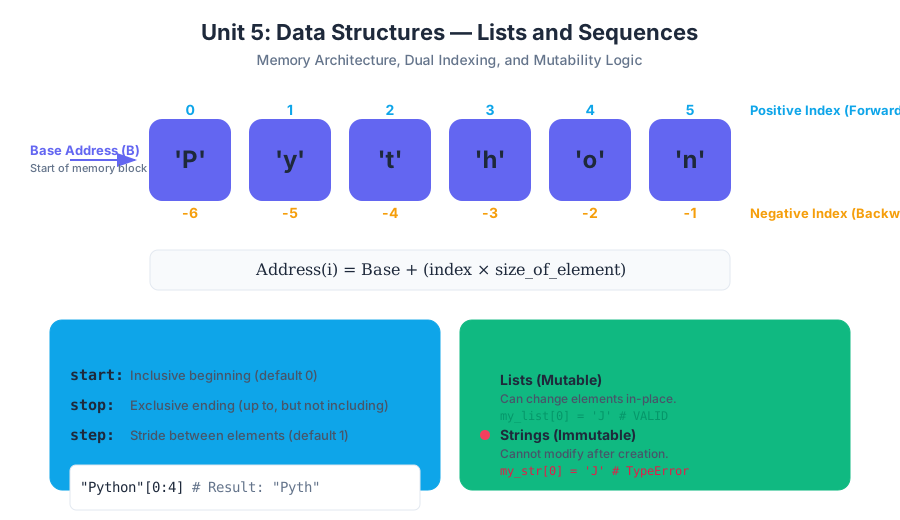
At its core, a list is a contiguous block of memory references. To understand why we access lists the way we do, we must understand the relationship between the index and the physical memory address.
The Zero-Based Indexing Logic
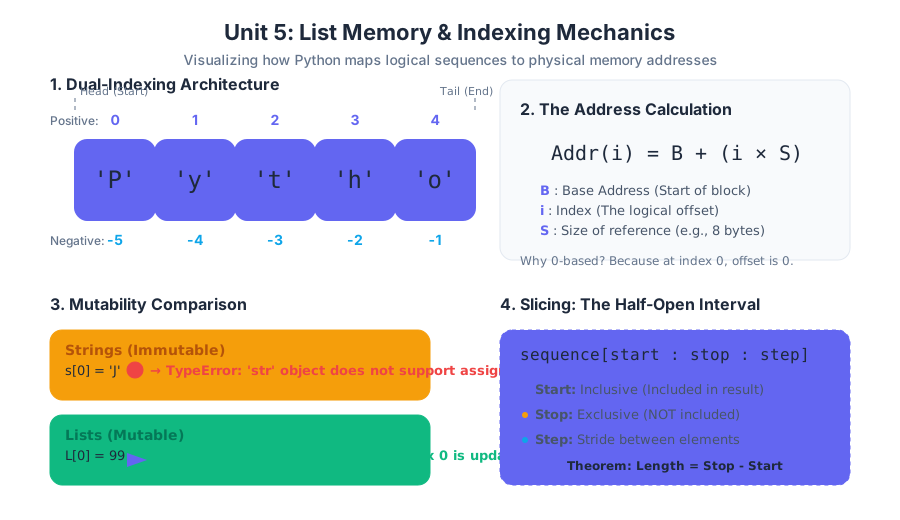
In Python, lists use zero-based indexing. While this can be counterintuitive for beginners, it is rooted in the mathematical definition of an "offset." If a list starts at memory address $B$ (the base address), and each element occupies $S$ bytes, the address of the $i$-th element is calculated as:
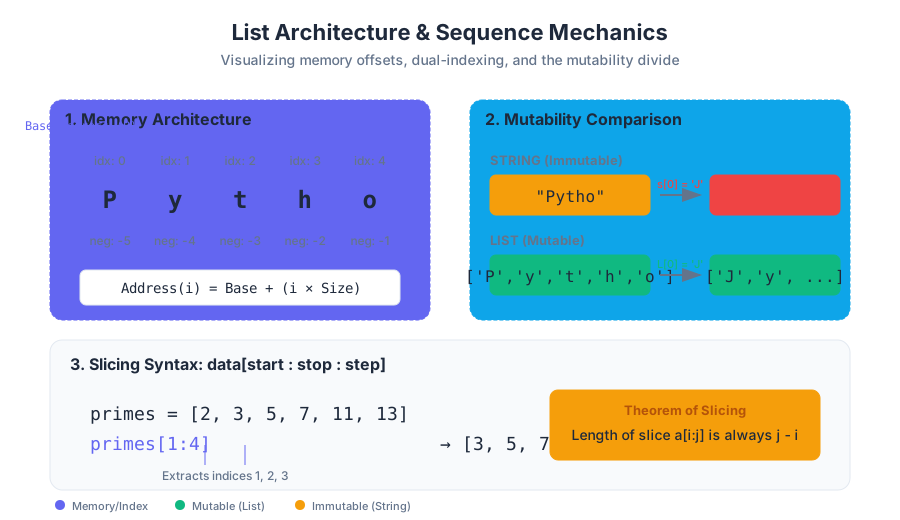
$$\text{Address}(i) = B + (i \times S)$$
By starting at index 0, the first element is located exactly at the base address ($B + 0$).
Positive and Negative Indexing
Python provides a dual-indexing system. Positive indices (0 to $n-1$) track the sequence from the beginning, while negative indices (-1 to $-n$) track it from the end.
| Index (Pos) | Index (Neg) | Element Example | Description |
|---|---|---|---|
0 |
-5 |
'P' |
The "Head" of the sequence |
1 |
-4 |
'y' |
Second element |
2 |
-3 |
't' |
Middle element |
3 |
-2 |
'h' |
Second to last |
4 |
-1 |
'o' |
The "Tail" of the sequence |
Slicing: Extracting Sub-sequences
Slicing allows us to extract a portion of a list using the syntax list[start:stop:step].
- Start: The inclusive beginning index.
- Stop: The exclusive ending index (the slice goes up to, but does not include, this index).
- Step: The interval between elements (default is 1).
Theorem of Slicing: The length of a slice
a[i:j]is always $j - i$, provided both indices are within the bounds of the list. This "half-open interval" design simplifies many algorithmic calculations.
# Implementation: Advanced List Slicing and Manipulation
def rotate_list(data, k):
    """
    Rotates a list to the right by k steps.
    Demonstrates slicing and sequence concatenation.
    """
    if not data:
        return data

    n = len(data)
    k = k % n  # Handle cases where k > n

    # The tail becomes the new head
    # The old head follows the tail
    rotated = data[-k:] + data[:-k]
    return rotated

# Example usage
primes = [2, 3, 5, 7, 11, 13]
print(f"Original: {primes}")
print(f"Rotated by 2: {rotate_list(primes, 2)}")
# Output: [11, 13, 2, 3, 5, 7]
2. Iteration Patterns: Traversing Sequences
Iteration is the process of visiting every element in a sequence exactly once. In Python, we distinguish between element-based iteration and index-based iteration.
Element-based (The for-in loop)
This is the most "Pythonic" way to iterate. It abstracts away the index and provides direct access to the object. Use this when you only care about the values, not their positions.
Index-based (The range(len()) pattern)
Sometimes we need the index to modify the list in place or to compare elements at different positions (e.g., checking if list[i] > list[i-1]).
The enumerate Pattern
To get the best of both worlds, enumerate() provides a counter alongside the element.
| Pattern | Syntax | Best Use Case |
|---|---|---|
| Direct | for item in list: |
Reading values, printing, summing. |
| Indexed | for i in range(len(list)): |
Modifying elements, comparing neighbors. |
| Enumerated | for i, item in enumerate(list): |
When both value and position are needed. |
ALGORITHM: Find Max Element
INPUT: A sequence S of n numbers
OUTPUT: The largest number in S

1.  Set max_val = S[0] (Assume first is largest)
2.  FOR each index i from 1 to n-1:
3.      IF S[i] > max_val THEN:
4.          max_val = S[i]
5.  RETURN max_val

COMPLEXITY: O(n) - We must touch every element once.
3. String Immutability vs. List Mutation
One of the most critical distinctions in computer science is between mutable and immutable objects.
Definition: Immutability: An object is immutable if its state cannot be modified after it is created. In Python,
str,int,float, andtupleare immutable.
The String Constraint
If you have a string s = "Python", you cannot perform s[0] = "J". To "change" a string, you must create an entirely new string in memory and reassign the variable name to it. This has significant performance implications for large-scale text processing.
The List Advantage
Lists are mutable. You can change, add, or remove elements without creating a new list object. This makes lists ideal for dynamic data that changes over time.
| Feature | Strings (str) |
Lists (list) |
|---|---|---|
| Mutability | Immutable | Mutable |
| Homogeneity | Usually characters | Can be heterogeneous (mixed types) |
| Memory | Compact, fixed-size | Over-allocated for growth |
| In-place change | Impossible | Possible via append, pop, etc. |
4. List Mutation Methods: Append, Insert, and Beyond
Mutation allows a list to grow and shrink dynamically. Behind the scenes, Python lists are implemented as dynamic arrays.
append(item)
Adds an item to the end of the list. This is an $O(1)$ (constant time) operation on average because Python over-allocates memory to accommodate future growth.
insert(index, item)
Adds an item at a specific position. This is an $O(n)$ operation because every element to the right of the insertion point must be shifted one position in memory.
pop(index) and remove(value)
pop(): Removes and returns the item at an index (default is the last item).remove(): Searches for the first occurrence of a specific value and deletes it.
# Real-world usage: Simulating a Task Queue via CLI
# We use a list to store tasks and 'pop(0)' to process them (FIFO)

# Theoretical Bash representation of list-like processing:
echo "task1,task2,task3" | tr ',' '\n' | while read task; do
    echo "Processing: $task"
    # This mimics iterating through a sequence and performing an action
done
Mutation Performance Table
| Method | Complexity | Description |
|---|---|---|
l.append(x) |
$O(1)$ | Add to end (Efficient) |
l.pop() |
$O(1)$ | Remove from end (Efficient) |
l.insert(0, x) |
$O(n)$ | Add to front (Expensive - requires shifting) |
l.pop(0) |
$O(n)$ | Remove from front (Expensive) |
l.sort() |
$O(n \log n)$ | Reordering elements |
5. The Accumulator Pattern
The Accumulator Pattern is a fundamental algorithmic template used to transform a sequence into a single result or a new, filtered sequence.
Structure of the Pattern:
- Initialize an accumulator variable (e.g.,
total = 0ornew_list = []). - Iterate through the source sequence.
- Update the accumulator based on some logic or condition.
- Return the final state of the accumulator.
Types of Accumulation:
- Summing/Counting: Reducing a list to a single number.
- Filtering: Creating a sub-list that meets specific criteria.
- Mapping: Creating a new list where every element has been transformed.
# Real-World Usage: Data Sanitization and Transformation
def clean_sensor_data(raw_readings, threshold):
    """
    Uses the Accumulator Pattern to filter out noise (values below threshold)
    and normalize the remaining data.
    """
    # 1. Initialize Accumulator
    cleaned_data = []

    # 2. Iterate
    for reading in raw_readings:
        # 3. Logic/Update
        if reading >= threshold:
            # Normalize reading to a 0-1 scale (assuming max 100)
            normalized = reading / 100.0
            cleaned_data.append(normalized)

    # 4. Return result
    return cleaned_data

# Data from a hypothetical temperature sensor
raw_data = [12, 85, 7, 92, 105, 3, 76]
processed = clean_sensor_data(raw_data, 10)
print(f"Processed Readings: {processed}")
6. Common Pitfalls and Edge Cases
1. Modifying a List While Iterating
One of the most common "senior" mistakes is removing items from a list while looping through it.
- The Problem: When you remove an item, the indices of all subsequent items shift. The loop index continues to increment, causing it to skip the element immediately following the deleted one.
- The Solution: Iterate over a copy of the list (
for x in my_list[:]) or use a list comprehension to create a new filtered list.
2. Shallow vs. Deep Copies
When you assign list_b = list_a, you are not creating a new list; you are creating a new reference to the same list in memory. Changing list_b will change list_a. To create a true independent copy, use list_b = list_a.copy().
3. Off-by-One Errors
Because of zero-based indexing, the last element is always at len(my_list) - 1. Attempting to access my_list[len(my_list)] will trigger an IndexError.
Summary of Unit 5
Lists and sequences represent the first step toward handling "Big Data." By understanding the memory implications of indexing, the constraints of string immutability, and the power of the accumulator pattern, programmers can write code that is not only functional but also efficient. Whether you are building a simple calculator or a complex encryption algorithm, these structures form the bedrock of your data architecture.
Source Materials
Study Intro to Python Fundamentals on Lykke
This course page is free to open: signed out, you can read its first two sections, and signing in, on any plan, opens the rest. The free Lykke Chrome extension syncs your own Canvas courses, so ChatGPT, Claude and Muse can answer from your classes and deadlines. It only reads Canvas.
Add the free extensionSign in to open every sectionAll sections of Intro to Python Fundamentals · Browse more course pages