From the free course Intro to Python Fundamentals on Lykke
Unit 4: Functions and Modularity
Key concepts: Function definitions and parameters · Local and global scope · Return values · Unit testing · Code organization
Teaches how to break down complex code into smaller, reusable, and organized modules.
Unit 4: Functions and Modularity
The Architecture of Abstraction: An Introduction to Modularity
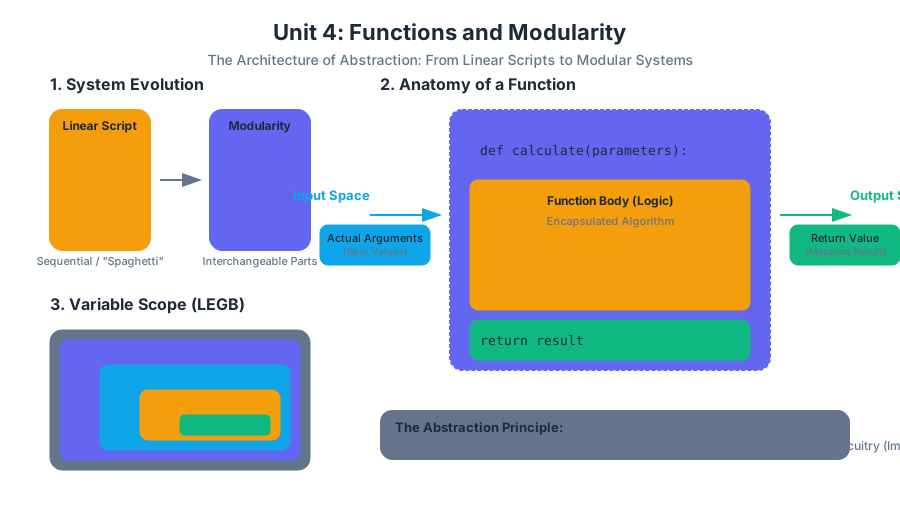
In the early stages of programming, code is often written as a linear script—a single, sequential list of instructions executed from top to bottom. While sufficient for trivial tasks, this "spaghetti" approach fails as complexity scales. Modularity is the engineering principle of breaking a complex system into smaller, self-contained, and interchangeable parts. In computer science, the primary unit of modularity is the function.
A function is a named, reusable block of code that performs a specific action. By encapsulating logic within functions, we achieve abstraction: the ability to use a complex tool without needing to understand its internal mechanics at every moment. This is analogous to a pilot using a cockpit instrument; they need to know the input (altitude) and the output (reading), but not the specific circuitry inside the gauge.
1. Function Definitions and Parameters
At its core, a function is a mapping between an input space and an output space. In Python, we define this mapping using the def keyword, followed by a unique identifier and a set of formal parameters.
1.1 The Anatomy of a Function
A robust function definition consists of the header, the docstring (documentation), the body, and the return statement. The parameters act as placeholders for the data the function requires to operate.
Definition: Formal Parameter vs. Actual Argument A formal parameter is the variable defined in the function signature (the "hole" in the machine). An actual argument is the real value passed into that "hole" during a function call.
1.2 Mechanics of Parameter Passing
Python utilizes a mechanism often called pass-by-object-reference. When you pass an argument to a function, you are passing a reference to the object, not a copy of the object itself. However, whether the original data can be changed depends on whether the object is mutable (like a list) or immutable (like an integer or string).
| Component | Syntax Example | Purpose |
|---|---|---|
| Keyword | def |
Signals the start of a function definition. |
| Identifier | calculate_entropy |
The name used to invoke the function later. |
| Parameters | (data, base=2) |
Variables that receive input values. |
| Docstring | """Computes...""" |
Human-readable explanation of the function's behavior. |
| Body | return -sum(p...) |
The algorithmic logic of the function. |
| Return | return result |
The mechanism for sending data back to the caller. |
1.3 Implementation: Non-Trivial Algorithm
The following example demonstrates a function implementing Simpson's Rule for numerical integration. This is a non-trivial mathematical algorithm that requires modularity to remain readable.
import math

def simpsons_rule(f, a, b, n):
    """
    Approximates the definite integral of f from a to b using Simpson's Rule.

    Parameters:
    f (function): The integrand function to be integrated.
    a (float): Lower bound of integration.
    b (float): Upper bound of integration.
    n (int): Number of sub-intervals (must be even).

    Returns:
    float: The approximated area under the curve.
    """
    if n % 2 != 0:
        raise ValueError("n must be an even integer.")

    h = (b - a) / n
    # Initial sum with the endpoints
    integral_sum = f(a) + f(b)

    for i in range(1, n):
        x_i = a + i * h
        if i % 2 == 0:
            # Even indices are multiplied by 2
            integral_sum += 2 * f(x_i)
        else:
            # Odd indices are multiplied by 4
            integral_sum += 4 * f(x_i)

    return (h / 3) * integral_sum

# Usage: Integrate sin(x) from 0 to Pi
result = simpsons_rule(math.sin, 0, math.pi, 100)
print(f"Approximated Integral: {result}")
2. Return Values and Control Flow
A function without a return value is often called a procedure. While procedures are useful for side effects (like printing to a console or saving a file), pure functions rely on return to pass results back to the calling environment.
2.1 The Return Statement as a Jump
When a return statement is executed, two things happen:
- The expression following
returnis evaluated. - The function's execution terminates immediately, and control is handed back to the point where the function was called.
2.2 Multiple Return Values
While many languages restrict functions to a single return value, Python allows returning multiple values by packing them into a tuple. This is mathematically equivalent to returning a single vector in $\mathbb{R}^n$.
2.3 Mathematical Representation
To understand functions at a theoretical level, we can view them through the lens of Lambda Calculus or set theory.
\text{Let } f: X \to Y \text{ be a function where } X \text{ is the domain and } Y \text{ is the codomain.} \\
\text{In programming, we define } f(x) = y \text{ such that:} \\
\forall x \in \text{Inputs}, \exists! y \in \text{Outputs} \\
\text{The 'return' operation is the mapping } x \mapsto y.
| Return Scenario | Behavior | Example |
|---|---|---|
| Explicit Return | Returns the specified value and exits. | return x + y |
| Implicit Return | Returns None after the last line is executed. |
(No return statement) |
| Early Return | Exits the function based on a conditional check. | if error: return None |
| Multiple Return | Returns a tuple of values. | return lat, lon |
3. Scope: Local vs. Global
Scope refers to the region of a program where a specific variable name is valid and accessible. Understanding scope is critical for preventing "name collisions" and managing memory efficiently.
3.1 The LEGB Rule
Python resolves variable names using the LEGB hierarchy. When you reference a variable, Python looks for it in this specific order:
- Local: Variables defined inside the current function.
- Enclosing: Variables in the local scope of any enclosing functions (relevant in nested functions).
- Global: Variables defined at the top level of the script or module.
- Built-in: Names pre-defined by Python (e.g.,
len,range).
3.2 The Lifetime of a Variable
A variable's lifetime is the duration for which it exists in memory. Local variables are created when the function is called and destroyed when the function returns. This is managed via the Call Stack. Each function call creates a new Stack Frame containing its local variables.
3.3 Scope in Action: A Comparison
To illustrate how scope behaves differently across environments, consider how a shell script manages variables compared to a structured programming language.
#!/bin/bash

# Global variable
APP_STATUS="Running"

check_status() {
    # Local variable (using the 'local' keyword)
    local APP_STATUS="Internal Check"
    echo "Inside function: $APP_STATUS"
}

echo "Before function: $APP_STATUS"
check_status
echo "After function: $APP_STATUS"

# Output:
# Before function: Running
# Inside function: Internal Check
# After function: Running
3.4 Common Pitfall: The Global Keyword
While you can modify a global variable from inside a function using the global keyword, it is generally considered bad practice. It creates hidden dependencies that make the code difficult to test and reason about. A function should ideally be a "black box" that only interacts with the outside world through its parameters and return values.
4. Unit Testing and Debugging
As modularity increases, so does the need for verification. Unit Testing is the practice of testing the smallest "units" of code—functions—in isolation.
4.1 The Philosophy of Testing
The goal of a unit test is to prove that for a specific set of inputs, the function produces the expected output. This provides a "safety net" when refactoring code.
4.2 Test Categories
When designing tests, engineers focus on three types of cases:
- Happy Path: Standard, valid inputs.
- Edge Cases: Inputs at the boundaries of validity (e.g., 0, empty strings, very large numbers).
- Corner Cases: Multiple edge cases occurring simultaneously.
| Test Type | Objective | Example for divide(a, b) |
|---|---|---|
| Positive Test | Verify correct functionality. | divide(10, 2) == 5 |
| Negative Test | Verify error handling. | divide(10, 0) raises ZeroDivisionError |
| Boundary Test | Check limits of data types. | divide(2**31, 1) |
4.3 Implementation: Unit Testing with unittest
The following code demonstrates how to structure formal tests for a function that calculates the Fibonacci sequence.
import unittest

def fibonacci(n):
    """Returns the nth Fibonacci number."""
    if not isinstance(n, int) or n < 0:
        raise ValueError("Input must be a non-negative integer.")
    if n == 0: return 0
    if n == 1: return 1

    a, b = 0, 1
    for _ in range(2, n + 1):
        a, b = b, a + b
    return b

class TestFibonacci(unittest.TestCase):
    def test_standard_values(self):
        self.assertEqual(fibonacci(5), 5)
        self.assertEqual(fibonacci(10), 55)

    def test_base_cases(self):
        self.assertEqual(fibonacci(0), 0)
        self.assertEqual(fibonacci(1), 1)

    def test_negative_input(self):
        with self.assertRaises(ValueError):
            fibonacci(-1)

    def test_type_safety(self):
        with self.assertRaises(ValueError):
            fibonacci("five")

if __name__ == '__main__':
    unittest.main()
5. Modularity and Code Organization
Beyond individual functions, modularity extends to how we organize files and libraries. This is the "Macro" view of Unit 4.
5.1 The DRY Principle
DRY stands for Don't Repeat Yourself. If you find yourself copying and pasting the same five lines of code in three different places, those lines should be encapsulated into a function. This ensures that if the logic needs to change, you only have to change it in one place.
5.2 Separation of Concerns (SoC)
A well-organized program separates different types of logic into different modules:
- Data Layer: Functions for reading/writing data.
- Logic Layer: Functions for processing and calculating.
- Presentation Layer: Functions for displaying results to the user.
5.3 Namespace Management
When importing functions from other modules, Python uses namespaces to prevent name collisions. Using import math creates a math namespace, requiring math.sqrt(). This is safer than from math import *, which dumps all names into the global scope and can lead to "shadowing" (where a library function overwrites your own function).
| Strategy | Syntax | Pros | Cons |
|---|---|---|---|
| Module Import | import math |
Clear origin of functions. | Slightly more typing. |
| Specific Import | from math import pi |
Clean code for specific constants. | Risk of name collision. |
| Aliased Import | import pandas as pd |
Shorthand for frequent use. | Can be confusing for beginners. |
Summary of Best Practices
- Keep functions small: A function should do one thing and do it well (The Single Responsibility Principle).
- Use descriptive names:
calculate_tax_rate()is better thancalc(). - Avoid side effects: A function should ideally not modify global variables or external state unless that is its explicit purpose.
- Document everything: Use docstrings to explain the "what" and "why," even if the "how" seems obvious.
Source Materials
Study Intro to Python Fundamentals on Lykke
This course page is free to open: signed out, you can read its first two sections, and signing in, on any plan, opens the rest. The free Lykke Chrome extension syncs your own Canvas courses, so ChatGPT, Claude and Muse can answer from your classes and deadlines. It only reads Canvas.
Add the free extensionSign in to open every sectionAll sections of Intro to Python Fundamentals · Browse more course pages