From the free course Intro to Python Fundamentals on Lykke
Unit 1: Expressions, Operators, and Output
Key concepts: Arithmetic operators · String Concatenation · The print() Function · Type casting · Program Execution Tracing
Explains how Python manipulates data using operators and displays results via the print function.
Unit 1: Expressions, Operators, and Output
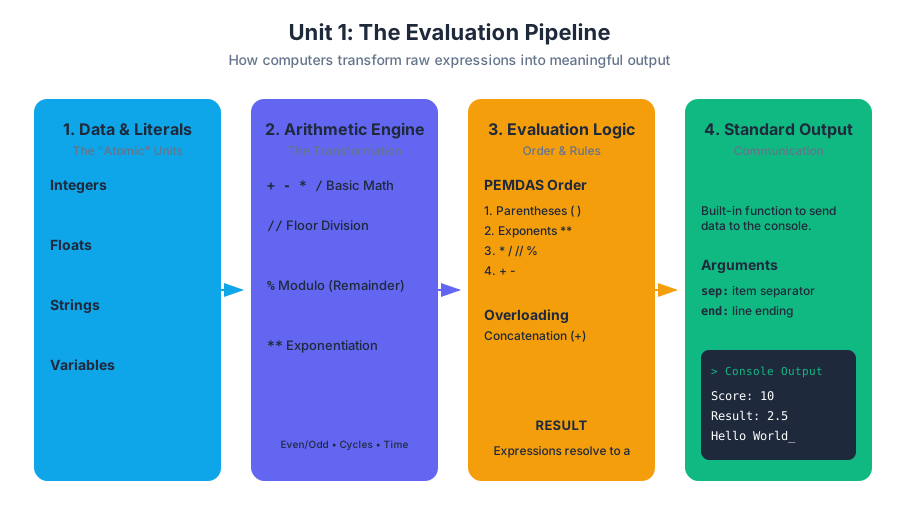
In the study of Computer Science, we begin not with complex algorithms or artificial intelligence, but with the "atomic" units of computation: Expressions and Output. At its core, every program you will ever write is a mechanism for transforming data from one state to another and communicating that state to the outside world. This unit establishes the foundational mental model required to understand how a computer evaluates logic, manages data types, and executes instructions in a linear sequence.
The Nature of Computation: State and Logic
Before diving into syntax, one must understand that a computer is essentially a high-speed calculator with a memory. Computation is the process of taking input, applying a series of expressions to it, and producing an output.
Definition: Expression An expression is a combination of values, variables, and operators that the Python interpreter evaluates to produce a single value. For example,
2 + 3is an expression that evaluates to the value5.
The process of "simplifying" an expression is called evaluation. Unlike human language, which can be ambiguous, programming expressions follow strict mathematical rules. If an expression is syntactically correct, it will always resolve to a single, predictable result.
Arithmetic Operators and Precedence
Arithmetic operators are the symbols that tell the computer which mathematical operation to perform. While most are familiar from basic algebra, their behavior in a programming environment involves nuances regarding data types and "order of operations."
The Primary Operators
Python supports the standard suite of arithmetic operators, categorized by their function:
| Operator | Name | Description | Example | Result |
|---|---|---|---|---|
+ |
Addition | Adds two operands | 10 + 5 |
15 |
- |
Subtraction | Subtracts the right operand from the left | 10 - 5 |
5 |
* |
Multiplication | Multiplies two operands | 10 * 5 |
50 |
/ |
Division | Divides left operand by right (always returns a float) | 10 / 4 |
2.5 |
// |
Floor Division | Divides and rounds down to the nearest integer | 10 // 4 |
2 |
% |
Modulo | Returns the remainder of the division | 10 % 3 |
1 |
** |
Exponentiation | Raises the left operand to the power of the right | 2 ** 3 |
8 |
The Modulo Operator (%)
The Modulo operator is often the most confusing for beginners but is arguably one of the most useful in computer science. It returns the remainder of a division operation.
- Parity Checking:
x % 2 == 0determines if a number is even. - Cyclic Sequences: In a game with 4 players,
turn % 4ensures the turn counter always stays within the range 0–3. - Time Calculations:
total_seconds % 60gives you the remaining seconds after extracting whole minutes.
Operator Precedence (PEMDAS)
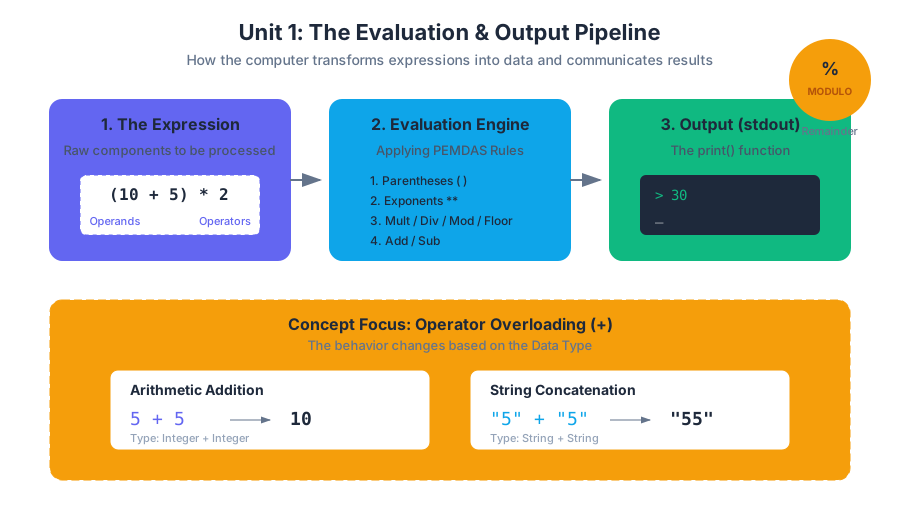
Computers do not read expressions from left to right in a simple sweep. They follow Operator Precedence, which dictates the order in which parts of an expression are evaluated.
- Parentheses
() - Exponentiation
** - Multiplication, Division, Floor Division, Modulo
*,/,//,%(evaluated left-to-right) - Addition, Subtraction
+,-(evaluated left-to-right)
/*
   Low-level implementation perspective:
   In C, we must be wary of integer overflow and the distinction
   between types during arithmetic. This snippet demonstrates
   how a simple modulo-based parity check looks in a systems context.
*/

#include <stdio.h>

int main() {
    int numerator = 17;
    int denominator = 5;

    // Integer division truncates decimals
    int quotient = numerator / denominator;
    // Modulo finds the remainder
    int remainder = numerator % denominator;

    printf("Quotient: %d, Remainder: %d\n", quotient, remainder);

    // Bitwise check for parity (more efficient than modulo at CPU level)
    if ((numerator & 1) == 0) {
        printf("%d is Even\n", numerator);
    } else {
        printf("%d is Odd\n", numerator);
    }

    return 0;
}
String Concatenation: The + Operator Overloaded
In programming, operator overloading occurs when a single symbol has different behaviors depending on the data types (operands) involved. The + symbol is the primary example:
- With Integers/Floats: It performs mathematical addition.
- With Strings: It performs concatenation, which is the process of joining two strings end-to-end.
Formal Definition of Concatenation
Mathematically, if we have two strings $S_1$ and $S_2$ from an alphabet $\Sigma$, the concatenation $S_1 \cdot S_2$ results in a new string containing the characters of $S_1$ followed by $S_2$.
\text{Let } S_1 = \text{"Hello"}, S_2 = \text{"World"}
\\
S_1 + S_2 = \text{"HelloWorld"}
\\
\text{Note: Concatenation is not commutative: } S_1 + S_2 \neq S_2 + S_1
Common Pitfalls in Concatenation
A frequent error is attempting to concatenate a string with a numeric type without conversion.
"Score: " + 10$\rightarrow$ TypeError: can only concatenate str (not "int") to str."5" + "5"$\rightarrow$"55"(String concatenation).5 + 5$\rightarrow$10(Mathematical addition).
The print() Function: Communicating with the User
The print() function is the standard method for sending data to the Console (or stdout). It is a built-in function that takes one or more arguments, converts them to strings, and displays them.
Anatomy of a Print Call
The print() function is more powerful than it appears. It includes optional keyword arguments that control its behavior:
sep: The string inserted between multiple values (default is a space).end: The string printed at the very end of the call (default is a newline\n).
# Realistic usage: Formatting output for a data report
username = "Admin_Alpha"
login_attempts = 3
success_rate = 92.5

# Using f-strings (formatted string literals) for clean output
print(f"--- USER REPORT: {username} ---")
print("Status:", "Active", "Verified", sep=" | ")
print("Attempts:", login_attempts, end=" --> ")
print(f"Success: {success_rate}%")

# Output:
# --- USER REPORT: Admin_Alpha ---
# Status: Active | Verified
# Attempts: 3 --> Success: 92.5%
Type Casting: Changing the "Shape" of Data
Data in Python is strongly typed, meaning the interpreter cares deeply about what "kind" of data a value is. However, Python is also dynamically typed, meaning variables can change types over time. Type Casting is the explicit process of converting a value from one data type to another.
Why Cast?
The most common reason for casting is handling User Input. In Python, the input() function always returns a string. If you ask a user for their age, you receive "25", not 25. To perform math on that age, you must cast it.
Conversion Table
| Target Type | Function | Input Example | Output Example | Note |
|---|---|---|---|---|
| Integer | int() |
"10" |
10 |
Drops decimals if converting from float. |
| Float | float() |
10 |
10.0 |
Adds .0 to integers. |
| String | str() |
100 |
"100" |
Essential for concatenation. |
| Boolean | bool() |
1 |
True |
0, None, and empty strings return False. |
Explicit vs. Implicit Casting
- Implicit (Coercion): Python does this automatically. If you add an
intto afloat(5 + 2.0), Python promotes the integer to a float to avoid losing precision, resulting in7.0. - Explicit: The programmer manually uses functions like
int()orstr().
# Shell script analogy: Type handling in Bash is much looser than Python.
# Everything is essentially a string, and we use 'bc' or '(( ))' for math.

VAR1="10"
VAR2="20"

# String concatenation in Bash
COMBINED="$VAR1$VAR2"
echo "Concatenated: $COMBINED" # Result: 1020

# Arithmetic evaluation (Explicit casting to integer context)
SUM=$((VAR1 + VAR2))
echo "Sum: $SUM" # Result: 30
Program Execution Tracing
Tracing is the mental or physical process of stepping through code line-by-line to track the state of variables and the flow of execution. This is the single most important skill for debugging.
The Trace Table
A trace table tracks the value of every variable after each line of code is executed. Consider the following code:
x = 10
y = 5
x = x + y
y = x * 2
print(x + y)
Step-by-Step Trace
| Line # | Instruction | x value |
y value |
Output |
|---|---|---|---|---|
| 1 | x = 10 |
10 | undefined | - |
| 2 | y = 5 |
10 | 5 | - |
| 3 | x = x + y |
15 | 5 | - |
| 4 | y = x * 2 |
15 | 30 | - |
| 5 | print(x + y) |
15 | 30 | 45 |
The "Mental Model" of the Interpreter
When tracing, you must act as the interpreter. This means:
- Evaluate the right side of an assignment (
=) completely before changing the variable on the left. - Update the State: Once a variable is updated, its old value is gone forever (unless stored elsewhere).
- Sequential Flow: Execution always moves from top to bottom unless a control structure (like a loop or function) redirects it.
Common Pitfalls and Edge Cases
1. Floating Point Imprecision
Computers represent decimal numbers in binary, which can lead to tiny errors in precision.
0.1 + 0.2in Python results in0.30000000000000004.- Lesson: Never use
==to compare two floats; instead, check if the difference between them is very small.
2. Division by Zero
Attempting to divide by zero (using /, //, or %) will trigger a ZeroDivisionError. This is a "runtime error" that crashes the program.
3. String Multiplication
While you cannot add a string and an integer, you can multiply them.
"Echo" * 3results in"EchoEchoEcho".- This is a unique Python feature used for creating visual separators in console apps.
4. The "Input is String" Trap
age = input("Enter age: ")
print(age + 1) # CRASH! age is a string.
Always wrap numeric input: age = int(input("Enter age: ")).
Source Materials
Study Intro to Python Fundamentals on Lykke
This course page is free to open: signed out, you can read its first two sections, and signing in, on any plan, opens the rest. The free Lykke Chrome extension syncs your own Canvas courses, so ChatGPT, Claude and Muse can answer from your classes and deadlines. It only reads Canvas.
Add the free extensionSign in to open every sectionAll sections of Intro to Python Fundamentals · Browse more course pages