From the free course Intro to Python Fundamentals on Lykke
Introduction to Computer Science and Programming
Key concepts: Computer Science vs. Programming · Coding vs. Programming · Python Libraries and Applications · Compilers and Interpreters
Explores the fundamental definitions of computer science and the distinctions between coding and programming.
Introduction to Computer Science and Programming
Computer Science is often misunderstood as the study of computers. In reality, it is the study of computation—the systematic study of algorithmic processes that describe and transform information. While a computer is the primary tool used to execute these processes, the theoretical underpinnings of the field predate modern electronic hardware, tracing back to the mathematical logic of the 19th and early 20th centuries.
Computer Science vs. Programming
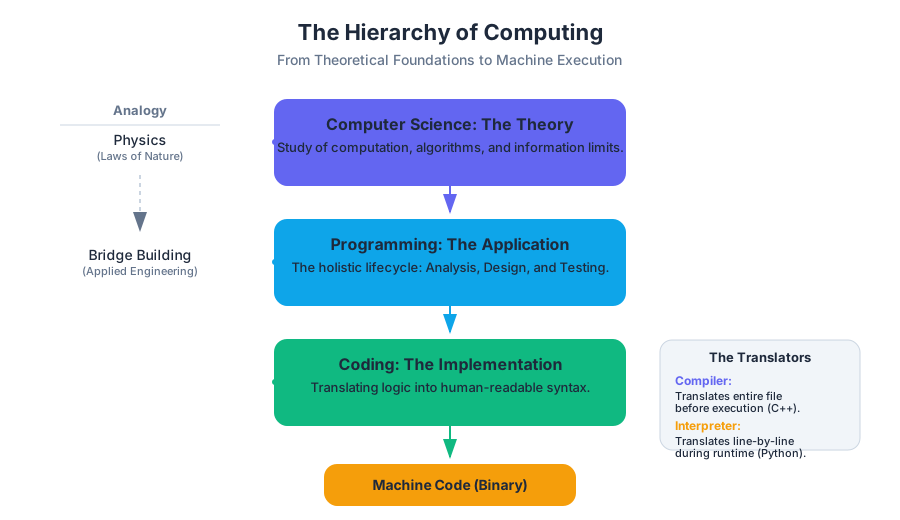
To understand the relationship between Computer Science (CS) and programming, one might look to the relationship between physics and bridge building. Physics provides the fundamental laws of motion, gravity, and material stress; bridge building is the application of those laws to solve a specific problem.
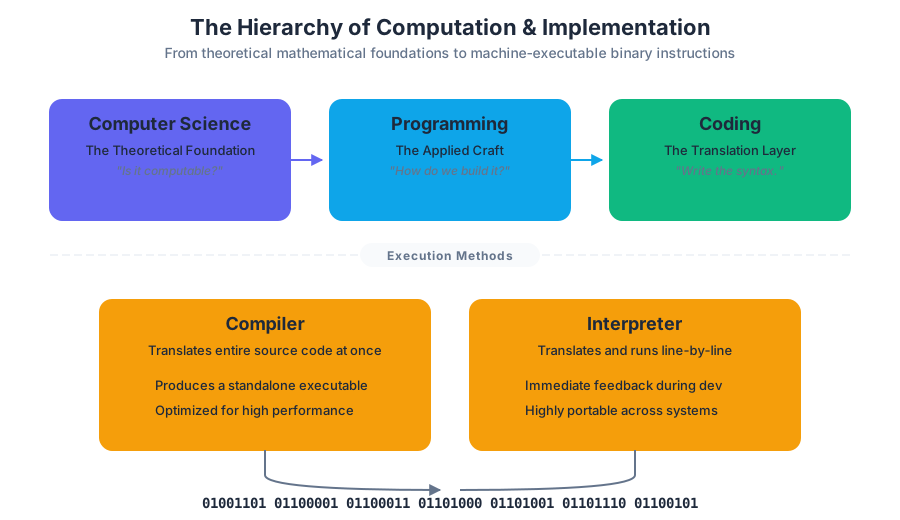
Computer Science: The Theoretical Foundation
Computer Science is a branch of mathematics and engineering that focuses on the theory of computation. It asks fundamental questions: What can be computed? How much time and memory will it take? How can we represent complex data structures efficiently?
Definition: Computer Science is the study of the storage, transformation, and transfer of information. It encompasses the design of algorithms, the architecture of hardware, and the limits of what machines can achieve.
Programming: The Applied Craft
Programming is the act of instructing a computer to perform specific tasks. It is the implementation phase of computer science. A programmer uses the principles discovered by computer scientists to build applications, websites, and systems.
| Feature | Computer Science | Programming |
|---|---|---|
| Primary Goal | Understanding the limits and possibilities of computation. | Solving specific problems and building functional software. |
| Core Activity | Developing proofs, analyzing complexity ($O(n)$), and designing architectures. | Writing code, debugging, and maintaining systems. |
| Key Question | "Is this problem solvable, and what is the most efficient way?" | "How do I implement this feature and ensure it works for the user?" |
| Output | Algorithms, theorems, and architectural patterns. | Executable applications, scripts, and libraries. |
Coding vs. Programming
In modern discourse, the terms coding and programming are frequently used as synonyms. However, in a professional and academic context, they represent different levels of the software development lifecycle.
Coding: The Translation Layer
Coding is the process of translating a set of logic or a specific algorithm into a syntax that a computer can execute. It is a subset of programming. If programming is "writing a novel," coding is the act of "typing the sentences."
Programming: The Holistic Lifecycle
Programming involves a much broader scope. It includes:
- Problem Analysis: Understanding the requirements.
- Algorithm Design: Planning the logic before a single line is written.
- Coding: The actual implementation in a language like Python or C.
- Testing and Debugging: Ensuring the logic holds up under edge cases.
- Maintenance: Updating the code as requirements change.
Low-Level Implementation Example
To illustrate the difference, consider the task of managing memory—a core concern in systems programming. A "coder" might follow a pattern, but a "programmer" understands the underlying memory map.
/*
 * A low-level C implementation of a dynamic array (vector).
 * This demonstrates the "Programming" aspect: managing
 * heap memory, pointers, and growth strategies.
 */

#include <stdio.h>
#include <stdlib.h>

typedef struct {
    int *data;
    size_t size;
    size_t capacity;
} IntVector;

void init_vector(IntVector *v, size_t initial_capacity) {
    v->data = (int *)malloc(initial_capacity * sizeof(int));
    v->size = 0;
    v->capacity = initial_capacity;
}

void push_back(IntVector *v, int value) {
    if (v->size == v->capacity) {
        // Geometric expansion: doubling capacity to achieve O(1) amortized time
        v->capacity *= 2;
        v->data = (int *)realloc(v->data, v->capacity * sizeof(int));
    }
    v->data[v->size++] = value;
}

int main() {
    IntVector myVec;
    init_vector(&myVec, 2);
    push_back(&myVec, 10);
    push_back(&myVec, 20);
    push_back(&myVec, 30); // Triggers realloc

    printf("Vector size: %zu, Capacity: %zu\n", myVec.size, myVec.capacity);
    free(myVec.data);
    return 0;
}
Compilers and Interpreters
Computers do not "understand" Python, Java, or C++. The Central Processing Unit (CPU) only executes Machine Code—a series of binary instructions (1s and 0s) that correspond to physical logic gates. To bridge the gap between human-readable code and machine-executable instructions, we use translators: Compilers and Interpreters.
The Compiler
A Compiler translates the entire source code into a standalone machine-code file (an executable) before the program runs.
- Lexical Analysis: Breaking code into "tokens."
- Parsing: Building an Abstract Syntax Tree (AST) to check for grammatical errors.
- Optimization: Reorganizing logic to run faster.
- Code Generation: Producing the binary file.
The Interpreter
An Interpreter translates and executes the code line-by-line (or block-by-block) at runtime. Python is primarily an interpreted language.
| Feature | Compiler | Interpreter |
|---|---|---|
| Execution | Translates once, runs many times. | Translates and runs simultaneously. |
| Speed | Faster execution (pre-optimized). | Slower execution (translation overhead). |
| Feedback | Errors reported after the whole file is scanned. | Errors reported the moment the line is reached. |
| Portability | Target-specific (e.g., Windows .exe won't run on Mac). | Highly portable (runs anywhere the interpreter is installed). |
Mathematical Derivation of Execution Time
The total time $T$ to run a program can be modeled differently for both systems.
For a Compiler: $$T_{total} = T_{compile} + T_{execute}$$ Since $T_{compile}$ happens only once, for $N$ executions, the average time per run is: $$\frac{T_{compile} + N \cdot T_{execute}}{N} \approx T_{execute} \text{ (as } N \to \infty)$$
For an Interpreter: $$T_{total} = N \cdot (T_{translate_line} + T_{execute_line})$$ The translation overhead is incurred every single time the program runs.
# Pseudocode: The Logic of a Simple Interpreter Loop
# --------------------------------------------------
WHILE program_counter < length_of_source:
    line = fetch_next_line(source_code)
    tokens = tokenize(line)
    syntax_tree = parse(tokens)

    IF syntax_tree.is_valid():
        result = execute_immediate(syntax_tree)
        update_environment_state(result)
    ELSE:
        throw_syntax_error(line_number)
        BREAK
Python: Libraries and Applications
Python has emerged as the premier language for introductory computer science and professional data science due to its "batteries included" philosophy. This refers to the Standard Library and the vast ecosystem of third-party packages.
What is a Library?
A Library is a collection of pre-written code that programmers can use to optimize their workflow. Instead of writing a complex mathematical function from scratch, you "import" a library that has already been tested and optimized by experts.
Major Python Application Domains
Python’s versatility is driven by specific libraries that dominate various industries:
| Domain | Key Libraries | Description |
|---|---|---|
| Data Science | NumPy, Pandas | High-performance array processing and data manipulation. |
| Machine Learning | PyTorch, TensorFlow | Building and training neural networks. |
| Web Development | Django, Flask | Backend frameworks for building scalable websites. |
| Automation | Selenium, BeautifulSoup | Web scraping and browser automation. |
| Scientific Computing | SciPy, Matplotlib | Advanced calculus, signal processing, and 2D/3D visualization. |
Real-World Usage: Data Analysis
The following example demonstrates how a library like pandas abstracts away hundreds of lines of manual file-parsing and calculation logic.
import pandas as pd
import matplotlib.pyplot as plt

# Realistic usage: Analyzing a CSV of global temperatures
def analyze_climate_data(file_path):
    # Load data into a DataFrame (Abstraction of file I/O)
    df = pd.read_csv(file_path)

    # Perform complex filtering and aggregation in two lines
    df['Year'] = pd.to_datetime(df['Date']).dt.year
    yearly_avg = df.groupby('Year')['Temperature'].mean()

    # Visualization (Abstraction of graphics rendering)
    plt.figure(figsize=(10, 5))
    plt.plot(yearly_avg.index, yearly_avg.values, label='Avg Global Temp')
    plt.title("Climate Trends Over Time")
    plt.xlabel("Year")
    plt.ylabel("Temperature (Celsius)")
    plt.legend()
    plt.show()

# Execution would look like:
# analyze_climate_data('global_temps.csv')
Computational Thinking: The Core of the Discipline
Beyond syntax and tools, the most critical skill in Computer Science is Computational Thinking. This is a problem-solving process that involves breaking down complex problems into manageable parts that a computer can solve.
The Four Pillars of Computational Thinking
- Decomposition: Breaking a large problem into smaller, logical sub-problems. (e.g., breaking "Build a Game" into "Player Movement," "Enemy AI," and "Score Tracking").
- Pattern Recognition: Identifying similarities or trends within a problem.
- Abstraction: Focusing on the important information while ignoring irrelevant details.
- Algorithms: Developing a step-by-step solution to the problem.
Worked Example: The Accumulator Pattern
Suppose we want to calculate the sum of all even numbers in a list. This requires an algorithmic approach:
- Initialize a variable
totalto 0 (State). - Look at each number in the list (Iteration).
- Check if the number is divisible by 2 (Conditional Logic).
- If yes, add it to
total(Mutation).
# Example of executing a Python script from the command line
# This shows how the interpreter is invoked in a real environment.

$ python3 --version
Python 3.10.12

$ cat sum_evens.py
numbers = [1, 2, 3, 4, 5, 6, 7, 8, 9, 10]
total = sum(n for n in numbers if n % 2 == 0)
print(f"The sum of evens is: {total}")

$ python3 sum_evens.py
The sum of evens is: 30
Common Pitfalls and Misconceptions
As students transition from "using" technology to "creating" it, several common hurdles emerge:
- The "Magic" Fallacy: Believing the computer "knows" what you mean. Computers are literal. If you have a typo in a variable name, the computer doesn't see a "small mistake"; it sees a completely different entity.
- Syntax vs. Logic: Beginners often spend 90% of their time worrying about where the colons and parentheses go (syntax). However, the most difficult bugs are logical errors, where the code runs perfectly but produces the wrong answer because the algorithm is flawed.
- Python is "Easy": While Python's syntax is readable, the computer science concepts it implements (like Object-Oriented Programming or Recursion) are just as rigorous as in any other language.
Key Insight: Learning to program is not about memorizing commands; it is about learning to think in a way that is structured, logical, and exhaustive.
Source Materials
Study Intro to Python Fundamentals on Lykke
This course page is free to open: signed out, you can read its first two sections, and signing in, on any plan, opens the rest. The free Lykke Chrome extension syncs your own Canvas courses, so ChatGPT, Claude and Muse can answer from your classes and deadlines. It only reads Canvas.
Add the free extensionSign in to open every sectionAll sections of Intro to Python Fundamentals · Browse more course pages