From the free course Intro to Python Fundamentals on Lykke
Curriculum Wrap-up and Practical Design
Key concepts: Practical program design · Problem-solving · Capstone projects · Self-paced learning
A final overview of the course principles and the application of skills through capstone projects.
Curriculum Wrap-up and Practical Design
The transition from understanding syntax to architecting systems represents the most significant hurdle in a developer's journey. While early units in the Python curriculum focus on the "what" (variables, loops, and types), the Curriculum Wrap-up and Practical Design phase focuses on the "how" and "why." This stage, often referred to as the Client Challenge, requires the synthesis of discrete computational concepts into a cohesive, functional whole. It is the move from being a student of a language to a practitioner of software engineering.
The Architecture of Problem Solving
At its core, practical program design is the application of Computational Thinking. This is not merely "thinking like a computer," but rather the process of breaking down complex, often ambiguous real-world problems into a series of steps that a deterministic machine can execute.
Decomposition and Modularity
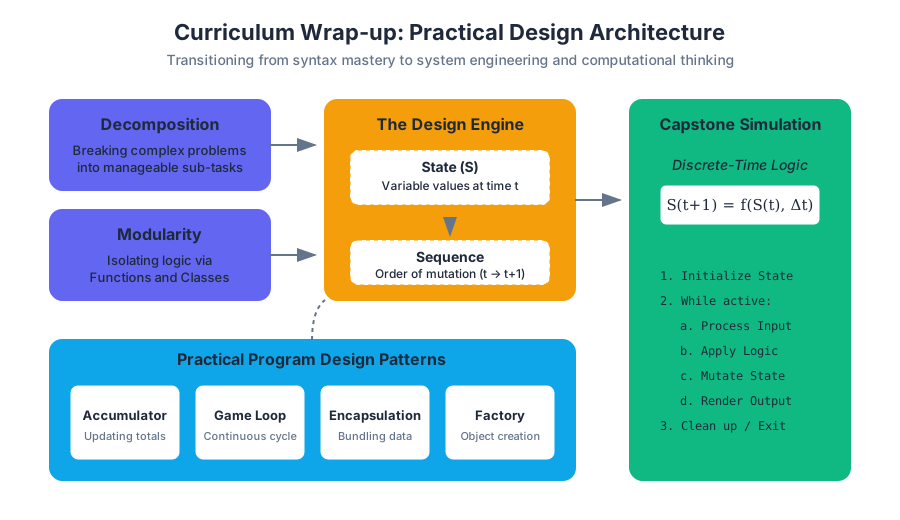
The first step in any capstone project is decomposition: the act of breaking a large system into smaller, manageable sub-problems. In Python, this is primarily achieved through Modularity. By utilizing functions and classes, a developer can isolate logic, making the code easier to test, debug, and maintain.
The Principle of Single Responsibility (SRP): A module, function, or class should have one, and only one, reason to change. In the context of a Python simulation, this means the logic for calculating population growth should be distinct from the logic that renders that data to the console.
Sequence and State
Every program is a management of State over a Sequence of time.
- State is the current value of all variables in a program at a specific moment ($t$).
- Sequence is the order in which operations mutate that state.
In complex simulations, such as modeling population dynamics or economic shifts, managing state transitions becomes the primary challenge. If the state is mutated inconsistently (e.g., updating a list while iterating over it), the program enters an undefined or erroneous state.
Practical Program Design Patterns
When moving to open-ended projects, senior engineers rely on established patterns to avoid "spaghetti code." The following table outlines the primary design patterns introduced in the final curriculum stages.
| Pattern | Description | Primary Use Case | Python Implementation |
|---|---|---|---|
| The Accumulator | Initializing a variable and updating it within a loop. | Summing values, building strings, or filtering lists. | total += value |
| The Game Loop | A continuous while loop that processes input, updates state, and renders output. |
Interactive games and real-time simulations. | while running: update() |
| Encapsulation | Bundling data (attributes) and methods that operate on that data within a class. | Modeling real-world entities (e.g., a "Bank Account" or "Player"). | class Player: |
| The Factory | A function or method dedicated to creating and returning new objects. | Generating NPCs in a game or data points in a simulation. | def create_enemy(): |
Worked Example: The Simulation Engine
To illustrate these concepts, consider a low-level implementation of a biological simulation. This requires managing a collection of objects, iterating through time steps, and handling state mutations based on conditional logic.
import random

class Organism:
    """Represents a single entity in the simulation with state and behavior."""
    def __init__(self, species, energy):
        self.species = species
        self.energy = energy
        self.is_alive = True

    def consume(self, amount):
        """Mutates state based on external input."""
        self.energy += amount
        print(f"{self.species} consumed {amount} units. Energy: {self.energy}")

    def age(self, decay_rate):
        """Simulates the passage of time on the entity's state."""
        self.energy -= decay_rate
        if self.energy <= 0:
            self.is_alive = False

class Environment:
    """Manages the collection of organisms and the simulation loop."""
    def __init__(self, initial_pop):
        self.population = [Organism("Type-A", random.randint(10, 20)) for _ in range(initial_pop)]
        self.cycle_count = 0

    def run_cycle(self):
        """The core simulation logic (Sequence and State mutation)."""
        self.cycle_count += 1
        print(f"--- Cycle {self.cycle_count} ---")

        # Use a list comprehension to filter state (The Filter Pattern)
        self.population = [org for org in self.population if org.is_alive]

        for org in self.population:
            org.consume(random.randint(0, 5))
            org.age(decay_rate=3)

        return len(self.population) > 0

# Execution logic
sim = Environment(5)
active = True
while active:
    active = sim.run_cycle()
Algorithmic Logic and Control Flow
The "Client Challenge" often involves designing algorithms that simulate phenomena. This requires a deep understanding of Selection (if-else) and Iteration (loops).
Discrete-Time Simulations
In a simulation, we represent continuous time as a series of discrete "ticks." Mathematically, we can express the state of a system $S$ at time $t+1$ as a function of its state at time $t$:
$$S_{t+1} = f(S_t, \Delta t)$$
Where $f$ is the algorithm containing our conditional logic and arithmetic operators.
ALGORITHM: Population_Simulation
INPUT: initial_population, growth_rate, carrying_capacity, steps
OUTPUT: population_history

1. SET current_pop = initial_population
2. SET history = [current_pop]
3. FOR each step from 1 to steps:
    a. CALCULATE growth = current_pop * growth_rate * (1 - current_pop / carrying_capacity)
    b. UPDATE current_pop = current_pop + growth
    c. IF current_pop < 0 THEN SET current_pop = 0
    d. APPEND current_pop TO history
4. RETURN history
Common Mistakes in Loop Design
- Infinite Loops: Failing to update the control variable in a
whileloop, causing the program to hang. - Off-by-One Errors: Misunderstanding the
range(start, stop)function, wherestopis exclusive. - Mutation During Iteration: Modifying a list (adding/removing items) while iterating over it with a
forloop, which leads to skipped elements.
Data Structure Selection
A critical component of practical design is choosing the right tool for the job. In Python, the choice between a List and a Dictionary (or a custom Class) dictates the efficiency and readability of the solution.
| Feature | List ([]) |
Dictionary ({}) |
Class (class) |
|---|---|---|---|
| Access Method | Index (Integer) | Key (Hashable) | Attribute (Name) |
| Order | Preserved | Preserved (Python 3.7+) | N/A |
| Best For | Ordered sequences, stacks, queues. | Lookups, mapping unique keys to values. | Complex entities with state and behavior. |
| Complexity (Access) | $O(1)$ for index, $O(n)$ for value. | $O(1)$ average case. | $O(1)$ for attribute access. |
The Accumulator Pattern with Dictionaries
When processing large datasets (e.g., a list of words in a book), the dictionary is the most efficient structure for counting occurrences.
# Real-world usage: Frequency Analysis
data_stream = ["apple", "banana", "apple", "orange", "banana", "apple"]
frequency_map = {}

for item in data_stream:
    # The 'get' method allows for a default value if the key doesn't exist
    frequency_map[item] = frequency_map.get(item, 0) + 1

print(f"Final Counts: {frequency_map}")
Capstone Project Framework: From Concept to Code
The final units of the curriculum culminate in Capstone Projects. These are open-ended challenges that mirror real-world software requirements. Whether building a text-based adventure game or a data visualization tool, the workflow remains consistent.
Step 1: Requirements Gathering
Define what the program must do. For a "Client Challenge," this often involves interpreting a prompt like: "Create a system that tracks student grades and identifies those at risk of failing."
Step 2: System Design (The Blueprint)
Before writing code, map out the data structures and functions.
- Data: Will I use a list of dictionaries or a list of objects?
- Logic: What functions are needed?
calculate_average(),add_student(),generate_report().
Step 3: Implementation (The Build)
Start with a Minimum Viable Product (MVP). Get the core loop running before adding "polish" like fancy formatting or complex error handling.
Step 4: Testing and Debugging
Testing is the process of verifying that the code behaves as expected under various conditions, including "edge cases" (inputs at the extreme ends of the valid range).
Debugging and Defensive Programming
Errors are an inevitable part of the design process. Professional developers categorize these into three types:
- Syntax Errors: The "grammar" of the code is wrong (e.g., missing a colon). The program won't run at all.
- Runtime Errors: The code is valid, but something impossible happens during execution (e.g.,
ZeroDivisionErrororIndexError). - Logic Errors: The program runs without crashing, but the output is incorrect. These are the hardest to find.
Defensive Programming with Try-Except
To build robust applications, developers use Exception Handling to catch potential runtime errors before they crash the program.
# Example: Setting up a project environment for a Capstone
mkdir my_python_project
cd my_python_project
python3 -m venv venv
source venv/bin/activate  # On Windows: venv\Scripts\activate
pip install requests      # Example of adding external capabilities
touch main.py
Unit Testing Logic
Using the assert statement or the unittest library allows developers to automate the verification of their logic.
def calculate_tax(price, rate):
    if price < 0 or rate < 0:
        raise ValueError("Price and rate must be non-negative")
    return round(price * rate, 2)

# Unit Test Cases
def test_calculate_tax():
    # Standard case
    assert calculate_tax(100, 0.05) == 5.0
    # Edge case: Zero
    assert calculate_tax(0, 0.05) == 0.0
    # Edge case: Rounding
    assert calculate_tax(10.99, 0.07) == 0.77
    print("All tests passed!")

try:
    test_calculate_tax()
except AssertionError:
    print("Logic Error detected in calculate_tax")
except ValueError as e:
    print(f"Validation Error: {e}")
Self-Paced Learning and Resource Management
The final stage of the curriculum is not just about finishing the code; it's about learning how to learn. In a self-paced environment, the ability to utilize resources is a core competency.
- Solution Keys: Used not for copying, but for reverse-engineering. If a learner is stuck, they should look at the solution, understand the logic, and then attempt to implement it from scratch without looking.
- Quickstart Guides: These provide the "scaffolding" for projects, allowing learners to focus on the logic rather than the boilerplate code.
- Documentation: Learning to read the official Python documentation (docs.python.org) is the "graduation" point for any beginner.
Theorem of Independent Problem Solving: The growth of a programmer is directly proportional to the time spent in the "struggle phase"—the period between identifying a bug and finding its solution without external intervention.
Conclusion: The Path Forward
The "Curriculum Wrap-up" marks the end of guided instruction and the beginning of independent engineering. By mastering the synthesis of variables, logic, loops, and objects, the learner has transitioned from understanding how a computer works to knowing how to make a computer work for them. The final capstone projects are not just assignments; they are the first entries in a professional portfolio.
Source Materials
Study Intro to Python Fundamentals on Lykke
This course page is free to open: signed out, you can read its first two sections, and signing in, on any plan, opens the rest. The free Lykke Chrome extension syncs your own Canvas courses, so ChatGPT, Claude and Muse can answer from your classes and deadlines. It only reads Canvas.
Add the free extensionSign in to open every sectionAll sections of Intro to Python Fundamentals · Browse more course pages