From the free course Information Systems - A Manager's Guide to Harnessing Technology on Lykke
Internet and Telecommunications
Key concepts: Internet Infrastructure · Internet Protocols (TCP/IP) · Last Mile Connectivity · Data Transmission
A foundational guide to how the internet works, including infrastructure, protocols, and the challenges of connectivity.
Internet and Telecommunications: The Global Nervous System
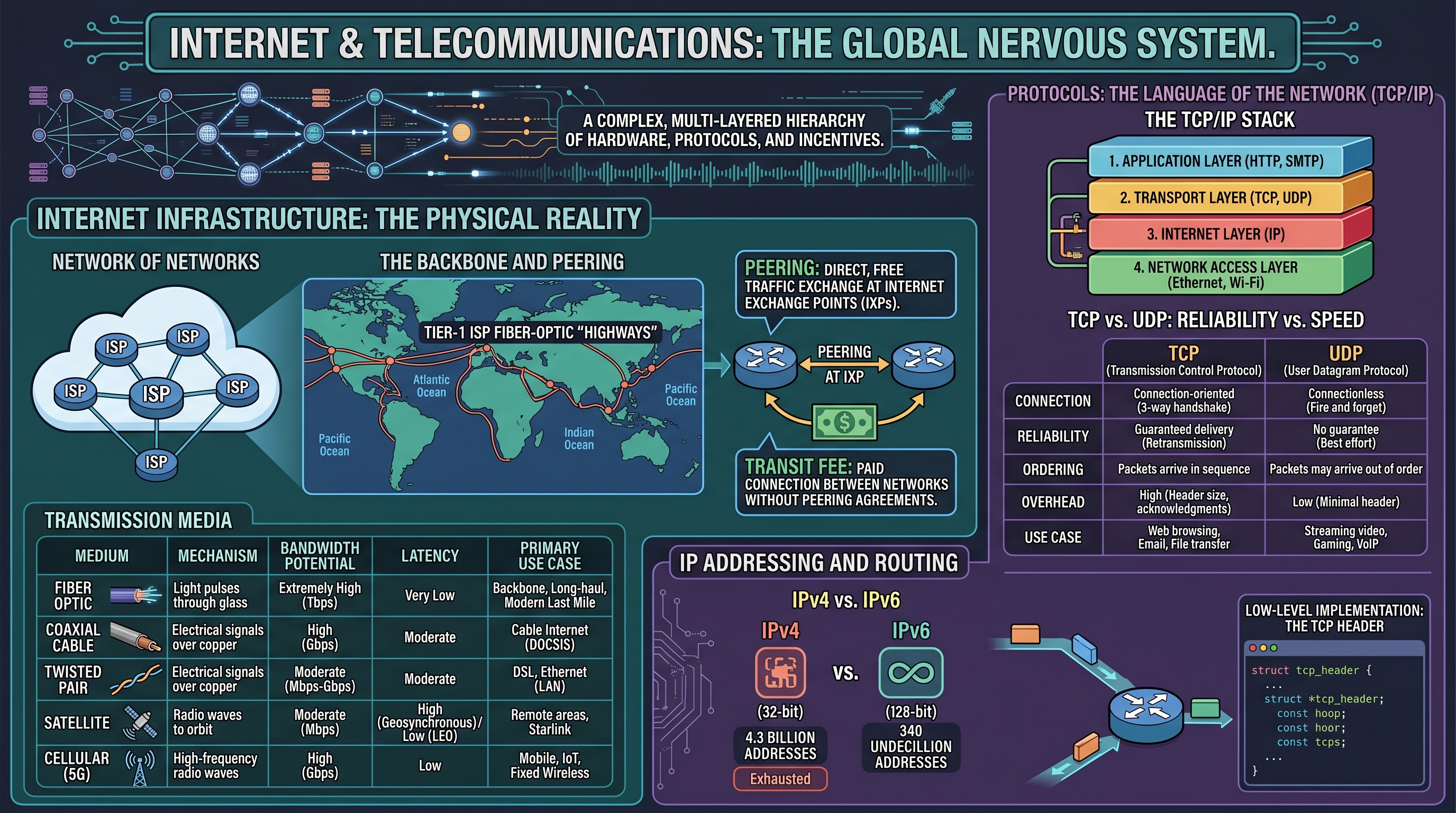
The modern enterprise does not exist in a vacuum; it exists as a node within a global, distributed architecture. To the casual observer, the Internet is a seamless "cloud" of information. To the engineer and the informed manager, it is a complex, multi-layered hierarchy of physical hardware, logical protocols, and economic incentives. Understanding this "plumbing" is critical because every strategic move—from Zara’s real-time inventory updates to Netflix’s transition from "atoms to bits"—is constrained or enabled by the underlying telecommunications infrastructure.
Internet Infrastructure: The Physical Reality
The Internet is often described as a "network of networks." It is not a single entity owned by one organization but a collaborative federation of Internet Service Providers (ISPs), content providers, and backbone operators.
The Backbone and Peering
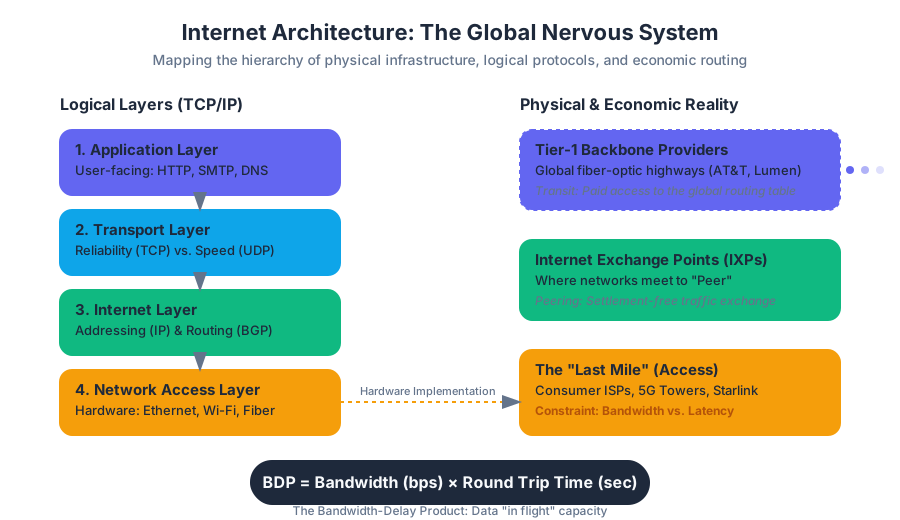
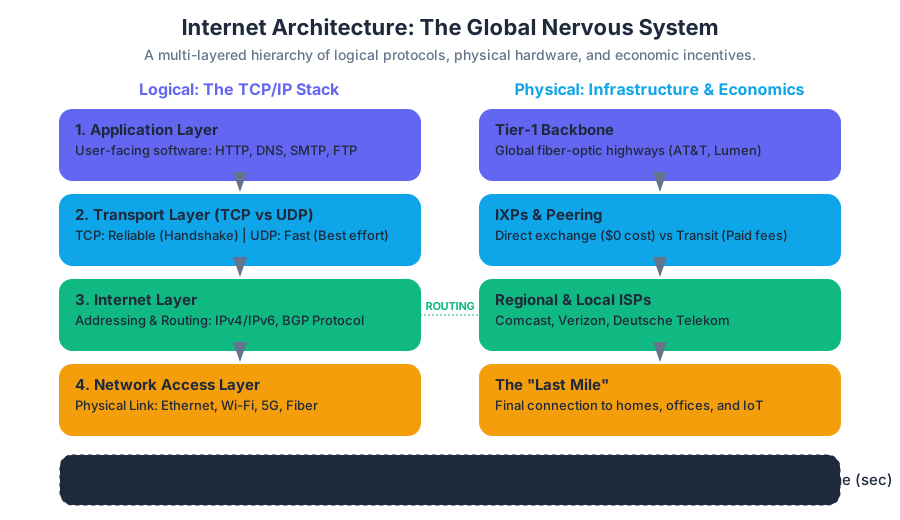
At the highest level, the Internet consists of Tier-1 ISPs (such as AT&T, Lumen, and Deutsche Telekom). These providers own the massive fiber-optic "highways" that span continents and oceans.
Definition: Peering Peering is a business relationship whereby two networks connect and exchange traffic directly without charging each other. This occurs at Internet Exchange Points (IXPs), which are physical locations where different ISPs connect their routers to facilitate data exchange.
When traffic moves between networks that do not have a peering agreement, they must pay a transit fee to a higher-tier provider. This economic reality dictates how data is routed across the globe; routers are programmed not just for the fastest path, but for the most cost-effective one.
Transmission Media
The speed and reliability of the infrastructure depend on the physical medium used to carry signals.
| Medium | Mechanism | Bandwidth Potential | Latency | Primary Use Case |
|---|---|---|---|---|
| Fiber Optic | Light pulses through glass | Extremely High (Tbps) | Very Low | Backbone, Long-haul, Modern Last Mile |
| Coaxial Cable | Electrical signals over copper | High (Gbps) | Moderate | Cable Internet (DOCSIS) |
| Twisted Pair | Electrical signals over copper | Moderate (Mbps-Gbps) | Moderate | DSL, Ethernet (LAN) |
| Satellite | Radio waves to orbit | Moderate (Mbps) | High (Geosynchronous) / Low (LEO) | Remote areas, Starlink |
| Cellular (5G) | High-frequency radio waves | High (Gbps) | Low | Mobile, IoT, Fixed Wireless |
Protocols: The Language of the Network (TCP/IP)
For disparate hardware to communicate, they must agree on a set of rules, or protocols. The Internet runs on the TCP/IP Protocol Suite, a four-layer model that abstracts the complexity of data transmission.
The TCP/IP Stack
- Application Layer: Where user-facing software lives (HTTP for web, SMTP for email).
- Transport Layer: Handles end-to-end communication, error checking, and flow control (TCP vs. UDP).
- Internet Layer: Handles the addressing and routing of packets (IP).
- Network Access Layer: The physical hardware and data link (Ethernet, Wi-Fi).
TCP vs. UDP: Reliability vs. Speed
The choice between Transmission Control Protocol (TCP) and User Datagram Protocol (UDP) is a fundamental engineering trade-off.
| Feature | TCP (Transmission Control Protocol) | UDP (User Datagram Protocol) |
|---|---|---|
| Connection | Connection-oriented (3-way handshake) | Connectionless (Fire and forget) |
| Reliability | Guaranteed delivery (Retransmission) | No guarantee (Best effort) |
| Ordering | Packets arrive in sequence | Packets may arrive out of order |
| Overhead | High (Header size, acknowledgments) | Low (Minimal header) |
| Use Case | Web browsing, Email, File transfer | Streaming video, Gaming, VoIP |
The TCP Header
To understand the "cost" of reliability, we look at the structure of a TCP segment in C.
IP Addressing and Routing
If TCP is the "envelope" and the "clerk" ensuring delivery, the Internet Protocol (IP) is the "addressing system."
IPv4 vs. IPv6
The world has largely exhausted the 4.3 billion addresses provided by IPv4 (32-bit). This led to the development of IPv6 (128-bit), which provides $2^{128}$ addresses—enough to assign an IP to every atom on the surface of the Earth.
The Routing Algorithm
Routers use the Border Gateway Protocol (BGP) to determine the path a packet should take. This is not a static path; it is dynamic. If a fiber line is cut in the Atlantic, BGP automatically reroutes traffic through the Pacific or across Europe.
Mathematical Foundation: Throughput and Latency
The performance of a network is defined by the relationship between Bandwidth (width of the pipe) and Latency (length of the pipe).
The Bandwidth-Delay Product (BDP) The BDP determines the maximum amount of data that can be "in flight" on the network at any given time. $$BDP = \text{Bandwidth (bits/sec)} \times \text{Round Trip Time (sec)}$$
If a manager upgrades bandwidth but ignores latency (e.g., switching to a high-bandwidth but high-latency satellite link), the perceived performance for interactive applications will not improve.
TCP Congestion Control (AIMD Algorithm)
---------------------------------------
1. Start: cwnd (congestion window) = 1 MSS (Maximum Segment Size)
2. Slow Start: For every ACK received, cwnd = cwnd * 2
3. Congestion Avoidance: If cwnd > ssthresh, cwnd = cwnd + 1 per RTT
4. On Packet Loss:
   - ssthresh = cwnd / 2
   - cwnd = 1 (for Timeout) OR cwnd / 2 (for Triple Duplicate ACK)
The Domain Name System (DNS): The Internet's Phonebook
Humans are poor at remembering IP addresses like 172.217.16.142, but excellent at remembering google.com. DNS is a distributed, hierarchical database that maps human-readable names to IP addresses.
The DNS Hierarchy
- Root Servers: The top of the tree (13 logical sets globally).
- Top-Level Domain (TLD) Servers: Manage
.com,.org,.edu, etc. - Authoritative Name Servers: The final authority for a specific domain (e.g., Zara's own DNS servers).
Last Mile Connectivity: The Bottleneck
The Last Mile refers to the final leg of the network that connects the ISP to the end-user. This is historically the most expensive and slowest part of the Internet infrastructure because it requires physical "trenching" or wiring to individual homes and businesses.
The Technologies of the Last Mile
- DSL (Digital Subscriber Line): Uses existing copper telephone lines. Performance degrades rapidly with distance from the central office.
- Cable (DOCSIS): Uses coaxial cable. Bandwidth is shared among neighbors, leading to slowdowns during "peak hours."
- FTTH (Fiber to the Home): The gold standard. Provides symmetrical speeds (same upload as download) and massive scalability.
- Fixed Wireless / 5G: Bypasses the need for physical wires by using high-frequency radio. Sensitive to "line of sight" obstructions.
| Technology | Typical Download | Typical Upload | Key Constraint |
|---|---|---|---|
| DSL | 5 - 100 Mbps | 1 - 20 Mbps | Distance to CO |
| Cable | 100 - 1000 Mbps | 10 - 50 Mbps | Neighborhood Congestion |
| Fiber | 1000 - 5000 Mbps | 1000 - 5000 Mbps | Infrastructure Cost |
| Starlink | 50 - 200 Mbps | 10 - 30 Mbps | Weather/Obstructions |
Data Transmission Mechanics: How "Bits" Move
Data does not travel as a continuous stream but as discrete packets.
Packet Switching vs. Circuit Switching
- Circuit Switching (Old Phone System): A dedicated physical path is opened between two points for the duration of the call. It is inefficient because if no one speaks, the capacity is wasted.
- Packet Switching (The Internet): Data is chopped into small packets, each containing the destination address. Packets from different users can share the same wire simultaneously (Multiplexing).
The Anatomy of a Request
When a user clicks a link on Netflix, a complex sequence occurs:
- DNS Lookup: Find the IP of the server.
- TCP Handshake: Establish a reliable connection.
- TLS Handshake: Encrypt the connection for security.
- HTTP Request: "GET /movie/12345".
- Packetization: The server breaks the movie file into thousands of packets.
- Routing: Packets travel different paths across the backbone.
- Reassembly: The user's device puts the packets back in order using TCP sequence numbers.
Managerial Implications: Strategic Connectivity
For a manager, these technical details translate into strategic risks and opportunities.
1. The "Atoms to Bits" Transition
Netflix’s success was predicated on the timing of Moore’s Law and the rollout of high-speed Last Mile connectivity. If they had launched streaming in 1998, the infrastructure would have failed them. Managers must assess if the current "plumbing" can support their digital ambitions.
2. Net Neutrality
The principle that all Internet traffic should be treated equally. If ISPs are allowed to create "fast lanes," companies like Netflix or Zara might have to pay extra to ensure their sites load quickly, creating a barrier to entry for smaller competitors.
3. Content Delivery Networks (CDNs)
To bypass the congestion of the public Internet, large firms use CDNs (like Akamai or Cloudflare). By placing servers in IXPs or even inside the ISP’s own data centers, they "shorten" the distance data travels, reducing latency and improving the user experience.
4. The "Death of Distance" Myth
While the Internet makes global communication possible, physical distance still matters. Latency is limited by the speed of light. A financial trading firm in New York will always have an advantage over one in London when trading on the NYSE, simply because the light pulses take ~30ms to cross the Atlantic.
Key Insight: The Fallacy of Infinite Bandwidth Managers often assume that buying more bandwidth solves all problems. However, for real-time applications (Video conferencing, Remote surgery, Cloud gaming), Latency and Jitter (variation in latency) are more critical than raw throughput.
Common Pitfalls and Misconceptions
- Confusing the Internet with the World Wide Web: The Internet is the infrastructure (the tracks); the Web is one application that runs on top of it (the train). Other applications include email, VoIP, and file sharing.
- Ignoring Upload Speeds: Many business processes (Cloud backups, Video broadcasting) require high upload speeds. Most residential "Last Mile" connections are asymmetric, offering 1000Mbps down but only 20Mbps up.
- Overestimating 5G: While 5G offers high speeds, its high-frequency signals (mmWave) cannot penetrate walls or even heavy rain effectively, making it a complement to, rather than a replacement for, fiber.
Source Materials
- 12: A Manager’s Guide to the Internet and Telecommunications
- 11: The Data Asset- Databases, Business Intelligence, and Competitive Advantage
- 7: Peer Production, Social Media, and Web 2.0
- 8: Facebook- Building a Business from the Social Graph
- 14: Google- Search, Online Advertising, and Beyond
- Front Matter
- 1: Setting the Stage- Technology and the Modern Enterprise
- 2: Strategy and Technology- Concepts and Frameworks for Understanding What Separates Winners from Losers
Study Information Systems - A Manager's Guide to Harnessing Technology on Lykke
This course page is free to open: signed out, you can read its first two sections, and signing in, on any plan, opens the rest. The free Lykke Chrome extension syncs your own Canvas courses, so ChatGPT, Claude and Muse can answer from your classes and deadlines. It only reads Canvas.
Add the free extensionSign in to open every sectionAll sections of Information Systems - A Manager's Guide to Harnessing Technology · Browse more course pages