From the free course AI FDE on Lykke
Security and Governance
Key concepts: User Identity and Permissions · Tool Approval System · Audit Logging · Governance Controls
A deep dive into how AI FDE maintains security through user identity, permissions, and audit logging.
Security and Governance
In the architectural paradigm of the AI Forward Deployed Engineer (AI FDE), security is not a peripheral layer but a foundational constraint. As an interactive agent operating within the Palantir Foundry ecosystem, the AI FDE possesses the capability to perform complex data transformations, edit ontologies, and manage resources. Without a robust governance framework, such an agent could inadvertently breach data silos or execute destructive operations.
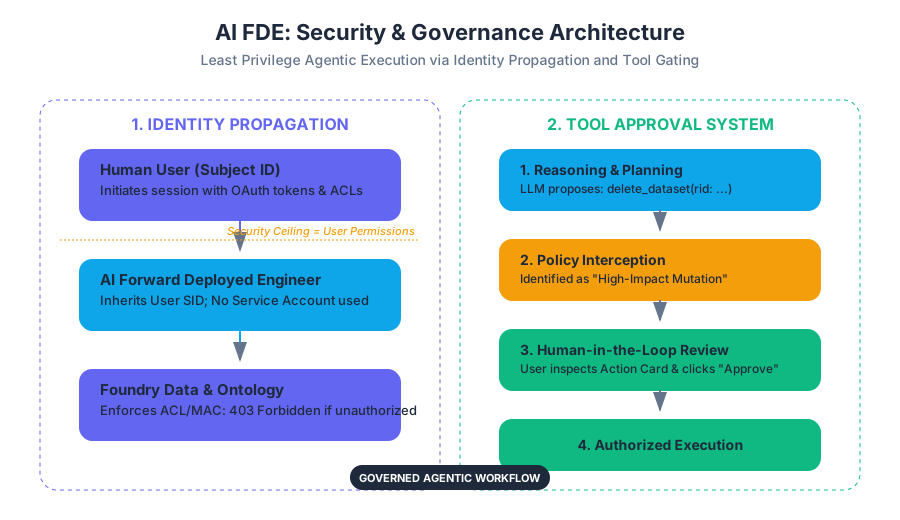
The security architecture of AI FDE is predicated on the principle of Least Privilege Agentic Execution. This ensures that the agent’s operational ceiling is exactly equal to—and never greater than—the permissions of the human user initiating the session. By strictly adhering to the user's existing security context, AI FDE transforms from a potential liability into a governed, transparent extension of human intent.
AI_SVGI_SVG## User Identity and Permissions
The core differentiator of AI FDE compared to traditional automation bots or "black-box" AI services is its reliance on Identity Propagation. In many enterprise AI implementations, an agent operates via a high-privilege "Service Account" that has broad access to backend databases. This creates a "security blind spot" where the system cannot easily distinguish between a legitimate user request and an unauthorized agent action.
What it is
AI FDE operates entirely within the user's existing Foundry Session. It utilizes the user’s specific OAuth tokens and security descriptors to interact with the Foundry API.
Definition: Identity Propagation The mechanism by which a user's security credentials and permissions are passed through an intermediary agent (the AI FDE) to downstream services, ensuring that the agent's actions are restricted by the same Access Control Lists (ACLs) and Mandatory Access Controls (MACs) as the user.
Why it matters
In high-stakes environments—such as healthcare, defense, or finance—data is often siloed by sensitivity levels. If an AI agent used a service account, it might accidentally leak "Level 4" data to a "Level 2" user during a summarization task. By using the user's identity, the AI FDE is physically unable to "see" or "touch" data that the user cannot access.
How it works
- Session Initiation: When a user opens an AI FDE session, the agent inherits the user's Subject Identifier (SID).
- Permission Check: Every time the agent attempts to call a tool (e.g.,
read_datasetoredit_ontology_object), the underlying Foundry service performs a standard permission check against the user's SID. - Scope Enforcement: If the user lacks
Compass:Vieweron a folder, the AI FDE's request to list files in that folder will return a403 Forbiddenerror, which the agent must then handle gracefully in the conversation.
| Feature | Traditional Service Account Bot | AI FDE (Identity Propagation) |
|---|---|---|
| Identity | Static, high-privilege account | Dynamic, matches the active user |
| Access Control | Broad, often bypasses granular ACLs | Strictly limited by user's specific ACLs |
| Auditability | Actions attributed to "Bot_User" | Actions attributed to "Human_User" |
| Risk Profile | High (Potential for privilege escalation) | Low (No more power than the user) |
| Maintenance | Requires managing separate credentials | No additional credential management |
Common Pitfalls
- The "Invisible Data" Problem: Users may ask AI FDE to analyze a dataset they think they have access to, but don't. The agent will report it cannot find the resource. Users often mistake this for an AI "hallucination" or failure, when it is actually a successful security enforcement.
- Over-reliance on User Knowledge: Because the agent only sees what the user sees, if a user has messy permissions, the agent’s view of the world will be equally fragmented.
Tool Approval System
While permissions dictate what the agent can access, the Tool Approval System dictates when and how the agent can act. This is the primary mechanism for human-in-the-loop (HITL) governance.
What it is
The Tool Approval System is a gating mechanism that intercepts high-impact tool calls and requires explicit human confirmation before execution. It categorizes tools based on their potential for side effects (mutating data, deleting resources, or incurring high costs).
Why it matters
Even with the correct permissions, an AI might generate a plan that is technically valid but logically flawed—for example, deleting a production dataset instead of a development one. The approval system prevents "runaway agent" scenarios where a single prompt leads to a cascade of unintended mutations.
How it works: The Plan-Validate-Execute Cycle
- Reasoning: The LLM determines that to satisfy the user's request, it must use a specific tool (e.g.,
delete_resource). - Interception: The AI FDE framework identifies the tool as "High Sensitivity."
- Staging: Instead of executing, the agent presents a "Plan" or "Action Card" to the user.
- User Review: The user inspects the parameters (e.g.,
resource_rid: ri.foundry.main.dataset...). - Execution/Rejection: Only upon the user clicking "Approve" does the agent receive the authorization token to fire the tool call.
| Tool Category | Example Tools | Approval Requirement |
|---|---|---|
| Read-Only / Discovery | list_files, get_schema, search_ontology |
Implicit (No approval required) |
| Non-Destructive Mutation | create_folder, add_comment, update_metadata |
Configurable (Default: Approval required) |
| High-Impact Mutation | delete_dataset, truncate_table, modify_security_policy |
Mandatory (Always requires approval) |
| Infrastructure / Cost | start_compute_cluster, run_heavy_transform |
Mandatory (Due to token/compute cost) |
Concrete Example: Ontology Editing
Imagine a user asks: "Update the 'Status' property of all 'Active' aircraft to 'Maintenance'." The AI FDE doesn't just do it. It generates a summary: "I will update 42 objects in the Aircraft object type. [View Details] [Approve] [Cancel]". The user can expand the details to see the exact logic before committing the change to the production ontology.
AI_DEMOI_DEMO--
Audit Logging and Attribution
In an enterprise environment, "Who did what and when?" is the most critical question for compliance. AI FDE provides a granular, immutable audit trail that links every AI-generated action back to the human operator.
What it is
Audit Logging in AI FDE is the systematic recording of every prompt, every LLM reasoning step (thought trace), every tool call, and every resulting data change. Attribution ensures that these logs are signed with the user's identity.
Why it matters
If a data breach or a corruption event occurs, investigators must be able to determine if the user performed the action manually or if the AI FDE performed it on their behalf. This is essential for Non-repudiation—the inability of a user to deny having performed an action.
How it works
Every interaction is logged in a centralized Foundry audit store. These logs typically include:
- Timestamp: Precise UTC time of the event.
- User ID: The SID of the human operator.
- Prompt: The raw natural language input.
- Tool Call: The specific function name and JSON arguments passed to the Foundry API.
- LLM Metadata: The model version (e.g., GPT-4), token count, and "thought" process.
- Result: The success/failure status of the operation.
{
  "event_type": "TOOL_EXECUTION",
  "timestamp": "2023-10-27T14:20:01Z",
  "user_id": "john.doe@example.com",
  "agent_id": "fde-agent-v1",
  "tool": "ontology.updateObject",
  "parameters": {
    "object_rid": "ri.ontology.main.object.123",
    "properties": { "status": "Maintenance" }
  },
  "approval_status": "APPROVED_BY_USER",
  "trace_id": "abc-123-xyz"
}
Variations: LLM Usage Tracking
Beyond security, audit logs are used for LLM Usage Tracking. This allows administrators to monitor token consumption per user or per department, preventing a few power users from exhausting the organization's AI compute budget.
Governance Controls and Infrastructure Constraints
The final pillar of the security framework involves administrative controls that limit the "blast radius" of the AI FDE at the system level.
What it is
Governance Controls are the knobs and levers available to Foundry administrators to restrict how AI FDE behaves across the entire organization. This includes enabling/disabling specific Modes or Skills and setting resource quotas.
Why it matters
AI operations are computationally expensive and potentially risky. Administrators need the ability to "turn off" certain capabilities (like code execution) in sensitive environments or for specific groups of users.
Key Governance Mechanisms
- Mode Restriction: Admins can restrict the "Ontology Editing" mode to only the Data Engineering team, while leaving "Data Discovery" open to all.
- Skill Whitelisting: Specific granular capabilities (e.g., the ability to write Python transforms) can be toggled on or off based on organizational policy.
- Token Quotas: To manage costs, admins can set daily or monthly token limits for AI FDE usage.
- Context Window Management: AI FDE manages context by selectively pruning old messages or irrelevant metadata. Governance controls ensure that sensitive metadata isn't "leaked" into the LLM's long-term context if it violates privacy policies.
| Control Type | Description | Impact |
|---|---|---|
| Skill Gating | Disabling tools like filesystem.delete |
Prevents accidental or malicious data loss. |
| Rate Limiting | Capping the number of requests per minute | Protects Foundry infrastructure from being overwhelmed. |
| Model Selection | Forcing the use of specific, vetted LLM versions | Ensures compliance with data privacy (e.g., using an internal LLM). |
| Resource Verification | Mandatory verification of generated resources | Ensures human oversight of all AI-created assets. |
Common Pitfalls: Infrastructure Constraints
A common mistake is treating AI FDE as an infinite resource. Because it operates "closed-loop" (executing, observing, and iterating), a single complex request can trigger dozens of tool calls and thousands of tokens. Without strict governance controls, a user might inadvertently launch a recursive loop that consumes significant infrastructure credits.
Synthesis: The "Closed-Loop" Security Model
The power of AI FDE lies in its Closed-loop operation. It doesn't just suggest code; it runs it, checks the output, and fixes errors. From a security perspective, this "loop" must be tightly bound.
- Input: User provides a command.
- Constraint: System checks if the user has permission to even think about that task.
- Reasoning: AI plans the steps.
- Gate: User approves the high-risk steps.
- Execution: System uses the user's identity to call the API.
- Observation: System logs the result for audit.
- Validation: Human verifies the final resource.
This cycle ensures that the AI FDE remains an agent of the user, not an independent actor. It solves the "Agency Problem" in AI by ensuring that every action is authorized, attributed, and auditable.
AI_STUDY_GUIDEI_STUDY_GUIDE## AI FDE Security Study Guide
1. Core Philosophy
- Identity-Centric: AI FDE is not a bot; it is a "proxy" for the user.
- Human-in-the-Loop: High-impact actions require explicit confirmation.
- Transparent: Every thought and action is logged.
2. Key Technical Terms
- Identity Propagation: Passing user credentials to the agent.
- Tool Approval: The gating mechanism for sensitive tools.
- Audit Attribution: Linking logs to a specific human user.
- Skill Gating: Administrative control over agent capabilities.
3. Critical Comparisons
- Understand the difference between Permissions (what you can do) and Approvals (what you should do right now).
- Contrast Service Accounts (risky) with User Sessions (secure).
4. Best Practices for Users
- Always verify the "Action Card" before clicking Approve.
- Decompose complex problems into smaller steps to make the Audit Log more readable.
- Be aware of your own permission limits; the AI cannot bypass them for you.
5. Administrative Checklist
- Define which user groups have access to which AI FDE Modes.
- Set token quotas to manage costs.
- Regularly review Audit Logs for anomalous agent behavior.
- Configure mandatory approval for all destructive tools.
Source Materials
Study AI FDE on Lykke
This course page is free to open: signed out, you can read its first two sections, and signing in, on any plan, opens the rest. The free Lykke Chrome extension syncs your own Canvas courses, so ChatGPT, Claude and Muse can answer from your classes and deadlines. It only reads Canvas.
Add the free extensionSign in to open every section