Systems Programming in C and Unix Environments
Institution: MIT
96 study materials · 8 sections
This course provides a comprehensive exploration of the interface between software and hardware, focusing on the C programming language and the Unix/POSIX operating system model. Students learn to manage low-level memory, navigate file systems, and orchestrate process lifecycles through system calls. The curriculum also covers network communication via sockets and the complexities of concurrent execution using multithreading. By the end of the course, students will be proficient in building robust, high-performance systems-level applications.
Course Sections
Introduction to Systems Programming and C
Key concepts: Systems Programming vs. Operating Systems · GCC Compilation Process · Object Lifetimes (Static, Stack, Heap) · C Type System and Casting · Undefined Behavior
An introduction to the role of systems programming, the GCC compilation process, and the fundamental type system of C.
Introduction to Systems Programming and C
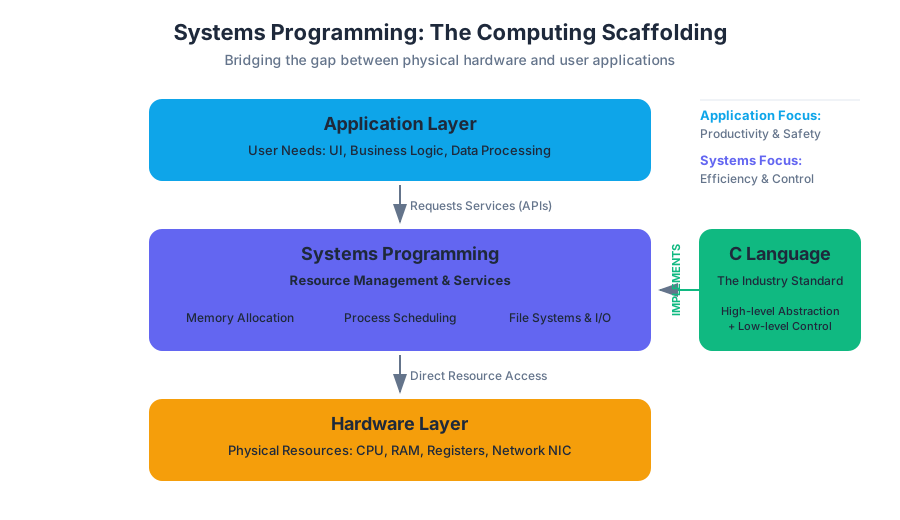
Systems programming is the discipline of building software that provides services to other software. It is the "scaffolding" of the computing world, sitting directly above the hardware and below the application layer. While application programmers focus on user needs—UI, business logic, and data processing—systems programmers focus on resource management: memory allocation, process scheduling, file system integrity, and network protocols.
In this domain, the C programming language remains the industry standard. Developed at Bell Labs in the early 1970s alongside the Unix operating system, C provides a unique balance of high-level abstraction and low-level control. It allows a developer to manipulate individual bits and memory addresses while providing the structural constructs (functions, loops, types) necessary for complex software engineering.
Systems Programming vs. Operating Systems
It is a common misconception that systems programming is synonymous with operating system (OS) development. While an OS is the most prominent example of a system-level program, the field is much broader.
Definition: Systems programming involves developing software that interfaces with the hardware and provides a runtime environment for application software.
| Feature | Application Programming | Systems Programming |
|---|---|---|
| Primary Goal | Solving user problems (e.g., banking, social media). | Managing hardware and providing services. |
| Resource Access | Abstracted via APIs and virtual machines. | Direct access to memory, registers, and I/O. |
| Languages | Java, Python, JavaScript, Swift. | C, C++, Rust, Assembly. |
| Failure Impact | Application crash (isolated). | System instability or kernel panic. |
| Runtime | Managed (Garbage Collection, JIT). | Unmanaged (Manual memory, static linking). |
Systems programming includes the development of Language Runtimes (like the Java Virtual Machine or the Python interpreter), Compilers (like GCC or Clang), Database Engines, Web Servers, and Embedded Firmware.
The GCC Compilation Process
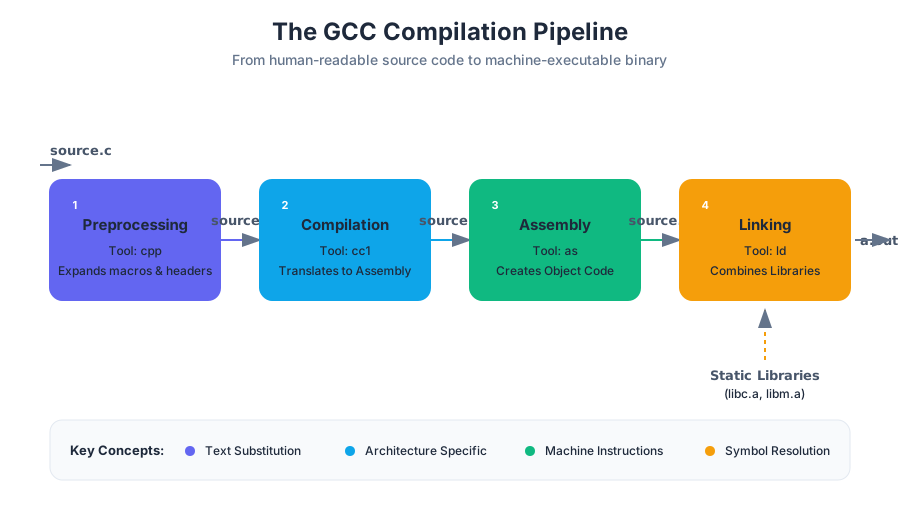
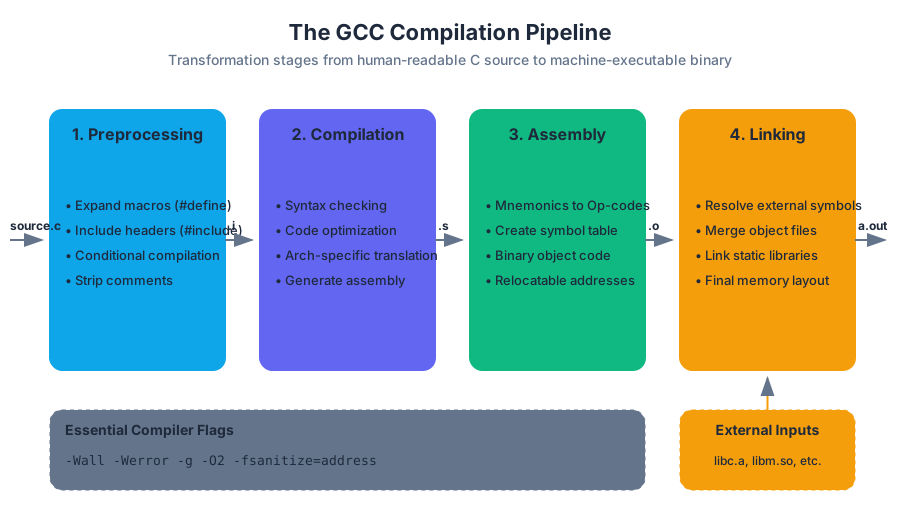
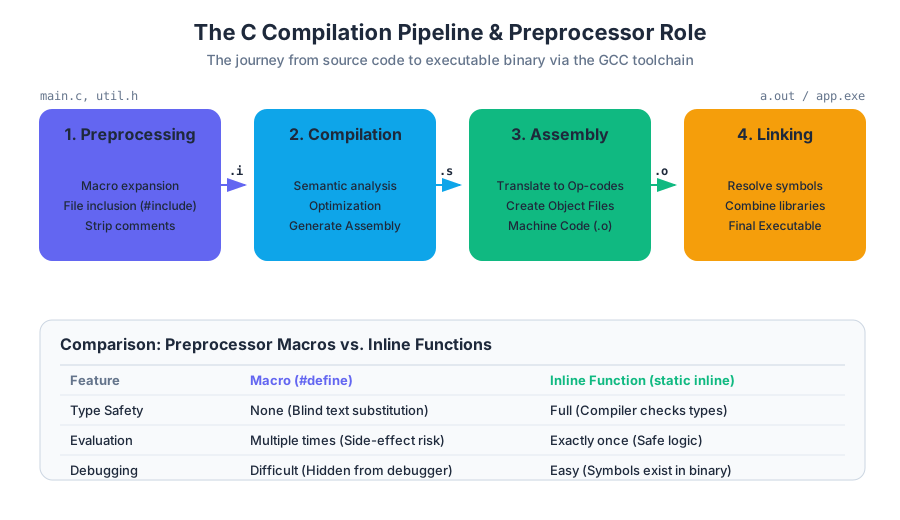
Unlike interpreted languages where code is executed line-by-line by a host program, C is a compiled language. The transformation from human-readable .c files to a machine-executable binary is a multi-stage pipeline managed by the GNU Compiler Collection (GCC).
1. Preprocessing (cpp)
The preprocessor handles directives starting with #. It performs text substitution, includes header files, and handles conditional compilation.
- Input:
source.c - Output:
source.i(Expanded source code)
2. Compilation (cc1)
The compiler translates the expanded source code into assembly language for a specific processor architecture (e.g., x86_64 or ARM). This is where syntax checking and optimization occur.
- Input:
source.i - Output:
source.s(Assembly code)
3. Assembly (as)
The assembler converts assembly instructions into object code—machine-level instructions (binary) that the CPU understands, but which are not yet executable because they lack addresses for external functions.
- Input:
source.s - Output:
source.o(Object file)
4. Linking (ld)
The linker combines multiple object files and libraries (like libc) into a single executable. It resolves symbols (function names and variables) to their final memory addresses.
- Input:
source.o,library.a - Output:
a.out(Executable)
Essential Compiler Flags
In a professional systems environment, we use flags to enforce strictness and aid debugging:
| Flag | Purpose |
|---|---|
-Wall |
Enables "all" common warning messages. |
-Werror |
Treats all warnings as errors, halting compilation. |
-g |
Includes debug symbols for use with gdb. |
-O2 |
Enables standard optimizations for performance. |
-fsanitize=address |
Instruments code to detect memory leaks and buffer overflows at runtime. |
Object Lifetimes: Static, Stack, and Heap
In C, an object is a region of data storage in the execution environment. Every object has a lifetime (or storage duration), which determines when the memory is allocated and when it is deallocated. Understanding these is the difference between a stable system and one riddled with "Heisenbugs."
Static Lifetime
Static objects are allocated when the program starts and persist until the program terminates. This includes global variables and variables declared with the static keyword.
- Location: Data segment (
.datafor initialized,.bssfor uninitialized). - Risk: Global state makes code harder to test and thread-unsafe.
Stack Lifetime (Automatic)
Stack objects are local variables within a function. They are "pushed" onto the stack when the function is called and "popped" (deallocated) when the function returns.
- Location: The Stack.
- Mechanics: Managed via the Stack Pointer (SP) and Frame Pointer (FP).
- Risk: Returning a pointer to a stack variable is a classic error, as that memory is reclaimed immediately upon function exit.
Heap Lifetime (Dynamic)
Heap objects are manually managed by the programmer using malloc(), calloc(), realloc(), and free().
- Location: The Heap.
- Mechanics: The
malloclibrary manages a pool of memory, requesting large chunks from the OS viasbrkormmap. - Risk: Memory leaks (forgetting to
free) and dangling pointers (using memory afterfree).
| Lifetime | Allocation | Deallocation | Scope |
|---|---|---|---|
| Static | Program Start | Program End | Global or File-local |
| Stack | Function Entry | Function Exit | Block-local |
| Heap | Manual (malloc) |
Manual (free) |
Pointer-based |
C Type System and Pointer Arithmetic
The C type system is static (types are checked at compile time) but weak (the language allows bypassing the type system via casting). At the hardware level, everything is just bytes; C types provide a lens through which we interpret those bytes.
Pointers and Dereferencing
A pointer is simply a variable that stores a memory address.
&(Address-of): Returns the memory address of a variable.*(Dereference): Accesses the value stored at the address held by the pointer.
int x = 42;
int *p = &x; // p holds the address of x
printf("%d", *p); // prints 42
Pointer Arithmetic
Pointer arithmetic is scaled by the size of the underlying type. If p is an int* (assuming 4-byte ints), p + 1 increments the address by 4 bytes, not 1.
The Pointer-Array Identity: In most contexts, the name of an array decays into a pointer to its first element.
arr[i]is mathematically equivalent to*(arr + i).
Type Casting
C allows you to treat a region of memory as a different type using a cast.
- Safe Casting: Upcasting (e.g.,
inttolong). - Dangerous Casting: Casting between unrelated pointer types (e.g.,
int*tostruct user*). This is often necessary in systems programming for "generic" functions usingvoid*.
void *raw_memory = malloc(100);
int *int_array = (int *)raw_memory; // Treating raw bytes as integers
The C Preprocessor: Power and Peril
The preprocessor is a text-processing engine that runs before the actual compiler. While powerful, it lacks knowledge of C's scope or type rules.
Macros and Constants
#define is used for constants and "function-like" macros.
#define PI 3.14159
#define SQUARE(x) ((x) * (x))
Pitfall: Precedence. Without parentheses, SQUARE(1 + 1) expands to 1 + 1 * 1 + 1, which equals 3, not 4. Always wrap macro arguments and the total expression in parentheses.
Conditional Compilation
This allows the same source code to be compiled differently for different platforms (e.g., Linux vs. Windows).
#ifdef DEBUG
    printf("Debug: x = %d\n", x);
#endif
Header Guards
To prevent a header file from being included multiple times (which causes redefinition errors), we use guards:
#ifndef MY_HEADER_H
#define MY_HEADER_H
// Declarations here
#endif
POSIX File I/O and Streams
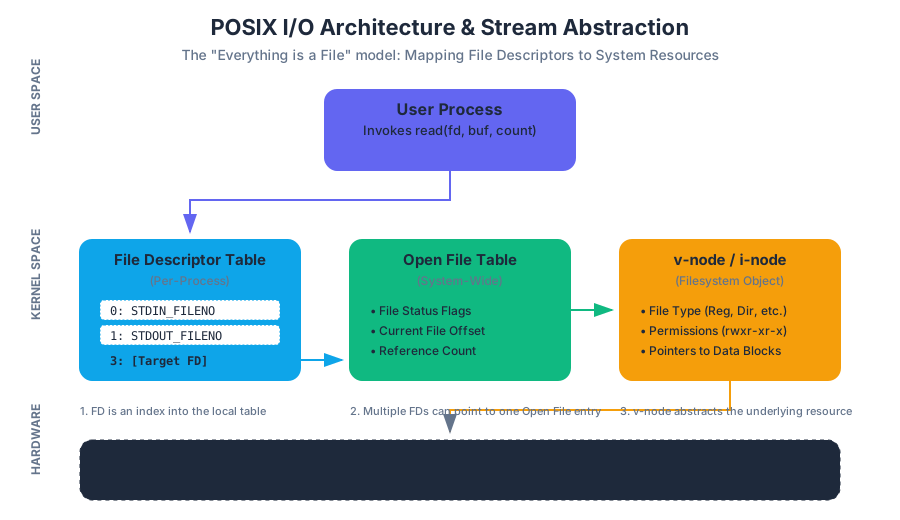
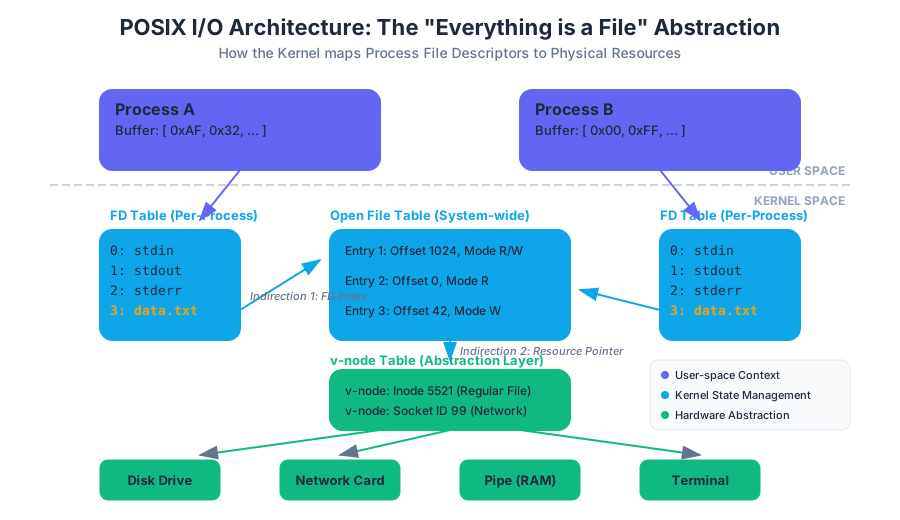
In Unix-like systems, "everything is a file." This abstraction allows us to use the same system calls to read from a disk, a keyboard, or a network socket.
File Descriptors
A File Descriptor (FD) is a non-negative integer that acts as an index into the process's open file table.
0:STDIN(Standard Input)1:STDOUT(Standard Output)2:STDERR(Standard Error)
Core System Calls
Unlike printf or scanf (which are buffered library functions), the following are direct entries into the kernel:
open(): Requests access to a file. Returns an FD.read(): Copies bytes from a file/stream into a buffer.write(): Copies bytes from a buffer to a file/stream.close(): Releases the FD.
int fd = open("data.txt", O_RDONLY);
char buf[1024];
ssize_t bytes_read = read(fd, buf, sizeof(buf));
write(STDOUT_FILENO, buf, bytes_read);
close(fd);
Process Management: Fork, Exec, and Wait
A process is an instance of a program in execution. It consists of the executable code, its own private virtual memory space, and metadata (PID, owner).
The fork() System Call
fork() creates a new process (the child) by making an exact copy of the calling process (the parent).
- In the Parent:
fork()returns the PID of the child. - In the Child:
fork()returns 0.
The exec() Family
exec() replaces the current process's memory image with a new program. The PID does not change, but the code, stack, and heap are wiped and replaced.
The wait() System Call
A parent process uses wait() to block until a child process finishes. This allows the parent to collect the child's exit status.
Zombies and Orphans:
- A Zombie is a process that has finished but its parent hasn't called
wait()yet. It occupies a slot in the process table.- An Orphan is a process whose parent has died. It is "adopted" by the
initprocess (PID 1).
Undefined Behavior (UB)
Undefined Behavior is a unique and terrifying aspect of C. The C standard defines certain actions for which the language places no requirements. When a program encounters UB, the compiler is allowed to do anything—including deleting your code, crashing the program, or (most dangerously) appearing to work correctly while leaving a security hole.
Common Sources of UB:
- Buffer Overflows: Writing past the end of an array.
- Use-after-free: Accessing memory after it has been
free()'d. - Dereferencing NULL: Attempting to read/write to address 0.
- Signed Integer Overflow: Adding 1 to
INT_MAX.
Why does UB exist?
UB allows the compiler to assume that certain "bad" things never happen, which enables aggressive optimizations. For example, if the compiler assumes an integer will never overflow, it can simplify loops and math logic that would otherwise require expensive checks.
Defense: Sanitizers
Modern systems programming relies on Sanitizers. These are tools (built into GCC/Clang) that add runtime checks to catch UB.
AddressSanitizer (ASan): Detects memory errors.UndefinedBehaviorSanitizer (UBSan): Detects integer overflows, null pointer dereferences, etc.
Memory Management, Objects, and Pointers
Key concepts: Pointer Arithmetic and Offsets · Null-terminated Strings · Pass-by-reference · Dereferencing and Address-of Operators · Void Pointers
Deep dive into C's memory model, pointer arithmetic, and the handling of arrays and strings.
Memory Management, Objects, and Pointers
In systems programming, memory is not an abstract container but a physical and logical resource that must be mapped, managed, and manipulated with mathematical precision. In the C programming language, we treat memory as a massive, contiguous array of bytes, where each byte is identified by a unique numerical address. To master C is to master the relationship between these addresses and the data they represent.
The C Memory Model: Objects and Lifetimes
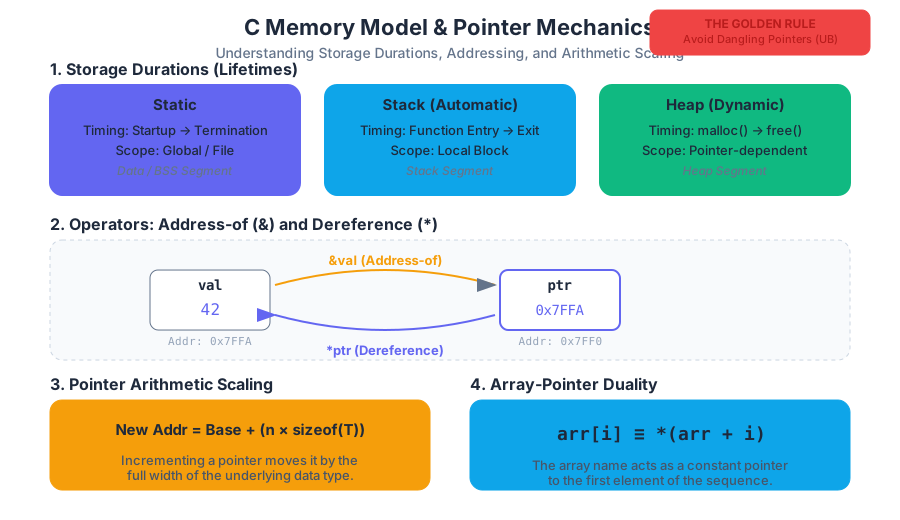
Before discussing pointers, we must define the object. In the context of C, an object is a region of data storage in the execution environment, the contents of which can represent values. Every object has a size, a type, and a lifetime (or storage duration). The lifetime determines when the memory is allocated and when it is guaranteed to be valid.
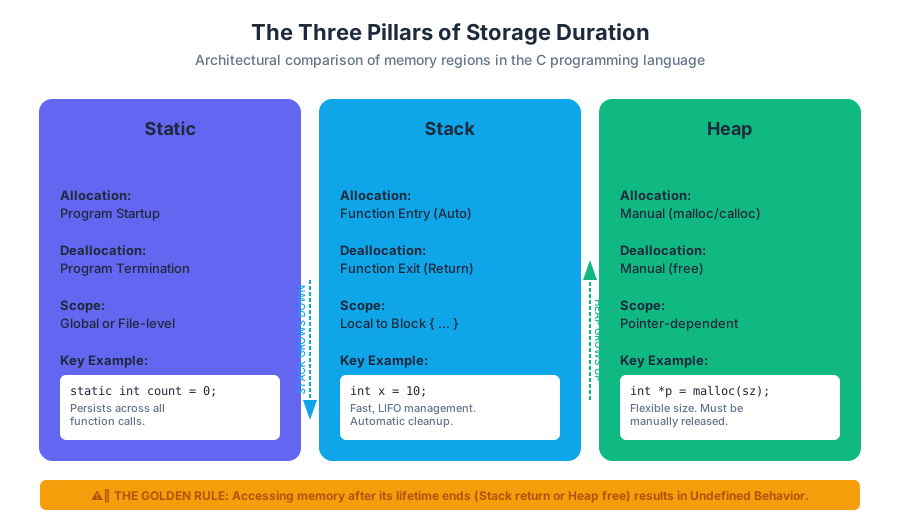
The Three Pillars of Storage Duration
C categorizes memory into three primary regions, each serving a distinct architectural purpose:
| Storage Class | Allocation Timing | Deallocation Timing | Scope/Visibility | Typical Location |
|---|---|---|---|---|
| Static | Program Startup | Program Termination | Global or File-level | Data/BSS Segment |
| Stack | Function Entry | Function Exit (Return) | Local to block | Stack Segment |
| Heap | Manual (malloc) |
Manual (free) |
Pointer-dependent | Heap Segment |
- Static Objects: These exist for the entire duration of the program. Global variables and variables declared with the
statickeyword fall into this category. They are useful for maintaining state across function calls but can lead to issues in multi-threaded environments. - Stack (Automatic) Objects: These are the most common. When you declare
int x;inside a function, it is "pushed" onto the stack. When the function returns, the stack pointer moves back, and that memory is effectively reclaimed. - Heap (Dynamic) Objects: These are managed manually by the programmer. Using
malloc,calloc, orrealloc, a programmer requests a specific number of bytes. This memory remains allocated until it is explicitly released viafree.
The Golden Rule of Lifetimes: Accessing a stack object after its function has returned, or a heap object after it has been freed, results in Undefined Behavior (UB). The pointer becomes "dangling," pointing to memory that may have been repurposed by the OS or the runtime.
Dereferencing and Address-of Operators
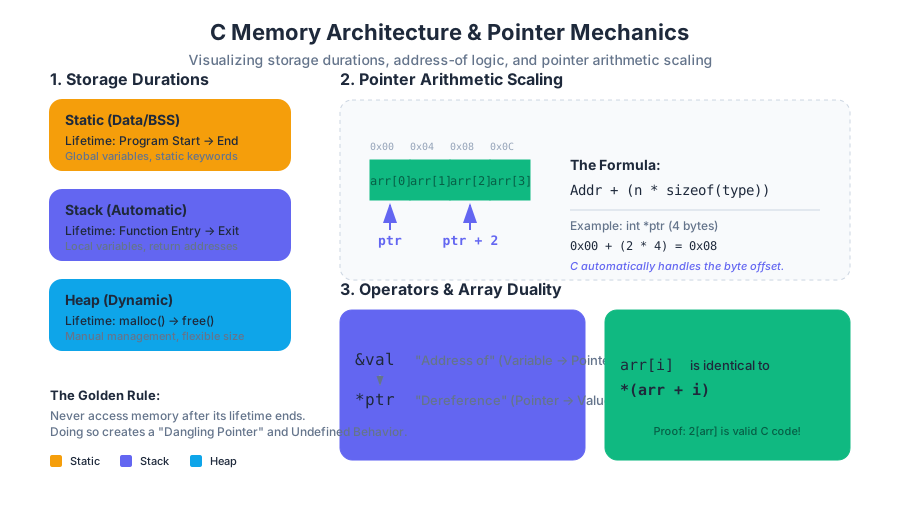
To bridge the gap between a variable name and its location in memory, C provides two fundamental operators: the Address-of operator (&) and the Dereference operator (*).
The Address-of Operator (&)
The & operator is a unary operator that returns the memory address of its operand. If x is an integer, &x is a pointer to an integer (int *).
The Dereference Operator (*)
The * operator is the inverse. When applied to a pointer, it accesses the value stored at the address the pointer holds. This is often called "indirection."
int main() {
    int val = 42;
    int *ptr = &val; // ptr now holds the address of val

    printf("Value: %d\n", val);    // Outputs 42
    printf("Address: %p\n", ptr);  // Outputs the hex address (e.g., 0x7ffee...)
    printf("Deref: %d\n", *ptr);   // Outputs 42

    *ptr = 100;                    // Changing the value via the pointer
    printf("New Value: %d\n", val); // val is now 100
    return 0;
}
Pointer Arithmetic and Offsets
One of the most powerful—and dangerous—features of C is Pointer Arithmetic. Unlike standard integer arithmetic, pointer arithmetic is automatically scaled by the size of the data type the pointer references.
The Scaling Mechanism
When you add an integer n to a pointer p of type T*, the resulting address is not p + n. Instead, it is:
$$\text{New Address} = \text{Base Address} + (n \times \text{sizeof}(T))$$
This ensures that incrementing a pointer (ptr++) always moves it to the next element of that type in memory, regardless of whether the type is a 1-byte char, a 4-byte int, or a 128-byte struct.
| Operation | Expression | Resulting Address Change |
|---|---|---|
| Increment | ptr++ |
+ sizeof(type) |
| Decrement | ptr-- |
- sizeof(type) |
| Addition | ptr + i |
+ (i * sizeof(type)) |
| Subtraction | ptr1 - ptr2 |
(Addr1 - Addr2) / sizeof(type) |
Array-Pointer Duality
In C, the name of an array acts as a constant pointer to its first element. The expression a[i] is actually "syntactic sugar" for *(a + i).
Proof of Duality:
If a[i] is equivalent to *(a + i), then by the commutative property of addition, *(a + i) is equivalent to *(i + a). This implies that i[a] is also valid C code.
int arr[5] = {10, 20, 30, 40, 50};
printf("%d\n", arr[2]); // Outputs 30
printf("%d\n", 2[arr]); // Also outputs 30!
Note: While i[a] is valid, it is considered extremely poor practice and is used only to demonstrate the underlying mechanics of pointer arithmetic.
Null-terminated Strings
C does not have a native "string" type in the way modern languages like Python or Java do. Instead, a string is defined by convention: an array of char elements ending with a null terminator (\0, which has the ASCII value 0).
The Importance of \0
Functions like printf, strlen, and strcpy do not know the size of the character array they are processing. They simply start at the provided pointer and continue reading bytes until they encounter a 0.
Common Pitfall: The Off-by-One Buffer
When allocating memory for a string, you must always account for the null terminator. To store the word "C-Style" (7 characters), you need an array of size 8.
char *str = malloc(8 * sizeof(char));
strcpy(str, "C-Style"); // Copies 'C','-','S','t','y','l','e' AND '\0'
If the null terminator is missing, string functions will continue reading past the end of the array into adjacent memory, leading to "garbage" output or segmentation faults. This is the root cause of many security vulnerabilities, such as buffer overflow attacks.
Pass-by-Reference (via Pointers)
Strictly speaking, C is a pass-by-value language. When you pass an argument to a function, a copy of that value is made on the stack. However, we can simulate pass-by-reference by passing the address of a variable (a pointer).
Motivation: The Swap Function
Consider a function intended to swap two integers. If we pass them by value, the function only swaps the copies, leaving the originals unchanged.
// WRONG: Pass-by-value
void swap_bad(int a, int b) {
    int temp = a;
    a = b;
    b = temp;
}

// CORRECT: Simulating Pass-by-reference
void swap_good(int *a, int *b) {
    int temp = *a;
    *a = *b;
    *b = temp;
}
Passing Arrays
When an array is passed to a function, it "decays" into a pointer to its first element. This is why you must almost always pass the size of the array as a separate argument, as the function no longer knows the original array's bounds.
| Method | Syntax | Effect |
|---|---|---|
| By Value | void func(int x) |
Local copy; original is safe. |
| By Reference | void func(int *x) |
Direct access; original can be modified. |
| Array | void func(int arr[]) |
Decays to int *; original can be modified. |
Void Pointers and Generic Programming
The void * is a special pointer type known as a generic pointer. It can hold the address of any data type without an explicit cast. However, there is a catch: you cannot dereference a void * or perform pointer arithmetic on it directly, because the compiler does not know the size of the underlying type.
Usage in Systems Programming
void * is essential for generic functions. The standard library function malloc returns a void * because it doesn't know what kind of data you intend to store in the allocated memory.
void print_bytes(void *ptr, int num_bytes) {
    // We must cast to char* to perform 1-byte pointer arithmetic
    unsigned char *p = (unsigned char *)ptr;
    for (int i = 0; i < num_bytes; i++) {
        printf("%02x ", p[i]);
    }
    printf("\n");
}
In the example above, casting to unsigned char * allows us to iterate through the memory byte-by-byte, regardless of whether the original data was an int, a double, or a custom struct.
Advanced Concept: Pointer Offsets and Struct Alignment
When dealing with complex data structures (structs), the compiler often inserts "padding" bytes between members to ensure that each member starts at a memory address that is a multiple of its size (alignment).
Alignment Theorem: For efficient CPU access, a data object of size $N$ bytes should typically be stored at an address $A$ such that $A \pmod N = 0$.
Worked Example: Struct Padding
struct Data {
    char a;     // 1 byte
    // 3 bytes of padding inserted here
    int b;      // 4 bytes
    char c;     // 1 byte
    // 3 bytes of padding inserted here
};
Even though the data only totals 6 bytes, sizeof(struct Data) will likely return 12. Understanding pointer offsets is critical when using void * to manually navigate these structures or when serializing data for network transmission.
Common Pitfalls and Memory Safety
The power of pointers comes with significant responsibility. Senior engineers focus heavily on avoiding the following "Big Three" memory errors:
- Memory Leaks: Allocating memory on the heap (
malloc) and losing the pointer to it before callingfree. Over time, the program consumes all available RAM. - Segmentation Faults (Segfaults): Attempting to dereference a
NULLpointer or an address that the program does not have permission to access. - Buffer Overflows: Writing past the end of an allocated block. This can overwrite the "Return Address" on the stack, allowing attackers to hijack the execution flow of the program.
The Null Pointer
A pointer assigned the value 0 (or the macro NULL) is guaranteed to point to "nothing." It is a best practice to initialize pointers to NULL and to check if a pointer is NULL before dereferencing it.
int *p = malloc(sizeof(int));
if (p == NULL) {
    fprintf(stderr, "Memory allocation failed\n");
    exit(1);
}
// Safe to use p
Summary of Pointer Operations
To synthesize these concepts, consider the following table which summarizes how different operators interact with memory:
| Operator | Name | Purpose | Mathematical View |
|---|---|---|---|
& |
Address-of | Get location of a variable | $Var \rightarrow Addr$ |
* |
Dereference | Get value at a location | $Addr \rightarrow Value$ |
+ / - |
Arithmetic | Move through contiguous memory | $Addr \pm (n \times Size)$ |
[] |
Subscript | Access element at index | $*(Addr + (i \times Size))$ |
-> |
Arrow | Access struct member via pointer | (*ptr).member |
The C Preprocessor and Build Systems
Key concepts: Preprocessor Directives (#include, #define) · Macro Pitfalls · Conditional Compilation · Header Files vs. Source Files · Makefiles
Exploration of source-to-source transformation using the preprocessor and automating compilation with Make.
The C Preprocessor and Build Systems
In the hierarchy of the C translation process, the C Preprocessor (CPP) occupies a unique and often misunderstood position. It is not, strictly speaking, part of the C compiler's semantic analysis engine. Instead, it is a source-to-source translator—a sophisticated text processing tool that operates on the source code before the compiler (the cc1 component in GCC) ever sees a single token of actual C logic.
The preprocessor acts as a bridge between the human-readable organization of a project and the machine-oriented requirements of the compiler. It handles the modularization of code through file inclusion, the abstraction of constants and logic through macros, and the adaptation of source code to different environments via conditional compilation. Understanding the preprocessor is the difference between writing "scripts" in C and engineering robust, portable, and scalable systems.
The Compilation Pipeline: Where the Preprocessor Lives
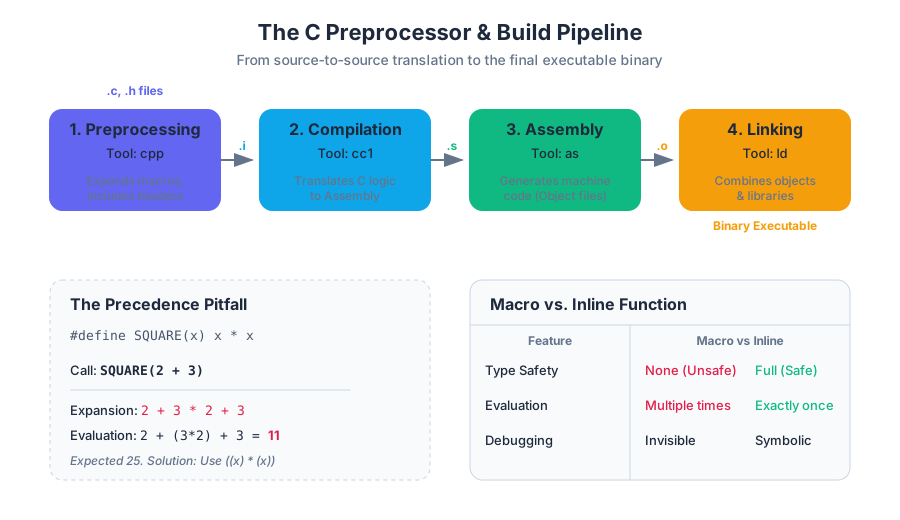
To understand the preprocessor, one must first locate it within the standard GCC toolchain. When a developer executes gcc main.c, several distinct stages occur in sequence. The preprocessor is the very first stage.
| Stage | Tool | Input | Output | Description |
|---|---|---|---|---|
| Preprocessing | cpp |
.c, .h |
.i |
Expands macros, handles includes, and strips comments. |
| Compilation | cc1 |
.i |
.s |
Translates preprocessed C into assembly language. |
| Assembly | as |
.s |
.o |
Translates assembly into machine code (object files). |
| Linking | ld |
.o, .a |
Executable | Combines object files and libraries into a final binary. |
Key Insight: Because the preprocessor operates purely on text, it has no concept of C's type system, scope, or control flow. It simply follows directives to rearrange or substitute text. This "blindness" is the source of both its immense power and its most dangerous pitfalls.
Preprocessor Directives: The Language of the CPP
All preprocessor directives begin with the # character. They must be the first non-whitespace character on a line. Unlike C statements, they do not end with a semicolon; the end of the line marks the end of the directive.
File Inclusion: #include
The #include directive is the mechanism for C's modularity. It literally instructs the preprocessor to "stop what you are doing, open this other file, and paste its entire contents right here."
- System Headers:
#include <stdio.h>searches in standard system directories (e.g.,/usr/include). - User Headers:
#include "my_header.h"typically searches the current directory first, then falls back to system paths.
A common mistake among beginners is including .c files. While the preprocessor will technically allow this, it violates the principle of separate compilation. If file_a.c includes file_b.c, and both are later linked together, the linker will encounter "multiple definition" errors because the functions in file_b.c were compiled twice—once as part of file_a.o and once as file_b.o.
Macro Substitution: #define
The #define directive creates a macro, which is a rule for text substitution. Macros come in two flavors: Object-like (constants) and Function-like (logic).
#define PI 3.14159          // Object-like macro
#define SQUARE(x) (x * x)   // Function-like macro
When the preprocessor encounters PI, it replaces it with 3.14159. When it encounters SQUARE(5), it replaces it with (5 * 5).
Macro Pitfalls: The Hazards of Text Substitution
Because macros are expanded before the compiler checks types or precedence, they are notorious for introducing subtle, hard-to-debug errors. There are two primary categories of macro bugs: Precedence Violations and Side Effect Double-Evaluation.
1. The Precedence Pitfall
Consider the SQUARE(x) macro defined as x * x. If a developer writes SQUARE(2 + 3), they expect 25. However, the preprocessor performs a literal substitution:
Derivation of Failure:
SQUARE(2 + 3)$\rightarrow$2 + 3 * 2 + 3Following the standard order of operations (multiplication before addition):2 + (3 * 2) + 3$\rightarrow$2 + 6 + 3$\rightarrow$11
The Solution: Always wrap macro arguments and the entire macro expression in parentheses.
#define SQUARE(x) ((x) * (x))
Now: ((2 + 3) * (2 + 3)) $\rightarrow$ 5 * 5 $\rightarrow$ 25.
2. The Side Effect Pitfall
Even with parentheses, macros can fail if an argument is passed that has a side effect (like i++).
Consider: #define MAX(a, b) ((a) > (b) ? (a) : (b))
If we call MAX(i++, j), the expansion becomes:
((i++) > (j) ? (i++) : (j))
If i is indeed greater than j, the expression i++ is evaluated twice: once for the comparison and once for the result. The variable i is incremented twice, which is almost certainly not what the programmer intended.
| Feature | Macro (#define) |
Inline Function (static inline) |
|---|---|---|
| Type Checking | None (unsafe) | Full (safe) |
| Evaluation | Multiple times (dangerous) | Exactly once (safe) |
| Scope | Global to the file | Respects C scope rules |
| Debugging | Difficult (hidden in .i file) |
Easy (symbols exist in debugger) |
Conditional Compilation: Architecting Portability
Conditional compilation allows developers to include or exclude portions of code based on defined symbols. This is essential for writing code that runs on multiple Operating Systems or for including debug-only logging.
Directives:
#ifdef SYMBOL: Include code ifSYMBOLis defined.#ifndef SYMBOL: Include code ifSYMBOLis not defined.#if,#elif,#else,#endif: General logic.
The Header Guard Pattern
One of the most critical uses of conditional compilation is the Header Guard. In large projects, a header file might be included multiple times through nested dependencies. Without guards, this leads to redefinition errors.
/* my_library.h */
#ifndef MY_LIBRARY_H
#define MY_LIBRARY_H

struct User {
    int id;
    char name[50];
};

void print_user(struct User u);

#endif
If this file is included twice, the second time the preprocessor reaches #ifndef MY_LIBRARY_H, the symbol is already defined, and the entire content is skipped. Modern compilers also support #pragma once, which is a non-standard but widely supported and more efficient alternative to manual guards.
Build Systems: The Logic of make
As a C project grows from a single file to dozens or hundreds, manual compilation becomes impossible. Recompiling every file when only one has changed is a waste of resources. This is where Build Automation tools like make come in.
A Makefile is essentially a description of a Directed Acyclic Graph (DAG) where nodes are files and edges are dependencies.
The Structure of a Rule
A Makefile consists of rules with the following syntax:
target: dependencies
	command
Note: The command MUST be preceded by a literal Tab character, not spaces.
How make Decides to Build
The "algorithm" of make is based on the Modification Timestamp (mtime) of files.
- For a given
target,makechecks themtimeof all itsdependencies. - If any dependency has a newer
mtimethan thetarget, or if thetargetdoes not exist,makeexecutes thecommand. - If the
targetis newer than all its dependencies,makeskips the rule.
Example Makefile for a Modular Project
CC = gcc
CFLAGS = -Wall -Wextra -g

# The final executable
myapp: main.o utils.o
	$(CC) $(CFLAGS) -o myapp main.o utils.o

# Object file rules
main.o: main.c utils.h
	$(CC) $(CFLAGS) -c main.c

utils.o: utils.c utils.h
	$(CC) $(CFLAGS) -c utils.c

# Clean utility
clean:
	rm -f *.o myapp
Advanced Makefile Concepts
To make Makefiles maintainable, we use variables and pattern rules.
| Variable Type | Syntax | Description |
|---|---|---|
| Recursive | VAR = val |
Evaluated when used; can reference other variables defined later. |
| Static | VAR := val |
Evaluated once, immediately at the point of definition. |
| Conditional | VAR ?= val |
Assigns val only if VAR is not already defined. |
| Automatic | $@ |
Represents the name of the current target. |
| Automatic | $^ |
Represents the names of all dependencies. |
| Automatic | $< |
Represents the name of the first dependency. |
Phony Targets
Targets like clean are not actual files. If a file named clean were ever created in the directory, make clean would stop working because make would think the target is "up to date." To prevent this, we use the .PHONY directive:
.PHONY: clean
clean:
	rm -f $(OBJS) $(EXEC)
Common Pitfalls in Build Systems
- Missing Dependencies: If
main.cincludesutils.h, bututils.his not listed as a dependency formain.o, changing the header will not trigger a recompile ofmain.o. This leads to "stale" binaries and bizarre runtime bugs. - Space vs. Tab: Using spaces instead of tabs in a Makefile is the most common cause of
Makefile: *** missing separatorerrors. - Circular Dependencies: If
Adepends onBandBdepends onA,makewill error out. - Over-Engineering: For very small projects, a complex Makefile is overhead. For very large projects, handwritten Makefiles become unmanageable, leading to the use of meta-build systems like CMake or Meson.
Summary of the Preprocessor and Build Workflow
The transition from source code to executable is a multi-step pipeline. The preprocessor handles the "meta-programming" aspects—cleaning up the code and preparing it for the compiler. The build system manages the "orchestration"—ensuring that the pipeline runs efficiently and only when necessary.
Theorem of Minimal Recompilation: In a correctly configured build system, the time to perform an incremental build after a change to a single source file $S$ should be proportional to the number of files that transitively depend on $S$, not the total size of the project.
By mastering #define, header guards, and the dependency logic of make, a systems programmer ensures that their code is not just a collection of instructions, but a professional, maintainable software product.
File Systems and POSIX I/O Streams
Key concepts: POSIX File Model · File Descriptors (STDIN/STDOUT/STDERR) · System Calls (open, read, write, close) · Vectored I/O (writev) · i-nodes and d-nodes
Understanding the POSIX file model and using system calls for low-level I/O operations.
File Systems and POSIX I/O Streams
In the landscape of systems programming, the Unix philosophy is famously distilled into a single, powerful mantra: "Everything is a file." This abstraction is not merely a convenience; it is the architectural bedrock of the POSIX (Portable Operating System Interface) standard. By treating hardware devices, network sockets, inter-process communication channels, and traditional disk-based data as uniform streams of bytes, POSIX allows developers to use a singular, consistent API to interact with the entire universe of system resources.
Understanding the POSIX I/O model requires peeling back the layers of the operating system to see how the kernel manages state, how the file system organizes physical bits into logical structures, and how the transition from user-space to kernel-space occurs through system calls.
The POSIX File Model: The Stream Abstraction
At its core, a POSIX file is an ordered stream of bytes. Unlike older record-oriented file systems, the kernel does not impose any internal structure on the data within a file. Whether a file contains a JPEG image, a C source file, or a compiled executable, the operating system treats it as a linear sequence of bytes starting at offset 0.
What it is
The POSIX model defines a file as a resource that can be opened, read from, written to, and closed. Most files also support the concept of a file offset (or "seek pointer"), which tracks the current position within the stream where the next I/O operation will occur.
Why it matters
This uniformity allows for polymorphism at the system level. A program designed to read text from a file on disk can, without modification, read text from a keyboard or a network pipe. This is the foundation of shell redirection and piping (cat file.txt | grep "search"), where the output of one process is seamlessly mapped to the input of another.
How it works: The File Descriptor
When a process requests access to a file, the kernel does not return a direct pointer to the data. Instead, it returns a File Descriptor (FD).
Definition: A File Descriptor is a small, non-negative integer that serves as an index into a per-process File Descriptor Table maintained by the kernel.
Each entry in this table points to an entry in the system-wide Open File Table, which in turn points to the v-node (virtual node) representing the actual file on disk. This indirection allows the kernel to manage permissions, file offsets, and sharing between processes safely.
| Descriptor | Name | Constant (unistd.h) | Default Mapping |
|---|---|---|---|
0 |
Standard Input | STDIN_FILENO |
Keyboard / Terminal Input |
1 |
Standard Output | STDOUT_FILENO |
Screen / Terminal Output |
2 |
Standard Error | STDERR_FILENO |
Screen / Terminal Output |
Core System Calls: The Interface to the Kernel
To interact with the file system, a C program bypasses the standard library's buffered I/O (like printf or fopen) and invokes system calls directly. These calls trigger a context switch from user mode to kernel mode.
open(): Gaining Access
The open() system call establishes a connection between a path in the file system and a file descriptor.
#include <fcntl.h>

int fd = open("data.txt", O_RDWR | O_CREAT, S_IRUSR | S_IWUSR);
The flags argument determines the access mode:
O_RDONLY: Read-only.O_WRONLY: Write-only.O_RDWR: Read and write.O_CREAT: Create the file if it doesn't exist.O_TRUNC: If the file exists, truncate its length to 0.
read() and write(): Data Transfer
These calls are the workhorses of I/O. They transfer a specified number of bytes between a user-space buffer and the kernel's file buffer.
ssize_t read(int fd, void *buf, size_t count);
ssize_t write(int fd, const void *buf, size_t count);
The Mechanics of Return Values:
It is a common mistake to assume read() will always return the exact number of bytes requested (count). In reality, read() returns the number of bytes actually read, which might be less than count due to:
- Reaching the End of File (EOF).
- Interruption by a signal.
- Reading from a pipe or network socket where data is arriving slowly.
Worked Example: Robust File Copy
A robust implementation must handle "short reads" and "short writes" by wrapping the system calls in a loop.
#include <unistd.h>
#include <fcntl.h>
#include <errno.h>

void safe_copy(int src_fd, int dest_fd) {
    char buffer[4096];
    ssize_t bytes_read, bytes_written;

    while ((bytes_read = read(src_fd, buffer, sizeof(buffer))) > 0) {
        char *ptr = buffer;
        while (bytes_read > 0) {
            bytes_written = write(dest_fd, ptr, bytes_read);
            if (bytes_written <= 0) {
                if (errno == EINTR) continue; // Interrupted, try again
                return; // Actual error
            }
            bytes_read -= bytes_written;
            ptr += bytes_written;
        }
    }
}
Vectored I/O: Scatter-Gather Operations
Standard read and write operations require data to be stored in a single contiguous buffer. However, high-performance applications (like web servers or database engines) often need to write data that is spread across multiple memory locations—for example, a fixed-size header in one buffer and a variable-size payload in another.
What it is
Vectored I/O, also known as Scatter-Gather I/O, allows a single system call to read into or write from multiple buffers. In POSIX, this is implemented via readv() and writev().
How it works
The programmer populates an array of struct iovec structures, each specifying a pointer to a buffer and its length.
struct iovec {
    void  *iov_base; /* Starting address */
    size_t iov_len;  /* Number of bytes to transfer */
};
Why it matters: Atomicity and Performance
- Atomicity: On many systems,
writev()is atomic. The kernel guarantees that the data from all buffers is written as a single, contiguous block, preventing other processes from interleaving their writes. - Efficiency: It reduces the number of system calls. Instead of calling
write()three times (header, body, footer), which involves three context switches, the program callswritev()once.
Concrete Example: Writing a Network Packet
#include <sys/uio.h>

struct header { uint32_t id; uint32_t len; };
char *body = "Payload data...";
char *footer = "\r\n";

struct iovec iov[3];
struct header h = {1, strlen(body)};

iov[0].iov_base = &h;
iov[0].iov_len = sizeof(h);
iov[1].iov_base = body;
iov[1].iov_len = strlen(body);
iov[2].iov_base = footer;
iov[2].iov_len = 2;

ssize_t total_written = writev(STDOUT_FILENO, iov, 3);
| Feature | write() |
writev() |
|---|---|---|
| Buffer Count | Single contiguous buffer | Multiple non-contiguous buffers |
| System Calls | One per buffer | One for all buffers |
| Atomicity | Atomic for the single buffer | Atomic for the entire vector |
| Use Case | Simple stream writing | Protocol headers, log entries, database pages |
File System Structure: i-nodes and d-nodes
To understand how the kernel finds data.txt on a physical disk, we must look at the internal metadata structures: i-nodes and d-nodes.
The i-node (Index Node)
An i-node is a data structure that describes a file system object (file or directory). Crucially, the i-node contains everything except the file's name and the actual data content.
Key Insight: A file is defined by its i-node number, not its name. Multiple names (hard links) can point to the same i-node.
i-node Metadata Includes:
- File type (regular, directory, symbolic link, etc.)
- Permissions (read, write, execute)
- Owner and Group IDs
- File size in bytes
- Timestamps (Access, Modify, Change)
- Block Pointers: A list of pointers to the physical disk blocks where the data resides.
The d-node (Directory Entry)
A d-node (or dirent) is a simple mapping. It resides within a directory file and links a human-readable string (the filename) to an i-node number.
| Filename | i-node Number |
|---|---|
. |
1024 (Current Directory) |
.. |
512 (Parent Directory) |
notes.txt |
2048 |
script.sh |
4096 |
The Path Resolution Process
When you call open("/home/user/file.txt", ...):
- The kernel starts at the root i-node (usually i-node 2).
- It reads the data blocks of the root directory to find the d-node for
home. - It gets the i-node number for
home, fetches that i-node, and reads its blocks to finduser. - This continues until the i-node for
file.txtis reached. - The kernel then checks permissions in that final i-node before granting a File Descriptor.
Advanced Concept: Buffered I/O vs. System I/O
A common point of confusion for students is the difference between read() (system call) and fread() (C standard library function).
User-Space Buffering
The C library (stdio.h) maintains its own buffer in user-space (typically 4KB or 8KB).
- When you call
fgetc(), the library reads a large chunk from the kernel viaread()and stores it. - Subsequent calls to
fgetc()return bytes from this user-space buffer without needing a costly system call.
Comparison Table
| Feature | System I/O (read/write) |
Standard I/O (fread/fwrite) |
|---|---|---|
| Layer | Kernel Interface | User-space Library |
| Buffering | None (Direct) | Managed Buffer (FILE *) |
| Efficiency | High for large, aligned blocks | High for many small operations |
| Portability | POSIX-specific | ANSI C (Cross-platform) |
| Identifier | File Descriptor (int) | File Stream (FILE *) |
Common Pitfalls and Edge Cases
- Leaking File Descriptors: Every
open()must have a correspondingclose(). Processes have a limit on the number of open FDs (often 1024). Failing to close files in a loop will eventually causeopen()to fail withEMFILE. - Ignoring Return Values: Assuming
write()wrote all requested bytes is a recipe for data corruption. Always check the return value. - Mixing
FILE *and FDs: Usingprintfandwriteon the same output stream without callingfflush()can result in out-of-order output, as theprintfdata sits in a user-space buffer whilewritegoes straight to the kernel. - The "Zombie" File: If you
unlink()(delete) a file while a process has it open, the d-node is removed, but the i-node and data blocks remain on disk until the process closes the FD. This is a common way to create temporary files that are guaranteed to be deleted.
Processes and Inter-Process Communication
Key concepts: Process Lifecycle · fork(), exec(), wait() · Zombie and Orphan Processes · Signal Handling · Pipes
Managing the process lifecycle using fork, exec, and wait, and understanding process states.
Processes and Inter-Process Communication
In the realm of systems programming, the process is the fundamental unit of work. While a "program" is a passive collection of instructions stored on disk (an executable file), a process is the active execution of those instructions. It is a container provided by the Operating System (OS) that isolates a running program from others, providing it with its own virtual address space, execution state, and resource handles.
Understanding process management is not merely an academic exercise; it is the cornerstone of building resilient, concurrent, and high-performance software. Whether you are writing a shell, a web server, or a distributed database, you must master the mechanics of how processes are born, how they transform, how they synchronize, and how they communicate.
The Process Abstraction and Lifecycle
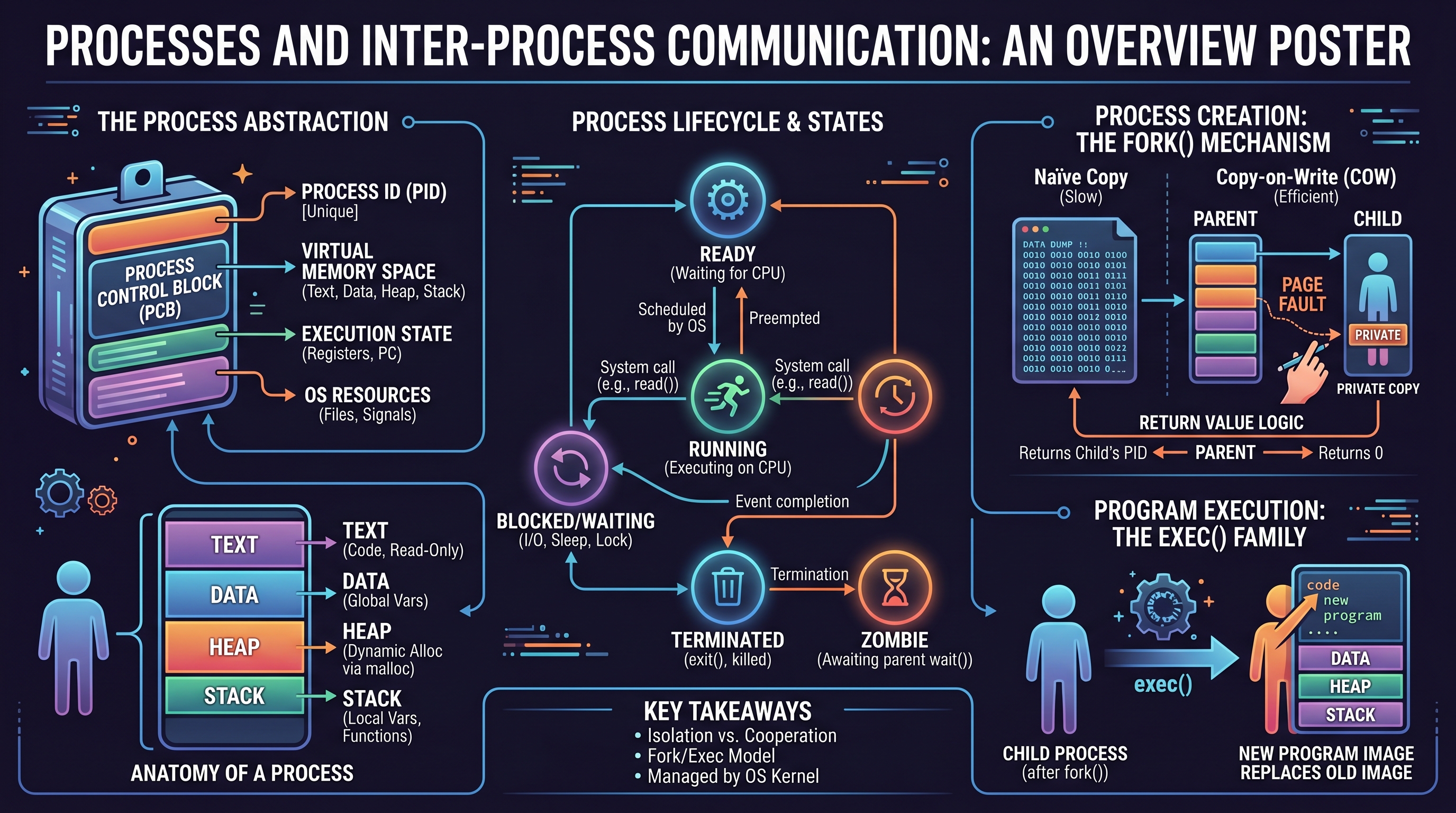
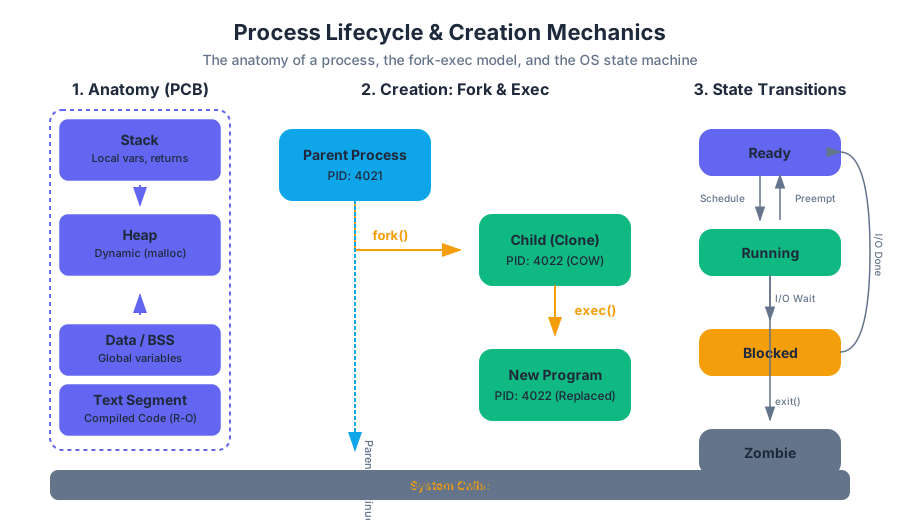
A process is an OS abstraction representing a running program. To the kernel, a process is defined by its Process Control Block (PCB), which tracks essential metadata.
Definition: Process A process is an execution context consisting of a unique Process ID (PID), a virtual memory space (containing text, data, heap, and stack), processor state (registers and program counter), and a set of OS resources (open file descriptors, environment variables, and signal dispositions).
The Anatomy of a Process
When a program is loaded into memory, the OS organizes its virtual address space into several distinct segments:
- Text Segment: Read-only instructions (the compiled code).
- Data Segment: Initialized and uninitialized (
bss) global and static variables. - Heap: Dynamically allocated memory (via
mallocorbrk). - Stack: Local variables, function parameters, and return addresses.
Process States
A process moves through various states during its existence. This lifecycle is managed by the OS scheduler.
| State | Description | Transition Trigger |
|---|---|---|
| Ready | The process is prepared to run but is waiting for CPU time. | Admitted by scheduler or preempted from Running. |
| Running | The process's instructions are currently being executed by the CPU. | Scheduled by the OS. |
| Blocked/Waiting | The process cannot proceed until an event occurs (e.g., I/O completion). | System call (e.g., read()), sleep, or lock acquisition. |
| Terminated | The process has finished execution or was killed. | exit() call or unhandled signal. |
| Zombie | The process has finished, but its entry remains in the process table. | Termination before the parent calls wait(). |
Process Creation: The fork() Mechanism
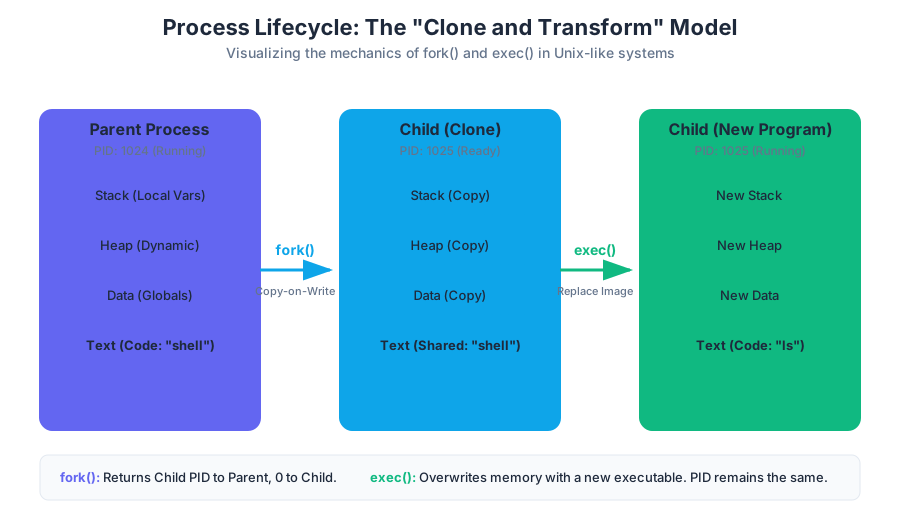
In Unix-like systems, process creation follows a unique "clone and transform" model. The fork() system call is the primary method for creating new processes.
What it is
fork() creates a new process (the child) by making an exact duplicate of the calling process (the parent).
How it works: Copy-on-Write (COW)
Naively copying the entire memory space of a parent (which could be gigabytes) to a child would be prohibitively slow. Modern operating systems use Copy-on-Write (COW). Both processes initially share the same physical memory pages. These pages are marked as read-only. If either process attempts to modify a page, a page fault occurs, and the kernel then creates a private copy of that page for the writing process.
The Return Value Logic
The most striking feature of fork() is that it is called once but returns twice:
- In the parent process,
fork()returns the PID of the newly created child. - In the child process,
fork()returns0. - If creation fails,
-1is returned in the parent.
#include <stdio.h>
#include <unistd.h>
#include <sys/types.h>

int main() {
    pid_t pid = fork();

    if (pid < 0) {
        perror("fork failed");
        return 1;
    } else if (pid == 0) {
        // This block executes in the CHILD
        printf("Child: My PID is %d, My Parent's PID is %d\n", getpid(), getppid());
    } else {
        // This block executes in the PARENT
        printf("Parent: My PID is %d, My Child's PID is %d\n", getpid(), pid);
    }
    return 0;
}
Common Pitfalls
- Resource Leakage: The child inherits copies of the parent's open file descriptors. If the child doesn't need them, they should be closed to avoid leaking resources.
- Fork Bombs: Calling
fork()in an infinite loop can exhaust the OS process table, crashing the system.
Program Execution: The exec() Family
While fork() creates a copy, we often want the child to run a different program. This is the role of the exec() family of system calls.
What it is
An exec() call replaces the current process image with a new program image. It loads the executable file into the current process's address space, overwriting the text, data, heap, and stack segments.
Why it matters
By separating fork() and exec(), Unix allows the child process to manipulate its environment (like redirecting file descriptors or changing permissions) after it is a separate process but before it starts running the new program. This is how shells implement I/O redirection (ls > file.txt).
The exec Variants
The exec family consists of several functions that differ in how they accept arguments and handle environment variables.
| Function | Argument Passing | Path Searching | Environment |
|---|---|---|---|
execl |
List (comma-separated) | Full path required | Inherited |
execv |
Vector (array of strings) | Full path required | Inherited |
execlp |
List (comma-separated) | Searches PATH |
Inherited |
execvp |
Vector (array of strings) | Searches PATH |
Inherited |
execve |
Vector (array of strings) | Full path required | Explicitly provided |
Crucial Insight:
exec()only returns if an error occurs. If successful, the original program is gone, and execution begins at themain()of the new program.
Synchronization: wait() and waitpid()
A parent process often needs to know when its child has finished and what its exit status was. This synchronization is handled by wait().
Mechanics of Reaping
When a child process terminates, it doesn't disappear immediately. It enters the Zombie state. It stays in the process table so the parent can read its exit status. The act of reading this status is called reaping.
wait(int *status): Blocks the parent until any child finishes.waitpid(pid_t pid, int *status, int options): Blocks until a specific child finishes.
Status Macros
The status integer filled by wait is encoded. We use macros to decode it:
WIFEXITED(status): True if the child terminated normally.WEXITSTATUS(status): Returns the actual exit code (0-255).WIFSIGNALED(status): True if the child was killed by a signal.
#include <sys/wait.h>
#include <unistd.h>
#include <stdio.h>

int main() {
    pid_t pid = fork();
    if (pid == 0) {
        printf("Child performing task...\n");
        _exit(42); // Exit with status 42
    } else {
        int status;
        waitpid(pid, &status, 0); // Wait for specific child
        if (WIFEXITED(status)) {
            printf("Child exited with code: %d\n", WEXITSTATUS(status));
        }
    }
    return 0;
}
Zombie and Orphan Processes
The relationship between parent and child processes requires careful management to avoid system clutter.
Zombie Processes
A Zombie is a process that has completed execution but still has an entry in the process table. This happens because the parent has not yet called wait().
- The Danger: While zombies don't consume CPU or memory, they consume a slot in the process table. If the table fills up, no new processes can be created.
- The Cure: The parent must call
wait()orwaitpid().
Orphan Processes
An Orphan is a process whose parent has terminated before it.
- The Solution: The OS handles this by having the
initprocess (PID 1) "adopt" the orphan.initperiodically callswait()to reap any adopted children that have finished.
Inter-Process Communication: Pipes
Since processes are isolated by their virtual address spaces, they cannot communicate via global variables. They require Inter-Process Communication (IPC) mechanisms provided by the kernel. The simplest and most common is the Pipe.
What it is
A pipe is a unidirectional communication channel that acts as a FIFO (First-In, First-Out) buffer in kernel memory.
How it works
The pipe(int pipefd[2]) system call creates a pipe and returns two file descriptors:
pipefd[0]is the read end.pipefd[1]is the write end.
Implementation in a Forked Environment
Because file descriptors are inherited across fork(), a pipe created before forking allows the parent and child to communicate. To establish a unidirectional flow:
- Call
pipe(). - Call
fork(). - Each process closes the end of the pipe it doesn't need.
#include <stdio.h>
#include <unistd.h>
#include <string.h>

int main() {
    int fd[2];
    pipe(fd); // fd[0] is read, fd[1] is write

    if (fork() == 0) {
        close(fd[1]); // Child closes write end
        char buffer[100];
        read(fd[0], buffer, 100);
        printf("Child received: %s\n", buffer);
        close(fd[0]);
    } else {
        close(fd[0]); // Parent closes read end
        char *msg = "Hello from Parent!";
        write(fd[1], msg, strlen(msg) + 1);
        close(fd[1]);
    }
    return 0;
}
Variations: Named Pipes (FIFOs)
Standard pipes are "anonymous" and only exist between related processes. Named Pipes (created via mkfifo) exist as files in the filesystem, allowing unrelated processes to communicate.
Signal Handling
Signals are software interrupts sent to a process to notify it of an event. They are the primary method for asynchronous communication.
Common Signals
| Signal | Name | Default Action | Trigger |
|---|---|---|---|
SIGINT |
Interrupt | Terminate | Ctrl+C from terminal |
SIGKILL |
Kill | Terminate (Immediate) | kill -9 (Cannot be caught) |
SIGTERM |
Terminate | Terminate | Polite request to stop |
SIGCHLD |
Child Status | Ignore | Child stopped or terminated |
SIGSEGV |
Segmentation Fault | Core Dump | Invalid memory access |
Handling Signals
A process can respond to a signal in three ways:
- Default Action: Let the OS handle it (usually termination).
- Ignore: Discard the signal (except
SIGKILLandSIGSTOP). - Catch: Execute a custom Signal Handler function.
The sigaction Interface
While the older signal() function exists, sigaction() is the modern, robust way to handle signals. It allows for fine-grained control over which signals are blocked while the handler is running.
#include <stdio.h>
#include <signal.h>
#include <unistd.h>

void handle_sigint(int sig) {
    printf("\nCaught signal %d. Graceful shutdown...\n", sig);
}

int main() {
    struct sigaction sa;
    sa.sa_handler = &handle_sigint;
    sa.sa_flags = SA_RESTART; // Restart system calls if interrupted
    sigemptyset(&sa.sa_mask);

    sigaction(SIGINT, &sa, NULL);

    while(1) {
        printf("Working...\n");
        sleep(2);
    }
    return 0;
}
Pitfall: Async-Signal Safety
Signal handlers can interrupt a process at any time, including in the middle of a printf() or malloc() call. Because these functions use global state/locks, calling them inside a signal handler can lead to deadlocks or memory corruption. Only async-signal-safe functions (like write(), _exit(), or wait()) should be used inside handlers.
Summary of Process Management
The power of systems programming in C lies in the granular control over these primitives. By combining fork, exec, wait, pipe, and signals, one can construct complex systems:
- Shells: Use
fork/execto run commands andpipeto connect them. - Servers: Use
forkto handle multiple client connections simultaneously. - Daemons: Use
forkandsetsidto run background tasks independent of a terminal.
Mastering these concepts requires a shift in thinking: from a linear flow of execution to a concurrent world where multiple processes evolve, communicate, and synchronize in a shared environment.
Network Programming and Sockets
Key concepts: Layered Network Model · IP Addressing (IPv4/IPv6) · Socket API · TCP vs. UDP · Network Address Translation (NAT)
The layered network model and implementing communication between processes over a network.
Network Programming and Sockets
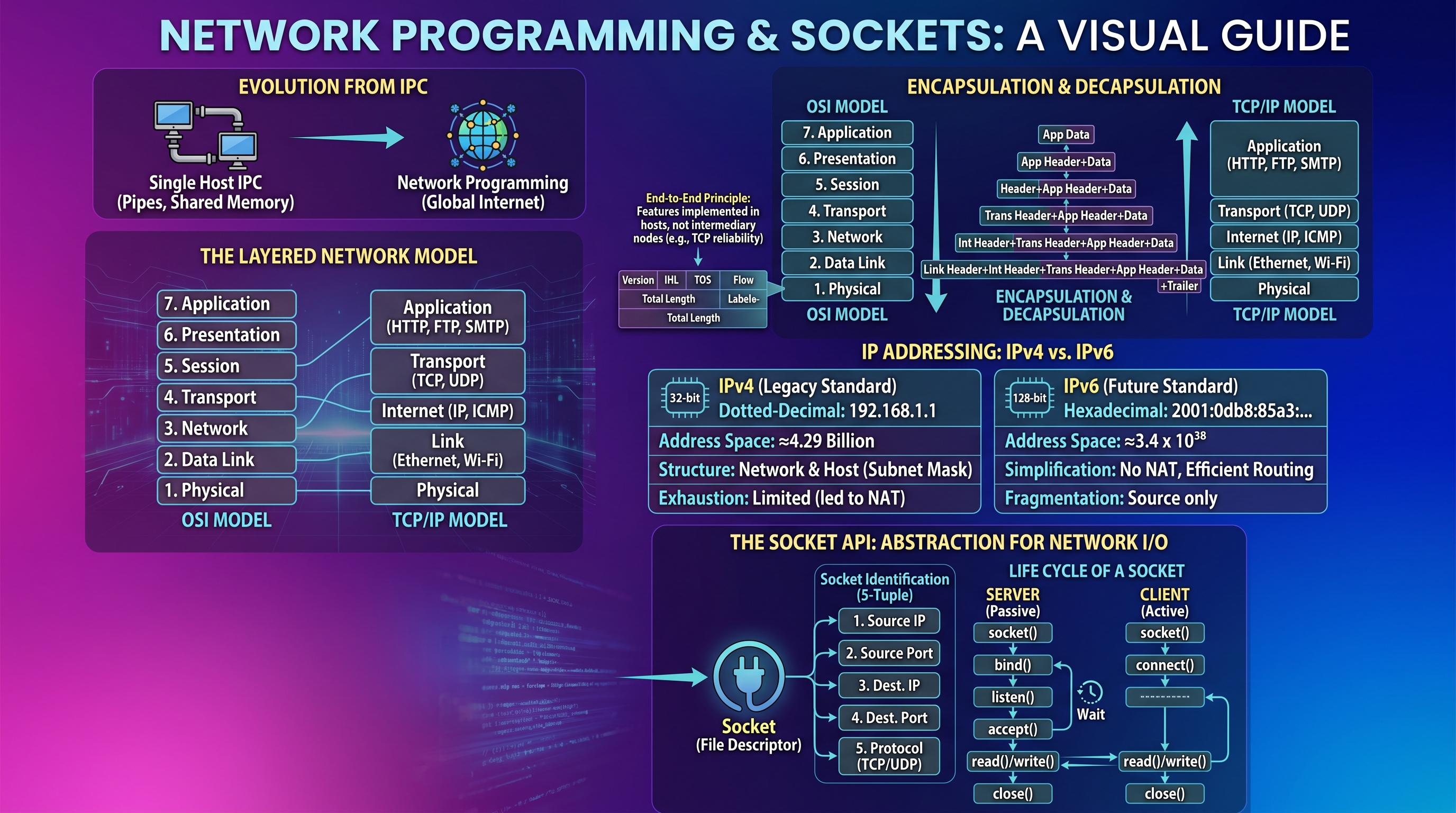
Network programming represents the logical evolution of Inter-Process Communication (IPC). While tools like pipes, shared memory, and signals allow processes on a single host to coordinate, network programming extends this capability across the global infrastructure of the Internet. At its core, network programming is the art of managing data exchange between two or more autonomous systems, often with vastly different architectures, through a standardized set of protocols and interfaces.
The Layered Network Model
To manage the immense complexity of global communication, networking is organized into a hierarchy of layers. Each layer provides a specific service to the layer above it while hiding the implementation details of the layers below. This abstraction is known as the Network Stack.
The OSI vs. TCP/IP Models
The theoretical standard is the OSI (Open Systems Interconnection) Model, which defines seven distinct layers. However, the practical implementation used by the modern Internet is the TCP/IP Model (or Internet Protocol Suite), which collapses these into four or five functional layers.
| OSI Layer | TCP/IP Layer | Functionality | Data Unit |
|---|---|---|---|
| Application (7), Presentation (6), Session (5) | Application | High-level APIs, data formatting (HTTP, FTP, SMTP) | Data/Message |
| Transport (4) | Transport | End-to-end communication, reliability (TCP, UDP) | Segment (TCP) / Datagram (UDP) |
| Network (3) | Internet | Routing packets across network boundaries (IP, ICMP) | Packet |
| Data Link (2) | Link | Physical addressing and media access (Ethernet, Wi-Fi) | Frame |
| Physical (1) | Physical | Binary transmission over wires, fiber, or radio | Bits |
Encapsulation and Decapsulation
The fundamental mechanism of the layered model is Encapsulation. When an application sends data:
- The Application Layer generates the raw message.
- The Transport Layer prepends a header containing port numbers and sequence info.
- The Internet Layer prepends a header containing source and destination IP addresses.
- The Link Layer prepends a header (MAC addresses) and appends a trailer (checksum).
As the data travels through the network, routers only look at the Internet Layer. When it reaches the destination, the process is reversed (Decapsulation), with each layer stripping its respective header and passing the remaining payload upward.
The End-to-End Principle: A design philosophy in networking which states that features should be implemented in the end hosts rather than the intermediary nodes (routers), unless they can be completely implemented in the network. This is why reliability (TCP) is handled at the Transport layer, not by the routers themselves.
IP Addressing: IPv4 and IPv6
An IP Address is a numerical label assigned to each device connected to a computer network that uses the Internet Protocol for communication. It serves two principal functions: host or network interface identification and location addressing.
IPv4: The Legacy Standard
IPv4 uses a 32-bit address space, typically expressed in dotted-decimal notation (e.g., 192.168.1.1).
- Address Space: $2^{32} \approx 4.29$ billion addresses.
- Structure: Divided into a Network portion and a Host portion, determined by the Subnet Mask.
- Exhaustion: The limited number of IPv4 addresses led to the development of NAT and the transition to IPv6.
IPv6: The Future Standard
IPv6 uses a 128-bit address space, expressed in hexadecimal (e.g., 2001:0db8:85a3:0000:0000:8a2e:0370:7334).
- Address Space: $2^{128} \approx 3.4 \times 10^{38}$ addresses (roughly 340 undecillion).
- Simplification: IPv6 removes the need for NAT and simplifies the header structure to improve routing efficiency.
| Feature | IPv4 | IPv6 |
|---|---|---|
| Address Length | 32 bits | 128 bits |
| Notation | Dotted Decimal (127.0.0.1) |
Hexadecimal (::1) |
| Header Size | 20–60 bytes (variable) | 40 bytes (fixed) |
| Fragmentation | Done by routers and hosts | Done only by the source host |
| Configuration | Manual or DHCP | Stateless Address Autoconfiguration (SLAAC) |
The Socket API
The Socket is the fundamental abstraction for network I/O in Unix-like systems. Following the POSIX philosophy that "everything is a file," a socket is accessed via a file descriptor.
Socket Identification: The 5-Tuple
A unique network connection is defined by five pieces of information:
- Source IP
- Source Port
- Destination IP
- Destination Port
- Protocol (TCP or UDP)
The Life Cycle of a Socket
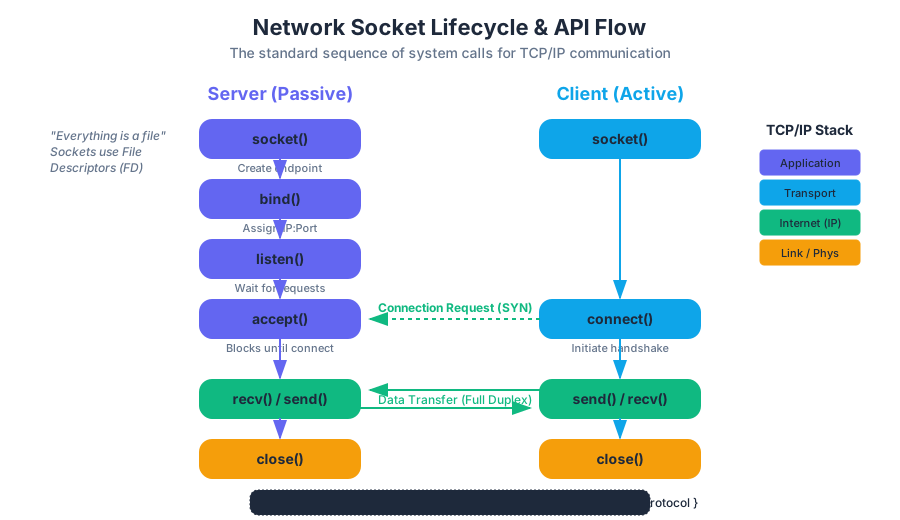
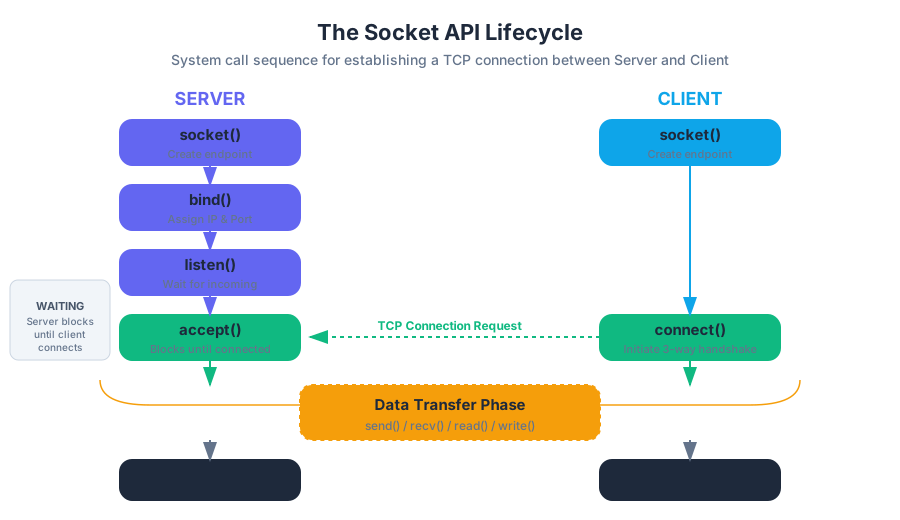
To establish communication, a program must perform a sequence of system calls. The sequence differs between the Server (which waits for connections) and the Client (which initiates them).
| Function | Role | Description |
|---|---|---|
socket() |
Both | Creates a new communication endpoint. |
bind() |
Server | Associates the socket with a specific local IP and Port. |
listen() |
Server | Puts the socket in a passive state to wait for incoming connections. |
connect() |
Client | Initiates a connection to a remote IP and Port. |
accept() |
Server | Extracts the first connection request on the queue and creates a new socket for it. |
send() / recv() |
Both | Transmits or receives data (for TCP). |
close() |
Both | Terminates the connection and releases the file descriptor. |
Example: A Minimal TCP Echo Server in C
The following code demonstrates the server-side lifecycle. Note the use of struct sockaddr_in to define the address.
#include <stdio.h>
#include <stdlib.h>
#include <string.h>
#include <unistd.h>
#include <arpa/inet.h>

#define PORT 8080
#define BACKLOG 5

int main() {
    int server_fd, new_socket;
    struct sockaddr_in address;
    int addrlen = sizeof(address);
    char buffer[1024] = {0};

    // 1. Create socket (IPv4, TCP)
    if ((server_fd = socket(AF_INET, SOCK_STREAM, 0)) == 0) {
        perror("socket failed");
        exit(EXIT_FAILURE);
    }

    // 2. Bind to Port 8080
    address.sin_family = AF_INET;
    address.sin_addr.s_addr = INADDR_ANY; // Listen on all interfaces
    address.sin_port = htons(PORT);       // Host-to-Network Short (Endianness)

    if (bind(server_fd, (struct sockaddr *)&address, sizeof(address)) < 0) {
        perror("bind failed");
        exit(EXIT_FAILURE);
    }

    // 3. Listen
    if (listen(server_fd, BACKLOG) < 0) {
        perror("listen");
        exit(EXIT_FAILURE);
    }

    printf("Server listening on port %d...\n", PORT);

    // 4. Accept incoming connection
    if ((new_socket = accept(server_fd, (struct sockaddr *)&address, (socklen_t*)&addrlen)) < 0) {
        perror("accept");
        exit(EXIT_FAILURE);
    }

    // 5. Read data
    read(new_socket, buffer, 1024);
    printf("Received: %s\n", buffer);

    // 6. Echo back
    send(new_socket, buffer, strlen(buffer), 0);

    close(new_socket);
    close(server_fd);
    return 0;
}
Transport Layer: TCP vs. UDP
The Transport Layer offers two primary protocols that provide different guarantees. Choosing between them is a trade-off between reliability and latency.
TCP (Transmission Control Protocol)
TCP is a connection-oriented protocol that provides a reliable, ordered, and error-checked stream of octets.
- The Three-Way Handshake: Before data flows, the client and server exchange
SYN,SYN-ACK, andACKpackets. - Flow Control: Uses a "sliding window" to ensure the sender doesn't overwhelm the receiver.
- Congestion Control: Detects network bottlenecks and slows down transmission.
- Retransmission: If a packet is lost (no
ACKreceived), TCP automatically resends it.
UDP (User Datagram Protocol)
UDP is a connectionless, "best-effort" protocol. It sends packets (datagrams) without establishing a connection or verifying receipt.
- Speed: No handshake and no overhead for ordering or reliability.
- Use Cases: Real-time applications like VoIP, online gaming, and DNS where a dropped packet is better than a delayed one.
| Feature | TCP | UDP |
|---|---|---|
| Connection | Connection-oriented | Connectionless |
| Reliability | Guaranteed delivery | Best effort (no guarantee) |
| Ordering | Strict ordering | No ordering |
| Speed | Slower (due to overhead) | Faster |
| Data Unit | Segment (Stream) | Datagram (Message) |
| Examples | HTTP, SSH, FTP | DNS, DHCP, Streaming |
Network Address Translation (NAT)
NAT is a method of remapping one IP address space into another by modifying network address information in the IP header of packets while they are in transit across a traffic routing device.
Motivation: The IPv4 Crunch
Because IPv4 only supports ~4 billion addresses, we cannot give every smartphone, laptop, and IoT toaster a unique public IP. NAT allows a whole private network (e.g., your home Wi-Fi) to share a single public IP address provided by the ISP.
How NAT Works
- Private Outbound: A host with private IP
192.168.1.10sends a packet to a web server. - Translation: The router intercepts the packet, changes the source IP to its Public IP (e.g.,
203.0.113.5), and assigns a unique Source Port. - Mapping Table: The router stores this mapping (Private IP + Port $\leftrightarrow$ Public Port) in a NAT table.
- Return Path: When the web server replies, the router looks at the destination port, finds the corresponding private IP in the table, and forwards the packet.
Common Pitfalls: "The NAT Hole"
NAT makes it difficult for external hosts to initiate a connection to an internal host (since there is no entry in the mapping table). This requires techniques like Port Forwarding or STUN/TURN protocols for Peer-to-Peer (P2P) applications.
Advanced Topics and Common Pitfalls
Endianness (Byte Order)
Different CPU architectures store multi-byte integers differently.
- Big-Endian: Most significant byte first.
- Little-Endian: Least significant byte first (common in x86).
- Network Byte Order: The Internet standard is Big-Endian.
When programming sockets, you must use functions like htons() (host-to-network-short) and ntohl() (network-to-host-long) to ensure the port numbers and IP addresses are interpreted correctly by the network hardware.
Blocking vs. Non-blocking I/O
By default, recv() and accept() are blocking calls; the process sleeps until data arrives. In high-performance servers, engineers use Non-blocking I/O or I/O Multiplexing (select, poll, or epoll) to handle thousands of concurrent connections in a single thread.
The "Zombies" of Networking: TIME_WAIT
When a TCP connection is closed, the socket enters a TIME_WAIT state for a few minutes. This prevents "delayed" packets from a previous connection from being incorrectly accepted by a new connection using the same port. A common error for beginners is Address already in use when restarting a server; this can be bypassed using the SO_REUSEADDR socket option.
Concurrency and Multithreading
Key concepts: POSIX Threads (pthreads) · Shared Mutable Memory · Race Conditions and Data Races · Mutexes and Locks · Atomic Operations
Managing multiple execution threads within a single process and ensuring thread safety.
Concurrency and Multithreading
In the evolution of computing, we have transitioned from the era of increasing clock speeds to the era of increasing core counts. To leverage modern hardware, a programmer can no longer rely on a single sequential flow of execution. We must embrace Concurrency—the composition of independently executing processes—and Parallelism—the simultaneous execution of multiple computations.
In a systems context, specifically within the POSIX (Portable Operating System Interface) environment, this is achieved through Multithreading. While processes provide a heavy-weight abstraction with isolated memory, threads offer a light-weight alternative where multiple execution contexts exist within a single address space. This shared-memory model is the source of both the immense performance of multithreaded applications and the notorious complexity of debugging them.
The Shared Memory Model
What it is
In a multithreaded program, a single process contains multiple threads of execution. While each thread possesses its own Program Counter (PC), stack, and register set, they all reside within the same virtual address space. This means they share the same heap, global variables, and open file descriptors.
Why it matters
The primary motivation for shared memory is communication efficiency. In the multiprocess model (using fork()), communicating between a parent and child requires Inter-Process Communication (IPC) mechanisms like pipes, sockets, or shared memory segments managed by the OS. These involve system calls and context switches that are computationally expensive. Threads, by contrast, communicate simply by reading from and writing to the same memory addresses.
How it works
When a process starts, it begins with a single "main" thread. When additional threads are spawned, the OS allocates a new stack for each thread within the process's address space.
| Feature | Process (fork) |
Thread (pthread_create) |
|---|---|---|
| Memory | Isolated (Copy-on-Write) | Shared Address Space |
| Communication | Explicit (IPC, Signals) | Implicit (Shared Variables) |
| Creation Cost | High (OS overhead) | Low (Lightweight) |
| Context Switch | Expensive (TLB flush) | Cheaper (Same Page Tables) |
| Failure Impact | One process crash is isolated | One thread crash kills the process |
The Shared Memory Axiom: Any object with a static or heap lifetime is accessible by all threads in the process. Only stack-allocated objects are "private" to a thread, and even then, they can be accessed by other threads if a pointer to the stack is shared (though this is highly dangerous).
POSIX Threads (pthreads)
What it is
pthreads is the standard execution model defined by POSIX.1c. It provides a C-language API for creating and managing threads. On Linux, this is typically implemented by the NPTL (Native POSIX Thread Library).
How it works: The Lifecycle
The lifecycle of a thread involves creation, execution, and termination. Unlike processes where the parent must wait(), threads can either be joinable or detached.
- Creation:
pthread_createspawns a new thread. It requires a function pointer (the "start routine") and a singlevoid *argument. - Execution: The thread runs concurrently with the caller.
- Joining:
pthread_joinblocks the calling thread until the target thread terminates. This is essential for retrieving the thread's return value and cleaning up resources. - Detaching:
pthread_detachtells the system that the thread's resources can be reclaimed immediately upon termination, without a join.
Concrete Example: Vector Addition
Consider a program that sums two large arrays. We can split the work between two threads.
#include <pthread.h>
#include <stdio.h>
#include <stdlib.h>

typedef struct {
    int *a;
    int *b;
    int *res;
    int start;
    int end;
} thread_data_t;

void* vector_add(void* arg) {
    thread_data_t *data = (thread_data_t *)arg;
    for (int i = data->start; i < data->end; i++) {
        data->res[i] = data->a[i] + data->b[i];
    }
    return NULL;
}

int main() {
    int N = 1000000;
    int *a = malloc(N * sizeof(int));
    int *b = malloc(N * sizeof(int));
    int *res = malloc(N * sizeof(int));

    pthread_t thread1, thread2;
    thread_data_t d1 = {a, b, res, 0, N/2};
    thread_data_t d2 = {a, b, res, N/2, N};

    pthread_create(&thread1, NULL, vector_add, &d1);
    pthread_create(&thread2, NULL, vector_add, &d2);

    pthread_join(thread1, NULL);
    pthread_join(thread2, NULL);

    printf("Addition complete.\n");
    return 0;
}
Common Pitfalls
- Passing Stack Variables: Passing a pointer to a local variable in
pthread_createthat goes out of scope before the thread reads it. - Ignoring Return Values:
pthread_createreturns an integer error code, noterrno. Always check it. - Memory Leaks: Joinable threads that are never joined or detached remain in the system as "zombie threads," leaking their stack memory.
Race Conditions and Data Races
What it is
A Race Condition is a flaw in a program where the output is dependent on the sequence or timing of uncontrollable events (such as the OS scheduler). A Data Race is a specific type of race condition where two or more threads access the same memory location concurrently, at least one access is a write, and no synchronization is used.
The Mechanics of the "Lost Update"
At the hardware level, an operation like counter++ is not atomic. It consists of three distinct steps:
- Load: Move the value from RAM to a CPU register.
- Increment: Add 1 to the register value.
- Store: Move the value from the register back to RAM.
If Thread A and Thread B both execute counter++ simultaneously, the following interleaving might occur:
| Time | Thread A | Thread B | Memory (counter) |
|---|---|---|---|
| T1 | Load (val=10) | 10 | |
| T2 | Load (val=10) | 10 | |
| T3 | Increment (11) | 10 | |
| T4 | Store (11) | 11 | |
| T5 | Increment (11) | 11 | |
| T6 | Store (11) | 11 |
Despite two increments, the value is 11, not 12. This is a lost update.
Mathematical Notation
Let $R_i(x)$ be a read of variable $x$ by thread $i$, and $W_i(x, v)$ be a write of value $v$ to $x$ by thread $i$. A data race exists if: $$\exists i, j : i \neq j \land (Access_i(x) \cap Access_j(x) \neq \emptyset) \land (Write_i(x) \lor Write_j(x))$$ where the accesses are not ordered by a "happens-before" relationship.
Mutexes and Locks
What it is
A Mutex (short for Mutual Exclusion) is a synchronization primitive used to protect Critical Sections—portions of code that access shared mutable resources.
How it works
A mutex acts like a "lock."
- A thread attempts to Lock the mutex.
- If the mutex is available, the thread gains ownership and proceeds.
- If the mutex is already held by another thread, the attempting thread blocks (sleeps) until the owner releases it.
- The owner calls Unlock, which wakes up one of the blocked threads.
Implementation in pthreads
pthread_mutex_t lock = PTHREAD_MUTEX_INITIALIZER;

void increment_safe() {
    pthread_mutex_lock(&lock);
    // --- START CRITICAL SECTION ---
    counter++;
    // --- END CRITICAL SECTION ---
    pthread_mutex_unlock(&lock);
}
Mutex Types and Behaviors
| Mutex Type | Description |
|---|---|
| Normal (Default) | Standard lock. Deadlocks if a thread tries to lock it twice. |
| Recursive | Allows the same thread to lock it multiple times; must unlock an equal number of times. |
| Error-Check | Returns an error if a thread tries to relock or unlock a mutex it doesn't own. |
| Adaptive | Spins in a tight loop for a short time before sleeping (performance optimization). |
Pitfalls: Deadlocks
A Deadlock occurs when two or more threads are waiting for each other to release locks, creating a circular dependency.
The Coffman Conditions for Deadlock:
- Mutual Exclusion: Resources cannot be shared.
- Hold and Wait: Threads hold a resource while waiting for another.
- No Preemption: Resources cannot be forcibly taken.
- Circular Wait: A chain of threads exists such that $T_1$ waits for $T_2$, $T_2$ for $T_3 \dots$ and $T_n$ for $T_1$.
Prevention Strategy: Always acquire multiple locks in a globally defined, consistent order (e.g., always lock mutex_A before mutex_B).
Atomic Operations
What it is
Atomic operations are low-level instructions that are guaranteed to execute as a single, indivisible unit. They are performed by the hardware (CPU) without the need for OS-level locks.
Why it matters
Mutexes are "heavy." Locking a mutex involves a system call and potentially putting a thread to sleep, which takes thousands of CPU cycles. Atomics allow for "lock-free" programming, providing high-performance synchronization for simple data types.
How it works: Compare-and-Swap (CAS)
The heart of most atomic logic is the Compare-and-Swap operation. It takes three arguments: a memory location ($V$), an expected old value ($A$), and a new value ($B$). The CPU atomically performs:
- Read value at $V$.
- If $Value == A$, set $V = B$ and return true.
- Else, do nothing and return false.
C11 Atomics (stdatomic.h)
Modern C provides a standard way to use these instructions.
#include <stdatomic.h>

atomic_int counter = 0;

void increment_atomic() {
    // This is a single, atomic CPU instruction
    atomic_fetch_add(&counter, 1);
}
Comparison: Mutex vs. Atomic
| Feature | Mutex | Atomic |
|---|---|---|
| Granularity | Can protect large blocks of code | Only protects single variables |
| Performance | High overhead (context switches) | Extremely low overhead |
| Blocking | Yes (Pessimistic) | No (Optimistic) |
| Complexity | Easier to reason about | Very difficult for complex logic |
Variations and Advanced Synchronization
1. Condition Variables
While mutexes provide exclusion, Condition Variables provide signaling. They allow a thread to sleep until a specific condition becomes true (e.g., "the queue is no longer empty"). They are always used in conjunction with a mutex.
2. Read-Write Locks (pthread_rwlock_t)
In many systems, reads are frequent and writes are rare. A Read-Write lock allows multiple threads to read simultaneously, but requires exclusive access for writing. This significantly increases throughput in read-heavy workloads.
3. Semaphores
A semaphore is a counter-based synchronization primitive. A Binary Semaphore acts like a mutex, while a Counting Semaphore can allow a fixed number of threads (e.g., $N$) to access a resource pool.
Summary Table: Synchronization Primitives
| Primitive | Best Used For... | Key Advantage | Key Disadvantage |
|---|---|---|---|
| Mutex | Protecting shared data structures | Simple, prevents races | Can cause deadlocks/latency |
| Atomic | Simple counters/flags | Maximum performance | Limited to simple types |
| RW-Lock | Databases / Cache lookups | High read concurrency | Write starvation possible |
| Cond Var | Producer-Consumer patterns | Efficient waiting | Prone to "Lost Wakeup" bugs |
| Semaphore | Throttling / Resource pools | Limits total access | Harder to debug than mutexes |
Core Definitions for Review
- Thread: The smallest unit of programmed instructions that can be managed independently by a scheduler.
- Critical Section: A code segment where shared memory is accessed and must be protected from concurrent access.
- Race Condition: A software bug where the output depends on the non-deterministic interleaving of threads.
- Mutual Exclusion: The property that no two threads can be in a critical section for the same resource at the same time.
- Liveness: A property of a system where "something good eventually happens" (e.g., no deadlocks).
- Safety: A property of a system where "nothing bad ever happens" (e.g., no data races).
Recommended Practice
- Implement a thread-safe Queue using
pthread_mutex_tandpthread_cond_t. - Write a program that demonstrates a deadlock and then resolve it using lock ordering.
- Compare the performance of a global counter protected by a mutex versus one using
atomic_fetch_addacross 10 threads.
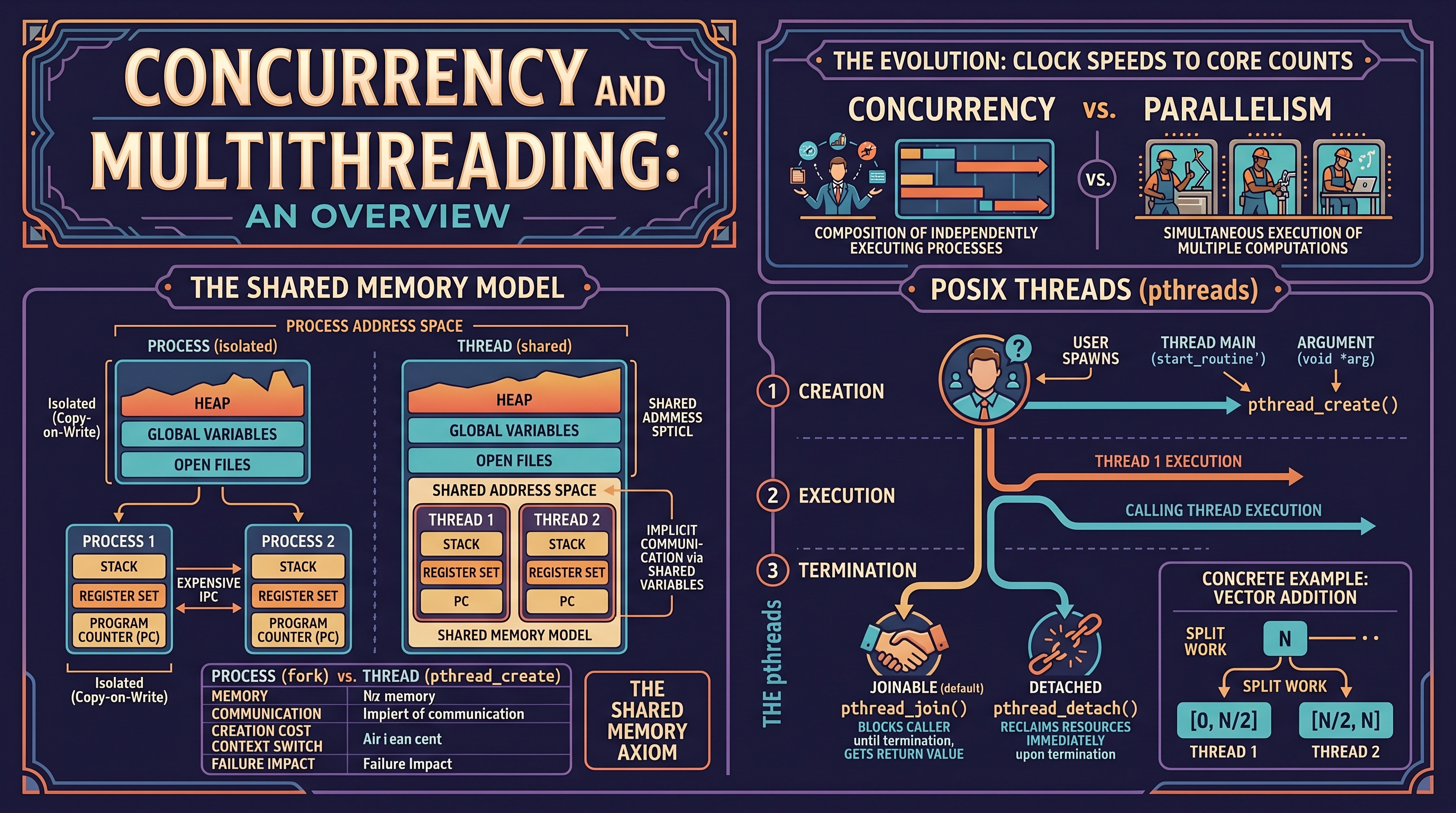
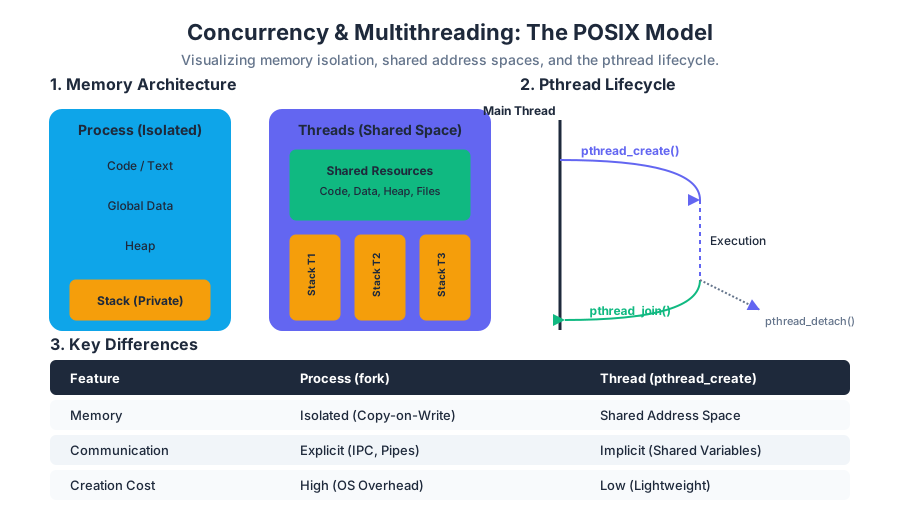
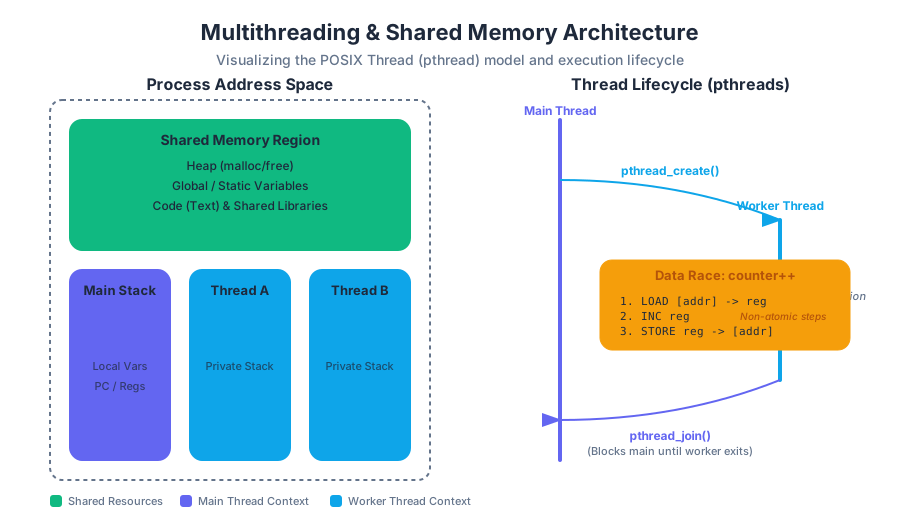
Exam Preparation and Review
Key concepts: C Memory Model Review · POSIX System Call Synthesis · Signal Disposition · Socket Management Pitfalls
Synthesis of course materials for midterm and final examinations.
Exam Preparation and Review
The transition from high-level application programming to systems programming requires a fundamental shift in how one perceives the computer. In systems programming, the abstractions of the language (C) and the operating system (POSIX) are not merely tools, but the very constraints and materials of the craft. Success in a systems-level examination depends on a dual mastery: the ability to manually trace the state of memory and the ability to predict the side effects of kernel-level operations.
This review synthesizes the core pillars of the curriculum—Memory Models, Process Management, Signal Handling, and Network I/O—into a cohesive framework for exam preparation.
The C Memory Model: Lifetimes and Layout
At the heart of every C program lies the memory model. Unlike managed languages like Java or Python, C requires the programmer to understand exactly where an object resides in the virtual address space and how long it stays there.
The Four Pillars of Object Lifetimes
C distinguishes between objects based on their lifetime (when they are created and destroyed) and their scope (where their names are visible).
| Segment | Lifetime | Management | Characteristics |
|---|---|---|---|
| Static / Data | Program Duration | Compiler/Linker | Stores global variables and static locals. Initialized once at startup. |
| Stack | Function Scope | Automatic (LIFO) | Stores local variables and return addresses. Fast, but limited in size. |
| Heap | Manual | malloc() / free() |
Dynamic allocation. Persistent until explicitly freed. Prone to leaks. |
| Text | Program Duration | Read-Only | Stores the actual machine instructions and string literals. |
The Rule of Three: When analyzing memory problems, always ask: 1) Who allocated it? 2) Who owns it? 3) Who is responsible for freeing it?
Pointer Arithmetic and Type Synthesis
Pointers are not merely integers; they are typed addresses. The expression ptr + 1 increments the address by 1 * sizeof(*ptr) bytes. This is the most common area for "off-by-one" errors in exam questions.
Example: Pointer Offset Calculation
int arr[5] = {10, 20, 30, 40, 50};
int *p = &arr[1]; // p points to 20
printf("%d\n", *(p + 2)); // Result: 40
In the example above, p + 2 moves the pointer forward by two int widths (usually 8 bytes), landing on arr[3].
Common Pitfalls in Memory
- Dangling Pointers: Accessing memory after it has been
free()'d or after a stack frame has been popped. - Memory Leaks: Losing the last pointer to a heap allocation without calling
free(). - Buffer Overflows: Writing past the allocated bounds of an array, often corrupting the stack canary or return address.
- Undefined Behavior (UB): Operations like dereferencing a
NULLpointer or shifting an integer by more than its bit-width. Once UB occurs, the compiler is no longer bound by the rules of the language.
POSIX System Call Synthesis
System calls are the gateway to the kernel. While C provides the logic, POSIX provides the capability. For the exam, you must be able to synthesize multiple system calls to achieve complex behaviors, such as redirection or process synchronization.
The Process Lifecycle: fork, exec, and wait
The fork() system call is unique because it returns twice: once in the parent (returning the child's PID) and once in the child (returning 0).
| Function | Purpose | Effect on Address Space |
|---|---|---|
fork() |
Create a child process | Exact clone (Copy-on-Write) |
execvp() |
Replace process image | Overwrites current memory with new program |
waitpid() |
Synchronize with child | Parent blocks until child changes state |
exit() |
Terminate process | Cleans up resources, returns status to parent |
File Descriptor Inheritance
One of the most critical concepts is how file descriptors (FDs) behave across a fork(). The child inherits a copy of the parent's FD table. Both FDs point to the same Open File Description in the kernel, meaning they share the same file offset.
Example: Redirection Logic
To redirect stdout to a file in a child process:
int fd = open("output.txt", O_WRONLY | O_CREAT, 0644);
if (fork() == 0) {
    dup2(fd, STDOUT_FILENO); // Replace stdout with our file
    close(fd);               // Close original copy
    execlp("ls", "ls", NULL);
}
close(fd);
wait(NULL);
Zombie and Orphan Processes
- Zombie: A process that has terminated (
exit) but whose parent has not yet calledwait(). It occupies an entry in the process table. - Orphan: A process whose parent has terminated. It is "adopted" by
init(PID 1), which automatically reaps it.
Signal Disposition and Asynchronous Safety
Signals are software interrupts that break the normal flow of execution. Handling them correctly is one of the most difficult tasks in systems programming due to their asynchronous nature.
Signal Handling Mechanisms
The modern way to handle signals is via sigaction, which provides more control and reliability than the deprecated signal() function.
| Signal | Default Action | Typical Usage |
|---|---|---|
SIGINT |
Terminate | Generated by Ctrl+C |
SIGKILL |
Terminate (Forced) | Cannot be caught or ignored |
SIGSEGV |
Terminate (Core Dump) | Invalid memory access |
SIGCHLD |
Ignore | Sent to parent when child stops/terminates |
SIGALRM |
Terminate | Generated by alarm() timer |
Reentrancy and Async-Signal-Safety
A function is reentrant if it can be interrupted in the middle of its execution and then safely called again (the "re-entry") before its previous invocation has finished.
Exam Tip: Inside a signal handler, you should only call async-signal-safe functions. For example,
printf()is NOT safe because it uses internal locks and buffers;write()IS safe because it is a direct system call.
The sig_atomic_t Type
When sharing a flag between a signal handler and the main program, use volatile sig_atomic_t. This ensures the compiler doesn't optimize the variable into a register and that reads/writes are atomic.
Socket Management Pitfalls
Networking in C involves a specific sequence of system calls. Errors usually arise from a misunderstanding of the state machine or improper buffer handling.
The Socket Lifecycle
- Socket Creation:
socket() - Naming:
bind()(Server only) - Preparation:
listen()(Server only) - Connection:
connect()(Client) oraccept()(Server) - Data Transfer:
read()/write()orsend()/recv() - Teardown:
close()
| Problem | Cause | Solution |
|---|---|---|
EADDRINUSE |
Port is in "TIME_WAIT" state | Use setsockopt with SO_REUSEADDR |
| Partial Reads | Network MTU or congestion | Wrap read() in a while loop |
| Deadlock | Both sides waiting to read | Ensure a clear application-level protocol |
| SIGPIPE | Writing to a closed socket | Handle SIGPIPE or use MSG_NOSIGNAL |
Byte Order (Endianness)
The internet uses Big-Endian (Network Byte Order). Most modern PCs use Little-Endian (Host Byte Order). You must use htons(), htonl(), ntohs(), and ntohl() to convert 16-bit and 32-bit integers when sending them over a socket.
Exam Problem Walkthroughs
Problem 1: The Fork Tree
Question: How many times is "Hello" printed?
fork();
if (fork() == 0) {
    fork();
}
printf("Hello\n");
Solution:
- Initial process (P1) forks. Now we have P1 and P2.
- P1 (parent) skips the
ifblock. - P2 (child) enters the
ifblock and forks again. Now we have P2 and P3. - P1, P2, and P3 all reach the
printf. - Total: 4 times. (Wait, let's re-trace).
- Start: 1 process.
- 1st fork: 2 processes.
- 2nd fork: The child of the 1st fork (P2) forks again. The parent (P1) does NOT.
- Result: P1 (original), P2 (child), P3 (grandchild).
- Correct Total: 3 times.
Problem 2: Pointer Arithmetic
Question: What is the output of the following code?
char *str = "Systems";
char **ptr = &str;
ptr++;
// What is *ptr?
Solution:
ptr is a char**. Incrementing it moves it by sizeof(char*) (usually 8 bytes). Since ptr was pointing to the local variable str on the stack, ptr++ now points to some random memory adjacent to str on the stack. Dereferencing it (*ptr) results in Undefined Behavior or a crash. This is a common trick question—incrementing a pointer to a single variable is almost always an error.
Problem 3: Signal Race Conditions
Question: Why is this code dangerous?
int count = 0;
void handler(int sig) { count++; }
int main() {
    signal(SIGINT, handler);
    while(count < 1) {
        // do work
    }
}
Solution:
If the compiler optimizes the while loop, it might load count into a register once and never check memory again, causing an infinite loop even if the signal arrives. The variable count must be declared as volatile sig_atomic_t.
Final Review Checklist
- Can you draw the memory layout of a process from memory?
- Do you know the difference between
char arr[] = "hello"andchar *ptr = "hello"? (Stack vs. Text segment). - Can you trace a complex series of
fork()andwait()calls? - Do you understand why
malloc(strlen(str))is a bug? (Forgetting the null terminator\0). - Are you comfortable converting between
struct sockaddr,struct sockaddr_in, andstruct addrinfo? - Can you identify a race condition in a multi-threaded program?
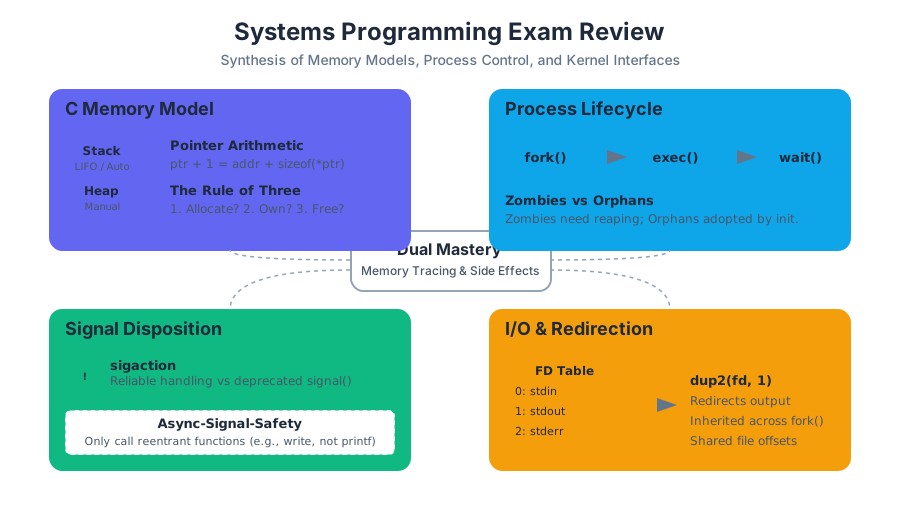
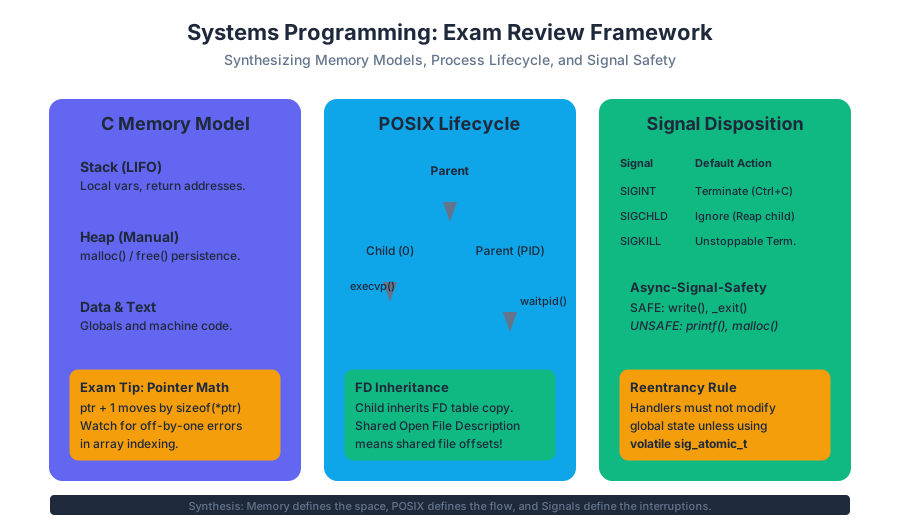
Source Materials
Study Systems Programming in C and Unix Environments with AI — Free on Lykke
Sign up for free to generate personalized flashcards, quizzes, and study guides from this course. Chat with an AI tutor that knows the material.
Get Started FreeView this course wiki on Lykke · Browse all public course wikis