Start building with Claude
Institution: MIT
1 study materials · 5 sections
This course provides a comprehensive guide for developers to integrate Claude into applications, covering the entire lifecycle from initial API calls to production deployment. It explores the two primary building paths: direct model access via the Messages API and fully managed autonomous agents. Students will learn about model selection (Opus, Sonnet, Haiku), tool integration, prompt engineering, and safety evaluation to build robust AI-driven solutions.
Course Sections
The Claude Model Family
Key concepts: Claude 3 Opus · Claude 3.5 Sonnet · Claude 3 Haiku · Model Selection
An introduction to the different versions of Claude and how to choose the right model for your specific use case.
The Claude Model Family
The Claude model family, developed by Anthropic, represents a frontier in Large Language Model (LLM) engineering, characterized by a unique focus on Constitutional AI, high-context reasoning, and a tiered architectural approach. Unlike monolithic model releases, the Claude 3 and 3.5 lineages are designed as a specialized ecosystem, where each model is optimized for a specific point on the Pareto frontier of intelligence, speed, and cost.
AI_IMAGEI_IMAGE## Overview and Philosophy The Claude family is built upon the principle of Helpfulness, Honesty, and Harmlessness (HHH). This is achieved through a process called Constitutional AI, where the model is trained to follow a set of high-level principles (a "constitution") during the Reinforcement Learning from AI Feedback (RLAIF) phase. This differs from traditional Reinforcement Learning from Human Feedback (RLHF) by reducing the reliance on human labelers and instead using a "teacher" model to evaluate outputs based on the defined constitution.
Technically, the Claude models are Decoder-only Transformers that have been heavily optimized for long-context recall and multimodal processing. With the introduction of the Claude 3 family, Anthropic moved to a "multimodal-first" architecture, allowing all models in the suite to process both text and visual data (images, charts, screenshots) with high precision.
The Tiered Hierarchy
The Claude ecosystem is divided into three distinct classes, each serving a different segment of the computational market:
| Model Class | Primary Value Proposition | Typical Use Case |
|---|---|---|
| Opus | Maximum Intelligence | Complex research, strategy, and intricate coding. |
| Sonnet | Balanced Performance | Enterprise automation, high-throughput RAG, and coding assistance. |
| Haiku | Near-Instant Speed | Real-time moderation, simple classification, and high-volume data extraction. |
Claude 3 Opus: The Reasoning Engine
Claude 3 Opus is the flagship model of the Claude 3 family. It is engineered for tasks that require deep "system 2" thinking—logical deduction, complex mathematical reasoning, and nuanced linguistic understanding.
Technical Characteristics
Opus excels in GPQA (Graduate-Level Google-Proof Q&A) and MMLU (Massive Multitouch Language Understanding) benchmarks, often outperforming human experts in specialized domains. Its architecture is likely the largest in terms of parameters within the family, allowing for a higher degree of "emergent properties" in reasoning.
Definition: Needle In A Haystack (NIAH) A performance metric measuring a model's ability to retrieve a specific piece of information (the "needle") embedded within a massive corpus of irrelevant data (the "haystack"). Claude 3 Opus maintains >99% accuracy across its entire 200k token context window.
Implementation Example: Multi-Step Reasoning
When implementing Opus, developers typically leverage its ability to handle complex system prompts that define multi-step "Chain of Thought" (CoT) requirements.
import anthropic

client = anthropic.Anthropic(api_key="my_api_key")

# Opus is used here for a complex financial analysis task requiring
# cross-referencing multiple data points in a single prompt.
response = client.messages.create(
    model="claude-3-opus-20240229",
    max_tokens=4096,
    system="You are a senior financial analyst. Deconstruct the provided 10-K report. "
           "Identify non-obvious risks related to supply chain volatility and "
           "quantify the potential EBITDA impact using a Monte Carlo simulation framework.",
    messages=[
        {"role": "user", "content": "Analyze the attached fiscal report for Q3."}
    ]
)

print(response.content[0].text)
Claude 3.5 Sonnet: The Efficiency Frontier
Claude 3.5 Sonnet represents a significant leap in the "middle" tier. Released after the initial Claude 3 launch, 3.5 Sonnet notably outperforms Claude 3 Opus on several key benchmarks while operating at the speed and cost of the previous Sonnet generation.
Why it Matters
3.5 Sonnet is currently considered the "Goldilocks" model for software engineering. It features enhanced spatial reasoning and vision capabilities, making it adept at interpreting architectural diagrams or UI/UX mockups and converting them into functional code.
Performance Metrics
The following table compares 3.5 Sonnet against its predecessor and the flagship Opus model:
| Benchmark | Claude 3 Opus | Claude 3 Sonnet | Claude 3.5 Sonnet |
|---|---|---|---|
| MMLU (Knowledge) | 86.8% | 79.0% | 88.7% |
| HumanEval (Coding) | 84.9% | 73.0% | 92.0% |
| GPQA (Reasoning) | 50.4% | 40.4% | 59.4% |
| Vision (MathVista) | 50.5% | 53.1% | 67.7% |
AI_DEMOI_DEMO--
Claude 3 Haiku: The Real-Time Processor
Claude 3 Haiku is optimized for latency. It is designed to be the fastest model in its intelligence class, capable of reading a dense research paper (approx. 10k tokens) with charts and graphs in less than three seconds.
Mechanics of Speed
Haiku achieves its performance through a combination of weight quantization, optimized KV (Key-Value) caching, and a likely smaller parameter count that allows for higher throughput (tokens per second) on standard H100/A100 GPU clusters.
Use Cases
- Content Moderation: Scanning user-generated content in real-time.
- Log Analysis: Sifting through millions of lines of server logs to find anomalies.
- Customer Support: Powering chatbots that require sub-second response times to maintain conversational flow.
Mathematical Representation of Cost-Latency Tradeoff
To select the optimal model, engineers often use a cost-function $J$ that balances latency ($L$), cost ($C$), and accuracy ($A$):
$$J(m) = w_1 \cdot L(m) + w_2 \cdot C(m) - w_3 \cdot A(m)$$
Where:
- $m$ is the model choice (Haiku, Sonnet, Opus).
- $w_i$ are weights determined by business requirements.
- For a real-time trading bot, $w_1$ (latency) would be maximized, favoring Haiku.
- For a legal discovery tool, $w_3$ (accuracy) would be maximized, favoring Opus.
Model Selection Strategy
Choosing the right model is not a one-time decision but a dynamic optimization problem. Anthropic provides a unified Messages API, allowing developers to swap models by changing a single string parameter.
Selection Matrix
| Requirement | Recommended Model | Rationale |
|---|---|---|
| Low Latency (<1s) | Claude 3 Haiku | Optimized for TTFT (Time to First Token). |
| Complex Coding | Claude 3.5 Sonnet | Highest HumanEval scores and fast iteration. |
| Large-Scale RAG | Claude 3.5 Sonnet | High context window with superior retrieval logic. |
| Nuanced Creative Writing | Claude 3 Opus | Better grasp of subtext and complex character arcs. |
| Cost Minimization | Claude 3 Haiku | Lowest price per million tokens. |
Implementation: Model Routing Logic
In production systems, a "Router" pattern is often used to send simple queries to Haiku and complex queries to Opus/Sonnet.
// Pseudocode for an Intelligent Model Router
async function routeQuery(userInput) {
    const complexityScore = await assessComplexity(userInput); // Fast heuristic or Haiku call

    const config = {
        model: complexityScore > 0.8 ? "claude-3-opus-20240229" : "claude-3-haiku-20240307",
        max_tokens: 1024,
        messages: [{ role: "user", content: userInput }]
    };

    return await anthropic.messages.create(config);
}
Advanced Features: Tool Use and Context Management
The Claude family supports Tool Use (also known as function calling), allowing the models to interact with external APIs, databases, or local code execution environments.
Tool Use Workflow
- Definition: The developer defines a set of tools in JSON schema.
- Planning: Claude determines which tool is needed to answer the user query.
- Call: Claude outputs a structured JSON object containing the tool name and arguments.
- Execution: The developer executes the tool and feeds the result back to Claude.
- Final Response: Claude incorporates the tool output into a natural language answer.
Example: Tool Definition (JSON)
{
  "tools": [
    {
      "name": "get_stock_price",
      "description": "Retrieves the current stock price for a given ticker symbol.",
      "input_schema": {
        "type": "object",
        "properties": {
          "ticker": {
            "type": "string",
            "description": "The stock ticker symbol (e.g., AAPL)"
          }
        },
        "required": ["ticker"]
      }
    }
  ]
}
Prompt Caching
A critical feature for enterprise applications is Prompt Caching. This allows developers to "freeze" a large prefix of a prompt (like a 50,000-token technical manual) and reuse it across multiple requests without re-processing the tokens.
- Cost Reduction: Cached tokens are significantly cheaper (up to 90% discount).
- Latency Reduction: Bypasses the initial computation phase for the cached prefix.
Infrastructure and API Reference
Anthropic provides several ways to access the Claude family, including the direct Anthropic API, Amazon Bedrock, and Google Cloud Vertex AI.
API Request Structure (cURL)
curl https://api.anthropic.com/v1/messages \
     --header "x-api-key: $ANTHROPIC_API_KEY" \
     --header "anthropic-version: 2023-06-01" \
     --header "content-type: application/json" \
     --data '{
         "model": "claude-3-5-sonnet-20240620",
         "max_tokens": 1024,
         "messages": [
             {"role": "user", "content": "Explain the difference between a GRU and an LSTM."}
         ]
     }'
Pricing Structure (Per 1M Tokens)
Pricing is bifurcated into Input and Output tokens, reflecting the asymmetric computational cost of processing context versus generating new text.
| Model | Input Cost (per 1M) | Output Cost (per 1M) |
|---|---|---|
| Claude 3 Opus | $15.00 | $75.00 |
| Claude 3.5 Sonnet | $3.00 | $15.00 |
| Claude 3 Haiku | $0.25 | $1.25 |
Common Pitfalls and Best Practices
1. The "System Prompt" Misconception
Many developers treat the system prompt as a simple instruction set. In the Claude family, the system prompt is a powerful steering mechanism. Placing complex constraints or large context data in the system prompt rather than the first user message often results in better adherence to formatting and tone.
2. Over-reliance on Opus
A common mistake is using Opus for all tasks "just to be safe." This leads to unnecessarily high latency and costs.
Pro-tip: Use Claude 3.5 Sonnet as your default starting point. Only upgrade to Opus if Sonnet fails on specific reasoning edge cases, and only downgrade to Haiku if latency is the primary bottleneck.
3. Token Limits and Truncation
While Claude supports a 200k context window, the max_tokens parameter controls the output length. If a model stops mid-sentence, check the stop_reason. If it is max_tokens, you need to increase the limit or implement a recursive generation strategy.
4. Handling Multimodality
When sending images, ensure they are base64 encoded and follow the supported media types (image/jpeg, image/png, image/gif, image/webp). Claude 3 models perform best when images are high-resolution and text within images is legible.
Safety and Constitutional AI
The Claude family is unique in its approach to safety. Instead of a "black box" of human preferences, Claude's behavior is guided by a transparent set of principles. This reduces "refusal sensitivity"—the tendency of a model to refuse a harmless prompt because it superficially resembles a harmful one.
The Constitutional Cycle
- Supervised Learning: The model is trained to generate responses based on the constitution.
- Evaluation: The model critiques its own responses based on constitutional principles.
- Preference Modeling: A reward model is trained on these AI-generated critiques.
- Reinforcement Learning: The final model is fine-tuned to maximize the reward from the preference model.
This process ensures that Claude 3 models are not only safe but also more resilient to "jailbreaking" attempts compared to models trained solely on human feedback.
AI_STUDY_GUIDEI_STUDY_GUIDE## Summary Table: The Claude 3 Family at a Glance
| Feature | Claude 3 Opus | Claude 3.5 Sonnet | Claude 3 Haiku |
|---|---|---|---|
| Context Window | 200,000 Tokens | 200,000 Tokens | 200,000 Tokens |
| Max Output | 4,096 Tokens | 8,192 Tokens | 4,096 Tokens |
| Vision Support | Yes | Yes | Yes |
| Tool Use | Yes | Yes | Yes |
| Best For | Deep Reasoning | Coding & General Purpose | Speed & Scale |
| Training Cutoff | Aug 2023 | Apr 2024 | Aug 2023 |
The Claude model family continues to evolve, with the "3.5" generation signaling a shift toward higher intelligence at lower price points. For the modern AI engineer, mastering the selection and implementation of these models is essential for building scalable, intelligent, and cost-effective applications.

Integrating with the Messages API
Key concepts: Messages API · JSON Request · Streaming · System Prompts
The fundamental method for interacting with Claude, focusing on request structures and response handling.
Integrating with the Messages API
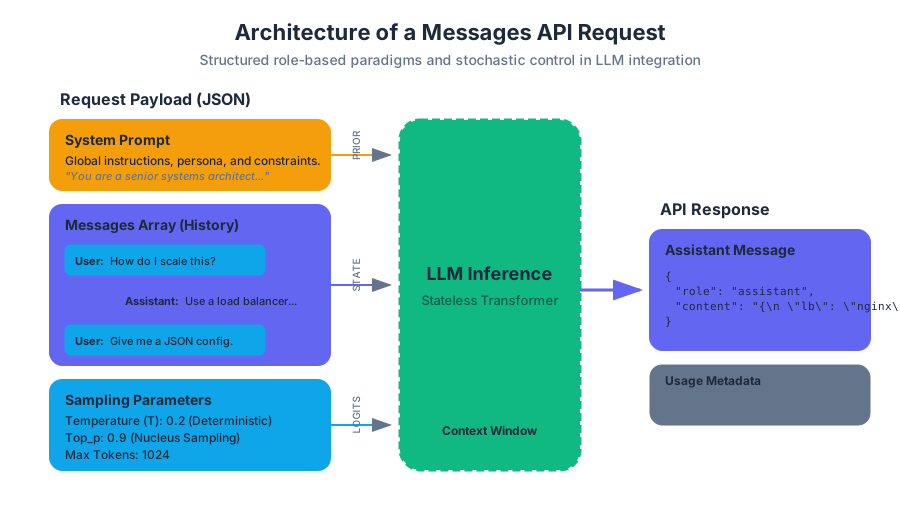
The Messages API represents the modern standard for interacting with Large Language Models (LLMs). Unlike legacy "Text Completion" interfaces—which treated the model as a simple string-in, string-out function—the Messages API enforces a structured, role-based paradigm. This structure is not merely a syntactic preference; it is a fundamental shift that allows for more sophisticated steering, better state management in conversational contexts, and the seamless integration of multi-modal inputs and tool-use capabilities.
In this deep dive, we will explore the architectural underpinnings of the Messages API, the mechanics of stateful simulation over a stateless protocol, and the technical nuances of streaming and system-level orchestration.
AI_SVGI_SVG## The Architecture of a Message Request
At its core, the Messages API is a RESTful interface that accepts a JSON payload representing a conversation history. Because LLMs are inherently stateless—they do not "remember" previous requests—the developer must provide the entire relevant history with every new request.
The fundamental unit of this API is the Message Object, which consists of a role and content.
| Component | Type | Description |
|---|---|---|
role |
String | Identifies the speaker. Valid values are user (the human) and assistant (the model). |
content |
String / Array | The actual data. Can be a simple string or a complex array of text and image blocks. |
model |
String | The specific model identifier (e.g., claude-3-5-sonnet-20240620). |
system |
String | (Optional) Instructions that guide the model's overall behavior and persona. |
The Role-Based Paradigm
The API enforces an alternating structure. A conversation must typically begin with a user message, followed by an assistant response. This structure mimics a Markov chain where the next state (the model's response) is conditioned on the sequence of all previous states (the message array).
Definition: Context Window Constraints The context window is the finite buffer of tokens the model can process at once. In the Messages API, every token in the
messagesarray, thesystemprompt, and the anticipated response counts toward this limit. Surpassing this limit results in a400 Bad Requestor truncated output.
System Prompts: The Latent Space Governor
The System Prompt is a distinct parameter, separate from the messages array. While user messages provide the "what" (the specific task), the system prompt defines the "how" (the constraints, persona, and behavioral boundaries).
Why System Prompts Matter
In the underlying transformer architecture, the system prompt is typically weighted or positioned such that it exerts a persistent influence over the entire generation process. It acts as a "prior" in a Bayesian sense, shifting the probability distribution of the model's vocabulary to favor certain styles or domains.
Implementation Mechanics
When a request is sent, the system prompt is concatenated with the message history in a format the model recognizes as high-priority instructions. This prevents "instruction drift," where a model might forget its initial constraints during a very long conversation.
| Feature | User Message | System Prompt |
|---|---|---|
| Persistence | Transient (part of the flow) | Persistent (global context) |
| Authority | Subject to model interpretation | High-level behavioral override |
| Use Case | Queries, data, specific tasks | Persona, safety rules, output format |
Stochastic Control: Sampling Parameters
Interacting with the Messages API requires fine-tuning the model's output through sampling parameters. These parameters control the Softmax layer of the neural network, determining how the model selects the next token from its vocabulary.
The Mathematics of Temperature
The most critical parameter is Temperature ($T$). It modifies the logits (raw scores) before the Softmax function is applied.
The probability $P$ of selecting token $i$ is given by:
$$P(x_i) = \frac{\exp(z_i / T)}{\sum_{j=1}^{V} \exp(z_j / T)}$$
Where:
- $z_i$ is the logit for token $i$.
- $V$ is the total vocabulary size.
- $T$ is the temperature.
As $T \to 0$, the distribution becomes "sharper," eventually becoming a one-hot vector (greedy decoding). As $T \to \infty$, the distribution becomes uniform, leading to maximum entropy (randomness).
Parameter Reference Table
| Parameter | Range | Effect | Recommended Use |
|---|---|---|---|
temperature |
0.0 - 1.0 | Controls randomness. | 0.0 for logic/code, 1.0 for creative writing. |
top_p |
0.0 - 1.0 | Nucleus sampling; cuts off the tail of the distribution. | Use as an alternative to temperature for diversity. |
max_tokens |
1 - 8192+ | Limits the length of the generated response. | Always set a limit to manage costs/latency. |
stop_sequences |
Array | Custom strings that trigger the end of generation. | Useful for templating or preventing run-on output. |
Implementation: The Pythonic Approach
The following example demonstrates a robust integration using the Anthropic Python SDK. It features a multi-turn conversation, a complex system prompt, and explicit error handling.
import anthropic
import os

# Initialize the client with an API key from environment variables
client = anthropic.Anthropic(api_key=os.environ.get("ANTHROPIC_API_KEY"))

def execute_structured_query(user_query: str):
    try:
        response = client.messages.create(
            model="claude-3-5-sonnet-20240620",
            max_tokens=1024,
            temperature=0.2, # Low temperature for factual consistency
            system="You are a senior systems architect. Respond only in structured JSON.",
            messages=[
                {
                    "role": "user",
                    "content": [
                        {
                            "type": "text",
                            "text": f"Analyze the following requirement: {user_query}"
                        }
                    ]
                }
            ]
        )

        # Accessing the content block safely
        return response.content[0].text

    except anthropic.APIConnectionError as e:
        print(f"The server could not be reached: {e.__cause__}")
    except anthropic.RateLimitError:
        print("Rate limit exceeded (429). Implement exponential backoff.")
    except anthropic.APIStatusError as e:
        print(f"Non-200 status code received: {e.status_code}, {e.response}")

# Example usage
# result = execute_structured_query("Design a scalable logging system for a microservices mesh.")
Streaming: Real-Time Token Delivery
For user-facing applications, waiting for a 1000-token response to complete can take 10-20 seconds, leading to a poor user experience. Streaming utilizes Server-Sent Events (SSE) to push tokens to the client as they are generated.
The SSE Protocol
In a streaming request, the server keeps the HTTP connection open and sends a series of data packets. Each packet is a JSON object representing a "chunk" of the message.
event: message_start
data: {"type": "message_start", "message": {"id": "msg_123", "role": "assistant", ...}}

event: content_block_start
data: {"type": "content_block_start", "index": 0, "content_block": {"type": "text", "text": ""}}

event: content_block_delta
data: {"type": "content_block_delta", "index": 0, "delta": {"type": "text_delta", "text": "Hello"}}

event: message_stop
data: {"type": "message_stop"}
AI_DEMOI_DEMO### Benefits of Streaming
- Reduced Perceived Latency: The Time To First Token (TTFT) is often under 500ms.
- Interactive UX: Text appears to be "typed" in real-time.
- Early Termination: If the model starts generating incorrect or harmful content, the client can close the connection immediately to save tokens and protect the user.
Advanced Implementation: TypeScript and SSE
Handling streams in a web environment requires managing the asynchronous nature of the events. This TypeScript example demonstrates how to consume a stream using the SDK's event listeners.
import Anthropic from '@anthropic-ai/sdk';

const anthropic = new Anthropic({
  apiKey: process.env.ANTHROPIC_API_KEY,
});

async function streamResponse(prompt: string) {
  const stream = await anthropic.messages.create({
    max_tokens: 1024,
    messages: [{ role: 'user', content: prompt }],
    model: 'claude-3-5-sonnet-20240620',
    stream: true,
  });

  for await (const event of stream) {
    if (event.type === 'content_block_delta' && event.delta.type === 'text_delta') {
      // Update the UI in real-time
      process.stdout.write(event.delta.text);
    }

    if (event.type === 'message_stop') {
      console.log('\n--- Stream Complete ---');
    }
  }
}

// streamResponse("Explain the concept of quantum entanglement in simple terms.");
Tool Use (Function Calling)
The Messages API is not limited to text. It can act as a reasoning engine that interacts with external tools. This is achieved by providing a tools definition in the request.
The Tool Execution Loop
- Request: The user sends a prompt + tool definitions.
- Model Intent: The model decides to use a tool and returns a
tool_useblock. - Client Execution: The developer's code executes the actual tool (e.g., a database query).
- Result Submission: The developer sends the tool result back to the model in a new
usermessage with atool_resultblock. - Final Response: The model interprets the tool output and provides a natural language answer.
| Tool Component | Description |
|---|---|
name |
The unique identifier for the tool (e.g., get_weather). |
description |
A detailed explanation of what the tool does (crucial for model selection). |
input_schema |
A JSON Schema defining the required parameters (e.g., lat, long). |
Raw HTTP Wire Format
Understanding the raw HTTP request is vital for debugging or for environments where an official SDK is unavailable.
POST /v1/messages HTTP/1.1
Host: api.anthropic.com
x-api-key: YOUR_API_KEY
anthropic-version: 2023-06-01
content-type: application/json

{
    "model": "claude-3-5-sonnet-20240620",
    "max_tokens": 1024,
    "system": "You are a helpful assistant.",
    "messages": [
        {"role": "user", "content": "What is the capital of France?"}
    ]
}
Common Pitfalls and Best Practices
1. Context Window Exhaustion
Developers often forget that the entire history is sent with every request. In long conversations, the token count grows quadratically if not managed. Solution: Implement a "sliding window" or "summarization" strategy where older messages are pruned or compressed.
2. Improper Role Alternation
The Messages API is strict about the sequence of roles. Sending two user messages in a row or starting with an assistant message will generally trigger an error.
Solution: Always validate the message array before submission. If multiple user inputs occur, concatenate them into a single user message.
3. Handling Stop Reasons
The API returns a stop_reason which indicates why the generation ended.
| Stop Reason | Meaning | Action Required |
|---|---|---|
end_turn |
Model finished naturally. | None. |
max_tokens |
Hit the length limit. | Increase max_tokens or prompt for a continuation. |
stop_sequence |
Hit a custom stop string. | Process the specific logic tied to that sequence. |
tool_use |
Model wants to call a tool. | Execute the tool and return the result. |
4. Safety and Content Filtering
LLMs have internal safety layers. If a request triggers these filters, the API may return an empty response or a specific error.
Solution: Check the stop_reason and handle cases where the model refuses to answer due to policy violations gracefully.
Prompt Engineering and Evaluation
Key concepts: Prompt Engineering · Golden Datasets · Evaluation Metrics · Iterative Refinement
Best practices for crafting effective prompts and establishing a rigorous evaluation framework for model outputs.
Prompt Engineering and Evaluation
The transition from a "toy" Large Language Model (LLM) implementation to a production-grade AI system is rarely a matter of model scaling alone. Instead, it is a function of Prompt Engineering and Evaluation (Evals)—the dual disciplines of optimizing the model’s input stimuli and rigorously measuring the resulting output distributions. In the early stages of development, engineers often rely on "vibe-based" development, where a prompt is tweaked until it "looks right." However, for systems requiring high reliability, safety, and performance, we must treat prompts as code and evaluations as unit tests.
AI_IMAGEI_IMAGE## The Taxonomy of Prompt Engineering
Prompt Engineering is the systematic process of refining the input provided to an LLM to steer its latent representations toward a specific, desired output. It is not merely "talking to the AI"; it is an exercise in constraint satisfaction and probability shaping.
The Anatomy of a High-Performing Prompt
A production prompt is typically composed of several distinct functional components. By modularizing these components, developers can isolate variables during the evaluation phase.
| Component | Purpose | Example |
|---|---|---|
| Role/Persona | Sets the stylistic and technical boundaries of the response. | "You are a senior site reliability engineer..." |
| Instruction | The core task the model must perform. | "Analyze the following stack trace for memory leaks." |
| Context | External data needed to complete the task (RAG). | "Here are the relevant documentation snippets: [DOCS]" |
| Constraints | Hard limits on output format, length, or content. | "Return only valid JSON. Do not include explanations." |
| Few-Shot Examples | Input-output pairs that demonstrate the desired pattern. | "Input: A, Output: B; Input: C, Output: D" |
Advanced Prompting Techniques
Beyond simple instructions, several architectural patterns have emerged to handle complex reasoning:
- Chain of Thought (CoT): Forcing the model to generate intermediate reasoning steps. This leverages the model's autoregressive nature, allowing it to "think" by generating tokens that serve as working memory.
- Few-Shot Prompting: Providing $n$ examples of a task. This performs "in-context learning," where the model aligns its output distribution with the provided examples without weight updates.
- ReAct (Reason + Act): A framework where the model generates a reasoning trace followed by an action (e.g., a tool call), then observes the result and repeats.
Definition: The In-Context Learning Hypothesis In-context learning is often theorized as a form of "implicit fine-tuning" where the prompt's examples allow the model to locate a specific task-relevant manifold within its pre-trained latent space, effectively narrowing the search space for the next token.
# Low-level implementation: A structured Prompt Template System
# This ensures consistency and allows for programmatic iteration over prompt variables.

import json
from typing import List, Dict

class PromptTemplate:
    def __init__(self, template_str: str):
        self.template = template_str

    def format(self, **kwargs) -> str:
        return self.template.format(**kwargs)

def build_chain_of_thought_prompt(task: str, context: str, examples: List[Dict[str, str]]) -> str:
    """
    Constructs a structured CoT prompt with few-shot examples.
    """
    system_role = "You are a logical reasoning assistant. Solve the task step-by-step."

    example_block = ""
    for ex in examples:
        example_block += f"Q: {ex['input']}\nA: Let's think step by step. {ex['thought']} Therefore, the answer is {ex['output']}.\n\n"

    prompt = f"{system_role}\n\n{example_block}Q: {task}\nContext: {context}\nA: Let's think step by step."
    return prompt

# Example usage
examples = [
    {"input": "Is 17 a prime?", "thought": "17 is only divisible by 1 and 17.", "output": "Yes"}
]
final_prompt = build_chain_of_thought_prompt("Is 91 a prime?", "Standard arithmetic rules apply.", examples)
print(final_prompt)
Golden Datasets: The Ground Truth
An evaluation is only as good as the data it uses. A Golden Dataset (or "Ground Truth" set) is a curated collection of inputs and their corresponding "ideal" outputs. This dataset serves as the benchmark against which all prompt iterations are measured.
Construction and Curation
Creating a Golden Dataset is often the most labor-intensive part of the LLM lifecycle. It requires:
- Diversity: Covering edge cases, "happy paths," and adversarial inputs.
- Accuracy: Human-verified or expert-generated outputs.
- Size: Usually 50–500 samples for prompt engineering, though more are needed for fine-tuning.
Synthetic Data Generation
When human labeling is too slow, we use "LLM-as-a-Generator." A stronger model (e.g., Claude 3.5 Sonnet) generates synthetic inputs and outputs, which are then filtered by a human expert. This is known as Distillation or Self-Instruct.
| Strategy | Pros | Cons |
|---|---|---|
| Manual Curation | Highest quality, catches subtle nuances. | Extremely slow, expensive, unscalable. |
| Production Logs | Real-world distribution, captures user intent. | Requires PII scrubbing, may contain "bad" examples. |
| Synthetic (LLM) | Rapid, covers vast edge cases. | Risk of "model collapse" or echo-chamber biases. |
AI_DEMOI_DEMO## Evaluation Metrics: Quantifying Success
Once a Golden Dataset is established, we need a way to score the model's performance. Evaluation metrics range from simple string matching to complex model-based judgments.
Deterministic vs. Probabilistic Metrics
For tasks with a single correct answer (e.g., data extraction), deterministic metrics work best. For creative or open-ended tasks, we use probabilistic or semantic metrics.
The Mathematical Intuition of BERTScore Unlike BLEU, which relies on $n$-gram overlap, BERTScore calculates the cosine similarity between the contextual embeddings of the candidate and reference sentences: $$R_{BERT} = \frac{1}{|x|} \sum_{x_i \in x} \max_{\hat{x}_j \in \hat{x}} \mathbf{v}_i^\top \mathbf{\hat{v}}_j$$ where $\mathbf{v}_i$ and $\mathbf{\hat{v}}_j$ are the pre-trained embeddings of the tokens.
LLM-as-a-Judge (G-Eval)
The current state-of-the-art for evaluating complex outputs (like summaries or code) is using an LLM to grade another LLM. This is often more correlated with human judgment than traditional metrics like ROUGE.
\text{Score} = \text{LLM}(\text{Prompt}, \text{Response}, \text{Rubric}) \rightarrow [1-5]
Metric Comparison Table
| Metric | Type | Best For | Limitation |
|---|---|---|---|
| Exact Match (EM) | Deterministic | Classification, IDs | Too rigid for natural language. |
| ROUGE-L | Statistical | Summarization | Penalizes synonyms; rewards length. |
| BERTScore | Semantic | Translation, Paraphrasing | Computationally expensive; opaque. |
| Pass@k | Functional | Code Generation | Requires an execution environment. |
| LLM-Judge | Model-based | Nuance, Tone, Logic | Potential for "self-preference" bias. |
# Third code block: CLI invocation for an evaluation pipeline
# Using a tool like 'promptfoo' to run a matrix evaluation

# 1. Define the test suite in a YAML file (promptfooconfig.yaml)
# 2. Run the evaluation across multiple models/prompts
promptfoo eval \
  --prompts "prompts/v1.txt" "prompts/v2_chain_of_thought.txt" \
  --providers "anthropic:messages:claude-3-5-sonnet-20240620" "openai:gpt-4o" \
  --tests "data/golden_dataset.csv" \
  --output "results/eval_report.html" \
  --cache

# This command generates a side-by-side comparison of how different
# prompt/model combinations performed against the golden dataset.
Iterative Refinement: The Eval Loop
Prompt engineering is an iterative cycle, not a one-off task. The "Eval Loop" mirrors the traditional software development lifecycle (SDLC) but centers on the stochastic nature of LLMs.
The Refinement Pipeline
- Baseline: Run the current prompt against the Golden Dataset.
- Error Analysis: Identify where the model failed. Is it hallucinating? Is the formatting wrong? Is it missing context?
- Hypothesis: Formulate a change (e.g., "Adding a negative constraint will stop the model from apologizing").
- Experiment: Update the prompt and re-run the eval.
- Regression Check: Ensure the change didn't break previously passing cases.
Common Pitfalls in Iteration
- Overfitting to the Eval Set: Tweaking a prompt so specifically for 50 examples that it fails on the 51st.
- Sensitivity to Permutation: LLMs are sensitive to the order of few-shot examples. Moving the "best" example to the end of the list often improves performance (Recency Bias).
- The "Verbosity Bias": LLM judges often give higher scores to longer responses, even if they are less accurate.
-- Fourth code block: Analyzing evaluation results in a database
-- This query identifies specific categories where the model's
-- 'faithfulness' score dropped after a prompt update.

SELECT
    test_category,
    AVG(score_v1) as avg_score_old,
    AVG(score_v2) as avg_score_new,
    (AVG(score_v2) - AVG(score_v1)) as delta
FROM
    eval_results
WHERE
    metric_name = 'faithfulness'
GROUP BY
    test_category
HAVING
    delta < -0.1
ORDER BY
    delta ASC;

-- This allows engineers to pinpoint regressions in specific logic domains.
Safety and Guardrails
In production, prompt engineering also involves Defensive Prompting. This ensures the model does not leak sensitive data, generate harmful content, or succumb to "Prompt Injection" (where a user tries to override the system instructions).
Guardrail Architectures
- Input Sanitization: Using a smaller, faster model to check if the user's query contains malicious instructions.
- Output Verification: Using regex or Pydantic validators to ensure the output matches the required schema before it reaches the user.
- Constitutional AI: Providing the model with a set of "principles" (e.g., "Do not be harmful") that it must follow during its reasoning process.
Summary of Best Practices
To build a robust system, follow these heuristics:
- Version Control Everything: Prompts should be stored in Git, not hardcoded in the application logic.
- Automate the Benchmarks: Integrate your Golden Dataset evals into your CI/CD pipeline.
- Use the Right Model for the Job: Use a "Teacher" model (Claude 3 Opus) for evaluation and a "Student" model (Claude 3 Haiku) for high-speed production inference.
- Mind the Context Window: Large prompts are expensive and can lead to "Lost in the Middle" phenomena, where the model ignores information in the center of the prompt.

Tool Use and Infrastructure
Key concepts: Tool Use (Function Calling) · Client-side Execution · API Schemas
Extending Claude's capabilities by allowing it to interact with external tools and APIs.
Tool Use and Infrastructure
Tool use, frequently referred to as function calling, represents the evolutionary bridge between Large Language Models (LLMs) as passive text generators and LLMs as active agents within a software ecosystem. While a standard LLM is confined to the knowledge present in its training weights, a tool-enabled model can interact with the real world in real-time—querying databases, executing code, browsing the web, or controlling hardware.
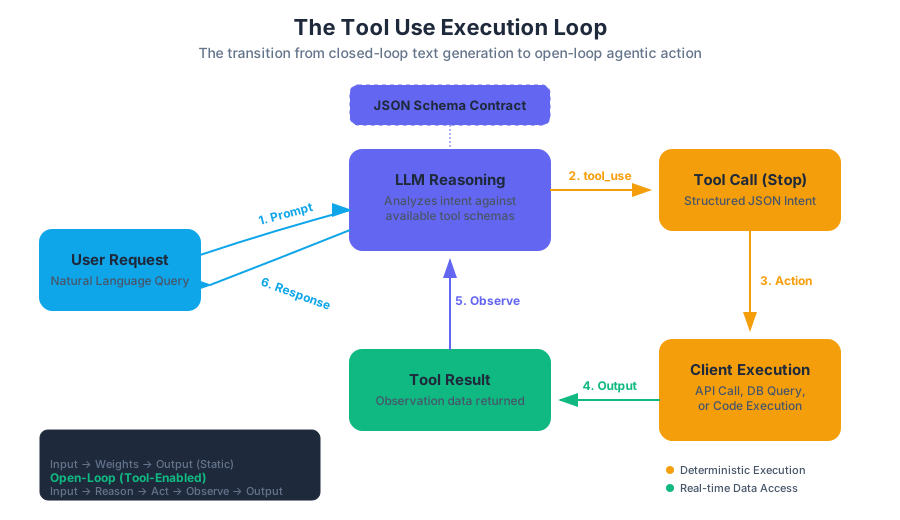
In the context of modern AI infrastructure, tool use is not merely an "add-on" feature; it is a fundamental architectural shift. It moves the model from a closed-loop system (input text → output text) to an open-loop system (input text → reasoning → action → observation → final output). This section explores the mechanics of tool definition, the lifecycle of a tool call, and the infrastructure required to support robust, secure, and scalable execution.
AI_SVGI_SVG## The Fundamental Mechanics of Tool Use
At its core, tool use is a structured negotiation between a model and a client application. The model does not "run" the tool itself. Instead, it expresses the intent to use a tool by generating a structured data block (typically JSON) that conforms to a schema provided by the developer.
Definition: Tool Use Tool use is a capability where an LLM is provided with a set of function signatures (schemas). When presented with a query, the model determines if a tool is required, selects the appropriate tool, and generates the arguments necessary to invoke that tool according to the defined schema.
Why Tool Use is Necessary
Standard LLMs suffer from several inherent limitations that tool use effectively mitigates:
- Knowledge Cutoffs: Models cannot know about events occurring after their training data was finalized. Tools allow them to fetch "live" data.
- Mathematical Precision: While LLMs are excellent at linguistic reasoning, they often struggle with high-precision arithmetic or complex algorithmic logic. Offloading these to a calculator or a Python interpreter ensures 100% accuracy.
- Side Effects: Models cannot inherently "do" things—like sending an email or updating a JIRA ticket. Tools provide the "hands" for the model's "brain."
| Feature | Standard Prompting | Retrieval-Augmented Generation (RAG) | Tool Use (Function Calling) |
|---|---|---|---|
| Data Source | Static Training Data | External Vector Database | Real-time APIs / Code Execution |
| Actionability | Read-only | Read-only | Read/Write (Stateful) |
| Precision | Probabilistic | Probabilistic (Contextual) | Deterministic (via Code/API) |
| Complexity | Low | Medium | High |
API Schemas: The Contract of Interaction
For a model to use a tool, it must understand the tool's "interface." This is achieved through API Schemas, almost universally implemented using the JSON Schema standard. A schema acts as a contract, defining exactly what parameters the tool expects, their types, and which ones are mandatory.
The quality of the tool's description within the schema is the single most important factor in tool-use performance. Because the model uses the description to decide when to call a tool, the description must be written as "model-facing documentation."
Implementation: Defining a Tool Schema
In a production environment, you often use high-level abstractions to generate these schemas. Below is a low-level implementation using Python's Pydantic library to generate a valid JSON schema for a weather tool.
from pydantic import BaseModel, Field
from typing import Optional, Literal
import json

class GetWeatherSchema(BaseModel):
    """
    Retrieves the current weather for a specific location.
    Use this tool whenever a user asks about weather, temperature, or forecasts.
    """
    location: str = Field(
        ...,
        description="The city and state, e.g. San Francisco, CA"
    )
    unit: Literal["celsius", "fahrenheit"] = Field(
        default="celsius",
        description="The unit of temperature to return"
    )
    include_forecast: bool = Field(
        default=False,
        description="Whether to include a 5-day forecast in the response"
    )

# Generating the JSON Schema for the LLM
tool_definition = {
    "name": "get_weather",
    "description": GetWeatherSchema.__doc__.strip(),
    "input_schema": GetWeatherSchema.model_json_schema()
}

print(json.dumps(tool_definition, indent=2))
The Execution Loop: A Step-by-Step Walkthrough
The lifecycle of tool use follows a specific "loop" pattern. It is a multi-turn conversation where the model and the client exchange control.
- User Request: The user asks a question (e.g., "What is the stock price of AAPL?").
- Tool Selection: The model analyzes the request against available tools. It decides
get_stock_priceis appropriate. - Tool Call (Stop Reason): The model outputs a
tool_useblock and stops generating text. The API response indicates astop_reasonoftool_use. - Client-Side Execution: The developer's code intercepts the
tool_useblock, extracts the arguments (e.g.,{"ticker": "AAPL"}), and executes the actual API call to a financial data provider. - Tool Result: The developer sends the result of the tool back to the model in a new message with the role
tool. - Final Response: The model processes the tool's output and generates a natural language response for the user.
Logic Flow: The Tool Use State Machine
The following logic represents the internal state transitions during a tool-enabled session.
STATE_MACHINE ToolExecutionLoop:
    INPUT: UserPrompt, Toolset

    STEP 1: Model.Generate(UserPrompt, Toolset)
    IF Response.Type == "text":
        RETURN Response.Text
    ELSE IF Response.Type == "tool_use":
        LET tool_id = Response.ToolID
        LET tool_name = Response.ToolName
        LET tool_args = Response.Arguments

        TRY:
            LET result = EXECUTE(tool_name, tool_args)
            GOTO STEP 2
        CATCH Error:
            LET result = "Error: " + Error.Message
            GOTO STEP 2

    STEP 2: Model.Generate(History + ToolResult(tool_id, result))
    GOTO STEP 1 (Recursion for multi-step reasoning)
AI_DEMOI_DEMO## Client-Side Execution and Infrastructure
One of the most critical aspects of tool use is where and how the code runs. Unlike managed agents where the provider might run the code, standard tool use requires the developer to manage the execution environment. This introduces significant security and infrastructure considerations.
Sandboxing and Security
When a model generates arguments for a tool, it is essentially generating input for your backend. If one of your tools is execute_sql or run_python_script, you are effectively giving the LLM (and by extension, the user) the ability to run code on your servers.
| Infrastructure Strategy | Description | Security Level | Latency |
|---|---|---|---|
| Local Process | Running tools in the same process as the API client. | Low: Risk of RCE or data leakage. | Very Low |
| Containerized (Docker) | Each tool call runs in a fresh, ephemeral container. | High: Isolated filesystem and network. | Medium |
| WebAssembly (Wasm) | Running code in a high-performance, secure sandbox. | Very High: Memory-safe, restricted syscalls. | Low |
| Serverless (Lambda) | Triggering a cloud function for each tool call. | High: Managed isolation, auto-scaling. | High (Cold starts) |
Real-World Implementation: Secure TypeScript Execution
In this example, we demonstrate how a client-side application might handle a tool call to a restricted "Calculator" tool using a safe evaluation pattern.
import { ClaudeClient } from '@anthropic-ai/sdk';

const client = new ClaudeClient({ apiKey: process.env.CLAUDE_API_KEY });

async function handleToolUse(message: any) {
  for (const content of message.content) {
    if (content.type === 'tool_use') {
      const { name, input, id } = content;

      let result;
      if (name === 'calculate_stochastic_volatility') {
        // Instead of eval(), we use a deterministic library call
        result = performMath(input.sigma, input.price_history);
      }

      // Send the result back to the model
      const finalResponse = await client.messages.create({
        model: 'claude-3-5-sonnet-20240620',
        messages: [
          { role: 'user', content: 'Calculate volatility for AAPL.' },
          { role: 'assistant', content: [content] },
          { role: 'user', content: [{ type: 'tool_result', tool_use_id: id, content: JSON.stringify(result) }] }
        ]
      });

      console.log(finalResponse.content[0].text);
    }
  }
}
Advanced Patterns: Parallelism and Forced Tool Use
As applications grow in complexity, simple one-by-one tool calling becomes a bottleneck. Modern infrastructure supports advanced orchestration patterns.
Parallel Tool Use
If a user asks, "What is the weather in London, Paris, and Tokyo?", a capable model can emit three tool_use blocks simultaneously. The infrastructure should be designed to execute these calls in parallel (e.g., using Promise.all in JavaScript or asyncio.gather in Python) to minimize latency.
Forced Tool Use (tool_choice)
Sometimes, you want to ensure the model always uses a tool, regardless of the user's input. This is useful for "Router" agents.
auto: The model decides whether to use a tool or text.any: The model must use at least one of the provided tools.tool: The model must use a specific tool.
| Parameter | Behavior | Best Use Case |
|---|---|---|
tool_choice: {"type": "auto"} |
Model chooses text or tool. | General purpose assistants. |
tool_choice: {"type": "any"} |
Model must call a tool. | Data extraction pipelines. |
tool_choice: {"type": "tool", "name": "x"} |
Model must call tool 'x'. | Specific sub-tasks (e.g., "Search"). |
Common Pitfalls and Best Practices
Even with perfect schemas, tool use can fail in subtle ways.
1. Argument Hallucination
The model might invent parameters that don't exist in the schema or provide values in the wrong format (e.g., "June 1st" instead of "2023-06-01").
- Solution: Use strict validation (like Pydantic or Zod) on the client side. If validation fails, send the error message back to the model as a
tool_resultso it can "self-correct."
2. Schema Drift
If your underlying API changes but your JSON schema provided to the model does not, the model will generate calls that result in 400 Bad Request errors.
- Solution: Generate your JSON schemas dynamically from your code's type definitions to ensure they are always in sync.
3. Context Window Bloat
Every tool call and result is added to the conversation history. Large tool outputs (e.g., a 500-row CSV) can quickly consume the context window.
- Solution: Summarize tool results before sending them back to the model, or use a "middle-man" tool that filters the data.
Example: Handling a Tool Error
When a tool fails, do not crash the application. Instead, inform the model of the failure so it can explain it to the user or try a different approach.
# Example of a raw API response where the tool execution failed
# The client sends this back to the model
curl https://api.anthropic.com/v1/messages \
  -H "x-api-key: $API_KEY" \
  -H "content-type: application/json" \
  -d '{
    "model": "claude-3-5-sonnet-20240620",
    "messages": [
      {
        "role": "user",
        "content": "Delete database table 'users'."
      },
      {
        "role": "assistant",
        "content": [{"type": "tool_use", "id": "call_123", "name": "db_query", "input": {"query": "DROP TABLE users"}}]
      },
      {
        "role": "user",
        "content": [
          {
            "type": "tool_result",
            "tool_use_id": "call_123",
            "content": "Error: Permission denied. User does not have DROP privileges.",
            "is_error": true
          }
        ]
      }
    ]
  }'
Infrastructure for Managed Agents
While the "Loop" described above is the standard for the Messages API, there is a rising trend toward Managed Agents. In this paradigm, the infrastructure provider (like Anthropic or AWS) manages the execution environment.
Managed agents simplify the developer experience by:
- Handling the Loop: The provider automatically re-invokes the model until a final answer is reached.
- State Management: The provider maintains the conversation state and tool outputs.
- Built-in Sandboxing: The provider runs the tools in a secure, managed environment.
However, for enterprise applications requiring custom authentication, private VPC access, or proprietary logic, the Client-side Execution model remains the gold standard for control and security.
Building with Claude Managed Agents
Key concepts: Autonomous Agents · Managed Workflows · Agentic Design
Leveraging fully managed autonomous agents for complex, multi-step task completion.
Building with Claude Managed Agents
The transition from Large Language Models (LLMs) as stateless text predictors to Managed Agents represents a fundamental shift in AI engineering. In a traditional request-response cycle, the developer is responsible for the "outer loop"—handling state, managing tool calls, and re-injecting results into the context. Managed Agents invert this relationship. By utilizing Claude’s native ability to reason, plan, and execute multi-step trajectories, developers can delegate the orchestration of complex tasks to the model itself.
This article explores the architectural underpinnings of Claude Managed Agents, the mechanics of agentic workflows, and the rigorous engineering required to deploy autonomous systems in production environments.
AI_IMAGEI_IMAGE## The Theoretical Foundation: From Inference to Agency
At its core, a standard LLM call is an approximation of the conditional probability $P(y | x)$, where $x$ is the prompt and $y$ is the completion. However, an Agentic Workflow treats the model as a policy $\pi$ in a partially observable Markov decision process (POMDP). The goal is no longer just a single output, but a trajectory $T$:
$$T = { (s_0, a_0, o_0), (s_1, a_1, o_1), \dots, (s_n, a_n, o_n) }$$
Where:
- $s_t$ is the state (the conversation history and internal reasoning).
- $a_t$ is the action (a tool call or a final response).
- $o_t$ is the observation (the result of the tool execution).
Definition: Managed Agency Managed Agency is a high-level abstraction where the infrastructure provider (Anthropic) manages the loop of $s_t \to a_t \to o_t$. The developer defines the tools and the objective, while the managed service handles the iterative reasoning and state persistence required to reach the terminal state $s_n$.
The ReAct Paradigm
Claude Managed Agents primarily utilize the ReAct (Reason + Act) framework. Instead of jumping directly to an action, the model generates a "Thought" block. This internal monologue serves as a latent space for planning, allowing the model to decompose complex goals into atomic sub-tasks.
| Component | Function | Managed Agent Implementation |
|---|---|---|
| Reasoning | Decomposing goals into sub-tasks. | Claude's internal "Thought" tokens and Extended Thinking blocks. |
| Acting | Interacting with the external world. | Structured tool_use blocks mapped to developer-defined APIs. |
| Observing | Processing feedback from actions. | tool_result blocks injected back into the model's context window. |
| Orchestration | Managing the loop and state. | Handled by the Managed Agents infrastructure to reduce overhead. |
The Managed Agent Architecture
Building with managed agents requires understanding the interplay between the Messages API, Tool Definitions, and the Model Family. While Claude 3.5 Sonnet is often the "sweet spot" for agentic tasks due to its balance of speed and reasoning, Claude 3.5 Opus provides the higher-order logic necessary for extremely ambiguous or high-stakes planning.
Low-Level Implementation: The Agentic Loop
The following Python implementation demonstrates the manual construction of an agentic loop. In a "Managed" context, much of this logic is abstracted, but understanding the underlying state machine is critical for senior engineers.
import anthropic
import json

class ManagedAgentSimulator:
    def __init__(self, model="claude-3-5-sonnet-20241022", tools=None):
        self.client = anthropic.Anthropic()
        self.model = model
        self.tools = tools or []
        self.history = []

    def run(self, user_goal: str):
        self.history.append({"role": "user", "content": user_goal})

        while True:
            # The model decides whether to think, use a tool, or finish
            response = self.client.messages.create(
                model=self.model,
                max_tokens=4096,
                tools=self.tools,
                messages=self.history
            )

            self.history.append({"role": "assistant", "content": response.content})

            # Check for tool use requests
            tool_use_blocks = [b for b in response.content if b.type == "tool_use"]

            if not tool_use_blocks:
                # Terminal state reached: No more tools to call
                return response.content

            # Execute tools and append results to history
            for tool_call in tool_use_blocks:
                result = self.execute_tool(tool_call.name, tool_call.input)
                self.history.append({
                    "role": "user",
                    "content": [
                        {
                            "type": "tool_result",
                            "tool_use_id": tool_call.id,
                            "content": json.dumps(result),
                        }
                    ],
                })

    def execute_tool(self, name, args):
        # Logic to route to actual Python functions or API calls
        print(f"[*] Executing {name} with {args}")
        return {"status": "success", "data": "Sample observation"}
Tool Use: The Agent’s Sensory-Motor System
For an agent to be "autonomous," it must have a well-defined interface with the environment. This is achieved through Tool Use (also known as function calling). In the Claude ecosystem, tools are defined using JSON Schema.
Tool Definition Schema
A tool definition must be precise. Ambiguity in the description leads to "hallucinated parameters" or incorrect tool selection.
# Example Tool Configuration for a Financial Agent
tools:
  - name: "get_stock_price"
    description: "Retrieves the real-time stock price for a given ticker symbol."
    input_schema:
      type: "object"
      properties:
        ticker:
          type: "string"
          description: "The stock ticker symbol (e.g., AAPL, MSFT)."
        currency:
          type: "string"
          enum: ["USD", "EUR", "GBP"]
          default: "USD"
      required: ["ticker"]

  - name: "execute_trade"
    description: "Places a buy or sell order. Requires explicit user confirmation."
    input_schema:
      type: "object"
      properties:
        action:
          type: "string"
          enum: ["BUY", "SELL"]
        quantity:
          type: "integer"
          minimum: 1
      required: ["action", "quantity"]
The Importance of "Thinking" Blocks
In recent updates, Claude has introduced Extended Thinking (or Adaptive Thinking). This allows the model to allocate more compute to the "Reasoning" phase before emitting a tool call.
Theorem: The Compute-Optimal Agent The performance of an agent $P_{agent}$ is a function of its base reasoning capability $R$ and the thinking budget $B$ allocated per step: $P_{agent} \propto R \times \log(B)$. For complex multi-step tasks, increasing the thinking budget is often more effective than increasing the number of tool calls.
Managed Workflows vs. Custom Orchestration
Engineers must choose between using Anthropic's managed agent features or building a custom orchestration layer (e.g., using LangGraph or Haystack).
| Feature | Managed Agents (Anthropic) | Custom Orchestration (Self-Built) |
|---|---|---|
| State Management | Automatic; handled via API session. | Manual; requires Redis/Postgres for history. |
| Latency | Optimized via internal routing. | Higher due to multiple round-trips. |
| Flexibility | Limited to Claude's native logic. | Full control over loop logic (e.g., DAGs). |
| Context Caching | Native support; reduces cost of long loops. | Must be manually implemented via headers. |
| Security | Standardized sandbox for tool execution. | Developer must secure the execution environment. |
Advanced Concept: Context Management and Caching
One of the primary bottlenecks in agentic workflows is the accumulating context. As the agent performs more steps, the history grows, leading to:
- Increased Latency: More tokens for the model to process.
- Increased Cost: Every step bills for the entire preceding history.
To solve this, Claude Managed Agents utilize Prompt Caching. By marking the tool definitions and the initial system prompt as "cacheable," the model can skip the expensive pre-computation of these static elements.
Real-World API Invocation with Caching
This curl example demonstrates how to invoke a managed agent step while utilizing prompt caching to minimize costs during a long-running task.
curl https://api.anthropic.com/v1/messages \
     -H "x-api-key: $ANTHROPIC_API_KEY" \
     -H "anthropic-beta: prompt-caching-2024-07-31" \
     -H "content-type: application/json" \
     -d '{
       "model": "claude-3-5-sonnet-20241022",
       "max_tokens": 1024,
       "system": [
         {
           "type": "text",
           "text": "You are a senior research agent...",
           "cache_control": {"type": "ephemeral"}
         }
       ],
       "messages": [
         {"role": "user", "content": "Analyze the last 10 years of semiconductor trends."}
       ],
       "tools": [
         {
           "name": "search_archive",
           "description": "Access historical data...",
           "input_schema": { ... },
           "cache_control": {"type": "ephemeral"}
         }
       ]
     }'
Evaluation and Safety: The "Agentic Sandbox"
Deploying an autonomous agent introduces risks that standard chatbots do not face. An agent with a delete_file tool can cause irreversible damage if it misinterprets a command.
The Evaluation Pipeline
Before deploying a managed agent, it must be benchmarked against a "Golden Dataset" of trajectories. Success is measured not just by the final answer, but by the Path Efficiency.
| Metric | Formula | Description |
|---|---|---|
| Success Rate (SR) | $S / N$ | Percentage of tasks completed correctly. |
| Path Efficiency (PE) | $O_{optimal} / O_{actual}$ | Ratio of minimum required steps to actual steps taken. |
| Tool Accuracy | $T_{correct} / T_{total}$ | How often the agent provides valid arguments to tools. |
| Safety Violation Rate | $V / N$ | Frequency of the agent attempting unauthorized actions. |
Implementing Guardrails
To prevent catastrophic failures, engineers should implement a Human-in-the-Loop (HITL) pattern for sensitive tools.
-- SQL Schema for Tracking Agent Trajectories and Human Approvals
CREATE TABLE agent_trajectories (
    trajectory_id UUID PRIMARY KEY,
    agent_id VARCHAR(255),
    start_time TIMESTAMP DEFAULT CURRENT_TIMESTAMP,
    status VARCHAR(50) -- 'running', 'pending_approval', 'completed', 'failed'
);

CREATE TABLE tool_calls (
    call_id UUID PRIMARY KEY,
    trajectory_id UUID REFERENCES agent_trajectories(trajectory_id),
    tool_name VARCHAR(255),
    arguments JSONB,
    requires_approval BOOLEAN DEFAULT FALSE,
    is_approved BOOLEAN DEFAULT NULL,
    observation JSONB
);
Common Pitfalls in Agentic Design
- The Infinite Loop: An agent repeatedly calls a tool with the same failing parameters.
- Solution: Implement a
max_iterationscap in the orchestration layer.
- Solution: Implement a
- Context Overflow: The trajectory exceeds the model's context window (e.g., 200k tokens).
- Solution: Use a "Summarizer" agent to compress the history or utilize Claude's context caching effectively.
- Tool Over-Reliance: The agent calls tools for tasks it could solve via internal reasoning.
- Solution: Refine the system prompt to emphasize "Think before you act."
- Brittle Tool Schemas: Using vague types like
stringfor everything.- Solution: Use
enumsand strict JSON schemas to force the model into valid state spaces.
- Solution: Use
Conclusion: The Future of Managed Agency
As Claude continues to evolve, the boundary between "model" and "application" will blur. Managed Agents are the first step toward a future where developers build systems by defining intent and constraints rather than procedural logic. By mastering the ReAct loop, tool integration, and evaluation frameworks, engineers can build autonomous systems that are both powerful and predictable.

Source Materials
Study Start building with Claude with AI — Free on Lykke
Sign up for free to generate personalized flashcards, quizzes, and study guides from this course. Chat with an AI tutor that knows the material.
Get Started FreeView this course wiki on Lykke · Browse all public course wikis